
Advanced Progressive Delivery with Feature Flags
Advanced progressive delivery is not only "turn the feature on for 5%, then 25%, then 100%." That pattern is useful, but it is incomplete when the release decision depends on accounts, workspaces, regions, environments, experiments, observability, auditability, and cleanup.
The advanced version treats a feature flag as release-decision infrastructure. The flag controls who sees a change, which variation they receive, how exposure expands, which metrics must stay healthy, when rollback is required, and when the temporary rollout code should be removed.
The Reader Job: Roll Out Without Guessing
The practical reader job behind this topic is not "what is progressive delivery?" It is: "How do we release a risky change in production without guessing at each expansion step?"
For engineering managers, platform teams, DevOps teams, and product-minded engineers, the answer is a controlled release loop:
| Decision | What the team needs to know | Feature flag role |
|---|---|---|
| Scope | Which users, accounts, regions, or environments should see the change first? | Target the first audience deliberately. |
| Assignment | Should the rollout be sticky by user, account, workspace, or another attribute? | Evaluate against the right context key. |
| Expansion | What evidence justifies moving from internal to canary to broader rollout? | Change targeting or percentage rules without redeploying. |
| Measurement | Which success metric and guardrails decide the next step? | Connect variation exposure to telemetry and metric events. |
| Rollback | What condition immediately stops exposure? | Disable or narrow the flag while keeping the deployment in place. |
| Cleanup | When does the rollout stop being temporary? | Record the release decision and remove stale flag logic. |
FeatBit's progressive rollout patterns page covers the broader rollout family. This article focuses on the advanced operating details that make those patterns reliable in real systems.
Start With The Rollout Unit
A simple percentage rollout often assigns traffic by user ID. That works for many consumer features, but it can fail for collaborative, enterprise, or multi-tenant products.
If a workspace feature is enabled for only half the users inside the same workspace, the team may create inconsistent permissions, confusing collaboration states, or support cases that are hard to reproduce. In that case, the rollout unit should be the workspace, organization, tenant, project, region, device group, or another stable attribute instead of the individual user.
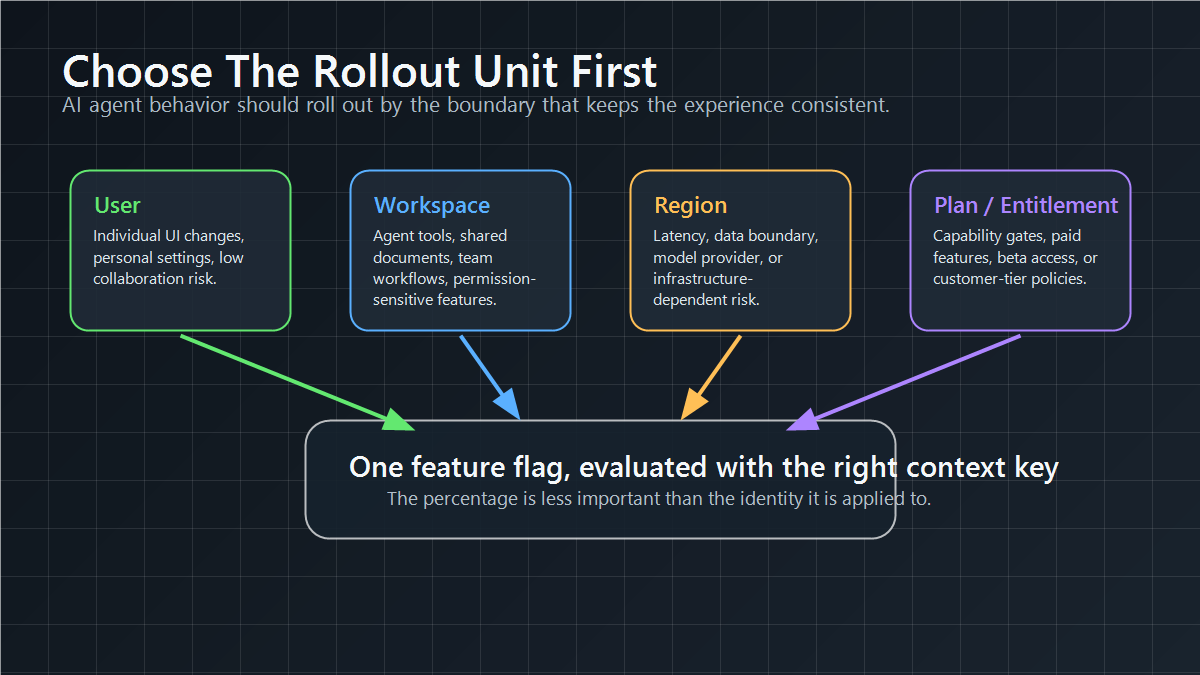
Choose the assignment unit before enabling the flag:
| Rollout unit | Use when | Common risk if chosen poorly |
|---|---|---|
| User | The feature is individual and independent. | Related users may see inconsistent behavior. |
| Account or workspace | The feature affects collaboration, billing, permissions, or shared data. | A user-level rollout can split one customer experience. |
| Region | The change depends on infrastructure, latency, data residency, or market timing. | A global percentage can hide regional failures. |
| Plan or entitlement | The release is tied to packaging or customer tier. | A generic rollout can expose unpaid or unsupported access. |
| Device or app version | The behavior depends on client capability. | Unsupported clients may receive a feature they cannot render. |
FeatBit supports this operating model through targeting rules, user attributes, and percentage rollouts. The important design choice is not only the percentage. It is the identity that percentage is applied to.
Use Staged Gates, Not One Long Rollout
Advanced progressive delivery should be a sequence of release decisions, not a slow automatic march to 100%.
| Stage | Typical audience | Main question | Advance when | Roll back or pause when |
|---|---|---|---|---|
| Internal | Employees, test accounts, dogfood users | Does the feature work outside local and staging assumptions? | No blocking usability or correctness issue appears. | Internal users find confusing, unsafe, or broken behavior. |
| Targeted beta | Selected customers, regions, or workspaces | Does this work for the intended real-world segment? | Segment feedback and support signal are acceptable. | The target segment sees unrecoverable workflow or data issues. |
| Canary | A small eligible percentage or cohort | Is production health stable under real traffic? | Error, latency, cost, and support guardrails remain healthy. | A guardrail breach appears or telemetry is missing. |
| Experiment | Control and treatment groups | Is the new behavior better enough to ship? | The primary metric wins without unacceptable guardrail harm. | The treatment harms users, loses the metric, or evidence is inconclusive. |
| Full release | All eligible users or accounts | Can this become the default behavior? | Rollback window, decision record, and cleanup plan are ready. | Delayed regression or unresolved decision risk appears. |
Do not let the percentage itself become the decision rule. "It has been at 25% for a week" is not evidence. A better release gate says which metric must improve, which guardrail must stay within bounds, who owns the decision, and what action follows.
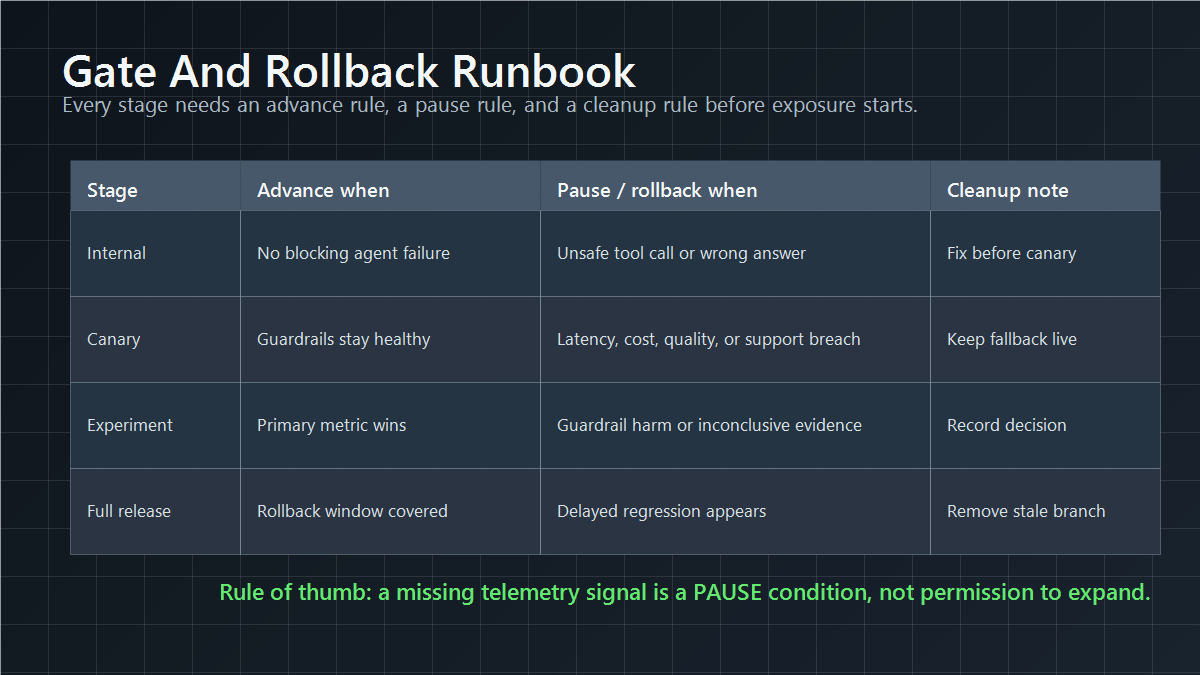
rollout_gate:
  stage: canary
  audience: 10_percent_of_eligible_workspaces
  minimum_window: 24_hours
  advance_when:
    - no critical incidents in treatment cohort
    - p95_latency_within_service_budget
    - support_contact_rate_not_materially_worse
    - exposure_and_metric_events_visible
  pause_when:
    - telemetry_missing
    - guardrail_threshold_breached
    - affected_segment_reports_blocking_issue
  rollback_action:
    - restore_control_variation
    - notify_release_owner
    - preserve_evidence_for_decision_review
For a deeper step-by-step rollout sequence, see From 5% Canary to 50% A/B to 100% Rollout.
AI Agent Release Example
AI agent behavior is a good example because the risky change is often not a single UI component. It may be a prompt, a model route, a retrieval profile, a tool policy, an autonomy level, or a fallback rule. Each of those choices can change quality, latency, cost, safety, and user trust under real traffic.
Imagine a support agent that can either draft suggested replies or autonomously call a refund tool for eligible cases. A mature progressive delivery plan would not expose the autonomous path to every customer at once. It would use feature flags to control the agent capability by workspace, plan, risk segment, and percentage cohort:
| Stage | Agent behavior | Release question |
|---|---|---|
| Internal | Draft-only mode for employee accounts | Does the agent follow policy and produce useful drafts? |
| Beta workspace | Draft-only plus limited tool preview | Do selected teams understand and trust the workflow? |
| 5% canary | Tool calls enabled for low-risk eligible cases | Do quality, latency, cost, and support guardrails stay healthy? |
| 50% experiment | Control receives draft-only; treatment receives controlled tool use | Does controlled autonomy improve resolution without guardrail harm? |
| Full release | Winning behavior becomes default for eligible segments | Can the team keep rollback live, record the decision, and clean up temporary branches? |
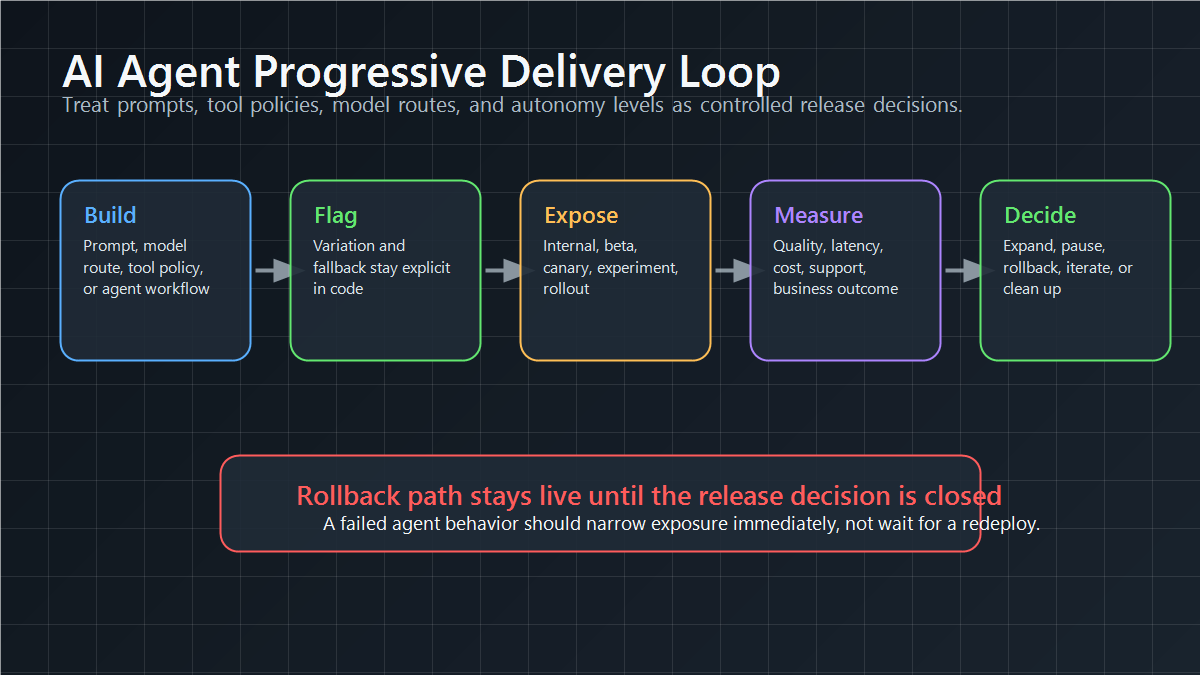
FeatBit's AI agent deployment loop, safe AI deployment, and AI control layer pages expand this pattern for prompts, model routes, tools, capability gates, and rollback. The same core rule applies to non-AI releases: the flag should represent a real release decision, not an unowned switch.
Connect Rollout To Measurement
Progressive delivery without measurement is only delayed exposure. The team still needs evidence to decide whether to expand, pause, roll back, or finish the release.
A useful measurement design separates three kinds of signal:
| Signal type | Purpose | Examples |
|---|---|---|
| Success metric | Decides whether the new behavior is worth shipping. | activation, task completion, conversion, accepted answer rate, retention proxy |
| Guardrail metric | Stops harmful expansion even if the success metric looks good. | error rate, latency, cost, complaint rate, support tickets, manual correction rate |
| Diagnostic signal | Explains what happened after the decision is made. | segment readout, browser version, region, plan, feature usage path |
FeatBit's measurement design guidance is useful here because it forces the team to define the primary decision metric before exposure begins. If the metric changes after the rollout starts, the team can rationalize almost any result.
For implementation, the flag evaluation should be close enough to the behavior that telemetry can record which variation was served. FeatBit's Track Insights API and flag insights support the exposure-and-outcome trail that progressive delivery needs.
Rollback Is A Designed State
Rollback should not be treated as a panic button that the team designs during an incident. It is part of the rollout contract.
Before starting a progressive release, define:
- the safe default variation;
- the exact targeting rule or percentage change that stops exposure;
- the owner who can approve rollback;
- the telemetry that proves whether rollback worked;
- the communication path for support, customer success, and incident review;
- the cleanup action if the treatment is rejected.
This is where feature flags differ from deployment-only strategies. If the deployment contains several changes, rolling back the entire build may undo unrelated fixes or create operational risk. A flag can narrow or disable one behavior while the deployed artifact remains in place.
That does not mean traffic routing, canary infrastructure, or blue-green deployment are obsolete. They still matter for service-level, infrastructure-level, and binary compatibility risk. Feature flags add product-level and audience-level control inside the application. In practice, mature teams use both: deployment controls for service health, and feature flags for runtime exposure and release decisions.
Add Governance Without Slowing The Release
Advanced progressive delivery is also a governance problem. When a rollout affects enterprise customers, regulated workflows, or expensive infrastructure, the team needs to know who changed the rule, why the audience expanded, and what evidence supported the decision.
Useful governance controls include:
- named flag owners and release owners;
- environment-specific rules for development, staging, and production;
- audit logs for flag changes;
- scheduled changes for planned rollout windows;
- approval expectations for high-risk segments;
- cleanup dates for temporary release and experiment flags.
FeatBit's docs for audit logs, scheduled flag changes, and IAM are relevant when progressive delivery needs a decision trail rather than only a toggle.
For teams that care about data ownership, private deployment, or integration flexibility, an open-source and self-hosted feature flag platform can also be part of the governance model. The goal is not just to roll out slowly. It is to keep the release-control plane under the team's operational and compliance expectations.
Finish With Lifecycle Cleanup
A progressive rollout is not complete when the flag reaches 100%. It is complete when the release decision has been made and the temporary flag logic has a known end state.
Common end states:
| Flag type | End state after decision |
|---|---|
| Release flag | Promote the winning behavior, remove the old branch, archive the flag. |
| Experiment flag | Keep the winning variation, preserve the decision note, remove losing paths. |
| Operational kill switch | Keep it only if there is a real ongoing runtime control need. |
| Permission or entitlement flag | Treat it as a long-lived policy control, not a stale release flag. |
FeatBit's feature flag lifecycle management model is designed for this step. It treats flags as release assets with type, owner, evidence, decision, and cleanup path. Without that lifecycle discipline, progressive delivery can reduce release risk today and create stale-flag debt tomorrow.
Practical Checklist
Use this checklist before starting an advanced progressive delivery rollout:
- Define the rollout unit: user, workspace, account, region, plan, device, or app version.
- Define the safe default and rollback action.
- Start with an internal or targeted segment before broad percentage exposure.
- Pre-commit the success metric and guardrails.
- Confirm exposure and outcome events are visible before expansion.
- Write advance, pause, and rollback criteria for each stage.
- Record who owns the release decision.
- Keep the rollback path available during the full-release observation window.
- Create the cleanup ticket before the rollout starts.
- Archive or convert the flag only after the final decision is recorded.
The bottom line: advanced progressive delivery is a release-decision loop. Feature flags make the loop controllable, but the quality comes from choosing the right audience, measuring the right evidence, preserving rollback, and cleaning up the control point when the decision is finished.
Source Notes
- FeatBit implementation context: targeted progressive delivery, targeting rules, user attributes, percentage rollouts, Track Insights API, flag insights, audit logs, and scheduled flag changes.
- Internal reader journey: continue with progressive rollout patterns, measurement design, feature flag lifecycle management, self-hosted feature flags, AI agent deployment loop, safe AI deployment, AI control layer, and 5% canary to 50% A/B to 100% rollout.
Image And Open Graph Notes
- Use
/images/blogs/Advanced-Progressive-Delivery-with-Feature-Flags/cover.pngas the Open Graph image because it shows AI agent rollout gates, feature flag controls, telemetry, and rollback paths. - Use
rollout-unit-map.pngin the rollout-unit section because the article's first practical decision is the assignment boundary. - Use
gate-rollback-runbook.pngin the staged-gates section because it summarizes advance, pause, rollback, and cleanup rules. - Use
ai-agent-release-loop.pngin the AI agent example because it connects prompts, tool policies, model routes, and autonomy levels to staged exposure and rollback.