Feature Release Management
Manage every release—from code to 100% production.
Define the release, deploy it behind a feature flag, approve the control boundary, prepare and validate configuration across environments, then execute the production plan, measure, and roll back until the change earns full production exposure.
Deploy
Once
Release
In stages
Rollback
Without deploy
const enabled = flags.checkoutV2;

return enabled
  ? runNewCheckout(order)
  : runStableCheckout(order);
Guardrails
Healthy
Experiment
Measuring
Feedback
Positive
Exposure
25%
Deployment moves code. Feature release management decides who sees it, when it expands, what evidence it needs, and how it returns to safety.
Who, when, how much
Percentage · user · segment · time
How the release moves
Manual · scheduled · automatic
Why the release moves
Metrics · logs · alerts · feedback
What happens next
Advance · pause · reduce · rollback
The complete release path
Seven gates. One controlled production decision.
Each stage exposes the decision, evidence, and owner needed to pass the next gate. Explore the release plan in the product gallery, then open the later gates for implementation checks.
Rollback is a first-class path, not an incident afterthought.
Create & plan
Gate 01
Create the flag with its release plan already attached
When creating a feature flag, choose a Release Management Template and tailor it to the change. Define what the flag controls, schedule each rollout step and audience, bind impact metrics and responses, add an A/B test window where needed, and record the release version and stability conditions that should surface a cleanup reminder.
One reviewable plan that carries the flag from its first audience to rollback, 100%, and cleanup.
Feature contract
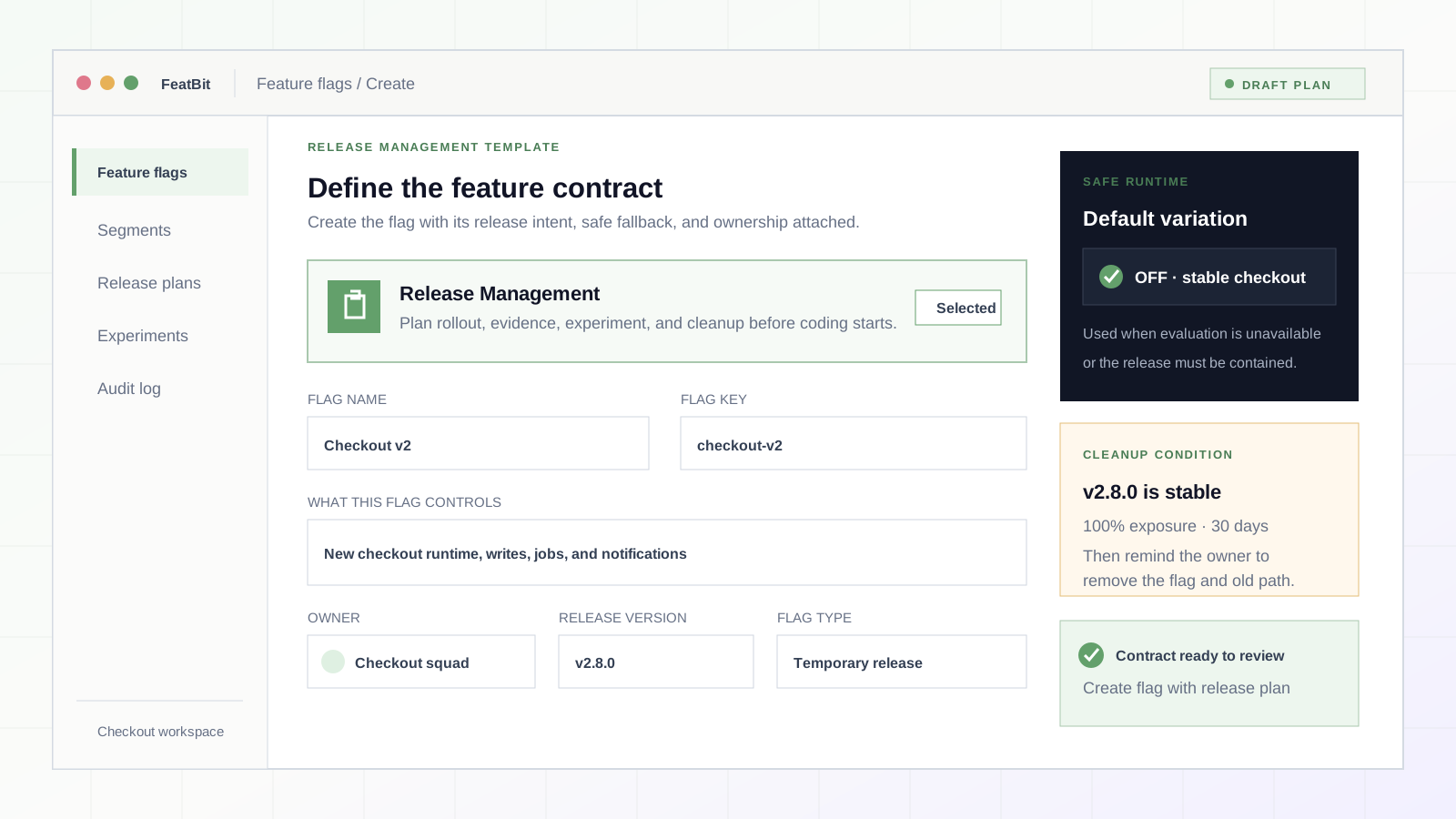
Say exactly what this flag controls.
- Feature behavior, product surface, and reason it must stay reversible
- Stable key, type, variations, owner, and target release version
- Safe OFF or fallback behavior when evaluation is unavailable
Gate runtime
Gate 02
Put the complete behavior behind one runtime decision
Evaluate the feature flag once, keep a safe fallback, and make sure every side effect of the new behavior is inside the controlled boundary. Deployment can continue while release remains off.
A reversible runtime path with no unflagged side effects.
const enabled = await flags.get(
"checkout-v2", false
);
if (enabled) {
return runNewCheckout(order);
}
return runStableCheckout(order);
Contain the changeThe flag must control the whole behavior, not only its UI.
- Wrap reads, writes, jobs, notifications, and downstream calls
- Keep the stable path reachable as the fallback
- Avoid evaluating the same flag differently inside one request
Design failure behaviorA missing control plane should not become an outage.
- Use a typed fallback that matches the safe production behavior
- Handle SDK initialization and evaluation errors explicitly
- Log failures with the flag key, environment, and request context
Instrument exposureConnect the delivered variation to what happens next.
- Record the evaluated variation before the outcome metric
- Attach flag context to traces, logs, and errors
- Test both flagged and fallback paths
Flag review
Gate 03
Review the flag on the way in—and on the way out
FeatBit Feature Flag Reviewer pairs an OpenFeature-aware flag-control code analyzer with a coding agent. It checks both ends of the lifecycle: every new runtime path and side effect stays inside the flag so OFF restores stable behavior; later, cleanup preserves the chosen permanent path without wrong deletions or stale flag code.
An evidence-backed PR review that makes rollback coverage and cleanup safety explicit.
OpenFeature scan
control flow · references
Coding agent review
intent · context · explanation
Runtime escapes the flag
sendCheckoutEmail()Runs after the flag branch. OFF cannot stop the new side effect.
Permanent behavior is preserved
Add a flag safelyKeep every new runtime path inside the control boundary.
- Trace OpenFeature evaluations through wrappers, branches, calls, and side effects
- Find reads, writes, jobs, notifications, or downstream calls that escape the boundary
- Verify OFF and fallback return the complete runtime to stable behavior
- Confirm both controlled states are covered by tests
Remove a flag safelyPreserve the approved behavior before removing control code.
- Confirm the permanent ON or OFF behavior before cleanup begins
- Detect wrong-branch deletion, missed references, and accidental removal of shared logic
- Remove temporary props, tests, telemetry, evaluations, and registry entries
- Retire the remote flag only after the cleaned code is in production
Analyzer + agentCombine deterministic code evidence with repository-aware reasoning.
- The analyzer produces a control-flow and code-reference map
- The coding agent interprets PR intent, explains gaps, and prepares focused fixes
- Unclear permanent behavior is returned as needs-owner-decision
- Human approval remains the final release decision
Preflight
Gate 04
Prepare every environment before production exposure
The Release Management Template governs production exposure; it is not a rollout to replay in every environment. Validate the flag contract and fallback in development, rehearse targeting, telemetry, access, and rollback controls in staging, then prepare production at a reviewed safe default before Gate 05 exposes real users.
Development is validated, staging is rehearsed, and production is ready at its safe default.
- DEV
Validate contract
Flag schema · stable fallback
verified - STAGE
Rehearse controls
Targeting · metrics · rollback
rehearsed - PROD
Ready at safe default
Safe baseline · owner gate
ready
Next · Gate 05
Execute the release plan
Promotion path · choose what fits
FeatBit UI · copy settings · REST API / CLI · pipeline · internal workflow · Terraform / GitOps
One contract, environment-specific stateKeep the flag contract consistent without cloning every environment's live state.
- Keep the flag key, type, and variations aligned across dev, staging, and production
- Keep defaults, targeting, credentials, and access controls environment-specific
- Start production on the reviewed baseline or fail-safe variation before new-feature exposure begins
Validate, rehearse, preflightGive each environment one clear job before the production release.
- Development validates SDK evaluation, variations, the stable path, and fallback behavior
- Staging rehearses targeting, schedules, telemetry delivery, safeguards, and rollback actions
- Production confirms the release owner, required sign-off, monitoring, emergency control, and safe starting state
Choose the promotion mechanismFeatBit does not require one promotion path.
- Use the FeatBit UI to create flags, copy flags, or compare and copy selected settings
- Use the REST API or CLI to automate supported changes in the target environment
- Use Terraform, GitOps, or an internal delivery workflow when reviewed configuration as code fits the operating model
Execute plan
Gate 05
Execute the production release plan in measured steps
Now the planned production exposure begins. Choose who sees the feature, how fast it grows, and what must remain healthy at every gate. Percentage rollout is only one option: users, segments, attributes, and time can define the release path.
A controlled blast radius with explicit expansion criteria.
5%
25%
50%
100%
Rollout strategyMatch exposure to the risk and learning goal.
- Percentage rollout for representative, gradual exposure
- Individual users or allowlists for internal and beta access
- Segments and attribute rules for cohorts, regions, or plans
- Time-based changes for scheduled release windows
Rollout controlDecide how each gate advances or reverses.
- Manual approval for sensitive or irreversible business steps
- Scheduled or automatic expansion when thresholds pass
- Pause, reduce percentage, target a rollback, or disable the flag
Canary gatesAdvance only when a stage has earned the next one.
- Internal → 5% → 25% → 50% → 100% is a policy, not a timer
- Require a minimum observation window and sample size
- Re-check health after every targeting change
Learn & protect
Gate 06
Combine monitoring, experiments, safeguards, and market evidence
A release is healthy only when technical signals, product impact, and user reality agree. Correlate metrics, logs, alerts, experiments, and feedback with the delivered flag variation.
Evidence that explains both system health and customer value.
Error rate
Conversion
Beta feedback
Human signal
Safeguards
Within limits
Rollout monitoringWatch leading and lagging signals by variation and cohort.
- Metrics for errors, latency, saturation, cost, and availability
- Logs and traces carrying flag, variation, and segment context
- Alerts that can pause or trigger an automatic rollback
A/B testingTurn exposure into a controlled product decision.
- Define control, treatment, assignment, and exposure event
- Analyze the primary metric and guardrails together
- Record continue, pause, rollback, or inconclusive as the decision
SafeguardsProtect the release while the team learns.
- Set hard limits for reliability, security, cost, and harmful outcomes
- Use automatic rollback only for trusted, well-tested thresholds
- Keep a manual override for ambiguous or high-impact decisions
Market validationPair automated signals with human interpretation.
- Customer interviews, support conversations, and beta feedback
- Adoption, conversion, retention, and task-completion metrics
- Technical health, incident volume, and operational load
Decide
Gate 07
Advance, pause, roll back, or complete the release
The final action is an evidence-backed decision, not an optimistic default. Expand exposure when the release earns it, pause when evidence is incomplete, and roll back through the fastest trusted control path when a safeguard fails.
A documented production decision with a reversible execution path.
Advance
Pause
Rollback
Final state
100% production
Keep the rollback window before cleanup.
Decision statesGive every evaluation window a named outcome.
- Advance when success and guardrails both pass
- Pause when evidence is incomplete or contradictory
- Roll back when a guardrail fails or customer harm appears
- Complete at 100% only after the production window is healthy
Rollback pathsUse the fastest path that preserves control and evidence.
- Manual change in the FeatBit control plane
- Automatic response to a trusted monitoring threshold
- REST API, CLI, Terraform or GitOps workflow
- Webhook or third-party flag trigger
Close the loopProduction is a state transition, not the end of ownership.
- Record the outcome, evidence, and final targeting state
- Keep rollback available through the stabilization window
- Remove temporary flag code after the permanent path is proven
Protect and learn
Canary proves it can run safely. A/B testing proves it is better.
Run both on the same feature flag when the release needs operational confidence and product evidence. Safeguards remain active across both paths.
Canary release
Limit operational risk
- Is the feature reliable for a representative production cohort?
- Do latency, error rate, cost, and incident signals stay within limits?
- Can the team contain a regression before the blast radius grows?
Shared flag
One exposure record
A/B test
Measure product impact
- Does the treatment improve the primary metric over the control?
- Are assignment, exposure, and outcome events connected correctly?
- Do product gains hold without violating business or technical guardrails?
Rollout and rollback control
One decision. Multiple trusted control paths.
Use the interface that fits the moment: human approval for ambiguity, automation for trusted thresholds, APIs for operational systems, and reviewed pipelines for configuration promotion.
Explore flag triggersManual control
An authorized owner pauses, reduces, or disables the release from the FeatBit control plane.
Automatic policy
A trusted metric threshold invokes a tested response without waiting for the next deployment.
REST API or CLI
Services, agents, and operational tools execute a precise flag-state change through automation.
CI, IaC, or GitOps
A reviewed pipeline—including Terraform-based workflows—promotes or restores desired configuration.
Alert or webhook trigger
An APM, incident, or workflow event calls the predefined flag trigger for immediate containment.
Final gate
Production exposure
Complete the release
Full production is a verified state—not the absence of an alert.
The intended audience receives the final variation
Check 1Business and product outcomes meet the release contract
Check 2Reliability, quality, safety, and cost guardrails are healthy
Check 3Human feedback and automated evidence tell the same story
Check 4The decision, owner, configuration, and audit trail are recorded
Check 5Keep the rollback window through stabilization, then remove a temporary release flag or convert it to an intentional long-lived control.
Manage the lifecycle