
TrueWatch Feature Flags with FeatBit: Observable Rollouts for Database Migration
Database migration is not only a schema or infrastructure task. It is a production exposure problem: which requests should still use the old database, which requests may touch the new database, what evidence says the new path is healthy, and how quickly can the team roll back when the evidence turns bad.
FeatBit and TrueWatch solve different parts of that loop. FeatBit acts as the global, trustworthy feature flag control plane for targeting, percentage rollout, rollback, audit history, and automation. TrueWatch provides the observability layer that shows whether the rollout is safe through APM traces, service health, errors, metrics, and alerts. Together, they turn a risky database migration into an observable release decision.
This article adapts the operating pattern from Guance's article, Using Feature Flags and observability tools for gradual database migration, and maps it to the global TrueWatch documentation and FeatBit release-control model.
Image note: all diagrams and UI images in this article are example visuals adapted from real FeatBit and TrueWatch software capabilities. They are modified English mockups for explanation, not copied screenshots or a claim that the exact screen layout appears in a specific customer environment.
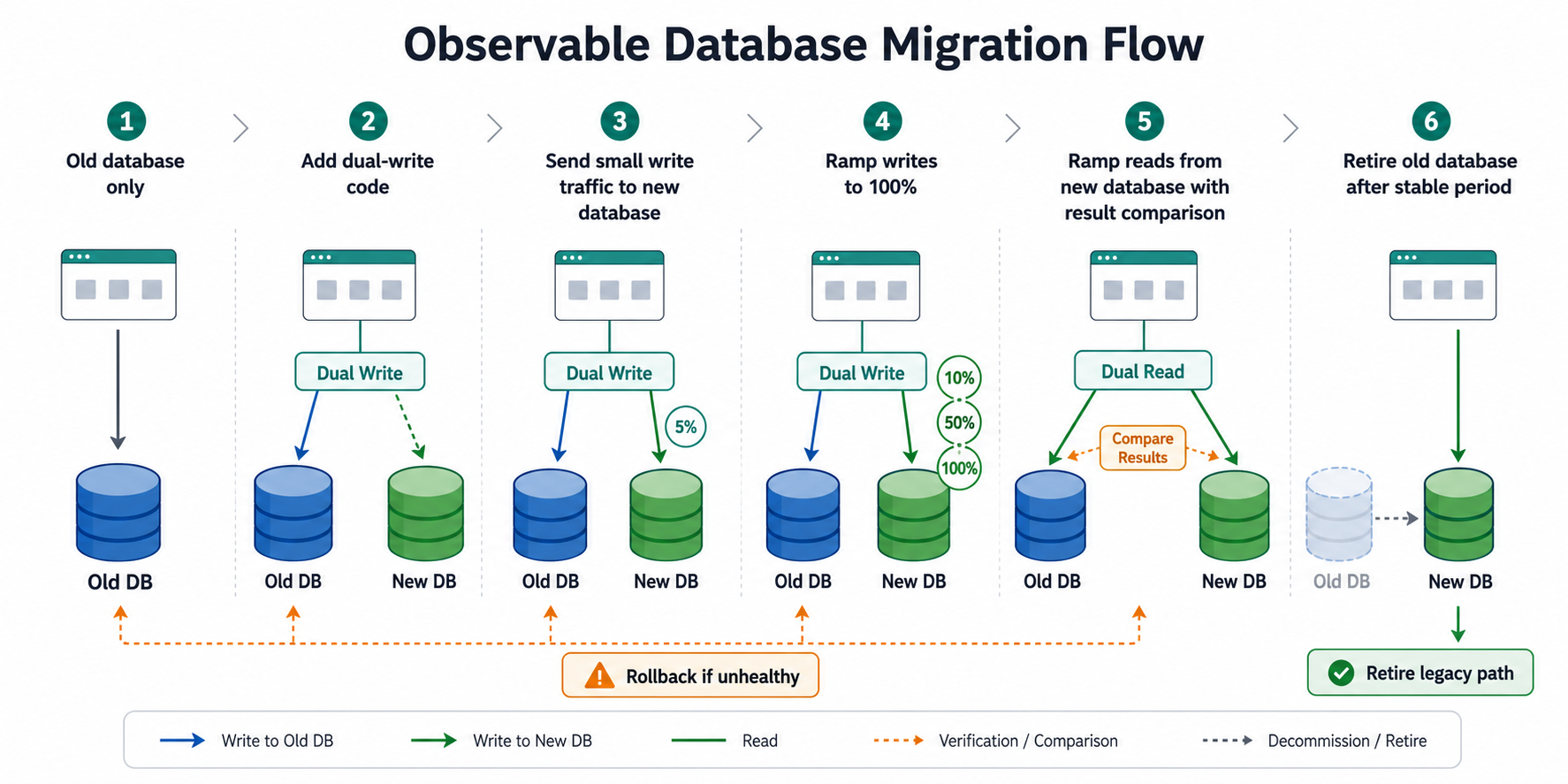
The Migration Pattern
The safest migration path is usually not "switch all traffic to the new database." It is a staged flow:
- Start with the application reading and writing only the old database.
- Add dual-write code so selected write paths can write to both the old and new databases.
- Send a small percentage of write traffic to the new database.
- Increase write traffic only when latency, errors, and data consistency remain healthy.
- Start dual-read or read-shadowing for selected traffic, compare results, and keep the user-facing response on the stable path.
- Retire the old database path only after the new path has handled full traffic for a meaningful stable period.
The important control point is not just the code. The control point is the feature flag that decides whether the new path is active for a request.
Where FeatBit Fits
FeatBit should own the release decision: who sees the new database path, what percentage is exposed, when a stage expands, and how the team returns to the previous healthy stage. FeatBit's docs cover targeting rules, percentage rollouts, flag insights, audit logs, and webhooks, which are the core primitives behind this workflow.
For a database migration, a practical flag contract might look like this:
| Flag | Purpose | Healthy expansion signal | Rollback action |
|---|---|---|---|
write-sport-newdb |
Controls dual-write traffic to the new database | No write error spike, acceptable write latency, no queue pressure | Reduce true percentage or turn off |
read-sport-newdb |
Controls whether selected reads execute against the new database | Read latency within threshold, result comparison passes, no error increase | Return to last healthy percentage |
compare-sport-db-results |
Enables result comparison and diagnostic events | Mismatch rate stays within an agreed threshold | Keep comparison on, reduce new DB read exposure |
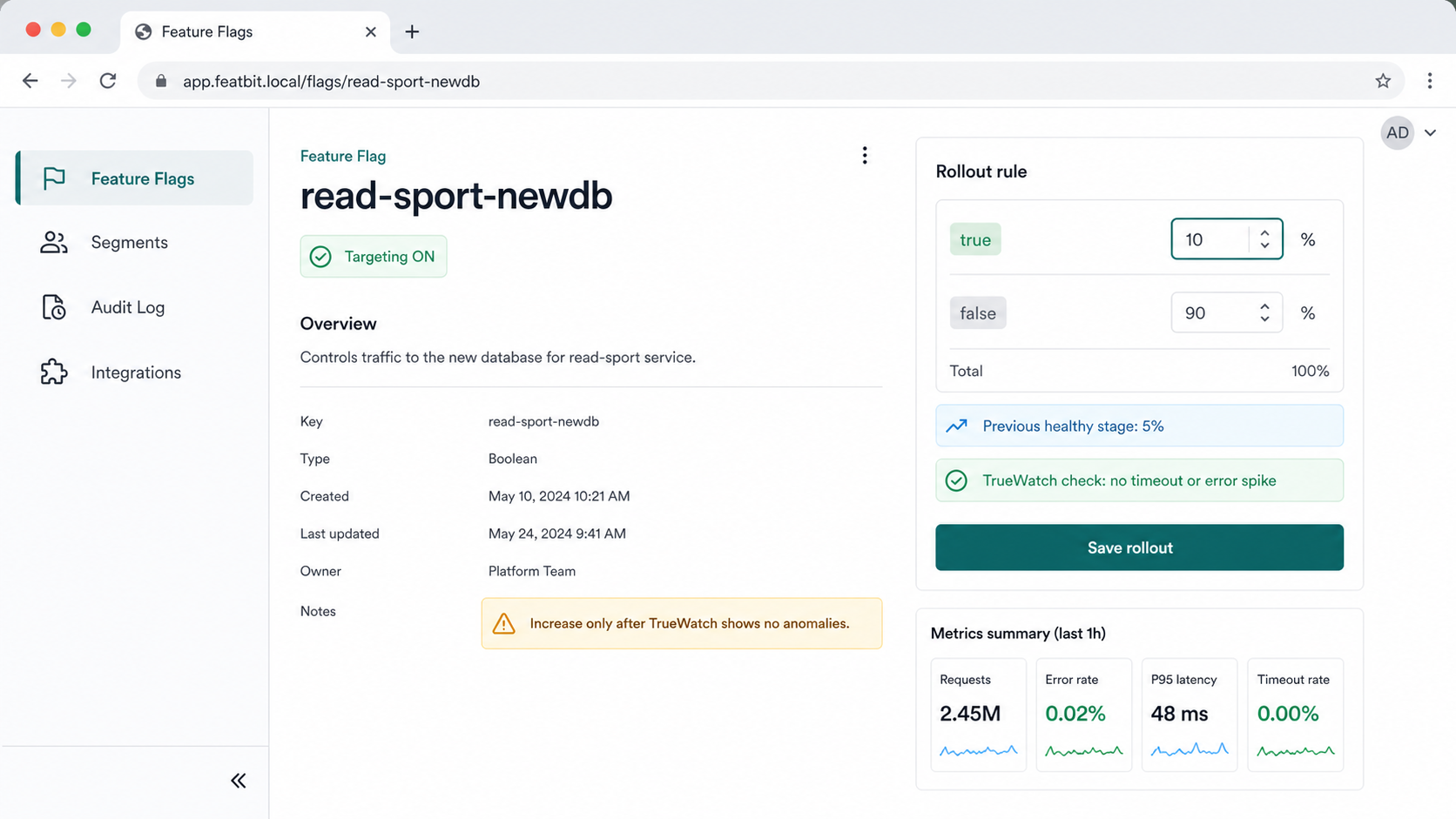
The application code stays simple: evaluate a flag, route the request, emit the flag key and variation into telemetry, and keep fallback behavior explicit.
public async Task<List<Sport>> GetSportsByCityAsync(
    int cityId,
    int pageIndex,
    int pageSize,
    UserContext user)
{
    var readNewDb = _fbService.BoolVariation("read-sport-newdb", user, false);

    if (!readNewDb)
    {
        return await GetSportsByCityQueryAsync(_oldDbContext, cityId, pageIndex, pageSize);
    }

    try
    {
        var oldDbTask = GetSportsByCityQueryAsync(_oldDbContext, cityId, pageIndex, pageSize);
        var newDbTask = GetSportsByCityQueryAsync(_newDbContext, cityId, pageIndex, pageSize);

        return await _migrationVerifier.CompareAndReturnStableResultAsync(
            oldDbTask,
            newDbTask,
            timeoutDelayForNewDb: TimeSpan.FromSeconds(3),
            telemetryAttributes: new Dictionary<string, string>
            {
                ["feature_flag.key"] = "read-sport-newdb",
                ["feature_flag.value"] = readNewDb.ToString()
            });
    }
    catch (Exception ex)
    {
        _logger.LogError(ex, "New database read failed for read-sport-newdb");
        return await GetSportsByCityQueryAsync(_oldDbContext, cityId, pageIndex, pageSize);
    }
}
That snippet is intentionally conservative. The old database remains the stable response path until the new path proves itself.
Where TrueWatch Fits
TrueWatch should own the evidence: service health, trace duration, error distribution, request attributes, metric thresholds, and alerting. The TrueWatch docs describe APM as a way to connect application calls and diagnose performance problems through tracing. The APM trace detail view includes trace analysis views such as flame graphs, span lists, and waterfall views, while Error Tracking and application performance monitors help teams find error trends and trigger alerts from production signals.
In this workflow, every request touching the new database should carry enough telemetry to answer four questions:
| Question | TrueWatch signal | FeatBit decision |
|---|---|---|
| Did the new path get slower? | P95/P99 latency, trace duration, slow spans | Pause expansion or roll back |
| Did the new path fail? | Error rate, exception type, timeout spans | Reduce percentage or turn off flag |
| Which users or services were affected? | Service, resource, region, user segment, request attributes | Narrow targeting or isolate a segment |
| Which flag caused this exposure? | feature_flag.key, feature_flag.value, variation attributes |
Change the exact flag, not a broad deployment |
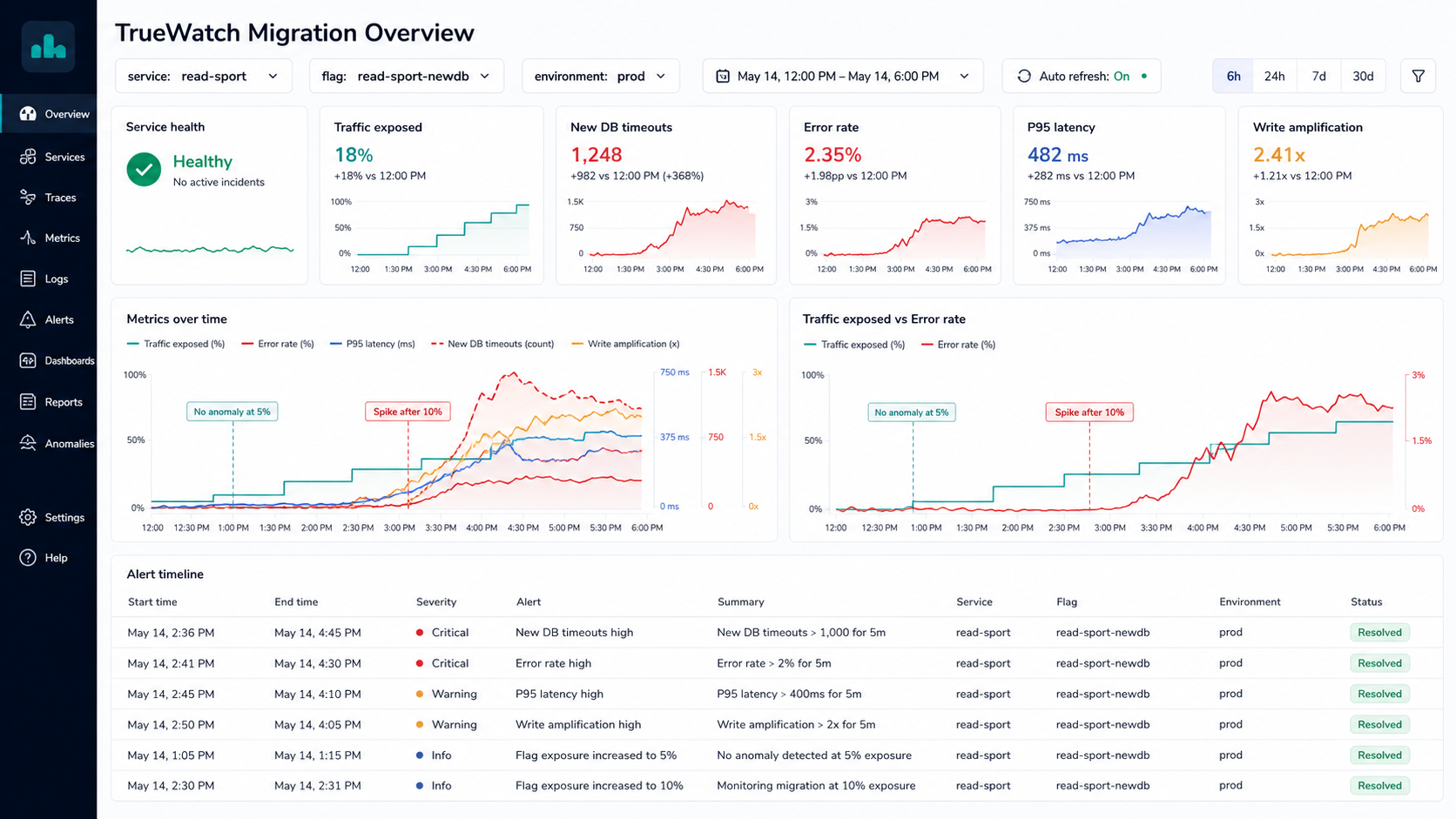
TrueWatch's APM getting started guide and Application Performance Monitoring docs are the entry points for instrumenting this layer. For release control, the telemetry must include the active flag and variation. FeatBit's OpenTelemetry integration is relevant when teams want flag context in traces, metrics, and logs across their observability stack.
The Operating Loop
The joint FeatBit and TrueWatch workflow is a loop, not a one-time integration.
Start with a small stage
Set read-sport-newdb to a narrow target or a low percentage. Keep the rollout stage small enough that rollback is operationally boring.
Use TrueWatch to watch service health before expanding. The source Guance example used traces and errors to find a new database timeout; the same workflow maps to TrueWatch APM services and trace views.
Correlate errors with the flag value
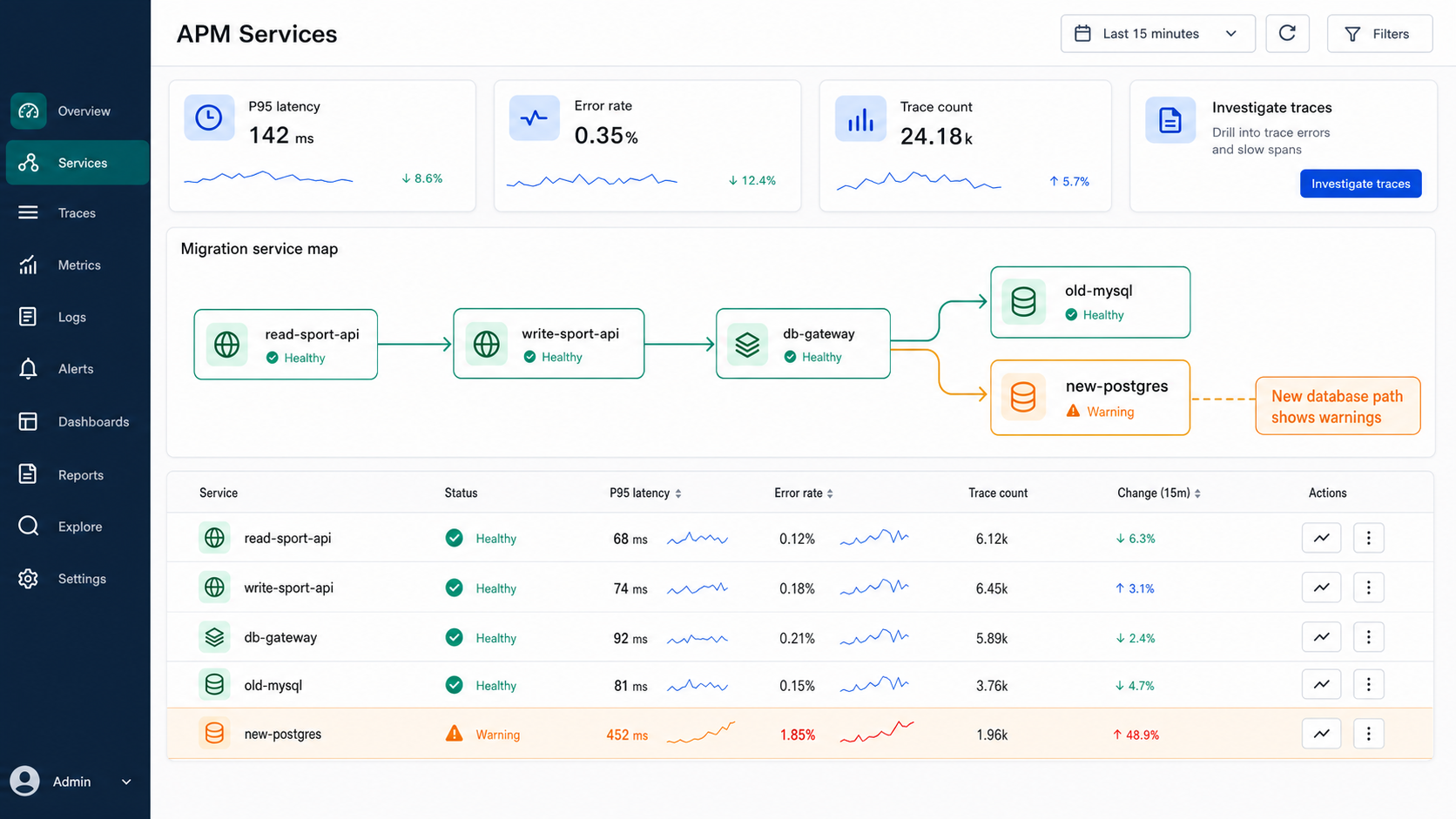
If TrueWatch shows errors after increasing exposure, filter traces by the flag attribute. The goal is to prove whether the new database path is correlated with the regression, not only that the system became unhealthy around the same time.
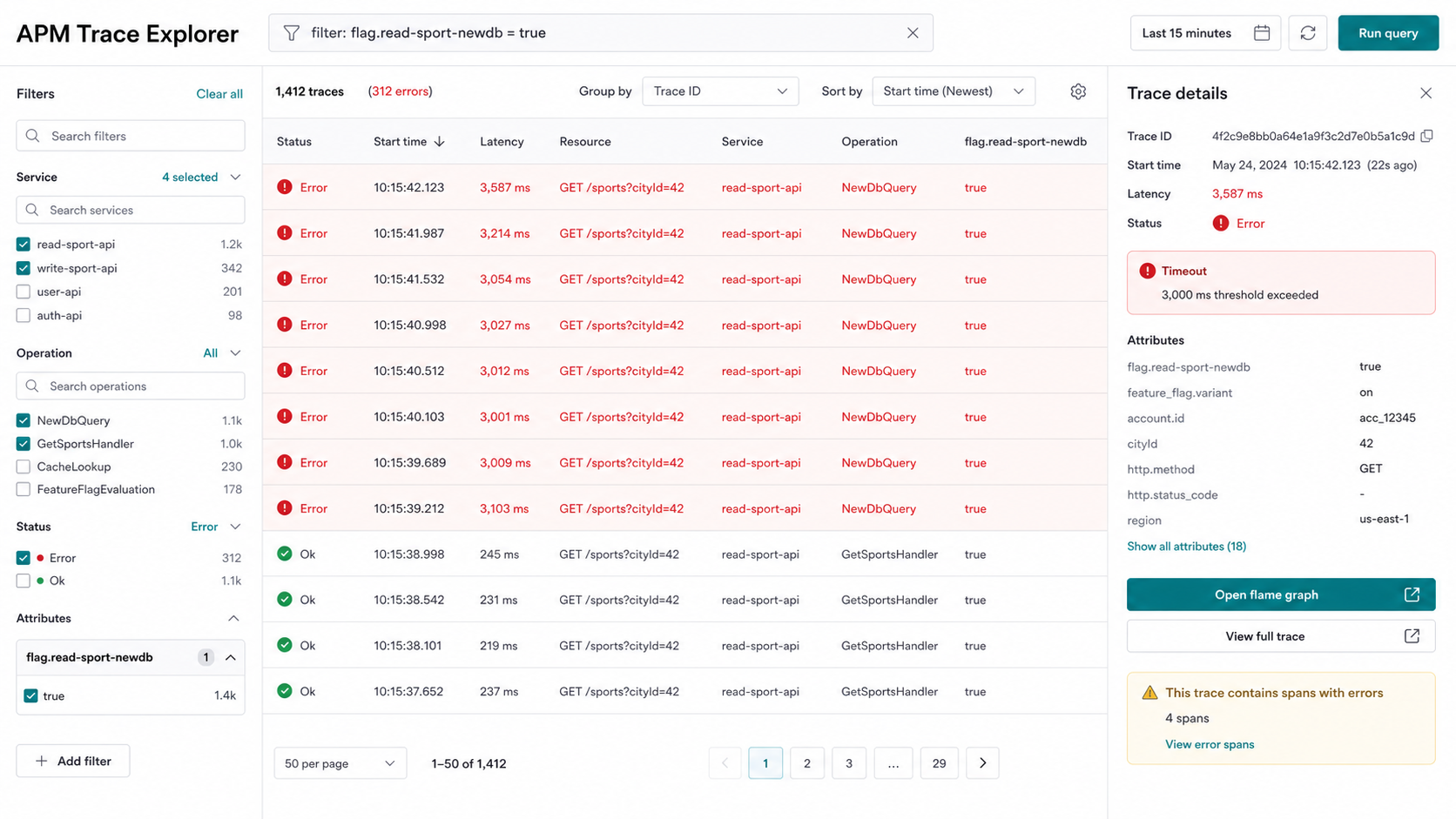
TrueWatch's trace explorer detail documentation is especially useful here because engineers need to move from "error rate increased" to "this span under this flag value caused the timeout."
Use the flame graph to find the rollback candidate
In the migration incident, the flame graph should show three things:
- the slow or failed span, such as
NewDbQuery; - the feature flag state, such as
read-sport-newdb = true; - the API context, such as request parameters, region, and headers needed for debugging.
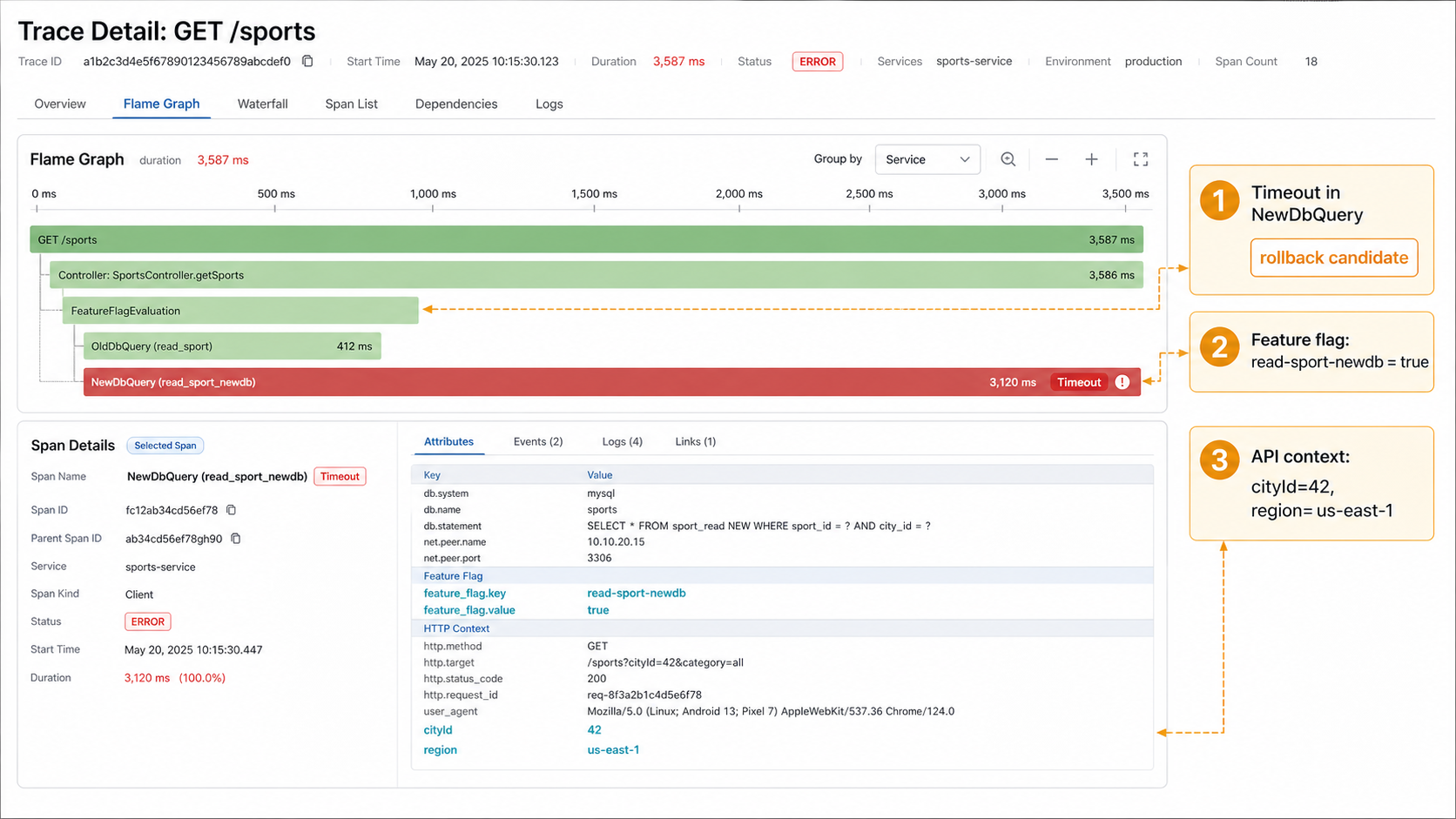
This is where feature flags and observability become mutually useful. TrueWatch tells the team which behavior is unhealthy. FeatBit gives the team a precise runtime control to reduce that behavior without redeploying.
Roll back to the last healthy stage
If 5% was healthy and 10% introduced timeouts, do not debate whether the code should be reverted immediately. First reduce exposure back to 5%. Then investigate the new database path while production returns to the known healthy state.
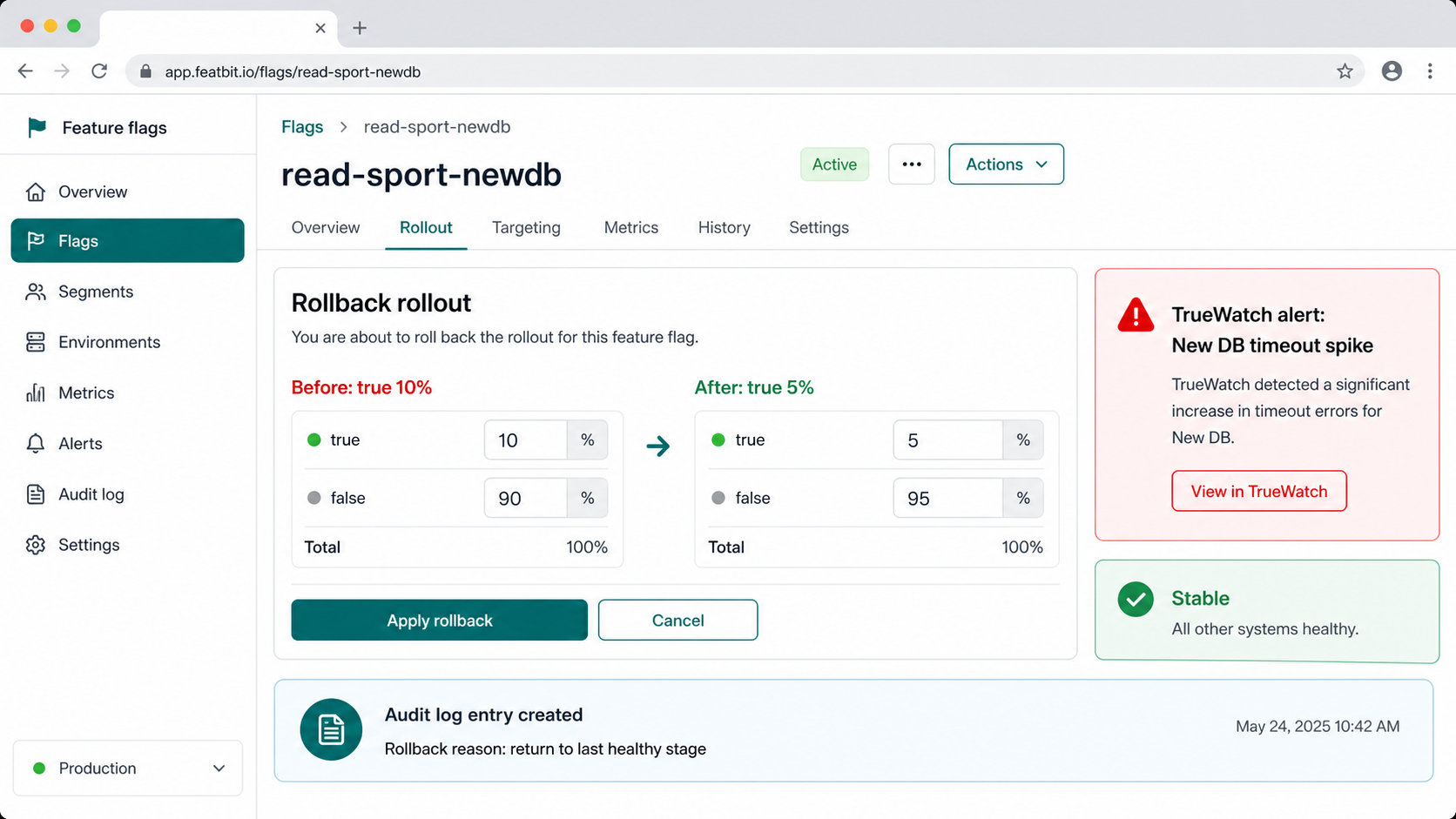
FeatBit audit logs and webhooks help preserve the decision trail: who changed the flag, when the rollout moved, why it rolled back, and which TrueWatch evidence justified the action. That matters for incident review and for the next expansion attempt.
What Good Interoperability Looks Like
TrueWatch and FeatBit should not be loosely connected screenshots. A trustworthy integration has a few concrete properties:
| Capability | Implementation detail |
|---|---|
| Shared correlation keys | Add feature_flag.key, feature_flag.value, environment, service, and rollout stage to traces and logs. |
| Rollout stage evidence | Store the TrueWatch dashboard, alert, trace link, or incident note next to the FeatBit rollout decision. |
| Automated notifications | Use FeatBit webhooks and TrueWatch alerts to connect flag changes with incident channels. |
| Reversible expansion | Define stage gates before rollout: 1%, 5%, 10%, 25%, 50%, 100%, with clear rollback thresholds. |
| Auditability | Keep FeatBit audit logs and TrueWatch incident evidence available for post-incident review. |
This is the practical reason to pair a feature flag system with observability. FeatBit does not replace TrueWatch. TrueWatch does not replace release control. The combined system lets teams see the production effect of a change and act on it immediately.
Common Mistakes
Treating the flag as only an if statement. A migration flag needs ownership, rollout stages, telemetry attributes, rollback rules, and a cleanup plan. FeatBit's feature flag lifecycle management model is useful once the migration decision is complete.
Observing only infrastructure metrics. CPU and database load matter, but they do not tell you which users saw the new path or which flag value activated it. Attach flag context to request telemetry.
Expanding by calendar instead of evidence. "Wait one day, then go to 25%" is weaker than "expand only if error rate, P95 latency, timeout count, mismatch rate, and support signals remain inside thresholds."
Skipping cleanup. When the new database is fully adopted, remove stale old-database branches and archive the migration flags. Otherwise a successful migration leaves behind release-control debt.
Implementation Checklist
- Define separate flags for write migration, read migration, and result comparison.
- Add the flag key, variation, user segment, service, and environment to TrueWatch-visible telemetry.
- Start with a small percentage and document the expected expansion stages.
- Use TrueWatch APM, trace explorer, error tracking, and application performance monitors to watch latency, error rate, timeout count, and affected resources.
- Roll back in FeatBit to the last healthy percentage when TrueWatch evidence crosses the threshold.
- Record the rollback reason in the flag audit trail and incident notes.
- After full migration, clean up stale code paths and archive the migration flags.
Source Notes
- The migration scenario and original Chinese diagrams are adapted from Guance's article, 使用 Feature Flags 与可观测工具实现数据库灰度迁移. All diagrams and UI images in this article are English raster PNG example visuals adapted from real FeatBit and TrueWatch software capabilities. They are modified conceptual recreations and UI mockups, not copied source screenshots, official TrueWatch screenshots, or exact customer-environment screens.
- TrueWatch implementation context comes from the TrueWatch APM getting started guide, Application Performance Monitoring docs, Trace Explorer Details, Error Tracking, and Application Performance Detection.
- FeatBit implementation context comes from docs for targeting rules, percentage rollouts, flag insights, audit logs, webhooks, and OpenTelemetry integration.