
How to Build Agent Tool Permission Gates with Feature Flags
An agent tool permission gate is a runtime control that decides whether an AI agent may call a tool, for this user, in this environment, at this moment. Treat it like a release control, not a static config file: start read-only, expand capability in stages, watch what happens, and keep a fast way to reduce or revoke access without redeploying the agent.
That is where feature flags fit. A flag can control which tools are available, which users or agent sessions can use them, which operations require approval, and which risky paths should fall back to read-only behavior. The goal is not to slow every agent down with confirmation prompts. The goal is to make tool access explicit, targeted, observable, and reversible.
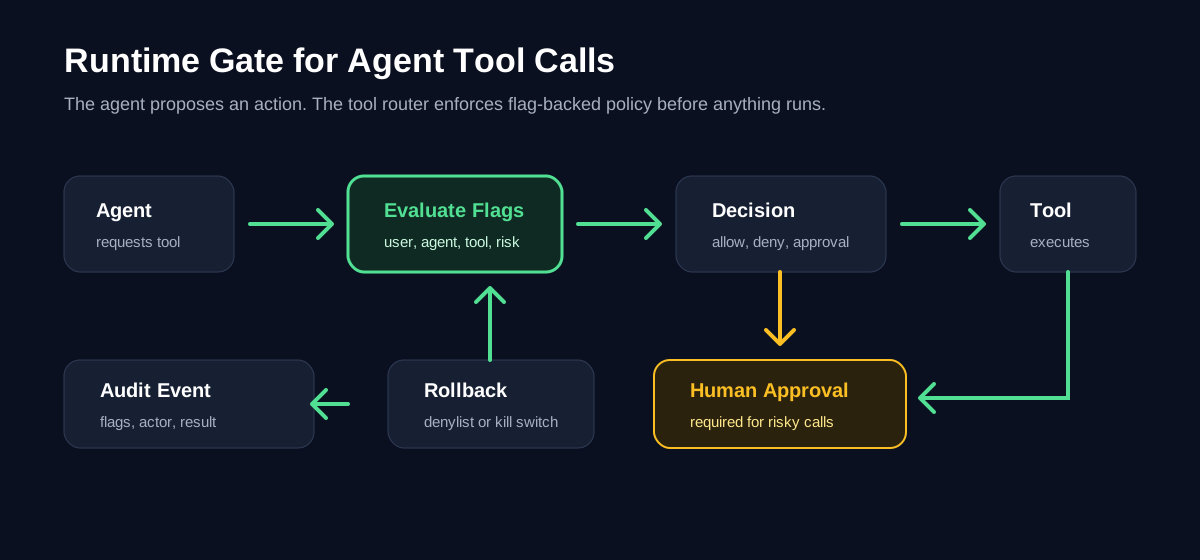
When You Need a Tool Permission Gate
Agent products usually start with a short tool list: read a file, search docs, query a database, open a pull request, send a message, update a ticket, or call an internal API. The problem is that those tools do not carry the same risk.
A search tool and a production database write tool should not be controlled by the same permission switch. A tool that drafts a support reply and a tool that sends it to a customer should not share the same autonomy level. A local code-modification tool and a cloud infrastructure tool need different rollout paths.
Use a permission gate when at least one of these is true:
- The agent can write, delete, publish, deploy, spend money, change permissions, or call an external service.
- The tool can touch production data, customer-visible state, security settings, billing, infrastructure, or compliance-relevant records.
- Tool behavior depends on model confidence, user role, environment, account tier, region, or task type.
- You want to expand agent autonomy gradually instead of granting broad access on day one.
- Operators need to disable one tool or capability tier during an incident without stopping the whole agent.
This is a release problem. You are not only deciding whether the code has a tool integration. You are deciding who should be exposed to that capability, under which constraints, with which rollback path.
Map Tools by Reversibility and Blast Radius
Start with a risk map. Do not begin by creating flags. Begin by classifying tools so the flag boundaries match the real control problem.
| Tool class | Examples | Default gate | Rollout posture |
|---|---|---|---|
| Read-only | Search docs, inspect repository files, query non-sensitive metrics | Enabled for internal users | Expand quickly if logging is healthy |
| Reversible write | Create draft, open internal ticket, generate branch, write sandbox file | Enabled for selected sessions | Require review after execution |
| Difficult-to-reverse write | Update CRM field, merge low-risk PR, change a workflow config | Disabled by default | Enable by segment and require stronger monitoring |
| External effect | Send email, post to Slack, create customer-visible issue, call partner API | Human approval by default | Expand only after evidence |
| High-risk operation | Delete data, change permissions, deploy production infra, execute financial action | Human execution or break-glass gate | Keep narrow and audited |
This table should become part of the agent's operating contract. A model prompt can mention it, but the enforcement point should live outside the prompt. Prompts can drift. Runtime gates are inspectable and reversible.
Design the Flag Model
A useful permission gate usually needs more than one boolean flag. Keep the model small, but separate the decisions that operators may need to change independently.
| Flag | Type | What it controls | Example fallback |
|---|---|---|---|
agent-tools-enabled |
Boolean | Whether this agent can use tools at all | false in production until rollout begins |
agent-tool-tier |
String | Capability tier: read_only, draft_write, approved_external, admin_only |
read_only |
agent-tool-approval-required |
Boolean | Whether risky tool calls must enter a human approval queue | true |
agent-tool-denylist |
JSON or string list | Tools temporarily unavailable during incidents | Empty list |
agent-tool-observe-only |
Boolean | Log intended tool calls without executing them | true during dry run |
The exact flag types depend on your platform and SDK. The important part is the separation:
- One flag controls whether tool use is available.
- One flag controls the capability tier.
- One flag controls human approval behavior.
- One flag gives operators a fast incident response path for a specific tool.
- One flag supports a dry-run mode before the agent gets real write access.
In FeatBit terms, this maps naturally to feature flag targeting, user attributes, segments, environments, audit logs, and API-driven automation. The same control plane that releases a product feature can release an agent capability.
Implement the Gate Outside the Model Prompt
The agent may propose a tool call, but a deterministic gate should decide whether the call can run. Put the gate in the tool router, not only in natural-language instructions.
type ToolRisk = "read_only" | "draft_write" | "external_effect" | "high_risk";

type ToolRequest = {
  toolName: string;
  risk: ToolRisk;
  agentId: string;
  userId: string;
  environment: "dev" | "staging" | "production";
  confidence: number;
  accountTier?: string;
};

type GateDecision =
  | { action: "allow" }
  | { action: "observe_only"; reason: string }
  | { action: "queue_for_approval"; reason: string }
  | { action: "deny"; reason: string };
Then evaluate flags through your normal server-side adapter before the tool executes. The example below is intentionally adapter-shaped rather than tied to one SDK method name.
async function decideToolPermission(request: ToolRequest): Promise<GateDecision> {
  const context = {
    key: request.userId,
    custom: {
      agentId: request.agentId,
      toolName: request.toolName,
      toolRisk: request.risk,
      environment: request.environment,
      accountTier: request.accountTier ?? "unknown",
    },
  };

  const toolsEnabled = await flags.boolean("agent-tools-enabled", context, false);
  if (!toolsEnabled) {
    return { action: "deny", reason: "Agent tool use is disabled for this context." };
  }

  const denylist = await flags.json<string[]>("agent-tool-denylist", context, []);
  if (denylist.includes(request.toolName)) {
    return { action: "deny", reason: "This tool is temporarily disabled." };
  }

  const observeOnly = await flags.boolean("agent-tool-observe-only", context, true);
  if (observeOnly) {
    return { action: "observe_only", reason: "Dry-run mode logs the intended tool call." };
  }

  const tier = await flags.string("agent-tool-tier", context, "read_only");
  const approvalRequired = await flags.boolean("agent-tool-approval-required", context, true);

  if (!tierAllowsRisk(tier, request.risk)) {
    return { action: "deny", reason: `Capability tier ${tier} does not allow ${request.risk}.` };
  }

  if (approvalRequired && needsApproval(request)) {
    return { action: "queue_for_approval", reason: "Risk or confidence requires human approval." };
  }

  return { action: "allow" };
}
The agent receives the decision and adapts. It should not be able to bypass the router by calling the tool directly. That is the difference between a permission gate and a prompt guideline.
Roll Out Agent Tool Access in Stages
Do not launch tool permissions as an all-or-nothing release. Use a staged rollout:
- Observe-only mode. Let the agent propose tool calls, log the intended action, and compare the proposal with what a human actually did.
- Internal read-only. Enable low-risk tools for employees or synthetic test users.
- Draft-write for selected workflows. Let the agent create drafts, branches, tickets, or pull requests while humans retain final action authority.
- External-effect tools behind approval. Queue email sends, production changes, customer-visible updates, or partner API calls for human review.
- Narrow autonomous execution. Allow a specific tool for a specific segment only after logs, error rates, support feedback, and review outcomes support expansion.
- Incident rollback path. Keep a denylist or kill switch that can revoke one tool without turning off every agent workflow.
This mirrors the AI agent deployment loop: build the control point, deploy it behind a flag, evaluate behavior, then expand or roll back. It also matches FeatBit's broader view of feature flags as release-decision infrastructure rather than simple code branches.
Add Human Approval Where It Actually Helps
A weak permission system asks the user to approve every tool call. That quickly becomes meaningless. A better gate routes only the right decisions to humans.
Use approval for:
- Low-confidence decisions with external effects.
- High-risk tools regardless of confidence.
- First use of a new capability tier.
- Bulk operations over many records or files.
- Permission changes, data deletion, and production infrastructure actions.
- Cases where the user's intent has drifted from the original task.
Avoid approval for:
- Read-only retrieval.
- Reversible draft creation.
- Repeated low-risk operations already approved for the same task.
- Tool calls that are safer to execute with an undo window than to block with a modal.
For AI product teams, the practical pattern is the same one described in FeatBit's human-in-the-loop release control page: agents queue the decision, authorized humans clear the gate, and every intervention remains traceable.
Make the Audit Trail Useful
Permission gates are only useful if operators can reconstruct what happened. Log the full decision, not just whether the tool ran.
At minimum, capture:
- Agent ID, user ID, environment, and session ID.
- Tool name, risk class, requested parameters summary, and target resource.
- Flag keys and variations used in the decision.
- Gate decision: allow, observe-only, queue for approval, or deny.
- Human approver identity when approval is required.
- Execution result, error, latency, and rollback or undo action if applicable.
This is where feature flag audit logs, API access tokens, webhooks, and observability integrations matter. FeatBit's docs cover feature flag audit logs, IAM and RBAC, API access tokens, and webhooks. Use those building blocks to connect permission changes and tool decisions with your incident, compliance, and support workflows.
Common Failure Modes
Putting the gate only in the prompt. A prompt can tell an agent not to call a tool. The router still needs to enforce it.
Using one global "agent allowed" flag. A single switch is helpful during an emergency, but it is too coarse for day-to-day expansion. Separate read-only, write, external-effect, and high-risk permissions.
Skipping observe-only mode. Dry-run logs show whether the agent would have chosen sensible tools before it can cause side effects.
Forgetting environment boundaries. A tool that is safe in a sandbox may be dangerous in production. Include environment in the evaluation context.
Treating human approval as a security blanket. Approval prompts without consequence summaries train users to click through. Give reviewers the proposed action, scope, fallback option, and reason the gate fired.
Leaving old gates forever. Temporary rollout flags need owners and cleanup conditions. Permanent operational gates are fine, but stale experiment or rollout flags become policy debt.
A Minimal Starting Checklist
Use this checklist before granting an agent a new tool:
- Tool risk class is documented.
- Default production behavior is deny, observe-only, or read-only.
- Flag keys, fallbacks, and owner are registered.
- Evaluation context includes user, agent, environment, tool, risk, and account attributes.
- Tool router enforces the decision outside the model prompt.
- Human approval path exists for high-risk calls.
- Audit event includes the flag decision and the final execution result.
- Rollback can disable the specific tool or capability tier without redeploying.
- Cleanup or review date is defined for temporary rollout gates.
If you already use FeatBit for product releases, the mental model is familiar: the tool permission is the feature, the agent sessions are the audience, the flag is the control plane, and the audit trail is the release memory.
Source Notes and Internal Link Plan
This tutorial is based on FeatBit's AI release-control positioning and product documentation, not on unsupported competitor comparisons.
- FeatBit's AI control layer, AI agent deployment loop, human-in-the-loop release control, and AI governance pages provide the internal framing for capability gates, staged autonomy, rollback, and auditability.
- FeatBit documentation for targeting users with flags, audit logs, IAM, REST API usage, and webhooks supports the implementation path.
- The FeatBit MCP repository, FeatBit CLI repository, and FeatBit Skills repository are relevant next steps for teams that want agent-native flag operations.
- For lifecycle cleanup, connect this pattern to feature flag lifecycle management and agent-assisted stale flag cleanup.
Next Step
Pick one agent tool that is currently either fully disabled or broadly enabled. Classify its risk, create an observe-only permission flag, log intended calls for a week or one release cycle, and review the cases where the agent would have crossed from read-only into side-effecting behavior.
That small exercise usually reveals the real permission model. From there, you can move from static agent access to controlled tool rollout: targeted, measured, reversible, and owned.