
Feature Flags for AI Agents: A Practical Release-Control Architecture
Feature flags for AI agents are runtime release controls for agent behavior. They decide which prompt profile, model profile, retrieval source, tool tier, approval rule, rollout segment, or fallback mode is active for a specific user, account, environment, session, or incident state.
The practical goal is not to put every line of agent logic behind a flag. The goal is to put flags at the decision points where production risk changes, evaluate them before the agent acts, connect the result to telemetry, and keep rollback independent from redeploying the agent service.
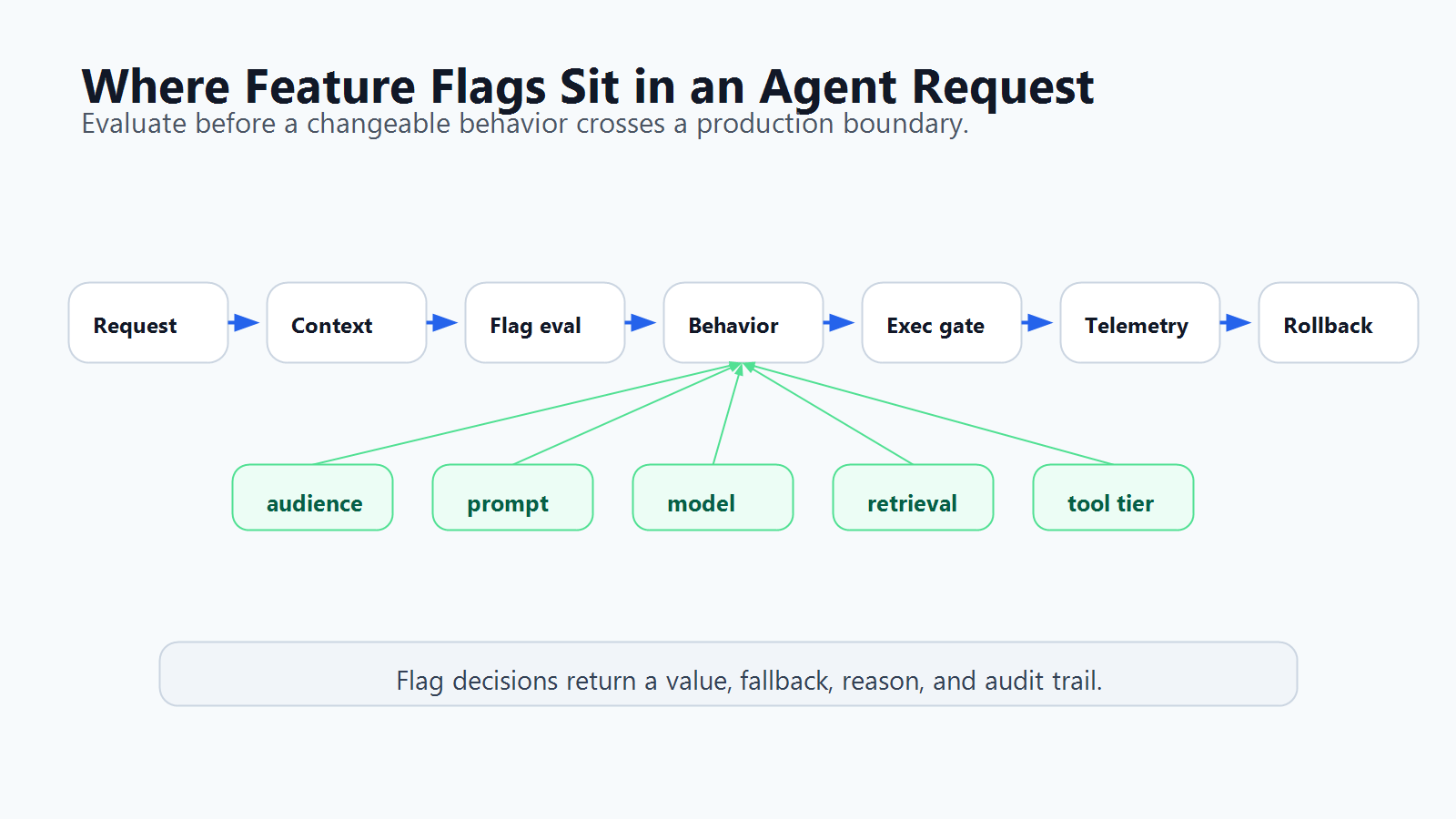
When AI Agents Need Feature Flags
Use feature flags for an AI agent when a behavior should vary after deployment:
- one audience should see a new agent workflow before everyone else;
- one account, region, tenant, plan, or environment needs stricter behavior;
- a prompt, model, retrieval source, tool tier, or approval rule may need rollback;
- operators need to reduce autonomy during an incident without disabling the whole agent;
- product teams want to compare agent strategies with real exposure and metric events;
- platform teams need an audit trail for who changed production behavior.
This is different from static configuration. Static config answers "what did we deploy?" A runtime flag answers "which behavior is active for this context right now, and how can we change it safely?"
It is also different from security authorization. A feature flag can decide whether an approved capability is released to a segment. It should not be the only control preventing unauthorized access. The Model Context Protocol authorization specification is a useful reminder for agent systems that token audience validation, token handling, and upstream authorization remain hard boundaries. Feature flags sit beside those controls as release and operations policy.
Start With Control Surfaces, Not Flag Names
Teams often start by creating flags such as agent-enabled or new-agent-mode. That is too early. Start by listing the agent control surfaces where the team may need a different runtime decision.
| Control surface | What changes | Why a flag helps | Safe fallback |
|---|---|---|---|
| Agent availability | Whether this agent workflow is reachable | Target internal users, beta accounts, or a small percentage first | Disabled |
| Prompt profile | Instruction set, policy wording, system prompt version | Roll out and roll back behavior without redeploying | Last stable prompt |
| Model profile | Model, reasoning mode, temperature, budget, timeout | Control cost, latency, and quality tradeoffs per context | Conservative profile |
| Retrieval profile | Index, corpus, memory scope, region-specific source | Keep data boundaries and source quality explicit | Approved docs only |
| Tool authority | Search-only, read-only, draft-write, approved external action | Expand autonomy in stages | Search-only or read-only |
| Human approval | Whether a tool call queues for review | Keep humans on consequential decisions | Approval required |
| Experiment exposure | Which strategy or workflow variant is active | Compare behavior with controlled exposure | Control or off variation |
| Incident state | Fallback, degraded, denylist, or kill switch mode | Reduce blast radius quickly | Fallback mode |
The article How to Control AI Agents in Production with Feature Flags covers the broader operating model. This guide focuses on the implementation architecture: where the flag evaluation happens, what context it needs, and how to launch the first useful controls.
Put Evaluation Before the Agent Crosses a Boundary
The safest place to evaluate a flag is just before a boundary where behavior changes or a side effect may happen.
That usually means:
- Evaluate audience and agent availability before the agent workflow starts.
- Evaluate prompt, model, and retrieval profiles before the run is assembled.
- Evaluate tool mode before the agent receives or calls tools.
- Evaluate approval and escalation policy before a side effect executes.
- Record the evaluated values with telemetry so rollback decisions have evidence.
OpenAI's Agents SDK documentation separates general guardrails from tool-level guardrails, and its tool guardrail references describe checks around tool input and output. The architecture lesson is portable: enforcement belongs at the execution boundary, not only in a natural-language instruction.
For feature flags, the same idea applies. The prompt may tell the agent that production writes require approval. The server-side tool router should still evaluate the approval flag and enforce the decision.
type AgentFlagContext = {
  userId: string;
  accountId: string;
  agentId: string;
  sessionId: string;
  environment: "dev" | "staging" | "production";
  region?: string;
  accountTier?: "free" | "team" | "enterprise";
  workflow: "support_triage" | "code_assist" | "incident_response";
  toolRisk?: "search" | "read_only" | "draft_write" | "external_action" | "admin";
};

type AgentReleaseControls = {
  enabled: boolean;
  mode: "off" | "observe" | "search_only" | "assist" | "autonomous_limited" | "fallback";
  promptProfile: string;
  modelProfile: string;
  retrievalProfile: string;
  approvalRequired: boolean;
  toolDenylist: string[];
};
The context is not decoration. It is the data the flag system needs to make a targeted release decision.
OpenFeature describes an evaluation context as contextual data used for dynamic flag evaluation. For agents, the important addition is to include agent-specific attributes: workflow, agent ID, tool risk, environment, account, region, and session. Without those attributes, every rollout becomes either global or ad hoc.
Build a Small Flag Set First
An agent control architecture should be small enough for operators to understand during a rollout or incident. Start with five to eight flags that map to independent release decisions.
| Flag key | Type | Decision | Example fallback |
|---|---|---|---|
agent-enabled |
Boolean | Is this agent workflow released for this context? | false |
agent-mode |
String | Should the agent run off, observe, search-only, assist, limited autonomy, or fallback? | observe |
agent-prompt-profile |
String | Which prompt or instruction profile is active? | stable |
agent-model-profile |
JSON or string | Which model, budget, timeout, and routing policy is active? | conservative profile |
agent-retrieval-profile |
String | Which source or memory scope can the agent use? | approved docs |
agent-tool-tier |
String | Which tool authority tier is active? | search_only |
agent-approval-required |
Boolean | Does this context require human approval before side effects? | true |
agent-incident-mode |
Boolean | Should the agent use a degraded or fallback path? | false |
FeatBit supports this style of implementation with targeting rules, percentage rollouts, multivariate flags, environments, SDK evaluation, audit logs, webhooks, and observability integrations. For the narrower tool-access pattern, use the companion tutorial on agent tool permission gates with feature flags. For a safer first stage, use a search-only agent tool policy.
Evaluate Server-Side and Pass Decisions Down
The agent should receive evaluated controls, not raw authority to query the flag control plane from arbitrary places in the workflow.
A practical server-side pattern:
async function getAgentReleaseControls(ctx: AgentFlagContext): Promise<AgentReleaseControls> {
  const enabled = await flags.boolean("agent-enabled", ctx, false);
  if (!enabled) {
    return {
      enabled: false,
      mode: "off",
      promptProfile: "stable",
      modelProfile: "conservative",
      retrievalProfile: "approved_docs",
      approvalRequired: true,
      toolDenylist: [],
    };
  }

  const incidentMode = await flags.boolean("agent-incident-mode", ctx, false);

  return {
    enabled,
    mode: incidentMode
      ? "fallback"
      : await flags.string("agent-mode", ctx, "observe"),
    promptProfile: await flags.string("agent-prompt-profile", ctx, "stable"),
    modelProfile: await flags.string("agent-model-profile", ctx, "conservative"),
    retrievalProfile: await flags.string("agent-retrieval-profile", ctx, "approved_docs"),
    approvalRequired: await flags.boolean("agent-approval-required", ctx, true),
    toolDenylist: await flags.json<string[]>("agent-tool-denylist", ctx, []),
  };
}
Then the orchestrator uses the evaluated controls:
- assemble the prompt from the selected profile;
- choose the model and budget profile;
- limit retrieval to the selected source;
- expose only the tools allowed by the current tier;
- queue side effects when approval is required;
- attach flag keys and variations to logs, traces, evaluation events, and review records.
This keeps runtime control deterministic. The model can reason about the controls, but the server remains responsible for enforcing them.
Roll Out an Agent Capability in Stages
Do not move directly from "agent disabled" to "agent autonomous." Use a release ladder where each step has evidence, rollback, and ownership.
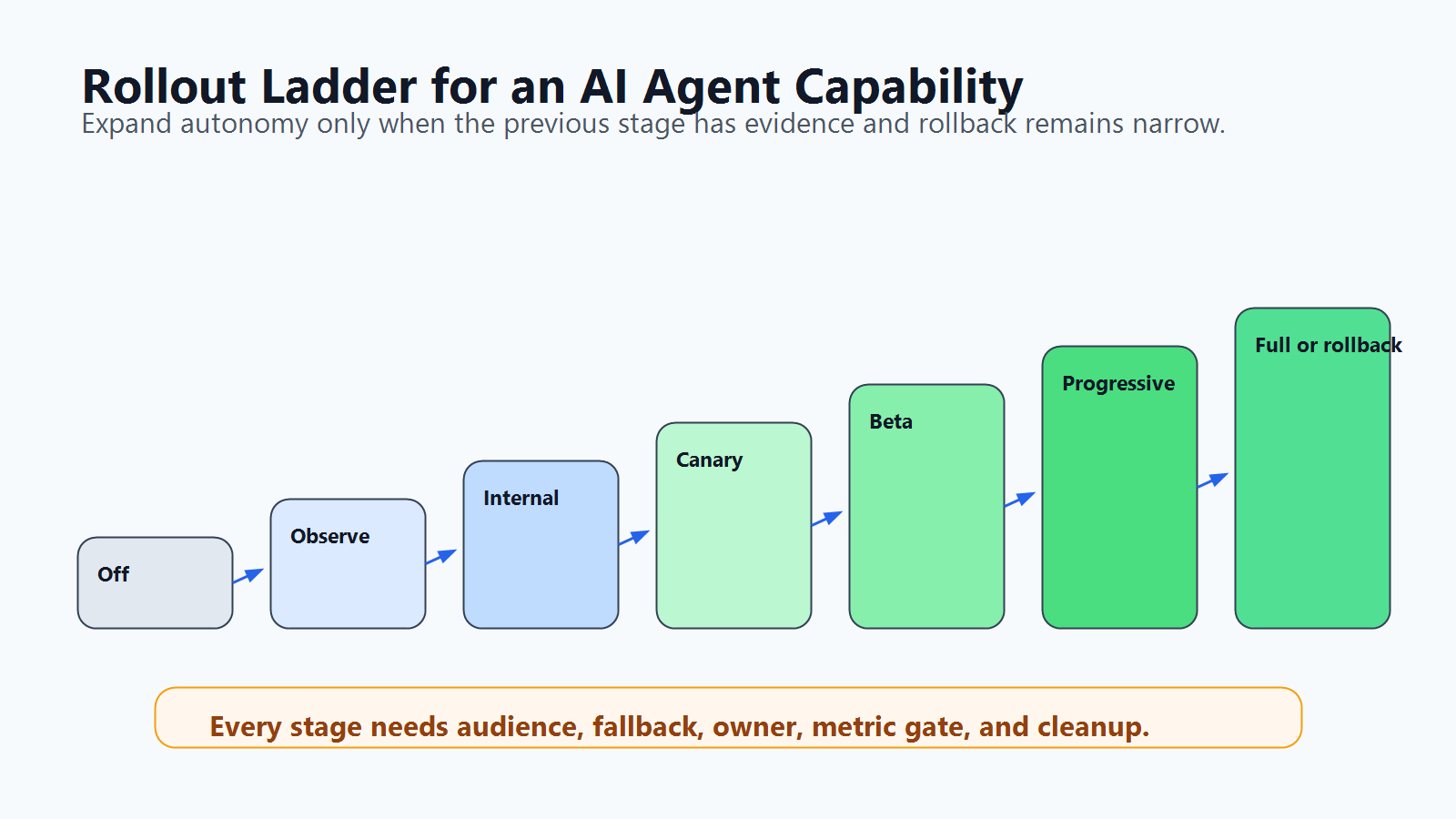
| Stage | What is released | Evidence to collect | Rollback action |
|---|---|---|---|
| Off | Code is deployed, behavior is not exposed | Build, tests, static checks | Keep off |
| Observe | Agent proposes actions but does not execute side effects | Intended tool calls, source choice, evaluator result | Return to off |
| Internal | Employees or test accounts use low-risk behavior | Latency, cost, audit quality, answer review | Narrow audience |
| Canary | Small customer or traffic segment reaches the behavior | Error rate, support signal, user feedback, quality review | Revert prompt, model, or mode |
| Limited beta | Selected accounts get broader access with approval gates | Completion rate, escalation rate, correction rate | Approval-required or search-only |
| Progressive rollout | Percentage or segment expands as signals remain healthy | Guardrail metrics, business metric, incident signal | Reduce percentage or fallback |
| Full release or cleanup | Control becomes permanent policy or rollout flag is removed | Decision record and owner approval | Archive temporary flags |
This is the same release discipline behind FeatBit's AI agent deployment loop: build the control point, deploy it behind a flag, evaluate behavior, and expand or roll back based on evidence.
Optimizely's Feature Experimentation documentation describes feature flags as a way to keep code unexposed, gradually roll out to a portion of users, and validate behavior before full release. Unleash documentation also separates release, experiment, operational, kill switch, and permission flags. Those are useful category patterns for AI agents, as long as the actual design still maps to your agent's risk surfaces rather than a generic flag taxonomy.
Connect Flags to Monitoring and Review
Feature flags are weak if the team cannot see what changed after a variation was evaluated.
For every production agent session, capture enough data to answer:
- Which flag keys and variations were evaluated?
- Which prompt, model, retrieval, and tool profiles were active?
- Which user, account, environment, region, workflow, and agent handled the request?
- Did the agent attempt a denied or escalated tool call?
- Was a human approval required, granted, or rejected?
- What were the latency, cost, error, support, evaluator, and review signals?
- Which rollback or fallback was available at that moment?
FeatBit's flag insights, audit logs, webhooks, and OpenTelemetry integration are relevant building blocks. The release decision should be visible in the same evidence stream that operators use to continue, pause, or roll back.
Decide Which Flags Are Temporary or Permanent
AI agent flags fall into two lifecycle groups.
Temporary rollout flags control a specific launch, experiment, or migration. They need an owner, decision date, expected end state, and cleanup path. Examples include a one-time canary flag for a new prompt profile or a temporary model comparison.
Permanent operational flags express a lasting control policy. Examples include kill switches, incident mode, approval-required gates, tool-tier policies, and environment restrictions. These should be documented as operational controls, not treated as stale code to delete automatically.
This distinction matters because an agent platform can accumulate control debt quickly. If every prompt, model, tool, audience, experiment, and incident creates a flag with no cleanup condition, the release system becomes another policy maze. FeatBit's feature flag lifecycle management guidance is the right companion for deciding which flags should expire, which should remain, and how agents can help clean up old flag references safely.
Common Implementation Mistakes
Using one global agent flag. A global agent-enabled flag is useful, but it cannot support normal operations. Teams still need separate controls for mode, tools, prompts, models, retrieval, approval, and incident state.
Evaluating flags inside the model prompt only. The model can be told which mode it is in, but the router or backend must enforce the decision before side effects.
Skipping context design. If the evaluation context does not include account, environment, workflow, tool risk, region, or agent identity, targeting becomes too coarse for production control.
Confusing rollout policy with authorization. Flags release approved capabilities. IAM, API permissions, scoped credentials, sandboxing, and MCP authorization still define what the agent is ever allowed to reach.
Measuring only uptime and cost. AI agents also need quality, correction, escalation, denied-action, support, and human-review signals.
Leaving rollout flags forever. Temporary flags need cleanup criteria. Permanent operational controls need documentation and ownership.
First Implementation Checklist
Use this checklist for the first practical feature flag architecture for an AI agent:
- Pick one agent workflow, not the whole agent platform.
- Identify the control surfaces: availability, mode, prompt, model, retrieval, tools, approval, and incident fallback.
- Define a safe production fallback for each flag.
- Design the evaluation context with user, account, environment, agent, session, workflow, region, and tool-risk attributes.
- Evaluate flags server-side before the agent crosses behavior or execution boundaries.
- Enforce tool and approval decisions outside the prompt.
- Attach evaluated flag variations to logs, traces, review records, and metric events.
- Roll out through observe, internal, canary, limited beta, and progressive stages.
- Keep hard authorization controls separate from runtime release controls.
- Give every temporary flag an owner, review date, and cleanup condition.
If you already use FeatBit for product releases, this should feel familiar. The agent capability is the feature. The agent sessions are the audience. The prompt, model, retrieval, and tool profiles are variations. The rollout stages are release decisions. The audit trail is release memory.
Source Notes and Internal Link Plan
This article is a standalone implementation architecture guide. It intentionally does not repeat the broader control AI agents in production article, the narrower agent tool permission gate tutorial, the runtime control runbook, or the search-only policy guide.
- Agent boundary sources: OpenAI Agents SDK guardrail references and Model Context Protocol authorization.
- Flag evaluation source: OpenFeature evaluation context.
- Category context sources: Unleash feature flag types, Optimizely create feature flags, and LaunchDarkly AgentControl documentation. These links are used only to show category language around flags, rollout, permissions, and agent control. This article does not make comparative performance, pricing, security, or market-ranking claims.
- FeatBit implementation sources: targeting rules, percentage rollouts, audit logs, webhooks, OpenTelemetry integration, and feature flag lifecycle management.
- FeatBit reader journey links: AI control layer, AI agent deployment loop, human-in-the-loop release control, AI governance, and self-hosted feature flags.
- Image and Open Graph recommendation: use
cover.pngas the social preview. Use the control-points diagram near the architecture section and the rollout-ladder diagram near the staged rollout section because both explain implementation decisions in crawlable text rather than replacing them.
Next Step
Choose one AI agent workflow that is close to production. Write its first control-surface map and create only the flags required for that workflow. If you cannot name the fallback, owner, evaluation context, rollout stage, and cleanup condition for a flag, it is not ready to become part of the agent control plane.