
How to Control Agent Tool Access in Production
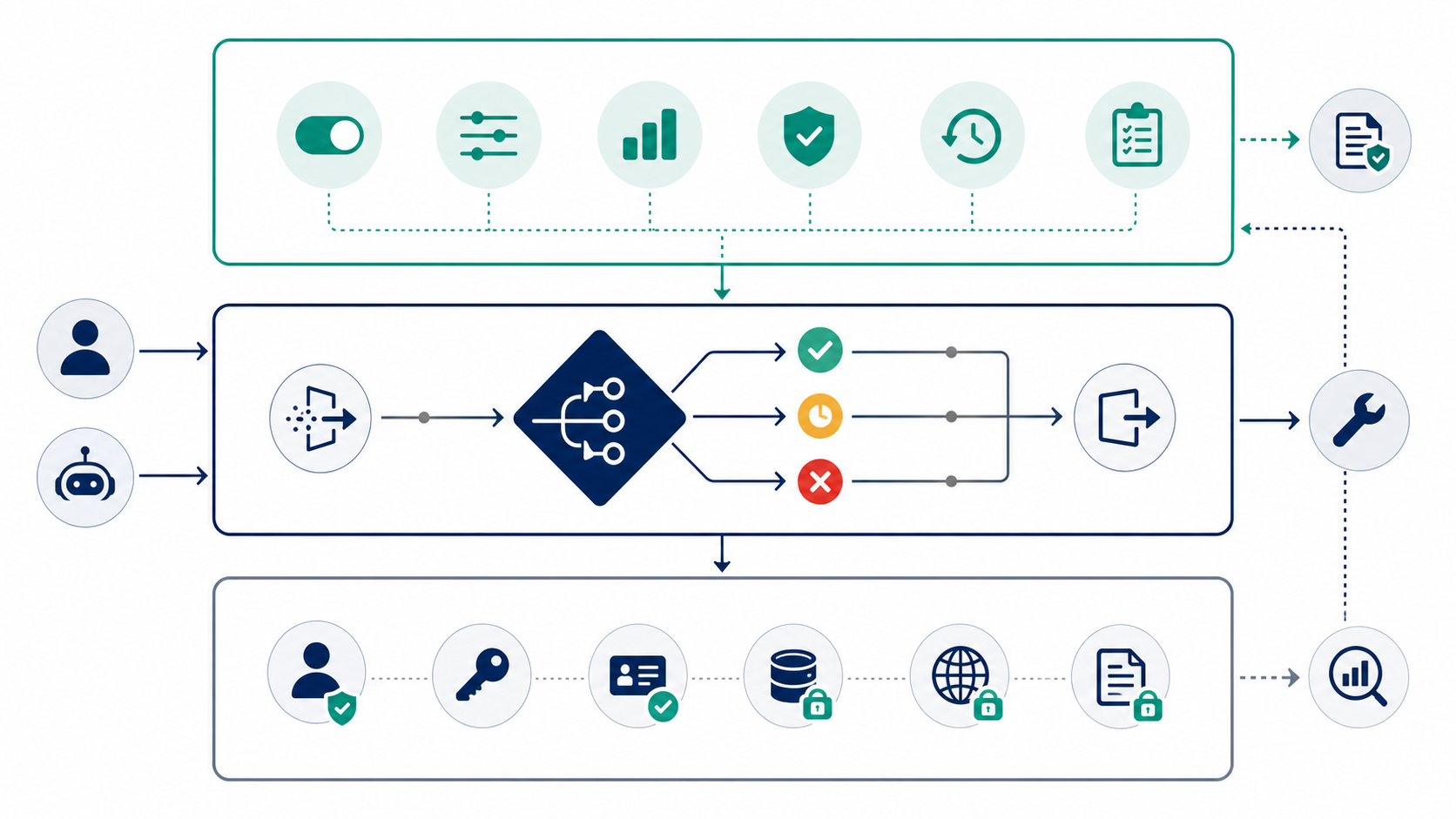
Controlling agent tool access in production means deciding which approved tools an AI agent can use, for which user or account, in which environment, at what authority level, and with what rollback path. The answer is not one global "tools on" switch. It is a layered control model: hard authorization limits what is ever possible, a deterministic tool router enforces policy before execution, and runtime feature flags decide which approved capability is active right now.
That distinction matters because tool access changes the risk profile of an agent. A search tool, a scoped read tool, a draft-writing tool, and a production admin tool should not share the same release path. If an agent can call tools that read sensitive data, change customer-visible state, spend money, deploy infrastructure, or update permissions, the access model needs to be explicit, observable, and reversible after deployment.
The Short Answer
Use three layers together:
| Layer | What it controls | Production rule |
|---|---|---|
| Identity and authorization | What the agent or service identity can ever access | Keep credentials scoped to the narrowest tool and operation needed. |
| Tool router policy | Whether a requested tool call may execute | Enforce decisions outside the prompt, before the tool runs. |
| Runtime release control | Who gets which tool mode right now | Use feature flags for targeting, staged rollout, approval gates, denylists, fallback modes, and rollback. |
The model prompt can describe the rules, but it should not be the only control. Prompts guide behavior. The tool router enforces behavior. Feature flags make approved behavior adjustable by context without redeploying the agent.
This is the practical production answer:
- Classify every tool by risk and reversibility.
- Put tool calls behind a server-side router.
- Check hard authorization before runtime policy.
- Evaluate flags with user, account, environment, workflow, agent, tool, and risk attributes.
- Return one of a small set of decisions: allow, constrain, observe-only, queue for approval, deny, or fallback.
- Log the evaluated policy state and final decision.
- Keep rollback able to disable one tool or lower one authority tier without shutting down the whole agent.
Start With Tool Classes, Not Flags
The fastest way to create a fragile access model is to add a new flag for every tool as soon as it appears. Start by naming the tool classes your production system understands.
| Tool class | Examples | Default production posture |
|---|---|---|
| Search | Search approved docs, runbooks, public help content, sanitized knowledge bases | Safe first rollout stage, but source allowlists still matter. |
| Scoped read | Read a narrow business object, account setting, ticket, or deployment status | Allow only after identity scope and purpose are clear. |
| Sensitive read | Read customer data, production traces, private files, security records, or billing details | Require stronger authorization, purpose limits, and audit. |
| Draft write | Create a draft reply, branch, ticket, config proposal, or change request | Useful with human execution or approval. |
| External action | Send email, call a partner API, publish content, update a customer-visible record | Queue for approval until evidence supports narrower autonomy. |
| Admin action | Delete data, change permissions, rotate secrets, deploy production infrastructure | Keep disabled, human-executed, or limited to break-glass workflows. |
This classification gives operators a shared language. Instead of debating whether one named tool is "safe," the team can ask which class it belongs to, what context makes it acceptable, and what evidence is needed before expansion.
Put Enforcement at the Tool Boundary
The agent may propose a tool call. Production software should decide whether the call runs.
OpenAI's Agents SDK documentation describes tool guardrails as checks that can run around function-tool execution. The production lesson is portable even if you do not use that SDK: place the enforcement point where the side effect would happen, not only in natural-language instructions.
A minimal request contract can be small:
type ToolRisk =
  | "search"
  | "scoped_read"
  | "sensitive_read"
  | "draft_write"
  | "external_action"
  | "admin_action";

type ToolRequest = {
  userKey: string;
  accountKey: string;
  environment: "development" | "staging" | "production";
  workflow: string;
  agentName: string;
  toolName: string;
  toolRisk: ToolRisk;
  targetSystem: string;
};

type ToolDecision =
  | { action: "allow"; reason: string }
  | { action: "constrain"; reason: string; mode: "search_only" | "scoped_read" }
  | { action: "observe_only"; reason: string }
  | { action: "queue_for_approval"; reason: string }
  | { action: "deny"; reason: string }
  | { action: "fallback"; reason: string };
The tool router should build this request, verify hard authorization, evaluate runtime policy, and return a decision before the tool executes. The agent receives the decision and adapts. It should not receive credentials or direct network access that let it bypass the router.
Separate Security Boundaries From Release Controls
Feature flags are useful for controlling production exposure. They are not a substitute for authorization, sandboxing, token scope, network policy, or API-level permission checks.
For MCP-based systems, the Model Context Protocol authorization specification is a useful reminder: transport authorization, token audience validation, and token handling are part of the hard security boundary. Runtime flags should sit beside that boundary. They can decide whether an approved capability is active for a user, account, environment, or rollout stage, but they should not make broad credentials safe.
Use this split:
| Question | Belongs in hard authorization | Belongs in runtime control |
|---|---|---|
| Can this service identity ever call the billing API? | Yes. | No. |
| Can it call only the draft endpoint, not the send endpoint? | Yes. | No. |
| Should beta accounts get draft-write mode this week? | No. | Yes. |
| Should production external actions require approval during an incident? | No. | Yes. |
| Should one risky tool be disabled without redeploying? | No. | Yes. |
OWASP's LLM risk guidance on excessive agency also points to the same general concern: agents become riskier when they have unnecessary functionality, permissions, or autonomy. The practical mitigation is not one control; it is least privilege plus runtime enforcement plus monitoring.
Design a Small Runtime Flag Model
A useful production model usually needs a few flags, not dozens.
| Flag | Type | Purpose | Conservative fallback |
|---|---|---|---|
agent-tools-enabled |
Boolean | Enables tool execution for a targeted context | false |
agent-tool-mode |
String | Selects off, observe, search_only, scoped_read, draft_write, approved_external, or fallback |
off |
agent-tool-approval-required |
Boolean | Requires human review for risky contexts | true |
agent-tool-denylist |
JSON or string list | Temporarily disables specific tools during incidents | Empty list |
agent-tool-source-allowlist |
JSON or string list | Limits search and read tools to approved sources | Empty list |
agent-tool-audit-sampling |
Number | Controls detailed decision logging volume after rollout | Full logging during rollout |
Evaluate these flags server-side before the tool runs. The evaluation context should include the attributes that matter for production control: user, account, role, region, environment, workflow, agent, tool name, tool risk, target system, incident state, and rollout segment.
FeatBit fits this layer because feature flags can target users and segments, support percentage rollout, select multivariate modes, preserve flag change audit logs, and connect changes to automation through webhooks. The hard boundary still belongs in your application and infrastructure. FeatBit is the release control plane that decides which approved behavior is active.
Roll Out Tool Access in Authority Tiers
Do not move from "no tools" to "autonomous tools" in one release. Treat tool access as progressive delivery.
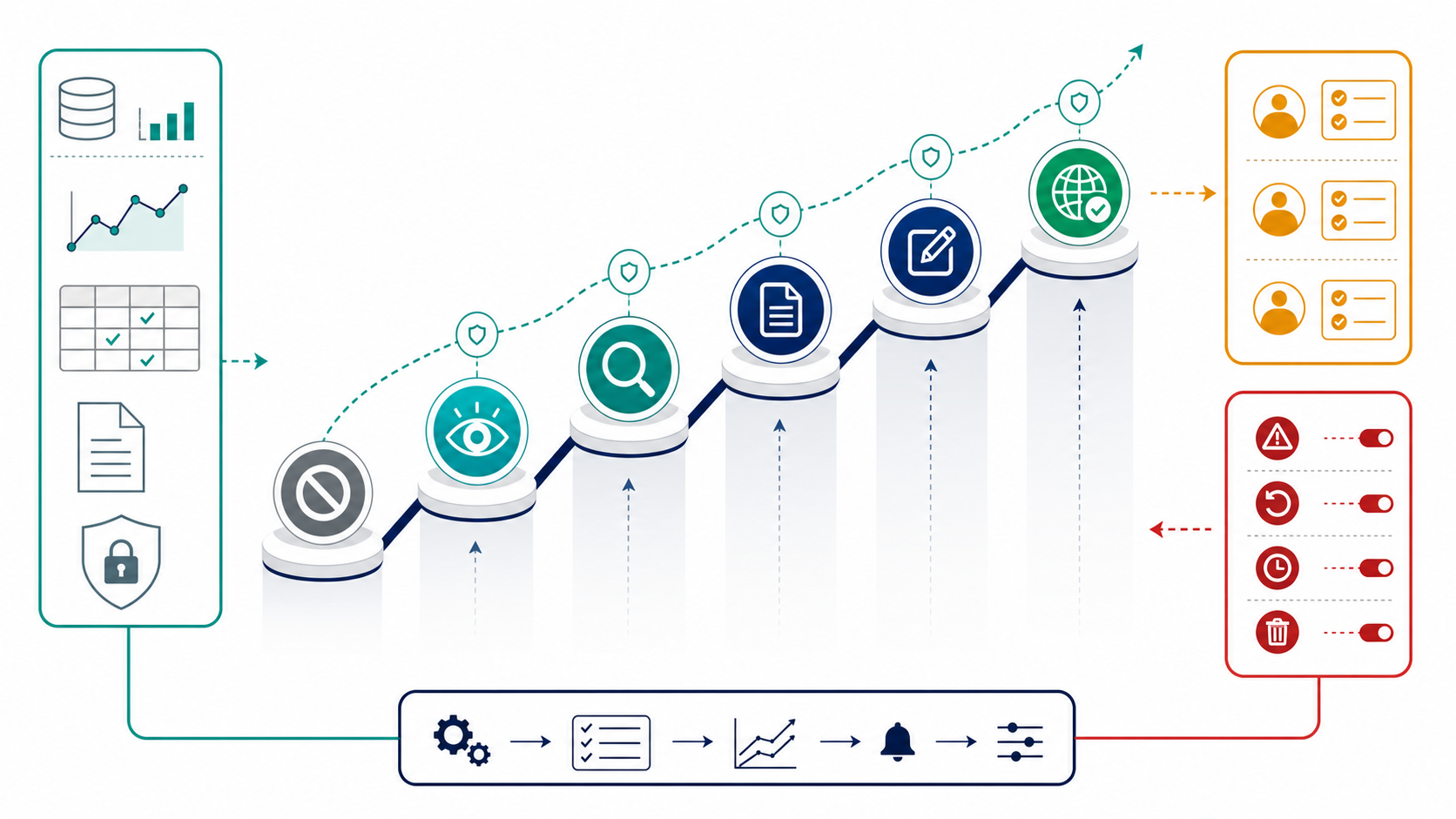
A practical rollout ladder looks like this:
- Off. The agent has no production tool execution. This is the default for unsupported workflows and emergency shutdown.
- Observe-only. The agent proposes tool calls, but the router logs intended decisions without executing side effects.
- Search-only. The agent can search approved sources and return sourced recommendations. It cannot read broad internal records or write anything.
- Scoped read. The agent can read selected business objects when account, region, role, and purpose match the policy.
- Draft write. The agent can create drafts, tickets, branches, or change proposals, but humans still execute external or production changes.
- Approved external action. The agent can prepare customer-visible or third-party actions that enter a review queue.
- Narrow autonomy. One specific tool, workflow, audience, and environment can execute without approval after evidence supports expansion.
- Fallback or rollback. Operators can lower the mode, activate search-only fallback, deny one tool, or disable tool execution without redeploying.
This ladder is different from a static permission table. A permission table says what is possible. The ladder says how production access expands, pauses, and rolls back.
Add Human Approval Where It Changes the Outcome
Human approval is useful when the reviewer has context and a real choice. It is weak when every tool call produces the same "approve" prompt.
Queue a tool call for review when:
- the tool can create an external or customer-visible effect;
- the tool touches production data, permissions, billing, infrastructure, or security-sensitive records;
- the request crosses from one authority tier into another;
- the account, environment, region, or incident state is high risk;
- the agent confidence, source quality, or policy evidence is below the rollout threshold;
- the action is hard to reverse.
The approval event should include the proposed action, target system, affected scope, tool-risk class, policy mode, evidence summary, fallback option, and reason the gate fired. A reviewer should be able to approve, reject, modify scope, lower the tool mode, or trigger rollback.
FeatBit's human-in-the-loop release control framing is useful here: approval is not a general-purpose safety ritual. It is a release gate for moments where autonomy needs a human owner.
Log Decisions, Not Just Executions
If a tool call is blocked, constrained, or sent to approval, that is still a production event. Log it.
Useful audit fields include:
- request ID, user key, account key, environment, workflow, agent name, and session ID;
- tool name, target system, tool-risk class, and requested action summary;
- evaluated flag values such as mode, approval requirement, denylist match, source allowlist, and fallback state;
- hard authorization result before runtime policy;
- final decision: allow, constrain, observe-only, queue for approval, deny, or fallback;
- reviewer identity and outcome when approval is required;
- execution result when the tool runs;
- rollback or incident state if the decision happened during mitigation.
Avoid logging sensitive tool inputs or retrieved content by default. Decision logs should explain why the system acted without creating a second uncontrolled store of private data.
FeatBit's feature flag audit log, IAM, API access tokens, and webhooks are relevant building blocks for connecting policy changes with operational review, incident response, and automation.
Common Failure Modes
Putting the rule only in the prompt. The model can be told not to use a tool. The router still needs to enforce the decision before execution.
Using one global tool switch. A kill switch is useful, but normal operations need modes, denylists, source allowlists, approval gates, and targeted rollout.
Treating read-only as harmless. Reading customer records, logs, traces, or private files can be sensitive even if no write occurs.
Letting search tools hide broader access. A search-only policy is only as narrow as the sources it can reach and the tools it can call internally.
Confusing authorization with rollout. Scoped credentials define the maximum possible access. Feature flags decide who receives an approved capability during a production rollout.
Approving without consequence summaries. Reviewers need to know what will change, who or what is affected, and how to reverse it.
Keeping temporary rollout flags forever. Temporary controls need owners, review dates, and cleanup rules. Stable access modes can become permanent operational controls, but release scaffolding should not become policy debt.
Production Checklist
Before giving an agent a new production tool, verify:
- The tool has a named risk class and owner.
- The service identity has the narrowest API scope needed.
- The tool router enforces policy outside the model prompt.
- Runtime flags default to off, observe-only, search-only, or fallback in production.
- Flag evaluation includes user, account, environment, workflow, agent, tool, risk, and target-system context.
- Approval is required for external effects, admin actions, sensitive reads, and escalation beyond the current tier.
- Audit logs capture blocked, constrained, approved, denied, and executed decisions.
- Operators can disable one tool or lower one authority tier without redeploying.
- The rollout has expansion criteria and rollback criteria.
- Temporary rollout flags have cleanup owners and review dates.
If you already use FeatBit for software releases, the operating model is familiar. The agent tool is the capability, the production users are the rollout audience, the flag is the runtime control, and the audit trail is the release memory.
Source Notes and Internal Link Plan
- OpenAI's Agents SDK guardrails documentation supports the execution-boundary point: tool guardrails can validate or block tool calls around function-tool execution.
- The Model Context Protocol authorization specification supports the distinction between runtime policy and hard authorization boundaries such as token audience validation.
- OWASP's Excessive Agency guidance for LLM applications supports the least-privilege concern for agents with tools, permissions, and autonomy.
- FeatBit product context: targeting users with flags, percentage rollouts, feature flag audit logs, IAM overview, API access tokens, and webhooks.
- FeatBit reader journey links: control AI agents in production, AI agent tool policy, search-only agent tool policies, agent tool permission gates, AI control layer, and human-in-the-loop release control.
- Image and Open Graph recommendation: use
cover.pngas the social preview. Use the control-stack diagram near the layered-control answer and the access-runbook ladder near staged rollout because both summarize decisions explained in crawlable text.
Next Step
Pick one production agent workflow and list every tool it can request. Classify each tool by risk, decide the default mode, name the hard authorization boundary, and create one runtime control that can move that workflow from observe-only to search-only without redeploying. If the team cannot name the rollback path, the agent is not ready for broader tool access.