
How to Control AI Agents in Production with Feature Flags
Controlling AI agents in production means making agent behavior adjustable, targeted, observable, and reversible after deployment. The practical pattern is simple: identify the agent decisions that can change risk, put deterministic gates around those decisions, evaluate runtime flags before the agent acts, and keep rollback independent from redeploying application code.
That control layer should not replace identity, authorization, sandboxing, or human review. It sits beside them. Security permissions decide what an agent is ever allowed to do. Runtime flags decide which approved capability is active for which users, sessions, environments, traffic percentage, or incident state.
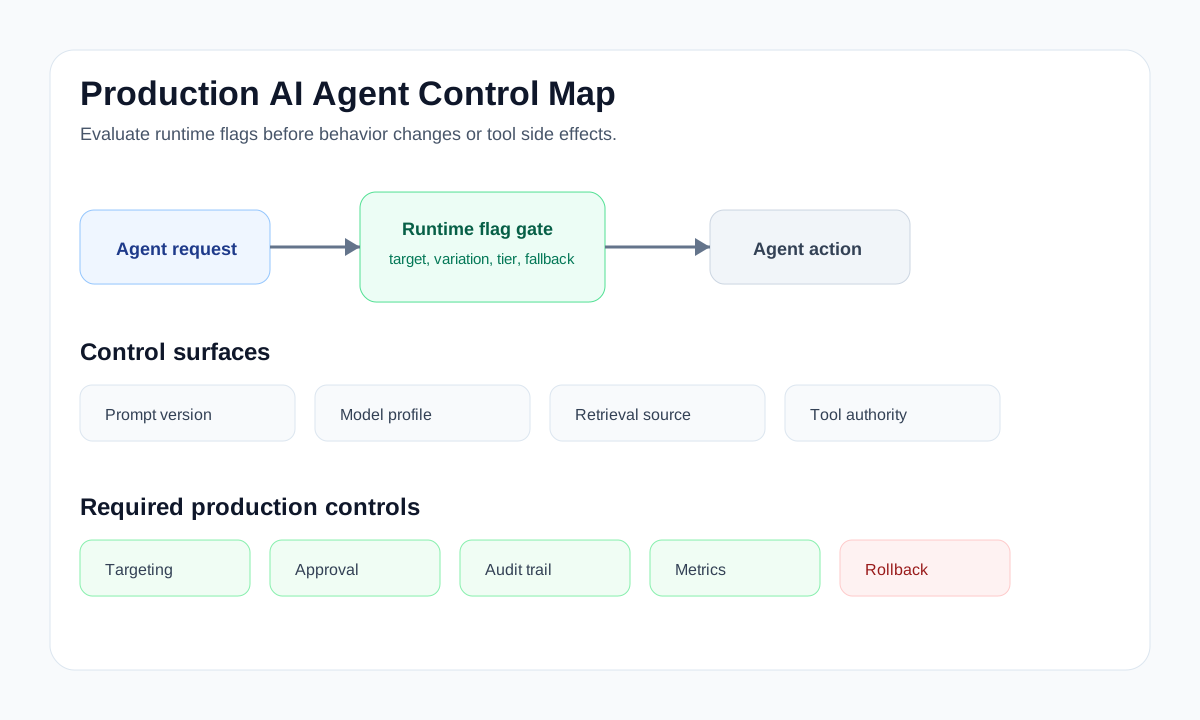
What Production Agent Control Should Mean
"Control your agents in production" is becoming vendor language. LaunchDarkly, for example, describes AgentControl as a way to manage prompts, models, guardrails, and production agent behavior outside application code, and its Control AI Agents solution page frames runtime control around shared standards, audit trails, and rollback for agent behavior. Those are useful category signals, but engineering teams still need to translate the phrase into architecture.
For a production team, agent control should answer six operational questions:
- Which agent capability is active right now?
- Which users, accounts, regions, environments, or workflows can reach it?
- Which tools can the agent call, and at what authority level?
- Which prompts, model settings, retrieval sources, or routing strategies are active?
- Which signals would pause, reduce, or roll back the behavior?
- Who changed the control state, and can operators reconstruct what happened?
If the only answer is "change the prompt and redeploy," the system is not really controllable in production. It is configurable at release time.
Map the Control Surfaces First
Do not start by creating flags. Start by naming the agent control surfaces where production risk changes.
| Control surface | What changes in production | Runtime control pattern |
|---|---|---|
| Agent availability | Whether the agent is active at all | Boolean kill switch with environment and segment targeting |
| Prompt or instruction set | How the agent interprets the task | String or JSON variation for prompt version, with staged rollout |
| Model and parameter choice | Cost, latency, quality, and behavior profile | Multivariate flag for model profile or reasoning mode |
| Retrieval source | Which knowledge base, index, or memory scope the agent uses | Flagged retrieval profile with account, region, and data-sensitivity targeting |
| Tool authority | Read-only, draft-write, approved external action, or admin action | Capability-tier flag plus approval-required flag |
| Human approval | Whether a tool call queues for review or executes | Boolean or rule-based approval gate for high-risk contexts |
| Incident response | Which risky behavior is temporarily unavailable | Denylist, fallback-mode, or degraded-mode flag |
| Experimentation | Which agent strategy is being tested | Percentage rollout or experiment flag with metric collection |
This map forces the team to separate behavior control from permission control. A flag can choose a safer model profile for a high-risk account. It should not be the only thing preventing the agent from deleting production data. That boundary still belongs in IAM, API authorization, sandbox policy, and the tool router.
Put Gates at Execution Boundaries
The model can propose an action. A deterministic gate should decide whether the action can run.
OpenAI's Agents SDK guardrails documentation makes a similar distinction in its guardrails model: tool guardrails wrap function-tool invocations and can validate or block calls before and after execution, while agent-level input and output guardrails do not necessarily run at every point in a workflow. That is a useful production lesson even if you are not using that SDK: place enforcement at the tool, routing, handoff, or execution boundary where the side effect happens.
A minimal control flow looks like this:
type AgentControlContext = {
  userId: string;
  accountId: string;
  agentId: string;
  environment: "dev" | "staging" | "production";
  toolName?: string;
  toolRisk?: "read_only" | "draft_write" | "external_effect" | "admin";
  region?: string;
};

async function decideAgentMode(ctx: AgentControlContext) {
  const agentEnabled = await flags.boolean("agent-enabled", ctx, false);
  if (!agentEnabled) return { action: "deny", reason: "Agent disabled" };

  const incidentMode = await flags.boolean("agent-incident-mode", ctx, false);
  if (incidentMode) return { action: "fallback", mode: "read_only" };

  const capabilityTier = await flags.string("agent-capability-tier", ctx, "read_only");
  const approvalRequired = await flags.boolean("agent-approval-required", ctx, true);

  return {
    action: "allow",
    capabilityTier,
    approvalRequired,
  };
}
In a real system, this decision belongs in the server-side tool router or orchestration service. The agent receives the decision and adapts. It should not be able to bypass the gate by calling the tool directly.
Use Flags for Release Decisions, Not Security Theater
Feature flags are good at runtime release decisions:
- turn a behavior on or off without redeploying;
- target internal users, beta accounts, regions, plans, or traffic percentages;
- choose prompt, model, retrieval, or strategy variants;
- move from observe-only mode to limited autonomy;
- roll back a behavior when metrics or review signals degrade;
- record who changed the control state.
Feature flags are not a substitute for hard security controls:
- use scoped API credentials and service identities;
- restrict tool permissions at the API layer;
- isolate high-risk execution in sandboxes;
- validate inputs and outputs before side effects;
- require human approval for irreversible or externally visible actions;
- log enough detail for incident review.
This matters for MCP-based agent systems too. The Model Context Protocol authorization specification describes OAuth-based authorization for HTTP transports and calls out token audience validation and token passthrough risks. In practical terms: if an agent reaches production tools through MCP, runtime flags can control rollout and behavior, but token scope, audience validation, and upstream authorization still need to be correct.
Roll Out Agent Autonomy in Stages
Agent control is a release process, not a one-time configuration task.
- Observe-only. The agent proposes actions, but the router logs the intended prompt, model, retrieval source, and tool call without executing side effects.
- Internal read-only. Employees or synthetic users can exercise low-risk paths while operators validate trace quality and audit events.
- Draft-write. The agent can create drafts, branches, tickets, or internal records, but humans still perform external publication or production change.
- Approved external action. The agent can prepare customer-visible or third-party actions, but a human approval queue clears the final step.
- Narrow autonomy. One specific workflow, tool, audience, and environment gets autonomous execution after enough evidence supports expansion.
- Progressive expansion. The rollout moves through segments or percentage stages with quality, latency, cost, and support signals attached.
- Rollback and cleanup. Operators can reduce capability tier, activate fallback behavior, or disable a single tool. Temporary rollout flags get owners and cleanup dates.
This is the same operating model behind FeatBit's AI agent deployment loop: build the control point, deploy behind a flag, evaluate behavior, and roll back or expand based on evidence.
A Practical Flag Model
Keep the initial model small. Too many flags create policy debt; too few create a coarse emergency switch that cannot support normal operations.
| Flag key | Type | Production purpose | Safe fallback |
|---|---|---|---|
agent-enabled |
Boolean | Enables the agent for a targeted audience | false |
agent-mode |
String | Selects behavior mode such as observe, assist, autonomous, or fallback |
observe |
agent-capability-tier |
String | Controls read-only, draft-write, external-effect, or admin capability | read_only |
agent-model-profile |
String or JSON | Selects model, prompt version, temperature, budget, and routing policy | conservative profile |
agent-retrieval-profile |
String | Selects retrieval source, index, or memory scope | verified internal docs |
agent-approval-required |
Boolean | Queues risky actions for human review | true |
agent-tool-denylist |
JSON | Temporarily disables specific tools during incidents | empty list |
agent-incident-mode |
Boolean | Forces fallback or read-only behavior | false |
FeatBit supports this style of control with targeting rules, percentage rollouts, multivariate flags, audit logs, API access, webhooks, and SDK evaluation. For the narrower tool-permission implementation, see the companion tutorial on building agent tool permission gates with feature flags.
Connect Control to Evidence
A production control plane is weak if it changes behavior without learning from the result. At minimum, connect flag decisions to these signals:
- flag key and variation evaluated for each agent session;
- user, account, environment, region, and agent identifier;
- prompt, model profile, retrieval profile, and tool-risk class;
- tool decision: allow, observe-only, queue for approval, deny, or fallback;
- output quality review, evaluator result, or human correction;
- latency, token cost, error rate, retry rate, and downstream incident signal;
- rollback decision and final state.
FeatBit's flag insights, audit logs, webhooks, and OpenTelemetry integration are relevant building blocks. The goal is not only to flip flags. The goal is to make each behavior change attributable and reversible.
When Production Control Should Stop the Release
Do not publish an agent capability just because it is behind a flag. A flag gives you reversibility; it does not prove the behavior is ready.
Stop the rollout when:
- the team cannot name the agent's tool-risk classes;
- high-risk tools are guarded only by prompt instructions;
- there is no audit event for a blocked or approved tool call;
- rollback disables the whole agent when only one tool is risky;
- the agent can reach production data with broad credentials;
- no one owns the temporary rollout flags;
- the team has metrics for latency and cost but no signal for task quality or user harm;
- human approval prompts do not explain the consequence, scope, and fallback.
These are not theoretical details. Agent failures often appear as plausible workflows that take the wrong path, not as obvious crashes. The control system has to catch paths, not only errors.
FeatBit's Angle
FeatBit's position is that feature flags are release-decision infrastructure. For AI agents, that means runtime control over prompts, models, retrieval profiles, tool authority, rollout segments, experiments, and rollback states.
The product-specific advantage is not that every agent problem becomes a feature flag. It is that agent behavior can be managed through the same release-control primitives teams already need for modern software:
- AI control layer for treating AI decision points as runtime control surfaces;
- safe AI deployment for canary rollout and rollback;
- human-in-the-loop release control for approval boundaries;
- feature flag lifecycle management for ownership, cleanup, and release memory;
- FeatBit MCP, FeatBit CLI, and FeatBit Skills for agent-native operations.
Open-source and self-hosted deployment matter when the agent control plane touches sensitive product behavior, customer data boundaries, or internal operational policy. In those environments, teams often need control over where flag state, audit events, and automation credentials live.
Production Checklist
Before granting an agent more production authority, verify the following:
- The agent capability is represented as a named release decision.
- The default production state is deny, observe-only, read-only, or fallback.
- Flag evaluation happens server-side before side effects.
- The evaluation context includes user, account, environment, agent, tool, risk, and region when relevant.
- IAM or API permissions still enforce the hard security boundary.
- Human approval is reserved for consequential decisions, not every harmless action.
- Audit events capture both the flag decision and the execution result.
- Rollback can reduce one capability tier or deny one tool without stopping unrelated workflows.
- Temporary flags have an owner, review date, and cleanup condition.
Source Notes and Internal Link Plan
This article uses vendor terminology from LaunchDarkly's AgentControl pages as category context, but it does not make comparative performance, pricing, security, or market-ranking claims.
- LaunchDarkly sources: Control your agents in production, Control AI Agents solution page, and AgentControl documentation.
- Agent guardrail source: OpenAI Agents SDK guardrails.
- Tool authorization source: Model Context Protocol authorization specification.
- FeatBit internal journey links: AI control layer, AI agent deployment loop, human-in-the-loop release control, feature flag lifecycle management, and agent tool permission gate tutorial.
- Image and Open Graph recommendation: use the cover image as the share preview, and use the production control map in the article body because it explains the article's operating model rather than decorating the page.
Next Step
Choose one production agent workflow and write its control-surface map before changing code. If the workflow contains a side effect, start with observe-only mode, log the intended tool call, and add a rollback path that disables that specific capability without redeploying the application.