
Why Agent Systems Need Feature Flags, Not Just Permissions
Agent systems need feature flags because permissions only define the hard boundary of what an agent may ever access. Feature flags define which approved behavior is active for this user, account, environment, workflow, rollout stage, or incident state right now.
That difference matters in production. A permission can say that an agent service identity is allowed to call a ticket API. It cannot decide that only internal users should get draft-write mode this week, that a risky tool should be disabled for one customer segment, or that a new agent strategy should roll back without redeploying the service. Those are runtime release decisions, and they need feature flags.
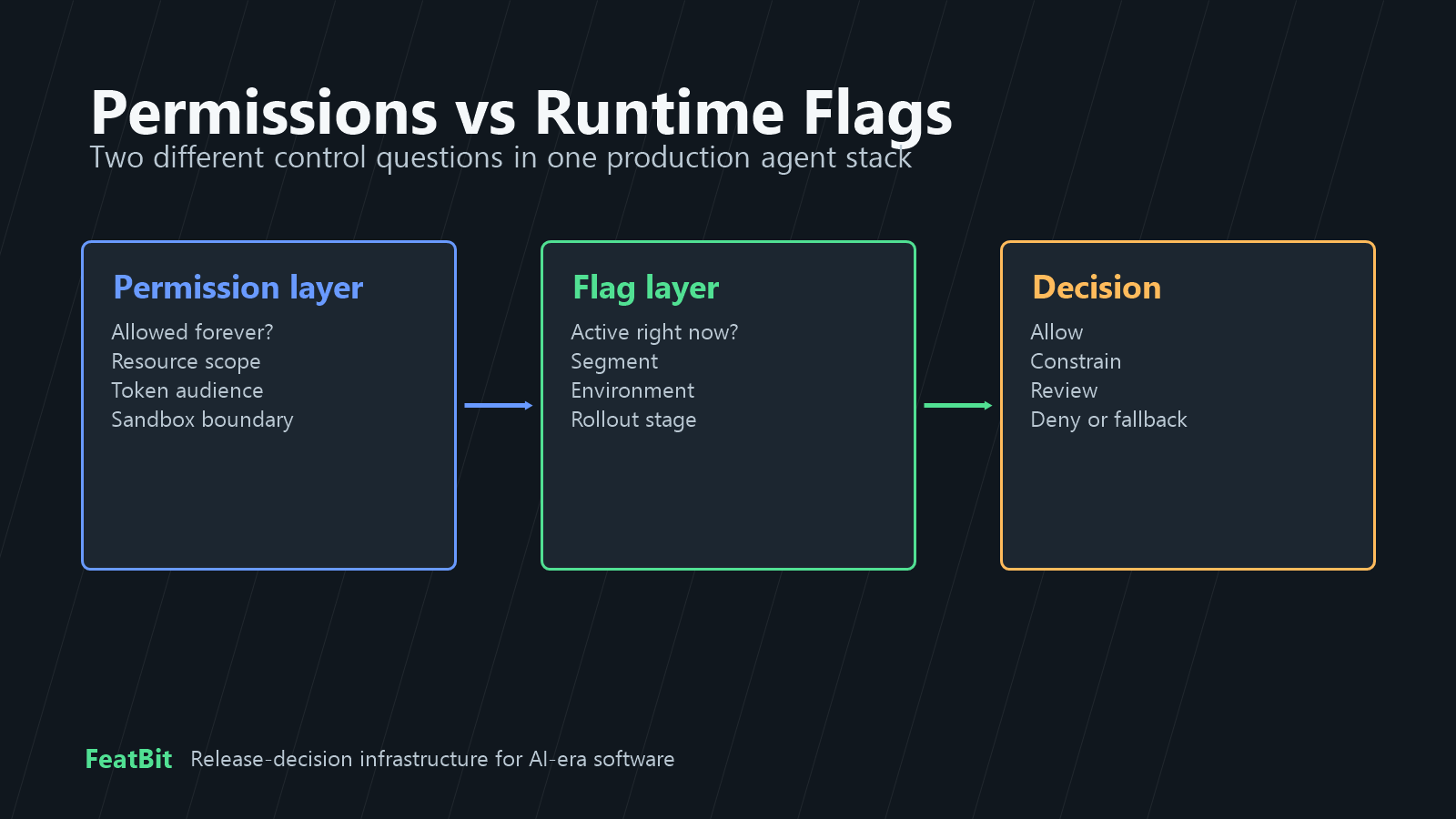
Permissions and Flags Answer Different Questions
Permissions are necessary. They are the security boundary that limits what identities, credentials, tools, APIs, data sources, and environments can ever be reached.
Feature flags are also necessary, but for a different reason. They are the runtime control layer that decides whether an approved capability should be exposed now, at what authority level, to which audience, with which fallback, and with which evidence trail.
| Control question | Belongs primarily in permissions | Belongs primarily in feature flags |
|---|---|---|
| Can this service identity ever call this API? | Yes | No |
| Can this token reach only the draft endpoint, not the send endpoint? | Yes | No |
| Should beta accounts get draft-write mode today? | No | Yes |
| Should production external actions require approval during an incident? | No | Yes |
| Should one tool be disabled while the rest of the agent stays available? | No | Yes |
| Should a new prompt, model, retrieval profile, or agent strategy reach 5 percent of traffic? | No | Yes |
A production agent needs both. Permissions keep forbidden access impossible. Feature flags keep permitted behavior targeted, staged, observable, and reversible.
Why Permissions-Only Control Breaks Down
A permissions-only model looks clean at first because it asks a simple question: "Is this agent allowed to use this tool?" Agent systems rarely stay that simple.
The same agent may need to search documentation, read account state, draft a change, update a ticket, call a partner API, or trigger an infrastructure workflow. Those actions have different blast radius, reversibility, and evidence requirements. A binary permission either grants too much too early or blocks useful lower-risk behavior that could have been released safely.
Permissions also tend to be static compared with product rollout decisions. Changing credential scope, IAM policy, network access, or tool registration is often owned by platform or security teams. Changing exposure for a release is usually owned by the product, engineering, or operations team running the experiment, beta, incident, or rollout. Those decisions move at different speeds.
Feature flags give teams a middle layer: keep the hard boundary strict, then release approved capabilities gradually.
What Feature Flags Add to Agent Control
Feature flags turn agent behavior into a release decision instead of a one-time access grant.
| Runtime need | What flags add |
|---|---|
| Targeted exposure | Enable a capability for employees, one account, one region, one workflow, or a small traffic percentage. |
| Staged autonomy | Move from off to observe, search_only, draft_write, approval_required, and narrower autonomous modes. |
| Fast rollback | Reduce authority, disable one tool, restore a stable prompt or model profile, or enter fallback mode without redeploying. |
| Incident control | Apply stricter approval, denylists, or read-only behavior while keeping safe parts of the agent available. |
| Experimentation | Compare prompts, retrieval profiles, model choices, and agent strategies with controlled exposure. |
| Audit and ownership | Record who changed runtime behavior, which variation was evaluated, and what evidence justified expansion or rollback. |
This is why FeatBit treats feature flags as release-decision infrastructure, not just code toggles. For AI agents, the release decision may be a tool tier, prompt profile, model route, retrieval source, approval rule, or fallback state.
The Practical Control Stack
Use a layered model instead of asking one mechanism to do everything.
| Layer | Job | Example |
|---|---|---|
| Hard authorization | Define what the agent can ever reach. | Scoped credentials, API permissions, sandbox boundaries, token audience checks. |
| Tool router or orchestration policy | Enforce a decision before a side effect runs. | Allow, constrain, queue for review, deny, or fallback. |
| Feature flag release control | Decide which approved behavior is active for this context. | Targeting rules, percentage rollout, capability mode, tool denylist, prompt profile. |
| Evidence loop | Decide whether to expand, pause, roll back, or clean up. | Metrics, traces, review outcomes, audit logs, support signals, experiment results. |
The Model Context Protocol authorization specification is a useful example of hard-boundary thinking for tool systems: authorization, token handling, and audience validation belong in the security layer. A feature flag should not make broad credentials safe.
At the same time, hard authorization does not replace runtime rollout. OpenAI's Agents SDK documentation describes guardrails as checks that can validate or interrupt agent behavior around execution. In production architecture, the broader lesson is portable: enforce the boundary before the side effect, then use runtime policy and flags to decide which approved behavior should proceed.
Where Feature Flags Should Sit
Feature flags should sit outside the model prompt and before the production side effect.
The agent can propose an action. The application should convert that proposal into structured context:
- user, account, tenant, region, and environment;
- agent identity, workflow, session, and rollout cohort;
- tool name, tool class, target system, and risk level;
- current incident state, approval state, and fallback mode;
- prompt, model, retrieval, or strategy profile when relevant.
Then the server-side control layer evaluates flags and returns a decision. The model should not be able to bypass this by calling the tool directly. A prompt instruction such as "do not send emails without approval" is useful guidance. It is not an enforcement boundary.
If you need the code-level pattern, the companion tutorial on agent tool permission gates with feature flags goes deeper. This article's point is the architecture decision: permissions set the maximum possible access; flags decide runtime exposure inside that maximum.
A Simple Rollout Path
Feature flags are most valuable when agent capability expands over time.
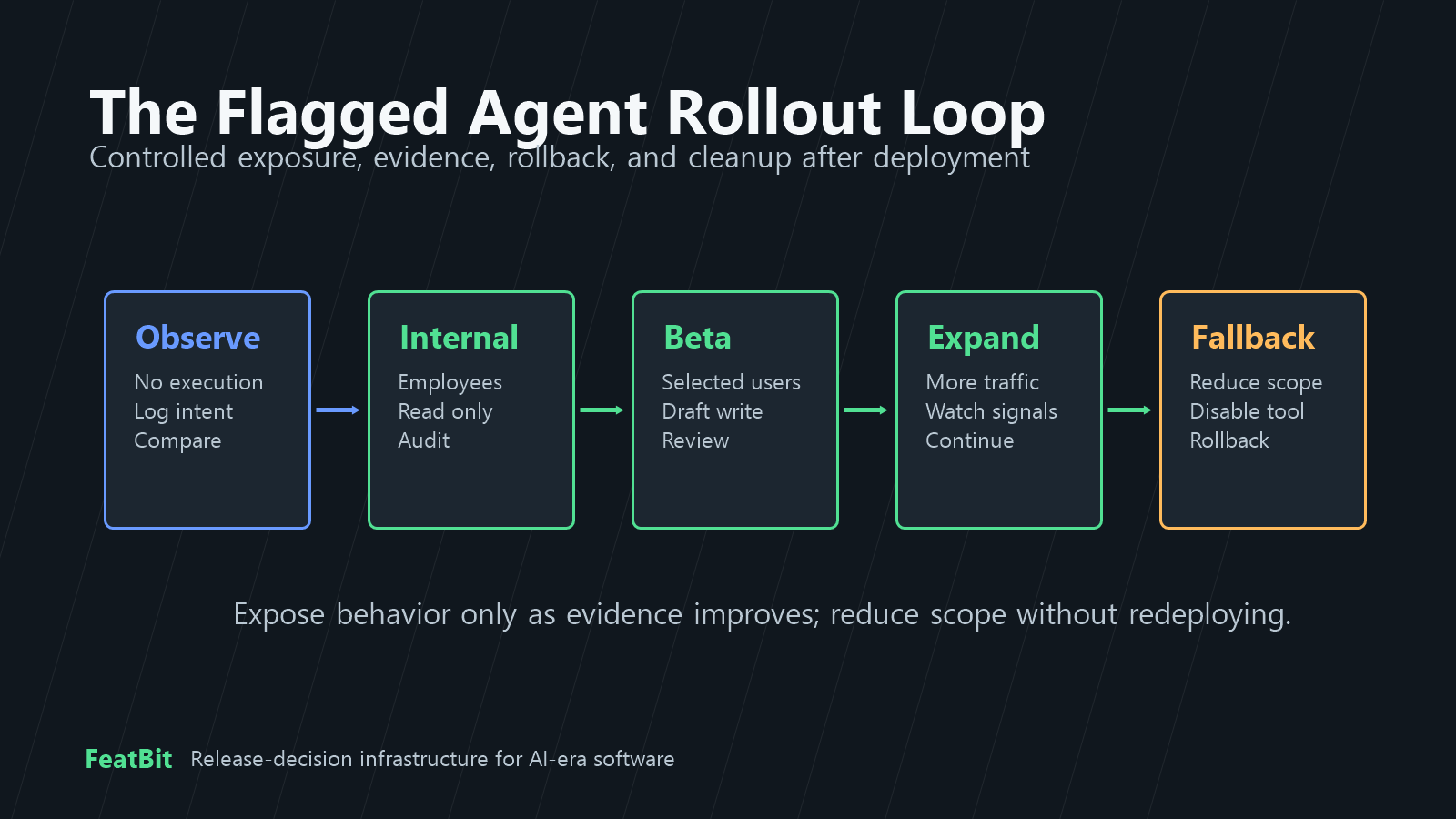
Start with a controlled path:
- Observe only. Let the agent propose tool calls, but log the intended action instead of executing it.
- Internal search or read-only mode. Release low-risk behavior to employees or test accounts.
- Draft-write mode for selected workflows. Let the agent create drafts, branches, tickets, or proposals while humans retain final action authority.
- Approval-required external actions. Queue customer-visible, partner-facing, or production-impacting actions for review.
- Narrow autonomous behavior. Allow one measured, reversible action for a specific segment only after evidence supports it.
- Fallback and cleanup. Keep a rollback path ready, then decide whether each flag becomes permanent policy or gets removed.
That path maps to FeatBit's AI agent deployment loop: build the control point, deploy behind a flag, evaluate behavior, then expand, roll back, or clean up.
Common Mistakes
Using permissions as rollout controls. Permission changes are too coarse for product rollout, beta access, experiments, and incident response. Keep permissions strict, then use flags for exposure.
Using flags as security controls. A flag should not be the only thing preventing forbidden access. If the agent should never reach a system, fix authorization, credentials, network policy, sandboxing, or tool registration.
Creating one global agent switch. A kill switch is useful, but day-to-day operation needs narrower controls for mode, tool tier, prompt profile, model profile, approval, and fallback.
Putting the rule only in the prompt. Prompts guide behavior. The tool router or backend must enforce decisions before side effects run.
Forgetting lifecycle ownership. Temporary rollout flags need owners, review dates, and cleanup conditions. Permanent operational flags need clear ownership and audit expectations.
When to Use FeatBit for This Pattern
FeatBit is a good fit when agent control is part of a broader release-control practice: staged rollout, targeting, experimentation, audit logs, rollback, and lifecycle ownership.
Use FeatBit to model agent runtime decisions such as:
- whether an agent workflow is enabled for a user, account, environment, or segment;
- whether the active mode is
off,observe,search_only,draft_write,approval_required, orfallback; - which prompt, model, retrieval, or strategy profile is active;
- which tool tier is released for a workflow or risk class;
- whether an incident state should require approval or disable a risky tool;
- which rollout evidence should decide expansion, rollback, or cleanup.
For implementation details, FeatBit documentation covers targeting rules, percentage rollouts, audit logs, flag insights, and feature flag lifecycle management. For a broader operating runbook, read runtime control for AI agents.
Source Notes and Internal Link Plan
This article is a conceptual explainer based on FeatBit's release-control positioning and public implementation references. It does not claim that feature flags replace authorization, compliance review, sandboxing, or security architecture.
- FeatBit context: AI control layer, AI agent deployment loop, feature flag lifecycle management, agent tool permission gates, and runtime control for AI agents.
- FeatBit implementation references: targeting rules, percentage rollouts, audit logs, and flag insights.
- External references: the Model Context Protocol authorization specification, OpenAI's Agents SDK guardrails documentation, and OpenFeature's evaluation context concept.
- Image and Open Graph recommendation: use
cover.pngas the social preview. Usepermission-boundary.pngnear the permissions-versus-flags distinction andflag-control-loop.pngnear the rollout workflow because both summarize guidance already available in crawlable text.
Next Step
Pick one agent capability that is currently either fully blocked or broadly enabled. Write down the hard permission boundary first. Then define the runtime flag decision inside that boundary: audience, mode, fallback, evidence, owner, and cleanup rule. If those fields are unclear, keep the capability in observe-only or search-only mode until the release decision is explicit.