
How to Block a Launch When an Offline Eval Gate Fails
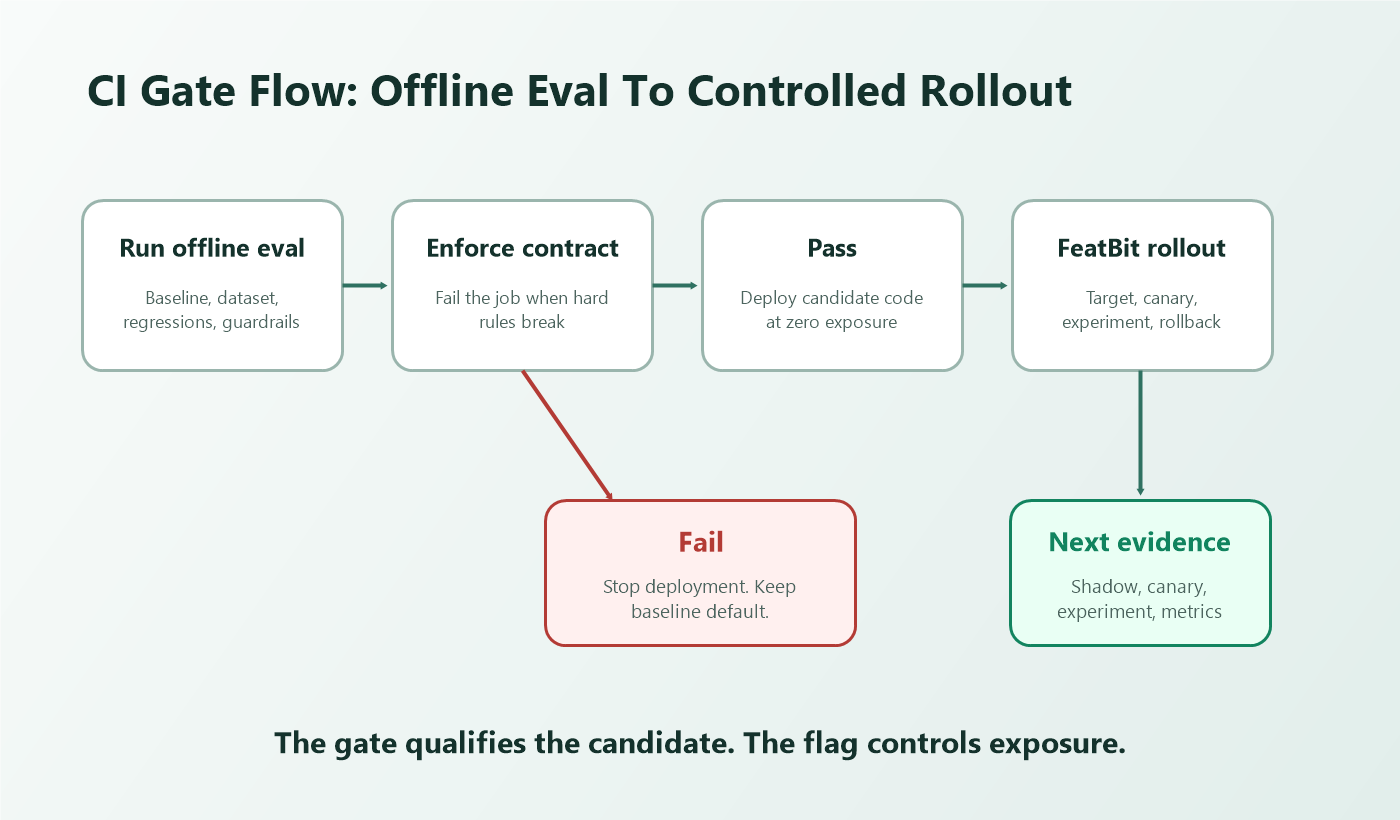
An offline eval gate should block launch when the candidate AI behavior fails the pre-exposure bar. The practical implementation is simple: turn the eval result into a release contract, fail CI when the contract is violated, and keep production exposure at zero until the candidate passes.
This tutorial is for teams that already understand what an offline eval gate is and now need to wire it into delivery. The goal is not to make offline evaluation the whole release decision. The goal is to stop a risky prompt, model, retrieval rule, classifier, or agent workflow before any user sees it, then hand passing candidates to controlled FeatBit rollout, metrics, and rollback.
The Launch Gate Contract
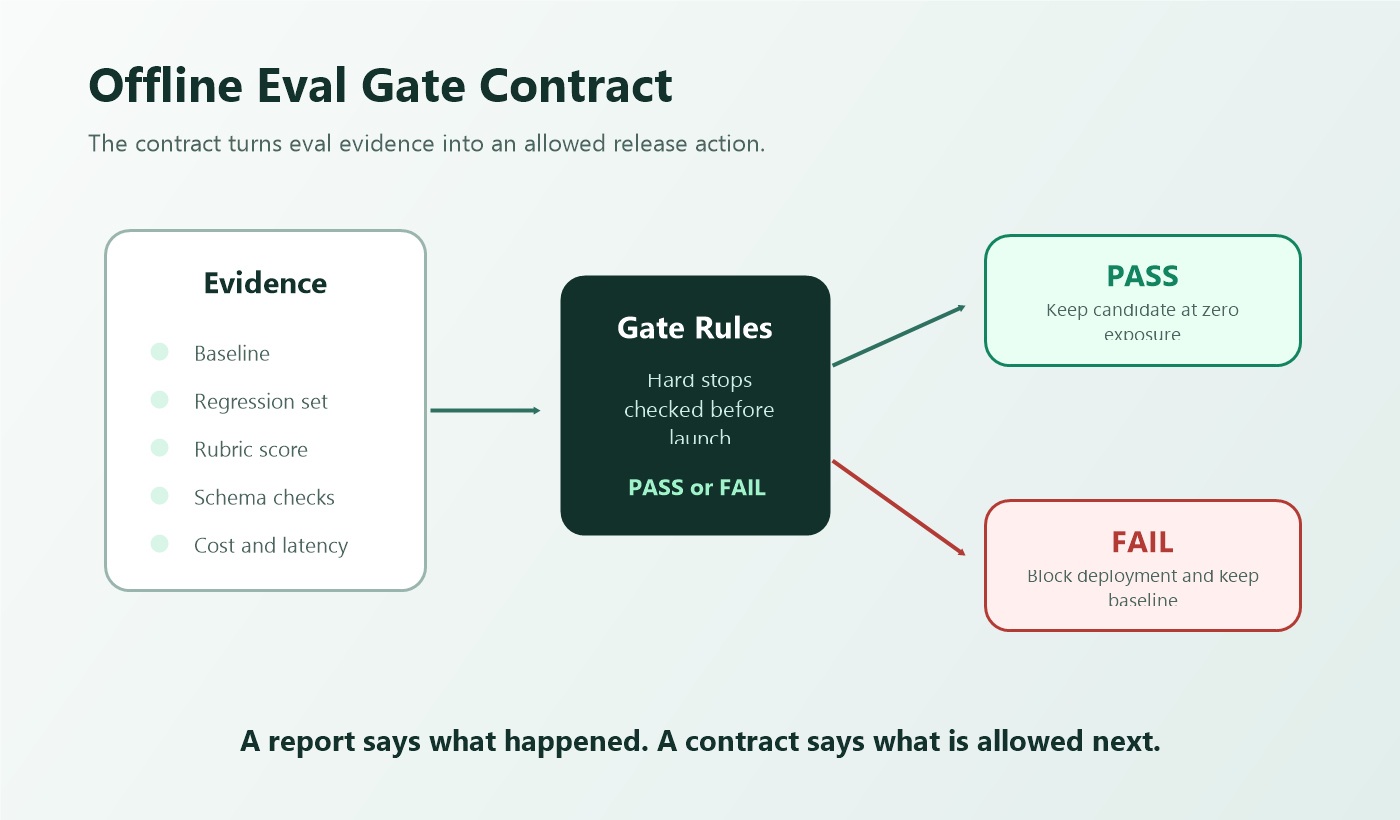
Start by writing the gate as a contract before the eval runs. A useful contract says which candidate is being tested, what baseline it must beat or preserve, which failures are hard stops, and what happens when the gate passes.
offline_eval_gate:
  change: support_assistant_prompt_v4
  baseline: support_assistant_prompt_v3
  owner: ai_platform
  release_question: can_this_candidate_reach_controlled_exposure
  evidence:
    dataset: support_eval_set_2026_06
    protected_regressions: billing_security_and_account_access
    grader: rubric_v3_plus_schema_assertions
  pass_when:
    - zero_severity_one_regressions
    - candidate_quality_not_worse_than_baseline
    - output_schema_valid_rate_above_team_threshold
    - p95_latency_within_budget
    - estimated_cost_within_budget
  fail_action: block_launch
  pass_action: keep_candidate_at_zero_exposure_until_rollout_owner_starts_canary
The most important line is fail_action: block_launch. Without an explicit action, the eval is only a report. A gate changes what the delivery system is allowed to do next.
Avoid copying universal thresholds from another team. A support assistant, fraud workflow, search reranker, and agent tool policy have different risk levels. The contract should encode the bar that is strong enough for the next stage, not a generic claim that the candidate is ready for full rollout.
Put The Gate Before Deployment
The gate belongs before the deployment or promotion job that could expose the new behavior. In a GitHub Actions workflow, a failing step can stop the job by returning a non-zero exit code. GitHub's workflow command documentation also describes core.setFailed as a shortcut for reporting an error and exiting with failure.
name: offline-eval-gate

on:
  pull_request:
  workflow_dispatch:

jobs:
  eval-gate:
    runs-on: ubuntu-latest
    steps:
      - uses: actions/checkout@v4

      - name: Install dependencies
        run: npm ci

      - name: Run offline eval
        run: |
          npm run eval:offline -- \
            --candidate support_assistant_prompt_v4 \
            --baseline support_assistant_prompt_v3 \
            --out eval-report.json

      - name: Enforce launch gate
        run: node scripts/enforce-offline-eval-gate.mjs eval-report.json

  deploy:
    runs-on: ubuntu-latest
    needs: eval-gate
    if: ${{ github.ref == 'refs/heads/main' }}
    steps:
      - uses: actions/checkout@v4
      - name: Deploy application
        run: ./scripts/deploy.sh
The deploy job depends on eval-gate. If the gate job fails, deployment does not proceed from this workflow. The same pattern works in other CI systems: run evals, parse the result, fail the pipeline on hard gate violations, and require that pipeline before promotion.
Enforce The Decision In Code
The enforcement script should be boring and deterministic. It should parse the eval report, check the contract, print a useful summary, and exit with failure when a hard rule fails.
import fs from 'node:fs';

const reportPath = process.argv[2];
const report = JSON.parse(fs.readFileSync(reportPath, 'utf8'));

const failures = [];

if (report.severityOneRegressions > 0) {
  failures.push(`severityOneRegressions=${report.severityOneRegressions}`);
}

if (report.schemaValidRate < 0.995) {
  failures.push(`schemaValidRate=${report.schemaValidRate}`);
}

if (report.candidateQualityDelta < 0) {
  failures.push(`candidateQualityDelta=${report.candidateQualityDelta}`);
}

if (report.p95LatencyMs > report.budgets.p95LatencyMs) {
  failures.push(`p95LatencyMs=${report.p95LatencyMs}`);
}

if (report.estimatedCostPerRequest > report.budgets.estimatedCostPerRequest) {
  failures.push(`estimatedCostPerRequest=${report.estimatedCostPerRequest}`);
}

if (failures.length > 0) {
  console.error('Offline eval gate failed:');
  for (const failure of failures) {
    console.error(`- ${failure}`);
  }
  process.exit(1);
}

console.log('Offline eval gate passed. Candidate remains eligible for controlled exposure.');
Do not hide the reason for failure in a dashboard link only. Engineers need the failed rule in the CI log, and release owners need the report artifact for review. A short job summary, JSON artifact, or pull request comment can make the result easier to audit later.
Keep Production Exposure At Zero
Passing the offline eval gate should not mean "ship to everyone." It should mean "eligible for controlled exposure."
Use a runtime flag to keep the candidate named but disabled for users until a release owner starts the next stage.
flag:
  key: support_assistant_route
  type: string
  default_variation: baseline
  variations:
    baseline: support_assistant_prompt_v3
    candidate: support_assistant_prompt_v4
initial_state_after_gate_pass:
  production_default: baseline
  candidate_exposure: 0
  eligible_next_stage:
    - internal_users
    - shadow_test
    - one_percent_canary
rollback:
  action: set_default_variation_to_baseline
This keeps two decisions separate:
| Decision | Owner | Evidence |
|---|---|---|
| Gate pass or fail | AI, platform, or quality owner | offline dataset, regressions, rubric, latency, cost |
| Production exposure | release owner | targeting, canary health, online evals, experiment metrics, guardrails |
FeatBit fits the second decision. A team can use targeting rules, percentage rollouts, and metric events to move a passed candidate from zero exposure to internal users, canary traffic, an A/B test, or rollback. The offline gate qualifies the candidate. The feature flag controls who receives it.
Choose Gate Outcomes That Operators Can Act On
A binary pass or fail is useful in CI, but the report should still describe the operational outcome.
| Gate outcome | CI result | Release action |
|---|---|---|
| Pass | success | Candidate may enter controlled exposure, still defaulting to baseline. |
| Repair | failure | Fix prompt, model route, retrieval config, grader, or instrumentation and rerun. |
| Reject | failure | Stop this candidate and keep the baseline. |
| Narrow | success or failure, depending on policy | Limit the next stage to a segment, locale, workflow, or risk tier. |
The "narrow" outcome is where many teams need judgment. If a candidate fails account-security cases but passes low-risk FAQ cases, do not turn that into a broad pass. Either fail the launch or produce a scoped allowlist that the FeatBit targeting rule can enforce during the next stage.
Add The Release Evidence Handoff
The CI gate should write a small handoff record. That record helps the release owner understand what the candidate is allowed to do next.
{
  "gate": "offline_eval_gate",
  "change": "support_assistant_prompt_v4",
  "baseline": "support_assistant_prompt_v3",
  "result": "pass",
  "datasetVersion": "support_eval_set_2026_06",
  "allowedNextStage": "internal_users_then_canary",
  "scope": {
    "locale": ["en-US"],
    "workflow": ["routine_support", "billing_question"],
    "excludedRiskTier": ["account_security"]
  },
  "requiredGuardrails": [
    "p95_latency",
    "estimated_cost",
    "fallback_rate",
    "human_escalation_rate",
    "confirmed_quality_issue"
  ]
}
Store this near the release artifact, pull request, or deployment record. The next operator should not need to reconstruct the eval context from memory.
Connect The Gate To FeatBit Rollout
Once the gate passes, FeatBit should receive a candidate that is ready for controlled evidence, not a candidate that silently becomes the default.
A practical handoff looks like this:
- CI runs the offline eval gate for the candidate.
- CI fails if a hard gate rule fails.
- If the gate passes, the deployment can proceed with the candidate code path present but not exposed by default.
- A FeatBit flag keeps the baseline variation as the production default.
- The release owner targets internal users or a low-risk segment.
- Exposure and outcome events are recorded when the candidate behavior actually runs.
- Guardrails decide whether to continue, pause, narrow, or roll back.
- After the release decision, the team removes stale candidate paths or converts the flag into an intentional operational control.
FeatBit docs on targeting rules, percentage rollouts, and the Track Insights API are the implementation bridge from a passed gate to measured exposure. FeatBit's AI experimentation and safe AI deployment pages explain the broader release-control model.
Common Failure Modes
The eval fails but deployment still happens. The eval is not wired into the promotion path. Make the deploy job depend on the gate job, or make the deployment environment require the gate status.
The gate passes and exposure jumps to all users. The gate answered only a pre-exposure question. Keep the candidate behind a flag and start with internal, shadow, or canary evidence.
The script checks averages only. Average quality can hide severe regressions. Treat protected cases, safety checks, schema validity, cost, and latency as separate rules.
The team changes thresholds after seeing the result. If the rule was wrong, revise it in a follow-up with a documented reason. Do not move the bar just to ship the current candidate.
The candidate is bundled with unrelated changes. If prompt, model, retrieval, and tool policy all change, name the variation as a route bundle. Do not claim the eval proves a single component improved.
The temporary flag never gets cleaned up. A release gate should leave release memory, not permanent confusion. FeatBit's feature flag lifecycle management guidance helps teams define owner, review date, evidence, and cleanup path.
A Practical Checklist
Before trusting an offline eval gate to block launch, confirm:
- The gate contract is written before the eval runs.
- The CI job fails on hard violations.
- The deployment or promotion job depends on the gate result.
- The eval report lists the failed rules in plain language.
- The candidate remains at zero production exposure after a pass.
- The FeatBit flag uses baseline as the default variation.
- The next stage is scoped by segment, percentage, or risk tier.
- Exposure and outcome events can be joined to the variation.
- Rollback returns traffic to baseline without redeploying.
- The release record includes the gate result, dataset version, owner, and cleanup expectation.
The most reliable offline eval gate is not the most complex one. It is the one that actually changes the release path when evidence is bad.
Bottom Line
An offline eval gate blocks launch by turning evaluation evidence into a CI-enforced release rule. If the candidate fails severe regressions, quality bars, schema checks, latency, or cost constraints, the pipeline stops and production exposure stays at zero.
When the candidate passes, do not treat that as proof that users should receive it broadly. Treat it as permission to collect controlled production evidence through FeatBit targeting, staged rollout, metrics, and rollback.
That boundary keeps AI delivery practical: offline evals prevent avoidable exposure, and feature flags control the learning that happens after the candidate is safe enough to test.
Source Notes
- OpenAI evaluation context: the OpenAI Evals API reference describes evals as testing criteria and data-source configuration that can be run against model configurations.
- CI gate context: GitHub's workflow commands documentation describes
core.setFailedas a shortcut for reporting an error and exiting with failure, and GitHub's deployment controls documentation describes deployment control with environments, concurrency groups, and protection rules. - Category context: Statsig's AI Evals overview describes offline evals on a fixed test set before user exposure and connects evals with gates, experiments, and analytics. GrowthBook's AI-native development page describes agent-accessible flags, rollouts, experiments, winner decisions, and stale-code cleanup. LaunchDarkly's metrics documentation connects flag variations, metrics, regressions, and release decisions. Optimizely's Feature Experimentation metrics documentation distinguishes primary, secondary, and monitoring metrics.
- FeatBit implementation context: targeting rules, percentage rollouts, Track Insights API, AI experimentation, safe AI deployment, and feature flag lifecycle management support the workflow described here.
Image And Open Graph Notes
- Use
cover.pngas the Open Graph image because it shows the launch path stopping before production exposure when the offline gate fails. - Use
ci-gate-flow.pngnear the opening because it visualizes the CI handoff from eval result to deployment block or controlled rollout. - Use
gate-contract.pngin the zero-exposure section because it shows the release contract behind the pass and fail actions.