
Offline Eval Before Launch: A Practical Tutorial for Release Teams
An offline eval before launch is a pre-exposure check that asks whether a candidate feature, prompt, model route, ranking rule, or experiment design is ready to touch production users. It uses curated examples, historical inputs, deterministic checks, rubrics, simulated event joins, and guardrail estimates before the first live rollout.
The point is not to prove the business result. Users have not seen the candidate yet, so an offline eval cannot prove conversion, retention, support deflection, or satisfaction. The point is to block preventable regressions and make the next release step explicit: repair the candidate, reject it, narrow the audience, shadow test it, or launch a small reversible rollout behind a feature flag.
This tutorial is different from a definition of an offline eval gate. It shows how to run the prelaunch workflow and hand the result to FeatBit-style runtime control.
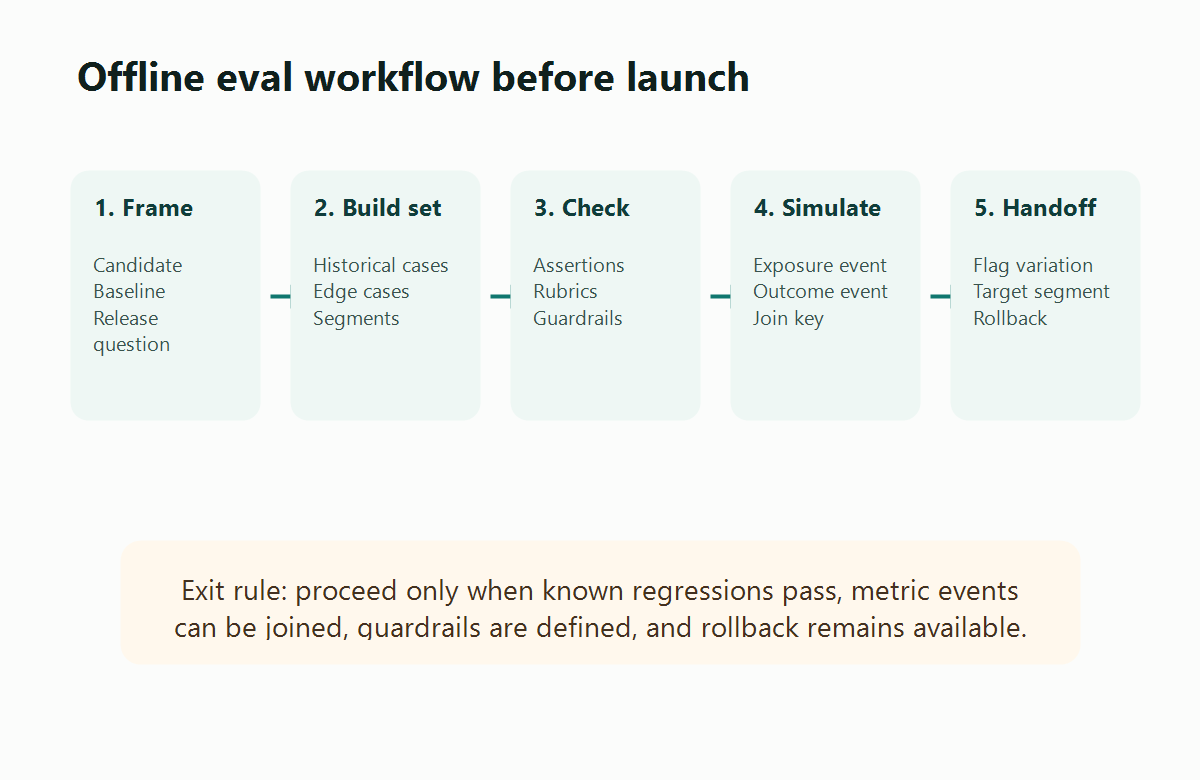
When To Run An Offline Eval
Run an offline eval when the candidate can be tested without changing the user-visible product experience.
Good candidates include:
- a new AI prompt, model route, retrieval policy, classifier, or agent workflow;
- a recommendation, ranking, personalization, or search rule;
- a checkout, onboarding, or pricing experiment where historical event data can test the instrumentation plan;
- a feature flag variation that changes product logic but can be exercised through fixtures or replayed inputs;
- a migration path where the new behavior must preserve schema, permissions, or fallback behavior.
Do not use an offline eval as a substitute for every launch decision. If the key question is how users react to a visible UI, message, or workflow, the offline eval can only check readiness. You still need controlled exposure, measurement, and rollback after launch.
FeatBit's release-decision framing is useful here: offline evaluation answers "Is the candidate eligible for exposure?" Feature flags answer "Who receives the candidate, under what conditions, and how quickly can we stop it?"
Step 1: Frame The Candidate And The Release Question
Start by writing the smallest release question the eval must answer. Avoid vague goals such as "test v2" or "see if the model is better."
Use a short spec:
offline_eval:
  candidate: support_answer_prompt_v4
  baseline: support_answer_prompt_v3
  owner: ai_platform_team
  release_question: eligible_for_internal_shadow_test
  next_stage_if_passes: shadow_test_internal_support_requests
  next_stage_if_fails: repair_candidate_and_rerun
The next_stage_if_passes field matters. An offline eval that gates a shadow test can use a different bar from an offline eval that gates visible canary exposure. If the next stage is visible to customers, the prelaunch bar should be stricter and the target audience should usually be narrower.
For non-AI feature experiments, the same pattern works:
offline_eval:
  candidate: checkout_recommendation_card
  baseline: no_card
  owner: growth_platform_team
  release_question: ready_for_5_percent_canary
  next_stage_if_passes: canary_low_risk_accounts
  next_stage_if_fails: fix_event_schema_or_remove_candidate
The candidate does not need to be an AI artifact. It needs to be a release decision that can be checked before users receive it.
Step 2: Build The Eval Dataset
An offline eval is only as useful as the cases it exercises. Build the dataset from the release question, not from whatever examples are easiest to collect.
For AI behavior, include:
- routine cases that represent expected traffic;
- known failure cases from incidents, reviews, or support escalations;
- segment cases such as language, plan, region, device, workflow, or customer tier;
- protected cases that must not regress;
- examples that test output format, citation behavior, tool selection, permissions, latency, and cost.
For feature or experiment readiness, include:
- fixture users or accounts with different targeting attributes;
- historical events that represent the metric funnel;
- cases where the candidate should be ineligible;
- missing or malformed attributes;
- fallback behavior when the flag is off, the SDK is unavailable, or a dependent service fails.
OpenFeature's evaluation-context specification describes a targeting context with a targeting key and custom fields used for flag evaluation. That vocabulary is helpful when building offline datasets because it forces the team to name the subject of evaluation and the attributes that decide targeting.
Example dataset shape:
[
  {
    "unitId": "acct_1029",
    "context": {
      "plan": "enterprise",
      "region": "us",
      "workflow": "support_answer",
      "language": "en"
    },
    "input": {
      "ticketCategory": "billing",
      "message": "Invoice total changed after seat update"
    },
    "expected": {
      "eligible": true,
      "requiredFields": ["answer", "citation", "confidence"],
      "protectedCase": true
    }
  }
]
Keep the dataset versioned. When a candidate passes, the team should know which cases were tested and which cases were outside the evidence.
Step 3: Run Checks That Match The Risk
Use checks that match the failure modes of the release.
| Risk | Offline check | Pass signal |
|---|---|---|
| Broken targeting | Evaluate fixture contexts against expected variations | Eligible and ineligible units receive the expected variation |
| Output regression | Compare candidate output to baseline and protected cases | No severe protected-case regression |
| Bad schema | Validate response or event payload shape | Required fields are present and typed |
| Metric gap | Join simulated exposure to outcome events | Each outcome can be attributed to unit and variation |
| Cost or latency spike | Estimate candidate resource use on representative cases | Candidate remains inside the launch budget |
| Rollback failure | Run fallback path with the flag off | Baseline behavior remains available |
For AI systems, Statsig's offline eval documentation describes grading model outputs on fixed test sets before real users are exposed. That category signal is useful, but the release team should still define its own pass rule. A generic score should not decide whether a candidate can affect customers.
For product experiments, Optimizely's Feature Experimentation docs distinguish primary metrics from secondary or monitoring metrics. Use that distinction before launch: the primary metric decides the experiment, while guardrails decide whether exposure should pause even if the primary metric looks promising.
Step 4: Simulate The Metric Join Before Launch
Many launches fail after exposure because the experiment events cannot be joined. The team discovers too late that one service emitted userId, another emitted accountId, the flag variation was missing, or the outcome event fired before the exposure event.
Run a prelaunch event simulation. It should prove that the eventual online evidence can connect:
- assignment unit: user, account, conversation, workflow, request, or device;
- feature flag key and variation key;
- exposure timestamp;
- candidate or baseline version;
- primary outcome event;
- guardrail events such as latency, cost, error, fallback, escalation, or complaint;
- segment attributes needed for later analysis.
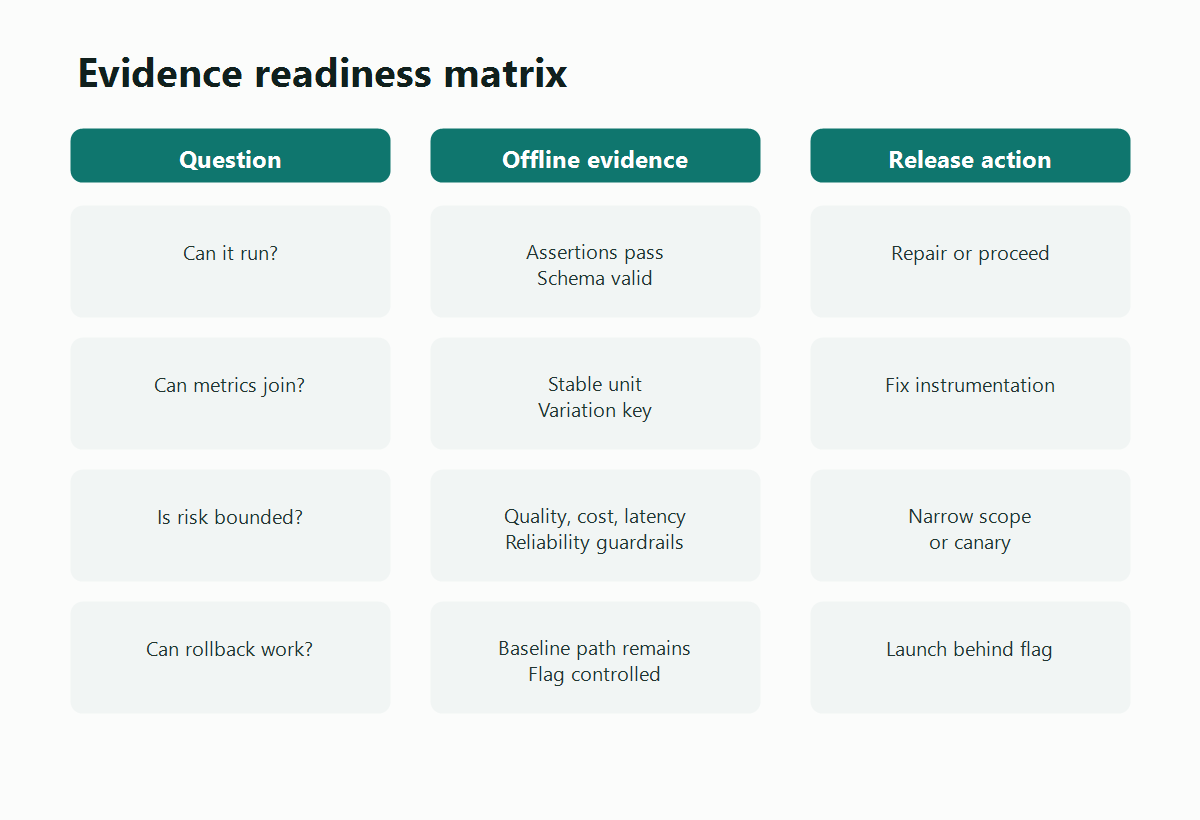
Example event contract:
{
  "exposure": {
    "unitId": "acct_1029",
    "flagKey": "support_answer_candidate",
    "variation": "prompt_v4",
    "candidateVersion": "support_prompt_v4",
    "timestamp": "2026-06-07T09:15:00Z"
  },
  "outcome": {
    "unitId": "acct_1029",
    "eventName": "support_case_resolved_without_escalation",
    "value": 1,
    "timestamp": "2026-06-07T09:42:00Z"
  }
}
FeatBit's Track Insights API is relevant after launch because it records feature flag usage and custom metric events. The offline step is to make sure your application can emit the right fields when the rollout begins.
Step 5: Decide Pass, Repair, Reject, Or Narrow
Do not end the offline eval with "looks good." End it with a release action.
| Outcome | Meaning | Next action |
|---|---|---|
| Pass | The candidate clears the prelaunch bar for the named next stage | Move to shadow test, internal targeting, canary, or experiment |
| Repair | Failures are fixable and the candidate still matters | Fix prompt, code, dataset, event schema, or guardrail instrumentation |
| Reject | The candidate fails a hard requirement or is no longer worth testing | Keep the baseline and stop this release path |
| Narrow | The candidate is acceptable only for a smaller scope | Restrict by segment, workflow, language, plan, region, or risk tier |
The narrow outcome is often the most practical. A candidate may be safe for internal users, English support tickets, low-risk accounts, or one product workflow, but not ready for broad exposure. FeatBit targeting rules and percentage rollout are designed for that kind of controlled next step.
Step 6: Hand The Result To A Feature Flag
The handoff from offline evaluation to live release control is where FeatBit fits.
Create or update the flag so it reflects the candidate and the next release action:
flag:
  key: support_answer_candidate
  type: string
  variations:
    - baseline_prompt_v3
    - candidate_prompt_v4
  default: baseline_prompt_v3
  initial_target:
    environment: production
    segment: internal_support_team
    rollout: 0_percent_until_shadow_ready
  rollback:
    action: serve_baseline_prompt_v3
  cleanup:
    owner: ai_platform_team
    review_after: experiment_decision
The flag should not hide the offline decision. Store the dataset version, pass rule, protected failures, remaining uncertainty, owner, and next-stage scope in the release notes or decision record. That gives future reviewers the context behind the rollout.
For the production side of this workflow, FeatBit's progressive rollout patterns page covers internal-first, canary, percentage, segment-targeted, and time-gated exposure. FeatBit's measurement design guidance helps choose the primary metric and guardrails before the experiment starts.
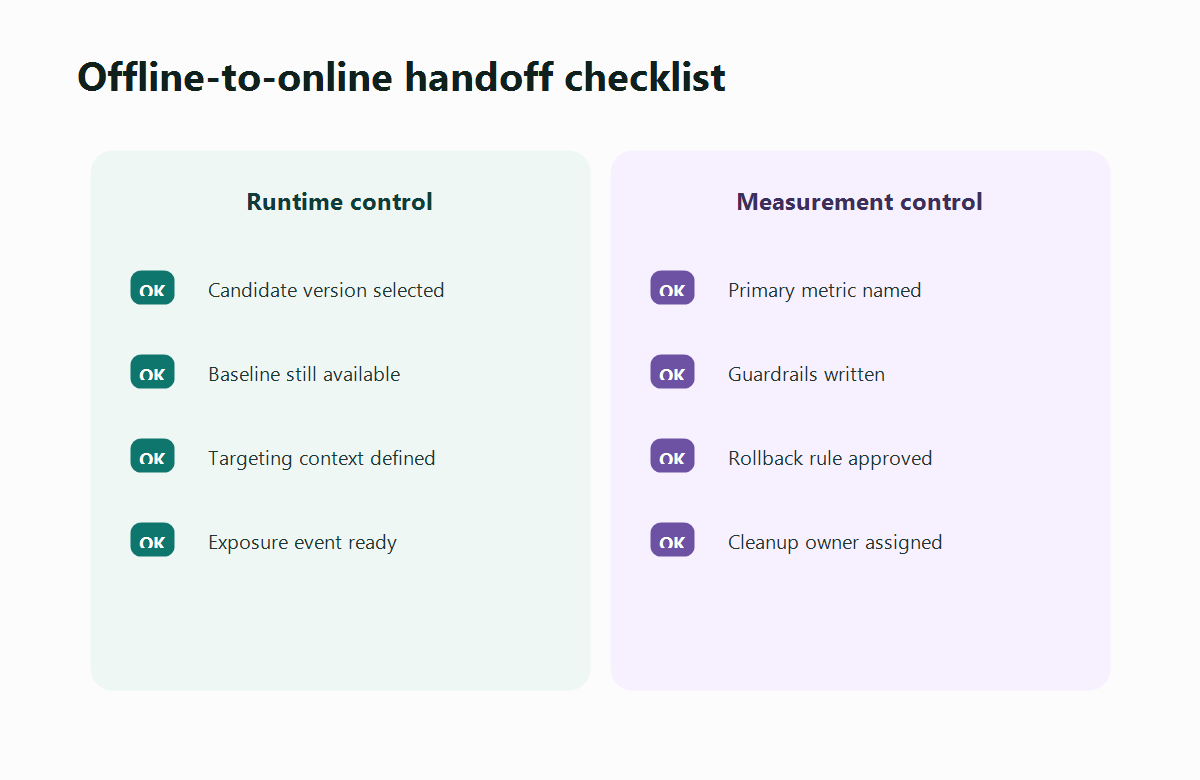
Example: Prelaunch Eval For A Support Assistant
Imagine a team wants to launch a new support assistant prompt. The candidate looked better in manual review, but the team needs a real prelaunch gate.
The offline eval could require:
- The candidate must answer a fixed dataset of historical support questions.
- No protected billing, account-security, or cancellation case may lose required warnings or citations.
- The output schema must include answer, citation, confidence, and fallback reason.
- Estimated latency and cost must remain within the team's launch budget.
- Simulated exposure and outcome events must join by account ID and conversation ID.
- The baseline prompt must remain available through a FeatBit flag variation.
- The next stage is internal shadow testing, not broad customer exposure.
If the candidate passes routine cases but fails two account-security examples, the right decision is repair or narrow. If it passes quality but the events cannot join, the right decision is to fix instrumentation before any A/B test. If it passes both, the team can move to a controlled next stage using the staged workflow described in offline eval to shadow test to canary rollout.
Example: Prelaunch Eval For A Checkout Experiment
Offline evals are not only for AI. A checkout team might want to test a recommendation card before a live A/B test.
The offline eval should check:
- the card appears only for eligible plans and regions;
- the treatment can be disabled without redeploying;
- every exposure event includes the same assignment unit the outcome event uses;
- add-to-cart, checkout-started, purchase, latency, and error events can be joined;
- the primary metric and guardrails are written before rollout;
- fallback layout remains valid when the flag is off.
This will not prove whether the recommendation card improves revenue. It will prove whether the experiment is ready to produce trustworthy online evidence.
Common Mistakes
Using offline evals to claim business impact. Offline evidence can show readiness, not user response. A candidate still needs controlled exposure to prove outcome impact.
Testing averages while ignoring protected cases. A higher average score can hide regressions in high-risk workflows, customer tiers, languages, or edge cases.
Skipping metric simulation. If exposure and outcome events cannot join, the later experiment may be inconclusive even when the product change is real.
Letting the candidate remove the fallback path. A launch is not reversible if the baseline behavior cannot be served quickly.
Changing the pass rule after seeing results. Revise the candidate or the eval for a documented reason, then rerun. Do not move the gate simply because the team wants to ship.
Leaving the flag forever. After the release decision, remove temporary experiment branches or convert the flag into a clear operational control. FeatBit's feature flag lifecycle management model helps keep release memory from becoming stale code.
Prelaunch Checklist
Before the candidate reaches live exposure, confirm:
- the release question and next stage are written;
- the baseline and candidate are both versioned;
- the eval dataset includes routine, edge, segment, and protected cases;
- checks match the real risks of the change;
- exposure and outcome events can join by the same assignment unit;
- primary metric and guardrails are separate;
- rollback serves the baseline without redeploying;
- the flag has an owner, review point, and cleanup plan.
The practical standard is simple: an offline eval is ready when it can tell the release team what to do next.
Bottom Line
An offline eval before launch is a release-readiness tutorial in miniature: define the candidate, test it against known cases, simulate the evidence path, write the pass rule, and keep the next stage reversible.
Use it to prevent avoidable exposure risk. Then use feature flags, targeting, metrics, experiments, and rollback to learn what only production can teach.
Source Notes
- Statsig's offline eval documentation is used as category context for fixed test sets and pre-exposure grading of AI outputs.
- LaunchDarkly's AgentControl experimentation documentation distinguishes config monitoring from experiments that measure end-user behavior through metrics.
- Optimizely's Feature Experimentation metrics documentation supports the distinction between primary metrics, secondary metrics, and monitoring metrics.
- OpenFeature's evaluation context specification provides vendor-neutral terminology for targeting keys and contextual fields used in flag evaluation.
- FeatBit implementation context: targeting rules, percentage rollouts, Track Insights API, measurement design, progressive rollout patterns, and feature flag lifecycle management.
Image And Open Graph Notes
- Use
cover.pngas the Open Graph image because it summarizes the prelaunch offline evaluation workflow. - Use
prelaunch-eval-workflow.pngnear the opening tutorial section because it shows the steps from candidate framing to rollout handoff. - Use
evidence-readiness-matrix.pngin the metric simulation section because it separates offline evidence from release action. - Use
handoff-checklist.pngin the feature flag handoff section because it shows which runtime and measurement controls must exist before launch.