
Feature Gates: How to Control AI Features at Runtime
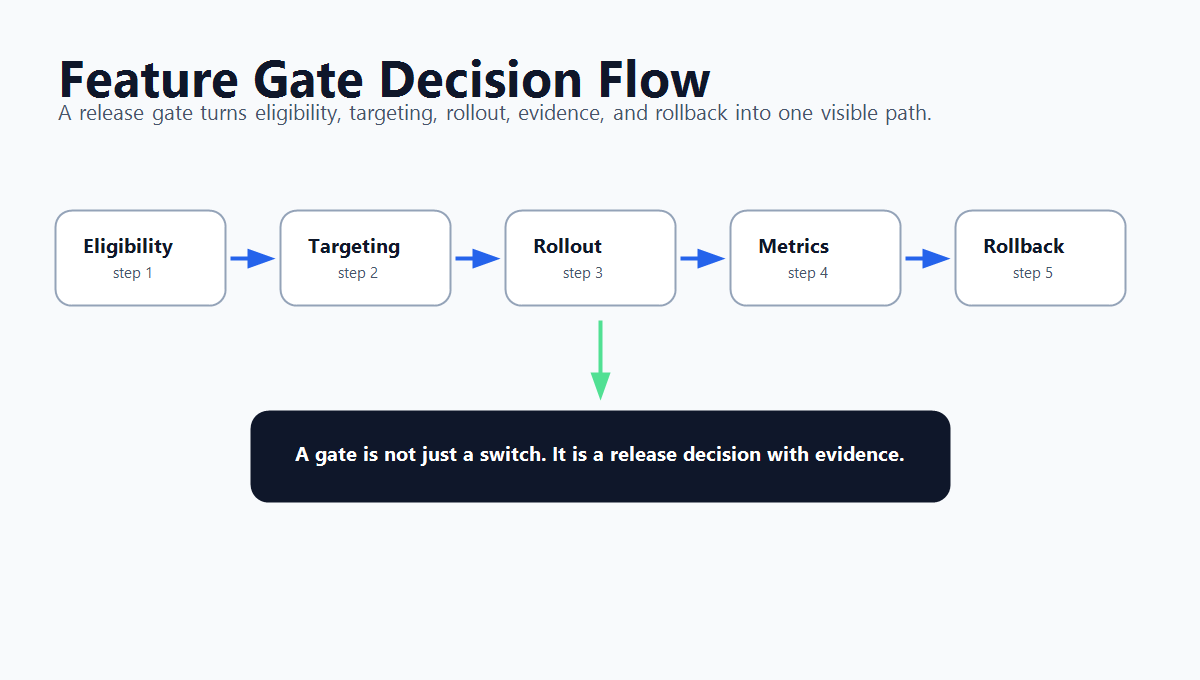
A feature gate is a runtime decision point that decides whether a feature, behavior, or AI capability is available for a specific context. In many tools, the phrase means the same operating pattern as a feature flag: evaluate context, serve a variation, expose the behavior to a controlled audience, measure what happens, and keep rollback available.
For AI teams, the useful question is not whether the industry calls it a feature gate, feature flag, toggle, or release control. The useful question is: which AI behavior needs a visible, targetable, measurable gate before it reaches more users?
What A Feature Gate Means
Feature gate is vendor and market language for a controlled runtime boundary. Statsig's documentation describes Feature Gates as feature flags that toggle product behavior in real time without deploying new code, including gradual rollout, targeted behavior, emergency disable switches, and exposure monitoring. Martin Fowler's feature toggle guide uses the broader "feature toggles" and "feature flags" language for the same family of techniques: changing system behavior without changing code while managing the complexity that introduces.
That means a feature gate should have more structure than an if statement.
At minimum, it should define:
| Gate part | What it answers |
|---|---|
| Gate key | What production decision is being controlled? |
| Default behavior | What happens when the gate is off, missing, or unavailable? |
| Evaluation context | Which user, account, environment, region, workflow, model route, or agent session is asking? |
| Variations | What behavior can be served? |
| Targeting and rollout | Who receives each behavior, and how quickly does exposure expand? |
| Evidence | Which exposure, metric, quality, latency, cost, or support signals decide the next move? |
| Owner and lifecycle | Who can change the gate, and when should it be cleaned up or made permanent? |
OpenFeature's flag evaluation specification is useful neutral language here: flag evaluation returns typed values from a flag key, default value, and evaluation context. FeatBit follows the same practical model with boolean and multivariate flags, targeting rules, percentage rollouts, audit logs, and metric events.
Why Feature Gates Matter More For AI Features
Traditional feature gates often controlled visible product surfaces: a new checkout step, a beta page, a premium feature, or a backend optimization. AI products add less visible control points:
- a prompt template;
- a model route;
- a retrieval profile;
- a classifier threshold;
- a content-safety fallback;
- an agent tool tier;
- a human review requirement;
- a cost or latency mode;
- a JSON configuration profile for an AI workflow.
Those changes can alter user experience without a large code deployment. A prompt edit can change tone, grounding, refusal behavior, output schema, and support burden. A model route can change quality, latency, and cost. An agent tool gate can change whether the system only drafts an action or actually executes it.
FeatBit's point of view is that these are release decisions. The gate should not be hidden inside a prompt, notebook, or model gateway rule that only one team understands. It should be a named runtime control with targeting, rollback, audit, and evidence.
Feature Gate, Experiment, Dynamic Config, Permission, Or Eval Gate?
Teams often use "gate" loosely. The word is useful only if it points to the right control layer.
| Control | Primary job | Use it when |
|---|---|---|
| Feature gate | Control runtime exposure or behavior | You need to turn a behavior on, off, or to a named variation for specific contexts. |
| Experiment | Measure causal impact between variants | You need a treatment/control comparison and a release decision based on metrics. |
| Dynamic config | Serve structured runtime settings | The decision is mostly configuration data, such as limits, thresholds, or profiles. |
| Permission check | Enforce authorization | The question is whether an identity is allowed to access a resource at all. |
| Offline eval gate | Qualify an AI candidate before live exposure | The question is whether a prompt, model, RAG, or agent change is eligible for production testing. |
The boundaries can work together. For example, an offline eval gate may decide that support_prompt_v4 is eligible for a limited canary. A feature gate then controls which production traffic receives support_prompt_v4. An experiment measures whether the change improves resolution quality without harming escalation, latency, or cost. A permission check still controls which support agents can approve sensitive actions.
The mistake is letting one layer pretend to do every job. A feature gate can control exposure. It should not replace identity and access management, safety evaluation, model registry discipline, or observability.
A Practical AI Feature Gate Contract
Before implementation, write a small gate contract. The point is to make the operating decision reviewable before the first user receives the new behavior.
feature_gate:
  key: support_ai_answer_mode
  owner: ai_platform_team
  purpose: control_runtime_mode_for_support_assistant
  default_off_variation: baseline_search_only
  variations:
    baseline_search_only:
      behavior: retrieve_docs_without_generation
    draft:
      behavior: generate_internal_reply_draft
    answer_with_citations:
      behavior: send_user_visible_answer_when_sources_are_present
    off:
      behavior: route_to_standard_support_flow
  context_required:
    - user_id
    - account_id
    - environment
    - support_topic
    - risk_tier
    - model_route
  first_targets:
    - internal_support_team
    - low_risk_beta_accounts
  rollout_rule: expand_only_when_quality_latency_cost_and_escalation_guardrails_hold
  rollback_rule: serve_off_or_baseline_search_only_without_redeploy
  metric_events:
    - ai_answer_served
    - ai_answer_escalated
    - ai_answer_corrected_by_human
    - support_case_resolved
  lifecycle: temporary_release_gate_until_default_decision_is_made
This contract is intentionally plain. It tells engineering where to evaluate the gate, product what the variations mean, support what behavior users may see, and release owners what evidence is needed before expansion.
Where To Evaluate The Gate
Evaluate the gate at the boundary that can still prevent the risky behavior.
For AI systems, that usually means the application service, backend workflow, model gateway, retrieval service, or agent tool router. Client-side evaluation can be appropriate for low-risk interface changes, but sensitive AI decisions should normally be evaluated before prompt assembly, model routing, retrieval expansion, tool execution, or external effects.
The evaluation context matters as much as the flag value. FeatBit targeting can use users, emails, systems, services, machines, resources, or any stable identifier that maps to a target. Percentage rollout can then expand exposure gradually while keeping assignment stable by key.
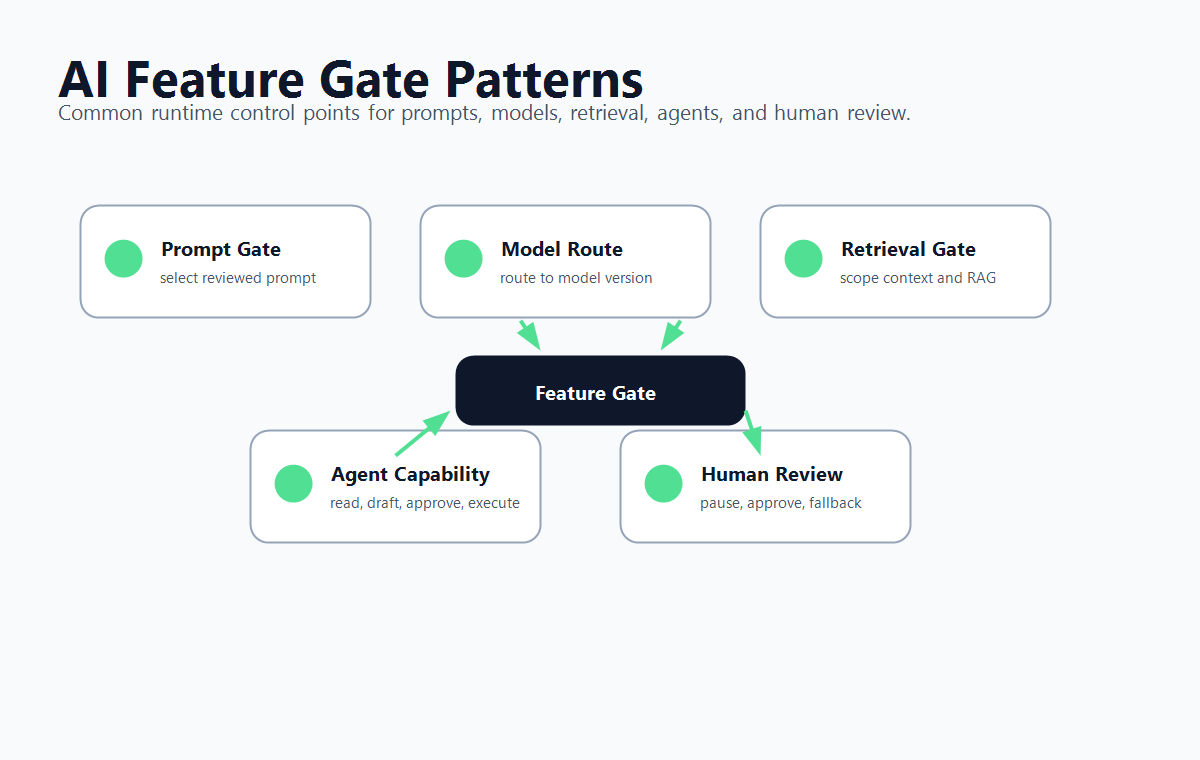
Four AI Feature Gate Patterns
Prompt Or Response Gate
Use this when a prompt, system instruction, output format, or response policy is changing.
Good variations might be baseline, candidate_v4, candidate_v4_with_review, and off. Metrics should include task completion, correction rate, escalation rate, policy issues, latency, cost, and human review feedback. Keep the prompt body in your prompt registry or application code; let the gate select the reviewed version.
Model Route Gate
Use this when routing traffic between model providers, model versions, fine-tuned models, or fallback models.
A model route gate should control a named route, not embed secrets or provider-specific request details. Common variations include current_model, new_model_canary, cheap_fallback, and off. Guardrails usually include quality score, latency, error rate, token cost, and downstream task success.
Retrieval Or Context Gate
Use this when changing RAG sources, retrieval depth, reranking, citation requirements, or customer-specific knowledge access.
This gate needs careful context. A retrieval change may be safe for one documentation collection and risky for another. Use targeting by account, environment, content set, language, or workflow. Roll back by serving the prior retrieval profile.
Agent Capability Gate
Use this when an AI agent moves from read-only assistance to draft creation, external action, production write access, or high-risk tools.
Do not store the permission model only in the model prompt. Put the gate in the deterministic tool router. The router evaluates context, checks hard permissions, serves the active capability tier, and records the final decision. FeatBit's human-in-the-loop release control and AI agent deployment loop expand this pattern for approval gates and staged autonomy.
How FeatBit Supports The Operating Model
FeatBit is useful when the feature gate is a release-control decision rather than a hidden implementation detail.
Use FeatBit to:
- create boolean gates for simple on/off control and multivariate gates for named AI modes, model routes, or JSON-backed configuration profiles;
- target gates by user, account, environment, system, region, workflow, risk tier, or any identifier your application passes as context;
- roll out exposure gradually with percentage rollouts instead of switching broad production traffic at once;
- track which variation a user received and connect it to custom metric events through the Track Insights API;
- keep a change history through audit logs;
- review temporary gates through feature flag lifecycle management before they become stale release logic.
The important design choice is to keep FeatBit at the control plane. Your application still owns model calls, prompt assembly, secrets, policy enforcement, and domain-specific safety checks.
Common Mistakes
Calling every condition a gate. A local branch that never changes after deployment is ordinary application logic. A feature gate should represent a production decision that someone may need to target, measure, change, roll back, or remove.
Using one global gate for a complex AI behavior. "AI on" is rarely enough. Separate prompt selection, model route, tool tier, review mode, and incident fallback when those decisions have different owners or rollback paths.
Putting sensitive control in the frontend. A browser flag can hide an interface, but it cannot protect a backend AI action. Evaluate sensitive gates server-side or at the execution boundary.
Skipping measurement. A gate without exposure and outcome events is only a switch. For release decisions, record which variation was served and which business, quality, latency, cost, or safety outcome followed.
Never cleaning up temporary gates. Some gates are permanent policy controls. Many rollout and experiment gates are temporary. Decide the lifecycle early so the codebase does not accumulate stale AI behavior branches.
A Minimal Checklist
Use this checklist before shipping an AI feature behind a gate:
- The gate controls one named release decision.
- The default behavior is safe if evaluation fails.
- The evaluation context includes the identifiers needed for targeting and rollback.
- The gate is evaluated before the risky AI behavior executes.
- Variations are named after behavior, not after internal opinions like
neworbetter. - First exposure is limited to internal users, a canary segment, or a narrow beta audience.
- Metrics and guardrails are defined before rollout.
- The owner, audit path, and cleanup rule are documented.
Feature gates are most useful when they make AI release decisions explicit. They give teams a shared control surface for who receives an AI behavior, how fast exposure expands, what evidence decides the next step, and how to reverse the decision if production tells a different story.
Source Notes
- Category terminology: Statsig's Feature Flags documentation describes Feature Gates as commonly known as feature flags and lists real-time toggling, gradual rollout, targeting, emergency disable, exposures, and lifecycle cleanup.
- Vendor-neutral evaluation language: the OpenFeature flag evaluation specification defines typed flag evaluation with flag keys, default values, and evaluation context.
- Feature toggle background: Martin Fowler's Feature Toggles article explains categories of toggles and the need to manage the complexity they introduce.
- FeatBit implementation context: create flag variations, targeting users with flags, percentage rollouts, audit logs, and the Track Insights API.
- Related FeatBit reading: AI control layer, safe AI deployment, AI experimentation, agent tool permission gates, and what is an offline eval gate.
Image And Open Graph Notes
- Use
cover.pngas the Open Graph image because it shows a feature gate as the runtime control point between an AI change and production exposure. - Use
gate-decision-flow.pngnear the opening because it summarizes the decision path from eligibility to rollout and rollback. - Use
ai-gate-patterns.pngin the implementation section because it maps feature gates to common AI control points without hiding the article's crawlable guidance inside the image.