
Conversation Analytics for AI Products: From Chat Events to Release Decisions
Conversation analytics is the practice of turning chat, support, copilot, or agent conversations into usable evidence: what happened in the conversation, which AI behavior produced it, whether the user completed the job, and whether guardrails stayed healthy.
For AI product teams, the useful question is not only "How many conversations happened?" The useful question is: "Which prompt, model, retrieval profile, or agent policy produced a better conversation for the right users, and can we roll it back if the evidence turns bad?"
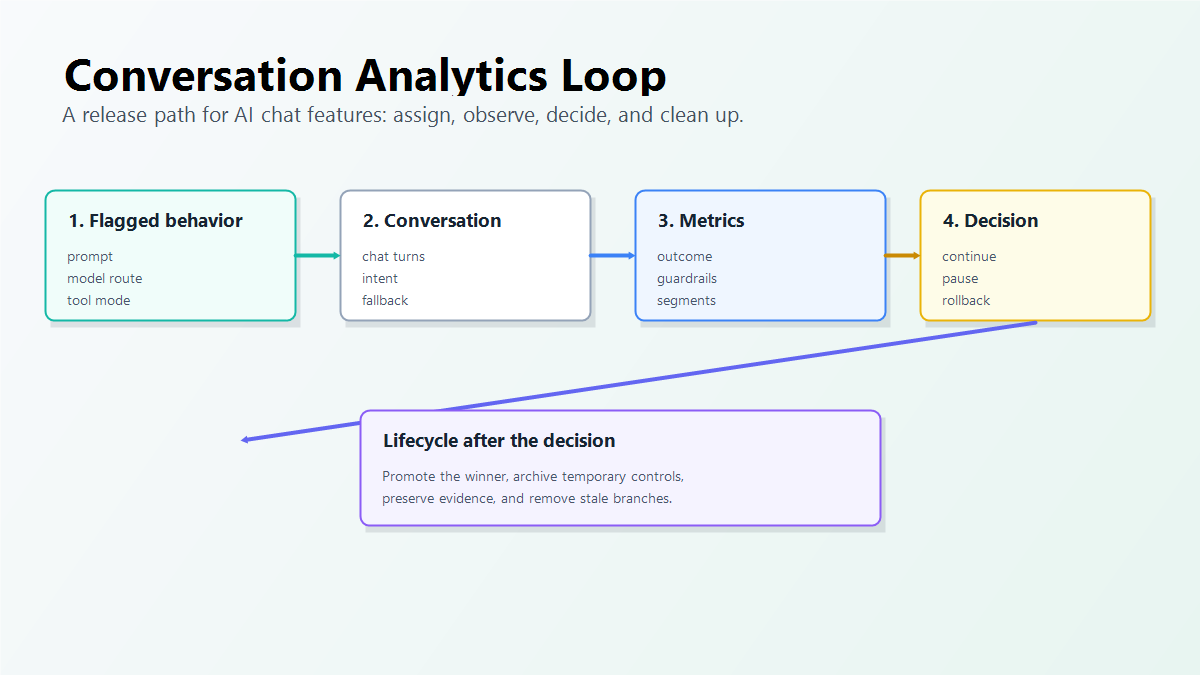
That makes conversation analytics a release-control problem. The analytics schema needs to connect each conversation to feature flag exposure, outcome events, guardrail signals, and a clear rollout decision.
What Conversation Analytics Should Answer
Conversation analytics sits between raw transcripts and business dashboards. A transcript tells you what was said. A dashboard tells you counts and trends. The analytics layer should connect the conversation to a product decision.
For an AI support assistant, onboarding copilot, sales assistant, or internal agent, the questions usually look like this:
| Question | Why it matters |
|---|---|
| Which AI behavior ran? | A conversation may depend on a prompt, model route, retrieval profile, tool policy, fallback mode, or guardrail setting. |
| Who or what was assigned? | The experiment unit may be a user, account, conversation, session, ticket, or workflow. |
| What outcome did the conversation produce? | The team needs a primary metric such as resolved case, completed setup, accepted draft, qualified lead, or avoided escalation. |
| Which guardrails changed? | A conversation can look successful while cost, latency, complaint rate, unsafe answer rate, or human correction rises. |
| What should the release owner do? | Continue, expand, pause, roll back, or clean up the temporary control. |
Generic product analytics can capture events. PostHog's event capture documentation, for example, describes sending custom events with optional properties and recommends consistent event names. Conversation analytics needs that event discipline, but it also needs AI release context: the variation that ran, the assignment unit, and the evidence that decides whether to expand or roll back.
Design The Event Map Before You Roll Out
A conversation analytics plan should be written before the new AI behavior reaches production. Otherwise the team often discovers too late that it cannot join exposure, transcript review, cost, latency, and outcome events.
Start with an event map:
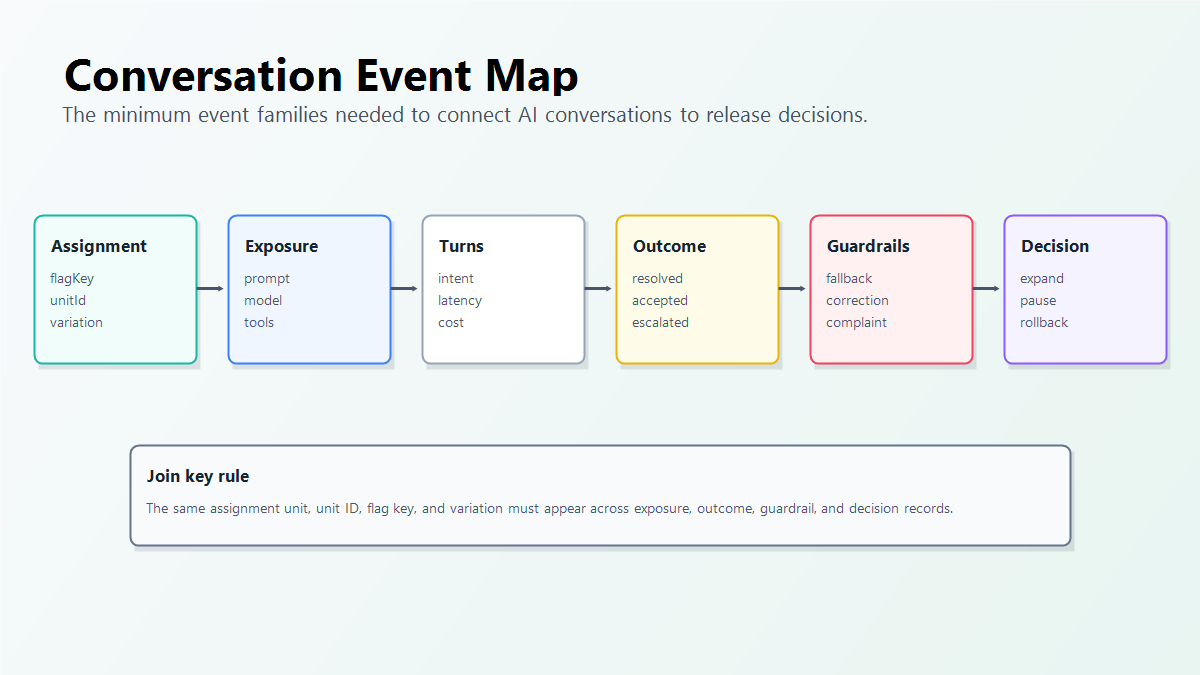
| Event family | Example fields | Release purpose |
|---|---|---|
| Assignment | flagKey, variation, assignmentUnit, unitId, conversationId |
Proves which AI behavior the conversation was supposed to receive. |
| Exposure | promptProfile, modelRoute, retrievalProfile, toolMode, fallbackMode |
Records the behavior that actually ran. |
| Turn-level signals | turnIndex, userIntent, toolCalled, retrievalHit, latencyMs, estimatedCost |
Finds where conversations slow down, fail, or escalate. |
| Outcome | resolved, setupCompleted, draftAccepted, leadQualified, escalated |
Measures whether the conversation completed the product job. |
| Guardrails | complaint, correction, fallbackUsed, unsafeReview, timeout, costBucket |
Stops expansion when the candidate behavior creates unacceptable risk. |
| Decision record | continue, pause, rollback, expand, cleanup |
Turns analytics into a release action. |
This map is intentionally broader than a transcript store. You may still store transcript samples for qualitative review, but the release decision should not depend on a person reading every conversation.
Use Feature Flags As The Conversation Assignment Layer
Conversation analytics becomes trustworthy when the same assignment key appears in every relevant event.
For many chat products, the best assignment unit is the conversation or workflow, not the request. A multi-turn assistant that changes prompt or model halfway through the same conversation can confuse users and corrupt the analysis. For durable user experiences, user or account assignment may be better.
The flag should be evaluated before the AI behavior runs:
type AssistantProfile = {
  promptProfile: string;
  modelRoute: string;
  retrievalProfile: string;
  toolMode: 'search_only' | 'draft_write' | 'approval_required';
};

async function answerConversation(input: {
  conversationId: string;
  userId: string;
  accountId: string;
  message: string;
}) {
  const profile = await featbit.variation<AssistantProfile>(
    'support_assistant_profile',
    {
      key: input.conversationId,
      custom: {
        assignmentUnit: 'conversation',
        userId: input.userId,
        accountId: input.accountId
      }
    },
    {
      promptProfile: 'support_v3',
      modelRoute: 'stable',
      retrievalProfile: 'baseline',
      toolMode: 'search_only'
    }
  );

  await trackConversationExposure({
    flagKey: 'support_assistant_profile',
    conversationId: input.conversationId,
    variation: profile.promptProfile,
    modelRoute: profile.modelRoute,
    retrievalProfile: profile.retrievalProfile,
    toolMode: profile.toolMode
  });

  return runAssistant(profile, input.message);
}
The exact SDK call will vary by stack. The operating rule should not vary: evaluate the runtime control before prompt assembly, retrieval, model routing, tool choice, or fallback behavior. FeatBit's AI control layer explains this broader model for AI behavior changes.
Pick Metrics That Match The Conversation Job
Conversation analytics fails when teams optimize for a shallow metric such as conversation count, average messages, or thumbs-up rate without connecting it to the product job.
Use one primary outcome and several guardrails:
| Conversation type | Primary outcome | Guardrails |
|---|---|---|
| Support assistant | Case resolved without human escalation | complaint rate, correction rate, unsafe answer review, p95 latency, cost per resolved case |
| Onboarding copilot | Setup completed | abandonment, repeated help requests, blocked steps, fallback rate |
| Sales assistant | Qualified meeting or reply | unsubscribe, manual rewrite, brand-risk review, low-quality lead rate |
| Internal operations agent | Task completed without rework | denied action, approval override, tool error, audit exception |
| Coding assistant | Accepted change without later rollback | failed tests, review churn, security finding, incident-linked rollback |
FeatBit's measurement design guidance uses the same separation: the primary metric decides whether the release is valuable, while guardrails decide whether the release remains safe enough to continue.
Keep Transcripts, Events, And Control Data Separate
Conversation analytics can touch sensitive operational context. A transcript may contain customer data, support details, internal policy, or proprietary workflow information. The release-control event stream usually does not need the full text.
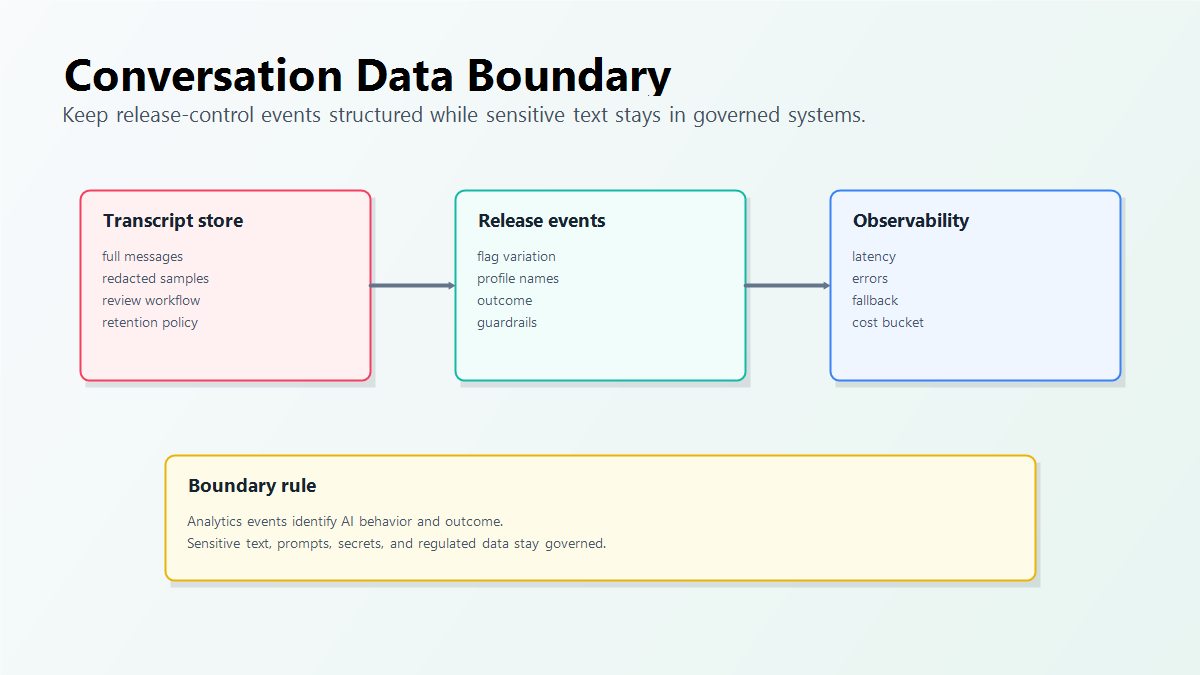
A practical boundary looks like this:
| Data type | Keep in the release event? | Better home |
|---|---|---|
| Full user message | Usually no | transcript store, redacted sample set, or support system |
| Prompt text | Usually no | prompt registry, repository, or AI gateway |
| Model route or prompt profile name | Yes | feature flag variation and exposure event |
| Conversation outcome | Yes | product analytics or experiment metric event |
| Latency, cost bucket, fallback status | Yes | observability and guardrail event |
| PII, secrets, or regulated content | No unless explicitly governed | system of record with retention and access policy |
OpenTelemetry's generative AI semantic conventions are useful category context because they push teams toward structured attributes for AI system telemetry rather than ad hoc logs. For release decisions, keep the event attributes that identify the behavior and outcome, and avoid turning every analytics event into a transcript copy.
Turn Conversation Analytics Into A Rollout Decision
Conversation analytics should feed a release loop, not only a report.
- Write the release hypothesis: what conversation outcome should improve, for which audience, by when?
- Put the AI behavior behind a feature flag or remote configuration value.
- Start with internal traffic or a narrow trusted segment.
- Record exposure when the conversation actually uses the AI behavior.
- Record outcome and guardrail events with the same assignment key.
- Review segment-level results before expanding.
- Continue, pause, roll back, or promote the winning behavior.
- Clean up temporary flags, prompt branches, model routes, and dashboards after the decision.
FeatBit's implementation primitives fit this loop: targeting rules, percentage rollouts, feature flag insights, and the Track Insights API for feature flag usage and custom metric events. The broader experimentation pattern is covered in experimentation for AI systems.
Common Conversation Analytics Mistakes
Tracking page views instead of AI exposure. A chat page view does not prove that a specific prompt, model, retrieval profile, or tool policy ran.
Randomizing per request in a multi-turn conversation. The sample size may look larger, but the user experience and evidence can become inconsistent.
Only measuring sentiment or thumbs-up. Feedback is useful, but it should not replace a primary outcome such as resolution, completion, acceptance, or qualified conversion.
Recording transcripts as analytics events. Store sensitive text where retention, access control, redaction, and review rules are explicit. Use analytics events for structured evidence.
Ignoring fallback behavior. If candidate traffic frequently falls back to the control route, the experiment may appear safer or better than it really is.
Leaving temporary conversation controls in production. After a decision, remove losing prompt branches, retire obsolete model routes, or intentionally convert the flag into a long-lived operational control. FeatBit's feature flag lifecycle management model helps close that loop.
Conversation Analytics Checklist
Before launching analytics for an AI conversation feature, confirm:
- The conversation job has one primary outcome metric.
- Guardrails cover quality, cost, latency, safety, fallback, and human correction where relevant.
- The assignment unit is explicit: user, account, conversation, session, ticket, or workflow.
- The feature flag is evaluated before the AI behavior runs.
- Exposure events record the actual behavior, not only intended assignment.
- Outcome events carry the same assignment key and variation.
- Transcript storage is separate from release-control analytics.
- Segment readouts are reviewed before expansion.
- Rollback can happen without redeploying the application.
- The flag has an owner, decision date, and cleanup expectation.
The bottom line: conversation analytics is useful when it helps teams make safer AI release decisions. Track the conversation outcome, the AI behavior that produced it, the guardrails that bound it, and the flag variation that lets the team expand, pause, or roll back with evidence.
Source Notes
- Category context: PostHog's capturing events documentation is cited for custom event capture and consistent event naming patterns. This article does not compare vendors or claim feature parity.
- Observability context: OpenTelemetry's generative AI semantic convention attributes are cited for structured AI telemetry context.
- FeatBit implementation context: AI control layer, AI experimentation, measurement design, targeting rules, percentage rollouts, feature flag insights, Track Insights API, and feature flag lifecycle management support the workflow described here.
Image And Open Graph Notes
- Use
cover.pngas the Open Graph image because it summarizes the article's main promise: conversation events connected to release decisions. - Use
conversation-analytics-loop.pngnear the opening because it shows the full decision path without hiding the guidance outside crawlable text. - Use
conversation-event-map.pngin the event design section because it makes the event families easier to compare. - Use
conversation-data-boundary.pngin the data-boundary section because it clarifies which data belongs in analytics events and which data should stay in governed systems of record.