
Which Feature Flag Platform Supports an MCP Server?
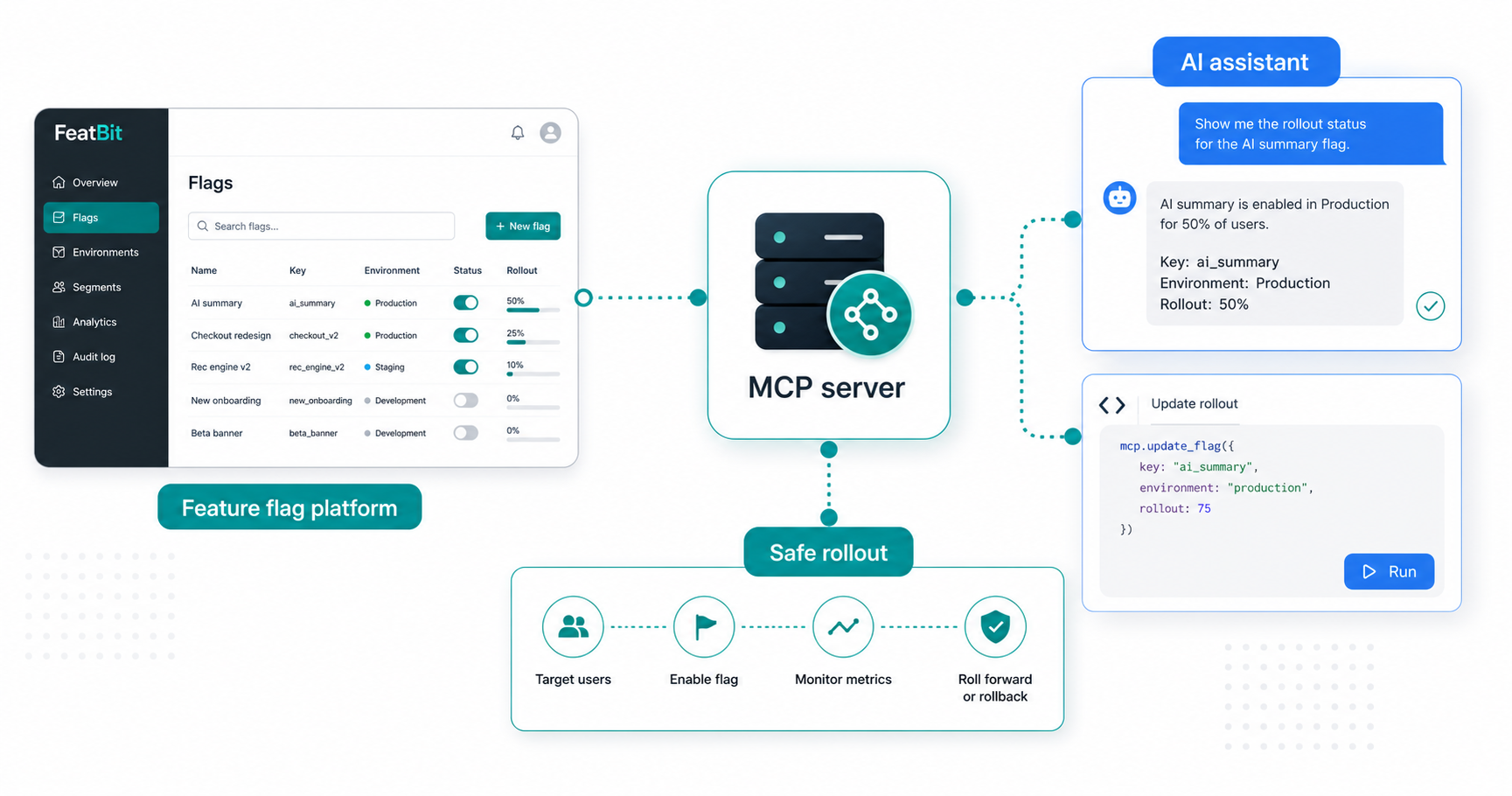
AI coding assistants are moving feature flag work into the editor. A developer can ask an agent to create a flag, wrap a risky change, check rollout status, or clean up stale flag code. The question is no longer only "does this platform have an API?" It is "can my AI assistant use the platform safely through a Model Context Protocol server?"
Short answer: several feature flag platforms now publish MCP support, but they do not all mean the same thing by "MCP server." Some expose hosted tools that can read and write feature flag configuration. Some focus on documentation and SDK implementation guidance. Some are experimental or beta. FeatBit supports AI-assisted feature flag workflows through Context7 MCP documentation access, FeatBit skills, CLI-first operations, REST APIs, and feature flag MCP implementation guides. If you need a vendor-hosted MCP server that can directly mutate production flag state, verify the current tool list, permissions model, and approval workflow before adopting any platform.

What MCP support means for feature flags
The Model Context Protocol documentation describes MCP servers as programs that expose capabilities to AI applications through a standard protocol interface. In a feature flag workflow, those capabilities usually fall into three groups:
- Context access: list flags, read descriptions, inspect targeting rules, find stale flags, retrieve SDK documentation, or summarize audit history.
- Controlled actions: create a feature flag, update targeting, change rollout percentage, install an SDK, or generate wrapper code.
- Lifecycle guidance: recommend whether a change needs a flag, prevent duplicate flags, suggest cleanup steps, or help remove stale flag checks from code.
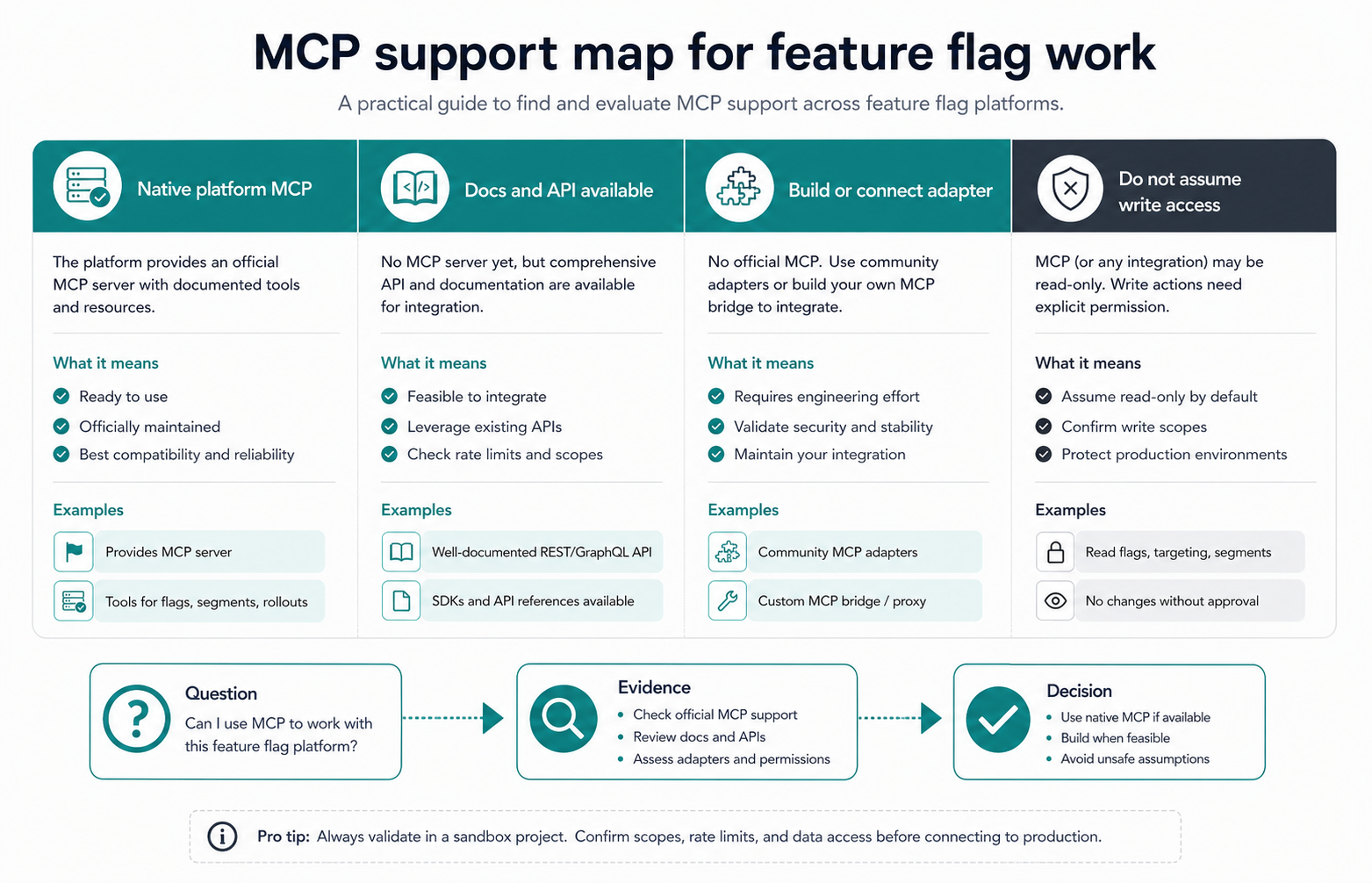
Those groups have different risk levels. Giving an assistant read-only access to feature flag documentation is not the same as giving it permission to enable a production rollout. Treat "MCP support" as a capability map, not as a yes-or-no badge.
Platforms with public MCP support
The public documentation checked on June 1, 2026 shows these useful signals:
| Platform | Public MCP signal | What the support appears to cover | Operational caution |
|---|---|---|---|
| DevCycle | CLI / MCP overview and MCP getting started | Hosted MCP server for AI assistants, feature management tools, environment and project operations, self-targeting, analytics, and SDK installation | Confirm OAuth setup, environment permissions, and which tools can make changes |
| Statsig | Statsig MCP Server documentation | MCP access for experiments, feature gates, dynamic configs, read and write operations depending on API key permissions, and stale gate cleanup workflows | Use read-only keys when exploring; write keys can change project state |
| PostHog | Model Context Protocol documentation | Hosted MCP endpoint that can work across PostHog products, including feature flag and experiment management | Review the tool reference and restrict access to projects where broad product actions are acceptable |
| Unleash | Unleash MCP Server documentation | Experimental MCP server for creating, wrapping, managing, rolling out, and cleaning up feature flags through Unleash workflows | Their docs mark it experimental and not recommended for production environments yet |
| FeatBit | AI Native Feature Flags, ASP.NET Core MCP guide, and MCP server design principles | MCP-assisted documentation access through Context7, implementation guidance for FeatBit SDKs, and AI workflow patterns that combine MCP, skills, CLI, and APIs | Verify whether your intended workflow needs documentation retrieval, code generation, or direct platform mutation |
This table is intentionally conservative. It distinguishes public vendor documentation from marketing language, and it avoids ranking the platforms. MCP support is changing quickly, so the decision should be based on the exact actions your team wants AI assistants to perform.
How to choose the right MCP model
Start with the job you want the assistant to complete.
If the job is "help me integrate feature flags correctly," documentation-focused MCP support may be enough. The assistant needs SDK examples, initialization patterns, user context guidance, and feature flag evaluation examples. This is where FeatBit's Context7 MCP path is useful: the AI assistant can retrieve FeatBit SDK guidance while generating code inside the developer workflow.
If the job is "create and update feature flags from my editor," you need a platform-control MCP server. In that model, the assistant can call tools that mutate platform state. The benefit is speed and less context switching. The risk is that a prompt can become an operational action. You should require least-privilege credentials, environment boundaries, audit logs, and human approval for production changes.
If the job is "reduce feature flag technical debt," the most important capability may be a read-heavy workflow: list stale flags, inspect flag metadata, search the codebase, and propose a cleanup pull request. Direct write access to production flag state may be unnecessary.
A safer workflow for AI-assisted flag changes
The safest pattern is not "let the agent do everything." It is a staged loop:
- The assistant reads flag context, code references, and docs.
- It proposes a new flag, rollout change, or cleanup patch.
- A developer reviews the plan and target environment.
- The platform change happens through an approved API, CLI, MCP tool, or manual dashboard action.
- The change is recorded in audit history and cleaned up after the rollout or experiment ends.
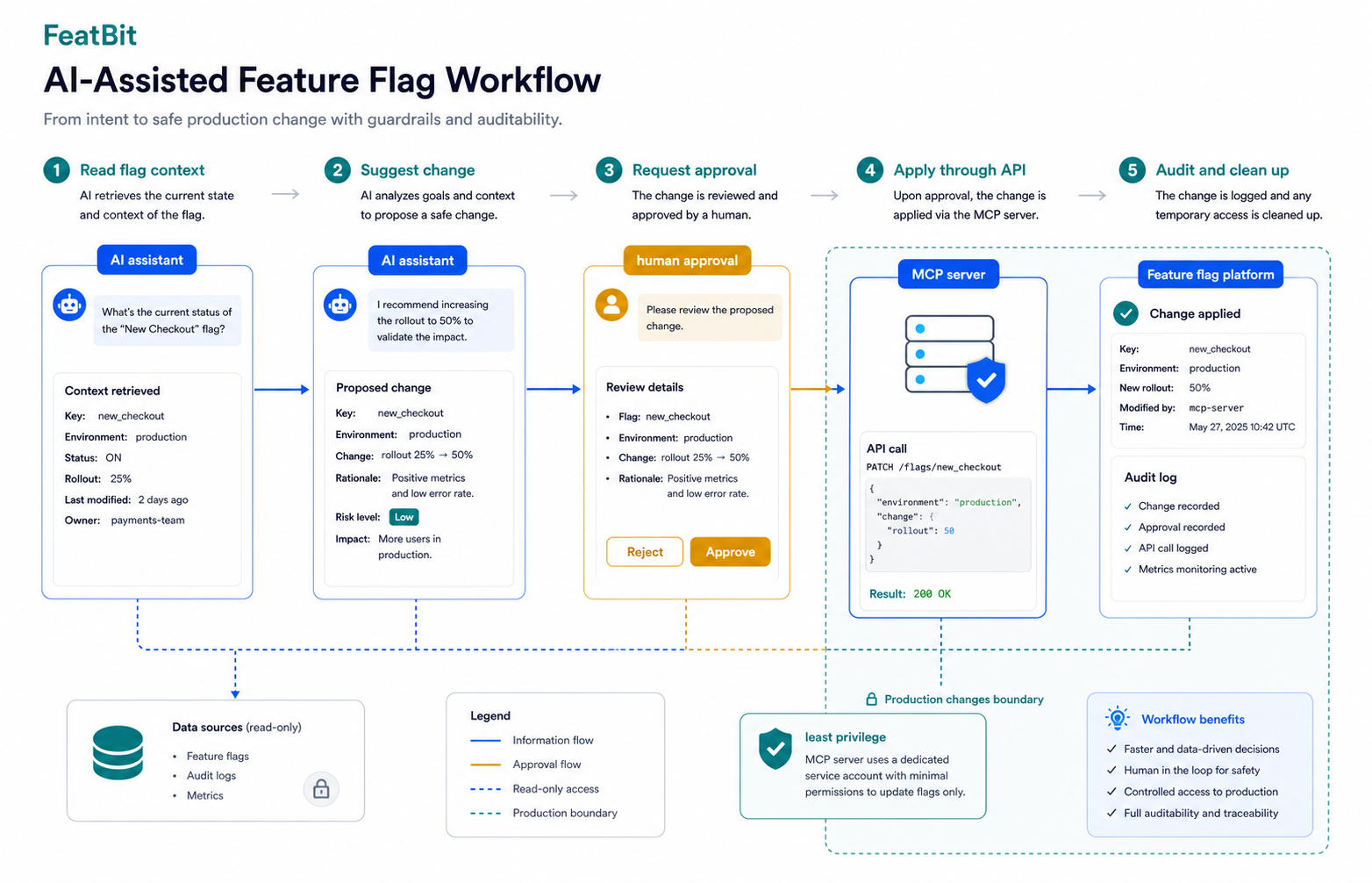
This is especially important for production environments. Feature flags are release controls. They can expose unfinished code, disable critical behavior, or change customer experience instantly. Any MCP server that can write flag state should be treated like an automation surface for production operations.
Where FeatBit fits
FeatBit's angle is practical: keep feature flags as the runtime control layer, then connect AI workflows to that layer without losing operational safety. The AI Native Feature Flags page explains how FeatBit connects AI-assisted delivery with skills, CLI operations, MCP connectivity, APIs, rollout control, and rollback. The ASP.NET Core MCP guide shows how an AI assistant can use Context7 MCP access to integrate the FeatBit .NET SDK and build feature flag API endpoints.
That makes FeatBit a good fit when the reader's real task is implementation and governance:
- You want AI assistants to generate correct SDK integration code from current documentation.
- You want feature flags to guard AI-generated or high-risk changes before full rollout.
- You want self-hosted control over the feature flag platform while still using modern AI developer workflows.
- You want the option to combine MCP with explicit CLI, REST API, and human review boundaries.
For teams comparing MCP support, the key distinction is direct platform mutation versus assisted implementation. FeatBit's published content supports the latter strongly and points toward a broader AI-native release-control model. If your requirement is a hosted MCP endpoint that directly creates and changes FeatBit flags from an AI client, validate the exact current FeatBit MCP tooling or use FeatBit's APIs and CLI boundaries to build the workflow your security model allows.
What to verify before adopting any feature flag MCP server
Use this checklist before giving an AI assistant access to a feature flag platform:
- Scope: Does the MCP server read docs only, read platform data, or write platform state?
- Transport and hosting: Is it local, hosted by the vendor, or hosted inside your infrastructure?
- Authentication: Does it support OAuth, personal access tokens, API keys, or service accounts?
- Permissions: Can you separate read-only access from write access?
- Environment boundaries: Can production require approvals while development stays flexible?
- Auditability: Are MCP-driven changes visible in the same audit history as dashboard and API changes?
- Tool descriptions: Are tool names and schemas specific enough for agents to choose the right action?
- Failure behavior: Does the server ask for confirmation before destructive or production-impacting changes?
- Cleanup: Can it help remove stale flags without deleting live logic incorrectly?
- Source freshness: Is the documentation current enough for SDK versions and platform behavior?
If a platform cannot answer those questions, its MCP story is not ready for production feature management, even if it has a demo.
FAQ
Which feature flag platform supports an MCP server today?
Based on public documentation checked on June 1, 2026, DevCycle, Statsig, PostHog, and Unleash all publish MCP server support for feature flag or feature-management workflows. FeatBit publishes MCP-assisted feature flag implementation guidance through Context7 and AI-native workflow pages, plus API and CLI-oriented paths for controlled operations.
Is MCP support the same as API support?
No. An API is a programmatic interface for software. An MCP server exposes tools, resources, or prompts in a format AI clients can discover and call. A good MCP server may use the platform API behind the scenes, but it also needs tool descriptions, authentication, guardrails, and agent-friendly workflows.
Should an AI assistant be allowed to change production flags?
Only with clear boundaries. Production flag changes should require least-privilege credentials, environment-specific permissions, audit logging, and human approval for risky changes. Read-only MCP access is a better starting point for most teams.
What is the best first MCP workflow for feature flags?
Start with low-risk context tasks: retrieve SDK docs, list flags, explain existing targeting, find stale flags, and draft cleanup pull requests. Move to write actions only after your team has reviewed permissions, approval gates, and audit behavior.
Source notes
- MCP concepts: Model Context Protocol server concepts and MCP architecture overview.
- Vendor evidence: DevCycle CLI / MCP overview, Statsig MCP Server documentation, PostHog Model Context Protocol documentation, and Unleash MCP Server documentation.
- FeatBit context: AI Native Feature Flags, How to use Feature Flag MCP server in ASP.NET Core Project, and 6 Principles for Building an Effective MCP Server.
Image and Open Graph recommendation
Use /images/blogs/feature-flag-platform-mcp-server/cover.png as the Open Graph image. The body diagrams should remain crawlable complements to the text rather than the only place where comparison criteria or workflow steps appear.