
Unleash MCP Server Alternative: Build Agent-Native Feature Flag Control Without Losing Release Discipline
If you are searching for an Unleash MCP Server alternative, the practical question is not whether an AI assistant can call a feature flag API. The practical question is whether agent-created flag work remains tied to release intent, scoped credentials, rollout evidence, audit history, and cleanup.
Unleash documents an MCP server for managing Unleash feature flags through LLM-powered coding assistants. Its public documentation describes tools such as evaluate_change, create_flag, detect_flag, code wrapping guidance, rollout support, cleanup guidance, and production protection through change requests. That is a useful signal for the category: feature flag systems are becoming part of AI coding workflows.
FeatBit is a credible alternative when your team wants the MCP surface to sit inside an open-source, self-hostable release-control platform. The goal is not to clone every Unleash noun. The goal is to give AI assistants enough access to discover flags, create controlled release assets, evaluate flag state, prepare rollout changes, inspect audit logs, and support cleanup while humans keep authority over production exposure.
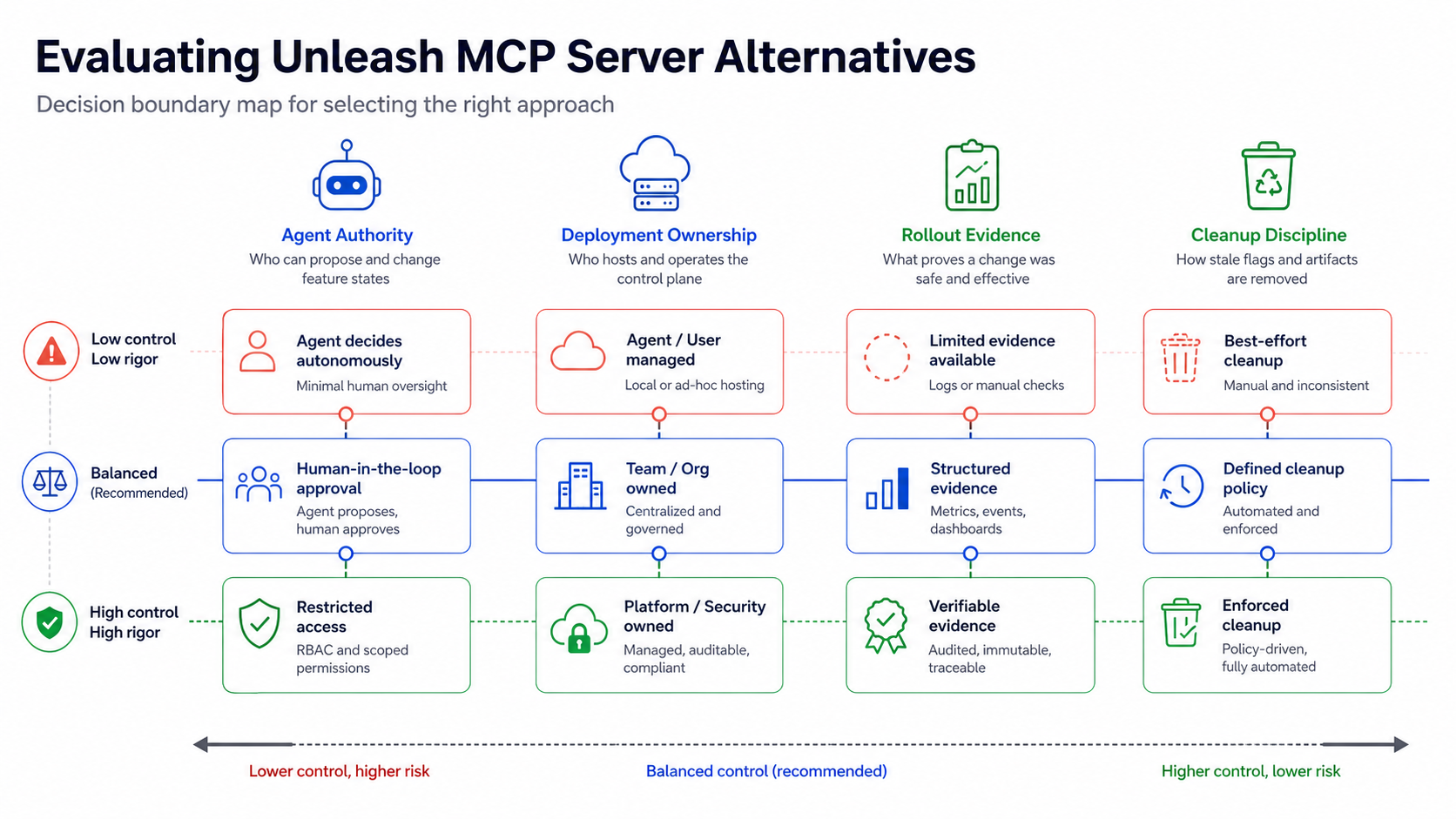
The Short Answer
Choose Unleash MCP Server when your organization already uses Unleash and wants AI assistants to follow Unleash's flag types, Admin API, project model, change requests, and code-wrapping guidance.
Evaluate FeatBit when the decision is broader:
- You want a feature flag platform that can be self-hosted and inspected.
- You want hosted MCP for convenience and local MCP for private deployments.
- You want AI assistants to work with feature flags without granting unchecked production mutation authority.
- You need flag lifecycle expectations before faster AI-assisted creation turns into technical debt.
- You want release control, progressive rollout, audit logs, experimentation, API automation, and cleanup to stay in one operating model.
That makes this a workflow decision, not a tool-count contest.
What Unleash MCP Server Is Designed To Do
The official Unleash MCP documentation describes a purpose-driven server that integrates with the Unleash Admin API. It is built around feature flag work that coding assistants can help with: deciding whether a code change should be behind a flag, creating a typed flag with validation, detecting existing flags to avoid duplicates, wrapping code, managing rollout work, and cleaning up after rollout.
Two design details are especially important for evaluators.
First, Unleash's evaluate_change workflow treats flag creation as a decision, not only as an object creation call. It checks code context, parent flags, risk patterns, and possible next actions. That is the right category direction because agents should not create flags blindly.
Second, Unleash documents production protection through change requests. When change requests are enabled for an environment, an MCP-driven change can submit a request instead of applying the change directly. That is a useful reminder that MCP is an interface to tools, not a safety boundary by itself.
If your system of record is Unleash, this tight fit can be an advantage. The AI assistant speaks the same feature flag model your team already uses.
If you are looking for an alternative, inspect the surrounding operating model: deployment ownership, credential handling, environment boundaries, audit, rollout evidence, and cleanup rules.
Evaluation Criteria for an Alternative
Use these criteria before comparing vendor feature lists.
| Criterion | Why it matters | What to verify |
|---|---|---|
| Agent authority boundary | MCP tools can affect production behavior when write access is available. | Which tools are read-only, write-capable, destructive, or approval-gated? |
| Deployment ownership | Some teams need feature flag metadata, audit history, and credentials to stay inside private infrastructure. | Can the MCP workflow run against a self-hosted control plane or only a vendor-hosted service? |
| Flag lifecycle model | AI assistants can create flags faster than teams can retire them. | Does the workflow capture owner, flag type, fallback, rollout evidence, and cleanup rule? |
| Codebase guidance | A platform flag is useful only when code evaluates it safely. | Can the assistant follow SDK conventions and produce small reviewable code changes? |
| Rollout control | Creating a flag is not the same as releasing a change. | Can the workflow support targeting, percentage rollout, audit review, rollback, and experiment evidence? |
| Credential scope | Prompt-driven operations should not run with broad reusable secrets. | Are tokens scoped by project, environment, action, and approval level? |
| Vendor portability | MCP standardizes tool access, but product models still differ. | Do you need API access, OpenFeature providers, export paths, or self-hosting to reduce lock-in? |
DevCycle, Statsig, and PostHog all publish MCP-related feature flag or product workflow support. Their official docs show the same category trend: AI coding tools are being connected to feature flags, experiments, analytics, and cleanup workflows. The safe evaluation pattern is to compare exact tool authority and workflow boundaries, not broad claims that one MCP server is universally better.
Where FeatBit Fits
FeatBit is an open-source feature flag and experimentation platform for teams that want release control to be inspectable, automatable, and self-hostable. The FeatBit MCP Server lets AI coding agents manage FeatBit feature flags through natural language. The hosted endpoint is documented as https://mcp.featbit.co/mcp, and the repository also shows local setup for teams that need a custom FeatBit API base URL.
That local option matters when a platform team wants an MCP server close to its own FeatBit deployment, network controls, and credential policy.
The FeatBit MCP repository documents tools for:
- listing projects;
- reading project and environment details;
- listing feature flags across a project or environment;
- reading a single feature flag;
- creating a disabled boolean feature flag;
- toggling, archiving, and updating rollout assignments;
- reading audit logs;
- evaluating feature flags for a given end user.
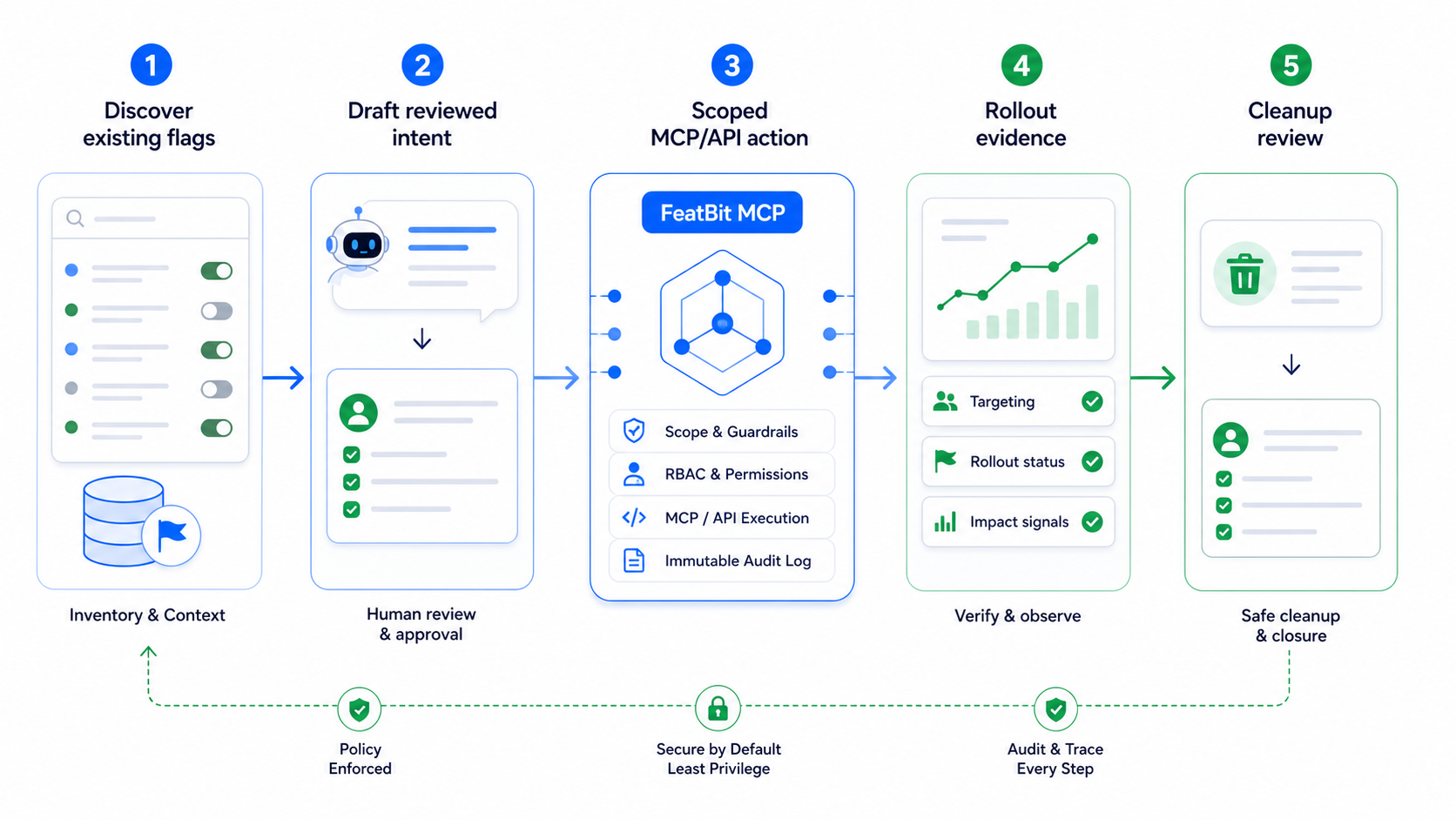
This tool surface supports a different evaluation question from "Can an assistant create a flag?" It asks whether the assistant can participate in a release-control loop:
- Discover existing flags and environments.
- Propose a flag intent with owner, fallback, target, and cleanup rule.
- Create or update only after the project and environment are explicit.
- Keep production-impacting changes approval-gated.
- Read back audit and rollout state after changes.
- Remove temporary code paths when the release decision is complete.
A Practical FeatBit Workflow for Teams Coming From Unleash
Do not begin by asking an assistant to "manage all flags." Start with one bounded workflow and expand only after the boundaries are proven.
1. Start With Read-Only Discovery
Give the assistant a prompt that makes mutation impossible:
List feature flags in the checkout project that match checkout, payment, or onboarding.
Return the flag key, environment, enabled state, archived state, tags, and last change if available.
Do not create, toggle, update, or archive any flag.
This helps the assistant avoid duplicate flags and gives reviewers a fast inventory. It also reveals whether your tagging, naming, and ownership conventions are agent-readable.
2. Require Flag Intent Before Creation
Before creating a flag, require a structured intent:
flag_intent:
  key: checkout-risk-model-v2
  type: release
  variation_type: boolean
  fallback: false
  owner: payments-platform
  initial_environment: staging
  first_target: internal staff and test accounts
  rollout_plan:
    - disabled in production
    - internal segment
    - 5 percent
    - 25 percent
    - full release after review
  guardrails:
    - checkout_error_rate
    - payment_authorization_failure
  cleanup_rule: remove old model branch after full rollout and rollback window
The assistant can help draft the intent, but a human should review it before the MCP server or API creates the flag. In FeatBit, the first platform action can create a disabled boolean flag, keeping exposure separate from creation.
3. Keep Production Rollout Explicit
A production rollout should be a separate decision from flag creation. Ask the assistant to prepare the operation first:
Prepare a rollout update for checkout-risk-model-v2 in production.
Read the current flag and relevant audit history.
Propose a 5 percent rollout for the internal beta segment.
Return the intended change and rollback path.
Do not update the rollout until I approve.
This pattern keeps MCP useful without turning it into silent production automation. It also matches the official Model Context Protocol guidance that tool invocation needs user consent, clear authorization, and caution because tools can represent arbitrary code execution or operational action.
4. Make Cleanup Part of the First Prompt
AI-assisted flag creation can reduce context switching, but it can also increase stale flag volume. Every agent-created flag should have a cleanup expectation from day one:
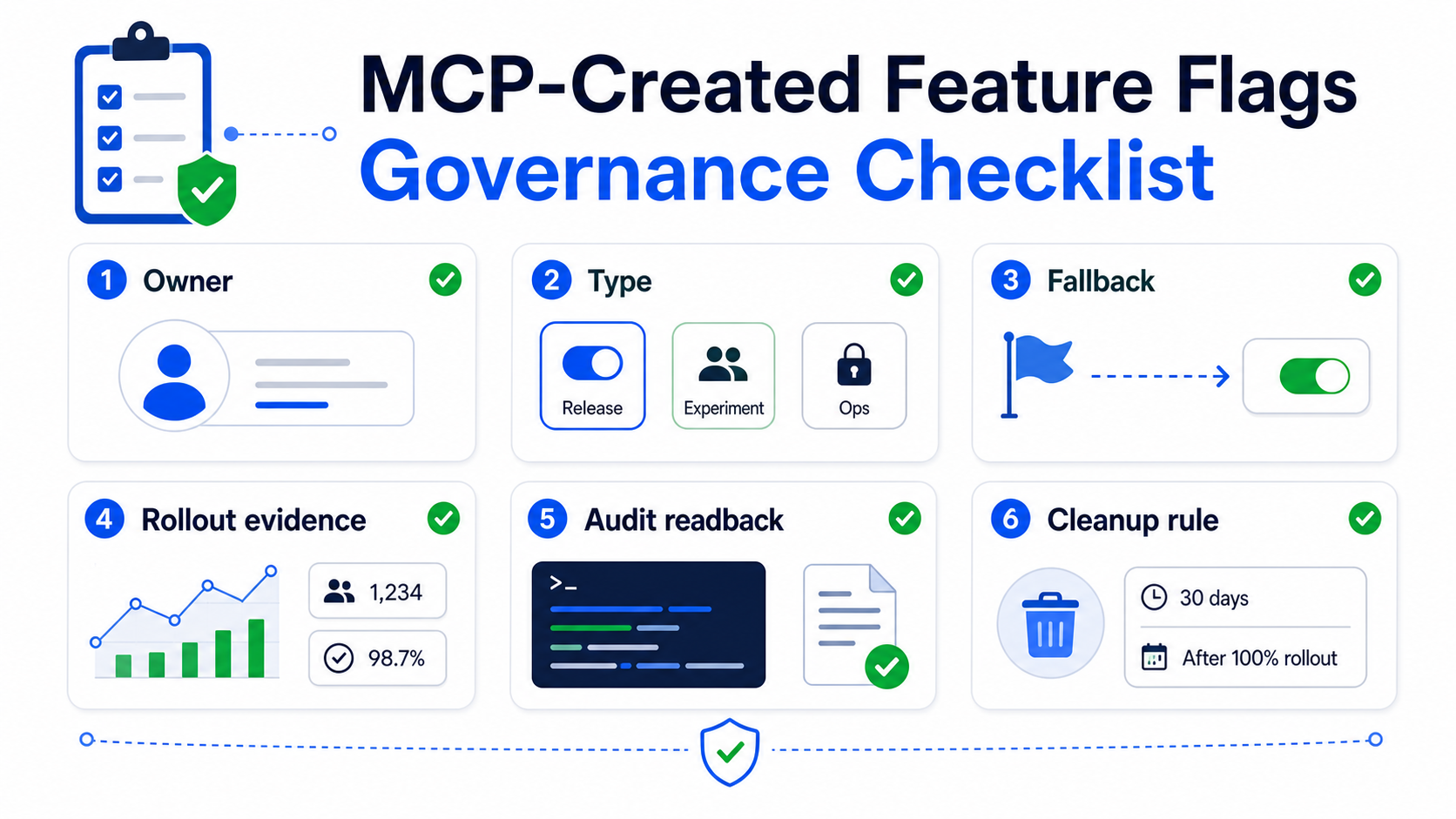
- What type of flag is this: release, experiment, operational, permission, or configuration?
- Who owns it?
- What event proves the release decision is complete?
- Which code references must be removed?
- Should the final state be archived, deleted, or kept as a long-lived operational control?
FeatBit's feature flag lifecycle management model is useful here because it treats flags as release assets with ownership, evidence, and cleanup paths. The related guide on cleaning up feature flags with coding agents gives a practical cleanup direction for agent-assisted workflows.
How FeatBit and Unleash Differ as an Evaluation Question
Avoid unsupported rankings. Compare fit.
| Buying question | Unleash MCP Server fit | FeatBit alternative fit |
|---|---|---|
| Are we already standardized on Unleash? | Strong fit because the MCP workflow maps to Unleash's Admin API and flag model. | Evaluate only if the team is also considering a platform change. |
| Do we need local MCP against a private feature flag deployment? | Check current Unleash deployment and MCP setup requirements directly. | FeatBit documents hosted MCP and local self-hosted MCP setup. |
| Do we want an assistant to decide when a change needs a flag? | Unleash documents evaluate_change and code-wrapping guidance. |
FeatBit can pair MCP with repository rules, skills, and lifecycle conventions, but the exact decision prompt is team-defined. |
| Do we need a self-hosted control plane? | Unleash is open source, but verify the operating and licensing model your team needs. | FeatBit is built around open-source and self-hosted feature flag control. |
| Do we need audit and rollout evidence after an MCP action? | Unleash documents best-practice guidance and production change-request protection. | FeatBit MCP includes audit-log and rollout-related tools, and FeatBit supports targeting, insights, and experimentation. |
| Do we care most about flag lifecycle debt? | Check Unleash cleanup and lifecycle workflows in current docs. | FeatBit has a dedicated lifecycle model for owner review, stale detection, cleanup, and agent guidance. |
The decision is not "Unleash versus FeatBit" in isolation. It is whether your AI-assisted flag workflow should remain vendor-native to Unleash, or whether you want a FeatBit-style release-control platform that can be self-hosted and wired into MCP, CLI, REST API, skills, audit, rollout, and lifecycle workflows.
Common Mistakes When Evaluating Feature Flag MCP Servers
Treating MCP as governance. MCP gives AI clients a standard way to discover and call tools. It does not replace IAM, scoped tokens, approval workflows, audit logs, rollout policy, or cleanup discipline.
Comparing only the number of tools. A bigger tool list can be useful, but only when tool descriptions, permissions, and human review match your production risk.
Letting agents create flags without lifecycle metadata. A flag with no owner, fallback, rollout plan, or cleanup rule is future debt, even when it was created through a modern MCP workflow.
Using one broad token for every assistant task. Read-only discovery, staging creation, and production rollout should not share the same credential scope.
Skipping read-before-write. Before a toggle, archive, or rollout update, the assistant should read the current flag, environment, and audit history.
A Low-Risk Trial Plan
Use a narrow pilot before making a platform decision.
- Pick one upcoming release flag that is not tied to billing, security, permissions, or regulated behavior.
- Connect FeatBit MCP with a scoped token in read-only or staging-only mode.
- Ask the assistant to inventory related flags and propose a new flag intent.
- Review the project, environment, key, tags, fallback, owner, rollout plan, and cleanup rule.
- Create the flag disabled by default.
- Add the SDK evaluation in a small pull request.
- Roll out to internal users first.
- Read back the audit log and rollout state.
- Record the cleanup trigger before expanding exposure.
This trial answers the real questions:
- Did the assistant produce useful context without guessing?
- Did humans retain release authority?
- Did the platform record the change in audit history?
- Did the rollout plan stay separate from flag creation?
- Did the cleanup path exist before the flag reached production?
When FeatBit Is a Strong Alternative
FeatBit is worth evaluating as an Unleash MCP Server alternative when the team wants agent-native feature flag work and also cares about control ownership.
Use FeatBit as the evaluation path when:
- platform engineering wants open-source feature flag infrastructure;
- security or compliance teams need a private deployment option;
- developers want MCP, CLI, API, and skills that fit AI coding workflows;
- release managers want targeting, rollout, audit, experimentation, and cleanup in the same control plane;
- teams want AI-assisted flag operations without giving AI assistants unrestricted production mutation authority.
Use Unleash MCP Server when:
- Unleash is already your feature flag system of record;
- your team wants Unleash-specific flag creation, change evaluation, code wrapping, and rollout workflows inside coding assistants;
- Unleash change requests match your production approval needs;
- the main job is improving Unleash-native developer workflow rather than evaluating a different release-control platform.
That is the fair alternative frame. FeatBit is not an Unleash clone. It is an open-source release-control platform with an agent-native surface for teams that want feature flags, rollout evidence, audit, lifecycle cleanup, and deployment ownership to stay under their operating model.
Source Notes
- Unleash product evidence comes from the official Unleash MCP Server documentation, including the documented
evaluate_change,create_flag,detect_flag, production change-request protection, and design principles. - FeatBit MCP evidence comes from the FeatBit MCP Server repository, including the hosted endpoint, local setup, credential handling guidance, and available tools.
- FeatBit platform context comes from the FeatBit GitHub repository, FeatBit REST API guide, API access token documentation, and feature flag lifecycle management.
- Category context comes from official vendor sources: DevCycle CLI and MCP overview, Statsig MCP overview, and PostHog's Model Context Protocol documentation.
- Protocol context comes from the official Model Context Protocol specification and MCP security best practices. This article treats MCP as a tool integration layer, not as a substitute for release governance.
Image and Open Graph Notes
- Cover image:
/images/blogs/unleash-mcp-server-alternative/cover.pngis the social preview for this article. - Body image:
/images/blogs/unleash-mcp-server-alternative/decision-boundary.pngsummarizes the evaluation frame for Unleash MCP Server alternatives. - Body image:
/images/blogs/unleash-mcp-server-alternative/agent-native-workflow.pngshows the recommended assistant-to-release-control workflow. - Body image:
/images/blogs/unleash-mcp-server-alternative/governance-checklist.pngvisualizes the owner, rollout, audit, and cleanup checks required for MCP-created flags.
Next Step
Before connecting any MCP server to production flag state, write the operating contract: allowed actions, credential scope, approval boundary, rollout path, evidence, owner, and cleanup rule. If that contract is clear, FeatBit MCP can become a useful interface for agent-native release control. If it is not clear, design the workflow before choosing the vendor.