
How to Use an MCP Server for Feature Flag Operations
An MCP server for feature flag operations gives an AI assistant a controlled way to inspect, create, evaluate, and update feature flags without asking the assistant to scrape a dashboard or guess API calls. The useful pattern is not "let the agent manage production." It is: expose a small set of flag operations, pass scoped FeatBit credentials through MCP headers, require explicit approval for risky changes, and keep every operation tied to rollout evidence and audit history.
This tutorial is for platform engineers, developer experience teams, and product-minded engineers who want AI assistants to help with flag work while preserving the release-control habits that feature flags are supposed to provide.
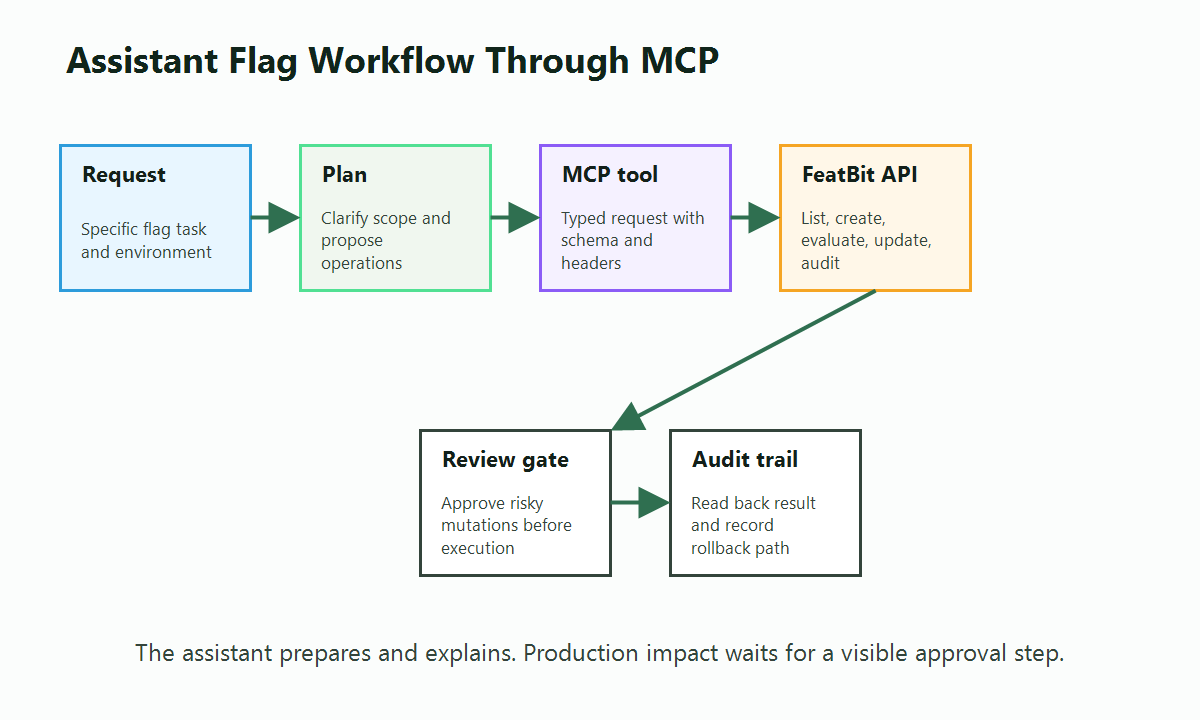
What MCP Changes About Flag Operations
The Model Context Protocol tools specification defines how servers expose tools that models can discover and call. In a feature flag workflow, those tools can map to practical operations such as listing projects, finding flags by tag, creating a release flag, evaluating a flag for a test user, or updating a rollout percentage.
That matters because feature flag work often lives between systems:
| Reader task | Without MCP | With an MCP server |
|---|---|---|
| Find relevant flags | Ask a human to search the dashboard or paste API output | Assistant calls a read tool and summarizes candidates |
| Create a release flag | Human switches context to the UI or writes API calls manually | Assistant proposes a flag name, key, tags, and lifecycle metadata |
| Check rollout state | Human opens each environment | Assistant reads flag state and audit history from FeatBit |
| Update exposure | Manual UI or script change | Assistant prepares a tool call, then waits for approval before mutation |
| Clean up stale flags | Manual code and dashboard review | Assistant combines repository search with flag metadata and audit logs |
The key shift is workflow shape. The assistant can do the tedious discovery and preparation, while humans keep control over intent, approval, and production impact.
Choose the Right Boundary Before You Connect Anything
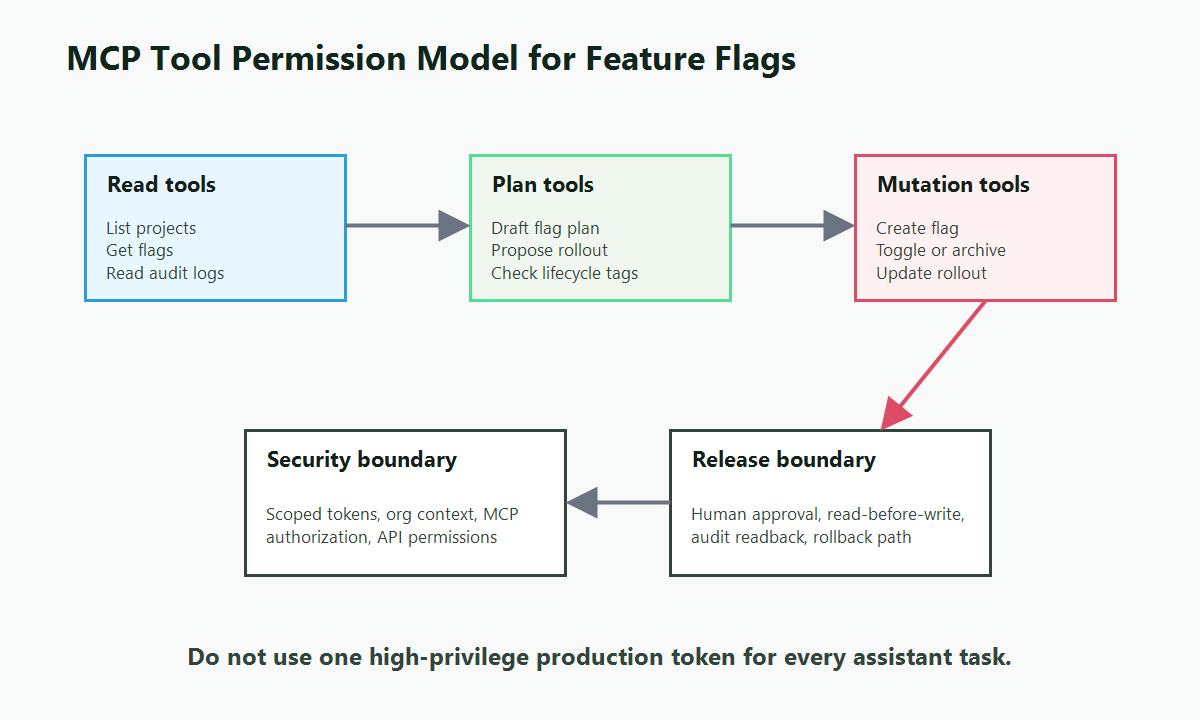
Before adding MCP to an AI assistant, decide which operations are read-only, which are write-capable, and which require human confirmation every time.
Use three operation classes:
| Operation class | Example MCP tools | Default policy |
|---|---|---|
| Read | List projects, list flags, get a flag, get audit logs | Safe to expose broadly when credentials are scoped |
| Prepare | Draft a flag plan, propose tags, propose rollout assignments | Safe when the assistant returns a plan instead of mutating state |
| Mutate | Create flag, toggle flag, archive flag, update rollout | Require explicit human approval, scoped credentials, and audit review |
This boundary is not only a UX preference. The MCP authorization specification treats authorization as a transport-level concern for HTTP transports and calls out token audience validation, token handling, and token passthrough risks. Runtime feature flag policy should sit beside that security boundary. It should not be the only thing preventing an assistant from using broad credentials.
For FeatBit specifically, the FeatBit MCP server acts as a thin proxy. FeatBit API credentials are forwarded with the request, and the hosted MCP server does not store them. That design keeps the credential decision with your FeatBit token, organization context, MCP client configuration, and approval workflow.
Connect FeatBit MCP to an Assistant
The hosted FeatBit MCP endpoint is:
https://mcp.featbit.co/mcp
The FeatBit MCP repository documents hosted and local configurations for VS Code, Claude Code, Cursor, and Codex. A VS Code workspace configuration follows this shape:
{
  "servers": {
    "featbit": {
      "type": "http",
      "url": "https://mcp.featbit.co/mcp",
      "headers": {
        "Authorization": "${input:featbitApiKey}",
        "Organization": "${input:featbitOrgId}"
      }
    }
  },
  "inputs": [
    {
      "id": "featbitApiKey",
      "type": "promptString",
      "description": "FeatBit API Key",
      "password": true
    },
    {
      "id": "featbitOrgId",
      "type": "promptString",
      "description": "FeatBit Organization ID"
    }
  ]
}
For local or self-hosted FeatBit deployments, run the MCP server from source and point its FeatBit API base URL at your deployment. That is useful when your FeatBit instance is private, your network requires local routing, or your team wants to extend the MCP server with organization-specific tools.
Keep these setup rules:
- Use an API token with the narrowest FeatBit permissions that can complete the assistant's job.
- Put credentials in MCP client headers or secure client inputs, not in prompts or tool arguments.
- Separate development, staging, and production credentials.
- Treat production write tools as approval-required, even when the MCP client technically allows automatic tool calls.
- Document the expected flag naming, tags, owner, review date, and cleanup rule in your repository so the assistant can follow the same conventions every time.
FeatBit API tokens are managed through the product's API access token documentation, and direct REST automation is documented in Using FeatBit REST API. MCP should make those operations easier to invoke from an assistant, not bypass the underlying permission model.
Map Assistant Prompts to Safe Flag Workflows
Most useful MCP workflows start with a human request that is still specific enough to audit. Avoid vague prompts such as "clean up my flags" or "roll this out." Ask the assistant for a plan first, then let it call read tools, then approve the mutation only after the proposed change is clear.
Workflow 1: Find Flags That Need Review
Use this when your team already tags release, experiment, operational, or permission flags and wants a repeatable review loop.
Find feature flags in the checkout project tagged release that have not changed in 30 days.
List the flag key, environment, current state, last change, owner tag if present, and whether audit logs show a recent rollout decision.
Do not archive or toggle anything.
The assistant should call read tools such as project listing, project flag listing, and feature flag audit logs. It should return a table and uncertainty notes, not mutate anything. This workflow pairs well with FeatBit's feature flag lifecycle management model because the output becomes evidence for owner review instead of a blind cleanup action.
Workflow 2: Create a Release Flag with Lifecycle Metadata
Use this when a developer is implementing a new feature and wants the assistant to create the matching flag consistently.
Create a disabled boolean release flag for the new checkout address validator.
Use key checkout-address-validator, tag it release and cleanup-2026-07-15, and add a description that says the owner is Payments Platform.
Create it only in the staging environment first.
The assistant should confirm the target project and environment before creation if either is ambiguous. The created flag should start disabled, with explicit tags and ownership metadata. After creation, the assistant can help update code, but flag evaluation should still follow your SDK or OpenFeature conventions.
If your team is defining agent-readable lifecycle rules, connect this workflow to FeatBit's AI flag owner review workflow so created flags do not become hidden release debt.
Workflow 3: Prepare a Rollout Change Without Applying It
Use this when you want the assistant to do the arithmetic and context gathering but not execute the rollout by itself.
Prepare a rollout update for checkout-address-validator in production.
Read the current flag, audit log, and variation IDs.
Propose a 10 percent enabled rollout for internal beta users only.
Return the exact tool call you would make, but do not call the update tool until I approve.
This is where the human-in-the-loop guidance in the MCP tools specification becomes operational. The client should make tool exposure and tool invocation visible, and the workflow should preserve a confirmation point for operations that affect production users.
Workflow 4: Evaluate a Flag for a Test User
Use this when debugging targeting rules or preparing QA evidence.
Evaluate checkout-address-validator for user qa-payments-17 with plan=premium, country=US, and beta=true.
Explain which variation is returned and which targeting assumption should be verified next.
Flag evaluation through MCP is useful for debugging, but it should not replace application-side SDK evaluation in production request paths. Runtime applications should still evaluate flags through FeatBit SDKs or direct evaluation APIs designed for that workload. MCP is a developer workflow interface.
Use MCP for Release Control, Not Dashboard Replacement
An MCP server can make flag operations faster, but speed is not the goal. Better release control is the goal.
Good MCP-assisted flag operations preserve four controls:
- Intent: The assistant should know whether the flag is for release, experiment, operation, permission, or AI behavior control.
- Scope: The assistant should know the exact project, environment, segment, user, or rollout percentage before proposing a mutation.
- Evidence: The assistant should read current state and audit history before changing a live flag.
- Reversibility: Every rollout change should have a rollback path that does not require redeploying application code.
That is why FeatBit's AI-era positioning treats feature flags as a runtime control layer, not just code switches. When an assistant helps manage flags, it should make release decisions more explicit: what is changing, who sees it, what evidence supports it, and how the team can reverse it.
For broader agent-control patterns, see feature flags as the AI control layer and the practical tutorial on agent tool permission gates with feature flags.
Production Guardrails for MCP-Based Flag Operations
Use this checklist before allowing production mutations through an MCP client.
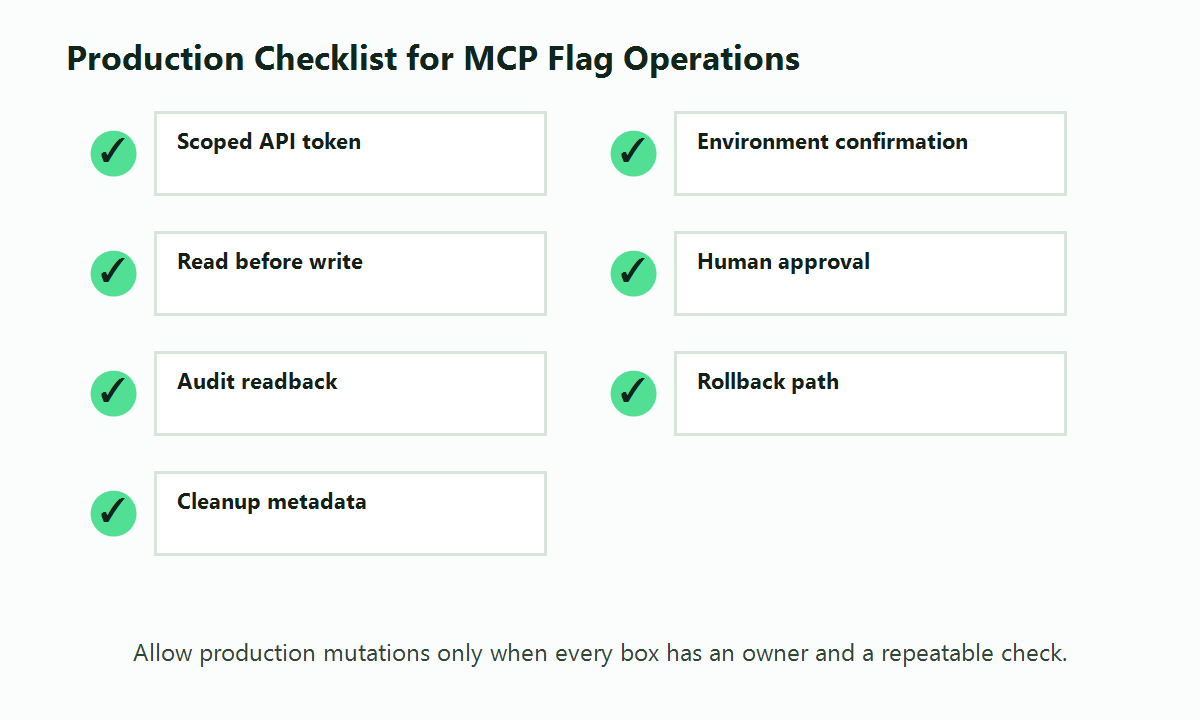
| Guardrail | Why it matters | Practical rule |
|---|---|---|
| Scoped API token | Limits what the MCP server can do if a client or workflow is misused | Use separate tokens for read-only, staging write, and production write workflows |
| Environment confirmation | Prevents accidental production changes | Require the assistant to name the project and environment before mutation |
| Read-before-write | Reduces stale assumptions | Read current flag state and audit logs before toggle, archive, or rollout changes |
| Human approval | Keeps risky operations intentional | Require approval for create, toggle, archive, and rollout update tools |
| Audit review | Makes changes reconstructable | After mutation, read back the flag and audit log entry |
| Rollback prompt | Keeps reversibility visible | Ask the assistant to state the rollback command or manual rollback path |
| Cleanup metadata | Prevents long-lived release debt | Require owner, flag type, and review date tags for new flags |
Two mistakes are common. The first is treating MCP authorization as the whole safety model. It is not. Authorization, token storage, audience validation, and transport security define what access is possible. Feature flag policy, lifecycle rules, and approval gates define which approved operation should happen now.
The second mistake is giving the assistant one high-privilege production token for every task. That makes simple read workflows carry unnecessary risk. If most prompts ask the assistant to inspect flags, start with read-only access and introduce mutation tools later.
A Practical First Rollout Plan
Start with a small adoption path:
- Week 1: Read-only discovery. Connect FeatBit MCP to one assistant with a read-only or low-risk token. Use it to list projects, find flags by tag, and summarize audit history.
- Week 2: Staging mutations. Allow create and rollout update tools only in staging. Require the assistant to print the intended operation before calling the tool.
- Week 3: Production prepare mode. Let the assistant prepare production changes, but do not allow it to execute mutation tools in production.
- Week 4: Narrow production writes. Allow a small set of production write operations only when the MCP client, reviewer, token scope, and audit-readback step are all in place.
This plan lets the team learn how the assistant behaves before granting it authority over live release controls. It also creates examples that can be encoded in repository instructions, FeatBit Skills, or internal platform documentation.
When MCP Is the Wrong Interface
Do not use MCP as the main runtime path for application feature evaluation. Applications should evaluate flags through SDKs or evaluation APIs. MCP is best for assistant-driven workflow operations: discovery, planning, creation, rollout preparation, audit review, and lifecycle cleanup.
MCP is also the wrong layer for broad policy enforcement. If a user, service, or environment must never access a tool or API, enforce that through IAM, network policy, FeatBit permissions, API token scope, and MCP authorization. Then use feature flags and approval gates for runtime release decisions inside that approved boundary.
Source Notes
- The Model Context Protocol tools specification describes tool discovery, tool calls, and human-in-the-loop expectations for tool invocation.
- The Model Context Protocol authorization specification describes HTTP transport authorization, resource indicators, token handling, audience validation, and token passthrough concerns.
- The FeatBit MCP repository documents the hosted endpoint, local setup, request headers, available tools, and coding-agent guidance for FeatBit feature flag operations.
- FeatBit's REST API guide and API access token documentation provide the underlying product automation and credential context that MCP workflows build on.
Next Step
If your team already uses FeatBit, connect the MCP server in read-only mode first and ask your assistant to summarize flags by project, tag, owner, and last change. If you are designing the workflow from scratch, start with the FeatBit MCP integration page, then add lifecycle expectations from feature flag lifecycle management before granting production write access.