
DevCycle MCP Server Alternative: Evaluate Agent-Native Feature Flag Workflows
If you are searching for a DevCycle MCP Server alternative, the real question is probably not "Which vendor has an MCP endpoint?" It is "Which feature flag workflow should my AI coding agents be allowed to touch, and where should human review, rollout evidence, audit, and cleanup stay deterministic?"
DevCycle's MCP Server is a strong category signal: feature flag platforms are moving into coding assistants. DevCycle documents a hosted MCP server that connects tools such as Cursor, Windsurf, Claude Desktop, Codex CLI, and Gemini CLI to DevCycle projects, with tools for feature management, variables, project selection, self-targeting, analytics, and SDK installation. The vendor-specific fit is clear when your organization already uses DevCycle and wants its AI workflow inside that model.
A FeatBit alternative should be evaluated differently. FeatBit's angle is an open-source, self-hostable release-control platform with API, CLI, MCP, skills, targeting, audit, rollout, experimentation, and lifecycle workflows. It is not useful to claim that every MCP tool maps one-to-one across vendors. It is more useful to decide whether your team wants agent-native flag operations to live inside a managed vendor workflow, a self-hosted control plane, or a hybrid operating model.
The Short Answer
Choose DevCycle MCP Server when your team already standardizes on DevCycle and wants AI assistants to operate directly against DevCycle's feature, variable, targeting, self-targeting, and analytics concepts.
Evaluate FeatBit when the decision is broader:
- You want an open-source feature flag control plane.
- You need hosted MCP for convenience and local MCP for self-hosted or private deployments.
- You want AI agents to work with feature flags, but not own production release authority.
- You care about flag lifecycle cleanup before AI-assisted flag creation becomes technical debt.
- You want the same platform to support progressive rollout, audit, experimentation, API automation, and self-hosted governance.
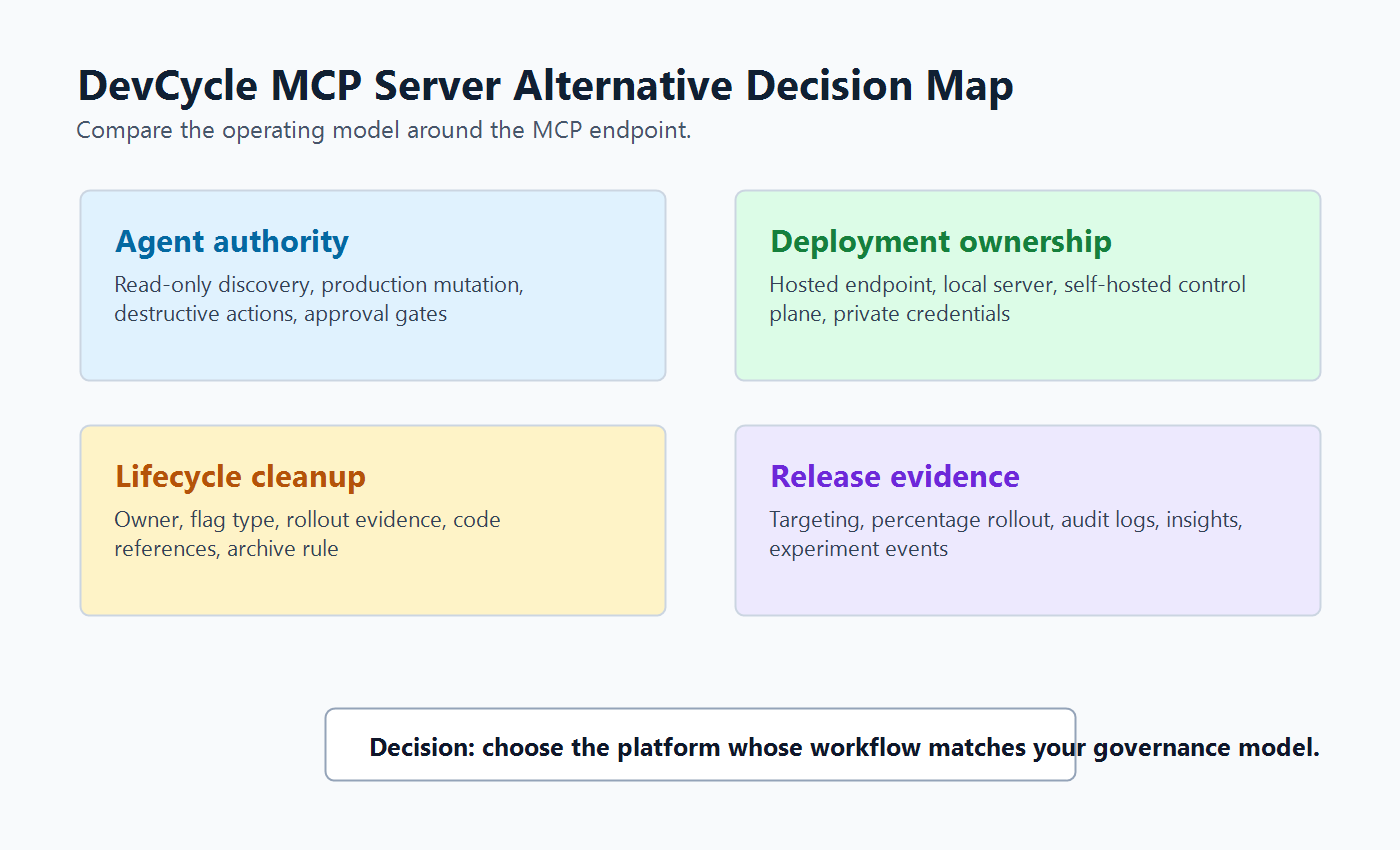
The better comparison is not "MCP endpoint versus MCP endpoint." It is the whole developer workflow around the endpoint.
What DevCycle MCP Server Signals
DevCycle's official MCP documentation shows where the category is heading. The server is hosted, supports remote MCP connections, and is organized around six tool categories: feature management, variable management, project management, self-targeting and overrides, results and analytics, and SDK installation. DevCycle's MCP reference also marks some tools as production-affecting or destructive, which is an important reminder that feature flag operations are not harmless chat actions.
That design solves a concrete DevCycle user job:
- Connect an AI coding assistant to DevCycle.
- Ask the assistant to create, inspect, update, or clean up feature flag objects.
- Use DevCycle's model of features, variables, targeting, overrides, and analytics as the operating surface.
If your team is committed to DevCycle, that tight coupling is a strength. The MCP server can speak the same nouns your dashboard, SDKs, and cleanup workflow already use.
If you are looking for an alternative, tight coupling is also the thing to inspect. Ask whether you want your AI workflow coupled to a specific vendor's project model, or whether you want a flag control plane you can self-host, inspect, automate, and adapt around your own release conventions.
Evaluation Criteria for an Alternative
Use these criteria before comparing tool lists.
| Criterion | Why it matters | What to check |
|---|---|---|
| Agent authority boundary | MCP tools can change production behavior if exposed too broadly. | Which actions are read-only, production-affecting, destructive, or approval-gated? |
| Deployment ownership | Some teams cannot route flag metadata, audit records, or credentials through a hosted vendor-only workflow. | Is hosted MCP enough, or do you need local MCP against a self-hosted instance? |
| Flag lifecycle model | AI can create flags faster than humans can clean them up. | Does the workflow record owner, type, fallback, rollout evidence, and cleanup rule? |
| Codebase integration | A flag is only useful when code evaluates it safely. | Can agents find references, follow SDK conventions, and propose small reviewable changes? |
| Rollout evidence | Creating a flag is not the release decision. | Can the workflow connect targeting, percentage rollout, audit logs, insights, and experiment events? |
| Vendor portability | MCP makes tool access easier, but SDK and data models still differ. | Do you need OpenFeature, API access, export paths, or self-hosted control to reduce lock-in? |
This frame also helps compare adjacent vendors. Unleash documents an MCP server focused on evaluating whether changes need flags, creating flags, wrapping code, managing rollouts, and cleanup. Statsig documents MCP capabilities across audit logs, dynamic configs, experiments, gates, layers, and metrics. PostHog has an official MCP repository that was archived in January 2026 after moving the server into its monorepo, with setup through its wizard. These are useful category signals, but each reflects a different product model.
Where FeatBit Fits
FeatBit should be evaluated as a release-control alternative for teams that want agent-native workflow without turning production control into an unchecked assistant action.
The FeatBit MCP Server is a Model Context Protocol server that lets AI coding agents manage FeatBit feature flags through natural language. The hosted endpoint is available at https://mcp.featbit.co/mcp, and the repository also documents local self-hosted setup for teams that need a custom FeatBit API base URL. The README states that FeatBit API credentials are forwarded with each request and should not be passed as MCP tool parameters.
That matters because many teams do not only need "an AI can create a flag." They need a controlled workflow:
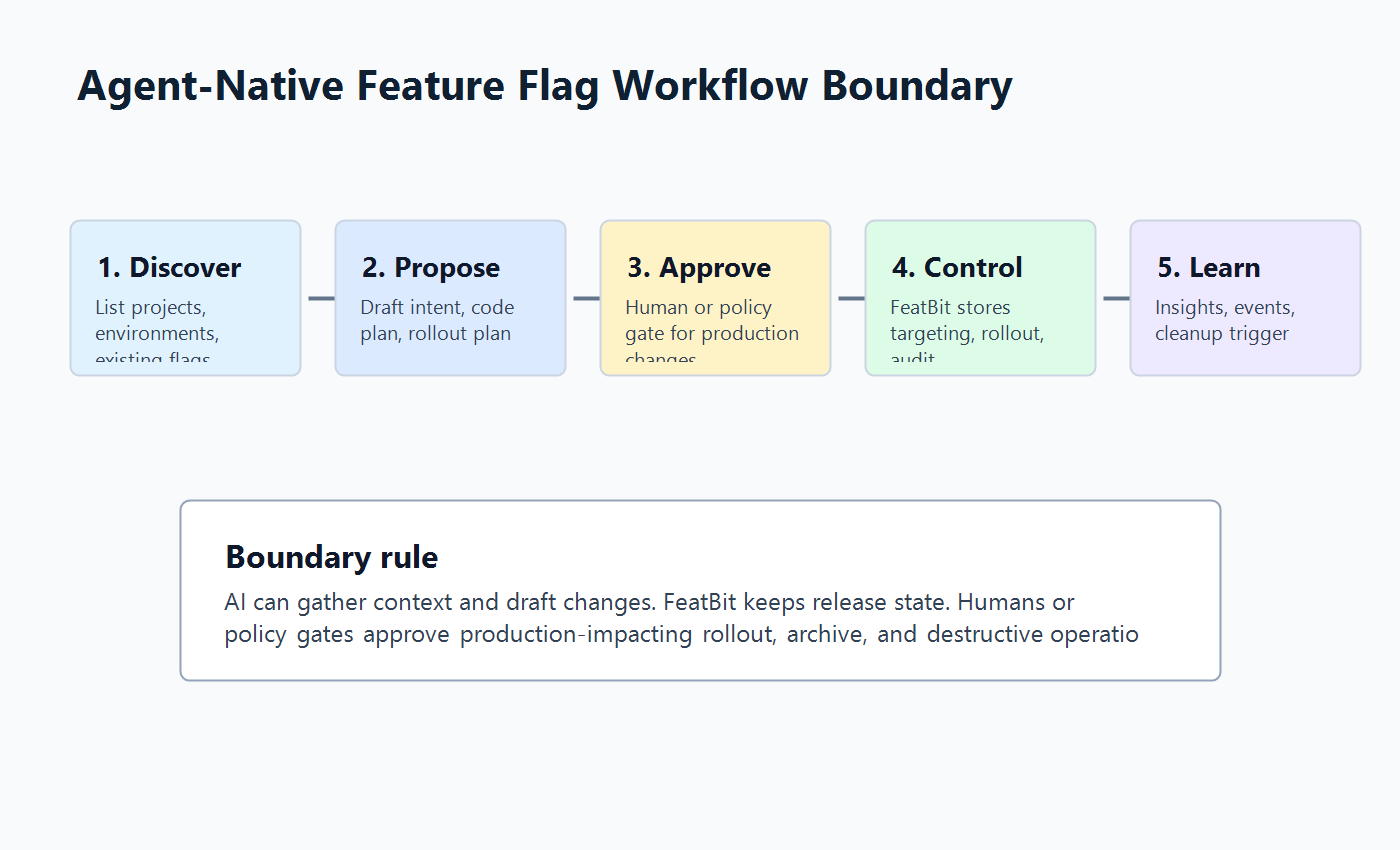
- The assistant discovers projects, environments, and existing flags.
- The assistant proposes a new flag or rollout change.
- A human or policy gate approves production-impacting changes.
- FeatBit stores the targeting, rollout, audit, and evaluation state.
- Code changes remain small, reviewable, and aligned with SDK conventions.
- Cleanup happens after the rollout decision is complete.
FeatBit's MCP tool surface includes project discovery, feature flag listing, single-flag lookup, toggling, archiving, creating disabled boolean flags, updating rollout assignments, audit log lookup, and feature flag evaluation. Combined with the FeatBit CLI, FeatBit Skills, and the FeatBit REST API documentation, this gives platform teams several ways to make feature flag operations agent-readable without forcing every workflow through a dashboard.
A Practical FeatBit MCP Workflow
For a team evaluating a DevCycle MCP Server alternative, a FeatBit workflow can look like this.
1. Start with read-only discovery
Do not begin by letting an assistant create or toggle production flags. Start with discovery:
List feature flags in this project that match checkout, payment, or onboarding.
Summarize the flag key, environment, enabled state, archived state, tags, owner hints, and last change if available.
Do not modify any flag.
This turns the MCP server into context before it becomes an operator. It also helps the assistant avoid duplicate flags, a problem every agent-native flag workflow needs to solve.
2. Require a flag intent before creation
Before creating a flag, ask the assistant to produce a reviewable intent:
flag_intent:
  key: checkout-risk-model-v2
  purpose: Gradually release a new checkout risk scoring model.
  type: boolean
  fallback: false
  owner: payments-platform
  first_target: internal staff and test accounts
  rollout_plan: 0 percent, 5 percent, 25 percent, 100 percent
  guardrails:
    - checkout_error_rate
    - payment_authorization_failure
  cleanup_rule: remove old model branch after full rollout and rollback window
Only after that intent is reviewed should an MCP or API workflow create the flag. The flag should begin disabled in production unless a separate rollout approval says otherwise.
3. Keep rollout authority explicit
An assistant can draft the rollout plan, but production exposure should remain a release decision. In FeatBit, that decision can use targeting rules, segments, percentage rollouts, audit logs, and insights. The point is to make the AI-assisted workflow faster without hiding the control state.
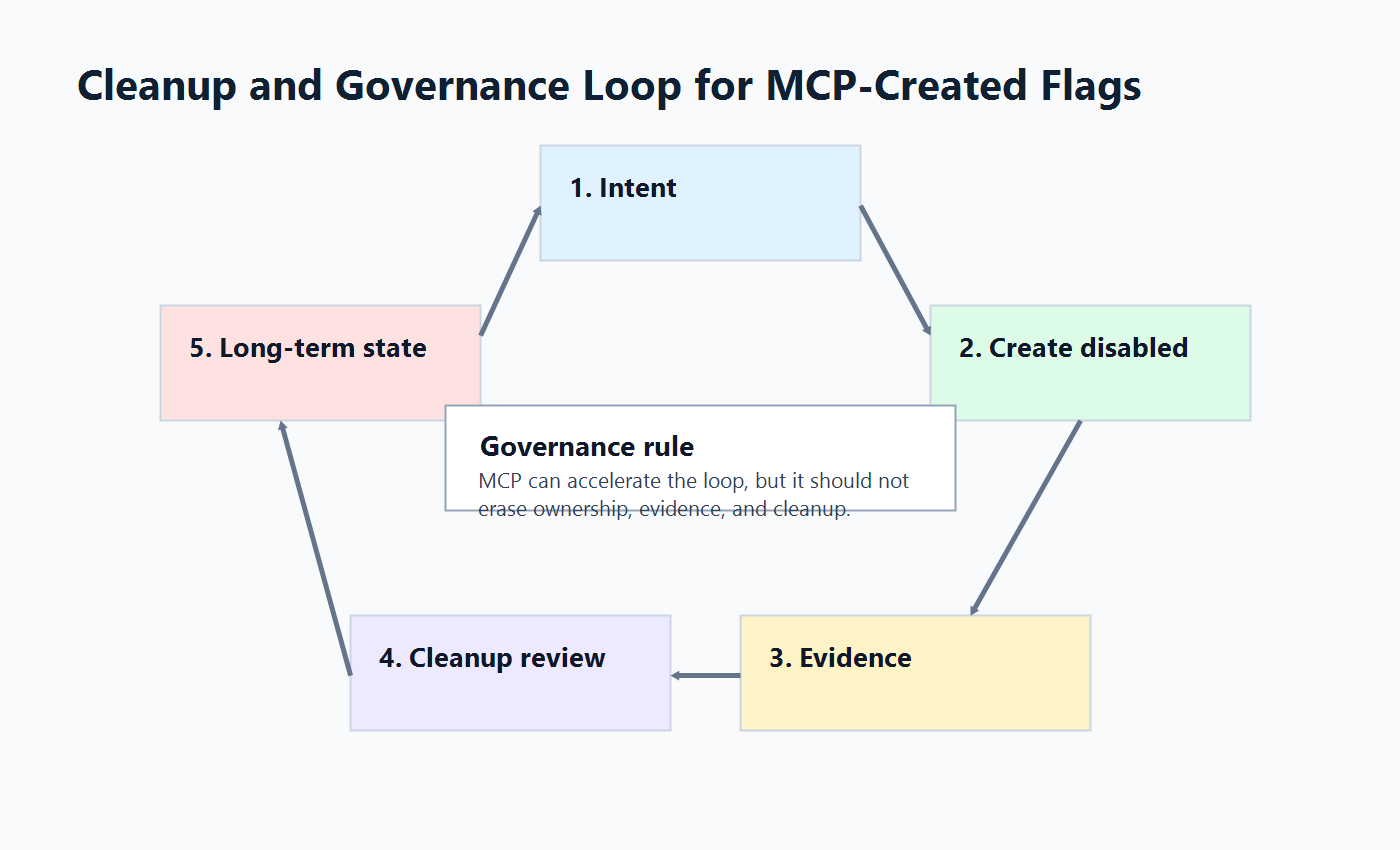
This pairs naturally with FeatBit's broader AI control layer, AI agent deployment loop, and feature flag lifecycle management model. A flag is not complete when it is created. It is complete when the release decision has evidence and the temporary control has a cleanup path.
4. Make cleanup part of the first prompt
The biggest hidden cost of AI-assisted flag creation is flag debt. Agents can create more flag branches, prompt switches, model routes, and tool gates than humans will remember to remove.
Make cleanup a required field:
- Who owns the flag?
- Is it a release, experiment, operational, permission, or configuration flag?
- What event proves the decision is complete?
- Which code references must be removed?
- Should the flag be archived, kept as a long-lived operational control, or converted into normal configuration?
For implementation detail, connect this article to the FeatBit guides on AI-assisted flag management, stale AI flag cleanup, and self-hosted feature flags.
How FeatBit and DevCycle Differ as an Evaluation Question
Avoid unsupported vendor rankings. Instead, compare fit.
| Buying question | DevCycle MCP Server fit | FeatBit alternative fit |
|---|---|---|
| Are we already standardized on DevCycle? | Strong fit because MCP maps directly to DevCycle concepts. | Evaluate only if broader platform change is on the table. |
| Do we need self-hosted release control? | Check DevCycle's deployment and data model requirements directly. | Stronger evaluation reason because FeatBit is open source and self-hostable. |
| Do we want AI agents to manage flag lifecycle, not just creation? | Check cleanup and stale-feature workflows in DevCycle docs. | Evaluate FeatBit lifecycle docs, MCP, CLI, and skills together. |
| Do we need natural-language flag operations inside coding tools? | DevCycle documents hosted MCP setup across multiple AI clients. | FeatBit documents hosted MCP and local MCP setup across common clients. |
| Do we need a broad experimentation and analytics suite in the same vendor platform? | DevCycle's feature management model includes analytics-related MCP tools. | FeatBit supports experimentation and insights, but teams should verify their exact analytics needs. |
| Do we need infrastructure ownership and auditability as part of procurement? | Ask for vendor-specific answers. | Evaluate FeatBit self-hosting, API access, audit logs, and deployment options early. |
The practical decision is this: use the vendor-native MCP server when the vendor-native workflow is exactly what you want. Consider FeatBit when the operating model matters as much as the MCP endpoint: self-hosting, source visibility, API-first automation, lifecycle cleanup, and release control across AI-assisted development.
Migration and Trial Path
A safe evaluation does not start with a full migration. Start with one low-risk workflow.
- Pick one new release flag that is not tied to billing, permissions, or regulated behavior.
- Use FeatBit MCP or API discovery to list related flags and confirm no duplicate exists.
- Ask the assistant to draft the flag intent, code insertion plan, rollout plan, telemetry checklist, and cleanup rule.
- Create the flag disabled by default.
- Add the SDK evaluation in a small pull request.
- Roll out to internal users first.
- Record the release decision and cleanup trigger.
This trial answers the questions that matter more than a feature checklist:
- Did the agent produce useful context?
- Did humans retain release authority?
- Did the flag stay visible in audit and rollout state?
- Did cleanup have an owner and trigger from day one?
- Did self-hosting, API access, or source visibility change the procurement conversation?
Common Mistakes
Treating MCP as a safety boundary. MCP standardizes how tools are exposed to agents. It does not replace authorization, scoped credentials, approval policy, audit, or rollout governance.
Letting agents mutate production before they can explain intent. Require a flag intent and rollout plan before any production-affecting action.
Comparing only tool counts. A large tool list is useful only if the permissions, prompts, and review process make those tools safe.
Forgetting code cleanup. A feature flag created by an agent still becomes code debt if nobody removes obsolete branches.
Using one global flag for agent behavior. Agent workflows often need separate controls for tool access, prompt profile, rollout stage, fallback mode, and cleanup.
When FeatBit Is a Credible Alternative
FeatBit is worth evaluating as a DevCycle MCP Server alternative when your team wants agent-native feature flag work, but the key requirement is control ownership rather than only assistant convenience.
Use FeatBit as the evaluation path when:
- platform engineering wants open-source infrastructure for feature flags and experimentation;
- security or compliance teams need a private deployment option;
- developers want MCP, CLI, API, and skills that fit coding-agent workflows;
- release managers want targeting, rollout, audit, and cleanup in the same control plane;
- teams want AI-assisted flag work without giving AI unrestricted production mutation authority.
Use DevCycle MCP Server when:
- your feature flag system of record is DevCycle;
- your team wants the DevCycle feature and variable model exposed directly to coding assistants;
- hosted OAuth-based MCP setup is the preferred operating pattern;
- the main job is accelerating DevCycle-native flag and SDK workflows rather than evaluating a different control plane.
That is the honest alternative frame. FeatBit is not a DevCycle clone. It is a release-control platform with an agent-native surface for teams that want feature flags, rollout evidence, lifecycle cleanup, and deployment ownership to remain under their own operating model.
Source Notes
- DevCycle documents its hosted MCP setup, supported AI clients, and six tool categories in MCP Getting Started and production-affecting tool warnings in the MCP Reference.
- FeatBit MCP details come from the FeatBit MCP Server repository, including hosted endpoint, local self-hosted setup, credential forwarding guidance, and available tools.
- FeatBit automation context comes from the FeatBit CLI repository, FeatBit Skills repository, and FeatBit REST API documentation.
- Category context comes from official vendor sources: Unleash MCP Server, Statsig MCP documentation, and the archived PostHog MCP repository.
- Protocol context comes from the official Model Context Protocol repository. This article uses MCP as tool-integration context, not as a claim of security or governance by itself.
Image and Open Graph Notes
- Cover image:
/images/blogs/devcycle-mcp-server-alternative/cover.pngis the social preview for the article. - Body image:
/images/blogs/devcycle-mcp-server-alternative/decision-map.pngsummarizes the evaluation frame for DevCycle MCP Server alternatives. - Body image:
/images/blogs/devcycle-mcp-server-alternative/agent-workflow-boundary.pngshows where AI proposal, FeatBit control, human approval, and rollout evidence belong. - Body image:
/images/blogs/devcycle-mcp-server-alternative/cleanup-and-governance-loop.pngvisualizes lifecycle cleanup so MCP-created flags do not become debt.
Next Step
Choose one upcoming flag that a coding assistant could help create. Before connecting any MCP server, write the operating contract: allowed actions, approval boundary, rollout path, evidence, owner, and cleanup rule. If that contract is clear, FeatBit MCP can become a useful interface. If it is not clear, the first task is workflow design, not vendor selection.