
Gateway vs App-Level Feature Flag Rollout: Where Should Canary Logic Live?
When people ask whether gradual rollout or canary logic should live in the gateway or at the application level, the honest answer is: it depends. A gateway can shift traffic between deployable versions. A feature flag can control a specific feature, behavior, segment, experiment, or rollback path inside the application.
The better first question is not "Where should the percentage logic run?" It is "Do we need to release, control, troubleshoot, and learn from features independently?"
If the answer is yes, feature flags usually matter more than the exact place where the rollout percentage is evaluated. Gateway canary and application-level feature flags solve related but different release-control problems.
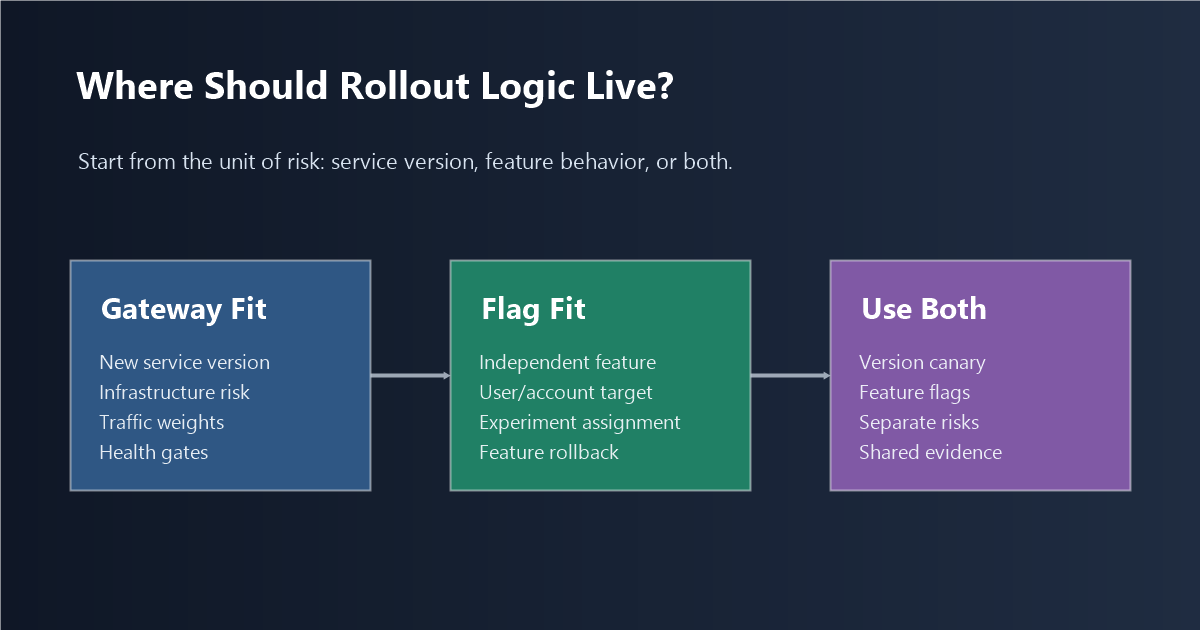
The Hidden Question Behind Gateway vs App Rollout
Gateway rollout is usually a deployment question. It asks: "Which version of the service should receive this request?"
Application-level feature flags are usually a release question. They ask: "Which product behavior should this user, account, request, workflow, or experiment unit receive?"
Those questions overlap, but they are not the same. A single deployed version can contain several unfinished or risky features. A single feature can need different exposure rules across account tiers, regions, users, permissions, experiments, or operational states. A gateway does not automatically know those product boundaries. Application code does.
That is why the decision should start from the team's release needs.
Feature flags make sense when a team needs to:
- ship multiple times a day;
- release multiple features in the same release train;
- isolate and disable a problematic feature in production without rolling back the whole deployment;
- identify which feature is causing production issues;
- validate user experience, product assumptions, or business outcomes before exposing a feature to everyone.
For teams with those needs, the real operating requirement is independent feature release control. The implementation can still include a gateway, but the feature decision needs a durable control point.
What Gateway Rollout Is Good At
Gateway, ingress, service mesh, and rollout-controller logic is strong when the unit of control is a deployable version or traffic route.
Use gateway-level rollout when you need to:
- shift a percentage of traffic from version A to version B;
- test a new container image, service version, endpoint, or infrastructure dependency;
- validate service-level metrics such as error rate, saturation, latency, and availability;
- route by headers, paths, hosts, or coarse request attributes;
- abort a deployment before a new version becomes stable.
This is the natural home for canary deployment. Argo Rollouts, for example, describes canary as releasing a new application version to a small percentage of production traffic, with steps such as setting traffic weight and pausing before promotion. That is valuable infrastructure control.
But the gateway usually sees traffic, not product intent. It may know that 10% of requests should reach version B. It may not know whether a request is for the new checkout flow, whether the account is in a beta program, whether the feature is part of an A/B test, or whether this feature should remain off for one enterprise customer.
What App-Level Feature Flags Add
Application-level feature flags are strong when the unit of control is a feature, behavior, configuration, user segment, experiment, permission, or rollback decision.
Use application-level flags when you need to:
- release one feature independently from other features in the same deployment;
- target specific users, accounts, regions, plans, or cohorts;
- keep assignment stable for an A/B test or progressive rollout;
- record exposure when the feature actually runs;
- connect feature exposure to product metrics, support signals, or business outcomes;
- disable one risky feature without reverting unrelated code;
- keep a decision record for cleanup after rollout.
Martin Fowler's feature toggle taxonomy is still useful here because different toggles serve different purposes: release toggles, experiment toggles, ops toggles, and permissioning toggles require different management rules. A gateway percentage split does not replace those categories. It only controls traffic flow.
FeatBit's view is that feature flags are release-decision infrastructure. They separate deployment from release, make exposure reversible, and let the team connect runtime behavior to evidence. For implementation details, FeatBit's guide to targeted progressive delivery covers targeting, ring deployment, canary launch, and percentage rollout patterns.
A Placement Decision Table
Use this table before choosing the technical boundary.
| Question | Gateway rollout | App-level feature flag | Often both |
|---|---|---|---|
| Are you validating a new service version? | Strong fit | Sometimes useful | Yes, if the version includes feature-level risk |
| Are several features shipped in one release train? | Weak fit | Strong fit | Gateway protects the version; flags control each feature |
| Do you need user, account, region, plan, or permission targeting? | Limited fit | Strong fit | Gateway may route broad traffic; flag handles eligibility |
| Do you need A/B assignment and exposure events? | Limited fit | Strong fit | Gateway can route; flag should own experiment assignment |
| Do you need to disable one feature without rollback? | Weak fit | Strong fit | Flag is the main control |
| Is the risk infrastructure-level, such as CPU, memory, or service latency? | Strong fit | Guardrail context | Both if product behavior also changed |
| Do you need product or business outcome validation? | Weak fit | Strong fit | Gateway is supporting infrastructure |
| Do you need feature cleanup after release? | Not enough | Strong fit | Flag lifecycle should own cleanup |
The practical answer is rarely "gateway or app forever." It is "which layer owns which decision?"
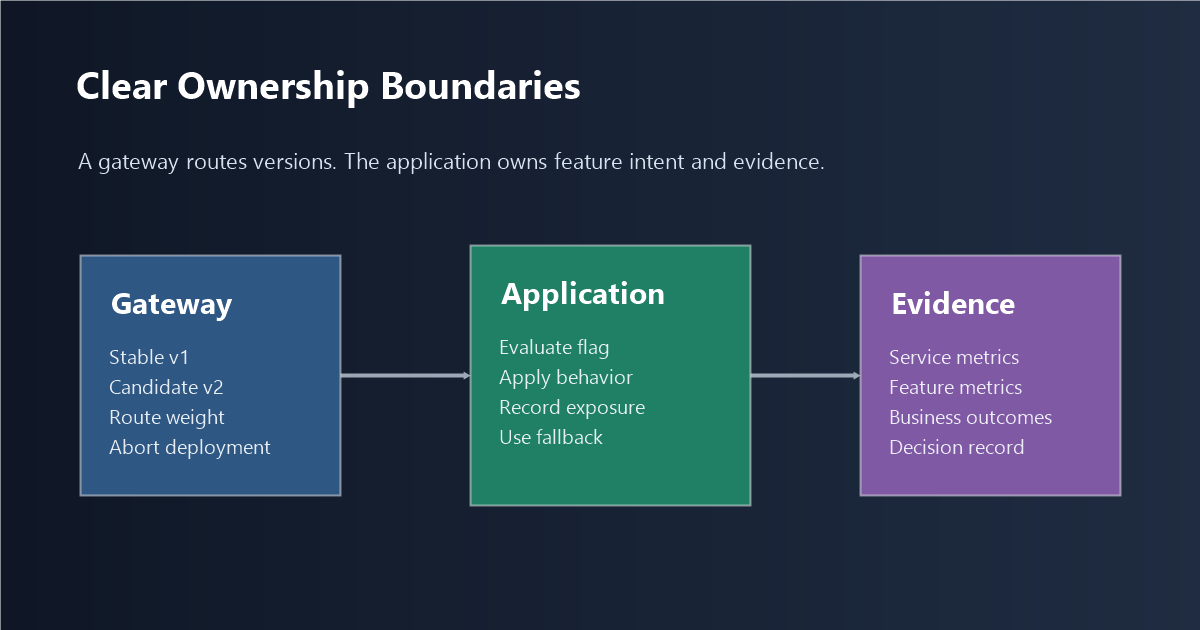
A Simple Architecture Rule
Let the gateway own service routing. Let the application flag own product release decisions.
That usually means:
- gateway: route traffic between stable and candidate service versions;
- application: evaluate feature flags using trusted request, user, account, and environment context;
- observability: correlate service metrics, feature exposure, and outcome events;
- release owner: decide whether to continue, pause, expand, roll back, or clean up.
This boundary is especially important when one deployment includes multiple feature changes:
deployment_2026_06_20
  feature_a: checkout_redesign
  feature_b: invoice_export_v2
  feature_c: new_recommendation_model
If the gateway sends 10% of traffic to the new version and errors increase, the team knows the candidate deployment has a problem. It may not know which feature caused it. If each risky feature has its own flag, the team can reduce exposure for new_recommendation_model while leaving checkout_redesign and invoice_export_v2 available.
That is the difference between deployment rollback and feature rollback.
When Feature Flags Are Not Worth It
Feature flags are not free. They add SDK calls, evaluation context, branch logic, operational ownership, and cleanup work. If the team releases once a month, ships one feature at a time, and can roll back the whole deployment without meaningful business cost, gateway-level rollout may be enough.
Feature flags become more valuable when the cost of broad rollback is high:
- multiple teams share the same release train;
- product and engineering need different release timing;
- production issues need fast isolation;
- beta, entitlement, region, or enterprise targeting matters;
- experiments need stable assignment and outcome attribution;
- the team wants to ship code before every feature is ready for everyone.
The maturity question is not "Can we add a flag SDK?" It is "Will someone own the flag's purpose, rollout rule, evidence, rollback path, and cleanup?"
Without that ownership, feature flags become another source of release debt. FeatBit's feature flag lifecycle management guidance treats a flag as a release asset with owner, intent, evidence, decision state, and cleanup expectation.
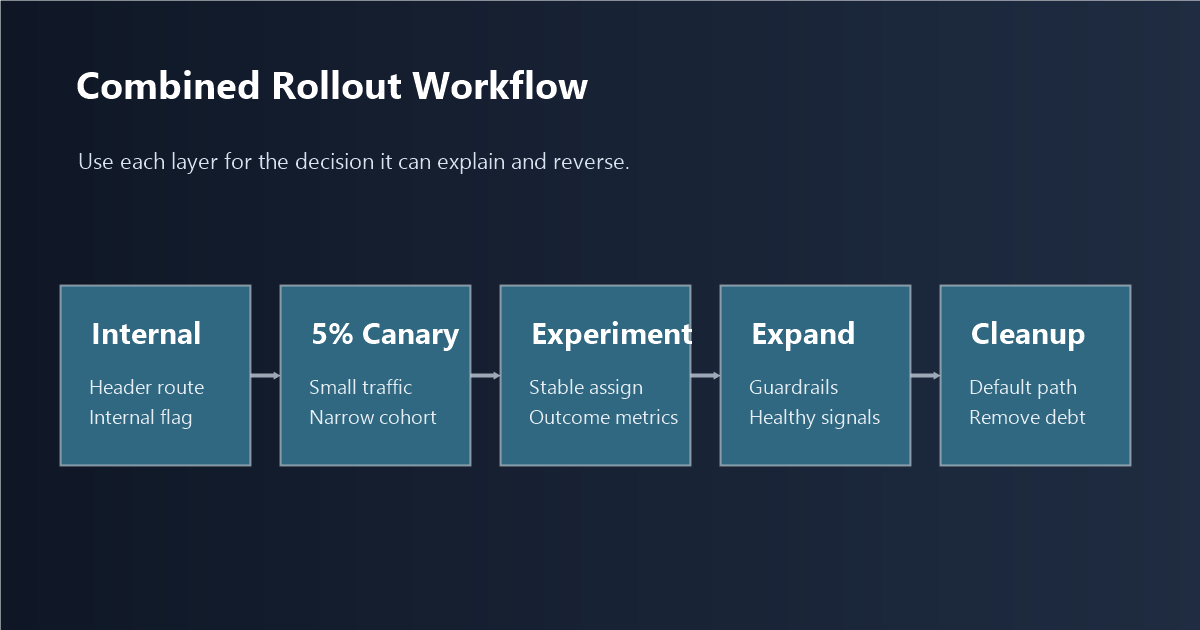
How To Combine Gateway Canary And Feature Flags
For a risky release, a combined rollout can look like this:
| Stage | Gateway control | App-level flag control | Decision evidence |
|---|---|---|---|
| Internal validation | Route internal or header-selected traffic to candidate version | Enable feature only for internal users | Smoke tests, logs, obvious UX issues |
| Small canary | Send 5% traffic to candidate version | Enable the feature for a narrow eligible cohort | Error rate, latency, support signal, feature exposure |
| Experiment | Keep service version stable enough for comparison | Split control and treatment by user, account, or request unit | Primary metric, guardrails, segment readout |
| Expansion | Increase service or feature exposure deliberately | Expand targeting rules or percentage rollout | Guardrails stay healthy |
| Full release | Candidate version becomes stable | Winning behavior becomes default | Decision record and cleanup path |
| Cleanup | Remove obsolete deployment path | Remove temporary feature flag branch or convert to operational control | Tests and ownership updated |
FeatBit's 5% canary to 50% A/B to 100% rollout playbook expands this staged model. The key point is that each stage answers a different question: service safety, feature safety, product impact, and rollout completion.
Common Mistakes
Using gateway canary as a substitute for feature ownership. Gateway rollout can reduce deployment blast radius, but it does not automatically create feature-level accountability, experiment assignment, or cleanup.
Putting every operational concern inside feature flags. Infrastructure routing, pod scaling, network-level traffic shifting, and deployment promotion belong closer to the platform layer. Feature flags should not become a hidden service mesh.
Randomizing twice. If the gateway and app both split traffic independently, the team may create confusing cohorts and unreliable experiment data. Pick one owner for assignment.
Rolling back a whole deployment because one feature is bad. This is the failure mode feature flags are meant to avoid. If the deployment contains multiple independent changes, risky features need independent controls.
Leaving flags after the decision is complete. A rollout flag should either be removed after the behavior becomes permanent or intentionally converted into an operational control with a longer lifecycle.
Practical Checklist
Before deciding where rollout logic should live, answer these questions:
- What is the unit of risk: service version, feature, user experience, permission, model route, or business workflow?
- Can one deployment contain multiple independent release decisions?
- Who needs to change exposure: platform team, application team, product owner, incident commander, or experiment owner?
- What context is required: request path, header, user ID, account tier, region, plan, risk level, or experiment unit?
- What evidence decides expansion: infrastructure health, product behavior, business outcome, support signal, or experiment metric?
- What is the rollback action: route back to stable, disable a feature, reduce a cohort, or restore a fallback?
- What cleanup is expected after full release?
If most answers are about service version health, start with gateway rollout. If most answers are about independent feature control, user targeting, experiments, or product evidence, use application-level feature flags. If both kinds of risk exist, combine them deliberately and make one layer the owner of each decision.
The goal is not to put rollout logic in the most elegant technical layer. The goal is to make release decisions reversible, observable, and attributable. For teams shipping often, releasing multiple features together, and validating production outcomes, feature flags are usually the control plane that makes gradual rollout operationally useful.
Source Notes
- User-provided draft context: the article is based on the operating question of whether gradual rollout and canary logic should live in a gateway or at the application level with feature flags.
- Gateway rollout context: Argo Rollouts' canary strategy documentation is used as an example of deployment-level canary control with traffic weights, pauses, traffic routing, and promotion.
- Feature toggle context: Martin Fowler's Feature Toggles article is used for the distinction between toggle categories such as release, experiment, ops, and permissioning toggles.
- FeatBit implementation context: targeted progressive delivery, percentage rollouts, feature flag lifecycle management, and 5% canary to 50% A/B to 100% rollout.
Image And Open Graph Notes
- Use
cover.pngas the Open Graph image because it frames the gateway-versus-application placement decision. - Use
placement-decision-map.pngnear the opening because it gives readers the decision split before implementation details. - Use
rollout-boundaries.pngin the architecture section because it shows which layer owns which control. - Use
combined-rollout-workflow.pngnear the combined rollout section because it explains how gateway canary and app-level feature flags work together.