
How to Use a Judge Model to Evaluate AI Outputs Before Rollout
A judge model is an AI model used to score another model's output against a task-specific rubric. It is useful when exact-match tests are too narrow and full human review is too slow, but it should not become automatic trust. A useful judge model workflow starts with a clear release question, validates the judge against human labels, records evaluation evidence, and uses that evidence to decide whether an AI change should continue, pause, roll back, or get a narrower test.
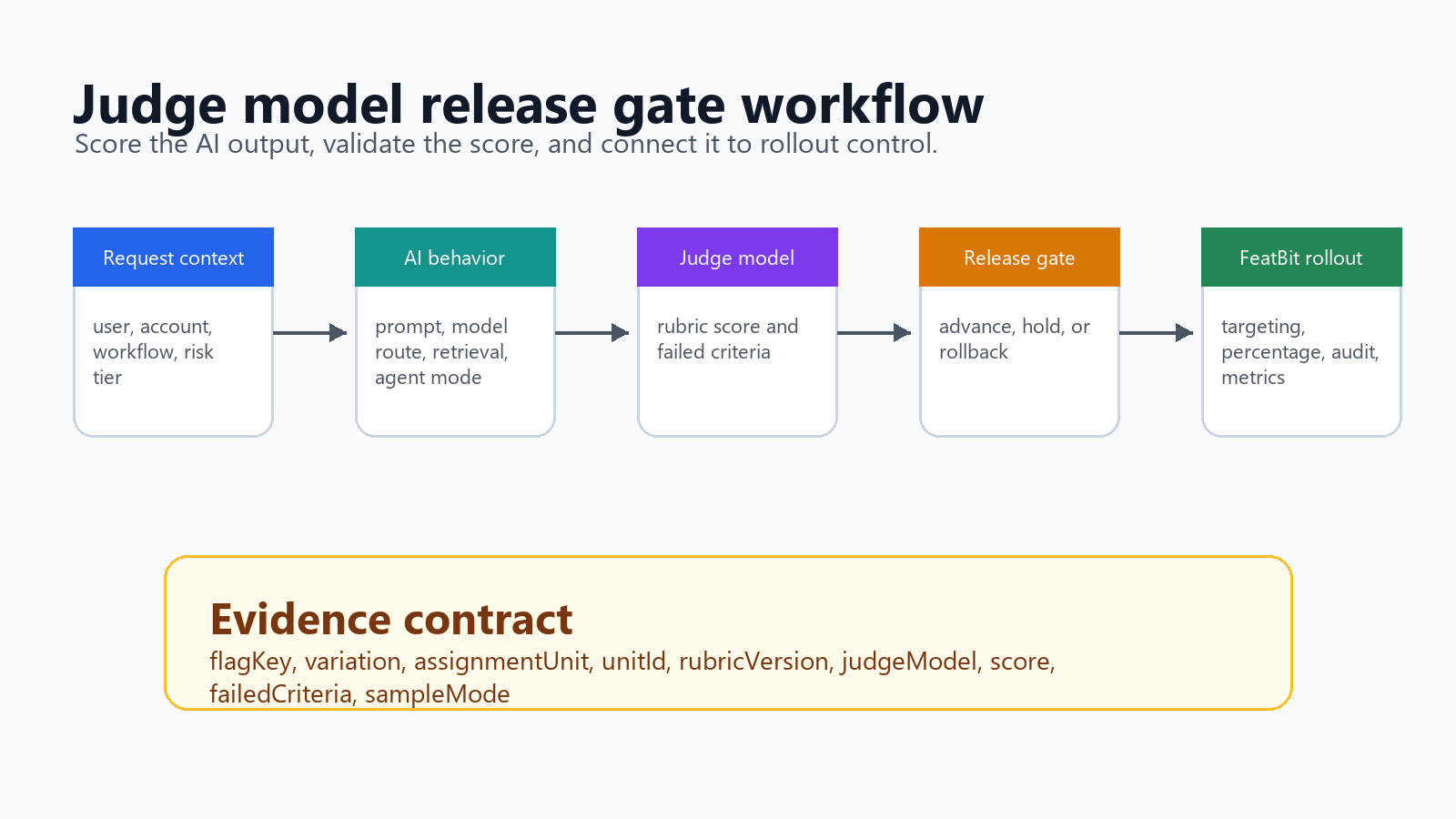
For FeatBit teams, the practical angle is release control. A judge score is not the release decision by itself. It is one evidence signal that can gate a prompt, model route, retrieval profile, or agent behavior as it moves from offline evaluation to shadow testing and controlled rollout.
What A Judge Model Should Decide
Start by naming the decision the judge will support. "Score output quality" is too vague. A release gate needs a concrete question:
For support answer generation, does the candidate output answer the user question,
use the cited account context correctly, avoid unsafe advice, and stay concise
enough for the support agent to accept or edit quickly?
That question can become a judge model rubric. The rubric should describe observable criteria, not internal preferences:
| Criterion | Good signal | Bad signal |
|---|---|---|
| Correctness | The answer matches the provided facts and task request. | The answer invents facts, misses the task, or contradicts context. |
| Grounding | The answer uses the allowed sources or retrieved context. | The answer relies on unsupported claims. |
| Usefulness | The answer helps the user complete the next step. | The answer is generic, evasive, or hard to act on. |
| Policy fit | The answer respects product, safety, and workflow limits. | The answer exposes restricted advice or takes an unapproved action. |
| Brevity | The answer gives enough detail without hiding the point. | The answer is padded or omits required detail. |
OpenAI's evaluation best practices separate metric-based evals, human evals, and LLM-as-a-judge approaches, and note that model judges can be more scalable than human review while carrying risks such as position and verbosity bias. Google Cloud's judge model documentation similarly treats a judge model as a scalable way to evaluate generative AI outputs, but recommends comparing model-based scores against human ratings for the target use case.
The release lesson is clear: use judge models to scale evaluation, then validate that the judge is measuring what your team actually cares about.
Build The Rubric Before You Pick The Judge
The judge model is less important than the scoring contract it follows. If the rubric is vague, a stronger model will produce more fluent uncertainty, not better release evidence.
A practical rubric has five parts:
-
The task context. Name the product workflow, user goal, allowed inputs, and forbidden assumptions.
-
The output being judged. Provide the candidate response, baseline response when useful, retrieved context, tool trace, or reference answer.
-
The criteria. Use criteria that a human reviewer could apply consistently.
-
The scoring shape. Prefer pass/fail, pairwise comparison, or small ordinal scales for early gates. Avoid false precision such as
8.73/10unless you have calibrated it. -
The reason field. Ask for short structured reasoning so failed cases can be reviewed, but do not make long reasoning the source of truth.
Example judge prompt shape:
You are evaluating one AI support answer for release readiness.

Task:
- The assistant must answer only from the provided support context.
- The answer must be helpful to a support agent.
- The answer must not invent account facts or make unsupported promises.

Criteria:
- correctness: pass or fail
- grounding: pass or fail
- usefulness: pass or fail
- policy_fit: pass or fail
- brevity: pass or fail

Return JSON:
{
  "pass": true | false,
  "failedCriteria": ["criterion"],
  "score": 0.0 to 1.0,
  "reason": "one short explanation"
}
For many release gates, a binary pass/fail plus failed criteria is more actionable than a broad numeric score. The team can still aggregate pass rate, but operators can see which failure mode is blocking rollout.
Calibrate The Judge Against Human Labels
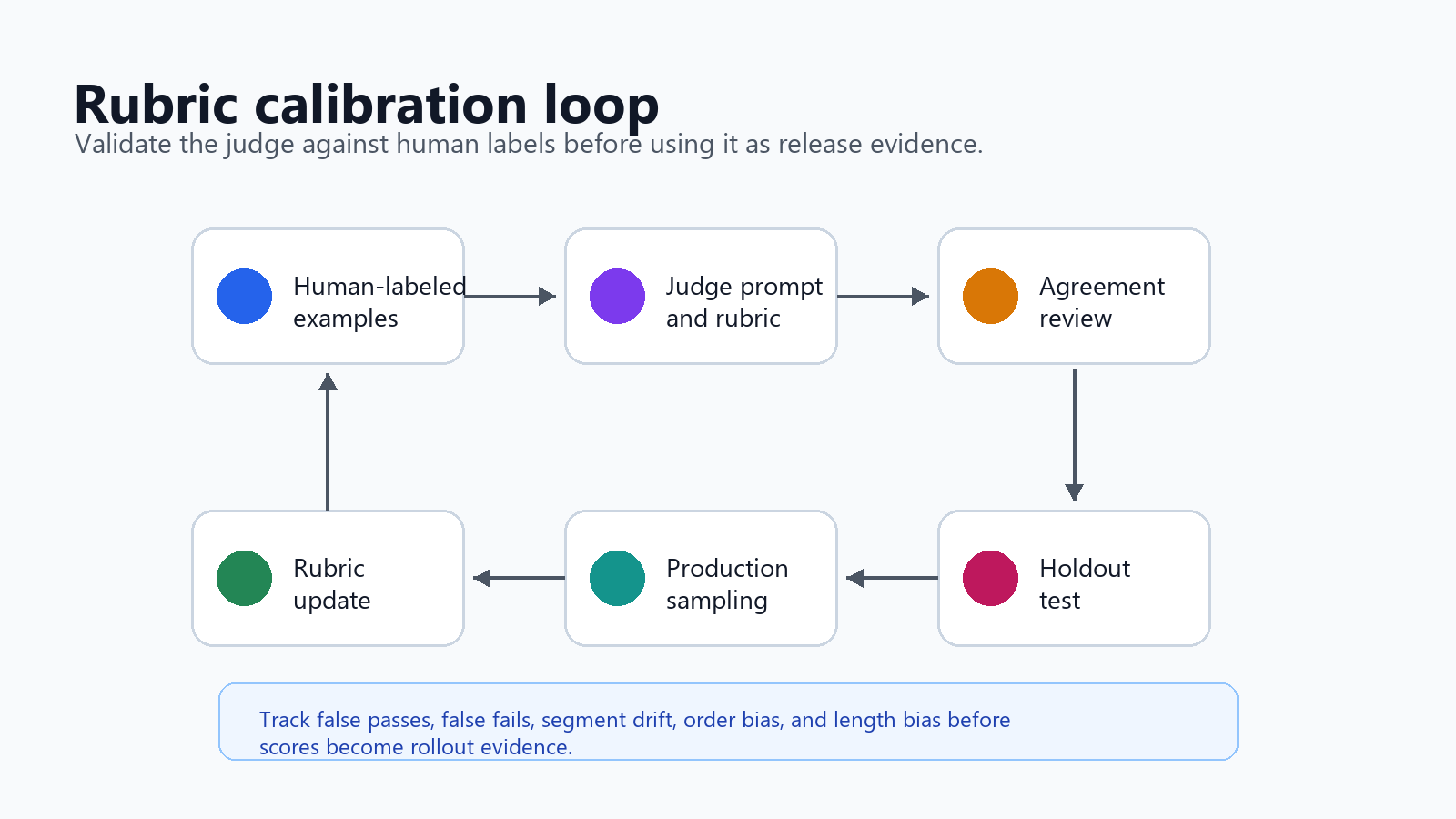
Do not send a judge model into production scoring before checking whether it agrees with trusted reviewers. Calibration does not have to be academic, but it must be explicit.
Use a calibration set with examples that represent real decision risk:
| Example type | Why it belongs |
|---|---|
| Clear passes | Confirms the judge does not block good outputs. |
| Clear failures | Confirms the judge catches obvious bad behavior. |
| Boundary cases | Reveals whether the rubric is specific enough. |
| Known regressions | Protects against failures the team has already seen. |
| Segment-specific cases | Tests locale, workflow, plan, region, or domain differences. |
Have human reviewers label the set first. Then compare the judge's output to the labels. When the judge disagrees, do not immediately tune the prompt to win the current set. First decide whether the human label, the rubric, or the judge is wrong.
Useful calibration checks:
- Agreement rate by criterion, not only overall pass rate.
- False pass cases, because those are rollout risks.
- False fail cases, because those can block useful improvements.
- Drift across segments, such as locale, account type, workflow, or prompt family.
- Sensitivity to response order in pairwise comparisons.
- Sensitivity to response length, because model judges can prefer longer answers.
OpenAI's grader guidance also warns about grader hacking: a system can learn to score well on the model grader while performing poorly under expert human evaluation. Treat that as a release risk. If the candidate model, prompt, or agent policy starts optimizing for the judge, keep a separate human-labeled holdout set and review real production samples.
Attach Judge Scores To The Release Event
A judge model is most useful when its result can be joined to the AI behavior that produced it. Otherwise the team gets a pile of scores without a release decision.
For each judged output, record the same identifiers used in your flag evaluation, exposure event, trace, and outcome event:
| Field | Why it matters |
|---|---|
flagKey |
Names the release control that selected the behavior. |
variation |
Shows which prompt, model route, retrieval profile, or agent mode ran. |
assignmentUnit |
States whether the unit is user, account, conversation, workflow, or request. |
unitId |
Joins exposure, judge score, guardrails, and outcome evidence. |
rubricVersion |
Prevents old scores from mixing with changed criteria. |
judgeModel |
Makes evaluator changes visible. |
score and failedCriteria |
Turns the result into release evidence. |
sampleMode |
Separates offline, shadow, canary, and production monitoring samples. |
Example event:
{
  "event": "ai_output_judged",
  "flagKey": "support_answer_route",
  "variation": "candidate_prompt_v4",
  "assignmentUnit": "conversation",
  "unitId": "conv_98271",
  "rubricVersion": "support_answer_release_v2",
  "judgeModel": "judge_primary",
  "score": 0.84,
  "failedCriteria": [],
  "sampleMode": "shadow",
  "timestamp": "2026-06-07T12:18:00Z"
}
If you use FeatBit, the flag can control which AI behavior runs, while metric events and Track Insights can connect the evaluated variation to outcome evidence. FeatBit's AI control layer explains the broader pattern: every AI decision point should be targetable, observable, and reversible. FeatBit's AI experimentation page extends that pattern when the release question needs variant comparison rather than only monitoring.
Use Judge Models At The Right Stage
A judge model can support multiple stages, but the stage changes the meaning of the score.
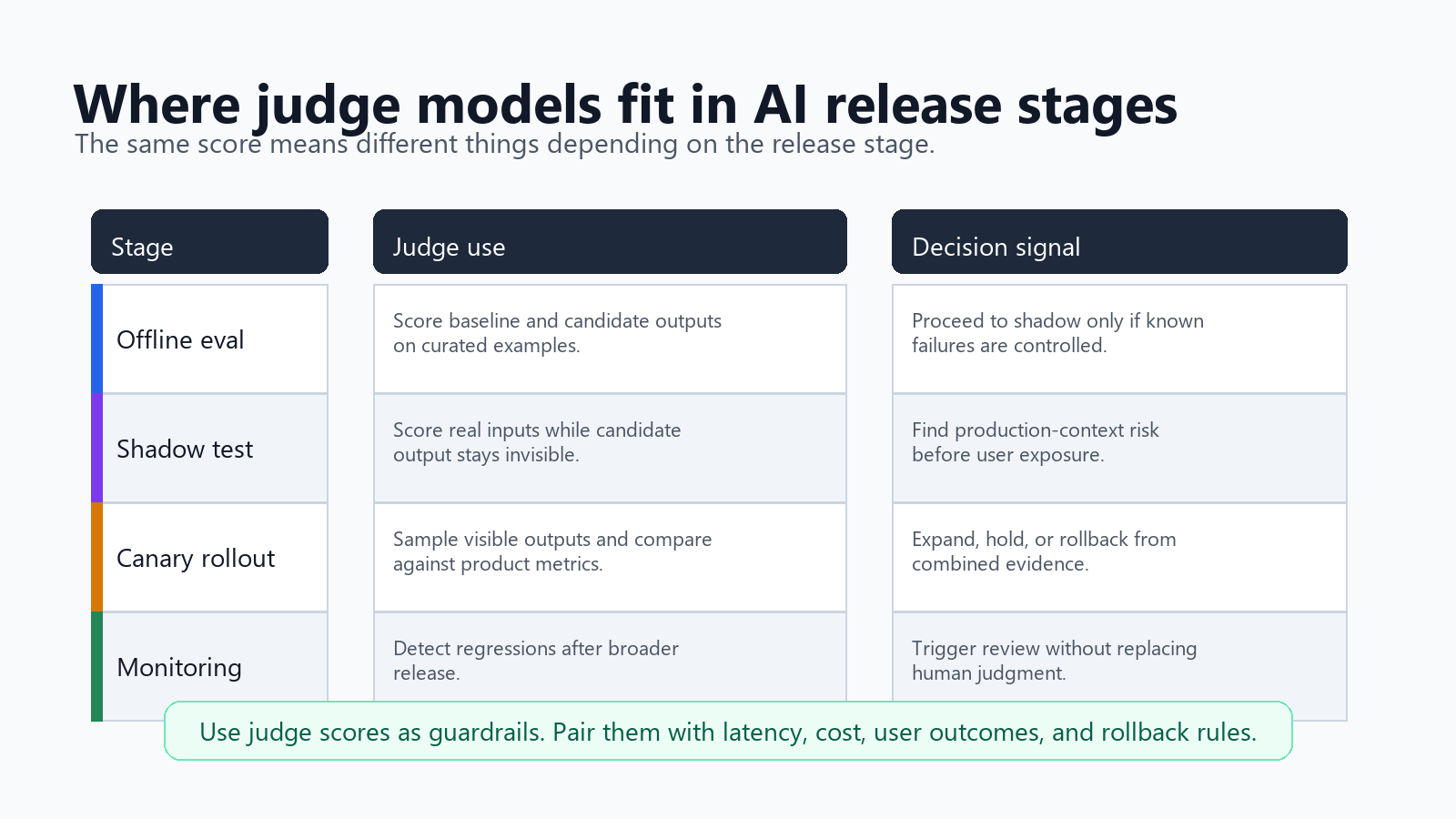
| Stage | How to use the judge | What not to assume |
|---|---|---|
| Offline eval | Score baseline and candidate outputs on labeled or curated examples. | A strong offline score proves production impact. |
| Shadow test | Score candidate outputs on real inputs without showing them to users. | Shadow quality equals user acceptance. |
| Canary rollout | Sample visible candidate outputs and watch judge score beside product metrics. | Judge score alone is enough to expand traffic. |
| Production monitoring | Detect regressions after broader release. | The judge replaces human review for high-risk cases. |
This is where judge models connect to FeatBit's release decision loop. A flag can keep the candidate in shadow mode, target a small canary segment, or roll back to the baseline. The judge score can act as a guardrail, but the final decision should also consider latency, cost, errors, user behavior, support feedback, and business outcomes.
For a staged release workflow, pair this tutorial with FeatBit's guide from offline eval to shadow test to canary rollout. That article covers the stage transitions. This article covers the judge model evidence that can help each transition.
Implement A Minimal Release Gate
The first version should be boring. Avoid a complex evaluator stack until the team can trust the basic evidence path.
type JudgeResult = {
  pass: boolean;
  score: number;
  failedCriteria: string[];
  reason: string;
};

async function runSupportAnswerCandidate(input: {
  conversationId: string;
  userId: string;
  accountId: string;
  question: string;
  retrievedContext: string;
}) {
  const route = await featbit.variation(
    'support_answer_route',
    {
      key: input.conversationId,
      custom: {
        userId: input.userId,
        accountId: input.accountId,
        assignmentUnit: 'conversation',
        workflow: 'support_answer'
      }
    },
    'baseline_prompt_v3'
  );

  const answer = await generateAnswer({
    route,
    question: input.question,
    context: input.retrievedContext
  });

  const judge: JudgeResult = await judgeSupportAnswer({
    question: input.question,
    context: input.retrievedContext,
    answer,
    rubricVersion: 'support_answer_release_v2'
  });

  await trackInsight('ai_output_judged', {
    flagKey: 'support_answer_route',
    variation: route,
    unitId: input.conversationId,
    rubricVersion: 'support_answer_release_v2',
    score: judge.score,
    pass: judge.pass,
    failedCriteria: judge.failedCriteria
  });

  if (!judge.pass && route !== 'baseline_prompt_v3') {
    await trackInsight('ai_release_guardrail_failed', {
      flagKey: 'support_answer_route',
      variation: route,
      unitId: input.conversationId,
      reason: judge.reason
    });
  }

  return answer;
}
This example does not make the judge the only runtime safety mechanism. It records the score, creates a guardrail signal, and keeps the release reversible through the flag.
For implementation details, use FeatBit docs for targeting rules, percentage rollouts, and the Track Insights API. If the flag is temporary, apply feature flag lifecycle management so the judge gate, candidate branch, and metric plan have an owner and cleanup path.
Turn Scores Into Release Decisions
Before the first canary user sees the candidate behavior, write the decision rule. It should combine judge score with product and operational guardrails.
Advance from 5 percent to 25 percent only if:
- judge pass rate is not worse than baseline by more than the agreed tolerance;
- false pass review finds no severity-1 issue in the sampled outputs;
- p95 latency and average cost stay inside guardrails;
- support escalation and correction rate do not worsen;
- no protected segment shows a concentrated failure pattern.

Roll back to baseline if:
- any severity-1 false pass appears in production sample review;
- judge pass rate drops below the rollback threshold for two review windows;
- latency, cost, or operational errors breach the guardrail;
- support or product owners cannot explain the failure pattern.
Avoid universal thresholds. A customer-support assistant, code-generation workflow, marketing copy helper, and database agent should not share the same tolerance. The important part is that the rule exists before the team sees a flattering dashboard.
Pitfalls To Avoid
Using the same model family to generate and judge without review. This can be practical, but correlated blind spots are possible. Validate against human labels and consider a different judge for high-risk criteria.
Treating the judge score as ground truth. A judge score is evidence, not reality. Keep human review for calibration, holdouts, incidents, and high-impact workflows.
Changing the rubric during the rollout without versioning. If rubricVersion changes, old scores and new scores should not be compared as one time series.
Judging only the final answer when the risk is in the process. Tool-using agents may fail through retrieval, tool choice, permission boundaries, or side effects. Capture traces or intermediate evidence when the output alone hides the failure.
Optimizing for the judge instead of the user. If teams tune prompts to make the judge happy, product metrics and human review become more important, not less.
Skipping rollback wiring. A judge model can detect a problem after the output exists. Feature flags keep the team able to reduce exposure while they investigate.
A Practical Checklist
Use this checklist before making a judge model part of an AI release gate:
- The release decision is named: continue, pause, roll back, expand, or clean up.
- The judge rubric is specific enough for human reviewers to apply.
- The judge output is structured, versioned, and easy to aggregate.
- Human-labeled examples exist for calibration and holdout review.
- False pass cases receive special attention.
- Judge results include flag key, variation, unit ID, rubric version, and sample mode.
- Scores are reviewed by stage: offline, shadow, canary, or production monitoring.
- Rollout rules combine judge score with latency, cost, errors, product outcomes, and human review.
- Temporary judge gates and candidate flags have owners and cleanup conditions.
A judge model can make AI output evaluation faster and more repeatable. It becomes useful for production only when it is connected to release evidence, targeted exposure, rollback, and learning.
Source Notes And Image Recommendations
- OpenAI's evaluation best practices are used for the distinction between metric-based evals, human evals, and LLM-as-a-judge methods, including common bias risks and rubric guidance.
- OpenAI's grader documentation is used as a cautionary source for grader hacking and the need to compare model-grader results with expert human evaluation. This article does not depend on any deprecated OpenAI workflow.
- Google Cloud's judge model evaluation documentation is used for the idea that model-based metrics should be compared with human ratings for the target use case.
- LaunchDarkly's AgentControl judges documentation is used as category context for online judge scoring in production. No comparative performance, pricing, security, or market-ranking claim is made.
- FeatBit reader journey links: AI control layer, AI experimentation, offline eval to shadow test to canary rollout, feature flag lifecycle management, targeting rules, percentage rollouts, and Track Insights API.
- Image and Open Graph recommendation: use
cover.pngas the social preview. Use the gate workflow near the opening thesis, the calibration loop near rubric validation, and the release matrix near staged rollout guidance because each image summarizes crawlable text already present in the article.