
LaunchDarkly AgentControl Alternative: Feature Flags for AI Agent Runtime Control
If you are searching for a LaunchDarkly AgentControl alternative, you are probably not asking a generic feature flag question. You are asking how to control an AI agent after it reaches production.
That means more than choosing a prompt, model, or provider. A production agent can select tools, call APIs, write data, spend tokens, ask for human approval, or expose a new behavior to only part of your customer base. The release problem becomes operational: who can use this behavior, which tool permissions are active, how fast should exposure expand, what telemetry decides the next step, and how quickly can the team roll it back?
LaunchDarkly positions AgentControl around managing model configuration, instructions, tools, targeting, and rollout for AI agents. FeatBit approaches the same operational problem from the feature flag control layer: make agent behavior explicit, evaluate it at runtime, expose it progressively, measure what happens, and keep a rollback path outside the deployment pipeline.
This article is not a claim that every AgentControl use case maps one-for-one to FeatBit. It is a decision guide for teams that want agent runtime control and are deciding whether they need a specialized agent configuration suite, a self-hosted feature flag control plane, or both.
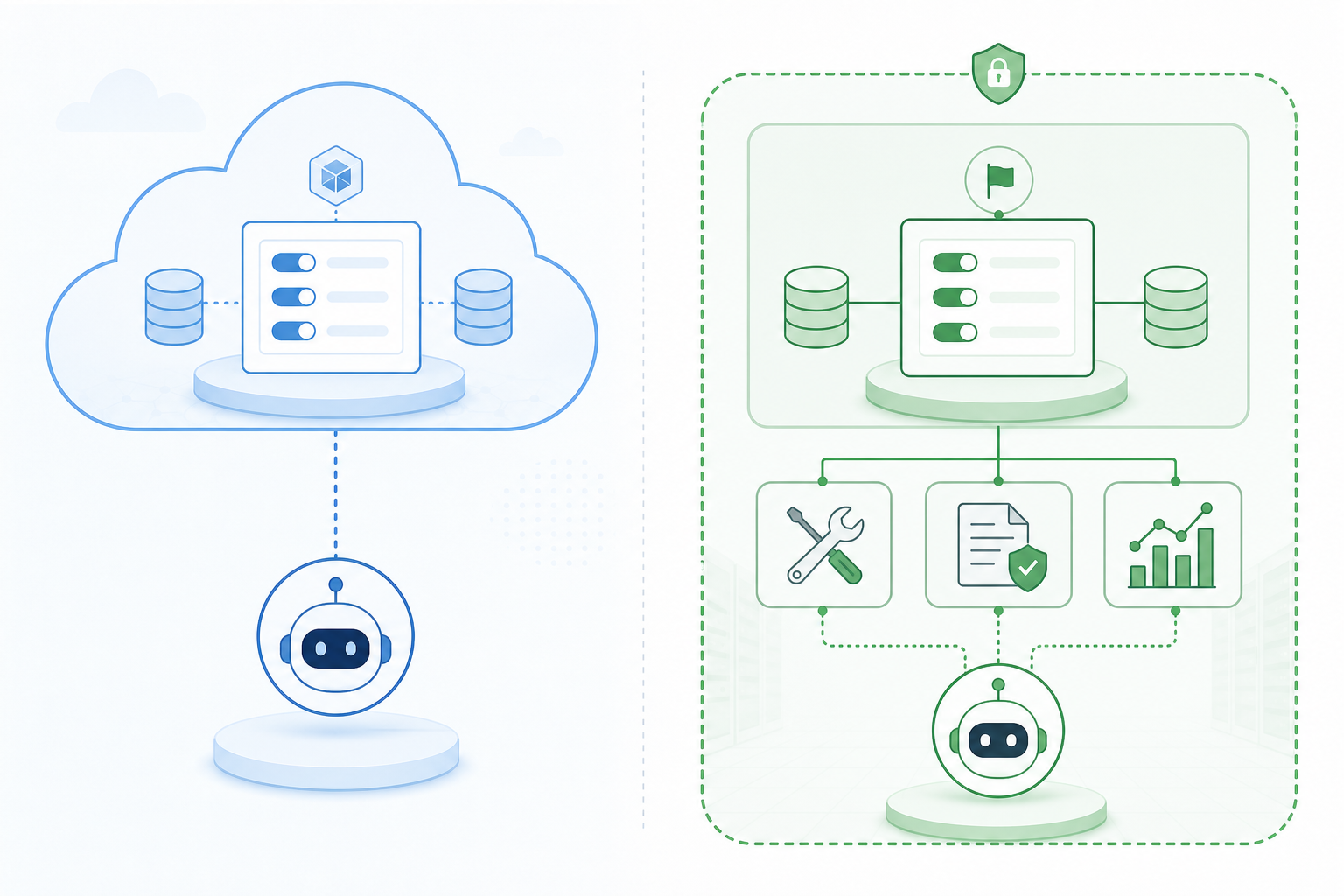
The Real Buying Question
The search phrase "LaunchDarkly AgentControl alternative" sounds like a vendor comparison, but the reader task is usually more specific:
- Control AI agent behavior without redeploying application code.
- Gate tool access by environment, tenant, user tier, risk level, or rollout stage.
- Test model, prompt, retrieval, and tool variants with limited exposure.
- Keep a fast kill switch for unsafe or expensive agent paths.
- Preserve auditability when non-code changes affect production behavior.
- Avoid sending all release-control data through a vendor cloud when self-hosting matters.
If your main problem is prompt authoring, offline evaluations, or agent-specific configuration management, a purpose-built AI configuration product may be the better primary system. If your main problem is runtime control of production behavior, FeatBit is a credible alternative architecture because feature flags already solve a similar class of release decisions.
What AgentControl Is Solving
LaunchDarkly's AgentControl documentation describes a product for managing AI agent configuration outside application code. Its official quickstart references providers and frameworks such as OpenAI, Anthropic, LangChain, the OpenAI Agents SDK, Strands, and the Claude Agent SDK. LaunchDarkly also documents use cases such as managing model configuration outside code, targeting model usage by tier, and choosing completion mode versus agent mode.
The product direction is clear: bring LaunchDarkly's rollout and targeting model into AI agent configuration.
That is useful because agent behavior changes more frequently than traditional application logic. Teams adjust prompts, models, tool sets, retrieval settings, autonomy levels, approval thresholds, and fallback behavior. Hardcoding those choices creates slow releases and weak rollback paths.
The important decision is whether you want this control plane to be specialized around AI agent configuration or generalized around feature flags and release governance.
Where FeatBit Fits as an Alternative
FeatBit is an open-source feature flag platform that can be self-hosted. Its core strengths are progressive rollout, targeting rules, environment separation, audit logs, experimentation, SDK-based evaluation, and operational control outside deployments.
For AI agents, those capabilities map naturally to runtime control points:
| Agent control point | Feature flag pattern |
|---|---|
| Enable a new agent workflow | Boolean release flag |
| Route traffic to a model variant | String or JSON variation |
| Limit high-risk tools | Permission or capability flag |
| Expose behavior to selected tenants | Targeting rule or segment |
| Expand gradually | Percentage rollout |
| Stop a failing path | Kill switch |
| Compare outcomes | Experiment or metric event |
| Review production changes | Audit log |
This is why FeatBit should not be framed only as a cheaper LaunchDarkly alternative. For agent teams, the stronger angle is control ownership. You can keep the release-control plane close to your infrastructure, expose agent behavior through typed control points, and let engineering teams decide which changes deserve a flag, an experiment, an approval flow, or a hard-coded policy.
Use Feature Flags for Agent Behavior, Not Just UI Toggles
Feature flags are sometimes reduced to simple UI toggles. That mental model is too small for agent systems.
An agent runtime can evaluate flags before it chooses a model, retrieves context, calls a tool, writes a file, sends a message, or escalates to a human. The flag decision becomes a production policy decision:
const canUseWriteTool = await flags.booleanVariation(
  "agent-write-tool-enabled",
  context,
  false
);

const agentMode = await flags.stringVariation(
  "support-agent-mode",
  context,
  "read_only"
);

if (!canUseWriteTool || agentMode === "read_only") {
  return runAgentWithReadOnlyTools(request);
}

return runAgentWithWriteTools(request);
That example is intentionally plain. The value is not in clever code. The value is that a risky agent capability is no longer a hidden deployment detail. It has an owner, a fallback, targeting rules, an audit trail, and a rollback path.
A Practical Control Model
For teams comparing AgentControl with FeatBit, the most useful exercise is to list the agent decisions that must remain controllable after deployment.
Start with five categories.
1. Model and prompt selection
Use string or JSON variations to choose a model family, model version, system instruction bundle, temperature profile, retrieval strategy, or fallback chain. This is closest to the configuration problem AgentControl highlights.
FeatBit can support this pattern as remote configuration through flag variations. The tradeoff is that FeatBit is not a prompt management workspace. If you need prompt dataset management, dedicated eval runs, or agent-specific authoring UI, use a system built for that purpose and keep FeatBit for release control.
2. Tool access
Tool access is where feature flags become more than configuration. An agent with read-only tools has a different risk profile from an agent that can write to a CRM, delete records, open pull requests, or trigger billing actions.
Use flags to separate tool availability from code deployment:
agent-github-pr-create-enabledagent-crm-write-enabledagent-database-query-modeagent-external-email-send-enabled
The default variation should be conservative. Production write paths should require explicit rollout, and high-risk paths should have both a flag-level kill switch and application-level authorization.
3. Autonomy level
Many agent failures are not caused by one bad tool call. They happen because the agent was allowed to continue through too many ambiguous steps without returning control to a human.
Represent autonomy as a controlled variation:
manual_reviewsuggest_onlyexecute_reversibleexecute_with_approvalexecute_full
This makes autonomy a rollout decision instead of a product philosophy buried in code.
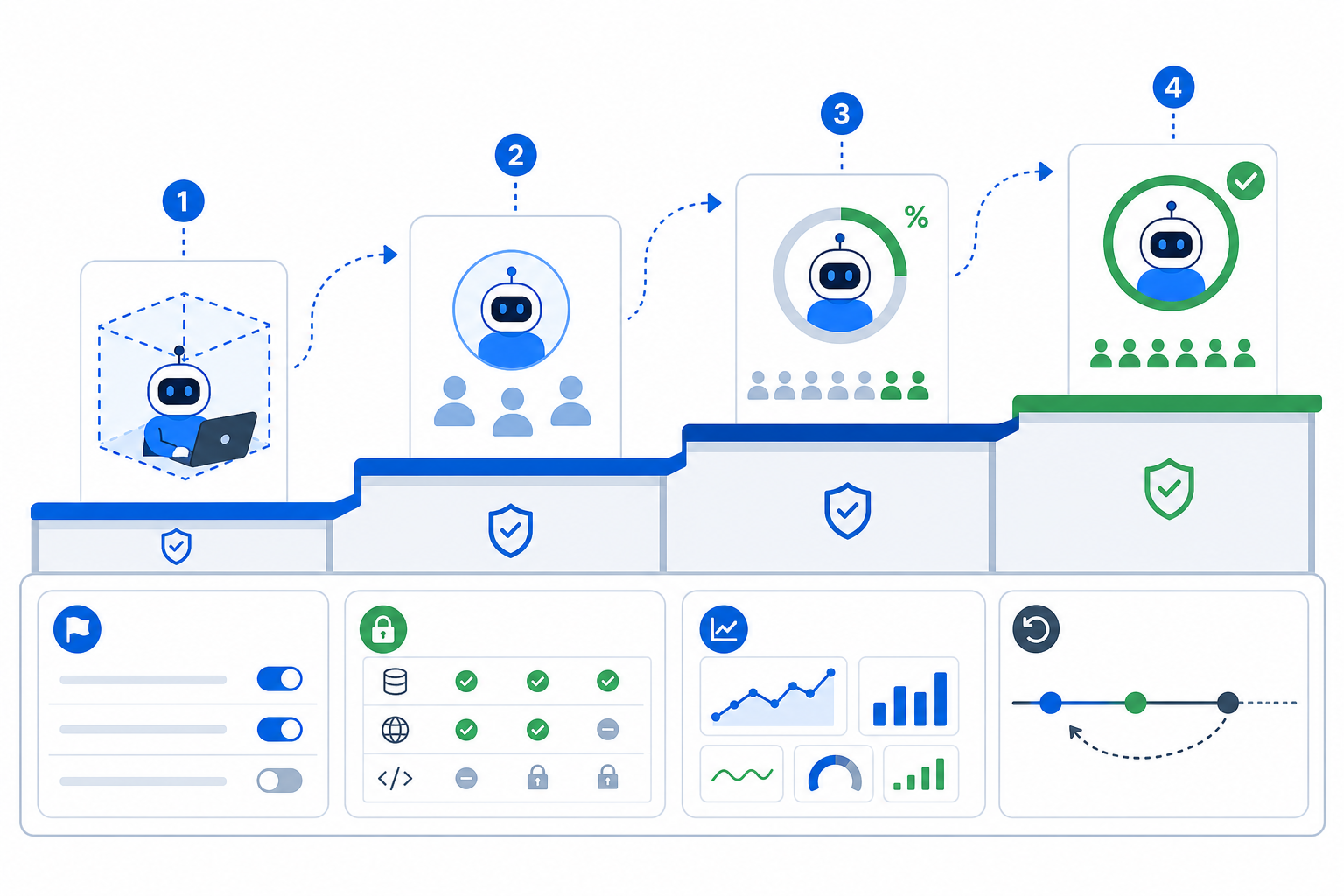
4. Exposure and segmentation
Agent behavior should move through staged exposure:
- Internal users only.
- A small beta segment.
- Selected customer tiers or tenants.
- A low percentage of production traffic.
- Broader rollout after metrics and review.
FeatBit's targeting and percentage rollout model fits this staged path. It lets teams separate deployment from release, which matters when the same codebase contains both stable and experimental agent behavior.
5. Measurement and rollback
The control layer is incomplete if it only flips behavior. Each agent variation needs observable outcomes:
- task completion rate
- human correction rate
- tool error rate
- escalation rate
- latency
- token cost
- customer-visible defect reports
- safety or policy review events
FeatBit can connect flags to experimentation and release decisions. The key is to define the metric before exposure expands. A flag that cannot answer "should we continue, pause, or roll back?" is only remote configuration.
When FeatBit Is a Better Fit
FeatBit is the stronger option when your primary requirement is operational release control.
Choose FeatBit when:
- You want an open-source or self-hosted control plane.
- You already treat feature flags as part of release governance.
- You need runtime gates for tools, model routes, workflow paths, and rollout stages.
- You want engineering-owned control points that can be reviewed, audited, and rolled back.
- You need to keep flag data, targeting rules, and event flow inside your infrastructure.
- You prefer vendor-neutral SDK patterns, including OpenFeature-compatible approaches where appropriate.
This is common for platform teams, regulated environments, B2B SaaS teams with tenant-specific release rules, and engineering groups that want AI behavior to follow the same release discipline as the rest of the product.
When AgentControl May Be the Better Fit
AgentControl may be the better primary product when the team wants an AI-specific workspace for prompt, model, and agent configuration.
Choose an agent configuration suite when:
- Prompt and model configuration authoring is the main workflow.
- Product and AI teams need a dedicated UI for agent variants.
- Offline evals against curated datasets are part of the daily workflow.
- You want vendor-provided AI configuration abstractions rather than building your own schema on top of flags.
- Your organization already standardizes on LaunchDarkly for release control.
This distinction keeps the comparison fair. FeatBit can control agent behavior at runtime, but it should not be described as a complete replacement for every AI-specific workflow in AgentControl.
The Tool Access Question
Tool access deserves special attention because it changes the risk model.
The Model Context Protocol specification includes authorization capabilities for HTTP-based transports, and OpenFeature defines evaluation context as a way to pass targeting data into flag decisions. These standards point to the same practical reality: production systems need context-aware decisions at the boundary where agents reach external tools and services.
Security guidance for LLM applications also treats excessive agency as a real risk category. In plain engineering terms, an agent should not have broader tool permissions than the task, user, tenant, and environment justify.
FeatBit can help here, but it should not be the only layer. Use feature flags to decide whether a capability is exposed. Use identity, authorization, policy checks, validation, rate limits, and human approval to decide whether a specific action is allowed.
A useful layered model is:
- Feature flag: is this tool path enabled for this context?
- Application policy: is this user or tenant allowed to request it?
- Tool authorization: does the token have the required scope?
- Action guardrail: is this specific operation within allowed limits?
- Audit event: who changed the control and what did the agent do?
Feature flags should not replace authorization. They should make production exposure controllable.
A Migration-Friendly Architecture
Teams evaluating AgentControl alternatives do not need to rebuild the whole agent stack at once. A migration-friendly architecture starts by wrapping the riskiest decisions.
- Identify production decisions that currently require a deploy.
- Split them into model, prompt, tool, autonomy, exposure, and fallback decisions.
- Create a flag for each decision that needs runtime control.
- Set conservative defaults.
- Evaluate flags server-side near the agent orchestration layer.
- Log the variation used for each agent run.
- Connect key outcomes to metrics or experiment events.
- Define rollback owners before broad exposure.
The goal is not to flag every line of agent logic. The goal is to make consequential behavior observable and reversible.
Example Flag Set for an AI Support Agent
A support agent might start with this control set:
| Flag | Type | Default | Purpose |
|---|---|---|---|
support-agent-enabled |
Boolean | false |
Turn the agent on for selected segments |
support-agent-mode |
String | suggest_only |
Control autonomy level |
support-agent-model-route |
String | stable_model |
Route between model variants |
support-agent-rag-strategy |
String | approved_docs_only |
Control retrieval scope |
support-agent-crm-write |
Boolean | false |
Gate write access to customer records |
support-agent-human-review-threshold |
Number | 0.75 |
Escalate uncertain cases |
support-agent-emergency-disable |
Boolean | true |
Stop agent execution quickly |
This structure gives engineering, product, and operations teams a shared language. They can discuss agent behavior as release decisions rather than prompt edits.
Decision Checklist
Use this checklist when comparing LaunchDarkly AgentControl and FeatBit.
| Question | If yes, FeatBit is a strong fit |
|---|---|
| Do you need self-hosted feature flag infrastructure? | Yes |
| Do you need runtime kill switches for agent paths? | Yes |
| Do you need tenant, tier, region, or environment targeting? | Yes |
| Do you want agent behavior to follow existing release governance? | Yes |
| Do you mainly need prompt authoring and eval management? | Not by itself |
| Do you need a complete AI configuration workspace? | Not by itself |
| Do you need feature flags plus experiments and rollout history? | Yes |
The cleanest answer is often not "replace AgentControl with FeatBit everywhere." It is "use FeatBit when agent behavior should be governed like production release control."
Recommended FeatBit Path
If your team is exploring FeatBit as a LaunchDarkly AgentControl alternative, start with a narrow pilot:
- Pick one agent workflow with real production risk.
- Add flags for tool access, autonomy level, model route, and emergency disable.
- Roll out to internal users first.
- Add one metric that decides whether to expand or pause.
- Review the audit trail after every change.
- Expand to a beta segment only after the rollback path is tested.
For more background, read FeatBit's page on feature flags as the control layer for AI systems, the broader LaunchDarkly alternatives guide, and the product-design article on human-AI collaboration boundaries.
Bottom Line
LaunchDarkly AgentControl is aimed at teams that want AI-specific configuration and rollout workflows inside the LaunchDarkly ecosystem. FeatBit is a better fit when the priority is open-source, self-hosted, engineering-owned runtime control for AI agent behavior.
For production agents, the most important question is not where a prompt is stored. It is whether the team can expose, measure, pause, and roll back agent behavior without redeploying. That is the control-plane job FeatBit is built to handle.
Source Notes
- LaunchDarkly documentation: AgentControl overview, AgentControl quickstart, and Agent Skills tutorial.
- LaunchDarkly product positioning: Introducing AgentControl.
- FeatBit product context: FeatBit homepage, AI control layer, and FeatBit GitHub repository.
- OpenFeature context: Evaluation Context and Flag Evaluation API.
- Agent security context: Model Context Protocol authorization and OWASP Top 10 for LLM Applications.
Image and Open Graph Recommendations
- Cover image:
/images/blogs/launchdarkly-agentcontrol-alternative/cover.png, showing an AI agent connected to model configuration, tool gates, rollout controls, audit logs, and rollback. - Body image 1:
/images/blogs/launchdarkly-agentcontrol-alternative/runtime-control-map.png, showing where flags intercept agent behavior before model, retrieval, tool, and approval decisions. - Body image 2:
/images/blogs/launchdarkly-agentcontrol-alternative/agent-rollout-ladder.png, showing staged exposure from internal sandbox to broad production rollout. - Suggested Open Graph crop: use the cover image at 1200 by 630 pixels, with no embedded text so social previews remain readable.
Structured Data Recommendation
Use the existing blog article schema pattern for this site. The structured data should use the visible article title, description, author, publish date, canonical blog URL, and cover image only. Do not add FAQ schema unless the visible page later includes a real FAQ section.