
How to Set Up Online Evals for Live AI Outputs
Online evals are the production evaluation loop that watches AI outputs after real inputs reach the system. The practical job is not only to calculate a score. It is to turn live outputs into repeatable release evidence: sample the right traffic, score the output, join every score to the runtime variation that produced it, and define the action before a guardrail fails.
This tutorial is for AI product and platform teams that already have an AI behavior in production or near production. If you need the term definition first, start with what an online eval flag is. This article is the implementation companion: how to set up a continuous loop for live AI outputs.
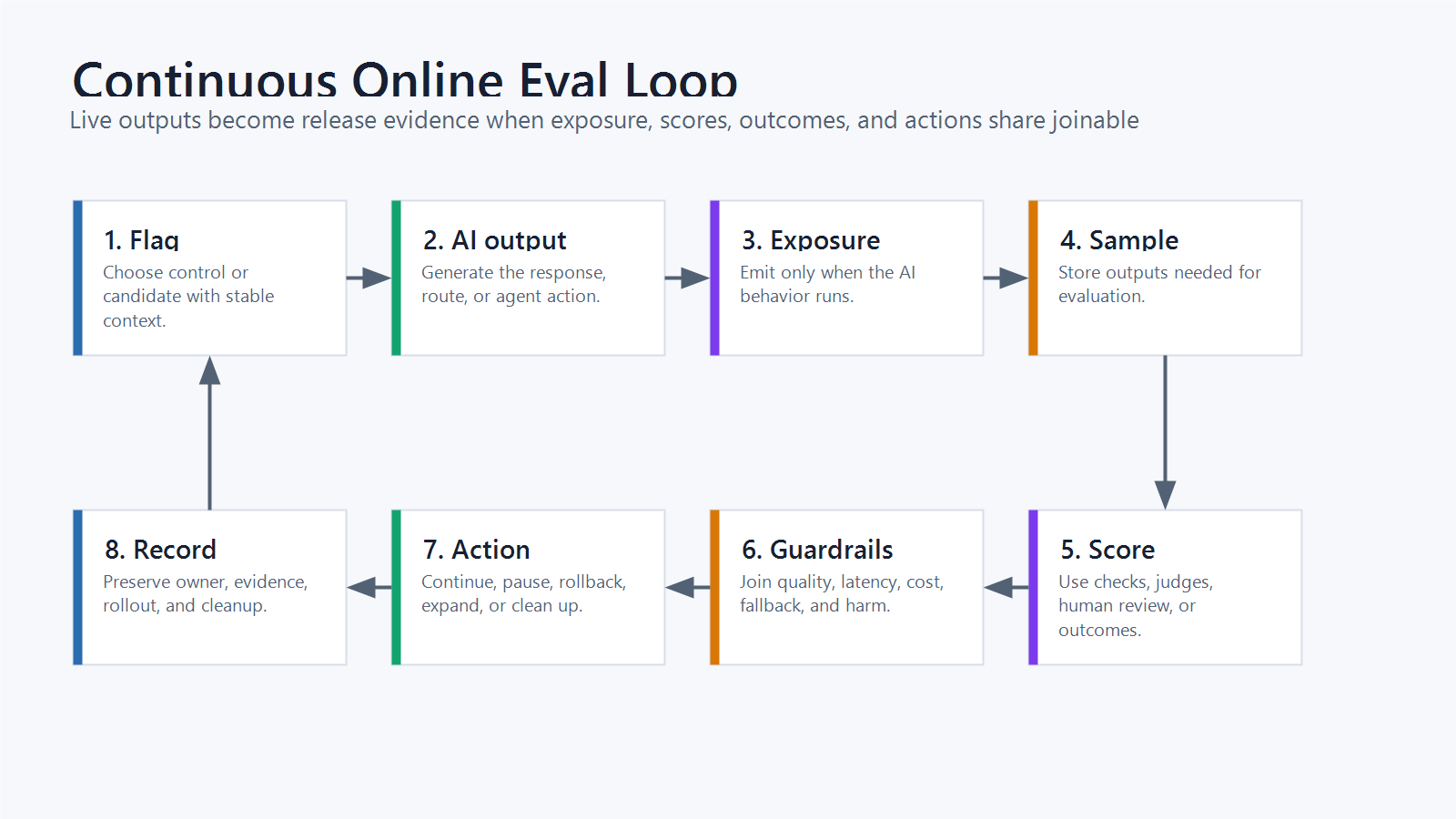
What The Online Eval Loop Must Prove
A useful online eval should prove five things:
| Proof | Why it matters |
|---|---|
| The output came from a known runtime variation | Without attribution, a score cannot support a release decision. |
| The sampled traffic matches the decision scope | A support-chat eval should not silently mix internal tests, beta traffic, and high-risk accounts. |
| The scoring method fits the task | A deterministic assertion, model judge, human review, and product metric answer different questions. |
| The eval result joins to product and operational outcomes | Quality can improve while latency, cost, fallback rate, or escalation gets worse. |
| The team knows which action each result can trigger | Continue, pause, rollback candidate, expand, or clean up should be written before the dashboard is read. |
That is the difference between monitoring and online evaluation. Monitoring tells you what happened. Online evaluation connects what happened to a controlled AI behavior and a release decision.
Step 1: Name The Live Behavior As A Variation
Start by naming the smallest runtime behavior that can be evaluated cleanly. For AI systems, this may be a prompt version, model route, retrieval profile, agent tool policy, guardrail setting, or a combined route.
Use a multivariate or structured flag when the route includes several fields:
{
  "flagKey": "support_assistant_answer_route",
  "variations": {
    "control": {
      "prompt": "support_prompt_v3",
      "modelRoute": "stable_model",
      "retrievalProfile": "baseline_search"
    },
    "candidate": {
      "prompt": "support_prompt_v4",
      "modelRoute": "candidate_model",
      "retrievalProfile": "reranker_v2"
    }
  }
}
The point is honesty. If the prompt and retrieval profile change together, call the variation a route. Do not later claim the online eval proved only the prompt won.
OpenFeature's evaluation context specification gives vendor-neutral language for the context used during flag evaluation, including targeting keys and custom fields. In practice, the same identity fields should appear in flag evaluation, exposure events, eval scores, product outcomes, and rollback reports.
Step 2: Choose The Sample Boundary
Online evals should not sample everything by default. Sampling too broadly can create noisy evidence, unnecessary storage, and avoidable privacy or governance review. Sampling too narrowly can hide the cases that matter.
Define the sample boundary before traffic starts:
| Boundary | Example decision |
|---|---|
| Surface | English support chat, onboarding assistant, agent refund workflow |
| Assignment unit | account ID, user ID, conversation ID, workflow ID |
| Eligible traffic | production, paid accounts, beta segment, internal users |
| Exclusions | active incidents, regulated workflows, high-risk accounts, opt-out users |
| Sampling rate | 100 percent during internal test, 10 percent during canary, lower rate after full rollout |
| Retention | store only fields needed for scoring, debugging, and release evidence |
The sample boundary is a product and governance decision, not only a data pipeline setting. If the output may include sensitive customer text, define what is stored, masked, reviewed, or excluded before the eval runs.
Step 3: Emit Exposure When The AI Output Actually Runs
The exposure event should fire when the AI behavior actually produces an output, not when a page loads or a user becomes eligible. Eligibility is not exposure.
{
  "event": "ai_output_exposed",
  "flagKey": "support_assistant_answer_route",
  "unitId": "account_1842",
  "conversationId": "conv_772",
  "variation": "candidate",
  "surface": "support_chat",
  "sampledForOnlineEval": true,
  "timestamp": "2026-06-07T10:15:30Z"
}
Add the fields that will later explain the result, but avoid storing secrets, credentials, or more customer content than the eval requires. The minimum useful fields are the flag key, variation, assignment unit, output ID, surface, and timestamp.
FeatBit implementation primitives for this part include targeting rules, percentage rollouts, and the Track Insights API. The flag controls the route. The event keeps the route visible to the evidence loop.
Step 4: Score Outputs With The Right Evaluator
An online eval can use several scoring methods. The best choice depends on the task and risk.
| Evaluator | Good fit | Watch out for |
|---|---|---|
| Deterministic checks | JSON validity, required fields, policy labels, citation presence | They catch format failures, not usefulness. |
| Model judge | Relevance, completeness, tone, groundedness, pairwise comparison | Calibrate against human review and known examples. |
| Human review | High-risk answers, domain judgment, policy-sensitive workflows | Slower and more expensive, so use sampling and triage. |
| Product outcome | task completion, escalation, conversion, accepted answer | Needs stable assignment and enough time to observe. |
| Operational metric | latency, cost, fallback rate, provider errors | A healthy system metric does not prove user value. |
OpenAI's evaluation best practices are useful context for matching evaluation methods to the task, including model-grader and LLM-as-judge patterns. LaunchDarkly's AgentControl documentation describes online evaluations and judges as automated quality checks for production AI outputs. Statsig's AI Evals documentation similarly distinguishes online evals as production grading on real-world use cases.
Use those category signals carefully. A model judge can scale review, but it is still a measurement instrument. For important workflows, compare judge scores with human labels, keep examples of disagreement, and avoid letting the judge score become the only release decision.
Step 5: Join Eval Scores To Outcomes
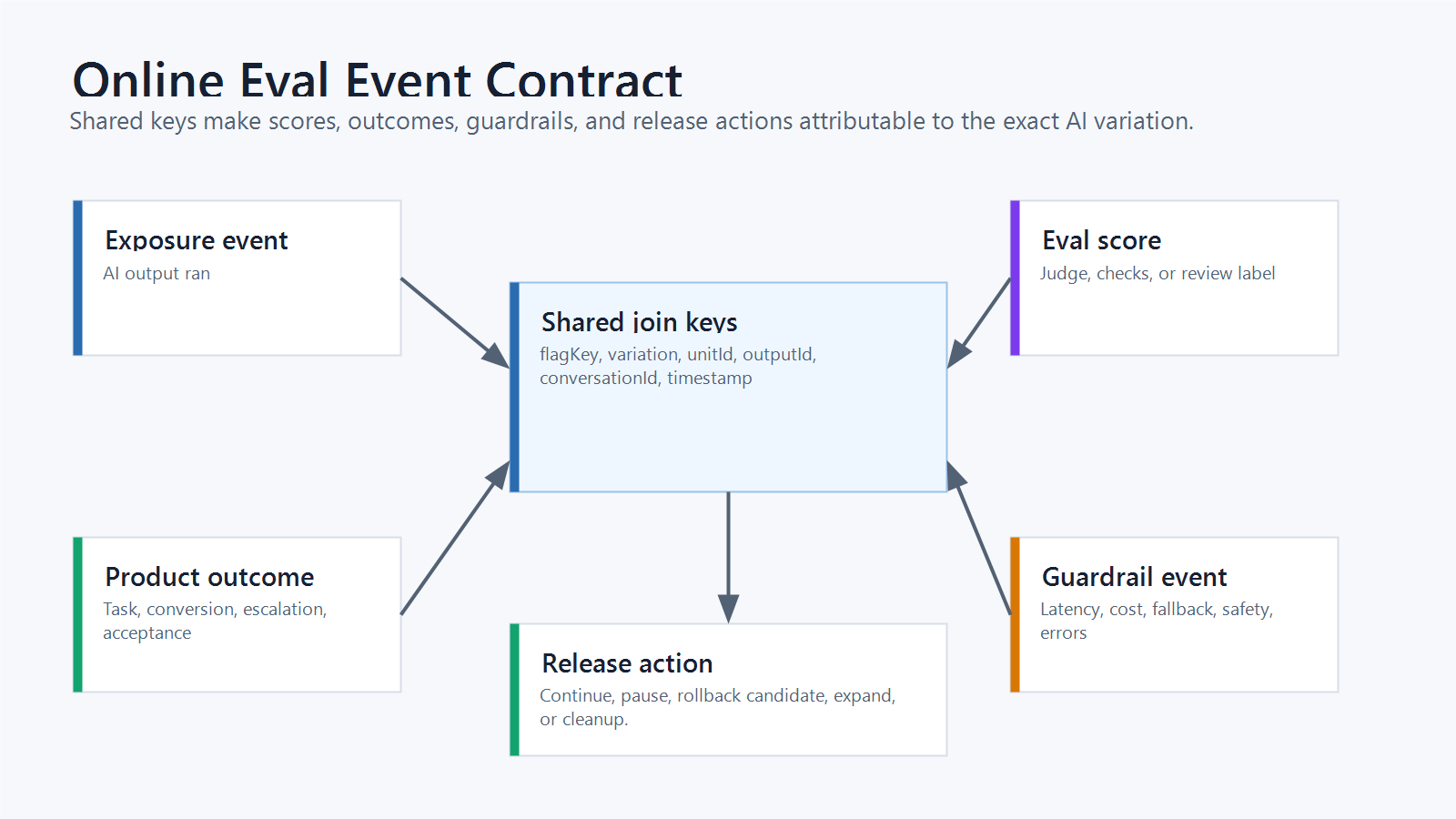
The eval score should use the same join keys as the exposure event. Otherwise the team may know that a bad answer happened, but not which runtime variation produced it.
{
  "event": "ai_output_eval_score",
  "flagKey": "support_assistant_answer_route",
  "unitId": "account_1842",
  "conversationId": "conv_772",
  "outputId": "out_9231",
  "variation": "candidate",
  "judge": "support_answer_quality_v2",
  "scores": {
    "groundedness": 0.91,
    "completeness": 0.84,
    "tone": 0.95
  },
  "label": "pass",
  "timestamp": "2026-06-07T10:16:05Z"
}
Then join product outcomes and guardrails to the same variation:
{
  "event": "support_case_outcome",
  "flagKey": "support_assistant_answer_route",
  "unitId": "account_1842",
  "conversationId": "conv_772",
  "variation": "candidate",
  "resolvedWithoutEscalation": true,
  "humanCorrection": false,
  "latencyMs": 1820,
  "estimatedCostUsd": 0.011
}
Optimizely's Feature Experimentation documentation is useful category context here because it separates primary metrics from secondary and monitoring metrics. Use the same discipline for online evals: one metric or score should answer the release question, while guardrails decide whether expansion must stop.
Step 6: Convert Scores Into Release Actions
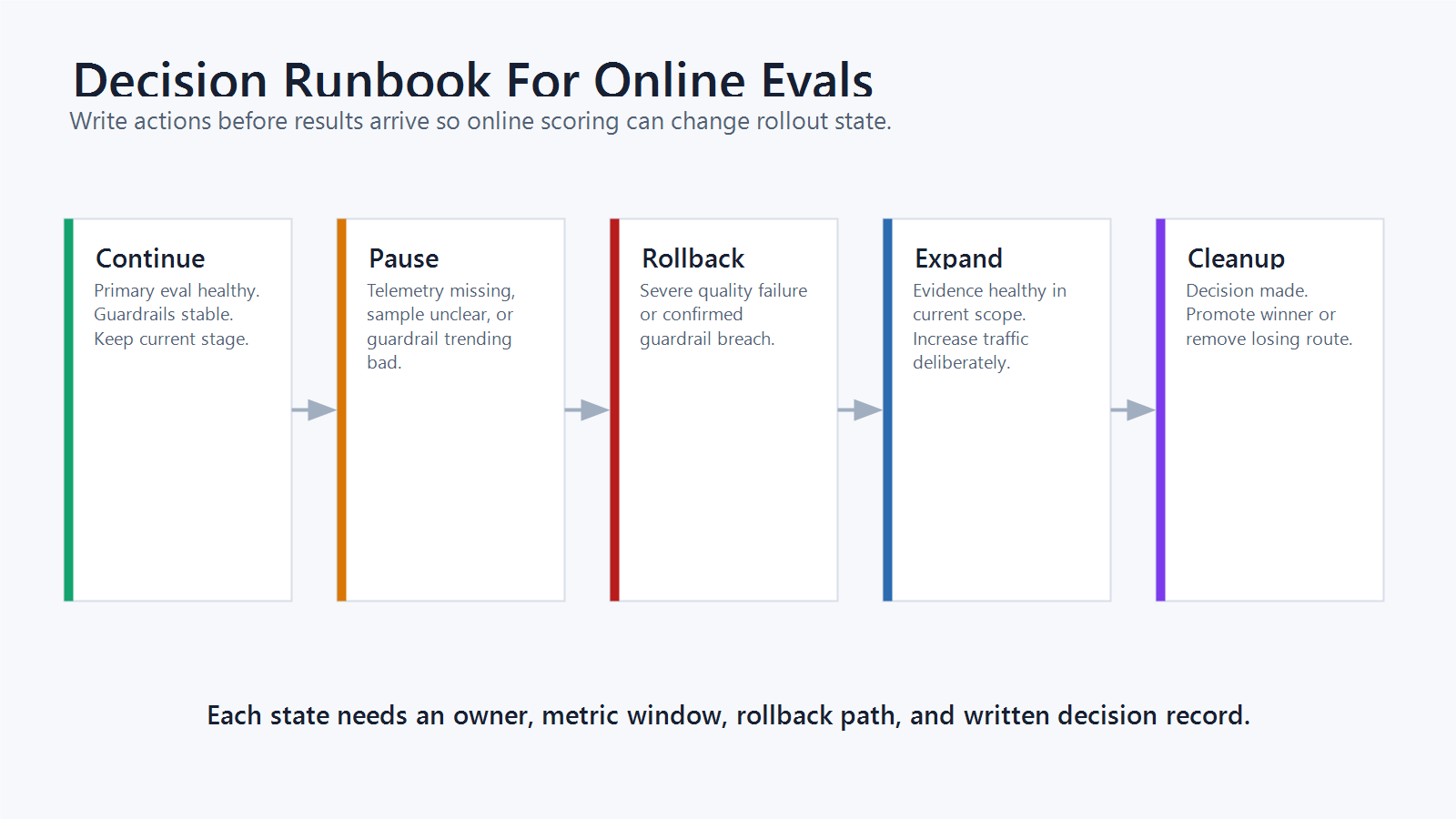
An online eval loop is incomplete until scores map to actions. Write the action rule before the rollout expands.
online_eval_decision_rule:
  release_question: should_support_assistant_candidate_expand
  primary_eval:
    metric: grounded_answer_pass_rate
    action_if_healthy: continue_or_expand
  guardrails:
    - metric: severe_human_review_failure
      action: rollback_candidate
    - metric: p95_latency
      action: pause_expansion
    - metric: fallback_rate
      action: investigate_before_expansion
    - metric: cost_per_resolved_case
      action: hold_for_business_review
  cleanup:
    winner: promote_route_and_remove_losing_branch
    loser: remove_candidate_route_after_postmortem
Avoid universal thresholds copied from another company. Use your baseline, risk tolerance, traffic volume, and customer impact. The reusable part is the decision shape: every score should have an owner, window, guardrail, and action.
FeatBit's measurement design guidance expands this release discipline. FeatBit's feature flag lifecycle management guidance helps keep temporary online eval controls from becoming stale branches after the decision.
Example: Support Assistant Online Eval
Imagine a team releasing a new support assistant route. The offline eval passed, but the team still needs to know whether live answers reduce escalation without increasing cost or complaints.
The tutorial setup would look like this:
- Create a flag named
support_assistant_answer_routewithcontrolandcandidatevariations. - Evaluate the flag by account ID so each account receives stable behavior during the decision window.
- Start with internal support agents, then a small eligible customer segment.
- Emit exposure only when the assistant returns an answer.
- Sample candidate and control outputs for judge scoring and human review.
- Track groundedness, completeness, human correction, escalation, latency, cost, fallback rate, and complaint signals.
- Compare the primary outcome and guardrails before expanding.
- Roll back to control if severe quality failure, missing telemetry, or guardrail breach appears.
- Promote the winner and remove the losing route after the decision record is written.
This is a tutorial pattern, not a claim that every team should evaluate support assistants the same way. A coding agent, medical triage assistant, finance workflow, or internal search assistant needs different sampling rules, human review thresholds, and governance. The operating model stays the same: controlled variation, joinable evidence, guardrails, rollback, and cleanup.
Common Mistakes
Scoring outputs without variation attribution. If the eval result cannot identify the flag key and variation, it is weak release evidence.
Sampling only candidate traffic. Control outputs are often needed to know whether the candidate is truly better or whether the task became easier.
Letting the judge decide alone. Model judges are useful, but important release decisions should also consider human review, product outcomes, cost, latency, fallback, and segment risk.
Tracking exposure too early. Eligibility, page load, and AI output are different events. Track exposure when the AI behavior actually runs.
Changing the scorecard after seeing results. Decide the primary eval signal, guardrails, and action rules before rollout.
Keeping the eval flag forever. After the release decision, remove the losing branch or intentionally convert the flag into a long-lived operational control with an owner.
Setup Checklist
Before calling an online eval ready, confirm:
- The flag variation names the live AI behavior being evaluated.
- The assignment unit matches the user journey.
- The sample boundary and exclusions are written down.
- Exposure fires only when the AI output is produced.
- Eval scores include flag key, variation, output ID, unit ID, and timestamp.
- Human review or model-judge calibration exists for important quality labels.
- Product outcomes and guardrails can join to exposure.
- The primary eval signal and guardrails are defined before expansion.
- Rollback returns traffic to the baseline without redeploying.
- Cleanup rules exist for the winning and losing routes.
Bottom Line
Online evals are most valuable when they become a continuous release evidence loop, not a detached scoring job.
Use feature flags to control which live AI behavior runs. Emit exposure when that behavior produces an output. Score sampled outputs with the right evaluator. Join scores to product outcomes and guardrails. Then use the evidence to continue, pause, roll back, expand, or clean up.
For FeatBit teams, this is release-decision infrastructure applied to live AI outputs: targetable behavior, measurable evidence, reversible exposure, and a clear decision record.
Source Notes
- Statsig's AI Evals overview is used as category context for online evals that grade model output in production on real-world use cases.
- LaunchDarkly's online evaluations and judges documentation is used as category context for automated quality checks and judge-based scoring.
- OpenAI's evaluation best practices are used for evaluation-method context, including model-grader and LLM-as-judge considerations.
- OpenFeature's evaluation context specification is used for vendor-neutral language around targeting keys and context passed into flag evaluation.
- Optimizely's Feature Experimentation metrics documentation is used for category context on primary, secondary, and monitoring metrics.
- GrowthBook's feature flag product documentation is used as category context for feature flags, gradual rollout, and experiments. It is not used as a vendor ranking.
- FeatBit implementation context: AI experimentation, measurement design, feature flag lifecycle management, targeting rules, percentage rollouts, Track Insights API, and flag insights support the release-control workflow described here.
Image And Open Graph Notes
- Use
cover.pngas the Open Graph image because it summarizes online evals as a live-output evidence loop. - Use
continuous-online-eval-loop.pngnear the opening because it shows the full workflow while keeping the guidance in crawlable Markdown. - Use
online-eval-event-contract.pngin the event schema section because it reinforces the join keys that make eval evidence trustworthy. - Use
online-eval-decision-runbook.pngin the example section because it connects eval results to release actions.