
How to Use an Online Eval Flag as a Release Switch
An online eval flag becomes useful when it is treated as a release switch, not just a name for an AI experiment. The flag should decide which live users, accounts, conversations, or workflows receive a candidate AI behavior. It should also give telemetry a stable variation key so the team can connect exposure, quality evidence, business outcomes, guardrails, and rollback.
This tutorial is for teams that already understand the idea of an online eval flag and now need to implement one cleanly. For the shorter definition and term boundaries, start with what an online eval flag is. This guide focuses on the operating workflow: flag design, evaluation placement, event contract, rollout states, and decision rules.
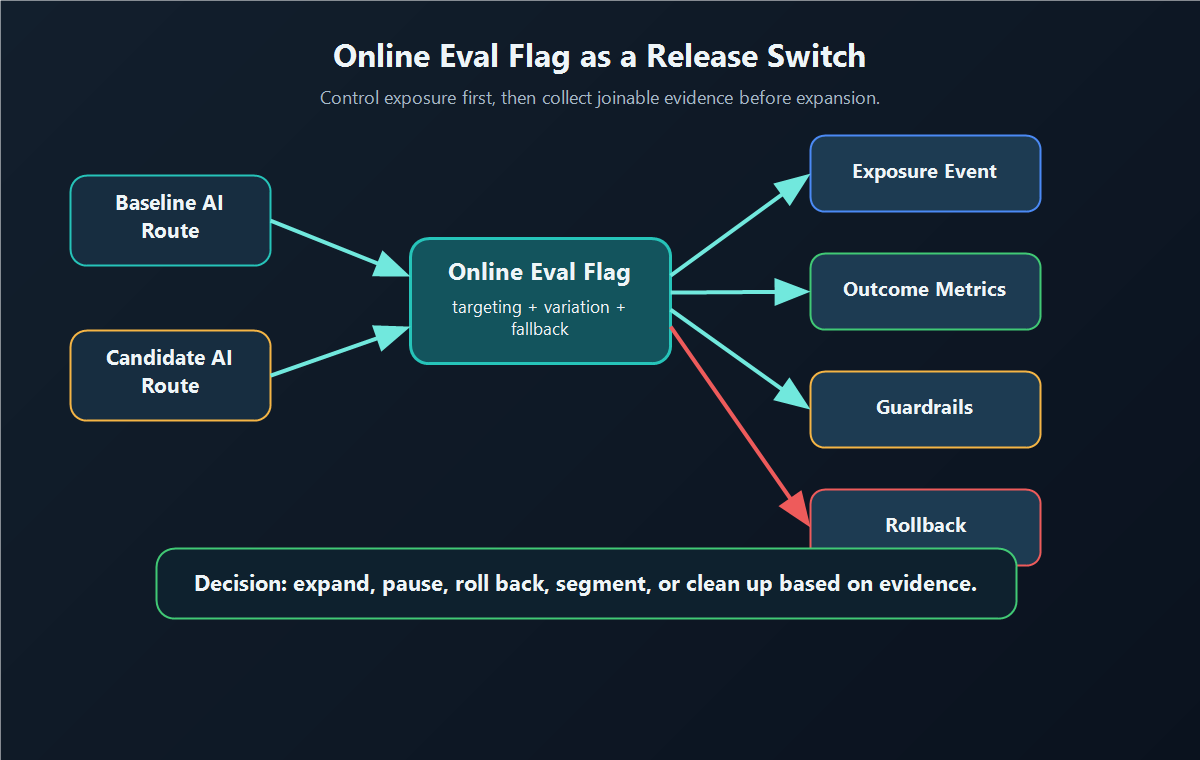
The Release Switch Contract
Before creating the flag, write the release switch contract. It should be short enough for a pull request description and specific enough for a release owner to act on.
online_eval_release_switch:
  flag_key: support_assistant_answer_route
  owner: ai_platform
  release_question: should_candidate_answer_route_expand
  assignment_unit: account_id
  baseline: prompt_v3_model_a_keyword_retrieval
  candidate: prompt_v4_model_b_hybrid_retrieval
  default_when_unavailable: baseline
  eligible_scope:
    environment: production
    segment: paid_support_accounts
    exclusions:
      - regulated_accounts
      - severity_one_incidents
  primary_metric: case_resolved_without_escalation
  guardrails:
    - p95_latency
    - cost_per_resolved_case
    - fallback_rate
    - human_correction_rate
  rollback_when:
    - telemetry_missing
    - guardrail_breach
    - severe_quality_failure
  cleanup_after_decision: promote_winner_or_remove_losing_route
The contract prevents three common failures:
- the candidate reaches production before the team agrees what the flag controls;
- exposure is logged under one identity while outcomes are logged under another;
- rollback becomes a manual code change instead of a flag decision.
For AI systems, this matters because the risky behavior may be invisible in the UI. A prompt, model route, retrieval profile, or agent tool policy can change cost, latency, quality, and downstream business outcomes without changing the button a user clicks.
Step 1: Choose The Smallest Clean Runtime Decision
The flag should represent one runtime decision that can be measured. If one flag changes the prompt, model, retrieval policy, and tool permissions, the result may still be useful, but the decision is a route-bundle decision. Do not claim the experiment proved only the model or only the prompt improved.
Use a boolean flag only when there are exactly two meaningful choices. Use a string or JSON variation when the application needs named AI routes.
| Flag decision | Example variations | Better release question |
|---|---|---|
| Prompt route | baseline_prompt, structured_prompt |
Does the structured prompt reduce escalation without hurting latency? |
| Model route | current_model, candidate_model |
Does the candidate model improve task success within cost guardrails? |
| Retrieval profile | keyword, hybrid_reranker |
Does hybrid retrieval improve accepted answers without unsafe sources? |
| Agent workflow | read_only, approval_required_write |
Does the candidate workflow complete more tasks without increasing intervention? |
| Guardrail setting | standard, strict |
Does stricter policy reduce bad outputs without blocking valid work? |
OpenFeature's flag evaluation specification is useful category language here because it describes typed evaluation against a flag key, default value, and evaluation context. The important implementation point is vendor-neutral: the application should resolve a named value before it runs the AI behavior.
Step 2: Evaluate The Flag At The AI Boundary
Evaluate the online eval flag at the boundary where the AI behavior is selected. For most AI products, that means the server, model gateway, agent runtime, or workflow service. Browser-side evaluation can be fine for UI copy, but it is usually the wrong control point for model routing, prompt construction, retrieval, tool access, fallback behavior, or cost policy.
type AnswerRoute = "baseline" | "candidate";

async function answerSupportCase(request: SupportCaseRequest) {
  const userContext = {
    keyId: request.accountId,
    plan: request.plan,
    region: request.region,
    workflow: "support_answer",
  };

  const route = await featbitClient.stringVariation(
    "support_assistant_answer_route",
    userContext,
    "baseline"
  ) as AnswerRoute;

  const trace = {
    flagKey: "support_assistant_answer_route",
    assignmentUnit: request.accountId,
    variation: route,
    requestId: request.id,
  };

  return runAnswerRoute({
    question: request.question,
    route,
    trace,
  });
}
The fallback value should be safe. If the flag service is unavailable, the application should choose the baseline or another documented safe route rather than silently serving a partially configured candidate.
FeatBit's targeting and rollout model fits this control point: use targeting rules for eligible cohorts and percentage rollouts when the release owner is ready to expand.
Step 3: Emit Exposure Only When The Candidate Can Affect The User
Do not record exposure when a page loads if the AI behavior never ran. Exposure should mean the system actually used the resolved variation to select a prompt, model, retrieval profile, tool policy, fallback path, or other AI behavior.
The minimum exposure event needs the assignment unit, flag key, variation, and trace identity.
{
  "event": "ai_online_eval_exposure",
  "flagKey": "support_assistant_answer_route",
  "assignmentUnit": "account_1842",
  "variation": "candidate",
  "requestId": "req_7f91",
  "surface": "support_answer",
  "timestamp": "2026-06-07T10:25:00Z"
}
Then outcome and guardrail events must carry the same join keys.
{
  "event": "support_case_outcome",
  "flagKey": "support_assistant_answer_route",
  "assignmentUnit": "account_1842",
  "variation": "candidate",
  "requestId": "req_7f91",
  "resolvedWithoutEscalation": true,
  "latencyMs": 1840,
  "estimatedCostUsd": 0.012,
  "fallbackUsed": false,
  "humanCorrection": false
}
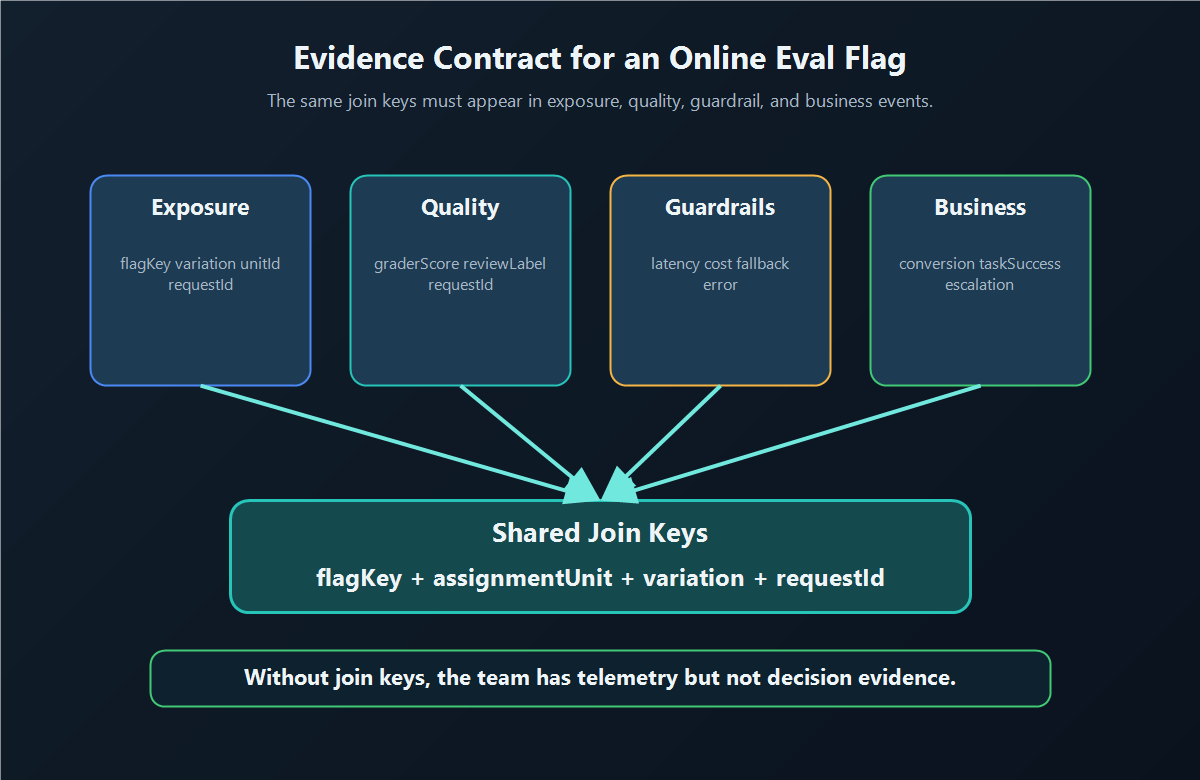
FeatBit's Track Insights API is the implementation bridge for sending feature flag usage events and custom metric events. The article text should still explain the event contract because the real release risk is not an API call. The risk is collecting evidence that cannot be joined back to the variation that caused it.
Step 4: Use Decision States Instead Of One Big Rollout
An online eval flag should move through explicit states. Each state answers a different question.
| State | Traffic | Main question | Allowed action |
|---|---|---|---|
| Off | 0 percent candidate | Is the candidate present but unexposed? | Keep baseline |
| Internal | staff or test accounts | Does the route work in the real stack? | Fix or continue |
| Shadow | production inputs, no visible candidate output | Can the candidate handle real input shape? | Repair, narrow, or continue |
| Canary | small visible cohort | Is exposure healthy enough to expand? | Continue, pause, or roll back |
| Online eval | controlled split or targeted cohort | Does the candidate improve the committed outcome? | Expand, keep control, segment, or iterate |
| Full release | all eligible traffic | Can the winner become default? | Promote, monitor, and clean up |
| Rollback | baseline restored | Did the switch contain the problem? | Review evidence and repair |
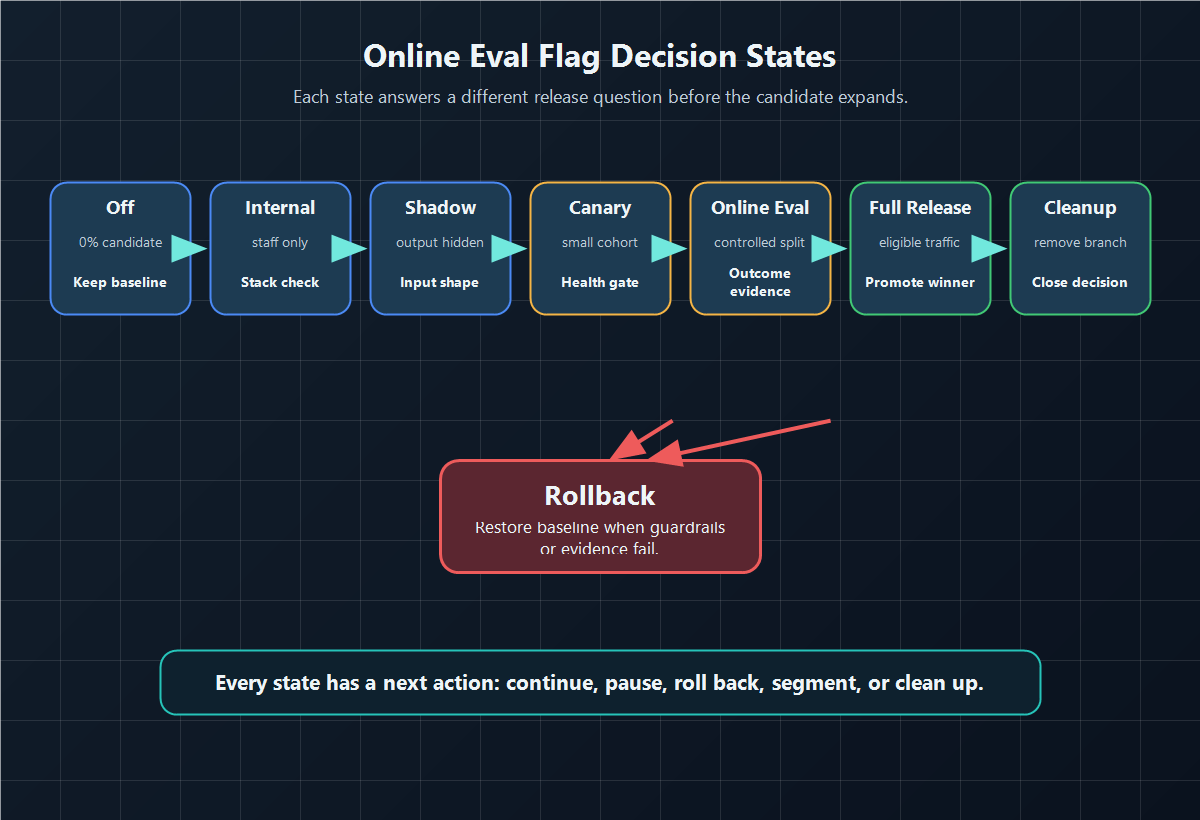
This is where online evaluation differs from passive monitoring. Monitoring tells you what happened. A release switch says what the team is allowed to do next when evidence changes.
If the candidate has not passed offline checks yet, keep it before production exposure. The companion tutorial on blocking launch with an offline eval gate covers that pre-exposure step. Once the candidate is eligible for live learning, the online eval flag controls who receives it.
Step 5: Define The Metric And Rollback Rule Before Expansion
Choose one primary outcome and a small set of guardrails before the flag expands. The primary metric decides whether the candidate is worth shipping. Guardrails decide whether to pause or roll back even if the primary metric looks good.
| AI change | Primary metric | Guardrails |
|---|---|---|
| Support assistant prompt | case resolved without escalation | correction rate, complaint rate, latency, cost |
| Model route | successful task completion | fallback rate, provider errors, token cost, p95 latency |
| Retrieval profile | accepted answer with useful source | no-answer rate, unsafe source rate, citation rejection |
| Agent workflow | workflow completed without takeover | wrong-tool rate, approval queue size, incident count |
| Classifier prompt | correct downstream routing | manual reroute rate, high-risk false positives, confidence drift |
FeatBit's measurement design guidance uses this same separation between decision metrics and guardrails. The discipline matters more than the statistical flavor. A Bayesian readout, frequentist test, human review queue, or AI grader can all be misused if the team changes the metric after seeing the dashboard.
Write the decision rule in operational language:
decision_rule:
  continue_when:
    - primary_metric_improves_enough_to_matter
    - no_guardrail_breach
    - exposure_and_outcome_events_join_cleanly
  pause_when:
    - evidence_is_missing_or_inconclusive
    - segment_readout_shows_possible_harm
  rollback_when:
    - severe_quality_failure
    - latency_or_cost_guardrail_breach
    - fallback_rate_masks_candidate_failures
  cleanup_when:
    - winner_is_promoted
    - losing_route_is_no_longer_needed
Step 6: Close The Loop In FeatBit
In FeatBit, the online eval flag should carry the release decision through targeting, rollout, metrics, and cleanup.
| Operating need | FeatBit role |
|---|---|
| Name the AI route | Create a boolean, string, or JSON flag with clear variations |
| Limit eligible users | Use targeting rules, segments, and environment scope |
| Ramp carefully | Use percentage rollout instead of a broad all-on switch |
| Attribute evidence | Send evaluation and custom metric events through tracking |
| Inspect served variations | Use flag insights to check variation exposure |
| Stop expansion | Change targeting or variation allocation without redeploying |
| Preserve accountability | Use audit history and owner conventions |
| Prevent stale branches | Apply feature flag lifecycle management after the decision |
This is FeatBit's practical point of view: the flag is release-decision infrastructure. It is not the grader, experiment dashboard, observability stack, or product owner. It is the runtime control point that makes those systems actionable because the team can target, measure, expand, pause, roll back, and clean up the candidate behavior.
Common Mistakes
Using the flag as the evaluation. A flag does not grade outputs. It exposes and labels behavior so graders, human review, telemetry, and product metrics can produce decision evidence.
Randomizing at request level for a multi-turn journey. Chat, support, coding, and agent workflows often need user, account, conversation, session, or workflow assignment. Request-level assignment can make the experience inconsistent and the evidence hard to interpret.
Measuring only quality scores. Quality matters, but release decisions also need cost, latency, fallback, support, and business outcome guardrails.
Letting fallback hide candidate failures. If candidate traffic frequently falls back to baseline, the candidate may appear safer than it really is. Track fallback rate by variation.
Skipping cleanup. Once the release decision is made, promote the winner, remove losing branches, or intentionally convert the flag into a long-lived operational control. A completed online eval flag should not become permanent release confusion.
A Practical Checklist
Before enabling an online eval flag beyond internal traffic, confirm:
- The flag controls one named AI behavior or one honest route bundle.
- The assignment unit matches the user journey.
- The safe fallback is explicit.
- Targeting excludes ineligible or high-risk segments.
- Exposure fires only when the AI behavior actually runs.
- Outcome and guardrail events share the same join keys.
- The primary metric and guardrails are written before expansion.
- Rollback can restore baseline behavior without redeploying.
- The release owner knows which evidence changes the next state.
- Cleanup is planned before the candidate becomes the default.
Bottom Line
An online eval flag is strongest when it works like a release switch: it controls live AI exposure, labels the variation that actually ran, connects evidence to a release question, and keeps rollback available while the decision is still uncertain.
Use offline eval gates to stop weak candidates before exposure. Use an online eval flag to collect production evidence safely. Then use the decision record to expand, pause, roll back, or clean up instead of leaving the AI change in an ambiguous rollout state.
Source Notes
- FeatBit implementation context: targeting rules, percentage rollouts, Track Insights API, flag insights, measurement design, and feature flag lifecycle management support the workflow described here.
- Category context: Statsig's AI Evals overview distinguishes offline and online evaluation work. GrowthBook's feature flag documentation connects flags with targeting, gradual rollout, and experiments. LaunchDarkly's experiment flags documentation connects flags, variations, and metrics. Optimizely's Feature Experimentation metrics documentation describes primary and secondary metric discipline.
- Feature flag standard context: the OpenFeature flag evaluation specification is cited for vendor-neutral flag key, default value, evaluation context, typed value, and detailed evaluation concepts.
Image And Open Graph Notes
- Use
cover.pngas the Open Graph image because it summarizes the release-switch idea behind the article. - Use
switch-workflow.pngnear the opening because it shows the runtime path from baseline and candidate routes into evidence and rollback. - Use
evidence-contract.pngin the event contract section because it shows the join keys that make exposure evidence trustworthy. - Use
decision-states.pngin the rollout section because it distinguishes off, internal, shadow, canary, online evaluation, full release, rollback, and cleanup states.