
Runtime Control for AI Agents: A Post-Deployment Operations Runbook
Runtime control for AI agents is the ability to change what a live agent can do without redeploying the agent service. In production operations, that means operators can reduce autonomy, disable a tool, roll back a prompt or model profile, narrow the audience, move traffic to fallback mode, and preserve an audit trail while the incident is still unfolding.
This article is not another overview of how to design agent control from scratch. Use it as a post-deployment runbook for agents that are already live and need an operational intervention path.
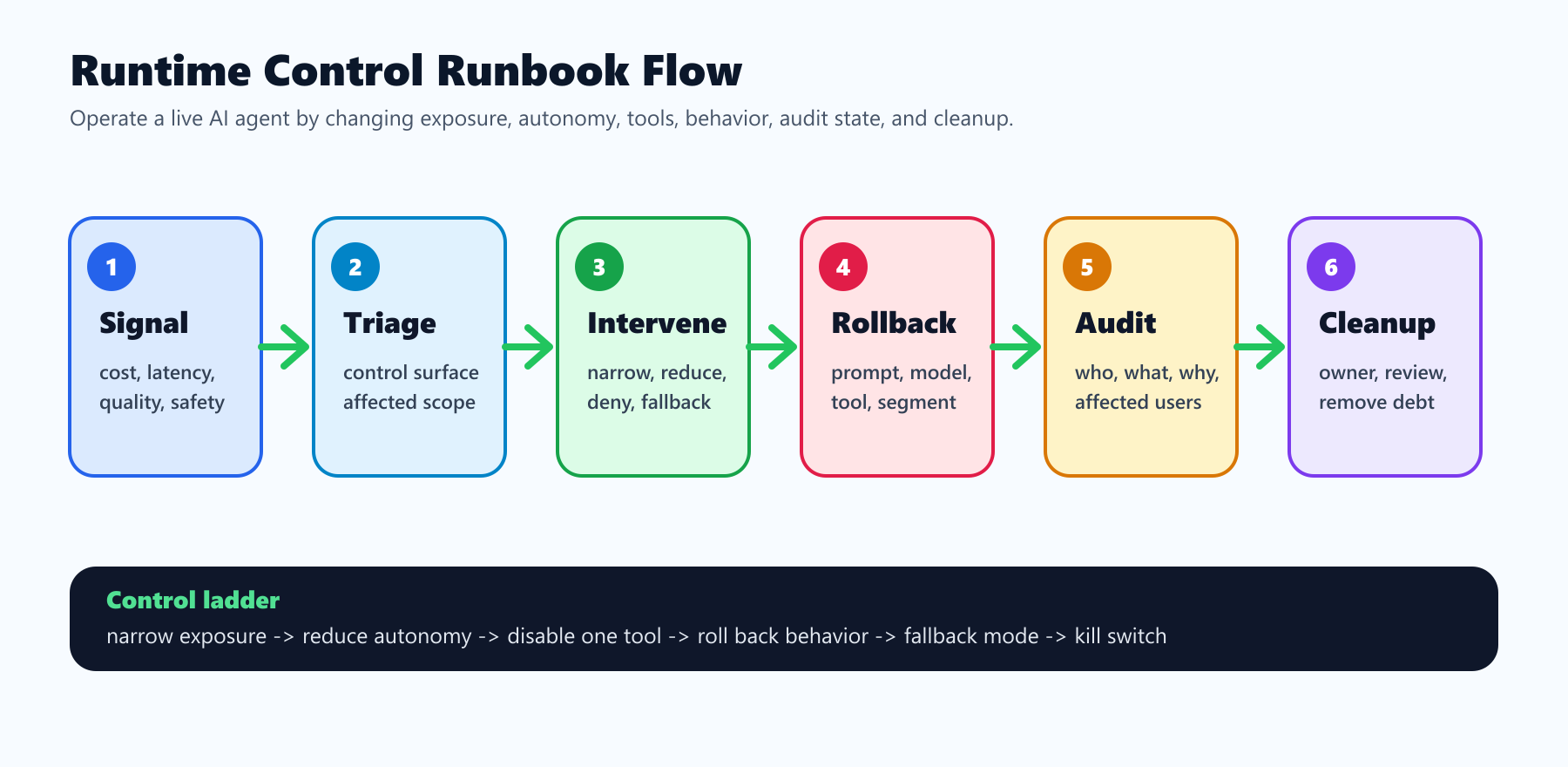
When This Runbook Applies
Use a runtime control runbook when the agent is already deployed and one of these conditions appears:
- A tool call is technically allowed but operationally unsafe for the current context.
- A new prompt, model profile, retrieval source, or agent strategy is producing poor outcomes.
- Cost, latency, error rate, support contacts, evaluator scores, or human review results cross a limit.
- A customer, account, region, environment, or workflow needs a narrower policy than the global default.
- Operators need to pause one capability without shutting down the entire agent.
- The team must reconstruct who changed agent behavior, when it changed, and which sessions were affected.
The key distinction is timing. A design guide asks, "How should we build agent control?" A runbook asks, "What should the operator do right now, with the controls already available?"
The Runtime Control Ladder
Do not jump straight from full autonomy to full shutdown. Production operators need a ladder of interventions so they can choose the least disruptive action that reduces risk.
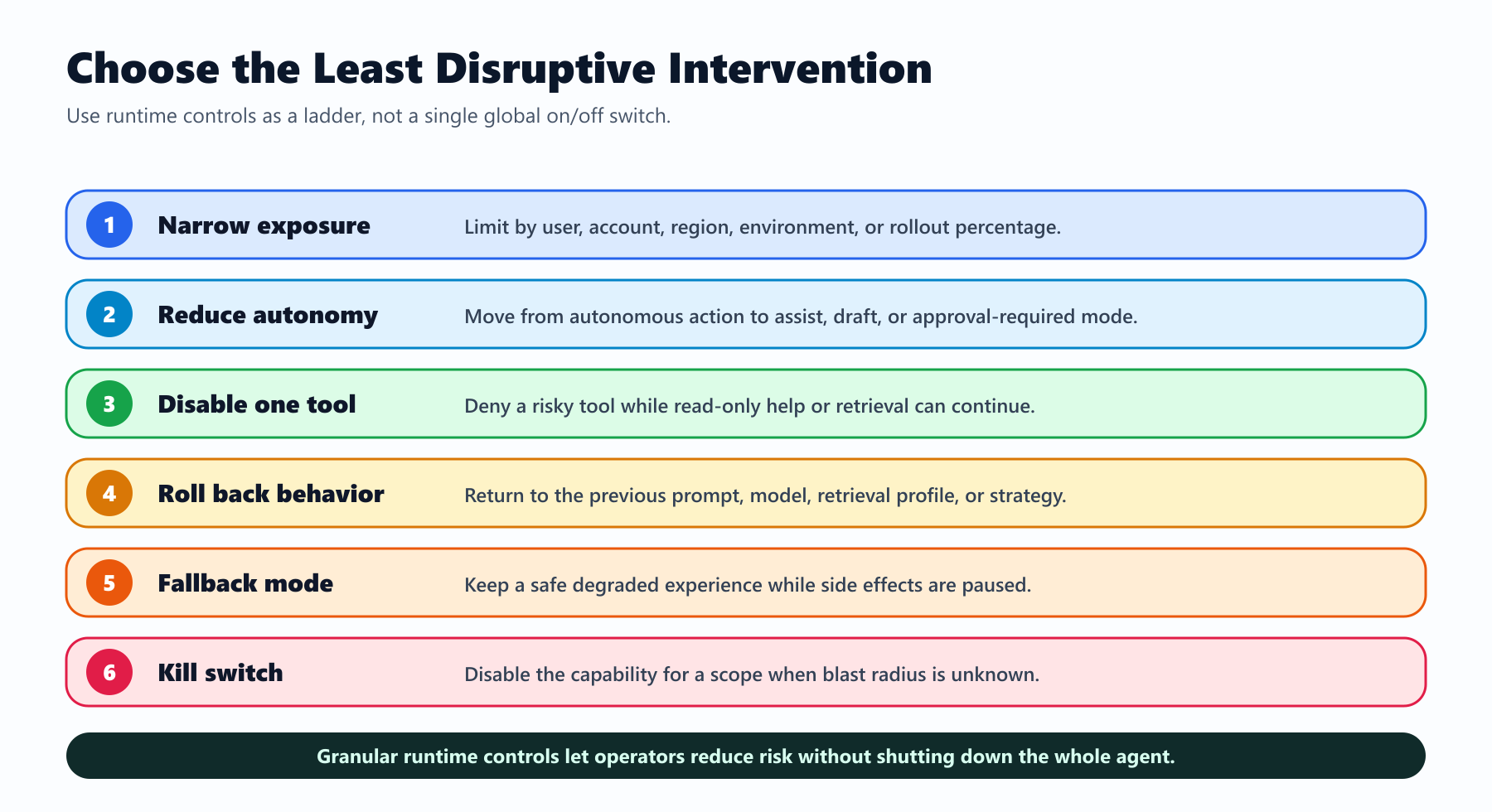
| Level | Operator action | Use when | Typical flag or policy |
|---|---|---|---|
| 1. Narrow exposure | Limit the agent to internal users, one account segment, or a smaller percentage | The issue is uncertain or limited to a rollout cohort | Targeting rule or percentage rollout |
| 2. Reduce autonomy | Move from autonomous action to assist, draft, or approval-required mode | The agent is useful but side effects need review | agent-mode or approval-required |
| 3. Disable one tool | Deny a specific tool or tool class | One integration is risky while the rest of the agent is healthy | Tool denylist or capability-tier flag |
| 4. Roll back behavior | Return to the previous prompt, model, retrieval profile, or strategy | A new variant is the suspected cause | Multivariate flag or configuration profile |
| 5. Fallback mode | Keep read-only help or deterministic workflow while stopping side effects | Users still need a safe degraded experience | Fallback-mode flag |
| 6. Kill switch | Disable the agent capability for a scope or environment | The blast radius is unknown or active harm is likely | Operational kill switch |
This ladder is why runtime control should be more granular than one global "agent on" switch. A global switch is useful for emergencies, but it is too coarse for normal operations.
Prepare the Controls Before the Incident
An incident runbook only works if the control points exist before the first incident. For each production agent workflow, define a small set of operational controls and their safe defaults.
| Control | Production default | Owner question |
|---|---|---|
| Agent availability | Disabled or targeted until rollout starts | Who can enable this agent for a new audience? |
| Agent mode | Observe, assist, or draft | Who can move it toward autonomous execution? |
| Tool tier | Read-only or approval required | Which team owns each side-effecting tool? |
| Tool denylist | Empty but ready | Who can deny one tool during an incident? |
| Prompt profile | Last stable version | How is a previous prompt restored? |
| Model profile | Conservative profile | Who approves higher-cost or higher-risk model routing? |
| Retrieval profile | Verified internal source | Which regions or accounts require restricted data sources? |
| Incident mode | Off | What changes when incident mode turns on? |
FeatBit maps these controls to feature flag targeting, variations, environments, audit logs, API access, webhooks, and SDK evaluation. If you need the broader architecture pattern, start with how to control AI agents in production with feature flags. This runbook assumes those controls already exist and focuses on operating them.
Triage the Signal Before Changing the Control State
When an alert fires, the first operator action should be classification, not a reflexive shutdown. Capture enough context to choose the intervention level.
| Signal | First question | Likely intervention |
|---|---|---|
| Cost spike | Is it tied to a model profile, retry loop, or traffic cohort? | Roll back model profile or narrow exposure |
| Latency spike | Is the issue model, retrieval, tool dependency, or approval queue? | Fallback mode or route to stable profile |
| Wrong tool use | Is one tool unsafe or is the agent strategy wrong? | Disable one tool or reduce autonomy |
| Bad answer quality | Is the issue prompt, retrieval source, model, or user segment? | Roll back behavior or target narrower segment |
| Unsafe external action | Did approval fail, or was approval bypassed? | Approval-required mode and tool denylist |
| Data boundary concern | Is the issue account, region, tenant, or source specific? | Environment or segment rule |
| Audit gap | Can operators reconstruct the decision path? | Freeze expansion and fix instrumentation |
The operator should record the signal, suspected control surface, chosen intervention, expected effect, owner, and review time. That record matters because many agent incidents are not crashes. They are plausible workflows taking a risky path.
Intervention Playbooks by Failure Mode
The agent is calling the wrong tool
Start by disabling the narrowest tool or tool class. Do not shut down the agent if read-only help, retrieval, or drafting still works safely.
Operational steps:
- Add the tool name or risk class to the runtime denylist.
- Move affected sessions to observe-only or approval-required mode.
- Confirm the tool router enforces the decision outside the model prompt.
- Review the last affected sessions for prompt, retrieval, user role, and account context.
- Remove the denylist entry only after the tool policy and tests are updated.
The companion tutorial on agent tool permission gates with feature flags goes deeper on the implementation pattern.
The prompt or model variant is underperforming
Roll back the behavior variant instead of disabling the whole agent. Treat prompt versions, model profiles, retrieval profiles, and agent strategies as release variants with known fallbacks.
Operational steps:
- Freeze rollout expansion for the affected variant.
- Route new sessions to the previous stable profile.
- Keep existing sessions on the safest recoverable path, not necessarily the original path.
- Compare affected and unaffected sessions by flag variation, segment, environment, latency, cost, and review result.
- Keep the failed variant available for post-incident analysis, but prevent new exposure.
This is the practical extension of FeatBit's rollback strategy for AI systems: rollback should target the behavior surface that changed, not always the whole service.
The agent is safe in staging but unsafe in production
Environment-specific rules should be stricter than code-level environment checks. Production often has real users, real data, external effects, billing impact, and audit requirements that staging cannot simulate.
Operational steps:
- Set production to read-only, draft, or approval-required mode.
- Keep staging or QA on the newer behavior only if it cannot affect production data.
- Compare the flag state across environments before copying settings.
- Require explicit approval for any production rule that enables side effects.
- Add an environment attribute to the evaluation context if it is missing.
FeatBit documentation covers environments, targeting rules, and percentage rollouts. Those are the basic primitives for separating production behavior from non-production validation.
The authorization boundary is unclear
Runtime flags can decide whether an approved capability is active. They should not be the only thing preventing unauthorized access. If the incident suggests that the agent can reach a tool it should never reach, treat it as an authorization issue first and a rollout issue second.
Operational steps:
- Disable the relevant tool or agent capability immediately.
- Rotate or narrow credentials if the tool boundary is uncertain.
- Verify API, IAM, or MCP authorization before re-enabling any rollout flag.
- Add runtime flags back only after the hard permission boundary is correct.
- Record the distinction in the incident notes so the fix is not reduced to a prompt update.
The Model Context Protocol authorization specification describes authorization for HTTP transports and highlights token audience and passthrough concerns. The operational lesson is straightforward: runtime control is not a replacement for scoped credentials, audience validation, API permissions, or tool-router enforcement.
Keep Auditability in the Hot Path
Auditability is part of runtime control, not a report generated later. Every intervention should leave enough evidence for the team to reconstruct the behavior change.
At minimum, capture:
- Incident or change ticket ID.
- Operator identity and approval path.
- Flag key, previous variation, new variation, and affected environment.
- Targeting rule, segment, account, region, or rollout percentage changed.
- Agent ID, session ID, user or account context, and tool risk class when available.
- Trigger signal, such as evaluator result, latency, cost, support case, or human review.
- Expected rollback effect and review time.
- Final outcome and cleanup decision.
FeatBit's audit logs, webhooks, OpenTelemetry integration, and flag insights are relevant here. A useful operations loop connects the control-plane change to the production signal that justified it.
Use Vendor Terminology Carefully
Runtime control for agents is becoming a shared category phrase. Unleash, for example, has written about runtime control for AI agents, and its feature flag documentation lists operational flags, kill switches, and permission flags as flag types for managing different kinds of production control. LaunchDarkly similarly uses AgentControl documentation and a Control AI Agents solution page to describe prompts, models, guardrails, audit trails, and rollback.
Those are useful category signals, but your runbook should stay vendor-neutral at the decision layer:
- What changed?
- Who or what is exposed?
- What is the safest fallback?
- Which hard security boundary still applies?
- Which signal proves the intervention worked?
- Who owns cleanup?
FeatBit's point of view is that feature flags are release-decision infrastructure. For AI agents, that means flags should help operators make targeted runtime decisions, not hide weak architecture behind a dashboard.
Do Not Let Runtime Controls Become Permanent Debt
After the incident is stable, decide whether each control is temporary or permanent.
Temporary rollout controls should have:
- an owner;
- a review date;
- a cleanup condition;
- a linked incident or release decision;
- a test proving the stable behavior no longer depends on the temporary flag.
Permanent operational controls are different. Agent kill switches, capability tiers, approval-required rules, and environment policies may stay because they are part of the operating model. Document them as operational flags, not stale release flags. FeatBit's feature flag lifecycle management guidance is useful for keeping this distinction clear.
Runtime Control Checklist
Before expanding a live agent's authority again, verify:
- The incident signal is tied to a named control surface.
- The rollback action affects the narrowest safe scope.
- The fallback behavior is known and tested.
- Tool-router, API, IAM, or MCP authorization still enforces the hard boundary.
- Production rules are stricter than staging rules where side effects exist.
- The audit trail records who changed what and why.
- Observability can show whether the intervention worked.
- Temporary flags have owner, review date, and cleanup path.
- The post-incident review separates prompt, model, retrieval, tool, authorization, and rollout causes.
Source Notes and Internal Link Plan
This article uses vendor terminology from Unleash and LaunchDarkly only as category context. It does not make comparative performance, pricing, security, or market-ranking claims.
- Unleash category context: runtime control for AI agents and feature flag types including operational, kill switch, and permission flags.
- LaunchDarkly category context: AgentControl documentation and Control AI Agents solution page.
- Agent boundary source: Model Context Protocol authorization specification.
- FeatBit implementation sources: targeting rules, percentage rollouts, audit logs, webhooks, and OpenTelemetry integration.
- FeatBit internal journey links: control AI agents in production, agent tool permission gates, rollback strategies for AI systems, AI agent deployment loop, and feature flag lifecycle management.
- Image and Open Graph recommendation: use the cover image as the social preview, and use the runbook diagram in the article body because it summarizes the operational sequence from signal to cleanup.
Next Step
Pick one live or soon-to-launch agent workflow. Write the runtime control ladder for that workflow before the next rollout: narrow exposure, reduce autonomy, disable one tool, roll back behavior, enter fallback mode, and activate the kill switch. If one of those steps is not possible today, that is the next control to build.