
Runtime Primitives for Agentic Software: What Belongs in the Control Plane
A runtime primitive for agentic software is a shared control that the agent platform can evaluate while the system is running. It is not another prompt instruction, environment variable, or dashboard toggle. It is a named, owned, observable mechanism for deciding which behavior is active for a specific user, account, environment, workflow, tool, or incident state.
For platform teams, the practical question is not "Should agents have runtime control?" They already do, through prompts, tool lists, policy files, credentials, model settings, routing rules, and operator interventions. The real question is which controls are important enough to become stable runtime primitives instead of scattered one-off switches.
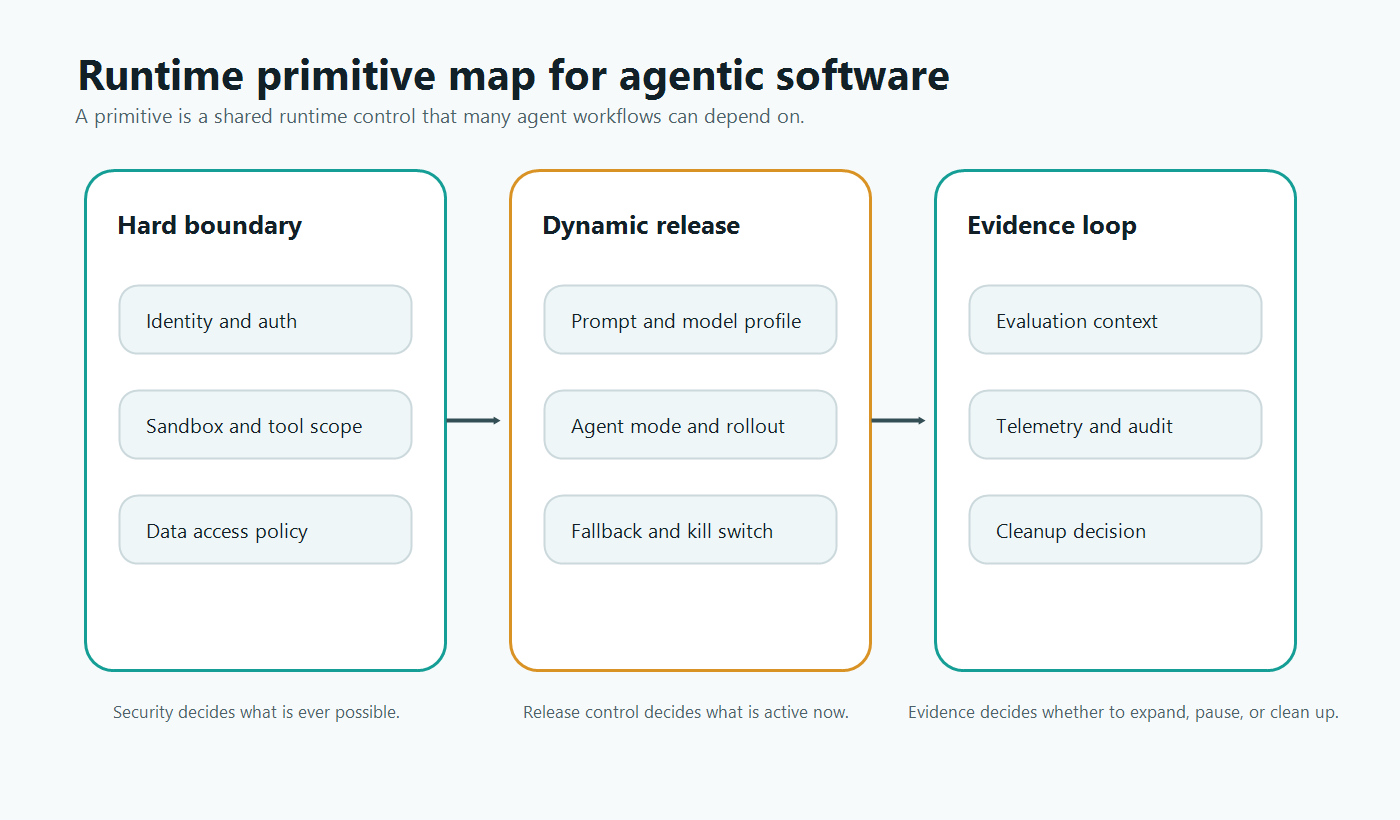
What Makes a Control a Runtime Primitive
A runtime primitive should meet five tests:
- It changes behavior after deployment.
- It depends on runtime context such as user, account, environment, workflow, tool risk, region, or incident state.
- It has a safe fallback that operators can activate quickly.
- It produces evidence through telemetry, audit events, review records, or experiment results.
- It is reused by more than one agent workflow or is important enough to standardize before reuse arrives.
That definition keeps the term useful. A primitive is not every configuration value. A temperature value for one prototype agent is configuration. A model profile control used across support, coding, analytics, and incident-response agents may be a runtime primitive. A one-time beta flag is a release control. A permanent kill switch for side-effecting agent behavior is a runtime primitive.
This distinction matters because agentic software changes risk at runtime. The same deployed agent can answer a question, call a search tool, draft a change, update a ticket, or trigger an external action depending on context. The control plane needs stable primitives for the decisions that should not be buried inside prompts or application-specific branches.
The Primitive Stack for Agentic Software
Agent platforms usually need three layers of primitives.
| Layer | Runtime primitive | What it decides | What it should not replace |
|---|---|---|---|
| Hard boundary | Identity and authorization | Who or what can ever access a resource | Runtime rollout policy |
| Hard boundary | Sandbox and tool scope | Which execution environment and tools are technically reachable | Product release decisions |
| Hard boundary | Data access policy | Which sources are allowed for the context | Quality evaluation |
| Dynamic release | Agent mode | Off, observe, search-only, assist, draft, approved action, or limited autonomy | API permission checks |
| Dynamic release | Prompt or model profile | Which behavior profile is active now | Prompt version history |
| Dynamic release | Tool tier or denylist | Which approved tools are released to this context | Tool-router enforcement |
| Dynamic release | Rollout and experiment gate | Who sees a new strategy, workflow, or capability | Measurement design |
| Evidence loop | Evaluation context | Which attributes explain the decision | Broad data collection without purpose |
| Evidence loop | Telemetry and audit | What changed, who changed it, and what happened next | Compliance claims without review |
| Evidence loop | Cleanup decision | Whether a rollout control becomes permanent policy or is removed | Automatic deletion without evidence |
The hard-boundary layer decides what is ever possible. The dynamic-release layer decides what is active right now. The evidence layer decides whether the team should expand, pause, roll back, or clean up.
Feature flags belong mainly in the dynamic-release layer, with links into the evidence layer. They are not a substitute for identity, authorization, sandboxing, or scoped credentials. They are the release-decision primitive that lets teams change approved behavior safely after deployment.
Why Static Configuration Breaks Down
Static configuration works when the system has a small number of modes and low operational pressure. Agentic software pushes past that quickly.
An agent platform may need to answer these questions during a single production day:
- Should this workflow be available only to internal users?
- Should one account stay in search-only mode while another account gets draft-write behavior?
- Should the agent use a conservative model profile for regulated data?
- Should a new retrieval source reach 5 percent of sessions before full release?
- Should a side-effecting tool be disabled during an incident while read-only assistance remains available?
- Should a prompt or strategy experiment continue after review quality drops?
If each answer is encoded in a different config file, prompt rule, or emergency patch, the control plane becomes hard to audit and hard to reverse. The platform team should instead promote repeated decisions into runtime primitives with owners, fallbacks, and evidence.
OpenFeature describes an evaluation context as contextual data used during flag evaluation. That concept is especially important for agents because the runtime decision often depends on agent-specific attributes: workflow, tool risk, environment, account, session, region, and incident mode. Without those attributes, runtime control collapses into global switches.
A Decision Test Before You Add Another Switch
Use this path before adding another agent configuration switch.
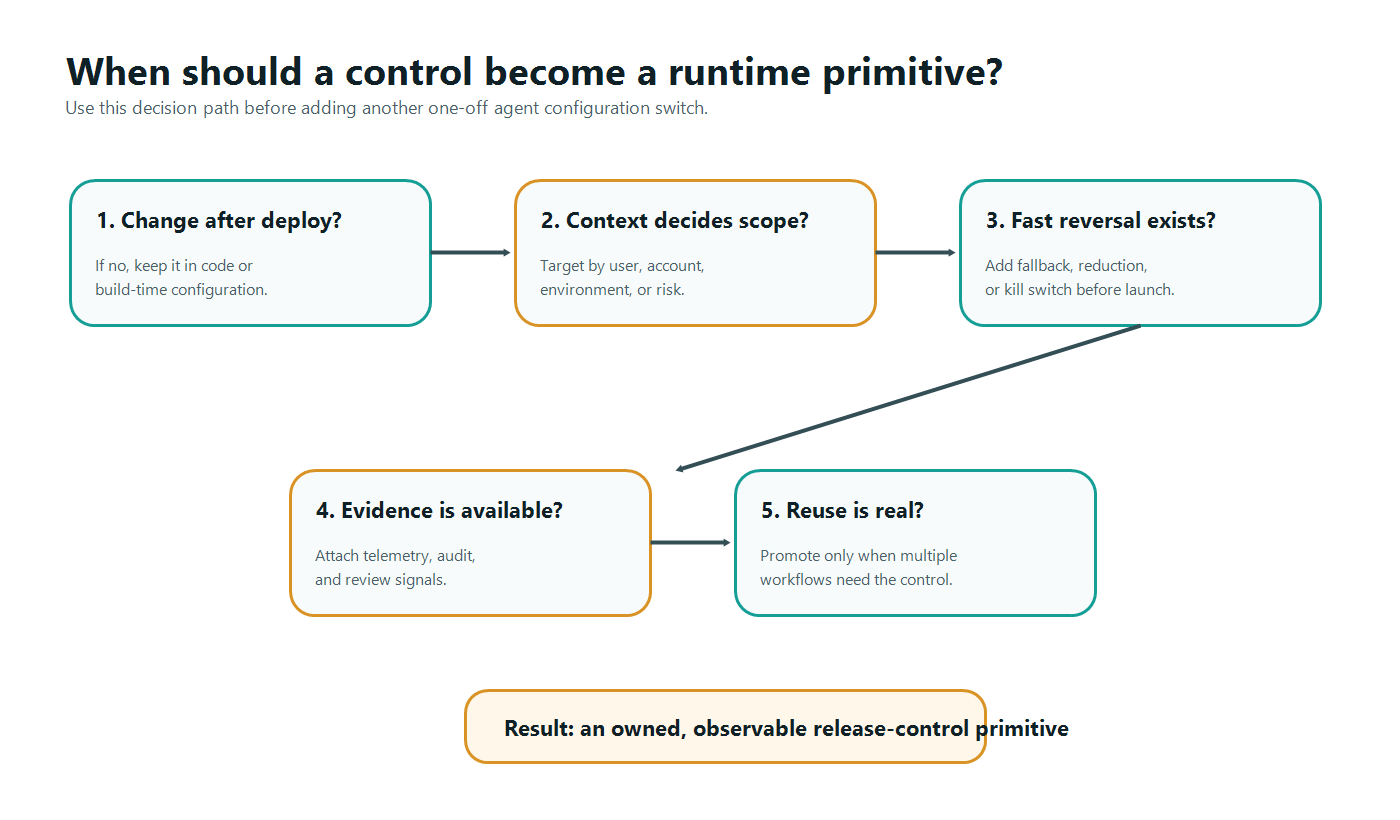
| Question | If yes | If no |
|---|---|---|
| Does this control need to change after deployment? | Treat it as a runtime decision. | Keep it in code, build-time config, or deployment config. |
| Does scope vary by context? | Add evaluation context and targeting. | Consider a simpler environment-level setting. |
| Can operators reverse it quickly? | Define the rollback action and fallback state. | Do not expose the behavior until reversal exists. |
| Will evidence guide expansion or cleanup? | Attach telemetry, audit, and review signals. | Keep it out of the shared control plane until the signal is clear. |
| Is it reused or likely to become a standard pattern? | Promote it to a primitive with naming, ownership, and lifecycle rules. | Keep it as a local rollout control with an expiration date. |
This test prevents two failure modes. The first is under-controlling agent behavior with one global "agent enabled" flag. The second is over-controlling every prompt detail with permanent flags that no one owns.
Example: Turning Agent Mode Into a Primitive
Agent mode is a strong candidate for a runtime primitive because many workflows need the same authority ladder.
| Mode | Meaning | Typical fallback |
|---|---|---|
off |
The agent workflow is unavailable for this context | Remain disabled |
observe |
The agent proposes actions but does not execute them | Off |
search_only |
The agent can query approved sources only | Observe |
assist |
The agent can answer and suggest next steps | Search-only |
draft_write |
The agent can create drafts, branches, tickets, or internal records | Assist |
approved_external |
The agent can prepare external actions for human approval | Draft-write |
autonomous_limited |
The agent can execute one narrow action without approval | Approved external action |
fallback |
The agent uses a degraded safe behavior during an incident | Search-only or off |
Once this ladder becomes a primitive, every new agent workflow can speak the same language. A support agent, code assistant, and incident assistant may use different tools, but they can share the same runtime concept of search-only, draft-write, approval-required, and fallback behavior.
In FeatBit, this pattern maps naturally to a multivariate flag with safe fallbacks, targeting rules, environments, audit logs, and server-side evaluation. The agent should receive the evaluated mode. It should not be able to query the control plane from arbitrary places or bypass the tool router.
Example: Separating Tool Policy from Tool Authorization
Tool access is another place where teams often confuse primitives.
Authorization decides whether an agent or service identity is ever allowed to reach a tool. Runtime tool policy decides whether an approved capability is active for this context right now. Both are needed.
The Model Context Protocol authorization specification describes OAuth-based authorization for HTTP transports and highlights concerns such as token audience validation and token passthrough. That is a hard-boundary problem. A feature flag cannot repair broad credentials or missing audience validation.
Runtime policy answers a different question:
- Is this tool released for this workflow?
- Is it read-only, draft-write, approved external action, or blocked?
- Does this account, region, or environment require stricter behavior?
- Is this tool temporarily denied during an incident?
- Should the tool call queue for human approval?
OpenAI's Agents SDK guardrail documentation distinguishes tool guardrails that run around function-tool calls from broader input and output guardrails. The architecture lesson is portable: enforce runtime primitives at execution boundaries, not only in natural-language instructions.
For implementation detail, use the companion tutorial on agent tool permission gates with feature flags. The primitive-level lesson is narrower: do not make every tool rule a bespoke branch. Standardize the few decisions that every side-effecting agent needs.
Where Feature Flags Fit
Unleash's feature flag documentation lists several flag types, including release, experiment, operational, kill switch, and permission flags. That taxonomy is useful category context for agentic software because those control types map to real runtime decisions: expose a behavior, test a variant, operate a system, stop a risky path, or govern access to a capability.
FeatBit's point of view is that feature flags are release-decision infrastructure. In agentic software, that means flags can become the runtime primitive for behavior that must be targeted, measured, audited, and reversible.
Use flags for:
- agent availability by audience, account, environment, or percentage;
- agent mode selection such as observe, search-only, assist, or fallback;
- prompt, model, retrieval, or strategy profile rollout;
- tool tier and approval-required decisions;
- incident denylist, fallback, or kill-switch behavior;
- experiments that compare agent strategies with exposure and metric events;
- cleanup decisions that turn temporary rollout flags into permanent operational policy or remove them.
Do not use flags as the only control for:
- API authorization;
- credential scope;
- sandbox isolation;
- user consent or legal policy;
- sensitive-data access;
- irreversible side effects without a hard enforcement boundary.
That boundary keeps runtime primitives honest. A flag can release an approved tool tier to a segment. It should not be the only thing preventing an agent from using a tool it should never reach.
A Minimal Primitive Registry
Platform teams should keep a registry for shared agent runtime primitives. The registry does not need to start as a large governance program. It can begin as a short contract in the repository or platform documentation.
| Field | Purpose | Example |
|---|---|---|
| Primitive name | Stable concept used across workflows | Agent mode |
| Owner | Team accountable for semantics and lifecycle | AI platform team |
| Evaluation boundary | Where the value is evaluated | Server-side orchestrator before tool exposure |
| Context fields | Attributes required for targeting | User, account, environment, agent, workflow, tool risk |
| Safe fallback | Default when missing, unknown, or risky | Search-only |
| Evidence | Signals needed for expansion or rollback | Audit event, evaluator score, correction rate, denied tool attempts |
| Lifecycle rule | Temporary rollout or permanent operational control | Permanent operational primitive |
This registry is different from a flag list. A flag list records current controls. A primitive registry records the reusable concepts that make agent behavior understandable across systems.
FeatBit's feature flag lifecycle management guidance is relevant here because runtime primitives can still create debt. Temporary rollout controls need owners and cleanup conditions. Permanent operational controls need documentation and review.
How FeatBit Turns Runtime Primitives Into Release Decisions
FeatBit is useful in this architecture when a runtime primitive needs release mechanics: targeting, variations, gradual rollout, auditability, API access, webhooks, observability integration, and lifecycle ownership.
For agentic software, that release layer can support:
- server-side flag evaluation before the agent receives a mode, profile, or tool tier;
- targeting rules for users, accounts, environments, regions, plans, or workflow attributes;
- percentage rollout for new agent behavior;
- multivariate flags for prompt, model, retrieval, and strategy profiles;
- audit logs for control-plane changes;
- webhooks that connect flag changes to incident, review, or approval workflows;
- observability integrations that help correlate a behavior change with production signals.
If you need the broader architecture, start with feature flags for AI agents. If you need the operating model, read how to control AI agents in production. If you need to roll a live agent backward after deployment, use the runtime control runbook.
The product angle is not "put every agent setting in FeatBit." The stronger pattern is to identify the controls that deserve primitive status, then use FeatBit as the release-decision layer for the ones that must be targeted, observable, reversible, and owned.
Common Mistakes
Calling every configuration value a primitive. A primitive should be shared, runtime-evaluated, owned, and reversible. Most local settings do not qualify.
Using one global agent switch. A global switch is useful for emergencies, but it cannot express mode, tool tier, prompt profile, retrieval source, approval policy, rollout stage, and incident fallback.
Putting the primitive only in the prompt. The model can be told the current policy, but the server-side router should enforce the decision before side effects.
Mixing authorization and release control. Authorization defines the maximum possible access. Runtime release control decides which approved capability is active now.
Skipping evidence. A primitive without telemetry, audit, review, or experiment signals is only a remote switch. It does not support a release decision.
Letting permanent controls hide temporary rollouts. Agent mode may be permanent. A one-time prompt rollout should not become permanent debt just because it used the same control plane.
Starting Checklist
Before promoting an agent control to a runtime primitive, verify:
- The control changes behavior after deployment.
- The control depends on runtime context, not only deployment environment.
- The default state is safe when the control plane is unavailable.
- Evaluation happens server-side before the agent crosses a behavior or execution boundary.
- Hard authorization, sandboxing, and credential scope still enforce maximum access.
- Operators can reduce scope, fall back, or disable the behavior quickly.
- Audit events record who changed the control state and why.
- Telemetry connects the evaluated value to agent outcomes.
- The primitive has an owner, naming convention, and lifecycle rule.
- Temporary flags that use the primitive have cleanup conditions.
Runtime primitives are the operating vocabulary of agentic software. They let platform teams stop arguing over isolated toggles and start designing shared controls for behavior that must stay adjustable after deployment.
Source Notes and Internal Link Plan
This article uses vendor and standards sources only as category and architecture context. It does not make comparative performance, pricing, security, or market-ranking claims.
- Flag evaluation source: OpenFeature evaluation context.
- Agent authorization source: Model Context Protocol authorization specification.
- Agent execution-boundary source: OpenAI Agents SDK guardrails.
- Category context source: Unleash feature flag types.
- FeatBit implementation sources: targeting rules, percentage rollouts, audit logs, webhooks, and OpenTelemetry integration.
- FeatBit reader journey links: AI control layer, AI agent deployment loop, feature flags for AI agents, control AI agents in production, and feature flag lifecycle management.
- Image and Open Graph recommendation: use
cover.pngas the social preview. Use the primitive map near the definition section and the decision tree near the promotion criteria because both summarize decisions already explained in crawlable text.
Next Step
Pick one agent workflow that is moving toward production. List every control that changes its behavior after deployment, then classify each one as local config, temporary rollout control, or shared runtime primitive. Promote only the controls that have context, fallback, evidence, ownership, and a cleanup or permanence rule.