
Dynamic Configs: A Practical Guide for Feature Flag Teams
Dynamic configs are runtime values that an application can fetch, evaluate, and apply without redeploying. In feature-management platforms, they usually mean more than a static settings file: the returned value can vary by user, account, segment, environment, percentage rollout, or experiment assignment.
For feature flag teams, the useful question is not only "what is a dynamic config?" The useful question is when a change should be a boolean flag, a dynamic config, an experiment, an environment variable, or ordinary code. Dynamic configs are strongest when a product or platform team needs a typed value, targeted exposure, evidence, rollback, and cleanup.
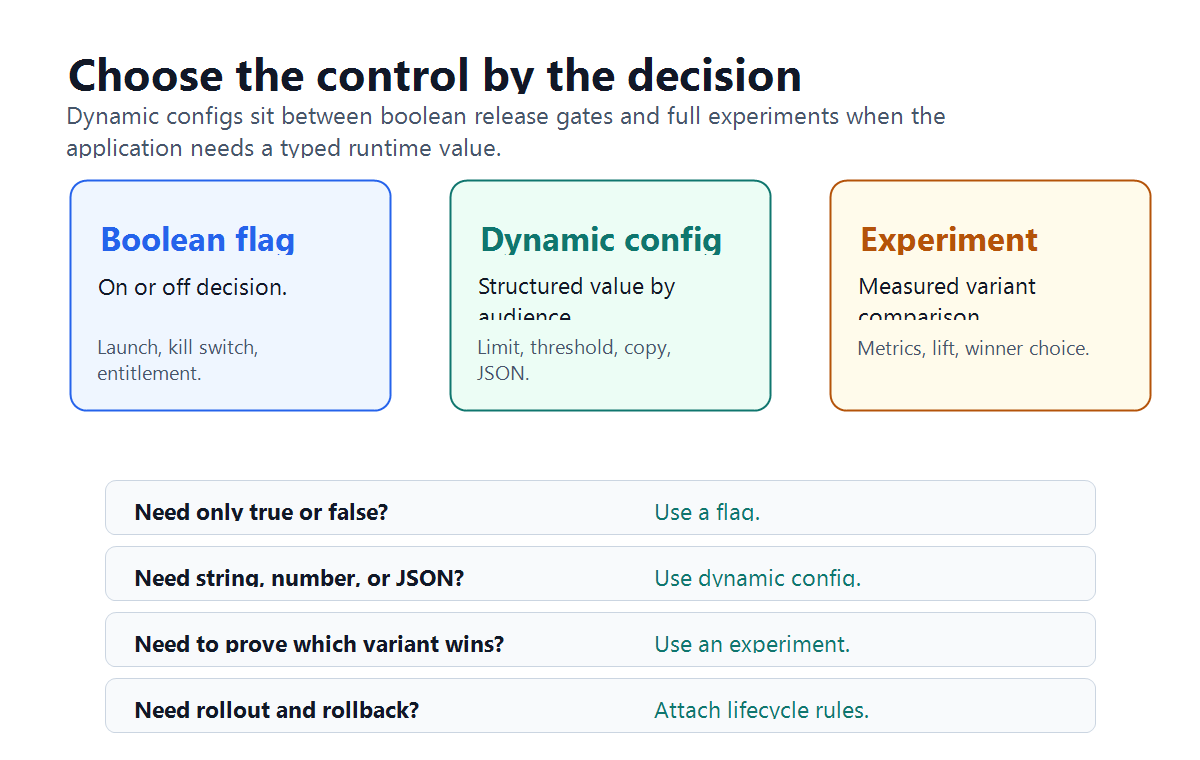
What Dynamic Configs Mean
A dynamic config is a named runtime value returned to an application by a control plane. The value can be simple, such as a string, number, or color. It can also be structured, such as a JSON object that selects a product limit, copy variant, algorithm profile, model route, pricing rule, or workflow policy.
That makes dynamic config different from a normal environment variable:
| Configuration type | Where it usually changes | Who receives it | Typical use |
|---|---|---|---|
| Environment variable | Deploy or restart boundary | Every instance in that environment | Infrastructure endpoint, secret reference, stable service setting |
| Boolean feature flag | Runtime evaluation | Targeted users, accounts, regions, or percentages | Launch, kill switch, entitlement, gradual rollout |
| Dynamic config | Runtime evaluation | Targeted users, accounts, regions, or percentages | Threshold, limit, copy, layout, pricing parameter, AI profile, workflow mode |
| Experiment variation | Runtime assignment and measurement | Enrolled experiment participants | Variant comparison with metrics and a winner decision |
Statsig's public feature flag documentation uses "Feature Gates" for feature flags and says boolean gates are not the right fit when the application needs structured or multi-value data, pointing readers to Dynamic Config instead. Its feature-gates-versus-experiments guide also distinguishes boolean gate return values from experiment JSON config values. Those docs are useful category language, not a reason to copy a vendor's implementation model.
FeatBit uses the more general remote config and multivariate flag language. FeatBit's remote config guide describes changing application behavior in real time without deployment, and its flag variation docs describe boolean and multivariate flags with string, number, and JSON variation types.
When To Use Dynamic Configs
Use dynamic configs when the runtime decision needs a value rather than a yes or no.
Good candidates include:
- product limits such as maximum projects, seats, exports, or messages;
- UI or onboarding variants such as copy, ordering, theme, or call-to-action text;
- operational thresholds such as timeout budgets, retry limits, sampling rates, or queue limits;
- pricing or packaging parameters that vary by plan, account, or region;
- algorithm profiles such as ranking mode, recommendation blend, or search weight set;
- rollout parameters such as staged percentage, region-specific value, or beta-only mode;
- AI behavior profiles such as prompt profile, model route, retrieval depth, guardrail mode, or fallback path.
Use a boolean flag instead when the decision is only on or off. Use an experiment when the team needs a measured comparison across variants and a decision rule for choosing a winner. Use ordinary code when the value is a stable invariant, a hard security boundary, or a rule that should not be changed through runtime targeting.
For an AI-specific implementation pattern, see FeatBit's guide to dynamic config for AI applications. This article is broader: it covers the general feature-management decision that comes before the AI-specific profile design.
Dynamic Configs Are Release Decisions
Dynamic config can look harmless because it is "just a value." In production, that value can still change user behavior, cost, performance, support load, risk, and revenue.
For example:
| Config key | Candidate value | Release risk |
|---|---|---|
checkout_discount_policy |
JSON profile with region, cap, and copy | Revenue impact, legal review, support confusion |
search_result_limit |
25 instead of 10 |
Latency, cost, click-through behavior |
support_queue_mode |
priority_accounts_first |
Fairness, SLA behavior, operational load |
recommendation_blend |
{ "freshness": 0.7, "similarity": 0.3 } |
Relevance, conversion, inventory exposure |
ai_support_profile |
citation_first_v2 |
Quality, latency, cost, escalation rate |
The right operating model is to treat each meaningful dynamic config as a small release. It needs a baseline, a candidate value, an owner, an audience, an evidence rule, a rollback path, and a cleanup decision.
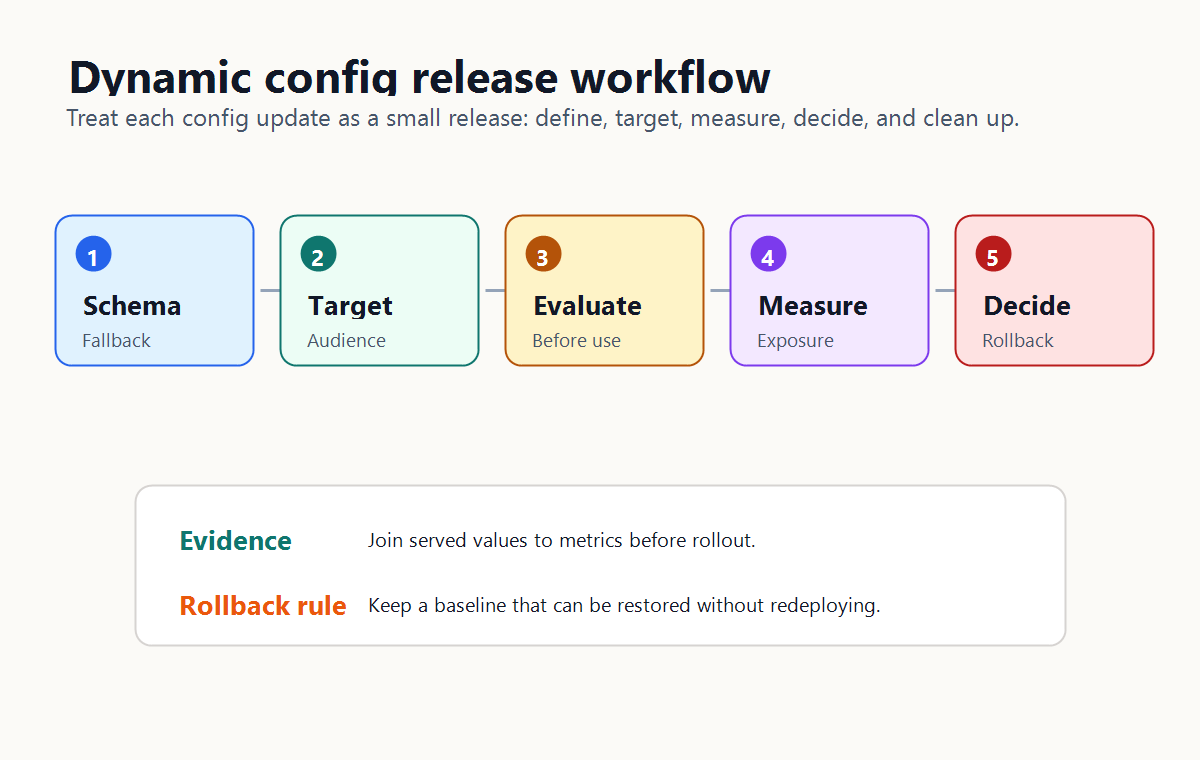
A Safe Dynamic Config Workflow
A safe workflow has five steps.
1. Define The Schema And Fallback
Do not expose loose, unrelated knobs when the team is really releasing a behavior. Prefer a typed profile with a safe default.
{
  "key": "checkout_discount_policy",
  "owner": "growth-platform",
  "profile": "regional_discount_v2",
  "discountCapPercent": 15,
  "eligiblePlans": ["team", "enterprise"],
  "regions": ["us", "ca"],
  "messageTemplate": "limited_offer_v2",
  "fallbackProfile": "standard_discount_v1"
}
The application should validate the returned value before use. If the config is missing, invalid, or outside an allowed range, it should fall back to a known safe behavior.
2. Evaluate In The Right Place
Evaluate the config where the decision can still affect behavior. For server-side product limits, pricing logic, model routes, or workflow policies, that usually means backend, edge, worker, or gateway evaluation. For client-side layout or copy, browser or mobile evaluation may be acceptable if the value is safe to expose.
OpenFeature's flag evaluation specification is useful vendor-neutral language here because it frames evaluation as a typed API call with a default value and a provider. The practical lesson is simple: the application should request a typed value, provide a default, and handle provider failure predictably.
3. Target The First Audience
Dynamic configs become safer when the first audience is deliberate:
- internal users;
- test accounts;
- beta customers;
- one region;
- one plan;
- one workflow;
- a small traffic percentage.
Avoid changing a dynamic config globally unless the value is low risk, reversible, and already validated. A global config edit is a release with maximum blast radius.
4. Join The Served Value To Metrics
A dynamic config is hard to judge unless the team knows which value actually ran. Record the flag or config key, served variation, user or account key, rollout stage, and the outcome events that matter.
Useful metrics depend on the config:
| Config type | Primary metric | Guardrails |
|---|---|---|
| Product limit | Paid conversion or successful task completion | Support tickets, error rate, churn signal |
| Search threshold | Search success or click-through | Latency, empty result rate, cost |
| Checkout copy | Checkout completion | Refunds, complaints, legal review flags |
| Algorithm profile | Engagement or qualified conversion | Diversity, latency, unexpected exposure |
| AI behavior profile | Accepted answer or resolved case | Cost, latency, fallback rate, correction rate |
Without this join, dynamic configs become live edits rather than controlled releases.
5. Decide And Clean Up
After the rollout or experiment, make the decision explicit:
- promote the candidate value;
- roll back to the baseline;
- keep the value for a narrower segment;
- iterate with a new candidate;
- convert the winning value into durable code or durable configuration;
- remove losing branches and stale config values.
FeatBit's feature flag lifecycle management model applies to dynamic configs too. Temporary runtime controls should not become permanent hidden product logic without ownership and review.
How FeatBit Supports This Pattern
FeatBit treats feature flags as release-decision infrastructure. For dynamic configs, that means the config value should not live alone. It should be connected to targeting, rollout, measurement, audit, rollback, and lifecycle cleanup.
In FeatBit, the implementation path usually starts with:
- remote config for non-boolean runtime values;
- multivariate flag variations for string, number, or JSON values;
- targeting rules for user, account, region, plan, or context-based assignment;
- percentage rollouts for staged exposure;
- flag insights and the Track Insights API for connecting served variations to usage and metric events.
The key design principle is not "store everything in dynamic config." The principle is "put runtime-changing behavior behind a controlled release decision when the team needs targeting, evidence, rollback, and cleanup."
Common Mistakes
Using dynamic configs for hard security boundaries. A config can select an approved behavior. It should not replace identity, authorization, secret management, or policy enforcement.
Creating a bag of knobs. Independent values can combine into behavior nobody reviewed. Use named profiles when values must be evaluated together.
Skipping defaults. Every dynamic config needs a safe fallback in code or durable configuration.
Changing values globally. Runtime flexibility should reduce blast radius, not make every config edit affect every user at once.
Measuring only technical success. A config that parses correctly can still hurt conversion, latency, cost, support load, or trust.
Leaving old values forever. Losing variants, obsolete profile names, and stale JSON branches create release debt. Review and remove them after the decision.
Starting Checklist
Before creating a dynamic config, confirm:
- The value controls one clear product, platform, or operations decision.
- A schema, allowed range, or profile contract exists.
- A safe fallback value is available when evaluation fails.
- The first audience is smaller than the full eligible population.
- The served value is recorded with user, account, environment, or workflow context.
- One primary metric and a small set of guardrails are defined before rollout.
- Rollback can restore the baseline without redeployment.
- Cleanup rules say when the value should be promoted, removed, or kept as durable configuration.
Bottom Line
Dynamic configs are useful when a runtime decision needs a value, not only an on/off state. They become safe when the value is typed, targeted, measured, reversible, and cleaned up after the release decision.
FeatBit supports that operating model through remote config, multivariate flags, targeting, percentage rollout, experimentation, insights, audit history, APIs, and self-hosted control. Use dynamic configs when they make a real production decision easier to release safely, not when they merely move hidden logic from code into a dashboard.
Source Notes
- Statsig terminology context: Statsig's Feature Flags documentation describes Feature Gates as feature flags and points users to Dynamic Config when structured or multi-value data is needed. Its feature gates versus experiments guide distinguishes boolean gate return values from experiment JSON config values. These sources are used for category terminology, not vendor ranking.
- FeatBit implementation context: remote config, create flag variations, targeting rules, percentage rollouts, flag insights, Track Insights API, and feature flag lifecycle management.
- Vendor-neutral evaluation context: OpenFeature's flag evaluation specification is used for the general idea of typed evaluation with default values and provider behavior.
- Related FeatBit reading: dynamic config for AI applications, AI config management, what AI configuration one feature flag can control, and AI control layer.
Image And Open Graph Notes
- Use
cover.pngas the Open Graph image because it frames dynamic configs as runtime values with targeting, evidence, rollback, and cleanup. - Use
dynamic-config-decision-map.pngnear the opening because it distinguishes boolean flags, dynamic configs, and experiments by reader task. - Use
dynamic-config-release-workflow.pngin the workflow section because it shows how schema, targeting, evaluation, measurement, and rollback connect.