
What AI Configuration Can One Feature Flag Control?
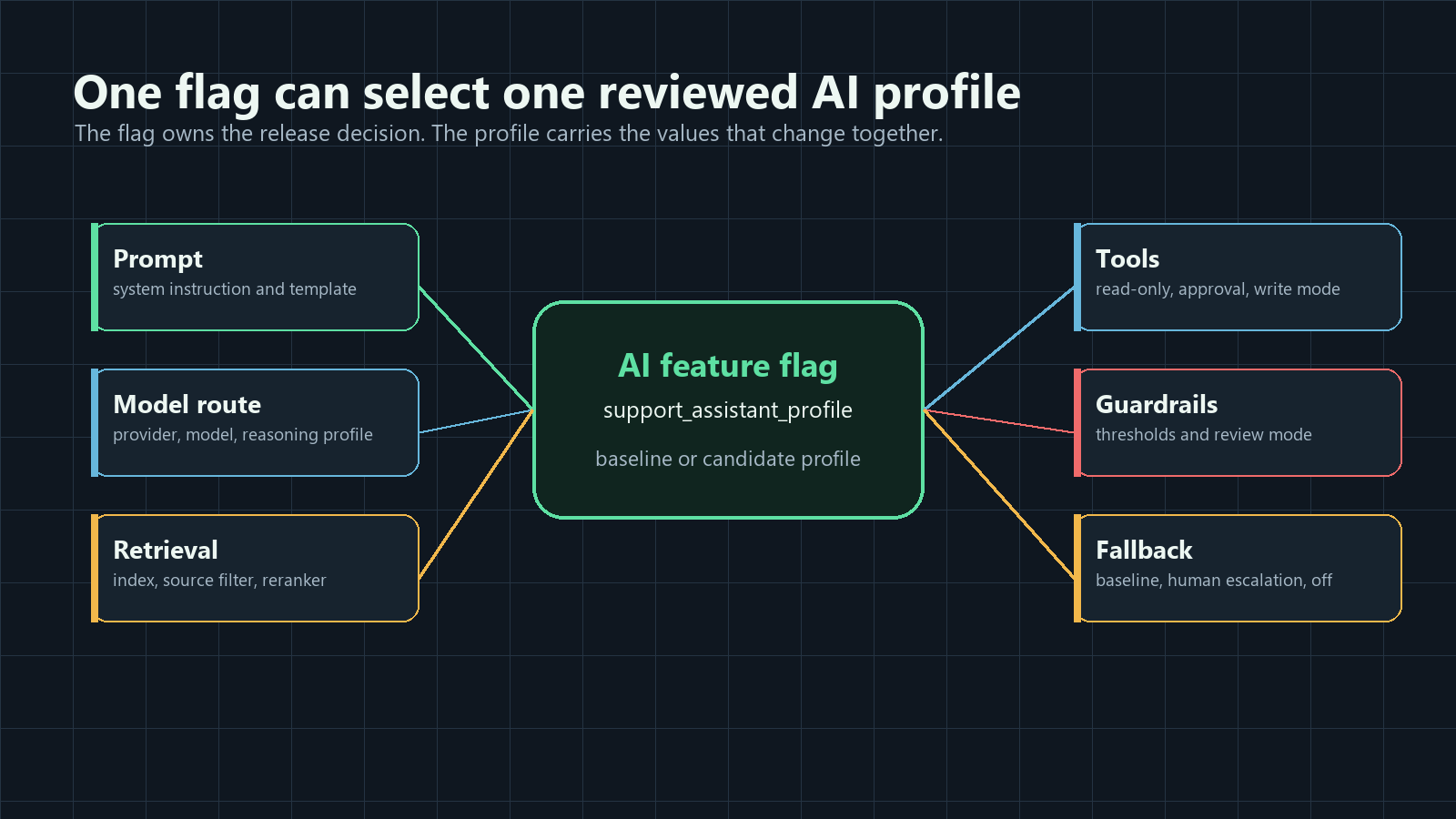
One AI feature flag can control any AI configuration that represents one production release decision: which prompt, model route, retrieval profile, tool policy, guardrail threshold, fallback mode, experiment variant, or rollout stage should run for a specific user, account, workflow, or traffic slice.
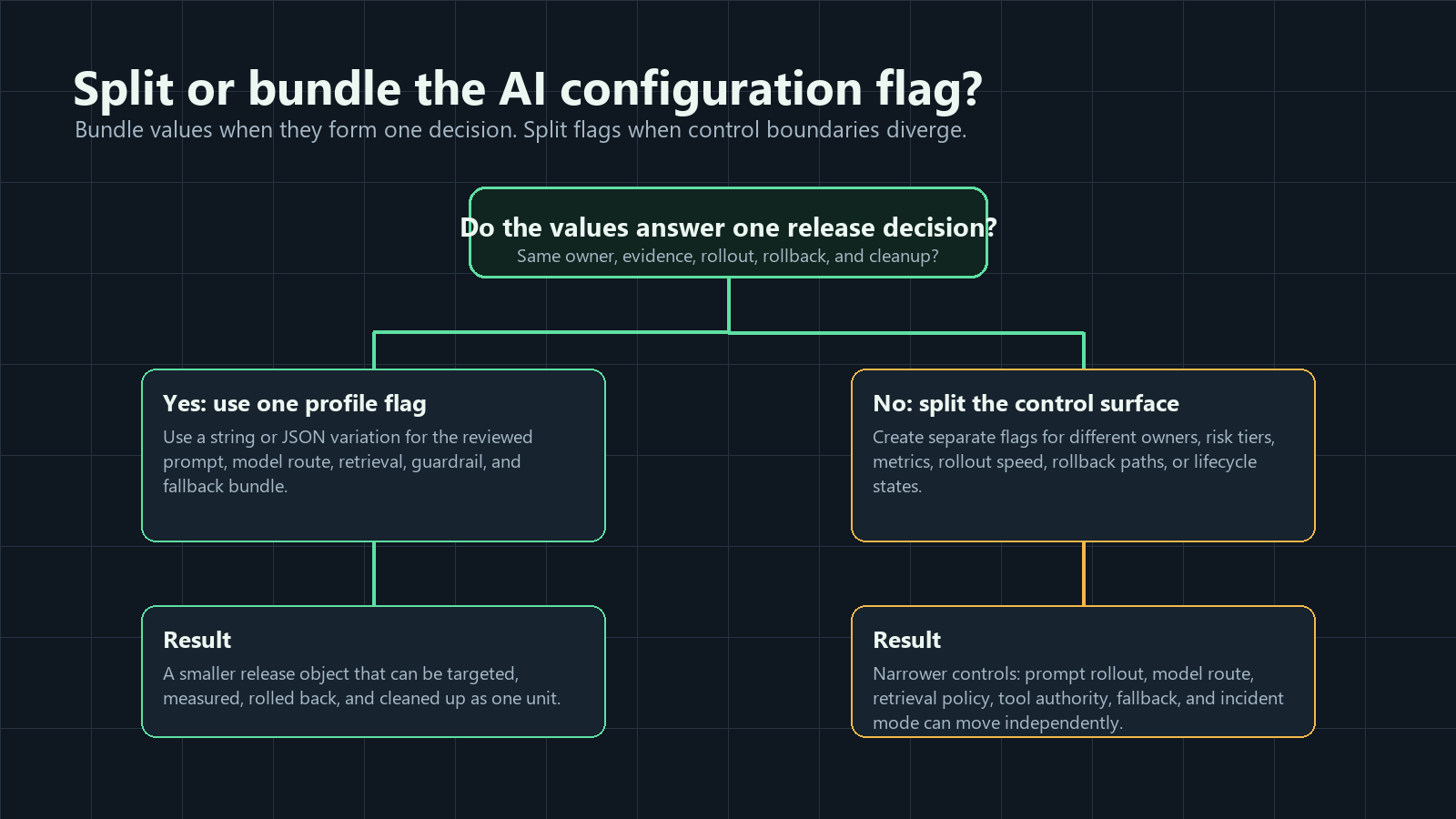
The important boundary is not the number of values inside the flag. The boundary is the decision the team needs to review, target, measure, and roll back. A single JSON variation can safely carry a full AI profile when those values change together. Separate flags are better when ownership, risk, metrics, rollout pace, or rollback behavior differ.
The Short Answer
A feature flag can control more than an on/off switch. For AI systems, a flag often controls a named runtime profile.
That profile may include:
| AI configuration surface | What one flag can choose | Example variation |
|---|---|---|
| Prompt | System prompt, instruction bundle, tone, template, or prompt version | support_citation_first_v4 |
| Model route | Provider, model family, model version, reasoning profile, or cost tier | standard_support_model |
| Sampling parameters | Temperature, top-p, token budget, timeout, or response format | balanced_generation_profile |
| Retrieval | Index, source filter, reranker, max chunks, citation rule, or memory scope | verified_docs_rerank_v2 |
| Agent tools | Read-only, draft, approval-required write, external action, or disabled mode | review_required_tools |
| Guardrails | Confidence threshold, escalation rule, human review mode, or safety fallback | strict_review_thresholds |
| Fallback | Baseline prompt, cheaper model, cached answer, human escalation, or feature off | human_escalation |
| Rollout | Internal, beta, canary, experiment, regional, plan-based, or percentage exposure | five_percent_paid_accounts |
FeatBit supports this through multivariate flags and remote config patterns where variations can be strings, numbers, or JSON values. That makes a flag useful for both simple routing and structured AI configuration profiles.
Use One Flag When The Values Form One Reviewed Profile
Use one flag when the values are part of the same release question.
For example:
release_question: should the support assistant use the citation-first profile?
flag_key: support_assistant_profile
variation: citation_first_v4
assignment_unit: account
first_audience: internal support team
fallback: baseline_v3
decision_evidence:
  primary: resolved cases without escalation
  guardrails:
    - latency_p95
    - correction_rate
    - citation_failure_rate
    - estimated_cost_per_case
The variation can point to a profile in code or carry the profile as JSON:
{
  "profile": "citation_first_v4",
  "prompt": "support_answer_citation_first_v4",
  "modelRoute": "standard_support_model",
  "temperature": 0.2,
  "maxOutputTokens": 900,
  "retrieval": {
    "profile": "verified_docs_rerank_v2",
    "maxChunks": 6,
    "requireCitation": true
  },
  "tools": {
    "mode": "read_only",
    "requiresApprovalForWrite": true
  },
  "fallback": "human_escalation"
}
This is one flag because the profile answers one decision: should this support workflow run the citation-first behavior for the targeted audience? The prompt, model route, retrieval profile, and fallback belong together because the team reviews them as one candidate experience.
Split Flags When Decisions Can Move Independently
One flag becomes risky when it hides multiple release decisions behind one label.
Split the configuration into separate flags when:
| Split trigger | Why it matters | Better design |
|---|---|---|
| Different owner | The AI platform team owns model routing, while the support team owns prompt content. | Separate model-route and prompt-profile flags. |
| Different risk | Retrieval source expansion can expose sensitive or stale information, while tone changes are lower risk. | Separate retrieval policy from prompt wording. |
| Different rollback | The team may need to disable write tools while keeping read-only AI help available. | Separate tool authority from the assistant entry point. |
| Different metric | Token budget is judged by cost per resolved case, while retrieval quality is judged by citation acceptance. | Separate parameter profile from retrieval experiment. |
| Different rollout pace | A prompt can reach beta accounts today, but a model provider change needs a longer canary. | Separate prompt rollout from model route. |
| Different lifecycle | A temporary experiment should be cleaned up, while an incident kill switch should stay. | Separate experiment flag from operational fallback flag. |
The practical rule is simple: one flag should own one reversible decision. If two parts need different reviewers, evidence, rollout schedules, or cleanup rules, they should not be forced into one global AI flag.
A Decision Framework For AI Flag Boundaries
Before creating the flag, answer five questions.
1. What behavior changes for the user?
Name the behavior in plain language. "Enable AI v2" is too broad. "Use the citation-first support answer profile for paid accounts" is reviewable.
2. Who should receive it first?
The flag should be evaluated with enough context to target the right audience. For AI systems, the context may include account, region, plan, workflow, conversation, environment, or risk tier. OpenFeature's evaluation context specification is useful here because it frames targeting as contextual data used during flag evaluation, not as a random global switch.
3. What is the fallback?
A good AI configuration flag has a tested baseline. If the flag is off, missing, invalid, or rolled back, the application should return to a known behavior: baseline prompt, baseline model route, read-only mode, human escalation, cached answer, or feature off.
4. What evidence decides expansion?
Attach the flag variation to exposure and outcome events. AI configuration changes can affect quality, cost, latency, trust, support load, and safety. Pick one primary outcome and a short set of guardrails before the rollout expands.
5. What is the end state?
Temporary AI configuration flags should end in a decision: promote the winning profile, iterate, segment by audience, operationalize as a long-lived control, or remove the losing branch. FeatBit's feature flag lifecycle management model helps keep this from becoming release debt.
Example: One Flag For A Support Assistant Profile
Suppose a team wants to test a support assistant that answers with more citations. The candidate changes the prompt, retrieval profile, token budget, and fallback behavior together.
Use one flag if the release question is the combined profile:
| Field | Example |
|---|---|
| Flag key | support_assistant_profile |
| Variations | baseline_v3, citation_first_v4, fallback_human_review |
| Assignment unit | Account or conversation |
| First audience | Internal support team, then beta accounts |
| Primary outcome | Cases resolved without escalation |
| Guardrails | Latency, correction rate, citation failure, cost per case |
| Rollback | Return targeted audience to baseline_v3 |
| Cleanup | Promote the winner or remove the candidate profile after the decision |
This flag is not merely storing settings. It is controlling production exposure to a named behavior.
Example: Split Flags For Agent Tool Authority
Now suppose the same assistant may also update tickets through an external tool. Do not hide that inside the support profile unless the whole profile must move as one risk decision.
Use separate controls:
| Flag | Controls | Why separate |
|---|---|---|
support_assistant_profile |
Prompt, model route, retrieval, response profile | Product-quality rollout. |
support_agent_tool_mode |
No tools, read-only tools, approval-required write tools | Permission and side-effect risk. |
support_ai_incident_fallback |
Baseline model, cached answer, human escalation, off | Operational rollback and incident response. |
This lets operators reduce tool authority without disabling the whole assistant. It also lets reviewers apply stricter approval to side effects while letting lower-risk prompt improvements continue through their own rollout.
How FeatBit Fits This Pattern
FeatBit's role is the release-control layer around the AI behavior your application implements. It does not need to be the prompt editor, model registry, retrieval engine, or agent runtime.
Use FeatBit to:
- define a boolean, string, number, or JSON variation for the AI control;
- target variations by user, account, segment, region, environment, plan, workflow, or percentage rollout;
- evaluate the flag before prompt assembly, model routing, retrieval, tool selection, or fallback selection;
- keep a safe default in code for SDK failure or invalid configuration;
- record flag changes and audit history;
- connect exposure and metric events to rollout decisions;
- review temporary AI flags through lifecycle rules.
For implementation details, start with FeatBit's docs for creating flag variations, remote config, targeting rules, percentage rollouts, flag insights, and flag lifecycle management.
Implementation Shape
Evaluate the AI configuration flag before the AI call. Then pass a typed, validated profile into the AI workflow.
type SupportAiProfile = {
  profile: "baseline_v3" | "citation_first_v4" | "fallback_human_review";
  prompt: string;
  modelRoute: string;
  temperature: number;
  maxOutputTokens: number;
  retrievalProfile: string;
  toolMode: "none" | "read_only" | "approval_required";
  fallback: "baseline" | "human_escalation";
};

const fallbackProfile: SupportAiProfile = {
  profile: "baseline_v3",
  prompt: "support_answer_v3",
  modelRoute: "standard_support_model",
  temperature: 0.2,
  maxOutputTokens: 700,
  retrievalProfile: "verified_docs_baseline",
  toolMode: "read_only",
  fallback: "human_escalation",
};

async function resolveSupportProfile(request: SupportRequest) {
  const context = {
    keyId: request.accountId,
    plan: request.plan,
    region: request.region,
    workflow: "support_answer",
  };

  const profile = await flags.jsonVariation<SupportAiProfile>(
    "support_assistant_profile",
    context,
    fallbackProfile
  );

  return validateSupportAiProfile(profile) ? profile : fallbackProfile;
}
The code path should make three things obvious to reviewers:
- The fallback is available without a network call.
- The assignment unit matches the user experience.
- The resolved profile can be attached to telemetry and outcomes.
OpenAI's Responses API reference documents configuration fields such as model selection, tools, tool choice, maximum output tokens, temperature, and top-p. Those are useful examples of values that may need controlled runtime profiles, but the same pattern applies to any AI provider or internal model gateway.
Common Mistakes
Using one global AI flag. A global switch is useful as an emergency off path, but it cannot express prompt profile, model route, retrieval source, tool authority, fallback mode, experiment assignment, and rollout scope with enough precision.
Exposing loose knobs instead of reviewed profiles. Letting operators independently change temperature, top-p, token budget, retrieval depth, and fallback can create combinations nobody approved. Use named profiles unless independent control is truly required.
Bundling unrelated risk. A prompt variant and a write-tool permission may both be AI configuration, but they do not carry the same risk. Split them unless they must ship and roll back together.
Evaluating after the AI call. If the flag is evaluated after prompt assembly, retrieval, model routing, or tool selection, it cannot control the behavior that matters.
Forgetting exposure evidence. Eligibility is not exposure. Record the variation that actually ran and join it to task outcome, quality, latency, cost, fallback, and review signals.
Leaving the control forever. If the flag was created to answer a release question, decide whether to promote, segment, operationalize, or remove it after the evidence is fresh.
Starting Checklist
Before putting AI configuration behind one feature flag, confirm:
- The flag represents one release decision.
- The controlled surface is named: prompt, model, retrieval, tool, guardrail, fallback, rollout, or profile.
- The fallback behavior is tested and acceptable.
- The assignment unit matches the product journey.
- The profile is typed and validated before use.
- Targeting starts with internal users, beta accounts, a segment, or a small percentage.
- Exposure events record the flag key, variation, assignment unit, and profile version.
- Outcome events can be joined to the served variation.
- Rollback can return affected traffic to baseline without redeploying.
- The end state and cleanup rule are clear before broad rollout.
The bottom line: one AI feature flag can control a whole AI configuration profile when that profile is one reviewed, measurable, reversible production decision. Split flags when different parts need different owners, evidence, rollout paths, or rollback behavior.
Source Notes
- FeatBit product context: AI control layer, safe AI deployment, AI experimentation, AI governance, and feature flag lifecycle management.
- FeatBit implementation context: create flag variations, remote config, targeting rules, percentage rollouts, flag insights, and flag lifecycle management.
- Standards context: OpenFeature's evaluation context specification describes contextual data for flag evaluation and targeting.
- AI API context: OpenAI's Responses API reference is cited for examples of runtime values such as model, tools, tool choice, maximum output tokens, temperature, and top-p. This article uses those fields as examples, not as a claim that every application should expose them directly.
- Related FeatBit reading: adjust AI parameters on the fly, AI flag lifecycle management, AI feature flag code references, and approval flow for AI config changes.
Image And Open Graph Notes
- Use
cover.pngas the Open Graph image because it summarizes one flag controlling a reviewed AI configuration profile. - Use
ai-config-surface-map.pngnear the opening because it shows which AI configuration surfaces a single flag may control. - Use
split-or-bundle-decision-tree.pngin the boundary section because it helps readers decide whether to keep one profile flag or split the control surface.