
Dynamic Config for AI Applications: A Runtime Control Guide
Dynamic config for AI applications is the practice of changing approved AI behavior at request time without redeploying the application. In production, that should not mean a loose settings page where every model, prompt, retrieval, or guardrail value can drift independently. It should mean typed configuration profiles, evaluated before the AI call, rolled out to the right audience, measured against outcomes, and reversible when the result is worse than expected.
For AI teams, the useful question is not "can we change config dynamically?" Most teams can. The question is which AI decisions deserve dynamic config, which ones should stay in code, and how the runtime control plane prevents a small config edit from becoming an unreviewed release.
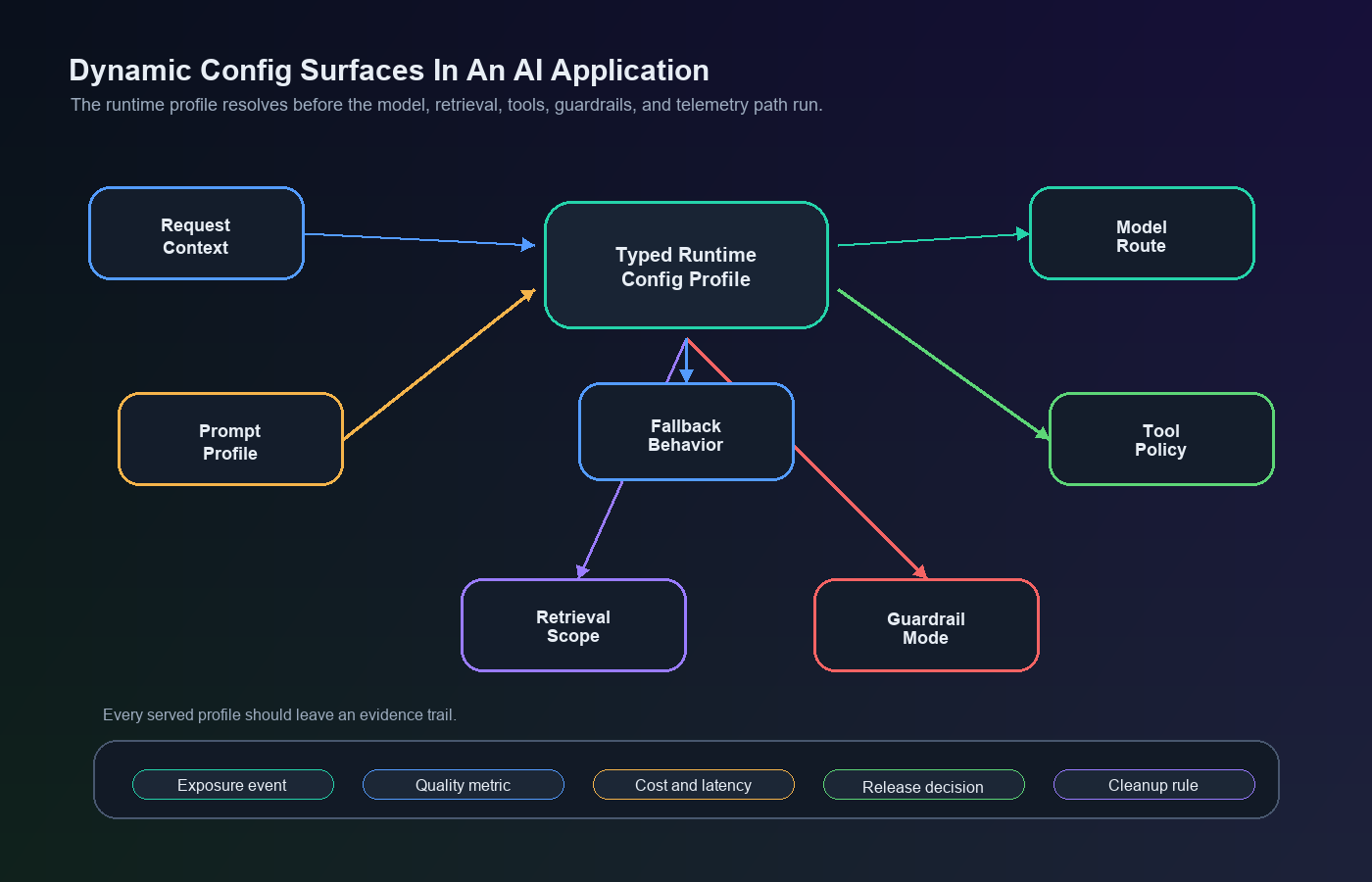
What Dynamic Config Means In An AI Application
Traditional dynamic config often controls UI copy, limits, regional behavior, or simple feature options. AI applications add a different class of runtime decisions:
| Config surface | Example value | Why it matters |
|---|---|---|
| Model route | fast, balanced, high_accuracy |
Affects quality, latency, cost, and provider dependency. |
| Prompt profile | baseline_v4, citation_first_v2 |
Changes the instruction pattern and answer style users receive. |
| Retrieval profile | docs_only, hybrid_search, enterprise_sources |
Changes grounding, source scope, latency, and data-access risk. |
| Guardrail mode | standard, strict, fallback_first |
Changes when output is blocked, rewritten, reviewed, or escalated. |
| Agent tool policy | read_only, draft_write, approved_external |
Changes what side effects an agent may attempt. |
| Cost and timeout budget | free_tier_budget, enterprise_budget |
Controls spend and reliability tradeoffs by context. |
| Fallback behavior | cached_answer, human_escalation, baseline_model |
Defines what happens when the AI path is slow, unsafe, or unavailable. |
These values are configuration, but they are also release decisions. A prompt profile can change conversion. A retrieval source can change answer quality. A tool policy can create side effects. A model route can change cost and latency. Treating these as ordinary environment variables hides the real operational risk.
FeatBit's AI control layer framing is useful here: each AI decision point becomes a runtime control surface. Dynamic config is the value layer. Feature flags, targeting, rollout, telemetry, and audit history are the operating layer that decides who receives the value and whether it should keep expanding.
Decide What Belongs In Dynamic Config
Put a value in dynamic config when the team needs at least one of these capabilities:
- targeted exposure by user, account, region, plan, workflow, or risk tier;
- staged rollout from internal users to canary traffic to broader release;
- fast rollback without redeploying the AI service;
- measurement that joins the served config to quality, cost, latency, and business outcomes;
- auditability for who changed the behavior and which audience was affected;
- temporary experimentation before the winning behavior becomes durable.
Keep a value in code when it is a stable invariant, a security boundary, a schema definition, a compliance rule that must not be bypassed by rollout targeting, or a low-level implementation detail that reviewers should not tune live.
That boundary prevents config sprawl. Dynamic config should make AI behavior easier to operate, not turn every request into a bag of unrelated runtime knobs.
Use Typed Profiles Instead Of Loose Knobs
The safest AI config object is usually a named profile, not a collection of independent switches.
Avoid this pattern:
support_model = "model-b"
support_temperature = 0.7
support_retrieval_k = 10
support_timeout_ms = 12000
support_guardrail = "relaxed"
Each value may be reasonable alone, but the combination may never have been reviewed. A better pattern is a typed profile with an owner, version, fallback, and intended decision.
{
  "profile": "support_citation_first_v2",
  "owner": "support-platform",
  "modelRoute": "balanced_support",
  "promptProfile": "citation_first_v2",
  "retrieval": {
    "sourceScope": "verified_docs",
    "maxChunks": 6
  },
  "guardrails": {
    "mode": "standard",
    "fallback": "human_escalation"
  },
  "budgets": {
    "timeoutMs": 9000,
    "maxOutputTokens": 900
  }
}
FeatBit supports this operating model through multivariate flag variations, including string, number, and JSON variation values. Its remote config guide describes using non-boolean variations to change application behavior without deployment when a simple on/off flag is too limited.
The typed profile gives reviewers a concrete object to approve. It also gives the application a schema to validate before the value reaches prompt assembly, model routing, retrieval, guardrail checks, or tool execution.
Evaluate Config Before The AI Decision Runs
Dynamic config has to be resolved before the AI path uses it. If the application evaluates the profile after the model call, it can no longer control cost, latency, retrieval scope, prompt behavior, or fallback.
OpenFeature's evaluation context specification describes contextual data used during flag evaluation. For AI applications, that context is what lets the system choose a profile by account, environment, region, workflow, plan, risk tier, or experiment assignment instead of serving one global config to every request.
type AiConfigProfile = {
  profile: string;
  modelRoute: string;
  promptProfile: string;
  retrieval: {
    sourceScope: "verified_docs" | "all_help_center" | "enterprise_sources";
    maxChunks: number;
  };
  guardrails: {
    mode: "standard" | "strict" | "fallback_first";
    fallback: "baseline_model" | "human_escalation" | "cached_answer";
  };
  budgets: {
    timeoutMs: number;
    maxOutputTokens: number;
  };
};

const fallbackProfile: AiConfigProfile = {
  profile: "support_baseline_v1",
  modelRoute: "balanced_support",
  promptProfile: "baseline_v4",
  retrieval: {
    sourceScope: "verified_docs",
    maxChunks: 4,
  },
  guardrails: {
    mode: "standard",
    fallback: "human_escalation",
  },
  budgets: {
    timeoutMs: 8000,
    maxOutputTokens: 700,
  },
};

async function answerSupportQuestion(request: SupportRequest) {
  const evaluationContext = {
    keyId: request.accountId,
    plan: request.plan,
    region: request.region,
    workflow: "support_answer",
    riskTier: request.riskTier,
  };

  const profile = await flags.jsonVariation<AiConfigProfile>(
    "support-ai-config-profile",
    evaluationContext,
    fallbackProfile
  );

  const validatedProfile = validateAiConfigProfile(profile, fallbackProfile);

  const response = await runAiRequest({
    question: request.question,
    modelRoute: validatedProfile.modelRoute,
    promptProfile: validatedProfile.promptProfile,
    retrieval: validatedProfile.retrieval,
    guardrails: validatedProfile.guardrails,
    budgets: validatedProfile.budgets,
  });

  await trackAiConfigExposure({
    accountId: request.accountId,
    flagKey: "support-ai-config-profile",
    profile: validatedProfile.profile,
    latencyMs: response.latencyMs,
    fallbackUsed: response.fallbackUsed,
  });

  return response;
}
For a deeper request-path pattern, see the FeatBit guide to server-side evaluation for AI feature flags. The same placement principle applies to dynamic config: evaluate once, use the resolved value in the AI path, and attach the served profile to telemetry.
Operate Dynamic Config Like A Release
Dynamic config is safest when every meaningful change follows a release loop.
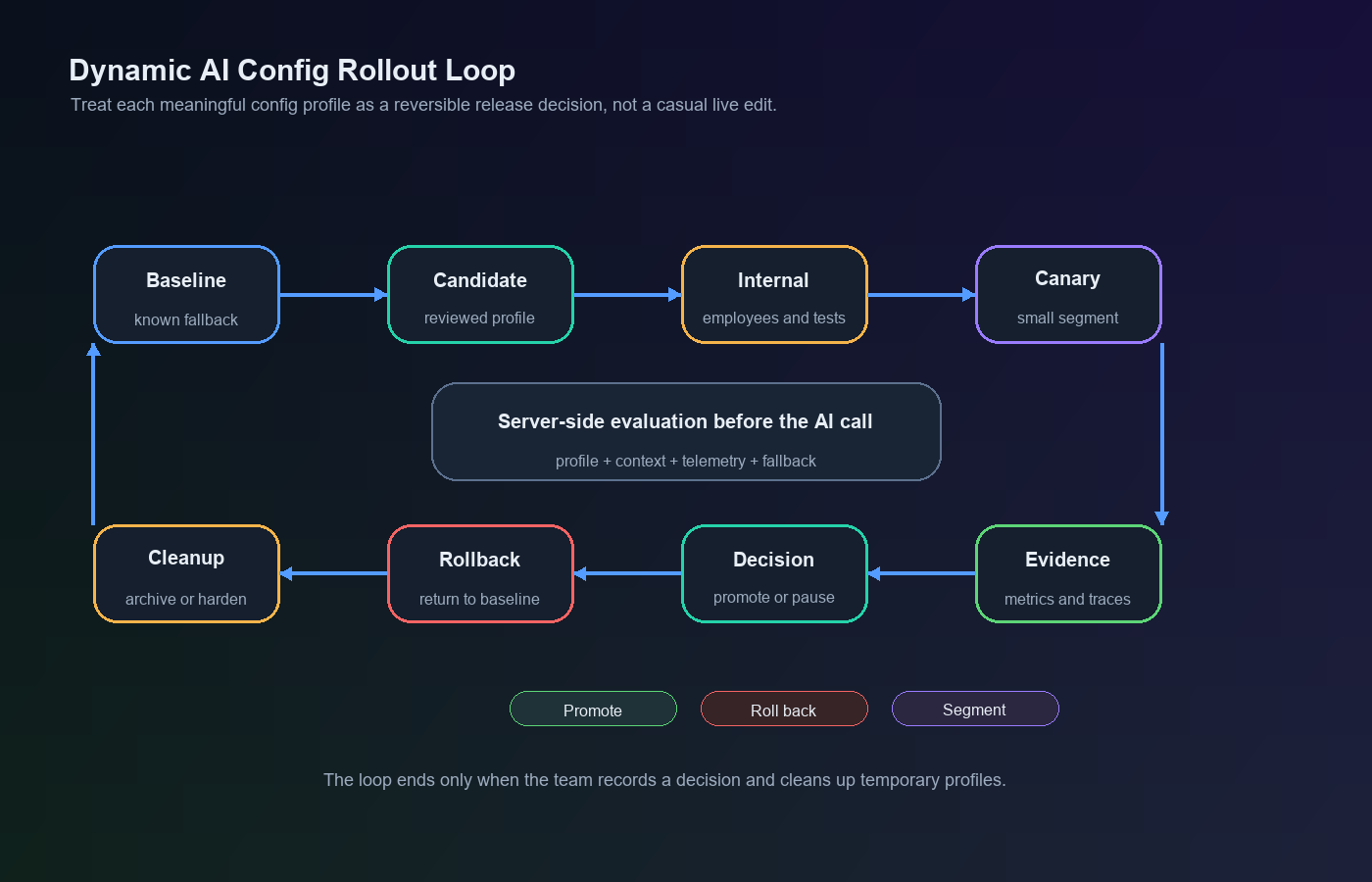
| Stage | What happens | Evidence to capture |
|---|---|---|
| Baseline | Keep the current profile available as the fallback. | Known behavior, current metrics, owner, schema. |
| Candidate | Create a reviewed profile for one release question. | Change summary, expected effect, affected AI surfaces. |
| Internal target | Serve the profile to employees, test accounts, or staging-like production traffic. | Trace review, obvious failures, validation errors. |
| Canary | Expand to a small eligible segment. | Quality, latency, cost, fallback, safety, and task outcome signals. |
| Experiment or rollout | Compare profiles or progressively expand the candidate. | Primary metric plus guardrails. |
| Decision | Promote, pause, segment, roll back, or iterate. | Decision rule and owner approval. |
| Cleanup | Remove losing profiles or convert the winner into durable config. | Lifecycle record and archived flag state. |
FeatBit's safe AI deployment and AI experimentation pages use the same release-control idea: expose AI behavior gradually, measure it, and keep the previous behavior available until the decision is complete.
Connect Config To Metrics And Traces
Dynamic config becomes useful when the served profile can be joined to outcomes. Without that join, teams are only editing live settings and hoping they helped.
Track at least:
- flag key and resolved profile name;
- user, account, conversation, session, or workflow key;
- important targeting attributes such as plan, region, environment, and risk tier;
- model route, prompt profile, retrieval profile, guardrail mode, and fallback path;
- latency, timeout, retry, error, and fallback state;
- cost or token usage where available;
- quality signal, human correction, user feedback, task completion, or business outcome;
- rollout stage and decision owner.
Then define one primary metric and a small set of guardrails before expansion.
| Config change | Primary outcome | Guardrails |
|---|---|---|
| Citation-first support profile | Resolved conversation without escalation | citation acceptance, latency, cost, fallback rate |
| Strict guardrail mode for high-risk requests | Valid answers that pass review | false block rate, human review queue, completion rate |
| Enterprise retrieval source profile | Accepted answer with approved source | source leakage checks, latency, irrelevant source rate |
| Low-cost model route for free tier | Successful answer per cost unit | complaint rate, retry rate, truncation, conversion |
| Draft-write agent tool policy | Completed workflow with approval | unsafe action attempts, approval burden, rollback events |
The metric plan is what turns dynamic config from an operations convenience into release-decision infrastructure.
Put Guardrails Around The Config System Itself
Dynamic config can fail in ways that code review normally prevents. Add controls around the config mechanism, not only around the AI output.
Use these rules:
- Validate every JSON profile against a schema before use.
- Keep a code-level fallback that is safe if the config service is unavailable or the profile is invalid.
- Restrict who can change production AI profiles.
- Require review for profiles that affect tool authority, retrieval source scope, safety thresholds, regulated segments, or broad production expansion.
- Store a change reason, owner, rollout stage, and cleanup expectation.
- Emit profile exposure before downstream success or failure is known.
- Keep hard authorization outside dynamic config. A flag can choose which approved behavior is active, but it should not grant access that the service identity is not allowed to have.
- Review temporary profiles after the decision so the config catalog does not become hidden product logic.
This is where FeatBit's feature flag lifecycle management model matters. AI config profiles are release assets. They need owners, evidence, decisions, and cleanup paths.
How Dynamic Config Differs From AI Parameter Tuning
AI parameter tuning is one important use case for dynamic config, but it is not the whole category.
| Topic | AI parameter tuning | Dynamic config for AI applications |
|---|---|---|
| Main question | Which inference settings should this AI path use? | Which approved AI behavior profile should run for this context? |
| Common values | temperature, token budget, timeout, retrieval depth | model route, prompt profile, retrieval scope, guardrail mode, tool policy, fallback, budgets |
| Primary risk | unreviewed parameter combinations | unreviewed production behavior across multiple AI surfaces |
| Control model | named parameter profiles | typed runtime profiles with targeting, rollout, telemetry, and cleanup |
| Best next step | tune a narrow behavior safely | design a control plane for AI behavior changes |
If your immediate task is changing temperature, token limits, retrieval depth, or timeout budgets, use the narrower FeatBit guide on adjusting AI parameters on the fly. If your task is designing the broader runtime configuration layer for an AI product, start with the profile, evaluation, rollout, and lifecycle model in this article.
Common Mistakes
Using dynamic config as a hidden product language. If major AI behavior lives only in a config dashboard, engineers and reviewers lose the ability to understand the product from code. Keep profile schemas, fallback behavior, and critical boundaries in code.
Changing many AI surfaces in one unversioned profile. If a profile changes the model, prompt, retrieval, guardrail, and tool policy at once, make that bundle explicit and versioned. Otherwise the team will not know what caused the outcome.
Skipping server-side evaluation. AI config usually controls behavior before the AI call. Evaluate it in the backend, model gateway, or agent router before prompt assembly, retrieval, tool selection, or model routing.
Treating rollout as approval. A percentage rollout only controls exposure. It does not prove the change is good. Define the metric and decision rule before the rollout starts.
Leaving old profiles active forever. Temporary AI profiles accumulate quickly. Promote the winner into durable config or code, archive losing profiles, and remove stale branches when the decision is complete.
Starting Checklist
Before adding dynamic config to an AI application, confirm:
- The config profile controls one clear release question.
- The profile schema is versioned and validated.
- A safe fallback profile exists in code.
- Evaluation happens before the AI decision runs.
- Targeting starts with internal users, a beta segment, or a small traffic percentage.
- Exposure events include the flag key, profile name, unit ID, and rollout stage.
- Outcome metrics can be joined back to the served profile.
- Cost, latency, quality, safety, fallback, and business guardrails are defined before expansion.
- Rollback can return affected users to the baseline without redeploying.
- Cleanup rules say when the profile should be removed, archived, or made durable.
Bottom Line
Dynamic config for AI applications is valuable because AI behavior changes faster than traditional release cycles. The discipline is to make those changes typed, targeted, observable, reversible, and owned.
FeatBit fits that operating layer by combining remote config values with feature flag targeting, progressive rollout, experimentation, audit history, and lifecycle cleanup. The result is not just live configuration. It is runtime release control for AI behavior.
Source Notes
- FeatBit implementation context: remote config, create flag variations, targeting rules, percentage rollouts, flag insights, and feature flag lifecycle management support the workflow described here.
- OpenFeature context: the evaluation context specification is used for the general idea that contextual data can drive flag evaluation, including targeting and fractional evaluation.
- Related FeatBit reading: AI control layer, safe AI deployment, AI experimentation, server-side evaluation for AI feature flags, and AI parameter runtime control.
Image And Open Graph Notes
- Use
cover.pngas the Open Graph image because it summarizes dynamic AI config as a runtime control plane. - Use
config-surface-map.pngnear the opening because it identifies the AI behavior surfaces that dynamic config may control. - Use
config-rollout-loop.pngin the release workflow section because it shows how baseline, candidate, canary, decision, rollback, and cleanup connect.