
How to Experiment with AI Using Feature Flags
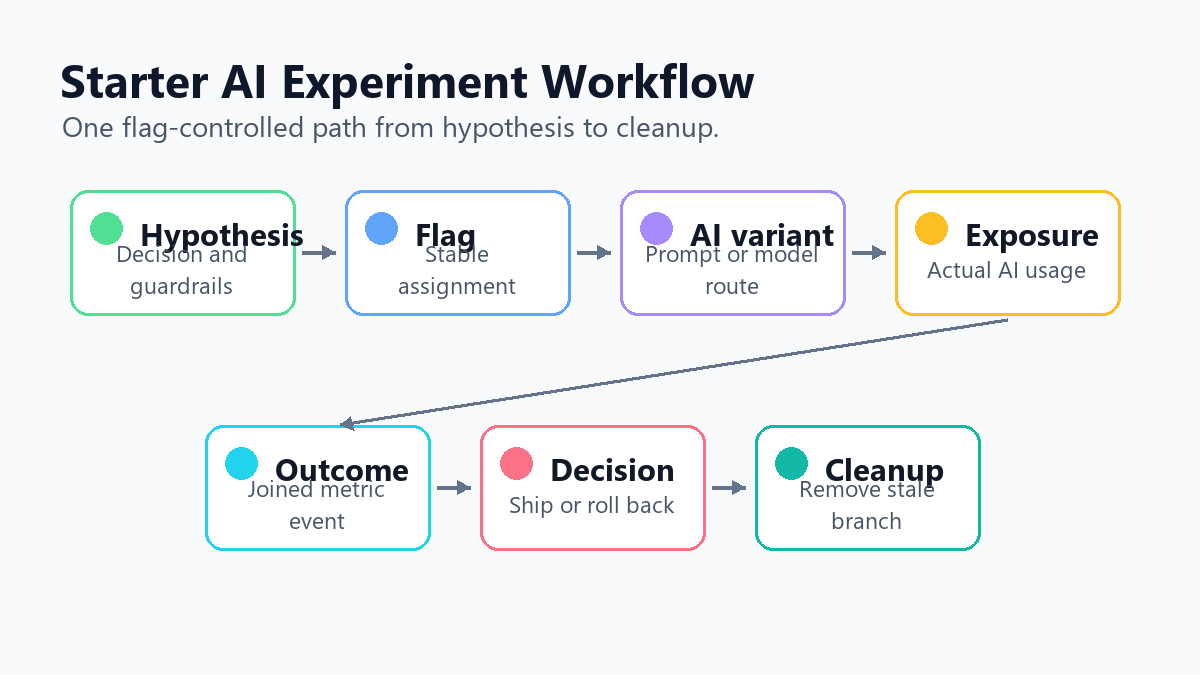
Experimenting with AI using feature flags means treating an AI change as a controlled release decision. Instead of shipping a new prompt, model route, retrieval profile, or agent policy to everyone at once, you assign eligible users or workflows to a variation, record the exposure, measure the outcome, watch guardrails, and keep rollback available until the decision is clear.
This tutorial is for teams running their first production AI experiment. The goal is not to build a statistics platform in one sprint. The goal is to choose one AI behavior, expose it safely, collect enough evidence to decide, and avoid leaving temporary experiment logic behind.
Pick One AI Behavior To Test
Start smaller than the roadmap. A good first AI feature-flag experiment changes one runtime decision:
| AI surface | First experiment example | Avoid for the first run |
|---|---|---|
| Prompt | current support summary prompt versus a stricter evidence-first prompt | changing the prompt, model, and retrieval settings together |
| Model route | current model versus a candidate model for one workflow | routing all AI calls through a new model |
| Retrieval | baseline retrieval profile versus a reranked profile | changing the knowledge base and prompt at the same time |
| Agent policy | read-only tool policy versus approval-required write policy | granting broad tool access without staged exposure |
| Configuration | conservative temperature versus a slightly more exploratory setting | tuning many parameters without naming the bundle |
For the rest of this article, use a concrete example: a support assistant currently summarizes tickets with summary_prompt_v1. The candidate summary_prompt_v2 asks the model to cite ticket evidence before proposing a summary. The team wants to know whether the new prompt increases accepted AI drafts without increasing latency, cost, or human correction.
That is narrow enough to run, but meaningful enough to teach the operating model.
Write The Release Hypothesis Before Creating The Flag
Do not begin with "let's try AI variant B." Begin with the decision the experiment must support.
ai_experiment:
  decision: should support ticket summaries use prompt_v2 by default?
  control: summary_prompt_v1
  treatment: summary_prompt_v2
  eligible_scope: English support tickets for internal and beta accounts
  assignment_unit: ticket_id
  primary_metric: accepted_ai_summary_rate
  guardrails:
    - p95_latency_ms
    - average_token_cost
    - human_correction_rate
    - escalation_after_summary_rate
  rollback: serve summary_prompt_v1 to all eligible tickets
  cleanup: remove the losing prompt branch after the decision
This is the difference between an AI trial and an AI release experiment. The hypothesis names the behavior, audience, metric, guardrails, rollback rule, and cleanup path before the team sees the result.
NIST's AI Risk Management Framework is a useful external reference for this habit because it frames AI risk work around governance, mapping, measurement, and management. In a product team, that translates into a simple rule: do not expose AI behavior until the team knows what evidence will change the release decision.
Create A Multivariate Flag For The AI Decision
Use a flag variation to represent the runtime behavior. For this example, a string flag is easier to understand than a boolean flag because it leaves room for a fallback or later candidate.
flag:
  key: support_summary_prompt
  type: string
  variations:
    - control_v1
    - evidence_first_v2
  fallback: control_v1
targeting:
  internal: evidence_first_v2
  beta_accounts:
    allocation:
      control_v1: 50
      evidence_first_v2: 50
  default: control_v1
In FeatBit, that design maps to the same release-control primitives used for ordinary software: targeting rules, percentage rollout, variation assignment, evaluation events, and rollback. The specific SDK call depends on your application, but the control-plane question is stable: which eligible unit should receive which AI behavior right now?
Unleash's documentation describes feature flags through activation strategies, gradual rollout, and variants for use cases such as A/B testing. That vendor terminology is useful category context: a feature flag is not only an on/off switch. For AI experiments, the variation can be a prompt, model route, retrieval profile, agent policy, or configuration bundle.
Evaluate The Flag At The Assignment Unit
Choose the assignment unit based on the product journey. For a support-ticket summary, ticket-level assignment is usually clearer than request-level assignment because all AI calls for the same ticket should use the same summary behavior during the experiment.
type SummaryPromptVariant = "control_v1" | "evidence_first_v2";

async function resolveSummaryPromptVariant(input: {
  ticketId: string;
  accountId: string;
  locale: string;
  plan: string;
}): Promise<SummaryPromptVariant> {
  const variation = await featbit.variation(
    "support_summary_prompt",
    {
      key: input.ticketId,
      custom: {
        accountId: input.accountId,
        locale: input.locale,
        plan: input.plan,
      },
    },
    "control_v1"
  );

  return variation as SummaryPromptVariant;
}
The key should represent the stable assignment unit. Attributes such as account, locale, plan, region, risk class, or workflow type should still be available for targeting and later segment analysis.
OpenFeature's evaluation context concept is useful here because it separates the targeting data from the application code path. For AI work, that context should include the unit you are assigning, not only the person who clicked a button.
Wire The AI Behavior Behind The Flag
Keep the experiment branch close to the runtime decision. The feature flag should select the prompt variant, not hide the entire experiment inside a deployment script.
const promptVariant = await resolveSummaryPromptVariant({
  ticketId: ticket.id,
  accountId: ticket.accountId,
  locale: ticket.locale,
  plan: ticket.plan,
});

const prompt =
  promptVariant === "evidence_first_v2"
    ? buildEvidenceFirstSummaryPrompt(ticket)
    : buildControlSummaryPrompt(ticket);

const summary = await llm.generate({
  model: "support-summary-route",
  prompt,
});
This gives the release owner three practical controls:
- Internal users can see the treatment before customers.
- Beta accounts can receive a balanced experiment split.
- Rollback means changing the flag to
control_v1, not waiting for a redeploy.
FeatBit's AI control layer explains the broader pattern: prompts, model choices, retrieval rules, and agent behavior are runtime control surfaces. The experiment flag makes that surface observable and reversible.
Record Exposure Only When The AI Behavior Runs
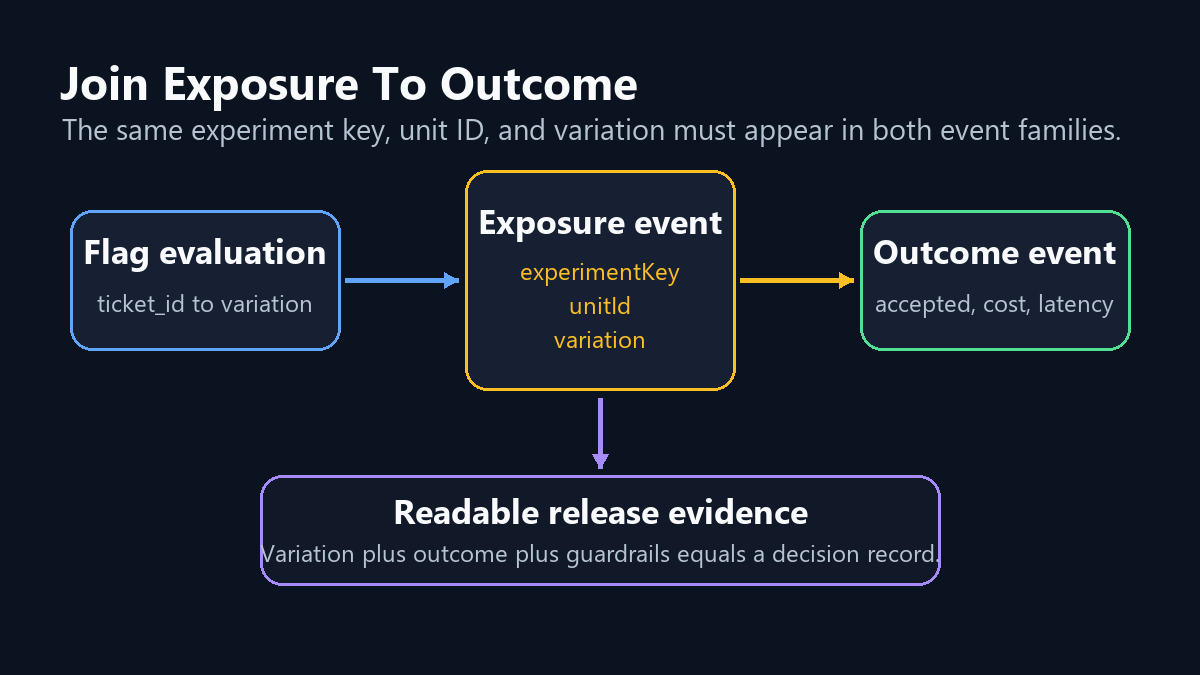
The exposure event should fire when the application actually uses the assigned AI behavior. Do not count a user as exposed just because they visited a page where the AI feature might run.
{
  "event": "ai_summary_exposure",
  "experimentKey": "support_summary_prompt",
  "unitId": "ticket_98271",
  "variation": "evidence_first_v2",
  "accountId": "acct_1842",
  "locale": "en-US",
  "timestamp": "2026-06-03T09:15:30Z"
}
Then record the outcome with the same experiment key, unit ID, and variation.
{
  "event": "ai_summary_accepted",
  "experimentKey": "support_summary_prompt",
  "unitId": "ticket_98271",
  "variation": "evidence_first_v2",
  "accepted": true,
  "latencyMs": 1640,
  "estimatedTokenCostUsd": 0.009
}
Joinability matters more than event volume. If exposure and outcome cannot be connected, the experiment may still generate dashboards, but it will not produce release evidence.
For implementation details in FeatBit, start with A/B testing with feature flags, targeted progressive delivery, targeting rules, percentage rollouts, and the Track Insights API.
Add Guardrails That Can Stop Expansion
An AI experiment should have one primary outcome and several guardrails. The primary outcome decides whether the candidate is worth keeping. Guardrails decide whether exposure should pause or roll back even if the primary outcome improves.
| Metric type | Example for support summaries | Release action |
|---|---|---|
| Primary outcome | accepted AI summary rate | promote, keep testing, or reject |
| Quality guardrail | human correction rate | pause or revise if worse |
| Reliability guardrail | generation error rate or fallback rate | roll back if the candidate is unstable |
| Cost guardrail | average token cost per accepted summary | limit expansion if too expensive |
| Latency guardrail | p95 generation latency | roll back or narrow exposure if user workflow slows down |
| Support guardrail | escalation after summary | pause if downstream harm appears |
Guardrails are not decoration. A prompt can increase accepted summaries by being more confident while also increasing corrections. A model route can improve quality while making each successful task too expensive. A retrieval profile can improve one segment while harming another.
FeatBit's measurement design guidance uses the same distinction: define the metric that decides the release separately from the metrics that stop expansion.
Run The Experiment In Stages
Do not jump from local testing to a 50/50 customer split. Move through stages that each answer a different question.
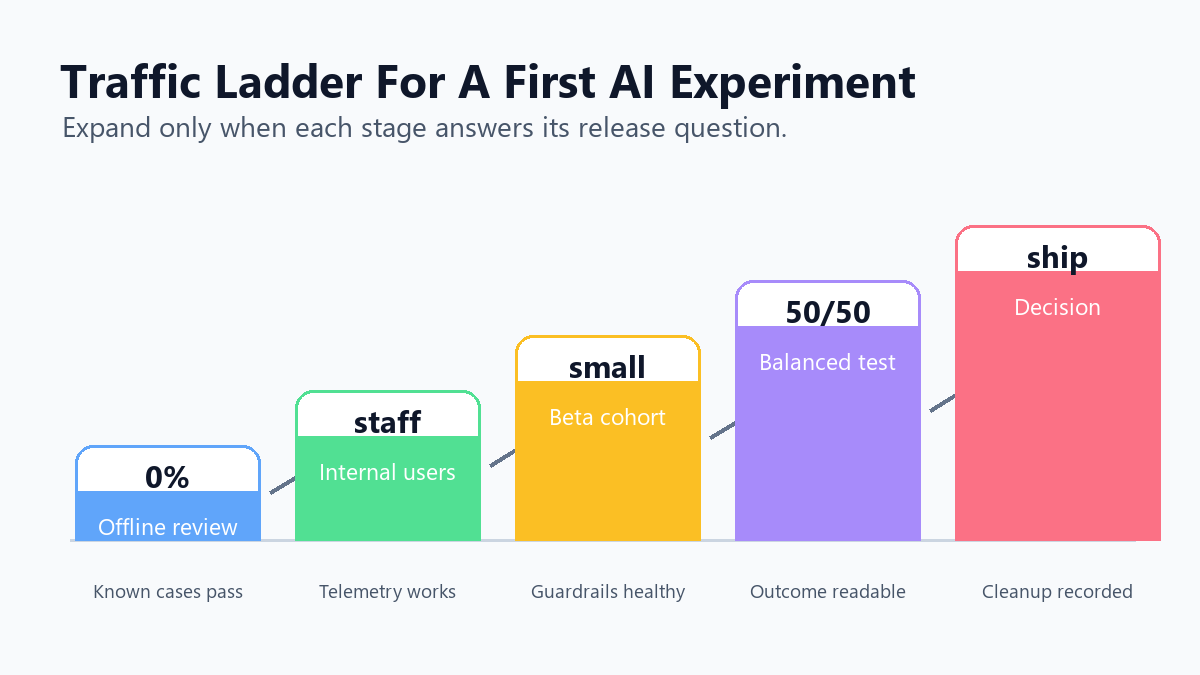
| Stage | Audience | Question | Exit condition |
|---|---|---|---|
| Offline review | historical tickets and known failure cases | Is the candidate safe enough to expose? | no severe regression and acceptable cost estimate |
| Internal exposure | employees and test accounts | Does it behave correctly in the real workflow? | no major workflow, latency, or telemetry issue |
| Beta cohort | small eligible customer segment | Does production behavior look safe? | guardrails remain healthy |
| Balanced experiment | eligible users or tickets | Does the candidate improve the primary outcome? | decision window closes with readable evidence |
| Release or rollback | default behavior or control | What should become permanent? | winner promoted, rollback executed, or test redesigned |
This staged path is why feature flags matter. The flag lets the team expand, pause, narrow, or roll back exposure without changing the deployed application. FeatBit's safe AI deployment and AI experimentation pages cover the broader release-engineering pattern for prompts, models, retrieval settings, and agent behavior.
Decide What Happens After The Result
Before the experiment starts, write the action tied to each result state.
decision_rule:
  ship_treatment_when:
    - accepted_ai_summary_rate improves enough to matter
    - correction_rate does not increase
    - p95_latency_ms remains inside the support workflow budget
    - token_cost stays inside the team's operating limit
  roll_back_when:
    - severe summary quality issue appears
    - telemetry cannot join exposure to outcome
    - escalation_after_summary_rate worsens for priority accounts
  revise_when:
    - treatment helps short tickets but harms long technical tickets
    - evidence is promising but guardrail noise is too high
  clean_up_when:
    - winner becomes default
    - losing prompt branch is removed from code
    - temporary experiment flag is archived or converted into a named operational control
The wording "enough to matter" should become a numeric threshold inside your team. The right value depends on traffic, baseline performance, risk tolerance, and the business value of the workflow. Do not invent a universal threshold for every AI experiment.
After the decision, clean up. Temporary AI experiment flags can become hard-to-read production logic if nobody owns the end state. FeatBit's feature flag lifecycle management model helps teams record owner, evidence, expected end state, and cleanup path before the flag becomes debt.
Common Mistakes In First AI Flag Experiments
Changing too many things at once. If the prompt, model, retrieval profile, and temperature all change together, call it a route experiment. Do not attribute the result to only one component.
Randomizing at the wrong level. Request-level assignment may be fine for independent backend calls. It is usually wrong for tickets, conversations, accounts, and agent workflows where continuity matters.
Counting exposure too early. A page view is not an AI exposure unless the assigned AI behavior actually ran.
Ignoring fallback behavior. If treatment traffic silently falls back to control, track that fallback rate. Otherwise the treatment can look safer than it was.
Letting AI operate the release without boundaries. AI agents can draft experiment briefs, propose flag variations, summarize telemetry, or prepare cleanup plans. Production targeting changes should still pass through authorization, approval, and audit controls.
Skipping cleanup. An experiment is not complete when the dashboard looks interesting. It is complete when the team has made a release decision and removed or reclassified the temporary control.
Where FeatBit Fits
FeatBit is useful for AI experiments because the AI behavior is a runtime decision. A team can use flags to target internal users, allocate beta traffic, keep assignment stable, record exposure, connect metric events, roll back when guardrails fail, and clean up the flag after the decision.
That does not replace offline evals, LLM observability, product analytics, human review, or incident response. It connects them into a release-control workflow. The flag decides who sees which AI behavior. Telemetry explains what happened. The decision rule tells the team whether to continue, pause, roll back, ship, or learn.
The practical next step is small: pick one AI behavior that matters, write the release hypothesis, create one multivariate flag, emit one exposure event and one outcome event, and define the rollback rule before the first customer sees the treatment.
Source Notes
- Category context: Unleash's feature flag documentation and activation strategies documentation are cited for common vendor terminology around flags, strategies, gradual rollout, and variants. They are not used as vendor rankings.
- AI risk framing: NIST's AI Risk Management Framework supports the article's recommendation to define governance, measurement, and management expectations before AI exposure.
- Feature flag standard context: OpenFeature's evaluation context concept supports the distinction between the stable assignment unit and targeting attributes.
- FeatBit implementation context: AI control layer, safe AI deployment, AI experimentation, measurement design, feature flag lifecycle management, A/B testing with feature flags, targeted progressive delivery, targeting rules, percentage rollouts, and the Track Insights API.
Image And Open Graph Notes
- Use
cover.pngas the Open Graph image because it summarizes the starter tutorial as a flag-controlled AI experiment. - Use
starter-workflow.pngnear the opening because it shows the sequence from hypothesis through cleanup while the article keeps the steps in crawlable Markdown. - Use
event-join-diagram.pngin the instrumentation section because it clarifies how exposure and outcome events connect. - Use
traffic-ladder.pngin the staged rollout section because it shows how exposure expands from offline review to release decision.