
AI Insights: What to Measure Before an AI Feature Rollout Expands
AI Insights should answer one release question: is this AI behavior healthy enough to expand, pause, roll back, or clean up?
That is a narrower and more useful promise than "AI analytics." For feature-flagged AI systems, the insight is not only token cost, latency, quality score, or user feedback in isolation. The insight is whether those signals can be joined back to the exact prompt, model route, retrieval profile, guardrail mode, tool policy, or agent behavior that a user actually received.
For FeatBit teams, the practical pattern is simple: use feature flags to control AI exposure, emit variation-aware telemetry when the AI behavior runs, watch quality and business guardrails, and make the release decision explicit.
Why AI Insights Is Becoming A Feature Flag Term
AI feature delivery has created a new visibility gap. A team can know that an AI call was slow, expensive, or poorly rated, but still not know which release decision caused the behavior.
That gap appears when teams change:
- a prompt version;
- a model route or provider fallback;
- a retrieval profile or reranker;
- a guardrail threshold;
- an agent tool policy;
- a workflow mode such as observe, draft, approval-required, or direct action.
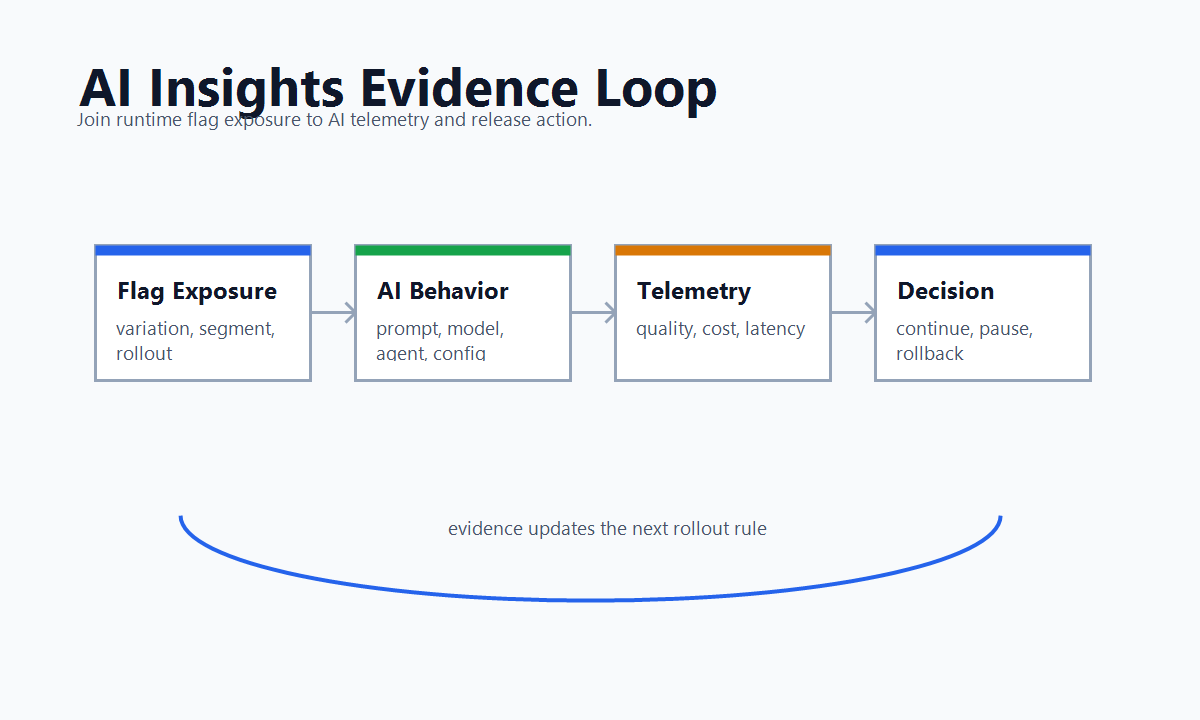
Those are not only AI settings. They are runtime release decisions. If they are controlled by feature flags, the AI insight system should preserve the flag key, variation, assignment unit, audience, rollout stage, and outcome evidence.
LaunchDarkly's public AgentControl documentation now includes an AI Insights page under the "Deliver and monitor configs" area, alongside config performance monitoring and AgentControl experimentation. The docs describe AI Insights as a view for monitoring metrics and identifying changes across configurations, while the monitoring tab focuses on a single config and its variations. LaunchDarkly's separate AgentControl experimentation page also distinguishes configuration monitoring from experiments that measure end-user behavior.
That category language is useful, but the engineering requirement is broader than one vendor page: AI Insights should connect runtime AI behavior to controlled exposure and a release decision.
What AI Insights Should Tell A Release Owner
An AI Insights view is useful only if it helps the release owner decide what to do next.
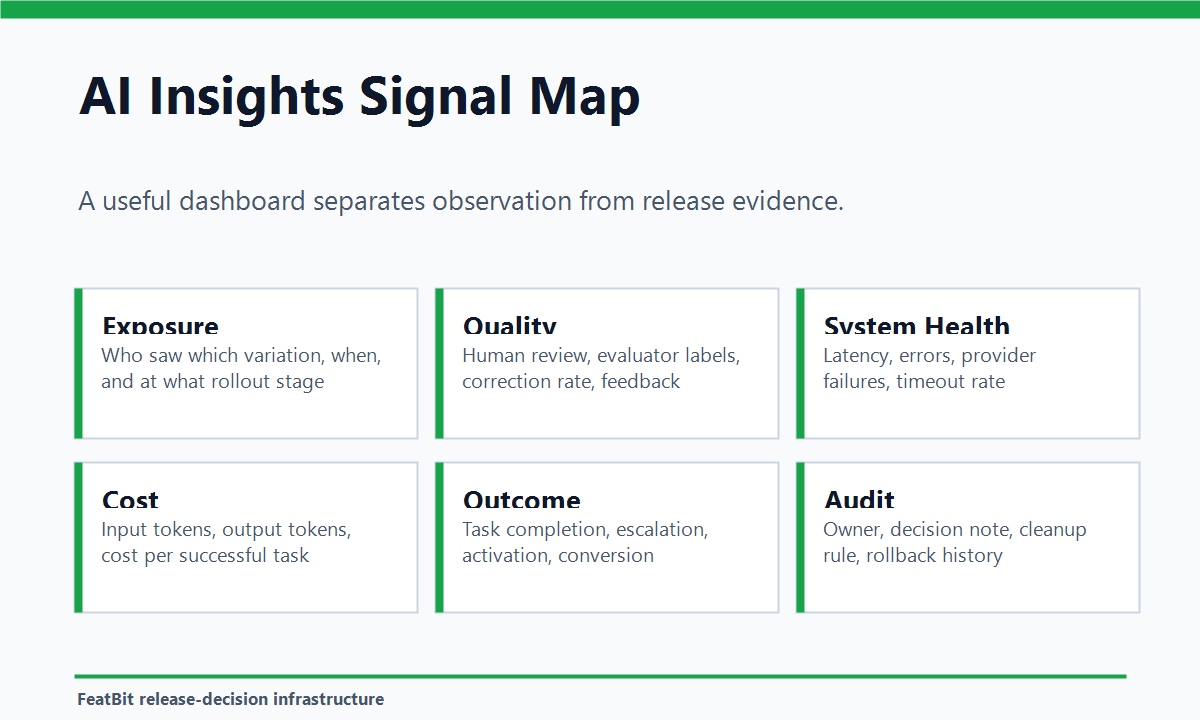
| Release question | Evidence the team needs | Typical action |
|---|---|---|
| Is the candidate being served to the intended audience? | flag key, variation, segment, environment, percentage, assignment unit | fix targeting or continue |
| Is quality acceptable? | human review, evaluator score, correction rate, fallback rate, complaint rate | continue, pause, or repair |
| Is the system healthy? | latency, error rate, timeout rate, provider failures, queue depth | pause, reduce exposure, or roll back |
| Is cost under control? | input tokens, output tokens, provider cost estimate, cost per successful task | tune, limit, or roll back |
| Is the product outcome better? | task completion, conversion, escalation, retention, revenue, activation | expand, keep testing, or stop |
| Can operators explain the decision later? | owner, change history, rollout stage, decision note, cleanup rule | document, promote, or clean up |
The first two rows keep the signal honest. If variation exposure is wrong or quality evidence is missing, the rest of the dashboard can look precise while supporting the wrong decision.
The Minimum Event Model
AI Insights starts with attribution. A release owner needs to know which behavior ran before asking whether it worked.
A practical exposure event might look like this:
{
  "event": "ai_feature_exposure",
  "flagKey": "support_assistant_route",
  "variation": "citation_first_v4",
  "assignmentUnit": "account",
  "unitId": "acct_1842",
  "surface": "support_chat",
  "rolloutStage": "canary_10_percent",
  "promptProfile": "support_answer_citation_first_v4",
  "modelRoute": "balanced_support",
  "retrievalProfile": "verified_docs_rerank_v2",
  "timestamp": "2026-06-18T09:15:30Z"
}
Outcome and guardrail events should carry the same join keys:
{
  "event": "support_assistant_outcome",
  "flagKey": "support_assistant_route",
  "variation": "citation_first_v4",
  "assignmentUnit": "account",
  "unitId": "acct_1842",
  "resolvedWithoutEscalation": true,
  "humanCorrection": false,
  "fallbackUsed": false,
  "latencyMs": 1860,
  "estimatedCostUsd": 0.012
}
The field names do not need to be universal. The rule is what matters: exposure and outcome evidence must share a stable flag key, variation, assignment unit, and release context.
FeatBit's Track Insights API supports reporting feature flag evaluation events and custom metric events. FeatBit's flag insights help teams inspect variation delivery. Together with targeting rules, percentage rollouts, and A/B testing with feature flags, those primitives make AI Insights actionable instead of descriptive.
Which AI Feature Flag Use Cases Need Insights
Not every AI feature needs a large analytics program. The need rises when the AI behavior is changing, costly, segment-dependent, risky, or tied to a product outcome.
| AI use case | Feature flag decision | Insight focus |
|---|---|---|
| Prompt rollout | Which prompt version should run for this audience? | quality review, correction rate, user task outcome |
| Model routing | Which model route should handle the request? | latency, cost, fallback, task success |
| Retrieval changes | Which retrieval profile should provide context? | accepted answers, citation quality, no-answer rate |
| Agent tool policy | Which tool authority level is active? | denied actions, approval queue, incident signals |
| Guardrail tuning | Which threshold or policy mode should apply? | false positives, unsafe misses, user frustration |
| AI fallback | Which baseline should run when the candidate fails? | fallback frequency, recovery quality, support impact |
The common thread is variation identity. Without it, AI teams can see that the system changed, but not which release control caused the change.
Build An AI Insights Release Loop
Use AI Insights as part of a release loop, not as a reporting afterthought.
-
Name the release question. Example: should the citation-first support assistant expand from internal users to 10 percent of paid support accounts?
-
Define the controlled behavior. Decide whether the flag controls one prompt, a model route, a retrieval profile, a tool policy, or a bundled AI profile.
-
Choose the assignment unit. Use user, account, conversation, session, or workflow consistently. The unit should match the product journey and the metric.
-
Emit exposure when the AI behavior actually runs. Do not count a page view as AI exposure if the prompt, model, route, or agent action never executed.
-
Join outcome events to the same variation. Quality labels, product outcomes, cost, latency, fallback, and error events should all carry the same release identifiers.
-
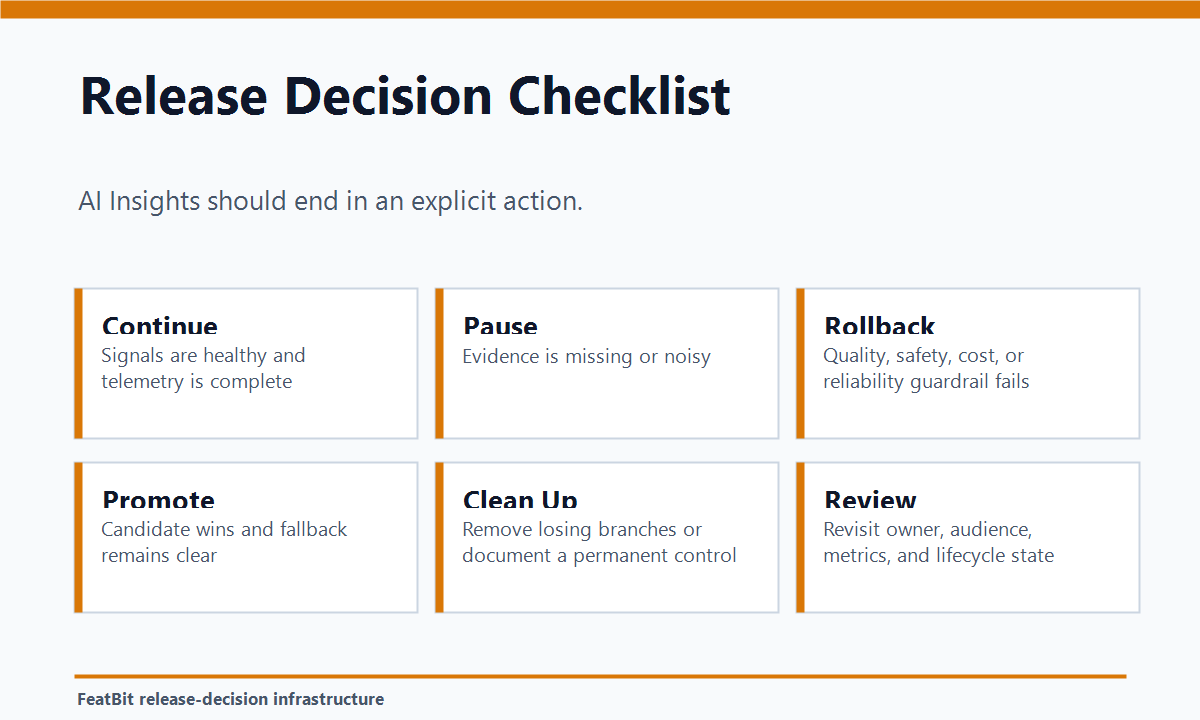
Decide with predefined gates. A healthy canary can expand. Missing telemetry should pause. A severe guardrail breach should roll back. A completed decision should trigger cleanup.
FeatBit's AI experimentation, safe AI deployment, and measurement design pages expand this operating model. The core principle is the same across all of them: an AI change should be targetable, measurable, reversible, and owned.
AI Insights Is Not The Same As AI Evals
AI evals and AI Insights overlap, but they do different jobs.
| Term | Main job | What it needs from feature flags |
|---|---|---|
| Offline eval | Test a candidate before production exposure | a candidate identity that may become a variation |
| Online eval | Judge live or shadow production behavior | stable assignment and exposure attribution |
| Experiment | Measure impact on a defined outcome | controlled variation assignment and metric events |
| AI Insights | Explain what happened across AI behavior, audience, cost, quality, and rollout | flag key, variation, rollout stage, guardrails, and decision state |
The dashboard becomes much more useful when these layers are connected. An offline eval may qualify a prompt. An online eval may show how the prompt behaves under production inputs. An experiment may test whether users complete more tasks. AI Insights should help the release owner see the whole state: who saw what, what changed, what evidence is missing, and what action is allowed next.
Common Mistakes
Tracking AI calls without tracking variation identity. Token cost and latency are useful, but not enough. Operators need to know which flagged AI behavior created the signal.
Using one generic AI success score. A support assistant can improve answer completeness while increasing escalation or cost. Keep one primary outcome and several guardrails.
Counting assignment before execution. A user may be assigned to a candidate variation but never trigger the AI behavior. Emit exposure when the behavior runs.
Mixing assignment units. If rollout is assigned by account but outcomes are analyzed by request, the signal may be noisy or misleading.
Letting insights stop at observation. A useful AI Insights workflow ends in a release action: continue, pause, rollback candidate, promote, or clean up.
Leaving temporary AI controls behind. After a decision, remove losing prompt, model, retrieval, or tool branches unless the flag is intentionally becoming a long-lived operational control. FeatBit's feature flag lifecycle management model is useful for keeping that cleanup explicit.
FeatBit Perspective
FeatBit should not be treated as an AI observability vendor or an LLM proxy. Its role is release control.
In a feature-flagged AI system, FeatBit can help teams:
- target an AI behavior to internal users, beta customers, regions, plans, accounts, workflows, or percentages;
- select structured variations such as prompt profiles, model routes, retrieval profiles, guardrail modes, or fallback policies;
- connect served variations to flag insights, custom metric events, experiment evidence, and external observability systems;
- roll back one audience or variation without redeploying the application;
- preserve audit and lifecycle context around who changed the release control and when it should be cleaned up.
That makes AI Insights a release-decision capability. The model gateway, evaluator, product analytics system, and observability stack can each own part of the evidence. FeatBit owns the runtime control point that decides who receives which behavior and how quickly the team can change that decision.
Starting Checklist
Before calling a dashboard "AI Insights," make sure the workflow can answer these questions:
- Which flag or runtime control selected the AI behavior?
- Which variation, prompt profile, model route, retrieval profile, or tool policy actually ran?
- Which user, account, conversation, or workflow was the assignment unit?
- Which audience, environment, region, or rollout stage was exposed?
- Did exposure fire only when the AI behavior executed?
- Can quality, cost, latency, fallback, and product outcomes be joined to the same variation?
- Which guardrail should pause or roll back expansion?
- Who owns the decision and cleanup rule?
- Can the team reduce exposure without redeploying?
- Can a future reviewer reconstruct why the release expanded, paused, or rolled back?
The bottom line: AI Insights is useful when it turns AI telemetry into release evidence. For feature-flagged AI systems, that means every prompt, model, retrieval, guardrail, or agent behavior change should be controlled, attributed, measured, reversible, and cleaned up after the decision.
Source Notes
- Vendor terminology context: LaunchDarkly's AI Insights documentation describes a view for monitoring metrics and identifying changes across AgentControl configurations. Its monitoring documentation describes config-level performance metrics when AI metrics are tracked in the SDK, and its AgentControl experimentation documentation distinguishes monitoring config performance from measuring end-user behavior through experiments. These sources are used as category context, not as a vendor ranking.
- FeatBit implementation context: Track Insights API, flag insights, targeting rules, percentage rollouts, A/B testing with feature flags, AI experimentation, safe AI deployment, measurement design, and feature flag lifecycle management support the workflow described here.
- Vendor-neutral flagging context: OpenFeature's flag evaluation specification provides general language for flag keys, typed values, evaluation context, and evaluation details that can help teams think about attribution across tools.
Image And Open Graph Notes
- Use
cover.pngas the Open Graph image because it frames AI Insights as release evidence for feature-flagged AI behavior. - Use
insights-evidence-loop.pngnear the opening because it shows the connection between exposure control, AI behavior, telemetry, guardrails, and release decisions. - Use
ai-insights-signal-map.pngin the measurement section because it separates exposure, quality, system health, cost, outcome, and audit evidence. - Use
release-decision-checklist.pngnear the release-loop section because it turns the dashboard idea into continue, pause, rollback, promote, and cleanup actions.