
AI Flag Lifecycle Management: Govern AI Features From Prompt to Rollback
AI flag lifecycle management is the discipline of treating every AI feature flag as a release asset with a purpose, owner, fallback, evidence rule, rollback path, and cleanup decision. The flag may control a prompt, model route, retrieval profile, agent tool, autonomy level, review mode, or parameter profile. The lifecycle question is the same: who should receive this behavior, how will the team know it is safe to expand, and when should the control be removed or made permanent?
This is different from ordinary flag hygiene. AI flags often control behavior that changes quality, latency, cost, data access, user trust, or side effects without a visible code deployment. Lifecycle management is how teams keep that runtime control useful instead of letting it become a second, undocumented product.
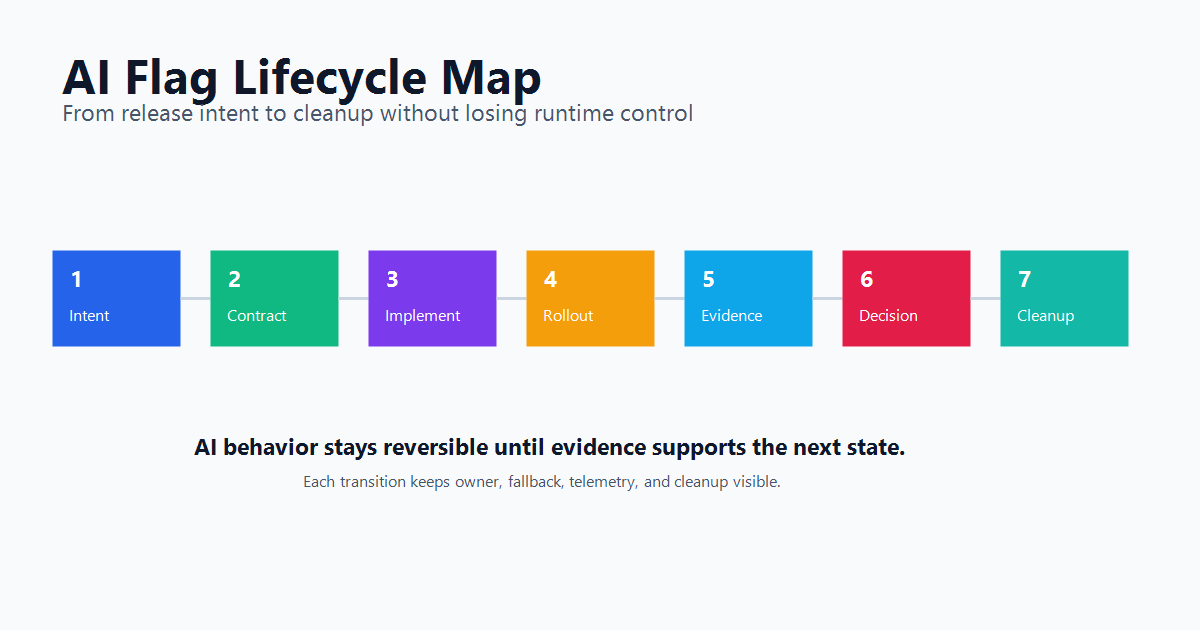
What Makes An AI Flag Different
A traditional release flag often answers a visible product question: should this user see the new checkout flow? An AI flag can answer a deeper runtime question: which prompt, model, retrieval profile, tool policy, review mode, or fallback path should run for this request?
That changes the lifecycle. The flag is no longer only a switch around code. It becomes a control point for behavior that may vary by user, account, region, workflow, risk tier, or rollout stage.
| AI flag surface | What the flag controls | Lifecycle risk |
|---|---|---|
| Prompt route | Baseline prompt, candidate prompt, safety prompt, or incident prompt | The prompt may live outside the code path that evaluates the flag. |
| Model route | Provider, model version, reasoning profile, or cost tier | The rollout can affect latency, cost, quality, and fallback behavior. |
| Retrieval profile | Index, filter, source set, reranker, or citation policy | The flag can change what the model is allowed to know. |
| Agent tool access | Read-only mode, draft mode, write tools, or external actions | The flag can authorize side effects, not just content generation. |
| Review mode | Automatic, sampled review, required review, fallback, or off | The flag can decide how much human judgment stays in the loop. |
| Parameter profile | Temperature, token budget, timeout, retrieval depth, or guardrail threshold | Loose runtime knobs can create combinations nobody reviewed. |
The lifecycle standard should match the risk. A prompt wording flag for internal help text may need a lightweight review. A flag that grants an agent write access to customer data should have stricter ownership, approval, audit, and rollback rules.
FeatBit's AI control layer framing is useful here: every AI decision point that changes production behavior should become a named control surface. AI flag lifecycle management keeps those surfaces understandable after the first rollout.
Define The Flag Contract Before Implementation
Do not start with the flag key. Start with the contract the key represents.
A useful AI flag contract answers:
| Contract field | Why it matters |
|---|---|
| Release question | Names the decision the team is trying to answer, such as "Can the new support prompt handle enterprise cases?" |
| Controlled behavior | Identifies the prompt, model, retrieval profile, tool policy, parameter profile, or review mode. |
| Owner | Gives one person or team responsibility for rollout, evidence, and cleanup. |
| Evaluation location | Shows whether the flag is evaluated on the server, edge, client, worker, or agent runtime. |
| Assignment unit | Defines whether rollout is by user, account, workspace, conversation, request, or workflow. |
| Safe fallback | States what happens when the flag is off, missing, invalid, or rolled back. |
| Evidence rule | Lists the primary metric, guardrails, review outcome, or operational signal required before expansion. |
| End state | Says whether the flag should be removed, converted into durable configuration, or kept as an operational control. |
The contract is what prevents "temporary AI rollout flag" from becoming permanent ambiguity.
OpenFeature's specification defines typed flag evaluation around a flag key, default value, evaluation context, and optional details. That shape is a good implementation baseline: the code should make type, default, context, and evaluation result explicit enough that reviewers can reason about fallback and telemetry.
Use Lifecycle Types For AI Flags
All AI flags are not the same. Use lifecycle types so cleanup and governance rules do not depend on memory.
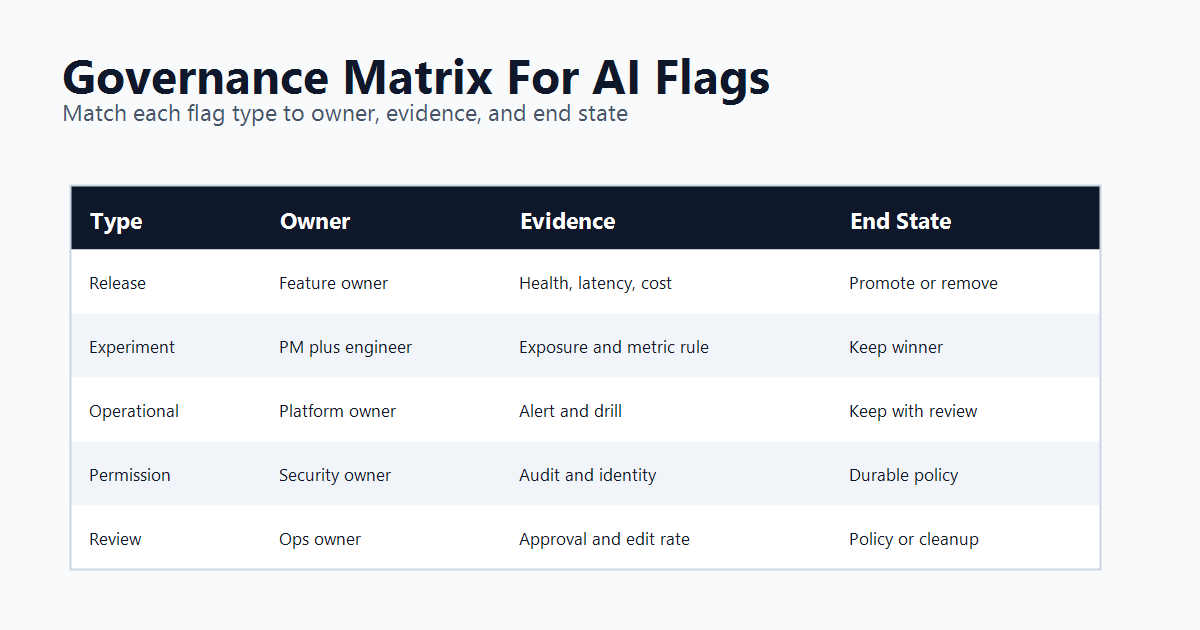
| Lifecycle type | Good for | Evidence before expansion | Expected end state |
|---|---|---|---|
| Release flag | New AI feature, prompt route, model route, or retrieval profile | Quality, latency, cost, fallback rate, segment health | Remove after the winning path becomes ordinary code or configuration. |
| Experiment flag | Prompt A/B test, model comparison, UI assist mode, or review workflow test | Exposure event, primary metric, guardrails, and decision rule | Keep winner, remove loser, archive experiment context. |
| Operational flag | Kill switch, incident fallback, model outage route, cost-saving mode | Operational drills, alert integration, owner review | Keep as durable control with periodic review. |
| Permission flag | Agent tool access, tier entitlement, beta access, or high-risk action authority | Identity, policy, audit, and support process validation | Keep as access policy, not release debt. |
| Configuration flag | JSON parameter profile, retrieval depth, timeout, threshold, or prompt bundle reference | Schema validation, metric impact, and fallback behavior | Promote stable values or keep as managed config. |
| Review flag | Human-in-the-loop mode, sample rate, escalation path, or autonomy level | Approval rate, edit rate, rejection rate, queue time, and escalation rate | Convert into durable policy or remove after automation is trusted. |
The same flag can move between types, but the owner should make that transition explicit. For example, a prompt rollout flag may start as a release flag. If the team keeps it as an incident fallback, it becomes an operational flag with a different review cadence and cleanup expectation.
FeatBit's feature flag lifecycle management hub expands this idea for general release assets. For AI systems, the important addition is the controlled behavior: prompt, model, retrieval, tool authority, review mode, or parameter profile.
A Seven-Step AI Flag Lifecycle
Use this lifecycle when a team adds a new AI capability or changes a production AI behavior.
1. State The Release Question
Write the question before creating the flag.
Good examples:
- Can the candidate support prompt reduce escalations without increasing corrections?
- Can the cheaper model route handle low-risk summaries without raising retry rate?
- Can the agent use write tools for internal accounts while keeping reviewer rejection below the guardrail?
- Can the new retrieval profile improve cited answers for enterprise users without increasing latency?
Weak examples:
- Enable AI v2.
- Try the new model.
- Test better prompt.
The release question determines the flag type, owner, metrics, targeting, and cleanup rule.
2. Choose The Assignment Unit
AI behavior often has memory. Assigning by request can create inconsistent conversations. Assigning by user can pollute account-level workflows. Assigning by account may be better for B2B copilots, while assigning by conversation may be better for chat experiments.
Choose the unit intentionally:
| Unit | Use when | Watch out for |
|---|---|---|
| User | Personal assistant, individual UI feature, or single-user workflow | Shared accounts and enterprise workflows may need account-level consistency. |
| Account or workspace | B2B assistant, admin workflow, enterprise rollout | One user can influence outcome metrics for a whole account. |
| Conversation or case | Chat, support ticket, review queue, or document workflow | The unit must stay stable across retries and follow-up messages. |
| Workflow | Background job, agent task, or pipeline step | The evaluation context must include enough metadata for targeting and analysis. |
OpenFeature's evaluation context model is relevant because targeting depends on contextual data. In practice, that context should include only what the application needs for stable assignment, segmentation, and evidence. Avoid sending sensitive prompt content or unnecessary user data into a flag evaluation path.
3. Implement The Fallback As A Product Behavior
The fallback is not only a default value. It is the behavior users receive during rollback, SDK failure, missing configuration, invalid JSON, incident mode, or paused rollout.
For AI flags, useful fallbacks include:
- baseline prompt or model route;
- search-only answer with citations;
- draft mode instead of external send;
- review-required mode instead of automatic action;
- lower-autonomy tool policy;
- cached response or manual workflow;
- feature off for the affected segment.
If the fallback is embarrassing, slow, or untested, the flag is not ready for production. FeatBit's safe AI deployment guidance starts with the same operating rule: expose behavior gradually and keep rollback available before the change scales.
4. Capture Exposure Where The AI Behavior Runs
An AI flag is useful only if the team can connect evaluated variation to outcome. Eligibility is not enough. Record the variation that actually ran.
type AiFlagExposure = {
  flagKey: string;
  variation: string;
  assignmentUnit: string;
  surface: "prompt" | "model" | "retrieval" | "tool" | "review" | "config";
  evaluationLocation: "server" | "edge" | "worker" | "agent-runtime";
  rolloutStage: "internal" | "canary" | "experiment" | "expanded" | "fallback";
};
Then join outcome events to the same unit and variation:
type AiOutcome = {
  assignmentUnit: string;
  flagKey: string;
  variation: string;
  eventName: string;
  latencyMs?: number;
  fallbackUsed?: boolean;
  reviewerDecision?: "approved" | "edited" | "rejected" | "escalated";
  costBucket?: "baseline" | "higher" | "lower";
};
FeatBit's Track Insights API is the product path for sending feature flag variation results and custom metric events. The exact event model belongs to your application, but the lifecycle rule is stable: record the served variation before asking whether the change worked.
5. Expand By Evidence, Not Confidence
Do not expand an AI flag because the demo looked good. Expand because the next rollout stage has evidence.
| Stage | Audience | Evidence to check |
|---|---|---|
| Internal | Employees, test accounts, or staging-like users | Obvious failures, trace quality, fallback behavior, review feedback. |
| Canary | Small production segment | Quality, latency, cost, error rate, escalation, support impact. |
| Segment expansion | Specific plan, region, workflow, or risk tier | Segment health and fairness of the chosen assignment unit. |
| Experiment | Controlled variants with primary metric and guardrails | Exposure integrity, metric quality, guardrail status, decision confidence. |
| General availability | Broad eligible audience | Rollback readiness, operational owner, support readiness, cleanup plan. |
This is where AI flag lifecycle management connects to release decision practice. FeatBit's release decision framework frames rollout as intent, hypothesis, reversible exposure, measurement, evidence, decision, and learning. The AI flag is the reversible exposure mechanism.
6. Decide The End State While The Evidence Is Fresh
Every AI flag should end in one of five states:
- Promote. Make the winning behavior ordinary code or durable configuration.
- Iterate. Keep the flag active while a new candidate is prepared.
- Segment. Keep different behavior for a defined audience because the evidence supports different needs.
- Operationalize. Convert the flag into a long-lived kill switch, fallback, permission, or incident control.
- Remove. Delete obsolete branches, deploy the cleanup, then archive or delete the flag.
Do this while the rollout context is still available. Waiting months means the team must reconstruct why the flag exists from code search, dashboards, tickets, and memory.
7. Clean Up In The Right Order
Cleanup should remove code before removing the control-plane record.
A safe order is:
- Confirm the release decision and permanent behavior.
- Search code references, wrappers, prompt registries, tests, telemetry, and docs.
- Remove obsolete branches and losing profiles.
- Preserve tests for the permanent behavior.
- Deploy the cleanup.
- Verify no production service still evaluates the flag.
- Archive or delete the flag according to policy.
AI coding agents can help with bounded evidence gathering and cleanup pull requests, but they need explicit rules. FeatBit's guide to cleaning up stale feature flags with coding agents covers the agent-assisted cleanup path.
Governance Rules For AI Flag Owners
AI governance often stays abstract. Lifecycle rules make it operational.
NIST's AI Risk Management Framework is a voluntary resource for managing AI risk across the AI lifecycle. For product teams, that does not automatically tell you how to ship a prompt, model, or agent feature safely. AI flag lifecycle management turns part of that governance work into concrete release controls:
| Governance need | Lifecycle rule |
|---|---|
| Accountability | Every AI flag has an owner and release question. |
| Traceability | The flag contract links key, variation, context, telemetry, rollout, and decision. |
| Oversight | High-risk flags require approval before expansion or autonomy increase. |
| Measurement | Exposure and outcome events are joined by assignment unit and variation. |
| Reversibility | Fallback and rollback are designed before production exposure. |
| Cleanup | Temporary controls have an expected end state and review date. |
The goal is not to claim that a feature flag platform provides complete AI governance. It does not. You still need model evaluation, security review, privacy controls, data governance, prompt and retrieval review, incident response, and domain-specific oversight. FeatBit fits the runtime release-control layer: targeting, staged rollout, rollback, audit history, flag insights, and lifecycle management around the behavior your application chooses to expose.
Common Mistakes
Using one flag for multiple AI decisions. A flag that controls prompt, model, retrieval, and tool authority at once is hard to review and harder to roll back. Split controls when the risk, owner, or evidence differs.
Treating AI flags as permanent config by accident. If a flag is meant to release a prompt, give it a cleanup condition. If it is meant to be durable config, say so and review it like config.
Evaluating in the wrong place. A client-side flag may be acceptable for a visible UI entry point. Prompt selection, model routing, retrieval source, cost profile, and tool permission usually belong server-side or in a controlled worker path.
Logging the wrong unit. If rollout is account-based but metrics are user-based, the decision can become noisy or misleading. Pick the assignment unit before rollout.
Leaving review outcomes outside release decisions. Human review data should influence whether automation expands, pauses, falls back, or rolls back. Otherwise review becomes a queue, not a learning loop.
Deleting the flag before deleting the code. If a service still evaluates the flag, removing the control-plane record can force default behavior in a way the team did not review.
Starting Checklist
Before launching an AI feature flag, confirm:
- The release question is specific enough to decide later.
- The flag type is release, experiment, operational, permission, configuration, or review.
- The controlled behavior is named: prompt, model, retrieval, tool, review mode, or parameter profile.
- The owner and review date are visible.
- The assignment unit matches the product workflow.
- Evaluation happens where the AI behavior can actually be controlled.
- The fallback is a tested product behavior.
- Exposure is recorded where the behavior runs.
- Outcome metrics can be joined to the served variation.
- Rollout stages have evidence gates.
- The expected end state is promote, iterate, segment, operationalize, or remove.
- Cleanup order is code first, then archive or delete the flag.
AI flag lifecycle management is how teams keep AI release speed compatible with operational control. The practical standard is simple: every AI behavior that can change at runtime should have a lifecycle contract before it reaches broad production traffic.
Source Notes
- FeatBit product context: AI Release Engineering, AI control layer, safe AI deployment, release decision framework, feature flag lifecycle management, and Track Insights API.
- FeatBit lifecycle implementation context: flag lifecycle management docs, define flag types, set cleanup expectations, and clean up flags with coding agents.
- Standards context: OpenFeature's Flag Evaluation API specification defines typed flag evaluation with flag keys, default values, evaluation context, and evaluation details. OpenFeature's Evaluation Context specification explains the context data used for evaluation.
- AI risk-management context: NIST's AI Risk Management Framework is cited as a general AI risk-management reference. This article applies the idea to runtime release controls and does not claim that feature flags alone satisfy AI governance requirements.
Image And Open Graph Notes
- Use
/images/blogs/ai-flag-lifecycle-management/cover.pngas the Open Graph image because it summarizes AI feature flags as lifecycle assets, not one-off toggles. - Use
lifecycle-map.pngnear the opening because it shows the end-to-end path from intent through cleanup. - Use
governance-matrix.pngin the lifecycle-types section because it maps AI flag types to ownership, evidence, rollback, and end-state rules.