
Human-in-the-Loop Flag Tutorial: Route High-Risk Actions to Review
A human-in-the-loop flag is most useful when it protects a specific production action, not when it becomes a vague "AI needs review" label. The tutorial version of the pattern is simple: evaluate a feature flag at the execution boundary, classify the requested action, then route the action to automatic execution, human review, safe fallback, or rollback before the side effect happens.
This article is narrower than a definition of what a human-in-the-loop flag is. The reader job here is implementation: design the flag contract, route high-risk actions, give reviewers enough context, and leave an audit trail that release owners can inspect later.
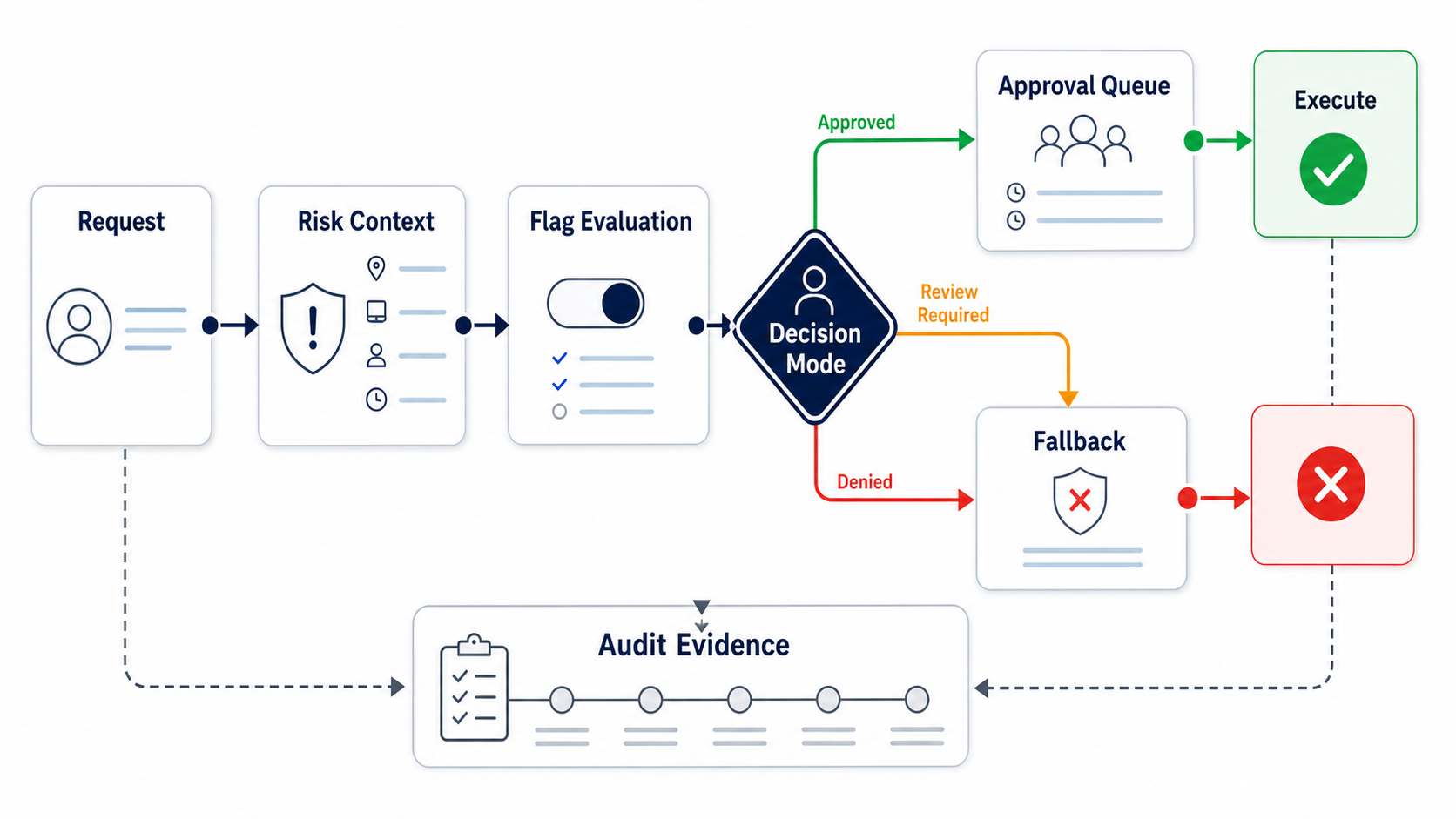
Start With The Action Boundary
Do not start by asking which AI model, agent framework, or approval UI you use. Start with the action boundary:
What is the system about to do that could affect a customer, account, permission, payment, production state, sensitive data, external system, or compliance-relevant record?
That boundary is where the human-in-the-loop flag belongs. The model can propose an action. A workflow service, tool router, API endpoint, or backend worker should decide whether the action can run.
Good candidates include:
- sending a customer-visible message;
- updating billing, entitlement, permission, or account state;
- calling an external API with side effects;
- publishing generated content outside a draft surface;
- changing production configuration or rollout state;
- reading sensitive data outside the normal workflow;
- expanding an AI behavior into a new account, region, or customer segment;
- acting during an incident, policy hold, or incomplete evidence window.
Low-risk retrieval, internal drafts, and reversible suggestions may not need formal approval. A human-in-the-loop flag should protect consequential decisions, not turn every interaction into a review queue.
Define The Flag Contract
A useful flag contract separates the runtime mode from the approval workflow. The flag tells the application what mode is active for this context. The approval system handles queueing, reviewer identity, timeout, and decision capture.
For many high-risk actions, a multivariate string flag is enough:
flag: high_risk_action_mode
type: string
fallback: review_required
variations:
  auto:
    meaning: "Execute automatically when hard authorization and guardrails pass."
  sampled_review:
    meaning: "Execute most actions, but send a sample or risk-triggered subset to review."
  review_required:
    meaning: "Queue the proposed action for human approval before execution."
  fallback:
    meaning: "Do not perform the side effect; use a safer product path."
  off:
    meaning: "Disable the action for this context."
The safe fallback should match the product. A support assistant can create a draft instead of sending a reply. A billing workflow can open an internal task instead of changing account state. A deployment helper can prepare a release note instead of modifying production rollout.
FeatBit fits this pattern because the flag can be evaluated by user, account, environment, segment, region, workflow, risk class, or rollout stage. The same release-control primitives behind targeting rules, percentage rollouts, and audit logs can control AI-era review boundaries.
Build A Risk Routing Matrix
Use a small matrix before writing code. It prevents the team from treating every action as either "allowed" or "blocked."
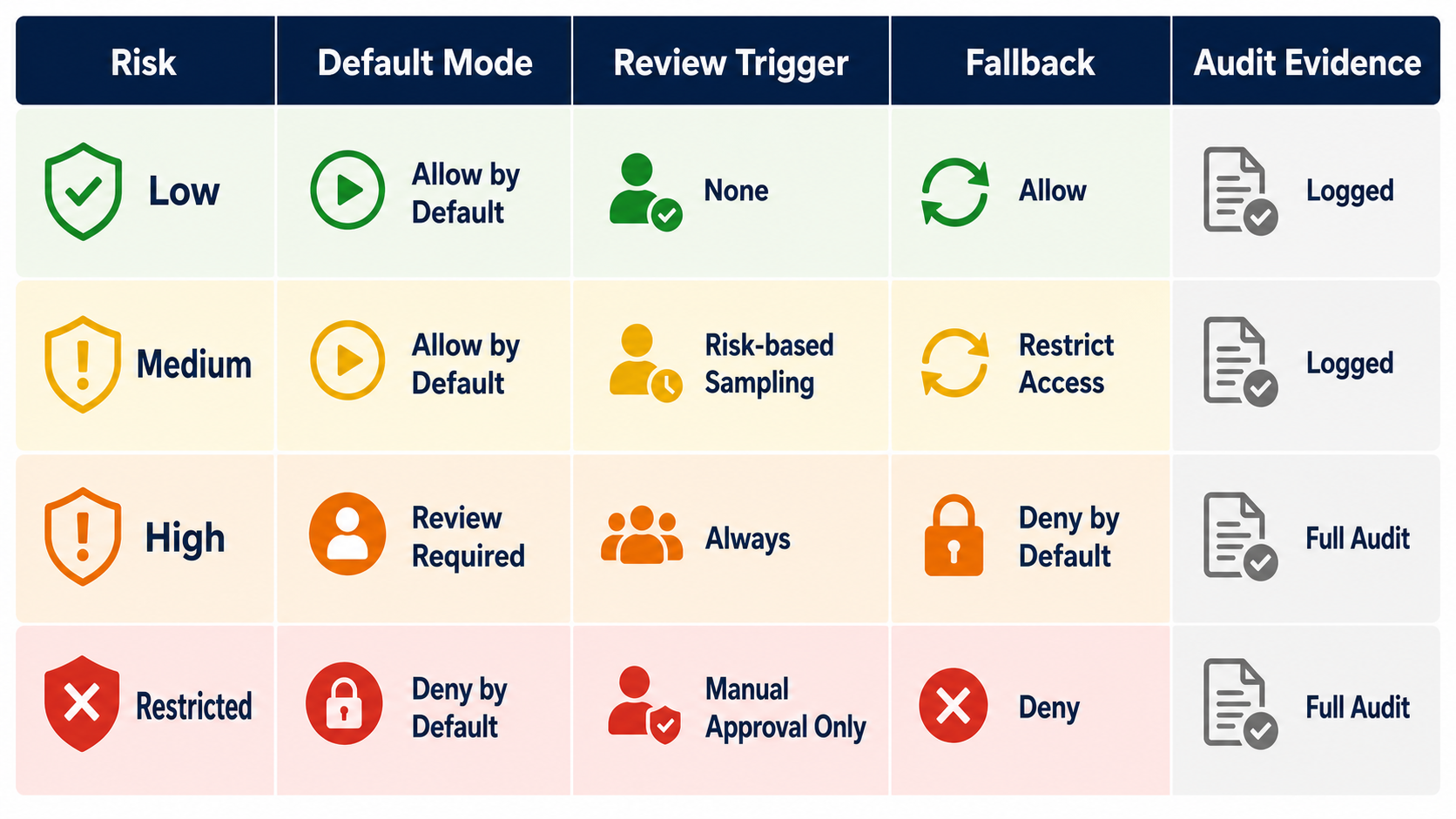
| Risk tier | Example action | Default mode | Review trigger | Fallback |
|---|---|---|---|---|
| Low | Summarize public docs, draft internal note, search approved sources | auto or sampled_review |
Sampled review or unusual context | Continue with normal answer |
| Medium | Draft customer response, suggest workflow update, read scoped account data | sampled_review |
Low confidence, high-value account, sensitive field | Draft-only response |
| High | Send message, update ticket state, change entitlement, call external API | review_required |
Always before first rollout or sensitive segment | Queue draft or manual handoff |
| Restricted | Delete data, change permissions, issue refund, modify production infrastructure | off or separate break-glass process |
Named human execution only | Deny agent execution |
This matrix is not a substitute for authorization. Identity, API scopes, data-access controls, tool permissions, sandboxing, and service boundaries still define what the actor can ever reach. The flag decides which approved behavior is active now.
Evaluate The Flag At The Execution Boundary
The implementation below is intentionally adapter-shaped. Replace flags.string(...), queueApproval(...), and writeAuditEvent(...) with your own FeatBit SDK wrapper, workflow queue, and logging system.
type ActionRisk = "low" | "medium" | "high" | "restricted";

type HighRiskActionRequest = {
  requestId: string;
  userKey: string;
  accountKey: string;
  environment: "development" | "staging" | "production";
  workflow: string;
  actionName: string;
  targetSystem: string;
  risk: ActionRisk;
  proposedAction: string;
  evidenceRefs: string[];
  confidence?: number;
  region?: string;
};

type ReviewDecision =
  | { route: "execute"; reason: string }
  | { route: "queue_for_review"; queue: string; reason: string }
  | { route: "fallback"; fallbackMode: "draft_only" | "manual_handoff" | "read_only"; reason: string }
  | { route: "deny"; reason: string };

async function routeHighRiskAction(
  request: HighRiskActionRequest
): Promise<ReviewDecision> {
  await assertHardAuthorization(request);

  const context = {
    key: request.userKey,
    custom: {
      accountKey: request.accountKey,
      environment: request.environment,
      workflow: request.workflow,
      actionName: request.actionName,
      targetSystem: request.targetSystem,
      risk: request.risk,
      region: request.region ?? "unknown",
    },
  };

  const mode = await flags.string(
    "high_risk_action_mode",
    context,
    "review_required"
  );

  const decision = decideRoute(mode, request);

  await writeAuditEvent({
    requestId: request.requestId,
    flagKey: "high_risk_action_mode",
    evaluatedMode: mode,
    route: decision.route,
    userKey: request.userKey,
    accountKey: request.accountKey,
    environment: request.environment,
    actionName: request.actionName,
    risk: request.risk,
    reason: decision.reason,
  });

  if (decision.route === "queue_for_review") {
    await queueApproval(request, decision.queue);
  }

  return decision;
}

function decideRoute(mode: string, request: HighRiskActionRequest): ReviewDecision {
  if (request.risk === "restricted") {
    return { route: "deny", reason: "Restricted actions require a separate human runbook." };
  }

  if (mode === "auto" && request.risk !== "high") {
    return { route: "execute", reason: "Mode allows this risk tier." };
  }

  if (mode === "sampled_review" && request.risk === "low") {
    return { route: "execute", reason: "Low-risk action allowed under sampled review." };
  }

  if (mode === "fallback") {
    return { route: "fallback", fallbackMode: "draft_only", reason: "Current flag mode requires safe fallback." };
  }

  if (mode === "off") {
    return { route: "deny", reason: "Action disabled for this context." };
  }

  return {
    route: "queue_for_review",
    queue: reviewQueueFor(request),
    reason: `Human review required for ${request.risk} action in ${request.environment}.`,
  };
}
The important order is:
- Check hard authorization first.
- Build a structured evaluation context.
- Evaluate the human-in-the-loop flag.
- Route before execution.
- Record the evaluated mode and route.
- Queue review only when human judgment can change the outcome.
The AI model should not infer its own authority from a prompt. The application boundary should enforce the evaluated mode.
Give Reviewers A Decision Payload
Human review fails when the reviewer sees only a raw function name or a vague "approve action" prompt. The review payload should make the consequence obvious.
Include:
- proposed action in plain English;
- user, account, environment, region, workflow, and target system;
- why the flag routed this action to review;
- flag key, evaluated variation, and fallback mode;
- evidence references, such as source documents, trace IDs, tickets, diffs, or eval results;
- expected effect if approved;
- safe fallback if rejected or expired;
- reviewer group and timeout;
- audit event location.
Example approval card:
approval_request:
  request_id: act_48291
  proposed_action: "Send a billing exception resolved message to account ACME-42."
  action_name: send_customer_message
  target_system: support_email
  environment: production
  evaluated_flag:
    key: high_risk_action_mode
    variation: review_required
  reason: "Customer-visible billing message for enterprise account."
  evidence:
    - ticket: BILL-1932
    - invoice_event: evt_831
    - draft_message: msg_draft_77
  approve_effect: "Message is sent once to the account billing contact."
  reject_fallback: "Keep draft and assign billing operations task."
  reviewer_group: billing-ops-leads
  expires_in_minutes: 15
That payload lets a reviewer decide quickly and lets a release owner reconstruct the decision later.
Roll Out The Flag In Stages
Do not launch high-risk autonomy by setting auto for everyone.
Use release stages:
| Stage | Audience | Flag mode | What to learn |
|---|---|---|---|
| Dry run | Internal users or synthetic sessions | fallback or review_required |
What would the system try to do? |
| Draft mode | Internal operators | fallback with draft output |
Are proposed actions useful and understandable? |
| Required review | Limited beta segment | review_required |
Can reviewers approve with enough context? |
| Sampled review | Mature low-risk segment | sampled_review |
Are guardrails and audit events reliable? |
| Narrow automation | Specific low-risk cohort | auto for selected actions only |
Does automation stay within expected bounds? |
| Incident response | Affected segment or environment | fallback or off |
Can the team reduce autonomy without redeploying? |
This is the same operating model behind FeatBit's AI control layer and safe AI deployment: expose behavior gradually, observe the result, and keep rollback available. For standard release-decision practice, the progressive rollout patterns page gives a broader staged exposure framework.
Record The Decision, Not Just The Click
An audit trail that says "approved" is too thin. Store the policy decision and the execution outcome.
Minimum audit fields:
| Field | Why it matters |
|---|---|
| Request ID and action name | Reconstructs the exact proposed action. |
| User, account, environment, region, and workflow | Explains the evaluated context. |
| Flag key, variation, and fallback value | Recreates runtime policy at decision time. |
| Risk tier and trigger reason | Shows why review was or was not required. |
| Reviewer, reviewer group, and outcome | Supports accountability. |
| Evidence references | Connects approval to source material. |
| Execution result | Shows whether the side effect happened. |
| Rollback or cleanup state | Keeps the release decision complete. |
FeatBit audit logs document changes to feature flags in an environment. Your application should also log request-level review decisions because the action payload, reviewer note, and execution result usually live outside the flag platform.
Where Azure-Style Approval Patterns Fit
Azure DevOps approvals and checks show a familiar enterprise pattern: a stage can pause until manual approval or other checks are satisfied. That is useful deployment governance. A human-in-the-loop flag uses the same control idea at a different point: the code can already be deployed, but the high-risk action waits for runtime approval, fallback, or denial.
Microsoft's Azure AI Content Safety documentation is also useful category context. Content safety systems can detect or score certain input and output risks. A human-in-the-loop flag answers the next operational question: for this user, account, workflow, and risk signal, should the product execute, queue review, fall back, or stop?
Do not collapse those layers. Detection, authorization, approval, rollout, audit, and rollback are different responsibilities.
Common Mistakes
Putting the rule only in the prompt. A prompt can instruct an agent to ask for approval, but the execution boundary should enforce the route.
Using one global review switch. Review often depends on account, region, action type, risk, environment, rollout stage, and incident state. A global switch is useful for emergencies, but too blunt for normal operation.
Sending every uncertainty to humans. Review queues become bottlenecks when low-risk or recoverable actions cannot continue. Use fallback and sampled review where they fit.
Approving without fallback. Review should not be the only safety path. Rejection, timeout, and incident states need product behavior that remains useful and safe.
Skipping lifecycle. Some human-in-the-loop flags become durable policy controls. Others are temporary release controls. Decide which one you are creating and review it through feature flag lifecycle management.
Implementation Checklist
Before shipping a human-in-the-loop flag for high-risk actions, confirm:
- The protected action boundary is named.
- Hard authorization runs before flag evaluation.
- The flag has safe fallback values.
- The evaluation context includes user, account, environment, workflow, action, target, risk, and segment data.
- Review triggers are deterministic and outside the model prompt.
- The reviewer payload shows consequence, scope, evidence, fallback, and reason.
- Approval has timeout behavior.
- Audit records include flag variation, route, reviewer outcome, execution result, and rollback state.
- Rollout starts with dry run, draft, or review-required behavior.
- Temporary flags have owner, review date, and cleanup rule.
The bottom line: a human-in-the-loop flag is not just a feature flag with a human approval label. It is a runtime review router for consequential actions. Use it where risk changes, evaluate it before execution, make fallback explicit, and leave enough evidence for the next release decision.
Source Notes
- Microsoft Learn Define approvals and checks is cited for Azure deployment-stage approval and check concepts.
- Microsoft Learn Azure AI Content Safety overview is cited as category context for AI risk detection, monitoring, and safety workflows. This article uses it as context, not as a claim that content safety replaces runtime approval.
- NIST AI Risk Management Framework is cited for the broader risk-management framing around AI design, development, use, and evaluation.
- FeatBit implementation context: targeting rules, percentage rollouts, audit logs, IAM overview, Track Insights API, AI control layer, safe AI deployment, and feature flag lifecycle management.
Image And Open Graph Notes
- Use
cover.pngas the Open Graph image because it shows the flag as the review router between a high-risk request, a human reviewer, and approve, fallback, or rollback outcomes. - Use
review-routing-flow.pngnear the opening because it explains the execution path from request to audit evidence. - Use
risk-review-matrix.pngin the risk matrix section because it summarizes default modes, review triggers, fallback behavior, and audit evidence.