
Human-in-the-Loop Gates for AI Agents: Approval Without Review Fatigue
A human-in-the-loop gate for agents is a stateful checkpoint that pauses an agent before a consequential action, gives a reviewer enough context to approve, reject, narrow, or roll back the action, and records the decision for audit.
The useful version is not a generic confirmation dialog. It is a release-control boundary. The gate has trigger rules, queue state, timeout behavior, fallback modes, reviewer authority, and evidence that can be inspected later. Without those parts, human approval becomes review theater: a person clicks a button, but the system still cannot explain why the gate fired or what changed after approval.
This article is intentionally narrower than a general guide to controlling AI agents in production or setting AI agent tool permissions. The reader job here is to design the approval gate itself.
The Gate Should Answer One Release Question
Start with the release question, not the UI.
The question is:
Should this agent be allowed to perform this action, for this user or account, in this environment, with this evidence, right now?
That framing keeps the gate away from two common failures.
First, it prevents approvals from becoming a blanket security substitute. Identity, API permissions, tool scopes, network policy, sandboxing, and data-access controls still define what the agent can ever reach. A human-in-the-loop gate decides whether an already possible action may proceed in this context.
Second, it prevents the team from asking humans to approve harmless work. If every search, summary, or draft requires approval, reviewers will learn to clear prompts quickly. Use the gate when human judgment can change the outcome.
Good gate candidates include:
- sending a customer-visible message;
- changing production state;
- calling an external API with side effects;
- reading sensitive data outside the normal workflow;
- updating billing, permissions, infrastructure, or compliance-relevant records;
- crossing from one authority tier into another;
- acting with low confidence, missing evidence, or unusual context;
- operating during an incident or policy-review period.
OpenAI's Agents SDK documents a human-in-the-loop flow where sensitive tool calls can pause agent execution until a person approves or rejects them. Microsoft Foundry's function-calling documentation shows the same architectural split in a different form: the model requests a function call, while the application executes the function and returns output. In production, that application-owned boundary is where approval policy belongs.
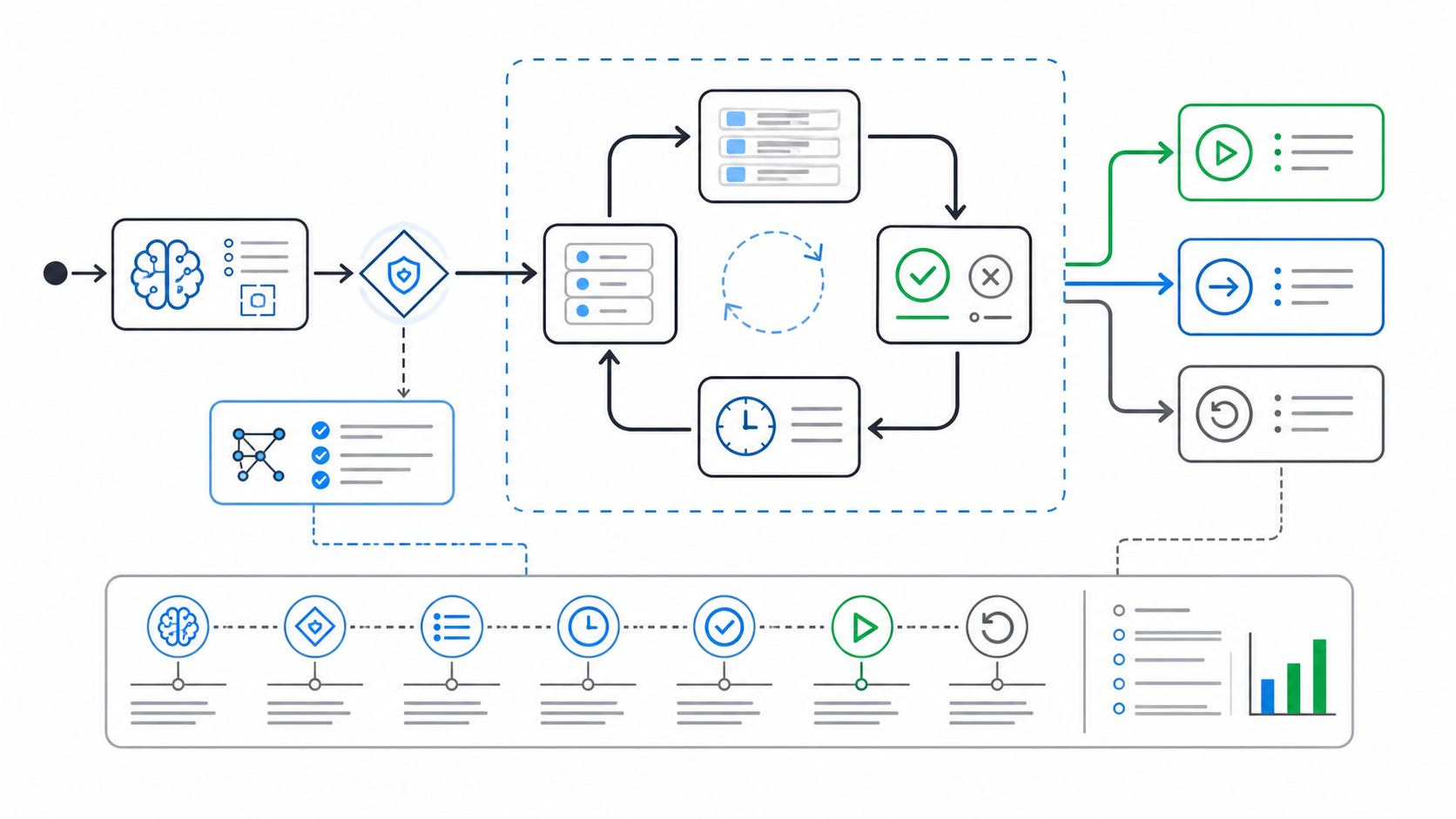
A Gate Needs State, Not Just A Prompt
The simplest approval prompt says "Approve?" That is not enough for production agents.
A real gate has state:
| State | Meaning | Required behavior |
|---|---|---|
not_required |
The action is inside the current policy. | Continue and log the policy decision. |
queued |
The action needs review before execution. | Store the request, freeze the proposed action, notify reviewers, and prevent execution. |
approved |
A qualified reviewer accepted the action as proposed. | Execute once, record reviewer identity, and prevent replay unless explicitly allowed. |
modified |
A reviewer approved a narrower action. | Execute the narrowed scope only and log the delta. |
rejected |
A reviewer denied the action. | Return a safe rejection message or fallback path to the agent. |
expired |
The approval was not resolved in time. | Use the configured timeout behavior, usually fallback or deny. |
rolled_back |
The action or policy was reversed after approval. | Record rollback cause, owner, and final state. |
State matters because agent runs may stream, pause, resume, delegate to nested agents, or wait for a person in another system. OpenAI's human-in-the-loop documentation describes serializing and resuming run state for long-running approvals. Even if your stack is different, the operating lesson is portable: pending approval is durable work, not a transient modal.
Define Trigger Rules Before Launch
Do not let the model decide when it needs approval. The model can propose an action, but the application should evaluate trigger rules outside the prompt.
Use a compact trigger model:
| Trigger input | Example | Gate rule |
|---|---|---|
| Tool class | external_action, admin_action, sensitive_read |
Require approval by default. |
| Environment | production |
Require stronger gates than staging. |
| Account or segment | regulated customer, enterprise design partner | Require account-specific approval or reviewer group. |
| Risk level | high impact, hard to reverse | Queue before execution. |
| Evidence maturity | first rollout, low sample size, missing source | Queue or constrain to draft mode. |
| Incident state | active incident, rollback watch | Force approval or fallback. |
| Policy change | new tool tier, new region, new data source | Require owner signoff before expansion. |
OWASP's LLM guidance on excessive agency is useful context here: agent risk grows when systems receive broad functionality, permissions, or autonomy without enough control. A gate is not the only control, but it is one practical way to prevent broad autonomy from silently expanding into high-impact actions.
Make The Approval Payload Reviewable
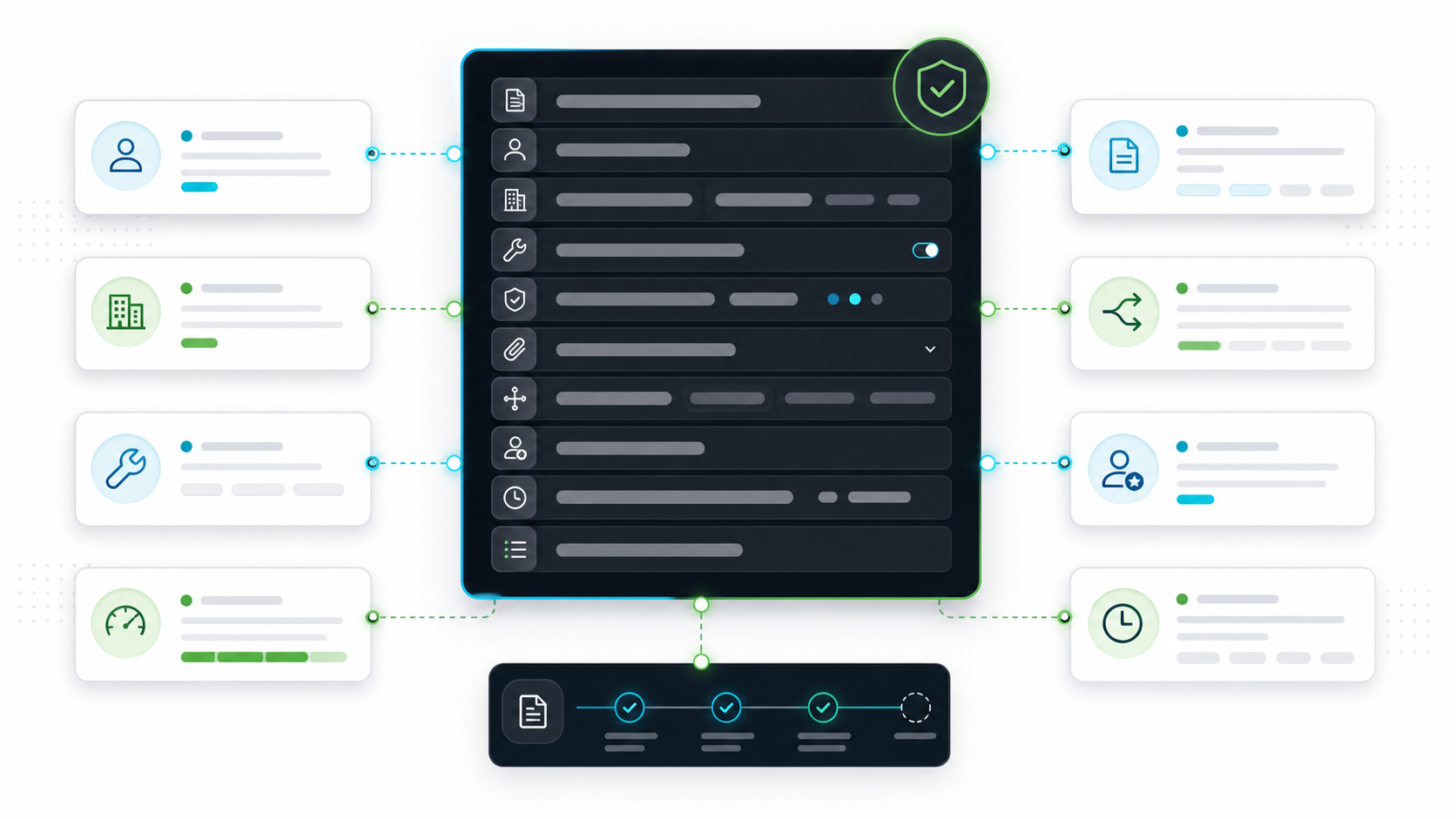
Human approval works only when the reviewer sees consequence, scope, evidence, and fallback quickly.
The approval payload should include:
- Proposed action: what the agent wants to do in plain language.
- Tool and target: tool name, target system, resource, account, and environment.
- Why the gate fired: risk class, policy rule, missing evidence, or rollout stage.
- Impact summary: who or what changes if the action is approved.
- Evidence: sources, diffs, trace IDs, tickets, retrieved documents, or evaluation results.
- Allowed reviewer actions: approve, reject, modify scope, request more evidence, lower authority, or roll back.
- Fallback behavior: what happens if the reviewer rejects or the request expires.
- Audit fields: agent ID, user key, run ID, flag state, reviewer, timestamp, and final result.
Avoid payloads that expose only implementation detail:
Approve function call: updateCustomerStatus(args)
Prefer consequence-first approval:
Agent wants to mark account ACME-42 as "payment exception resolved" in production.
Gate fired because this is a customer-visible billing state change.
Evidence: ticket BILL-1932, invoice event evt_831, reviewer note required.
Fallback if rejected: create draft note for billing operations.
That format lets a reviewer make a real decision. It also makes the audit record understandable after the incident, not only during the approval moment.
Implement The Gate At The Execution Boundary
The approval gate belongs before the side effect. A prompt instruction such as "ask before sending email" is useful guidance, but it is not enforcement.
A simple TypeScript-shaped contract can look like this:
type AgentActionRisk =
  | "search"
  | "scoped_read"
  | "sensitive_read"
  | "draft_write"
  | "external_action"
  | "admin_action";

type ApprovalRequest = {
  requestId: string;
  agentId: string;
  runId: string;
  userKey: string;
  accountKey: string;
  environment: "development" | "staging" | "production";
  toolName: string;
  targetSystem: string;
  risk: AgentActionRisk;
  proposedAction: string;
  evidenceRefs: string[];
  fallbackMode: "deny" | "draft_only" | "search_only" | "manual_handoff";
};

type ApprovalDecision =
  | { state: "not_required"; reason: string }
  | { state: "queued"; queue: string; expiresAt: string; reason: string }
  | { state: "approved"; reviewer: string; reason: string }
  | { state: "modified"; reviewer: string; allowedScope: string; reason: string }
  | { state: "rejected"; reviewer: string; reason: string }
  | { state: "expired"; fallbackMode: ApprovalRequest["fallbackMode"] };
Then put the decision in the tool router:
async function decideApproval(request: ApprovalRequest): Promise<ApprovalDecision> {
  await assertHardAuthorization(request);

  const context = {
    key: request.userKey,
    custom: {
      accountKey: request.accountKey,
      environment: request.environment,
      agentId: request.agentId,
      toolName: request.toolName,
      targetSystem: request.targetSystem,
      risk: request.risk,
    },
  };

  const gateEnabled = await flags.boolean(
    "agent-human-approval-gate",
    context,
    true
  );
  const approvalMode = await flags.string(
    "agent-approval-mode",
    context,
    "approval_required"
  );

  if (!gateEnabled) {
    return { state: "not_required", reason: "Gate disabled for this context." };
  }

  if (approvalMode === "off" && request.risk !== "admin_action") {
    return { state: "not_required", reason: "Current mode allows this action." };
  }

  if (approvalMode === "draft_only") {
    return {
      state: "expired",
      fallbackMode: "draft_only",
    };
  }

  return {
    state: "queued",
    queue: "agent-approvers",
    expiresAt: new Date(Date.now() + 15 * 60_000).toISOString(),
    reason: `Approval required for ${request.risk} in ${request.environment}.`,
  };
}
The names are illustrative. The important pattern is the order:
- Check hard authorization.
- Build structured context.
- Evaluate runtime release policy.
- Queue, allow, constrain, deny, or fallback before the tool executes.
- Record the decision and evaluated policy state.
Use Feature Flags For The Runtime Policy
The gate should be changeable without redeploying the agent. That is where feature flags fit.
Use flags for runtime release decisions:
| Flag | Type | Purpose | Safe fallback |
|---|---|---|---|
agent-human-approval-gate |
Boolean | Enables the gate for a targeted context. | true |
agent-approval-mode |
String | Selects off, sampled_review, approval_required, draft_only, or manual_handoff. |
approval_required |
agent-approval-timeout-minutes |
Number | Sets how long a request can wait. | Short timeout for production actions |
agent-approval-reviewer-group |
String | Routes review to support, security, platform, billing, or compliance. | Owner group |
agent-approval-incident-mode |
Boolean | Forces stricter approval during incidents. | false, with emergency override |
agent-approval-denylist |
JSON | Blocks tools, targets, or action classes temporarily. | Empty list |
Evaluate these flags server-side. The evaluation context should include the user, account, environment, workflow, agent ID, tool, risk class, target system, segment, and incident state.
FeatBit fits this layer because the same release-control primitives used for product rollout also apply to agent gates: targeting rules, segments, percentage rollout, multivariate flag values, audit logs, API access, and webhook-driven automation. The gate remains an application boundary. FeatBit supplies the runtime control plane that tells the boundary which policy is active now.
For the broader control philosophy, see FeatBit's human-in-the-loop release control, AI control layer, and AI agent deployment loop pages.
Plan Timeout And Fallback Behavior
An approval gate without timeout rules can stop a workflow indefinitely. Define timeout behavior before launch.
Use different defaults by action class:
| Action class | Timeout posture | Fallback |
|---|---|---|
| Search or evidence gathering | Usually no approval needed. | Continue with approved sources only. |
| Sensitive read | Short timeout. | Return summary without sensitive fields or require manual handoff. |
| Draft write | Moderate timeout. | Keep draft and notify owner. |
| Customer-visible external action | Short timeout in production. | Do not execute. Keep draft for review. |
| Production change | Short timeout or manual runbook. | Deny and escalate to owner. |
| Admin, destructive, or financial action | No unattended fallback. | Human execution or break-glass process. |
The safe fallback is often not "turn the agent off." A support agent can usually fall back to draft mode. A research agent can fall back to approved search sources. A workflow agent can create a ticket for a human. The gate should reduce authority while keeping safe work useful.
Audit The Decision, Not Only The Tool Call
If the audit trail only says that a tool executed, the gate is hard to trust. Record the decision before execution.
Minimum audit fields:
| Field | Why it matters |
|---|---|
requestId, runId, and agentId |
Reconstructs the paused agent run. |
| User, account, environment, and segment | Explains the evaluated context. |
| Tool, target system, risk class, and proposed action | Shows what authority was requested. |
| Evaluated flag keys and variations | Recreates runtime policy at decision time. |
| Gate state and reason | Shows whether the action was allowed, queued, modified, rejected, expired, or rolled back. |
| Reviewer and reviewer group | Supports accountability. |
| Evidence references | Connects approval to sources, tickets, traces, or diffs. |
| Execution result and rollback state | Connects approval to outcome. |
FeatBit's feature flag audit log, IAM overview, targeting rules, and webhooks are relevant implementation references for policy changes and automation. Your application should still log the agent action decision itself, especially when it contains request-specific evidence or reviewer notes.
Common Failure Modes
| Failure mode | Why it breaks the gate | Better pattern |
|---|---|---|
| Approval on every tool call | Review fatigue hides real risk. | Gate only consequential actions and policy transitions. |
| Gate only in the prompt | The model can drift or be bypassed. | Enforce at the tool router or execution boundary. |
| No timeout rule | Agent runs can hang indefinitely. | Define expiration and fallback by action class. |
| No scope modification | Reviewers can only approve or reject. | Let reviewers narrow scope or move to safer mode. |
| No replay protection | A stale approval may execute twice. | Bind approval to request ID, call ID, version, and expiration. |
| No policy evidence | Operators cannot explain why approval fired. | Log evaluated flag values, risk class, trigger rule, and reviewer outcome. |
| Using flags as authorization | Runtime policy is mistaken for a hard boundary. | Keep identity, API scope, and sandbox controls separate. |
Starting Checklist
Before shipping a human-in-the-loop gate for agents, confirm:
- The gate protects a named action class, not a vague "AI risk."
- Hard authorization runs before approval policy.
- Trigger rules are deterministic and outside the model prompt.
- The approval payload shows consequence, scope, evidence, fallback, and reason.
- Reviewers can approve, reject, narrow scope, or request more evidence.
- Timeout and fallback behavior are defined by action class.
- The gate can be tightened or relaxed by targeted runtime policy.
- Audit records include the evaluated flag state, reviewer decision, execution result, and rollback state.
- Temporary rollout gates have an owner, review date, and cleanup rule.
- Operators can lower authority without redeploying the agent service.
The bottom line: a human-in-the-loop gate is not a button. It is a release-control checkpoint for agent autonomy. Design it like production infrastructure: explicit triggers, durable state, reviewable payloads, safe fallbacks, audit evidence, and a rollback path.
Source Notes And Internal Link Plan
External sources used:
- OpenAI Agents SDK human-in-the-loop documentation: https://openai.github.io/openai-agents-python/human_in_the_loop/
- OpenAI Agents SDK guardrails documentation: https://openai.github.io/openai-agents-python/guardrails/
- Microsoft Foundry agents function calling documentation: https://learn.microsoft.com/en-us/azure/foundry/agents/how-to/tools/function-calling
- OWASP LLM06 Excessive Agency: https://genai.owasp.org/llmrisk/llm06-excessive-agency/
- Model Context Protocol authorization specification: https://modelcontextprotocol.io/specification/2025-06-18/basic/authorization
Internal links used:
- Control AI agents in production, for the broader runtime-control model.
- AI agent permissions, approvals, and fallbacks, for the permission and fallback matrix.
- Human-in-the-loop release control, for FeatBit's AI release-control pillar.
- AI control layer, for the control-surface framing.
- AI agent deployment loop, for build, deploy, evaluate, and rollback context.
- FeatBit audit logs, IAM, targeting rules, and webhooks, for implementation details.
Image and Open Graph notes:
- Use
cover.pngas the Open Graph image because it summarizes the gate as a checkpoint between agent autonomy and production action. - Use
gate-state-machine.pngnear the state-machine section because it shows queue, approval, fallback, execution, rollback, and audit as one flow. - Use
approval-payload.pngnear the payload section because it shows the context a reviewer needs before making a decision.