
Reviewer Workflow for AI Systems: Route, Review, Resolve, Learn
A reviewer workflow is the operating path that decides when an AI output or action needs human judgment, who should review it, what evidence they need, what decision they can make, and how that decision changes the live system.
The mistake is treating review as a generic queue. A useful reviewer workflow is a production control loop: route the right cases, give the reviewer enough context, resolve the action, record the decision, and adjust runtime behavior when review results show that automation should expand, pause, fall back, or roll back.
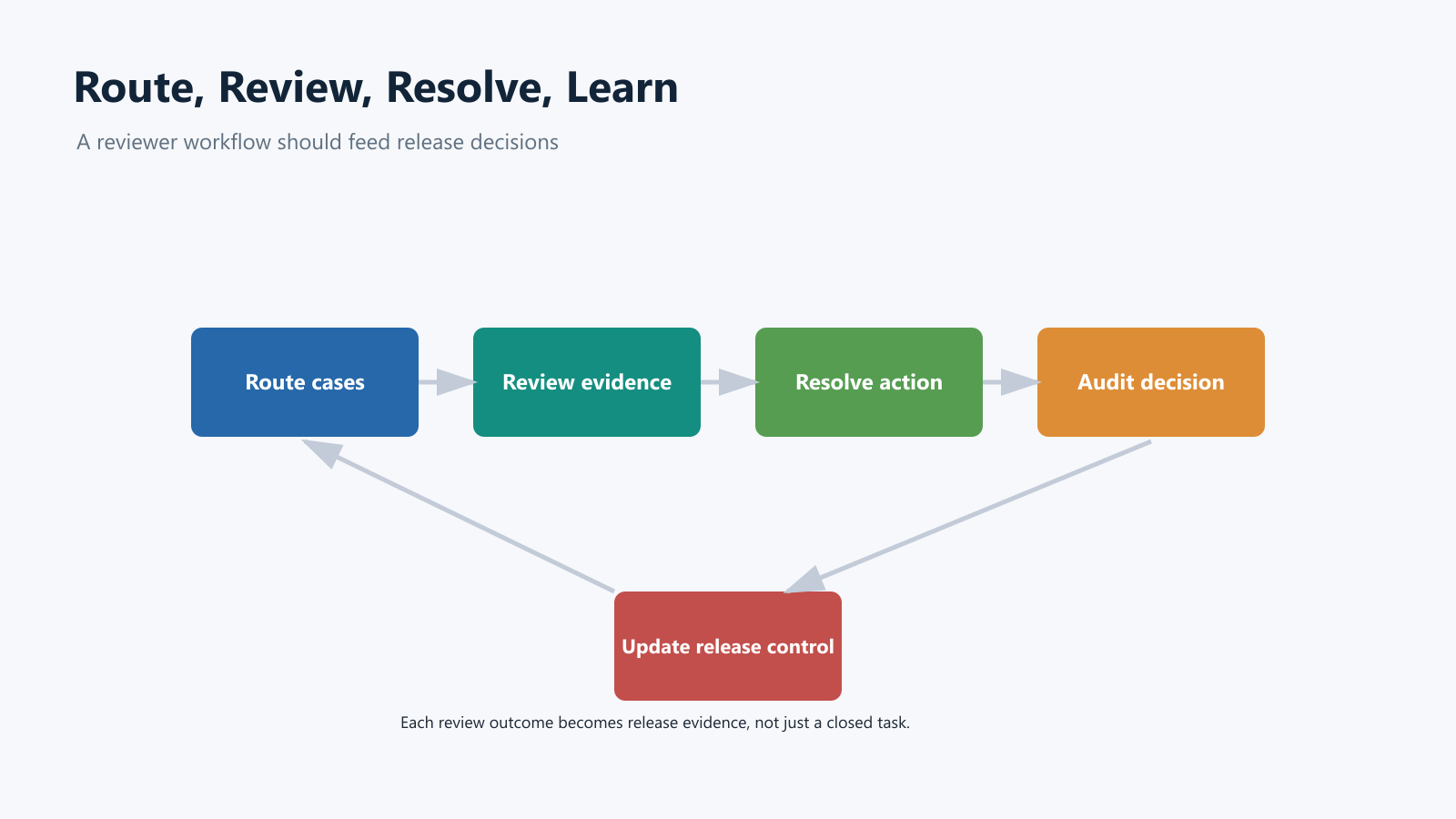
What A Reviewer Workflow Should Decide
Start with the decision the reviewer is being asked to make. "Please review this" is too vague for production AI systems.
A reviewer workflow should answer six questions:
| Workflow question | Why it matters |
|---|---|
| What triggered review? | The route should name the signal: low confidence, policy risk, high-value account, external side effect, cost spike, safety score, or rollout stage. |
| Who should review it? | A support lead, domain expert, security reviewer, release owner, or product owner may own different risks. |
| What can the reviewer decide? | Approve, edit, reject, escalate, fall back, sample for later review, or stop the automation path. |
| What evidence is shown? | The reviewer needs input, output, model or prompt version, sources, confidence signals, policy result, user context, and proposed action. |
| What happens after the decision? | The workflow should execute, return a draft, notify a human, keep a safe fallback, or change a runtime flag. |
| What record is kept? | Audit records should connect the AI behavior, reviewer, decision, evidence, flag variation, and outcome. |
Cloud platforms show pieces of this pattern. Azure Pipelines can pause deployment stages until approvals and checks are satisfied. Google Cloud Deploy can require approval before a rollout enters a target and can notify external workflow systems. Amazon SageMaker AI's Augmented AI documentation defines a human review workflow around activation conditions, worker instructions, workforce routing, task limits, and output storage. For AI product teams, those ideas need to be brought closer to the runtime behavior users actually experience.
Review Queue Vs Approval Gate Vs Release Control
These controls overlap, but they are not the same thing.
| Control | Primary job | Best location | Common failure |
|---|---|---|---|
| Review queue | Ask a person to judge an AI output, draft, action, or exception | Product workflow, operations UI, support tool, annotation system | Queue grows without changing automation behavior. |
| Approval gate | Decide whether a change, action, or rollout step can proceed | CI/CD, admin workflow, launch process, model-release process | Approval becomes a ceremonial checkbox. |
| Runtime release control | Decide which behavior is active for this user, account, workflow, or risk tier | Application execution boundary or feature flag control plane | The system cannot reduce autonomy without redeploying. |
The strongest design connects all three. The review queue handles individual cases. The approval gate controls consequential changes. Runtime release control adjusts exposure and autonomy when review evidence says the AI path is not ready for broad use.
That is where FeatBit's human-in-the-loop release control and AI control layer framing becomes practical. The review decision should not live only in a ticket comment. It should be able to influence which variation, mode, tool authority, prompt route, or fallback path is active now.
A Four-Step Reviewer Workflow
Use this as the starting pattern for AI assistants, agent workflows, model routes, document extraction, content moderation, support automation, or any product path where automation sometimes needs human judgment.
1. Route Cases By Risk And Context
Do not send everything to humans. Also do not wait until the model is obviously wrong.
Define review triggers such as:
- confidence below threshold;
- policy, safety, or groundedness signal above threshold;
- user account belongs to an enterprise, regulated, or high-value segment;
- action affects money, permissions, customer communication, production systems, or external services;
- model, prompt, retrieval source, or tool policy is in a new rollout stage;
- reviewer correction rate or fallback rate crosses a guardrail;
- incident mode is active.
For custom AI workflows, Amazon A2I's documentation makes an important distinction: built-in task types can use activation conditions, while custom task types need the application to decide when to call the human loop. The same product lesson applies outside AWS: your application should own the route-to-review rule, not bury it inside a prompt.
2. Give Reviewers An Evidence Card
Reviewers should not have to reconstruct context from logs, chat, and screenshots. The workflow should present one compact evidence card.
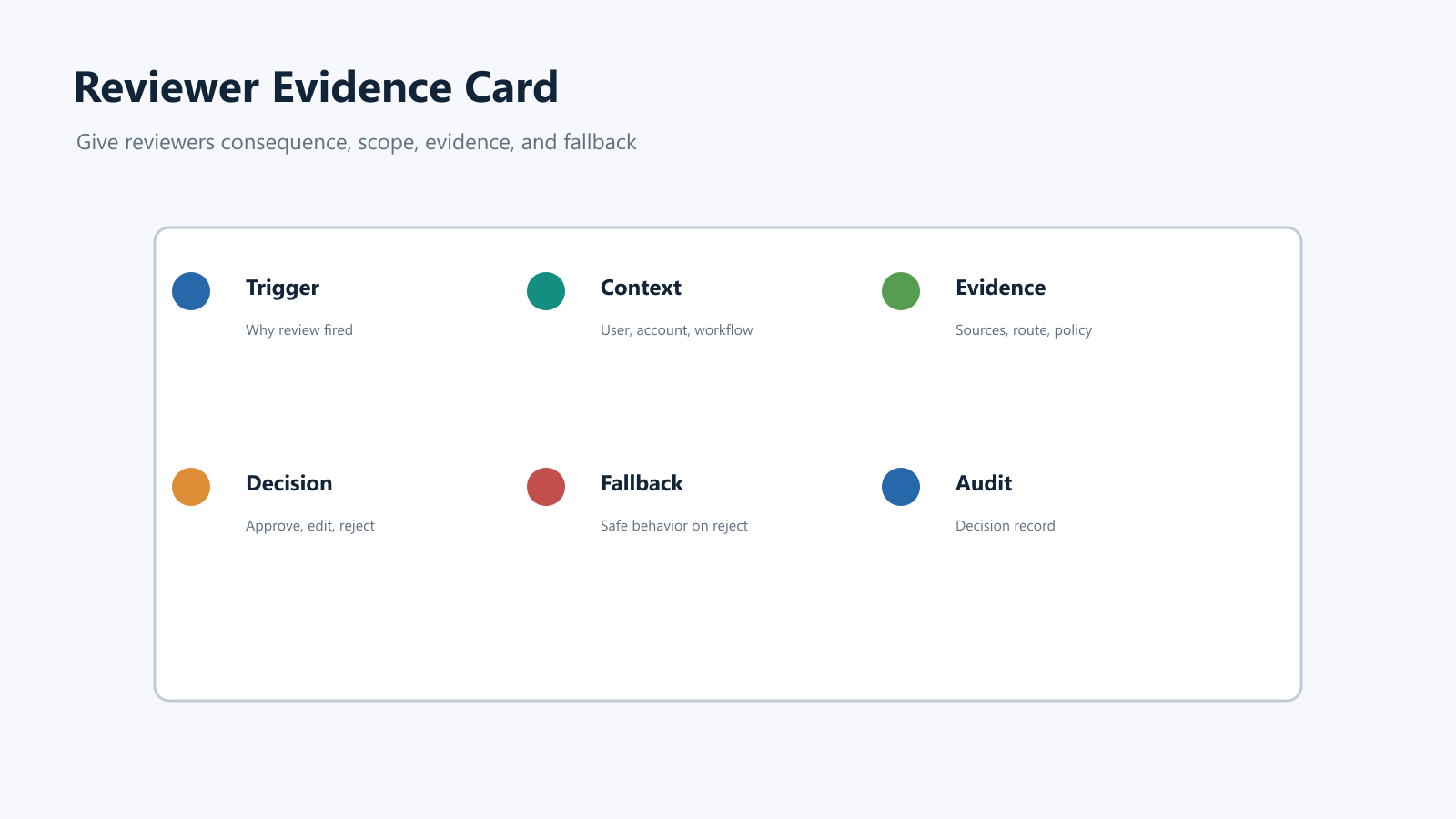
Include these fields:
| Evidence field | Reviewer question |
|---|---|
| Trigger | Why did this item reach me? |
| User or account context | Which segment, plan, region, environment, or workflow is affected? |
| Proposed output or action | What exactly will the AI say, change, send, call, approve, or block? |
| Model route | Which model, prompt version, retrieval profile, tool policy, or AI mode produced it? |
| Source evidence | Which documents, traces, citations, eval results, tickets, or policy checks support it? |
| Decision options | Can I approve, edit, reject, escalate, request more evidence, or force fallback? |
| Fallback path | What happens if I reject, timeout, or escalate? |
| Audit fields | What will be recorded after the decision? |
This is the difference between useful human judgment and a liability prompt. A reviewer can only improve the outcome when they can see consequence, scope, evidence, and fallback.
3. Resolve The Item And Update Runtime State
The reviewer decision should have a clear operational effect.
Common outcomes:
| Review outcome | Runtime effect |
|---|---|
| Approve | Execute the proposed output or action for the current case. |
| Edit and approve | Use the edited version and record the correction as feedback. |
| Reject | Use fallback behavior, keep the baseline path, or return to manual handling. |
| Escalate | Route to a specialist reviewer and freeze the side effect until resolved. |
| Sample only | Keep automation running but store the reviewed item for quality monitoring. |
| Stop automation | Reduce a flag variation from auto to review_required, fallback, or off for the affected segment. |
The last outcome is the one many review systems miss. If reviewers keep rejecting the same class of AI action, the workflow should not only clear tickets faster. It should make the release decision visible. The team may need to pause expansion, change the prompt, lower autonomy, adjust targeting, or roll back the candidate path.
FeatBit supports this operating model through targeting rules, percentage rollouts, audit logs, IAM and RBAC, and Track Insights API. The application still owns the review UI and domain decision, but the control plane should make exposure targetable and reversible.
4. Learn From Review Outcomes
A reviewer workflow should generate operational evidence, not just completed tasks.
Track signals such as:
- review volume by trigger and workflow;
- approval, edit, rejection, escalation, and timeout rates;
- reviewer correction categories;
- time to first review and time to resolution;
- fallback rate after review;
- incident or support tickets linked to reviewed AI actions;
- variation, model route, prompt version, or tool mode associated with each decision.
These signals answer release questions:
| Signal | Release decision it supports |
|---|---|
| High approval and low edit rate | Candidate behavior may be eligible for wider exposure. |
| High edit rate | Keep human review and improve prompt, retrieval, model route, or UI context. |
| High rejection or escalation rate | Pause expansion or roll back the affected segment. |
| Long queue time | Reduce review-trigger volume, add fallback, or limit automation scope. |
| Concentrated failure in one segment | Change targeting instead of disabling the whole feature. |
This is why reviewer workflow design belongs in AI release engineering, not only operations. Human review is one of the feedback signals that tells the team whether automation is ready for more users.
Example: Support AI Reviewer Workflow
Imagine a support AI assistant that can answer with citations, draft ticket updates, and prepare account-specific actions.
The team starts with a runtime flag:
support_ai_review_mode:
  default: review_required
  variations:
    auto:
      externalReplies: allowed
      review: sampled
      fallback: draft_reply
    review_required:
      externalReplies: reviewer_approval
      reviewQueue: support_leads
      fallback: draft_reply
    fallback:
      externalReplies: disabled
      responseMode: search_with_sources
    off:
      externalReplies: disabled
      responseMode: manual_support
The reviewer workflow then works like this:
- Internal users run in
review_required. - The evidence card shows the user request, AI draft, citations, confidence signals, account tier, affected workflow, and fallback.
- Reviewers approve, edit, reject, or escalate each proposed external reply.
- The application records the evaluated flag variation and the review outcome.
- If approval rate is high and correction severity is low, the release owner targets
autoto a low-risk beta segment. - If rejection rate rises, the release owner rolls that segment back to
review_requiredorfallbackwithout redeploying the assistant.
This workflow is narrower than a full AI governance program. It is the part that makes human judgment operational at the moment AI behavior reaches users.
Design The Escalation Path Before Launch
Reviewers need more than approve and reject. They need a way to move uncertainty to the right owner.
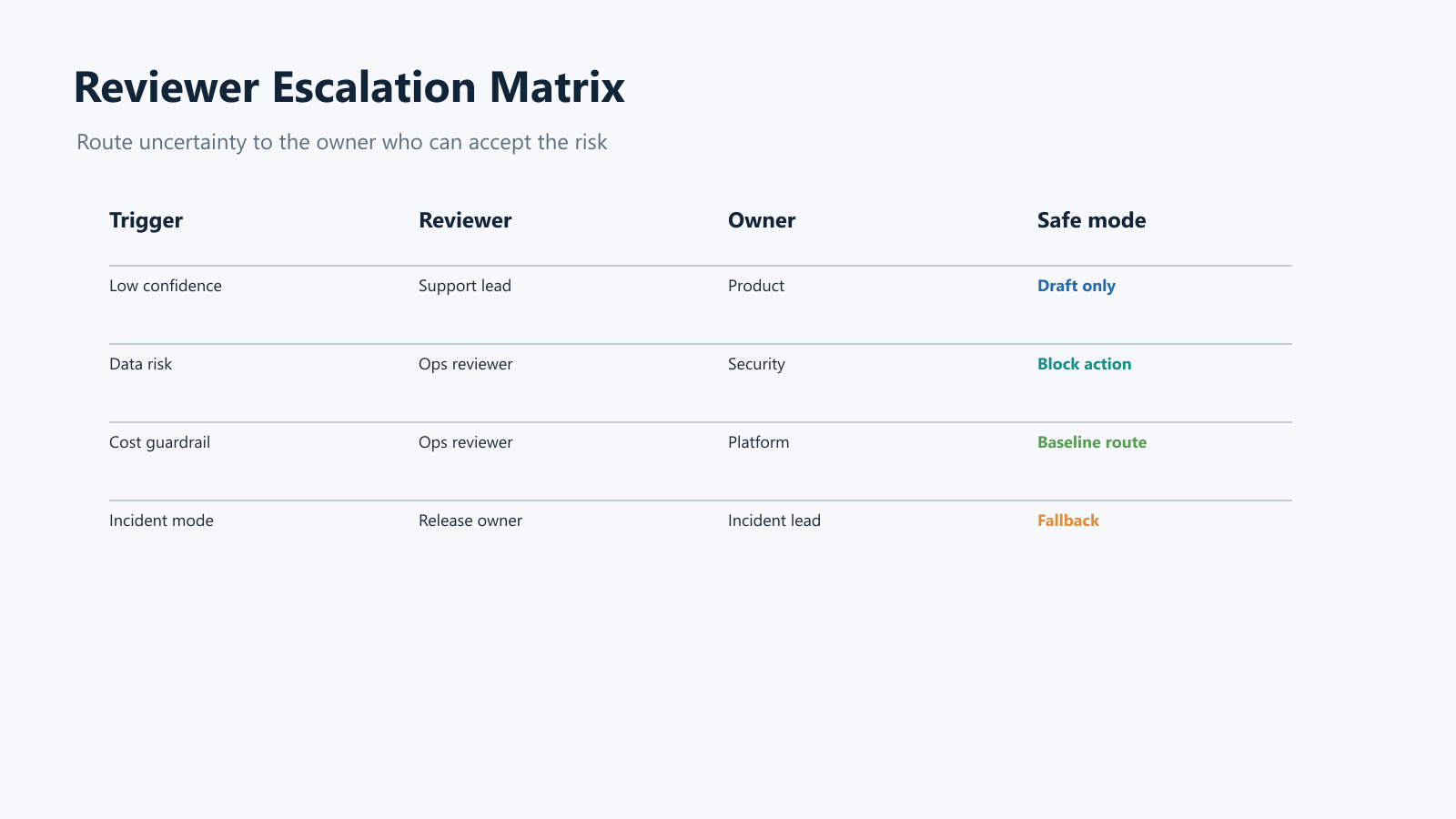
Use an escalation matrix like this:
| Trigger | First reviewer | Escalation owner | Runtime response while pending |
|---|---|---|---|
| Low confidence answer | Support lead | Product owner | Draft reply only |
| Missing or weak source | Support lead | Knowledge owner | Search-only fallback |
| Data boundary concern | Operations reviewer | Security or privacy owner | Block external action |
| High-value account | Support lead | Customer success owner | Approval required |
| Cost or latency guardrail | Operations reviewer | Platform owner | Keep baseline model route |
| Tool side effect | Product operations reviewer | Release owner | Approval required or off |
| Incident mode | Release owner | Incident commander | Fallback or off for affected segment |
The matrix keeps human review from becoming an overloaded inbox. It also gives operators a safer default when the right reviewer is unavailable.
Common Failure Modes
Sending every uncertain case to review. Review should protect consequential uncertainty. Low-risk ambiguity should often use safe fallback, sampling, or draft mode.
Showing evidence without consequence. A confidence score, policy label, or model name is useful only if the reviewer understands what action will happen after approval.
Letting review results stay in the queue. Review outcomes should feed release decisions, prompt or model improvement, targeting rules, and rollback criteria.
Using one reviewer role for every risk. Product quality, security, customer trust, billing, data handling, and production operations often need different owners.
No timeout behavior. If a reviewer does not respond, the system should know whether to keep a draft, use fallback, escalate, or stop the action.
No lifecycle decision. Some review controls are temporary rollout gates. Others are permanent policy controls. Decide which one you are creating before the workflow spreads through the product.
Where FeatBit Fits
FeatBit does not replace a review UI, annotation tool, ticket queue, model evaluator, security boundary, or identity provider. It fits the runtime release-control layer around them.
Use FeatBit when reviewer decisions need to change exposure:
- route AI behavior by user, account, environment, workflow, region, or risk segment;
- keep
review_required,fallback, oroffas safe runtime modes; - expand automation gradually after review evidence supports it;
- roll back one segment without redeploying the AI service;
- preserve audit history for flag and targeting changes;
- connect flag variations and review outcomes to release evidence;
- review temporary AI controls through feature flag lifecycle management.
For broader context, FeatBit's safe AI deployment, AI governance and risk control, and what is a human-in-the-loop flag pages expand the same release-control model.
Starting Checklist
Before launching a reviewer workflow for an AI system, confirm:
- Review triggers are tied to risk, context, confidence, rollout stage, or guardrail signals.
- Each trigger maps to a reviewer role and escalation owner.
- Reviewers see consequence, evidence, context, decision options, and fallback.
- Timeout behavior is safe and explicit.
- Review outcomes are recorded with AI route, flag variation, reviewer, decision, and result.
- Repeated review outcomes can change runtime behavior, not only close queue items.
- Rollback returns the affected segment to a known safe mode without redeploying.
- Metrics distinguish approval rate, edit rate, rejection rate, escalation rate, queue time, and fallback rate.
- Temporary review controls have an owner and cleanup or permanence rule.
The bottom line: a reviewer workflow is not just a human queue beside an AI system. It is the path that turns human judgment into operational evidence and release control.
Source Notes
- Microsoft Learn Define approvals and checks is cited for deployment-stage approvals, checks, approver instructions, timeout behavior, and resource-level controls.
- Google Cloud Deploy Promote your release and manage approvals and configuration schema are cited for target approvals,
requireApproval, approver roles, Pub/Sub notifications, and approve or reject rollout behavior. - AWS SageMaker AI Create a Human Review Workflow is cited for human review workflow components such as activation conditions, workforce routing, worker instructions, task configuration, and output storage.
- Microsoft Learn Azure AI Content Safety overview is cited for category context on moderation, prompt protection, groundedness detection, and task adherence signals that can feed review routing.
- FeatBit implementation context: human-in-the-loop release control, AI control layer, safe AI deployment, feature flag lifecycle management, targeting rules, percentage rollouts, audit logs, IAM, and Track Insights API.
Image And Open Graph Notes
- Use
cover.pngas the Open Graph image because it summarizes reviewer workflow as a production control loop. - Use
reviewer-workflow-loop.pngnear the opening because it shows route, review, resolve, audit, and release-control feedback. - Use
reviewer-evidence-card.pngin the evidence-card section because it shows the context reviewers need before making a decision. - Use
reviewer-escalation-matrix.pngin the escalation section because it maps review triggers to owners and runtime safe modes.