
Set Tool Permissions, Fallbacks, and Human Approval for AI Agents
Setting tool permissions for AI agents is not only a security configuration task. It is a production operating decision: which approved tools can the agent use, when should a human approve the action, what fallback should run when risk rises, and what evidence will prove the decision was controlled?
The practical answer is to define an approval and fallback matrix before launch. Keep hard authorization in your identity, API, and tool-scope layers. Then use runtime controls to decide which approved capability is active for a user, account, environment, workflow, and risk class. FeatBit's angle is that those runtime decisions should be targetable, observable, reversible, and auditable like any other release decision.
This article is intentionally narrower than a full AI agent tool policy blueprint and less code-focused than a tool permission gate tutorial. The reader job here is to set the permission modes, fallback behavior, and human approval rules that operations, product, security, and engineering can all understand.
Start With the Permission Decision, Not the Tool List
A tool list says what an agent could call. A permission decision says what the production system will allow right now.
That difference matters because the same tool can have different risk depending on context. A ticketing tool may be low risk when creating an internal draft and high risk when closing a customer escalation. A repository tool may be acceptable for search, risky for branch creation, and unacceptable for production credential changes. A billing API may require human execution even if the agent can prepare the recommendation.
Use this decision order:
- Identify the human, service, and agent identity.
- Check hard authorization and tool scope.
- Classify the requested action by reversibility and blast radius.
- Evaluate the runtime permission mode for this context.
- Decide whether to allow, constrain, queue for approval, deny, or fallback.
- Record the evaluated policy, reason, outcome, and reviewer when relevant.
The Model Context Protocol authorization specification is a useful reminder for tool-connected systems: tokens must be validated for the intended resource, and runtime policy should not replace authorization boundaries. Feature flags and approval modes sit after that boundary, not instead of it.
Use a Permission Mode Ladder
Most teams create too few permission states. They start with "tools on" and "tools off," then discover they need read-only, draft-only, approval-required, and fallback behavior during real incidents.
A clearer ladder gives operators smaller controls:
| Mode | What the agent may do | Human approval rule | Safe fallback |
|---|---|---|---|
off |
No tool calls | Not applicable | Return manual handoff |
observe_only |
Log intended tool calls without execution | Review sampled decisions | Keep observing |
search_only |
Query approved sources and return cited recommendations | Usually no approval | Search-only response |
read_only |
Read scoped business or system data | Approval for sensitive reads | Search-only or deny |
draft_write |
Create drafts, branches, or internal tickets with no external effect | Review after execution for sampled cases | Draft but do not submit |
approval_required |
Prepare side-effecting actions for human review | Approval before execution | Draft recommendation |
autonomous_limited |
Execute a narrow, measured action | Approval by exception | Approval-required mode |
break_glass |
Emergency operator action only | Named human owner | Off or manual runbook |
The important design principle is monotonic safety: if the control system is missing context, the flag service is unavailable, an incident state is active, or a reviewer cannot be reached, the agent should fall back to a safer mode. For many production agents, the safer mode is search_only or approval_required, not full shutdown.
FeatBit can model this as a multivariate flag evaluated server-side before the agent crosses an execution boundary. The agent receives the evaluated mode. It should not decide its own authority from a prompt.
Build the Approval Matrix
Human approval should be reserved for decisions where human judgment changes the outcome. If every small action asks for approval, users learn to click through. If only catastrophic actions ask for approval, the system misses the middle zone where context, customer impact, and reversibility matter.
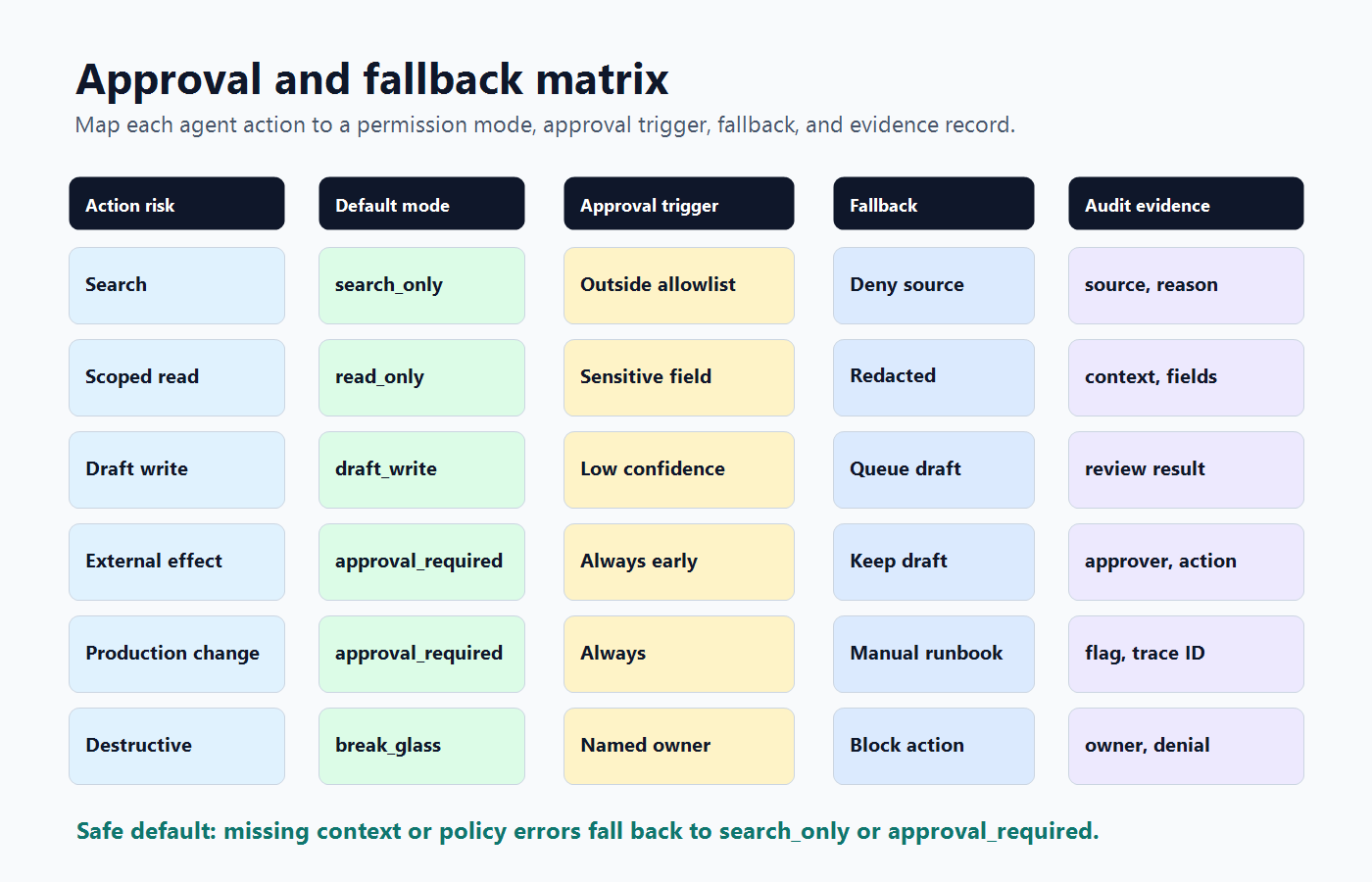
Use a matrix that combines action class, reversibility, blast radius, and evidence maturity:
| Action class | Example | Default mode | Approval trigger | Fallback |
|---|---|---|---|---|
| Evidence gathering | Search docs, read approved runbooks | search_only |
Source is outside allowlist | Deny source and continue search |
| Scoped read | Read account metadata or observability traces | read_only |
Sensitive field or regulated segment | Return summary without sensitive field |
| Draft creation | Draft support reply, create internal issue | draft_write |
Low confidence or high-value account | Queue draft for review |
| External effect | Send email, post to customer channel, call partner API | approval_required |
Always before first rollout | Keep draft and notify owner |
| Production change | Change workflow config, deploy, merge, modify rollout | approval_required or break_glass |
Always, unless mature narrow path exists | Manual runbook |
| Destructive or financial action | Delete data, change permissions, issue refund | break_glass |
Named human execution | Block agent execution |
The matrix should be visible in code review, operations runbooks, and release planning. It is not a hidden prompt instruction. It is a production contract.
Make Fallback a First-Class Permission Outcome
Fallback is often treated as a model behavior: if the LLM fails, call another model or return a generic response. For agent tool permissions, fallback is broader. It is the safe behavior when the requested authority is not available.
Examples:
- Convert an external action into a draft for review.
- Convert a sensitive read into a summary from approved sources.
- Convert a write request into a ticket that a human can execute.
- Convert an autonomous workflow into search-only mode during an incident.
- Disable one tool while leaving the rest of the agent useful.
The OWASP Top 10 for Large Language Model Applications calls out excessive agency as a risk when LLM applications are granted unchecked autonomy. Fallbacks reduce that autonomy without forcing the entire product offline.
Enforce Approval at the Execution Boundary
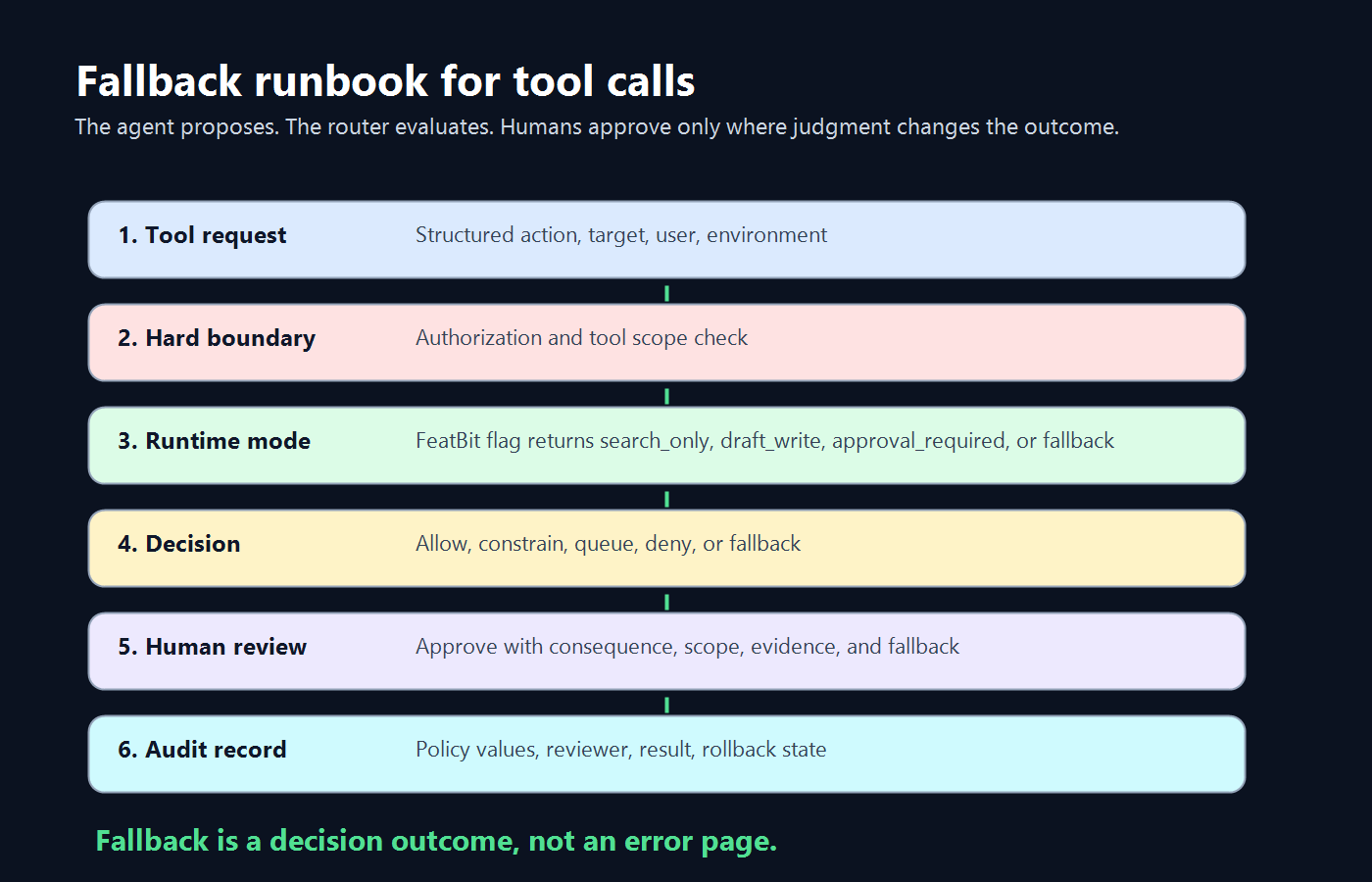
The model can propose an action. The tool router should decide whether the action runs.
OpenAI's Agents SDK documentation describes tool guardrails around custom function-tool invocations, with checks before and after execution. The portable lesson is simple: if the action can create a side effect, place the approval and fallback decision at the tool boundary, not only in natural-language instructions.
A minimal policy contract might look like this:
agentToolPermission:
  key: support-agent-tool-mode
  owner: support-platform
  defaultMode: search_only
  fallbackMode: search_only
  approvalQueue: support-leads
  modes:
    search_only:
      allowedRisk: [search]
      approval: none
    read_only:
      allowedRisk: [search, scoped_read]
      approval: sensitive_read
    draft_write:
      allowedRisk: [search, scoped_read, draft_write]
      approval: sampled_review
    approval_required:
      allowedRisk: [external_effect]
      approval: before_execution
  rollback:
    onIncident: search_only
    onApprovalQueueSaturation: draft_write
    onPolicyError: search_only
This contract is deliberately plain. It gives engineering the fields needed to implement the gate, gives operations a rollback map, and gives security a reviewable boundary between authorization and runtime release control.
Roll Out Permission Changes Like Product Releases
Do not grant a new tool tier to every user at once. Tool permission changes deserve rollout stages because each stage answers a different question.
| Stage | Audience | Question | Expansion evidence |
|---|---|---|---|
| Dry run | Internal sessions | What would the agent try to call? | Intended calls match policy and risk labels |
| Search-only | Internal users or beta accounts | Are sources, summaries, and logs useful? | Low policy error rate and useful review notes |
| Draft-write | Selected accounts | Can drafts reduce work without external harm? | Review acceptance and low correction burden |
| Approval-required external actions | Narrow workflow | Can humans approve with enough context? | Approval quality, queue time, and rollback readiness |
| Limited autonomy | Mature narrow action | Can the action run without approval under strict conditions? | Stable guardrails, audited decisions, and owner signoff |
FeatBit's AI control layer and human-in-the-loop release control pages describe the broader release philosophy. In implementation, use FeatBit targeting rules, segments, environments, audit logs, and rollout controls so permission changes can start with internal users, expand by segment, and roll back without redeploying the agent service.
What the Human Reviewer Needs to See
Human approval only helps when the reviewer can make a real decision quickly. A useful approval card should show:
- the proposed action in plain language;
- the tool, target, account, environment, and agent identity;
- why the gate fired;
- what will happen if the reviewer approves;
- the fallback if the reviewer rejects or times out;
- the model or agent confidence only if it is calibrated and useful;
- the linked evidence, such as source documents, diffs, trace IDs, or ticket context;
- the audit record that will be written after the decision.
Avoid approval copy that exposes only implementation detail, such as "execute function updateCustomerStatus." A reviewer needs consequence, scope, and fallback. Without that context, human approval becomes a liability shield instead of a control mechanism.
Audit the Decision, Not Only the Tool Call
An audit trail that says "tool called" is not enough. For permission governance, record the decision that happened before the tool call.
Minimum fields:
| Field | Why it matters |
|---|---|
| Agent, user, and service identity | Separates human intent from agent execution |
| Tool and risk class | Shows what authority was requested |
| Evaluation context | Explains account, environment, region, workflow, and segment |
| Evaluated flag or policy values | Reconstructs the runtime decision |
| Decision and reason | Shows allow, constrain, approval, deny, or fallback |
| Reviewer and approval outcome | Supports accountability for human-gated actions |
| Execution result | Connects decision to real side effect or blocked action |
| Rollback or cleanup state | Keeps temporary controls from becoming permanent debt |
NIST's AI Risk Management Framework frames AI risk management as work that should be incorporated into design, development, use, and evaluation of AI systems. For agent tool permissions, the practical translation is continuous evidence: know what was allowed, why it was allowed, who reviewed it, and what happened afterward.
How FeatBit Fits
FeatBit should not be the only security boundary for an AI agent. Identity, API scopes, network controls, sandboxing, and tool-specific authorization still matter.
FeatBit fits the runtime release-control layer:
- evaluate permission mode by user, account, environment, workflow, region, agent ID, or risk segment;
- target a new tool tier to internal users before beta accounts;
- keep
search_onlyorapproval_requiredas a safe fallback value; - use audit logs to track who changed a flag and when;
- connect flag evaluations and metric events to release evidence;
- use lifecycle rules so temporary permission flags get reviewed or cleaned up.
For implementation details, use FeatBit docs for targeting rules, percentage rollouts, audit logs, and flag lifecycle management. If the control plane must run in your own infrastructure, evaluate the self-hosted feature flag platform path as part of the governance design.
Starting Checklist
Before an AI agent gets production tool access, confirm these items:
- Every tool has a risk class and owner.
- Hard authorization is enforced before runtime permission modes.
- The default production mode is safe when configuration is missing.
- Human approval is required for external effects, destructive actions, financial actions, permission changes, and immature production writes.
- Each approval prompt shows consequence, scope, evidence, and fallback.
- Fallback modes are tested, not only documented.
- Rollout starts with observe-only or search-only behavior.
- Audit records capture the policy decision, reviewer, result, and rollback state.
- Temporary permission flags have an owner and review date.
- Operators can reduce authority without disabling the whole agent.
The bottom line: set tool permissions as a release-control system, not a static prompt instruction. Authorization defines what the agent can ever reach. Runtime flags define what it may do now. Human approval handles consequential exceptions. Fallback keeps the product useful when the safest answer is not full autonomy.
Source Notes and Internal Link Plan
External sources used in this article:
- OWASP Top 10 for Large Language Model Applications, for the excessive-agency risk framing in LLM applications: https://owasp.org/www-project-top-10-for-large-language-model-applications/
- NIST AI Risk Management Framework, for the design, development, use, and evaluation framing of AI risk management: https://www.nist.gov/itl/ai-risk-management-framework
- Model Context Protocol authorization specification, for token audience and resource-boundary guidance in MCP-style tool systems: https://modelcontextprotocol.io/specification/2025-06-18/basic/authorization
- OpenAI Agents SDK guardrails documentation, for the tool-boundary guardrail pattern: https://openai.github.io/openai-agents-python/guardrails/
Internal links used:
- AI agent tool policy blueprint, for the broader production policy contract.
- Tool permission gate tutorial, for implementation details.
- AI control layer, for FeatBit's runtime control philosophy.
- Human-in-the-loop release control, for the override model.
- Search-only agent tool policies, for the safe default mode.
- Self-hosted feature flag platform, for private control-plane evaluation.
Image and Open Graph notes:
- Use
cover.pngas the Open Graph image because it summarizes permission, approval, fallback, and audit as one operating loop. - Use
approval-matrix.pngin the matrix section because it helps readers map action risk to approval and fallback behavior. - Use
fallback-runbook.pngin the fallback section because it shows the runtime path from request to approval, fallback, execution, and audit.