
LLM Guardrails With Feature Flags: Route, Compare, and Roll Back Safely
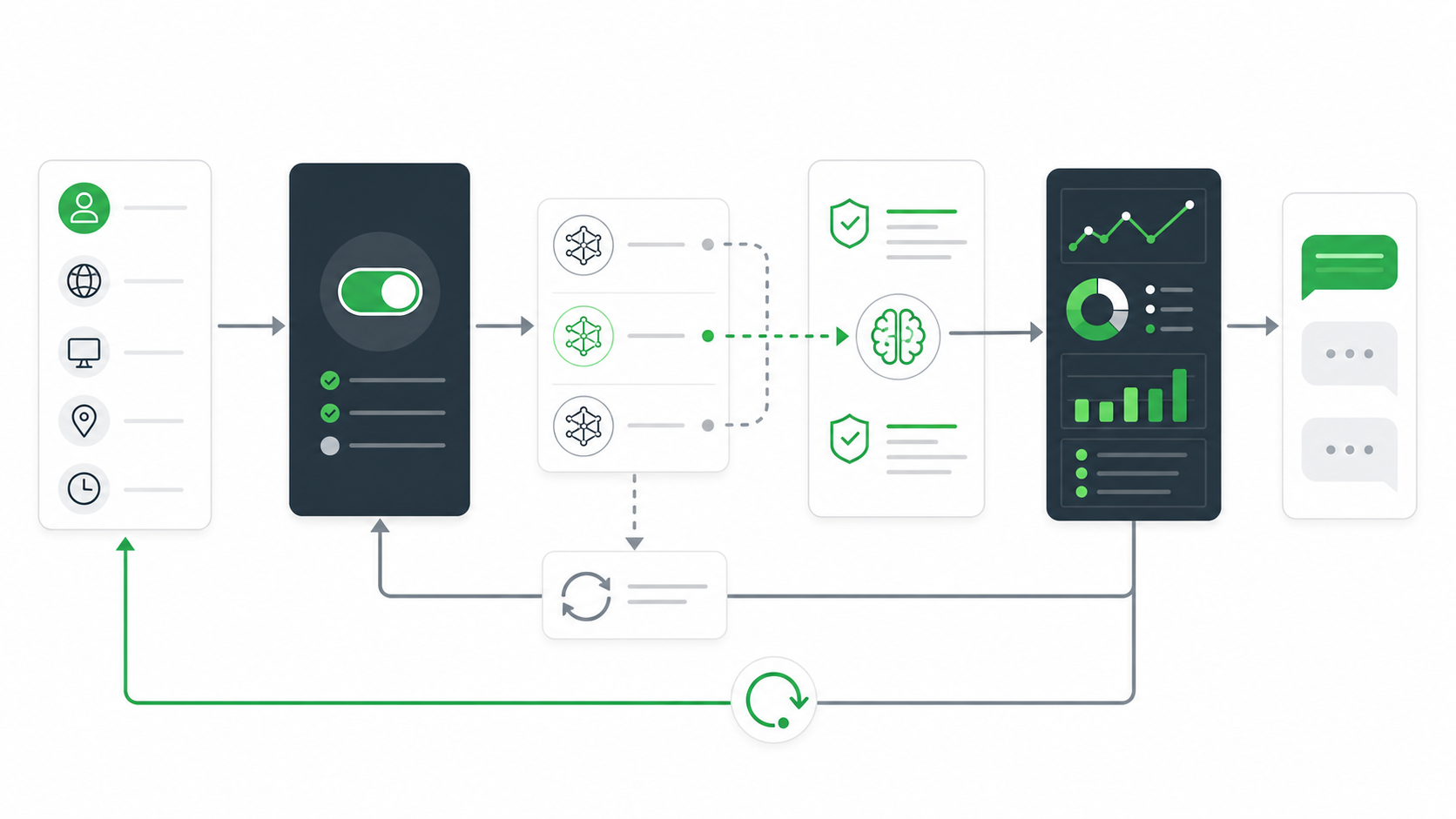
LLM guardrails with feature flags means treating every guardrail decision as a runtime release control: which model route is allowed, which prompt or retrieval policy runs, which output checks are strict, which audience receives the candidate, and which fallback takes over when evidence turns negative.
That is different from adding a content filter and hoping the release is safe. A production LLM system needs guardrails that can be targeted, compared, expanded, paused, and rolled back without redeploying. Feature flags provide the release-control layer around the LLM guardrail stack.
What The Reader Is Trying To Buy Or Build
The transactional search behind "LLM guardrails feature flags" usually comes from one of three jobs:
| Reader job | Practical question |
|---|---|
| Route LLM behavior | Can we choose model, prompt, retrieval, safety mode, and fallback by user, account, environment, region, or risk tier? |
| Compare guardrail policies | Can we test strict versus standard guardrails without mixing exposure, outcomes, and rollback evidence? |
| Roll back safely | Can operators disable a risky LLM path, reduce rollout, or switch to approval-required mode without redeploying? |
FeatBit's point of view is that these are release decisions, not only model decisions. The model provider, eval system, safety classifier, prompt registry, and observability stack each own part of the system. The feature flag owns the runtime exposure decision.
Define Guardrail Modes Before You Roll Out
Start with modes, not switches. A single boolean such as enable_llm_guardrail cannot express the difference between shadow testing, approval-required delivery, strict output checks, fallback-only behavior, and full release.
Use a string or JSON flag variation for the guardrail mode:
llm_guardrail_flag:
  key: support_assistant_guardrail_mode
  type: string
  owner: ai_platform_team
  default: baseline_safe
  variations:
    off: non_llm_or_previous_path
    observe: run_candidate_without_user_visible_output
    standard: candidate_route_with_standard_checks
    strict: candidate_route_with_stricter_checks
    approval_required: queue_output_before_delivery
    fallback: force_baseline_route_or_human_handoff
  first_audience: internal_support_users
  rollback_value: fallback
The application still owns enforcement. The flag should select a named mode; the LLM service should apply the model route, prompt version, retrieval profile, guardrail checks, approval path, and fallback behavior tied to that mode.
Map Guardrail Flags To LLM Control Surfaces
The most useful guardrail flags sit at control surfaces where production behavior can change without a code deployment.
| Control surface | Example flag variations | What the flag controls |
|---|---|---|
| Model route | baseline, candidate, fallback |
Which model or provider route receives eligible traffic |
| Prompt profile | stable, candidate, citation_first |
Which prompt contract and output shape runs |
| Retrieval policy | public_docs, restricted_sources, no_retrieval |
Which context source is allowed |
| Safety mode | standard, strict, block_high_risk |
Which validation and blocking policy applies |
| Human review | none, sampled, required |
Whether output is delivered, sampled, or queued |
| Fallback behavior | stable_answer, search_only, human_handoff |
What happens when the route or guardrail fails |
| Rollout scope | internal, beta, five_percent, full |
Which audience receives the LLM path |
This matrix also prevents a common mistake: hiding multiple behavior changes inside one undocumented toggle. If the model, prompt, retrieval profile, and safety mode all change together, call it a route change and evaluate it as a route change. If the team needs causal clarity, split the control surfaces and run a narrower experiment.
Build The Guardrail Release Path
A guardrail rollout should move through evidence states. Each state answers a different question and has a clear flag action.
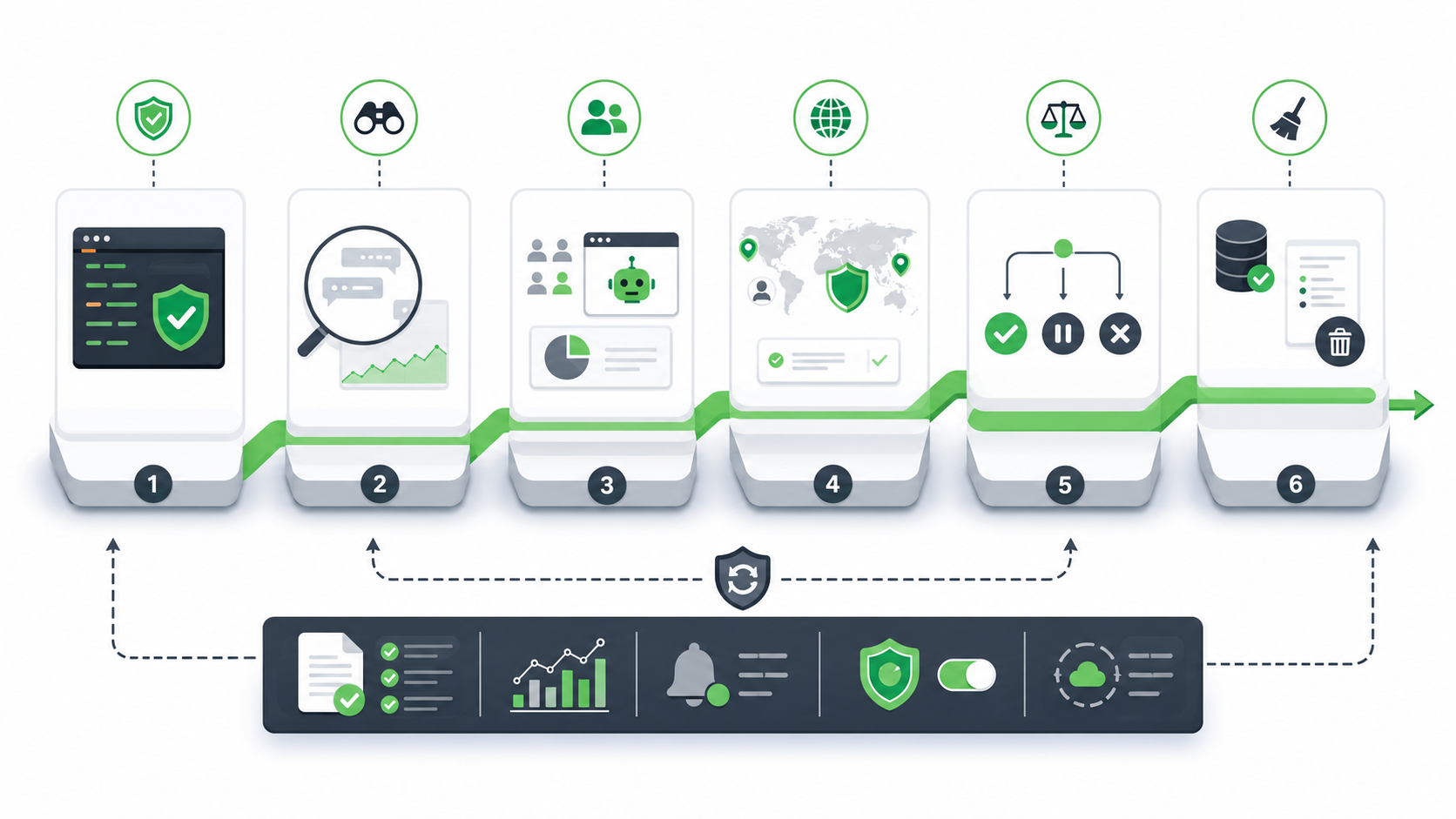
| Stage | Question | Flag action |
|---|---|---|
| Offline gate | Does the candidate avoid known severe failures before exposure? | Keep production variation at off or baseline_safe. |
| Observe mode | Does the candidate process real input shape without reaching users? | Target internal traffic or shadow traffic with observe. |
| Internal canary | Do employees see acceptable quality, latency, cost, and fallback behavior? | Enable standard or strict for an internal segment. |
| Guarded external release | Does a narrow customer segment stay within guardrails? | Roll out to beta, region, account tier, or a small percentage. |
| Decision | Should the team expand, pause, switch modes, or roll back? | Move to full, approval_required, fallback, or lower percentage. |
| Cleanup | What temporary branch should remain? | Promote baseline, remove losing route, or document a permanent operational flag. |
FeatBit's AI safe deployment and LLM canary release pages cover the broader rollout model. The specific contribution here is the guardrail mode contract: every stage must map to a runtime value operators can inspect and change quickly.
Keep Exposure Evidence Joinable
Guardrail flags are useful only when exposure, guardrail results, and outcomes can be joined later. Record the evaluated variation when the LLM behavior actually runs, not merely when a page loads.
Minimum event fields:
| Field | Why it matters |
|---|---|
flagKey |
Names the guardrail release decision |
variation |
Records the selected guardrail mode |
assignmentUnit and unitId |
Joins exposure, output, outcome, and rollback evidence |
modelRoute |
Shows which LLM route actually executed |
promptVersion |
Prevents prompt drift from hiding in the result |
retrievalProfile |
Captures context changes that affect answer quality |
guardrailResult |
Shows pass, block, repair, approval required, fallback, or reject |
fallbackReason |
Makes safe degradation visible |
latencyMs and estimatedCost |
Turns performance and cost into release guardrails |
outcomeMetric |
Connects quality and safety to product impact |
Example:
{
  "event": "llm_guardrail_exposure",
  "flagKey": "support_assistant_guardrail_mode",
  "variation": "strict",
  "assignmentUnit": "conversation",
  "unitId": "conv_48291",
  "modelRoute": "support_model_candidate",
  "promptVersion": "support_answer_v4",
  "retrievalProfile": "restricted_sources",
  "guardrailResult": "approval_required",
  "fallbackReason": null,
  "latencyMs": 2140,
  "estimatedCost": 0.018
}
FeatBit's Track Insights API can record feature flag usage events and custom metric events. For release reviews, also connect the flag change record to your observability, incident, and evaluation systems.
Decide Which Guardrails Should Stop Rollout
Do not define guardrails after the rollout starts. Before exposure, write the stop conditions and the flag action they trigger.
| Guardrail | Stop condition | Release action |
|---|---|---|
| Safety or policy | Confirmed unsafe output, sensitive data leak, or forbidden tool path | Set mode to fallback or approval_required; exclude affected segment |
| Output quality | Rejection, correction, escalation, or evaluator failure above team threshold | Reduce rollout, return to standard, or hold for review |
| Grounding | Missing citation, unsupported answer, stale source, or retrieval mismatch | Switch retrieval profile or require human approval |
| Latency | Tail latency breaches the agreed service target | Reduce candidate exposure or route high-risk segments to fallback |
| Cost | Cost per successful task exceeds the release budget | Narrow rollout or use cheaper baseline mode for low-value traffic |
| Telemetry | Exposure, outcome, or guardrail events are missing | Pause expansion until evidence is trustworthy |
| Segment harm | A protected, regulated, high-value, or priority segment degrades | Exclude that segment and review before expansion |
This is where a feature flag is stronger than an alert alone. An alert tells the team something changed. A flag gives the team a prepared action: reduce exposure, switch guardrail mode, force fallback, or require approval.
Where FeatBit Fits In The Architecture
FeatBit should sit in the release-control layer around the LLM service, not inside the model as another instruction.
Use FeatBit to control:
- targeting by user, account, environment, region, plan, workflow, risk tier, or custom context;
- percentage rollout for candidate model routes and guardrail modes;
- multivariate or JSON variations for named route policies;
- audit history for who changed guardrail exposure and when;
- IAM and RBAC for production flag authority;
- webhooks, APIs, and observability integrations for review, incident, and automation workflows;
- lifecycle ownership so temporary LLM guardrail flags do not become permanent debt.
Use the application, model gateway, and guardrail services to enforce:
- provider credentials and endpoint policy;
- prompt assembly and prompt registry lookup;
- retrieval policy and data boundary checks;
- input and output validation;
- human approval queue behavior;
- fallback execution;
- telemetry emission.
FeatBit documentation for targeting rules, percentage rollouts, audit logs, IAM, webhooks, Track Insights API, and feature flag lifecycle management supports this operating model.
Buyer Checklist For LLM Guardrail Feature Flags
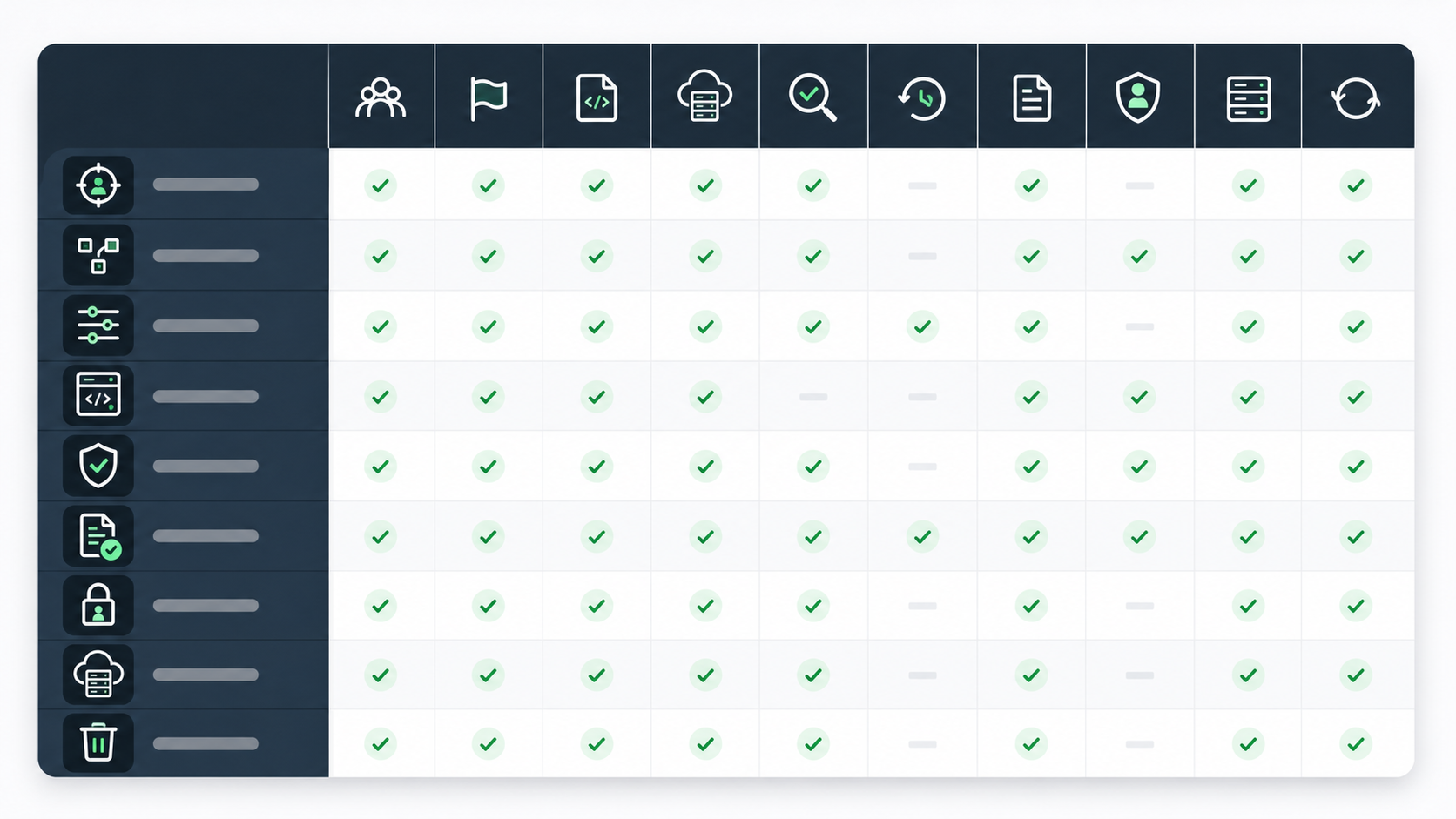
Use this checklist when evaluating a feature flag platform, guardrail workflow, or internal control plane.
| Requirement | What to verify |
|---|---|
| Runtime targeting | Can guardrail mode vary by account, user, environment, region, workflow, risk tier, and custom context? |
| Typed variations | Can one flag represent modes such as observe, strict, approval_required, and fallback? |
| Server-side evaluation | Can sensitive LLM routing decisions run on the server or model gateway instead of the browser? |
| Stable assignment | Can conversations, users, or accounts receive consistent route behavior during an experiment? |
| Rollout control | Can operators expand, reduce, pause, or roll back without redeploying? |
| Auditability | Can reviewers see who changed the guardrail mode, targeting rule, or rollout percentage? |
| Evidence integration | Can exposure and custom metric events carry flag key, variation, guardrail result, fallback, and outcome fields? |
| Access control | Can production guardrail changes be limited to the right owners or connected to approval workflows? |
| Self-hosting option | Can governance-relevant flag and exposure data stay inside your infrastructure when required? |
| Lifecycle cleanup | Can temporary model, prompt, retrieval, and guardrail flags be reviewed and removed after the decision? |
This is the difference between "we have LLM guardrails" and "we can operate LLM guardrails in production." The first may be a code library. The second is a release system.
Common Mistakes
Treating feature flags as the guardrail itself. A flag selects the route or mode. The application still needs real validation, authorization, data filtering, sandboxing, human review, and fallback logic.
Storing sensitive prompts or policies in flag values. Prefer named route profiles. Keep secrets, raw prompts, protected policy content, and large retrieval rules in the systems built to manage them.
Using one global LLM kill switch for every risk. A global kill switch is useful during incidents, but daily operations need smaller controls for model route, prompt profile, retrieval policy, safety mode, approval, and fallback.
Measuring intended assignment instead of actual exposure. If the candidate route falls back before output reaches the user, the exposure event should record that fallback.
Ignoring cleanup. LLM guardrail flags can multiply quickly. Each flag needs an owner, a decision date, and an expected end state.
Source Notes
- Risk-management context: NIST's AI Risk Management Framework is used as voluntary risk-management context. This article does not claim legal compliance certification.
- LLM application security context: OWASP's Top 10 for LLM and Gen AI applications is used for application-layer risk categories such as prompt injection, sensitive information disclosure, excessive agency, improper output handling, and unbounded consumption.
- Guardrail pattern context: OpenAI's Agents SDK guardrails documentation is cited for input and output guardrail patterns around agent execution. The workflow in this article is provider-neutral.
- Feature flag standard context: OpenFeature's flag evaluation specification is cited for typed flag evaluation, evaluation context, default values, and evaluation details.
- FeatBit implementation context: FeatBit's AI control layer, AI safe deployment, LLM canary release, AI rollback strategy, and feature flag lifecycle management pages provide the release-control framing behind this blueprint.
Image And Open Graph Notes
- Use
/images/blogs/llm-guardrails-feature-flags/cover.pngas the Open Graph image because it summarizes LLM guardrails as a runtime release-control workflow. - Use
/images/blogs/llm-guardrails-feature-flags/guardrail-control-plane.pngnear the opening because it shows how flag routing, LLM execution, guardrail checks, fallback, and telemetry connect. - Use
/images/blogs/llm-guardrails-feature-flags/guardrail-rollout-path.pngin the rollout section because it makes the staged release states concrete. - Use
/images/blogs/llm-guardrails-feature-flags/buyer-checklist.pngnear the checklist because it reinforces the transactional evaluation criteria.
Next Step
Pick one LLM behavior that could affect customers, such as a support assistant route, RAG answer, summarizer, classification prompt, or agent instruction. Write the guardrail mode contract first: owner, default, variations, first audience, stop conditions, fallback value, event fields, and cleanup rule. Then use FeatBit to keep that behavior targetable, measurable, reversible, and reviewable while production evidence is still uncertain.