
Latency and Cost Guardrails for LLMs: A Release Control Playbook
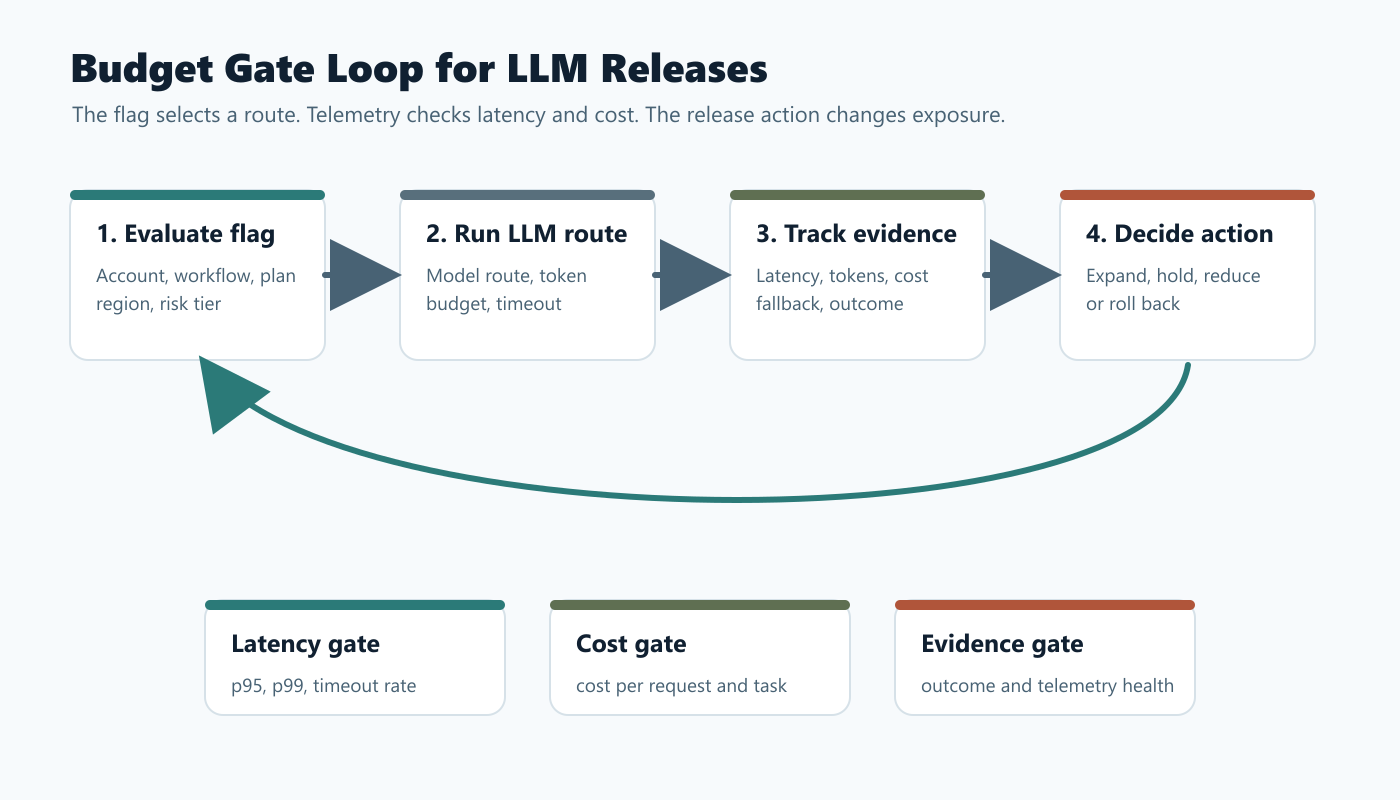
Latency and cost guardrails for LLMs are operating controls that decide when an AI route can expand, pause, fall back, or roll back based on real production evidence. They are not only dashboard alerts and they are not only monthly billing limits. A useful guardrail connects a measured signal, such as p95 latency or estimated cost per successful task, to a prepared runtime action.
For FeatBit readers, the practical pattern is to put LLM route profiles behind feature flags, evaluate the route on the server, record the selected variation with latency and cost fields, and define release actions before traffic expands. That turns latency and spend from after-the-fact surprises into release decisions the team can control.
What The Reader Is Trying To Control
Teams usually search for latency and cost guardrails for LLMs when they already have an AI feature in motion and need a safer way to operate it. The question is rarely "How do we spend less?" in isolation. It is closer to:
| Reader job | Operational question |
|---|---|
| Control user experience | Which LLM route is too slow for this workflow, user tier, or support channel? |
| Control unit economics | Which route is too expensive per successful task, case, summary, classification, or agent action? |
| Keep quality visible | Which low-cost or low-latency fallback still preserves an acceptable outcome? |
| Avoid broad incidents | Can the team reduce exposure, switch route, or turn on fallback without redeploying? |
| Prove the decision | Can exposure, route, latency, token usage, cost estimate, fallback, and outcome be joined later? |
This is a narrower job than a general LLM guardrails with feature flags blueprint. That broader article covers safety, routing, approval, fallback, and guardrail modes. This playbook focuses on the cost and performance side of the release decision.
Define A Budget Contract Before Rollout
Do not start with a vague rule such as "keep LLM cost down." Start with a budget contract for the specific workflow.
llm_budget_contract:
  workflow: support_answer
  owner: ai_platform_team
  assignment_unit: conversation
  primary_outcome: case_resolved_without_escalation
  latency_guardrails:
    first_token_ms: team_defined_limit
    p95_end_to_end_ms: team_defined_limit
    timeout_rate: team_defined_limit
  cost_guardrails:
    estimated_cost_per_request: team_defined_limit
    estimated_cost_per_successful_task: team_defined_limit
    daily_budget_burn: team_defined_limit
  release_actions:
    warning: hold_expansion
    breach: reduce_candidate_rollout
    severe_breach: route_to_baseline_or_fallback
  cleanup: promote_winner_or_remove_candidate_route_after_decision
The contract should use your own thresholds. Do not copy a generic number from another product. A support assistant, legal review workflow, batch summarizer, and agentic coding workflow can have very different tolerance for wait time and spend.
The important part is the connection between signal and action. A budget without a runtime action is only accounting. A latency alert without a rollback path is only notification.
Model Routes Should Carry Cost And Latency Intent
The safest LLM routing pattern is to serve named route profiles, not loose settings. Each profile should make the tradeoff explicit.
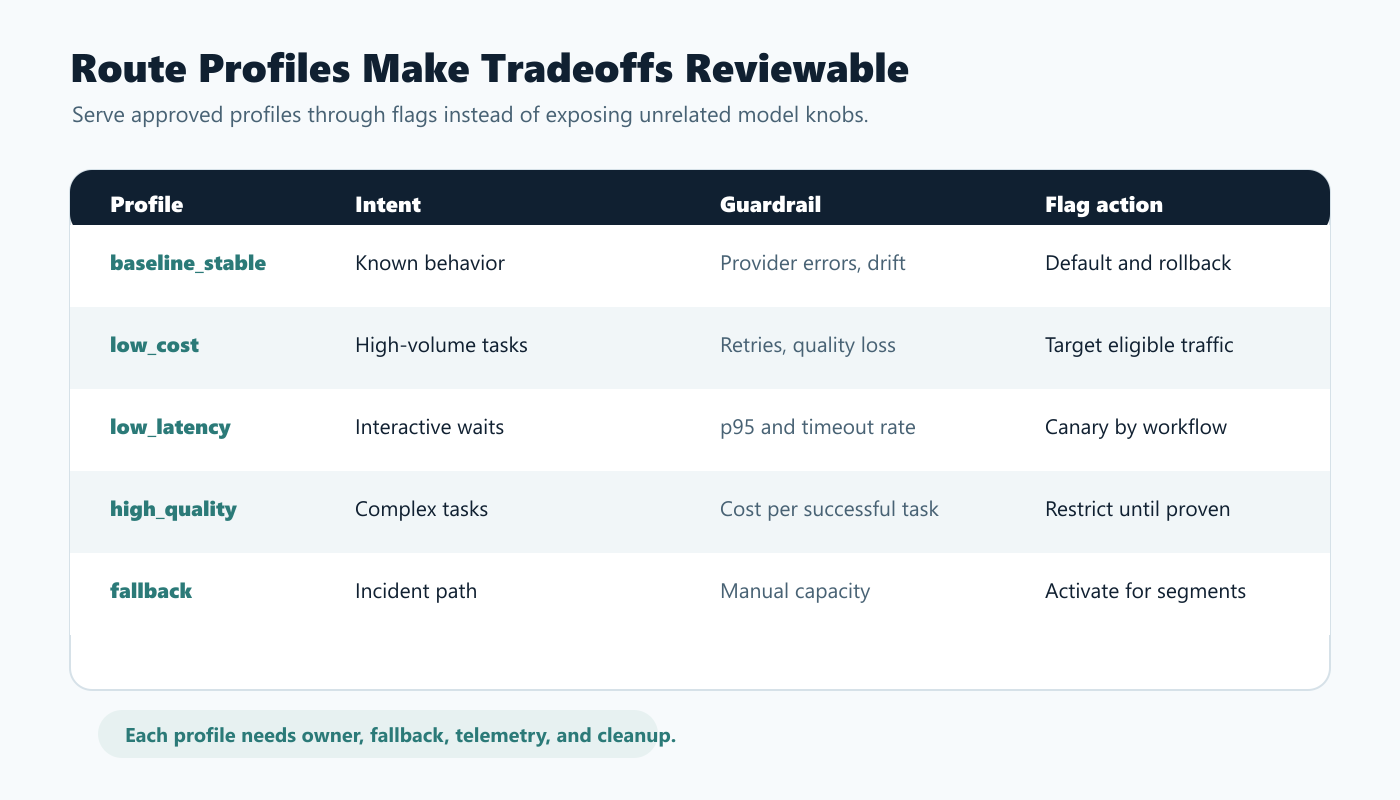
| Route profile | Intended use | Watch closely | Typical flag action |
|---|---|---|---|
baseline_stable |
Known production behavior | drift, provider errors, fallback capacity | keep as default and rollback value |
low_cost |
Lower-value or high-volume tasks | quality loss, retries, escalations | target to eligible segments first |
low_latency |
Interactive workflows where waiting hurts the experience | answer quality, fallback use, timeout rate | canary by workflow or account tier |
high_quality |
Complex tasks where quality may justify higher cost | cost per successful task, p95 latency | restrict to high-value contexts until proven |
fallback |
Incident, budget breach, provider issue, or timeout path | customer impact, manual handoff capacity | activate quickly for affected segments |
This profile approach is easier to review than a scattered set of flags such as use_fast_model, max_tokens_override, cheap_mode, and timeout_mode. A named profile lets the team ask: who should receive this profile, what evidence should expand it, and what route should replace it during rollback?
FeatBit supports this operating model through multivariate flag variations, targeting rules, percentage rollouts, and remote config. The application still owns enforcement. The flag selects the approved profile; the LLM gateway applies model route, token budget, timeout, retry, streaming, and fallback behavior.
Evaluate The Route Before The LLM Call
Latency and cost guardrails only work if route selection happens before the expensive work starts. Evaluate the flag on the server, validate the returned profile, then call the model gateway.
type LlmRouteProfile = {
  profile: 'baseline_stable' | 'low_cost' | 'low_latency' | 'high_quality' | 'fallback';
  modelRoute: string;
  maxOutputTokens: number;
  timeoutMs: number;
  stream: boolean;
  fallbackProfile: 'baseline_stable' | 'fallback';
};

const fallbackProfile: LlmRouteProfile = {
  profile: 'baseline_stable',
  modelRoute: 'support_standard',
  maxOutputTokens: 700,
  timeoutMs: 8000,
  stream: true,
  fallbackProfile: 'fallback',
};

async function answerSupportQuestion(request: SupportRequest) {
  const context = {
    keyId: request.accountId,
    plan: request.plan,
    region: request.region,
    workflow: 'support_answer',
    riskTier: request.riskTier,
  };

  const profile = await flags.jsonVariation<LlmRouteProfile>(
    'support-answer-llm-route',
    context,
    fallbackProfile
  );

  const safeProfile = isValidRouteProfile(profile) ? profile : fallbackProfile;
  const startedAt = Date.now();

  const response = await runLlmGateway({
    question: request.question,
    modelRoute: safeProfile.modelRoute,
    maxOutputTokens: safeProfile.maxOutputTokens,
    timeoutMs: safeProfile.timeoutMs,
    stream: safeProfile.stream,
  });

  await trackLlmRouteExposure({
    flagKey: 'support-answer-llm-route',
    variation: safeProfile.profile,
    accountId: request.accountId,
    workflow: 'support_answer',
    latencyMs: Date.now() - startedAt,
    inputTokens: response.usage.inputTokens,
    outputTokens: response.usage.outputTokens,
    estimatedCostUsd: response.usage.estimatedCostUsd,
    fallbackUsed: response.fallbackUsed,
    outcome: response.outcome,
  });

  return response.answer;
}
OpenFeature's flag evaluation specification describes typed flag evaluation with a flag key, default value, evaluation context, and returned value. That shape matters for LLM route control because the default value is also the safety net when a provider, network, or config issue prevents a valid route from being served.
Make The Telemetry Joinable
Guardrails fail when latency is in one dashboard, cost is in a billing export, feature flag assignment is in another system, and product outcomes are somewhere else. The release decision needs a joinable event record.
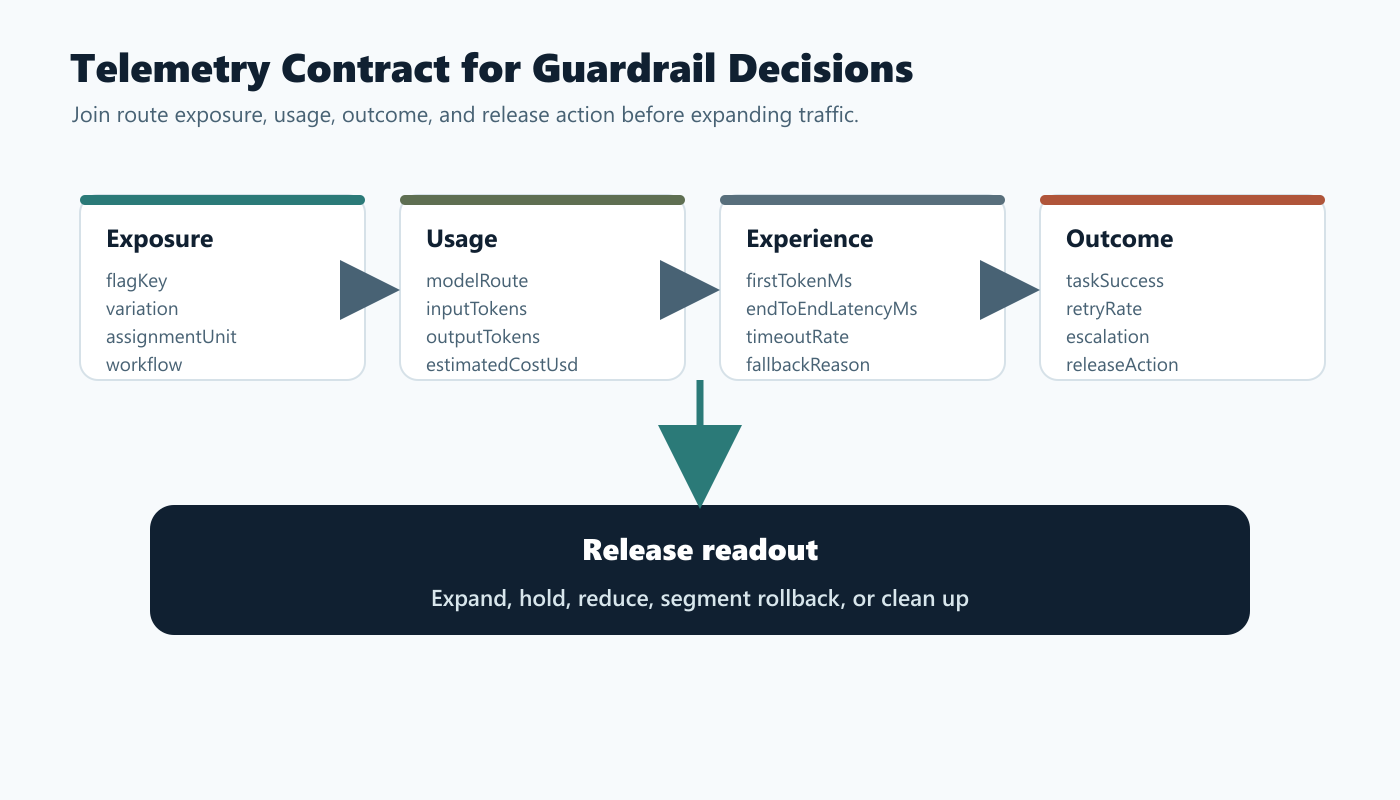
Track at least these fields when the LLM route actually runs:
| Field | Why it matters |
|---|---|
flagKey and variation |
Identifies which route profile was served. |
assignmentUnit and unitId |
Joins request, conversation, account, workflow, or task evidence. |
workflow |
Separates chat, summarization, classification, search, or agent workflows. |
modelRoute |
Shows which provider, model tier, gateway route, or profile executed. |
inputTokens and outputTokens |
Supports cost estimation and detects prompt or response drift. |
firstTokenMs |
Shows perceived responsiveness for streamed experiences. |
endToEndLatencyMs |
Captures the full product wait, including retrieval and guardrails. |
estimatedCostUsd |
Lets teams compare cost per request and cost per successful task. |
fallbackUsed and fallbackReason |
Shows when latency or cost protection changed behavior. |
outcomeMetric |
Connects spend and speed to the product result. |
FeatBit's Track Insights API supports feature flag usage events and custom metric events. FeatBit flag insights can help teams inspect variation exposure over time. For deeper SRE and FinOps analysis, export or forward these events into the observability and warehouse systems where latency, token usage, billing, incident, and outcome data can be reviewed together.
Turn Thresholds Into Release Actions
The guardrail action should be written before rollout. Otherwise, teams argue about whether a breach is serious after production traffic is already affected.
| Signal | Example release action |
|---|---|
| p95 latency breaches the workflow budget | Hold expansion and investigate route, retrieval, token budget, retries, or provider status. |
| timeout rate rises for a segment | Target that segment back to baseline_stable or fallback. |
| estimated cost per successful task breaches budget | Reduce candidate exposure or move low-value traffic to low_cost. |
| daily budget burn accelerates unexpectedly | pause nonessential candidate routes and keep high-value workflows active. |
| cheaper route increases retries or escalations | stop treating cost per request as the primary metric and compare cost per successful task. |
| high-quality route improves outcome but breaches budget | restrict it to contexts where the business value justifies the cost. |
| telemetry is missing or delayed | pause expansion because the team cannot trust the decision readout. |
OpenAI's production guidance includes usage limits, notification thresholds, and project-level controls such as custom rate and spend limits. Those account-level protections are useful, but application-level release control answers a different question: which audience, workflow, model route, or feature should change right now?
Use Product Outcomes To Avoid False Savings
Cost guardrails should not optimize only for cheapest request. A cheaper route can become more expensive if it increases retries, escalations, abandoned workflows, support tickets, or manual correction.
Use a paired metric design:
| Workflow | Primary outcome | Cost guardrail | Latency guardrail |
|---|---|---|---|
| Support answer | case resolved without escalation | estimated cost per resolved case | p95 time to useful answer |
| Document summary | summary accepted without edit | estimated cost per accepted summary | end-to-end summary time |
| RAG answer | cited answer accepted | estimated cost per accepted answer | p95 retrieval plus generation time |
| Agent workflow | task completed without rollback | estimated cost per completed task | p95 step latency and total workflow time |
| Classification | correct decision without manual review | estimated cost per correct decision | p99 decision latency |
FeatBit's measurement design page expands this idea for release decisions. The same structure works here: choose one primary outcome, define guardrails, and decide what evidence will allow expansion.
Where FeatBit Fits
FeatBit should sit in the release-control layer around the LLM gateway. Use it to decide who receives each route profile and how quickly a profile expands.
Use FeatBit for:
- targeting by account, plan, region, workflow, risk tier, environment, or custom context;
- percentage rollout for
low_cost,low_latency, orhigh_qualityprofiles; - JSON or string variations that represent approved route profiles;
- audit logs showing who changed a production route or rollout percentage;
- IAM controls for who can alter production route flags;
- Track Insights events that connect variation, metric, and outcome evidence;
- lifecycle management so temporary cost and latency flags do not become permanent debt.
Use the application and LLM gateway for:
- provider credentials and endpoint policy;
- prompt assembly, retrieval, and token budgeting;
- timeout, retry, streaming, and fallback execution;
- cost estimation from provider usage fields or billing exports;
- validation that returned JSON profiles are safe before use;
- final telemetry emission.
That split keeps FeatBit focused on runtime exposure and release decisions. It does not turn a feature flag into the only cost system, safety layer, or model gateway.
Buyer Checklist For LLM Latency And Cost Guardrails
Use this checklist when evaluating a feature flag platform, model gateway, observability stack, or internal control plane.
| Requirement | What to verify |
|---|---|
| Server-side evaluation | Can route decisions happen before prompt assembly and the LLM call? |
| Typed route profiles | Can string or JSON variations represent named routes, not only booleans? |
| Context targeting | Can routes vary by account, plan, workflow, region, environment, or risk tier? |
| Percentage rollout | Can candidate routes expand gradually and roll back quickly? |
| Audit trail | Can operators review who changed route exposure, targeting, or percentage? |
| Event tracking | Can exposure, latency, token usage, cost estimate, fallback, and outcome fields be joined? |
| Fallback design | Does the application have a safe route when evaluation, provider, or profile validation fails? |
| Budget actions | Are latency and cost thresholds tied to specific release actions? |
| Lifecycle cleanup | Can temporary cost experiments and fallback flags be reviewed and removed? |
The goal is not to buy a dashboard. The goal is to operate LLM behavior with enough control to protect user experience, budget, and release confidence at the same time.
Common Mistakes
Using account spend limits as the only guardrail. Spend limits can prevent runaway cost, but they usually do not choose the best route for one workflow, segment, or release stage.
Optimizing for average latency. Tail latency matters when users wait inside a product workflow. Track p95 or p99 where the workflow requires it.
Optimizing for cost per request. A route that is cheaper per request can be more expensive per successful task if it causes retries, escalations, or manual review.
Changing model route and token budget without naming the profile. If multiple surfaces change together, give the route a profile name and log it.
Hiding cost and latency in images or dashboards only. Keep the guardrail contract, thresholds, release actions, and telemetry fields in crawlable documentation or runbooks.
Forgetting cleanup. Cost-saving experiments and fallback flags should end with a decision: promote, segment, operationalize, or remove.
Starting Checklist
Before rolling out a new LLM route, confirm:
- The route profile has an owner, fallback, and rollout question.
- The latency budget and cost budget are defined for the workflow, not copied from a generic template.
- Flag evaluation happens server-side before the LLM call.
- Route profiles are validated before use.
- Initial exposure starts with internal users, a beta segment, a low-risk workflow, or a small percentage.
- Exposure events include flag key, variation, route profile, assignment unit, latency, token usage, cost estimate, fallback, and outcome.
- Cost is reviewed per successful task, not only per request.
- Latency uses the percentile that matches user experience risk.
- Breaches have prepared release actions.
- Temporary flags have cleanup expectations.
Bottom Line
Latency and cost guardrails for LLMs are release controls. They work when the team can target a route, measure what actually ran, connect speed and spend to outcomes, and change exposure before a small issue becomes a broad product or budget problem.
Use FeatBit to keep LLM route profiles targetable, measurable, reversible, auditable, and ready for cleanup. Use your LLM gateway, observability stack, and billing data to enforce and verify the guardrails. The combination gives platform teams a practical way to run faster AI systems without letting latency or cost drift silently.
Source Notes
- OpenAI latency context: OpenAI's latency optimization guide discusses reducing latency by making fewer requests, parallelizing where possible, streaming, chunking, and avoiding LLM calls where a faster classical method is more appropriate.
- OpenAI production context: OpenAI's production best practices describe billing limits, usage notifications, project separation, and project-level rate and spend controls.
- Feature flag evaluation context: OpenFeature's flag evaluation specification provides vendor-neutral language for typed flag evaluation, default values, evaluation context, and evaluation details.
- FeatBit implementation context: FeatBit docs for create flag variations, targeting rules, percentage rollouts, Track Insights API, flag insights, audit logs, and feature flag lifecycle management support the workflow described here.
- Related FeatBit reading: LLM guardrails with feature flags, AI control layer, LLM canary release, AI safe deployment, AI experimentation, and measurement design.
Image And Open Graph Notes
- Use
/images/blogs/llm-latency-cost-guardrails/cover.pngas the Open Graph image because it frames latency and cost as release guardrails around LLM routes. - Use
/images/blogs/llm-latency-cost-guardrails/budget-gate-loop.pngnear the opening because it shows the route-to-metric-to-action loop. - Use
/images/blogs/llm-latency-cost-guardrails/routing-tier-matrix.pngin the route-profile section because it summarizes the operational choices readers need to compare. - Use
/images/blogs/llm-latency-cost-guardrails/telemetry-contract.pngin the telemetry section because it shows how exposure, usage, outcome, and release-decision fields stay joinable.