
Search-Only Agent Tool Policies: A Safe Default for Production AI Agents
A search-only agent tool policy lets an AI agent gather evidence without letting it change systems. In production, that means the agent can query approved knowledge sources, inspect permitted context, and return a sourced recommendation, but it cannot write records, send messages, create tickets, call external side-effecting APIs, update configuration, or escalate into a broader tool tier without a separate gate.
This is narrower than a full agent runtime-control model. Use search-only as the safe default, the first rollout stage, or the fallback mode when an agent is useful for investigation but not yet trusted with side effects.
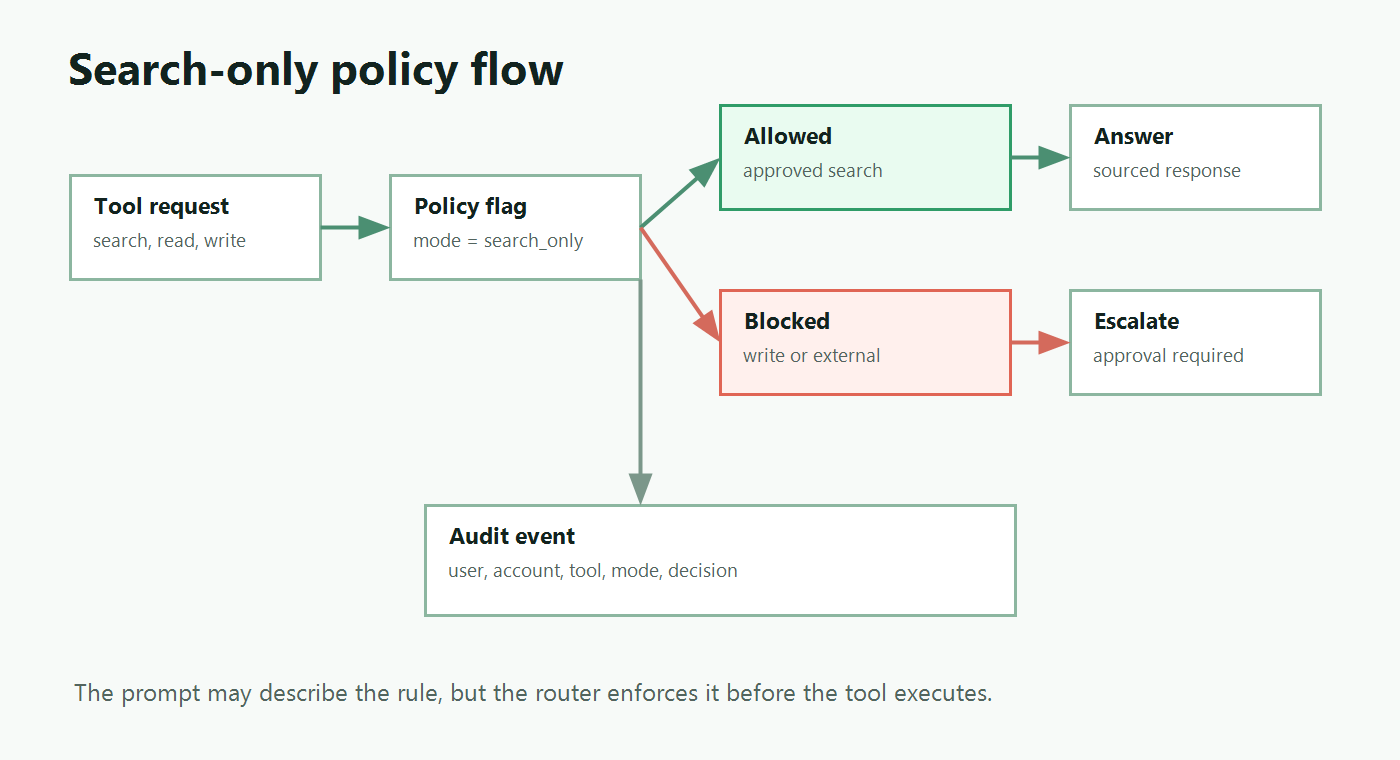
What a Search-Only Policy Should Mean
"Search-only" should be an enforceable runtime mode, not a sentence in the system prompt. A prompt can tell an agent to search before acting. A policy must decide whether a requested tool call is allowed.
A practical definition:
| Capability | Search-only behavior |
|---|---|
| Web or document search | Allowed only through approved search tools and approved indexes |
| Repository or documentation read | Allowed when the source is in scope for the user, account, and environment |
| Sensitive data lookup | Denied unless the tool is explicitly classified as safe for the context |
| Draft creation | Denied by default; route to a higher tool tier or approval mode |
| External action | Denied; no email, ticket update, deployment, publish, merge, billing, or customer-visible action |
| Admin action | Denied; no permission changes, credential changes, data deletion, or infrastructure mutation |
The important word is "policy." Search-only is not the absence of write tools in a demo. It is a named operating state that the production tool router can evaluate, log, roll out, and roll back.
When Search-Only Is the Right Default
Start an agent in search-only mode when the team still needs evidence about behavior, source quality, tool selection, or user trust.
Common cases include:
- A support assistant that should find relevant docs before humans send a customer reply.
- A security triage assistant that can retrieve runbooks and alerts but cannot modify incident state.
- A developer assistant that can inspect documentation and repository context but cannot open a pull request.
- A product analytics assistant that can summarize dashboard context but cannot change experiment configuration.
- A production incident assistant that can gather evidence while operators retain control of remediation.
This mode is also useful as a degraded fallback. If cost, latency, quality, user trust, or tool misuse crosses a threshold, operators can move the agent back to search-only without disabling the whole experience.
That is the same operating idea behind FeatBit's broader AI agent deployment loop: expose one controlled behavior, evaluate it, and expand only when the evidence supports more autonomy.
Search-Only Is Different from Read-Only
Teams often use "search-only" and "read-only" as if they are the same thing. They should not be.
Search-only is narrower. It usually means the agent can retrieve from a small allowlist of knowledge tools. Read-only may include broader access to business records, internal databases, user objects, account state, observability traces, or production metadata. Those reads can still be sensitive.
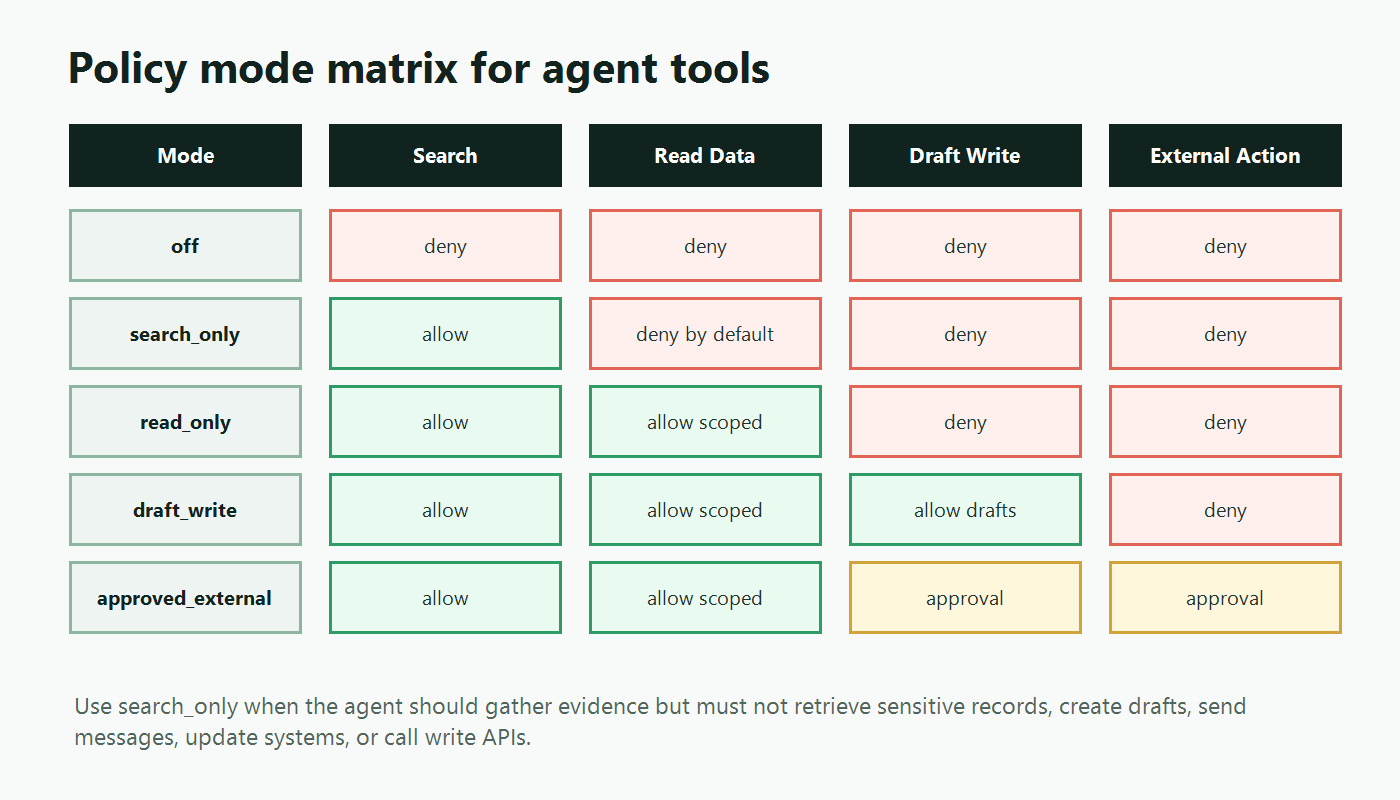
Use a mode ladder instead of one vague "read" permission:
| Mode | Allowed intent | Typical production use |
|---|---|---|
off |
No tool calls | Emergency shutdown or unsupported context |
search_only |
Query approved knowledge sources | First rollout stage, degraded mode, low-trust accounts |
read_only |
Read scoped business or system data | Internal operations after access review |
draft_write |
Create drafts with no external effect | Human-reviewed workflows |
approved_external |
Prepare external action for approval | Customer-visible or third-party workflows |
autonomous_limited |
Execute a narrow action without approval | Mature, measured, reversible workflow |
This distinction keeps "search-only" from becoming an accidental data-access policy. If an agent can read every customer record but cannot write, that may still be too broad for the first rollout stage.
Enforce the Policy at the Tool Router
The agent may request a tool call. The router should decide whether that call can run.
OpenAI's Agents SDK documentation makes this boundary concrete for custom function tools: tool guardrails can validate or block function-tool calls before and after execution. The same architectural lesson applies even when you use a different agent framework: put enforcement at the tool invocation boundary, not only in agent instructions.
type ToolRisk =
  | "search"
  | "scoped_read"
  | "sensitive_read"
  | "draft_write"
  | "external_action"
  | "admin_action";

type AgentToolRequest = {
  toolName: string;
  toolRisk: ToolRisk;
  userId: string;
  accountId: string;
  agentId: string;
  environment: "dev" | "staging" | "production";
  sourceName?: string;
};

type ToolDecision =
  | { action: "allow" }
  | { action: "deny"; reason: string }
  | { action: "escalate"; requiredMode: string; reason: string };
Then evaluate runtime policy before the tool executes:
async function decideToolCall(request: AgentToolRequest): Promise<ToolDecision> {
  const context = {
    key: request.userId,
    custom: {
      accountId: request.accountId,
      agentId: request.agentId,
      environment: request.environment,
      toolName: request.toolName,
      toolRisk: request.toolRisk,
      sourceName: request.sourceName ?? "unknown",
    },
  };

  const agentMode = await flags.string("agent-tool-mode", context, "search_only");
  const allowedSearchSources = await flags.json<string[]>(
    "agent-search-source-allowlist",
    context,
    ["public_docs", "help_center"]
  );

  if (agentMode === "off") {
    return { action: "deny", reason: "Agent tool use is disabled." };
  }

  if (agentMode === "search_only") {
    if (request.toolRisk !== "search") {
      return {
        action: "escalate",
        requiredMode: "read_only",
        reason: "Search-only mode blocks non-search tools.",
      };
    }

    if (!allowedSearchSources.includes(request.sourceName ?? "")) {
      return { action: "deny", reason: "Search source is not allowed for this context." };
    }
  }

  return { action: "allow" };
}
This example uses adapter-shaped flag calls rather than a specific SDK method. In a FeatBit implementation, the policy values can be evaluated server-side before execution using targeting rules, segments, environments, and safe fallbacks. The agent should receive the decision, not the ability to bypass it.
The Minimum Flag Model
Keep the flag model small enough for operators to understand during an incident.
| Flag key | Type | Purpose | Safe fallback |
|---|---|---|---|
agent-tools-enabled |
Boolean | Enables the tool router for a targeted audience | false |
agent-tool-mode |
String | Selects off, search_only, read_only, draft_write, or another tier |
search_only |
agent-search-source-allowlist |
JSON | Limits which indexes or knowledge sources can be searched | public or internal docs only |
agent-tool-escalation-required |
Boolean | Requires approval before moving beyond search-only | true |
agent-tool-denylist |
JSON | Temporarily blocks a named tool during an incident | empty list |
agent-policy-audit-sampling |
Number | Controls how much allowed search activity is logged when volume is high | full logging during rollout |
The search-source allowlist is the part teams often miss. A search tool is only as safe as the corpus it can reach. Searching public documentation, approved internal runbooks, and sanitized support articles is a different risk profile from searching raw CRM records, production traces, user-uploaded files, or private Slack exports.
FeatBit's documentation for targeting rules, percentage rollouts, and audit logs covers the primitives behind this model: targeted exposure, gradual expansion, and traceable control-plane changes.
Roll Out Search-Only Before Higher Authority
Search-only mode gives you a clean first release because it lets the agent exercise intent understanding, retrieval behavior, source ranking, and response formatting before it can create side effects.
A staged rollout can look like this:
- Observe-only. The agent proposes the search query and intended source. The router logs it but does not execute the search.
- Internal search-only. Employees can use approved knowledge sources. Operators inspect query quality, source choice, latency, and hallucinated citations.
- Limited customer search-only. A small segment gets sourced answers from approved docs or account-safe content.
- Search-only with escalation. The agent can ask for
read_onlyordraft_writemode, but a human or policy gate must approve the escalation. - Scoped read-only. The agent can read selected business data only when account, region, role, and purpose match the policy.
- Draft or external action. Side effects remain behind a separate approval or release gate.
This is where feature flags are more useful than static configuration. Operators can expand by segment, environment, account tier, region, workflow, or traffic percentage, and they can return to search-only if the rollout signal degrades.
What to Log for Search-Only Decisions
Search-only does not mean low-observability. Log enough to reconstruct whether the agent stayed inside policy and whether the policy was useful.
At minimum, capture:
- user, account, environment, agent, and session identifiers;
- requested tool name, source name, and risk class;
- evaluated mode and search-source allowlist variation;
- allow, deny, or escalation decision;
- search query summary, result source identifiers, and citation coverage;
- whether the final answer cited allowed sources;
- denied non-search tool attempts;
- human escalation outcome, if the agent asked for higher authority;
- latency, error rate, and user feedback or review result.
Do not log sensitive retrieved content by default just because the mode is search-only. Log policy decisions and source identifiers first. If content capture is needed for review, put that behind a separate data-retention policy.
Security Boundaries Still Matter
A runtime flag can choose whether search-only mode is active. It should not be the only thing preventing unauthorized access.
Keep hard boundaries in place:
- Use scoped credentials for each search source.
- Keep production write APIs out of the search-only tool list.
- Validate that the user or account is allowed to access the source.
- Separate public, internal, customer-specific, and sensitive corpora.
- Sanitize retrieved text before it flows into later tool calls.
- Deny escalation when identity, source, or purpose is ambiguous.
For MCP-based systems, this distinction is especially important. The Model Context Protocol authorization specification describes transport-level authorization and points implementers toward token audience validation and avoiding token passthrough risks. A search-only feature flag cannot fix broad credentials or a server that accepts tokens intended for another resource.
How FeatBit Fits
FeatBit's angle is that search-only mode is a release decision, not just an agent prompt. The release question is: who can use this agent capability, against which sources, in which environment, with what fallback, and what evidence is required before expanding authority?
In FeatBit terms:
- targeting rules decide which users, accounts, environments, or regions get search-only mode;
- multivariate flags select the tool mode and source allowlist;
- audit logs record policy changes;
- webhooks and observability integrations can connect policy changes to review, incident, and monitoring workflows;
- lifecycle management keeps temporary rollout controls from becoming permanent policy debt.
If you need the broader operating model, start with how to control AI agents in production with feature flags. If you are ready to design the full tool tier system, use the companion tutorial on agent tool permission gates with feature flags. Search-only is the smaller, safer pattern to implement first.
Teams building agent-native workflows can also connect this with the FeatBit MCP repository, FeatBit CLI, and FeatBit Skills when they want AI assistants to manage release controls through approved automation paths.
Common Failure Modes
Treating search-only as harmless. Search can expose sensitive records if the source is broad. Classify sources before classifying tools.
Putting the rule only in the prompt. The model should know the policy, but the router must enforce it.
Allowing hidden escalation. A search tool should not call another tool internally that writes, sends, updates, or retrieves out-of-scope data.
Skipping source allowlists. A global search connector is usually too broad for first production exposure.
Logging too much content. Audit policy decisions without creating a new sensitive-data store.
Using one permanent mode flag for everything. Temporary rollout flags need owners, review dates, and cleanup conditions. Permanent operational policies should be documented as such.
Starting Checklist
Before launching a search-only agent policy, verify:
- The search-only mode has a clear definition.
- Approved search sources are allowlisted.
- Sensitive read tools are separate from search tools.
- The tool router enforces the decision before execution.
- The default production fallback is
search_onlyoroff. - Escalation beyond search-only requires approval or a separate targeted rollout.
- Audit events include the evaluated mode, source, tool, and decision.
- Operators can return the agent to search-only without redeploying.
- Temporary rollout flags have an owner and review date.
Source Notes and Internal Link Plan
This article is a narrowed implementation playbook. It intentionally does not repeat the broader agent-control and permission-gate articles.
- OpenAI's Agents SDK guardrails documentation supports the tool-boundary point: enforcement belongs around function-tool execution, not only in a prompt.
- The Model Context Protocol authorization specification supports the distinction between runtime rollout policy and hard authorization boundaries.
- LaunchDarkly's AgentControl documentation, Unleash's feature flag type documentation, and Optimizely's Feature Experimentation documentation are used only as category context for runtime configuration, permissions, and rollout patterns. This article does not make comparative performance, pricing, security, or market-ranking claims.
- FeatBit implementation links: targeting rules, percentage rollouts, audit logs, webhooks, and feature flag lifecycle management.
- FeatBit reader journey links: control AI agents in production, agent tool permission gates, AI agent deployment loop, and human-in-the-loop release control.
- Image and Open Graph recommendation: use
cover.pngas the social preview. Use the policy-flow diagram for implementation readers and the mode-matrix diagram for teams deciding where search-only sits in their authority ladder.
Next Step
Pick one live or planned agent workflow and list every tool it can request. Mark each tool as search, scoped read, sensitive read, draft write, external action, or admin action. If any tool does not fit the search-only contract, keep it out of the first rollout and add a separate escalation gate before production users see it.