
AI Agent Tool Policy: A Production Control Blueprint
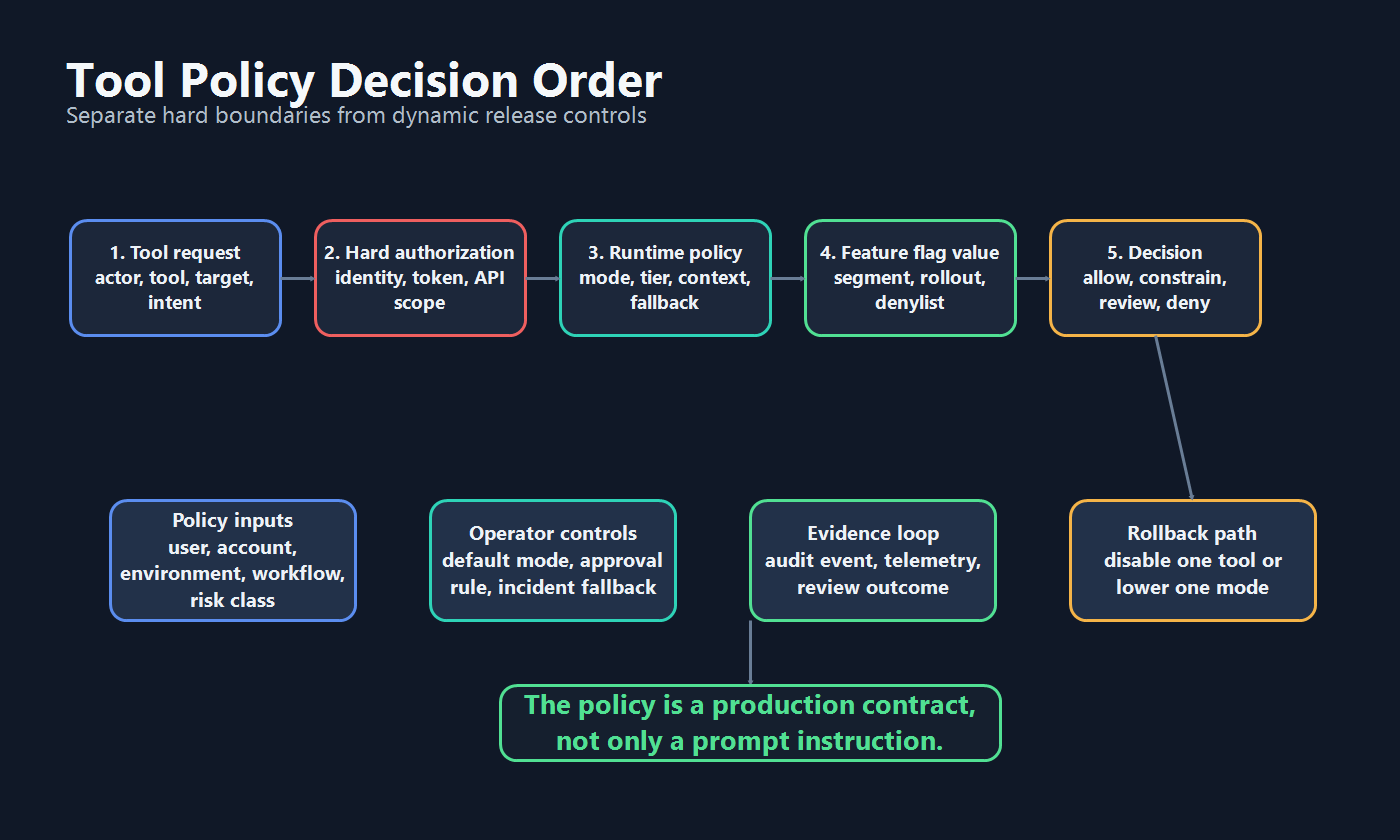
A tool policy for AI agents is a production contract that decides which approved tools an agent may use, in which context, at what authority level, with what fallback, and with what audit trail. It should be enforced by the tool router or orchestration service before a tool runs. It should not live only in a prompt.
That distinction matters in production. A model can propose a search, read, draft, ticket update, deployment, or admin action. The tool policy decides whether the system should allow it, constrain it, queue it for review, deny it, or fall back to a safer mode.
This article is narrower than a broad production agent control model, broader than a single search-only agent policy, and less code-focused than a tool permission gate tutorial. The reader job here is to define the policy contract itself so platform, security, product, and operations teams can operate the same tool-access rules after deployment.
What a Tool Policy Should Mean
"Tool policy" is often used loosely to mean the list of tools available to an agent. That is too weak for production.
A production tool policy should answer these questions before a tool executes:
| Policy question | Production meaning |
|---|---|
| Who is acting? | User identity, service identity, agent identity, and human approver when relevant. |
| What is the tool? | Search, scoped read, sensitive read, draft write, external action, admin action, or another named risk class. |
| What is the target? | Account, record, repository, environment, external service, region, or customer-visible surface. |
| What context applies? | Workflow, environment, account tier, region, incident state, rollout segment, and policy mode. |
| What can change at runtime? | Mode, tool tier, approval requirement, denylist, source allowlist, rollout percentage, or fallback state. |
| What happens if the policy blocks the call? | Deny, constrain to a safer mode, queue for review, return a sourced recommendation, or disable one tool. |
| What evidence is recorded? | Evaluated policy values, decision, reason, execution result, review outcome, and rollback state. |
The policy does not need to be a large rules engine on day one. It does need enough structure that the same request gets the same decision outside the model prompt.
Separate Policy from Authorization
Tool policy and authorization are related, but they are not the same control.
Authorization defines what an agent or service identity can ever access. Tool policy defines which approved capability is active for this user, workflow, environment, rollout stage, or incident state right now.
| Layer | Owns | Example decision | Should not replace |
|---|---|---|---|
| Identity and authorization | Security and platform boundary | This service identity may call the ticket API. | Runtime rollout or experiment decisions. |
| API and tool scope | System owner boundary | This tool can only create draft tickets, not close them. | Feature flag targeting or product exposure. |
| Runtime tool policy | Agent platform and release owner | This account is in search-only mode during beta rollout. | API permissions, token audience checks, or sandboxing. |
| Feature flag control | Release decision layer | Enable draft-write mode for internal users and 5 percent of beta accounts. | Tool-router enforcement. |
| Evidence and audit | Operations and governance | The policy allowed a draft, queued an external action, then rolled back after review. | Legal, compliance, or security approval claims without review. |
The Model Context Protocol authorization specification is a useful reminder for MCP-based tool systems: transport authorization, token audience validation, and token handling are hard boundaries. Runtime flags and tool policies should sit beside those boundaries, not pretend to replace them.
Use a Clear Decision Order
The safest tool policy order is simple:
- Build a structured tool request.
- Check hard authorization and tool scope.
- Evaluate runtime policy for the current context.
- Read feature flag values for mode, tier, rollout, denylist, and fallback.
- Return a decision before execution.
- Record the decision and outcome.
OpenAI's Agents SDK documentation describes tool guardrails as checks that wrap function-tool calls before and after execution. The production lesson is portable even if you use another framework: put enforcement at the tool boundary where the side effect would happen.
The decision should support more than allow or deny.
| Decision | Meaning | Example |
|---|---|---|
allow |
Execute the tool as requested. | Search approved product docs for an internal support workflow. |
constrain |
Execute in a safer mode or smaller scope. | Convert a draft-write request into a search-only recommendation. |
queue_for_review |
Human review is required before the side effect. | Prepare a customer reply, but let a support lead send it. |
deny |
Block the request because policy, context, or authorization is insufficient. | Deny an admin action in production for a beta account. |
fallback |
Move the agent to a safe degraded state. | During an incident, return to search-only behavior. |
This decision vocabulary gives operators a way to reduce authority without turning off the entire agent.
Define the Minimum Policy Contract
Start with a small contract that the tool router can evaluate deterministically.
type ToolRisk =
  | "search"
  | "scoped_read"
  | "sensitive_read"
  | "draft_write"
  | "external_action"
  | "admin_action";

type ToolPolicyRequest = {
  userId: string;
  accountId: string;
  agentId: string;
  environment: "dev" | "staging" | "production";
  workflow: string;
  toolName: string;
  toolRisk: ToolRisk;
  targetSystem: string;
  region?: string;
  incidentMode?: boolean;
};

type ToolPolicyDecision =
  | { action: "allow" }
  | { action: "constrain"; mode: "search_only" | "read_only" }
  | { action: "queue_for_review"; reason: string }
  | { action: "deny"; reason: string }
  | { action: "fallback"; mode: "off" | "search_only" };
Then evaluate policy values before the tool executes:
async function decideToolPolicy(request: ToolPolicyRequest): Promise<ToolPolicyDecision> {
  const context = {
    key: request.userId,
    custom: {
      accountId: request.accountId,
      agentId: request.agentId,
      environment: request.environment,
      workflow: request.workflow,
      toolName: request.toolName,
      toolRisk: request.toolRisk,
      targetSystem: request.targetSystem,
      region: request.region ?? "unknown",
    },
  };

  const enabled = await flags.boolean("agent-tool-policy-enabled", context, false);
  if (!enabled) {
    return { action: "deny", reason: "Tool policy is not enabled for this context." };
  }

  const mode = await flags.string("agent-tool-policy-mode", context, "search_only");
  const approvalRequired = await flags.boolean("agent-tool-approval-required", context, true);
  const denylist = await flags.json<string[]>("agent-tool-denylist", context, []);

  if (request.incidentMode || mode === "fallback") {
    return { action: "fallback", mode: "search_only" };
  }

  if (denylist.includes(request.toolName)) {
    return { action: "deny", reason: "This tool is temporarily disabled." };
  }

  if (!modeAllowsRisk(mode, request.toolRisk)) {
    return { action: "constrain", mode: "search_only" };
  }

  if (approvalRequired && requiresReview(request)) {
    return { action: "queue_for_review", reason: "Risk or context requires approval." };
  }

  return { action: "allow" };
}
The exact SDK call shape will differ by platform. The important pattern is stable: evaluate server-side, use safe fallbacks, and return a decision the agent cannot bypass.
Design Policy Modes Before Individual Rules
Individual rules are easier to manage when the team agrees on a small mode ladder.
| Mode | Allowed behavior | Good default for |
|---|---|---|
off |
No tool execution. | Unsupported workflows and emergency shutdown. |
observe |
Log intended calls without execution. | First production rehearsal. |
search_only |
Query approved sources only. | New agents, low-trust contexts, degraded fallback. |
read_only |
Read scoped business or system data. | Internal operations after access review. |
draft_write |
Create drafts, branches, tickets, or internal records. | Workflows where humans review before external impact. |
approved_external |
Prepare external action for human approval. | Customer-visible or third-party actions. |
autonomous_limited |
Execute one narrow, measured, reversible action. | Mature workflows with strong evidence and rollback. |
fallback |
Force safer degraded behavior. | Incidents, quality regression, cost spike, or policy uncertainty. |
This mode ladder prevents every new tool from becoming a unique exception. The policy can still include tool-specific rules, but operators get a shared vocabulary for release, rollback, and audit.
Roll Out Tool Policy Like a Release
A tool policy is not finished when the schema compiles. It needs a lifecycle.
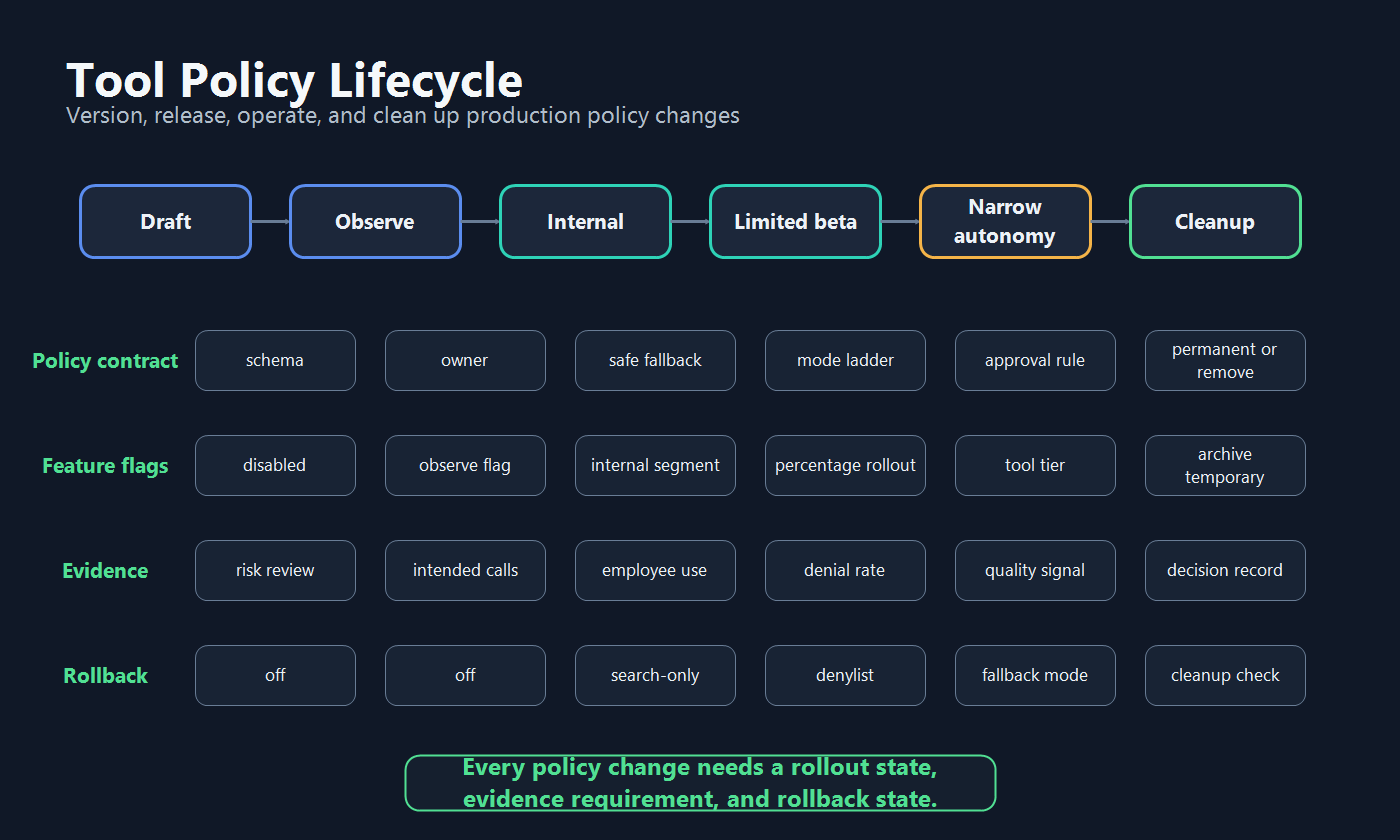
A practical rollout path looks like this:
- Draft the contract. Define actor, tool, target, risk class, mode, fallback, evidence, owner, and cleanup rule.
- Run observe mode. Let the agent propose tool calls while the router logs decisions without executing side effects.
- Release internally. Enable search-only or read-only behavior for employees, synthetic users, or trusted test accounts.
- Expand to a limited beta. Use segments or percentage rollout for one workflow and one authority level.
- Allow narrow autonomy. Remove approval only for a specific tool, audience, environment, and rollback path.
- Clean up temporary controls. Convert stable controls into permanent operational policy or remove rollout flags that served their purpose.
Optimizely's Feature Experimentation documentation describes feature flags as a way to turn functionality on and off without deploying code, gradually roll out features, and validate functionality and performance before full release. That general feature-flag pattern applies well to tool policy too: do not grant broad tool authority in one step when the policy itself can be released gradually.
What FeatBit Controls
FeatBit's role is the dynamic release layer for tool policy. It should not be the only security boundary, but it can decide which approved capability is active for a given context.
Use FeatBit for:
- server-side flag evaluation before the tool router executes a request;
- targeting by user, account, environment, region, workflow, agent, or tool-risk attribute;
- multivariate policy modes such as
off,observe,search_only,draft_write, andfallback; - percentage rollout for new tool authority;
- denylists, fallback modes, and kill switches for incident response;
- audit logs that show who changed policy state;
- webhooks and observability integrations that connect policy changes to review and incident workflows;
- lifecycle ownership so temporary rollout flags do not become policy debt.
FeatBit documentation for targeting rules, percentage rollouts, audit logs, webhooks, and OpenTelemetry integration covers the primitives behind this model.
This is also where FeatBit's AI agent deployment loop and AI control layer pages fit: build the control point, deploy it behind a flag, evaluate behavior, and roll back or expand based on evidence.
What to Log for Each Decision
Policy logs should explain why the system allowed, constrained, reviewed, denied, or rolled back a tool call.
At minimum, record:
- user, account, agent, environment, workflow, and session identifiers;
- tool name, target system, risk class, and requested action summary;
- evaluated flag keys and variations used in the decision;
- policy mode, approval requirement, denylist match, and fallback state;
- final decision and reason;
- human approver identity and rationale when review is required;
- execution result, latency, error, undo result, and downstream signal;
- operator changes to policy flags, including who changed them and why.
Avoid logging sensitive tool inputs or retrieved content by default. A useful audit trail records decisions and enough context to investigate. It should not create a second uncontrolled data store.
Common Failure Modes
Policy only in the prompt. The model can be told the rules, but the server-side router must enforce them before tools run.
Authorization treated as rollout. API permissions define the maximum possible access. They do not express which beta account, region, or workflow should receive a new capability today.
One global tool switch. A kill switch is useful, but normal operations need modes, tiers, approvals, denylists, rollouts, and fallback.
No policy owner. Tool policy changes are production behavior changes. They need an accountable owner and review path.
No observe mode. Without dry-run decisions, teams learn about bad tool choices only after side effects happen.
Human approval without context. Reviewers need the proposed action, consequence, scope, evidence, reason the gate fired, and fallback option.
Temporary flags left forever. A rollout control that survives the release decision becomes policy debt unless it is converted into a permanent operational control with documentation.
Starting Checklist
Before putting an AI agent tool policy into production, verify:
- The policy has a structured request contract.
- Tool risk classes are defined.
- Hard authorization and API scope still enforce maximum access.
- The default production mode is
off,observe,search_only, or another safe fallback. - Flag evaluation happens server-side before tool execution.
- The policy can return allow, constrain, queue for review, deny, or fallback.
- Operators can disable one tool or lower one mode without redeploying.
- Audit events include the evaluated policy state and final execution result.
- Rollout evidence includes denial rate, review outcome, quality signal, latency, cost, and rollback events.
- Temporary rollout flags have an owner, review date, and cleanup condition.
Source Notes and Internal Link Plan
This article uses standards, framework, vendor, and FeatBit sources as architecture context. It does not make comparative performance, pricing, security, compliance, or market-ranking claims.
- OpenAI's Agents SDK guardrails documentation supports the execution-boundary point: tool guardrails can wrap function-tool calls before and after execution.
- The Model Context Protocol authorization specification supports the distinction between runtime tool policy and hard authorization boundaries such as token audience validation.
- Optimizely's Feature Experimentation feature flag documentation is used as category context for flag-enabled rollout, validation, and lifecycle control.
- OpenFeature's evaluation context documentation supports the idea that runtime flag decisions depend on contextual attributes, which is important for agent, workflow, tool, and environment policy.
- FeatBit implementation links: targeting rules, percentage rollouts, audit logs, webhooks, and OpenTelemetry integration.
- FeatBit reader journey links: control AI agents in production, search-only agent tool policies, agent tool permission gates, AI control layer, and feature flag lifecycle management.
- Image and Open Graph recommendation: use
cover.pngas the social preview. Use the decision-order diagram near the policy definition and the lifecycle map near rollout guidance because both summarize decisions explained in crawlable text.
Next Step
Pick one production or near-production agent workflow. Write its tool policy contract before adding another tool: actor, tool, target, risk class, default mode, rollout stage, approval rule, evidence requirement, rollback state, and owner. If any field is unclear, keep the workflow in observe or search-only mode until the policy is explicit.