
Stale Model Flag Cleanup: How to Retire AI Rollout Flags Safely
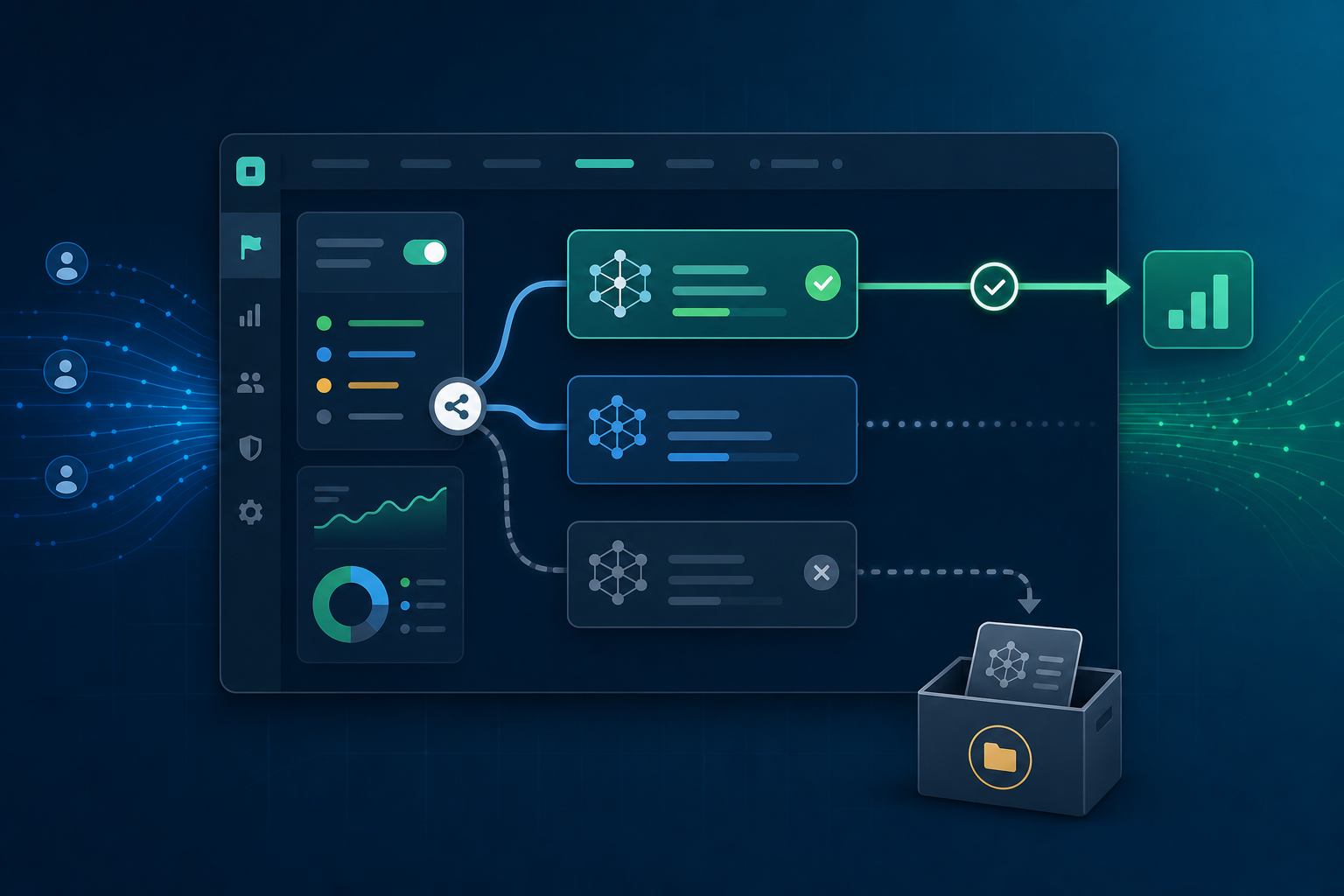
AI model flags are useful when a team needs to route traffic between a baseline model, a candidate model, and a fallback path. They let platform teams compare behavior, ramp up gradually, and roll back without redeploying the application.
They also create a cleanup problem. Once the team has chosen a model, the flag that made the rollout safe can become a stale control point. If nobody removes it, engineers keep carrying old model branches, unused prompt versions, dead evaluation code, and confusing dashboards. The next model rollout then starts on top of old uncertainty.
Stale model flag cleanup is the practice of retiring AI model rollout flags after the decision they supported is complete. The goal is not to delete every flag as fast as possible. The goal is to remove obsolete routing logic only after the chosen model, fallback behavior, observability, and ownership boundaries are clear.
What makes a model flag stale?
A model flag is stale when it no longer changes an active release decision.
That can happen in several ways:
- The candidate model is now serving all intended production traffic.
- The experiment or evaluation window has ended.
- The old model is no longer a valid rollback target.
- The flag always returns the same variation in every production segment.
- The code path is still present, but nobody owns the decision anymore.
- The flag controls a model version that is no longer deployed, monitored, or costed.
For normal application features, stale flags are often release-debt cleanup. For AI systems, stale flags also affect model governance. A stale model flag can keep an old model available in code after the team has stopped watching its quality, latency, cost, or safety behavior.
Why stale model flags are riskier than ordinary release flags
AI model routing usually touches more than one branch in application code. A single flag may decide the model name, prompt template, retrieval settings, guardrail policy, token budget, caching behavior, and fallback response. Leaving that flag in place after the rollout creates several risks.
First, the rollback path can become imaginary. If the old model is removed from the provider account, loses access to a prompt dependency, or no longer has current monitoring, the flag still looks reversible even though the system cannot safely use it.
Second, stale branches make incident response slower. During a production issue, engineers need to know which model path is live. A flag that always resolves to the same variation but still wraps multiple branches adds another question to the debug path.
Third, ownership gets blurry. A platform team may own the flag, an ML team may own model quality, and an application team may own the customer workflow. Cleanup is where those boundaries need to become explicit.
A cleanup decision frame
Do not start by searching for old flag names and deleting code. Start by deciding what the flag was supposed to control.
Use this frame:
| Question | Cleanup implication |
|---|---|
| Was the flag a temporary rollout control? | Retire it after the final model choice is stable. |
| Was the flag a permanent kill switch? | Keep it, but rename or document it as an operational control. |
| Was the flag used for an experiment? | Preserve the result and remove experiment-only variations. |
| Was the flag protecting provider cost or latency? | Replace it with an explicit operating policy before cleanup. |
| Was the flag used by multiple services? | Remove branches service by service and verify each consumer. |
This distinction matters because not all long-lived flags are stale. A permanent emergency fallback flag can be healthy. A temporary model comparison flag that has served one variation to everyone for weeks is usually cleanup debt.
The stale model flag cleanup workflow
The safest workflow is a controlled retirement, not a blind deletion.
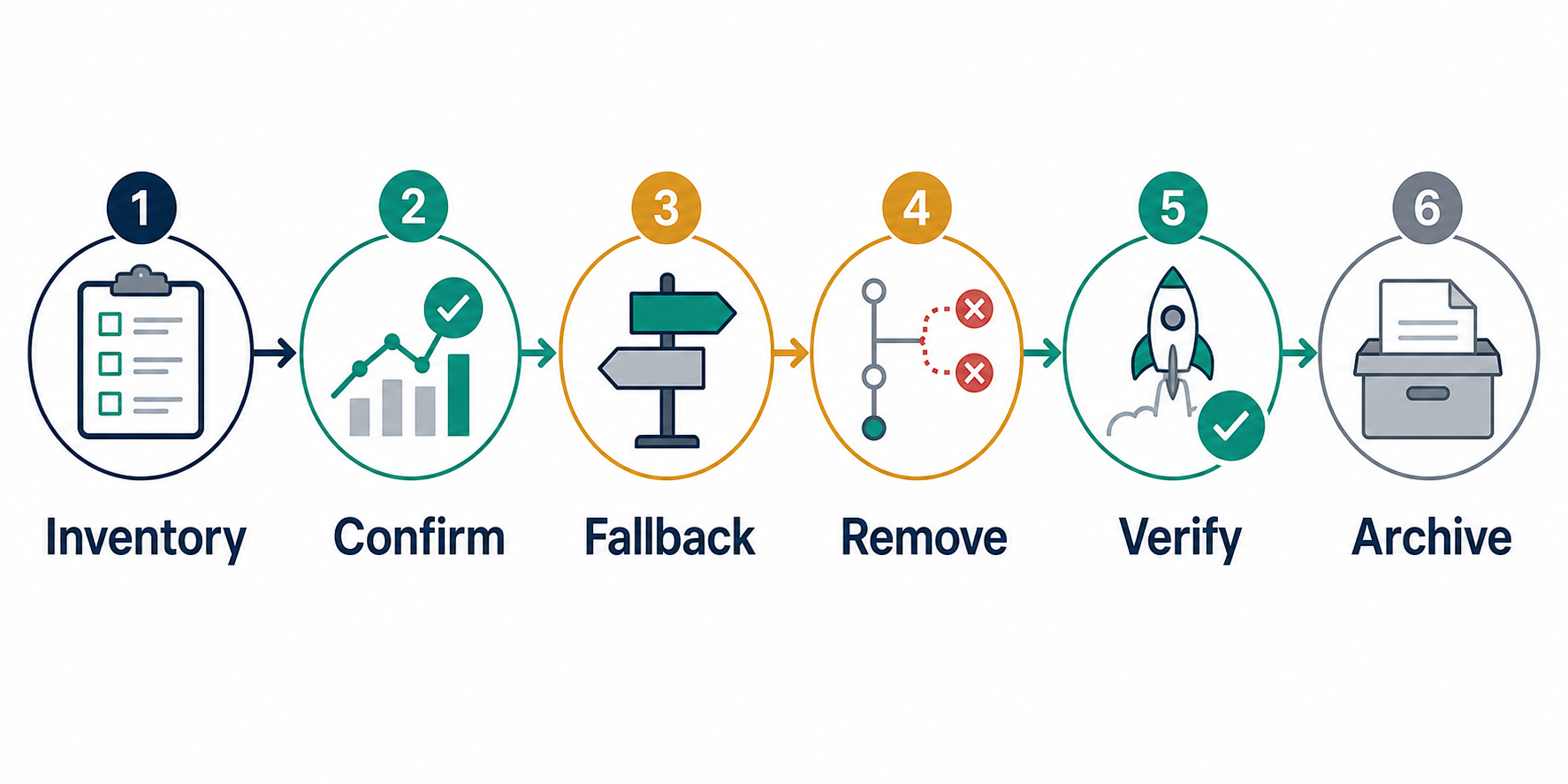
1. Inventory the model decision
Write down the flag key, variations, model versions, traffic rules, owners, and connected services. Include any prompt templates, retrieval indexes, model provider settings, dashboards, alerts, and cost monitors that depend on the variation.
For FeatBit users, this is also the point where the flag should have a clear project, environment, targeting rule, and owner. If the flag controls a production AI path, it should not be an anonymous switch in a shared project.
2. Confirm the winning path
Before cleanup, confirm the selected model path in production:
- The chosen variation is serving the intended population.
- The old variation is no longer needed for active comparison.
- Rollout metrics, error rates, latency, and cost are acceptable.
- The team knows what rollback means after cleanup.
This step is especially important when the flag was used for an A/B test or model evaluation. Removing the flag should not erase the evidence behind the decision.
3. Decide whether rollback still needs a flag
Some teams remove the rollout flag and keep a separate emergency flag. That is often cleaner than turning a temporary comparison flag into a permanent kill switch.
For example:
Temporary rollout flag:
  ai-search-model-v2-rollout

Permanent operational fallback:
  ai-search-force-baseline-model
The first flag exists to make a model decision. The second exists to protect production if the selected model or provider degrades. They have different owners, alerts, and cleanup expectations.
4. Remove dead branches in code
Once the selected path is clear, remove the unused model branch from code. This includes more than the if statement around the flag:
- Delete unused model identifiers.
- Remove old prompt templates that no longer have a serving path.
- Remove unused retrieval or ranking configuration.
- Delete experiment-only metric labels after preserving the analysis result.
- Remove obsolete tests that only assert the old path.
- Update runbooks, diagrams, and dashboards.
Keep one focused pull request when possible. A cleanup PR should be easy to review because reviewers need to verify that the live production path is unchanged.
5. Archive the flag after code is gone
The flag should usually be archived after the code path has been removed, not before. Archiving first can make the dashboard look clean while stale code still exists.
For a FeatBit workflow, the sequence is:
- Freeze or document the final variation.
- Remove unused branches in the consuming services.
- Deploy and verify the chosen path.
- Archive the flag in the relevant environment.
- Keep the decision record and source notes linked from the cleanup ticket.
Ownership matrix for AI model flags
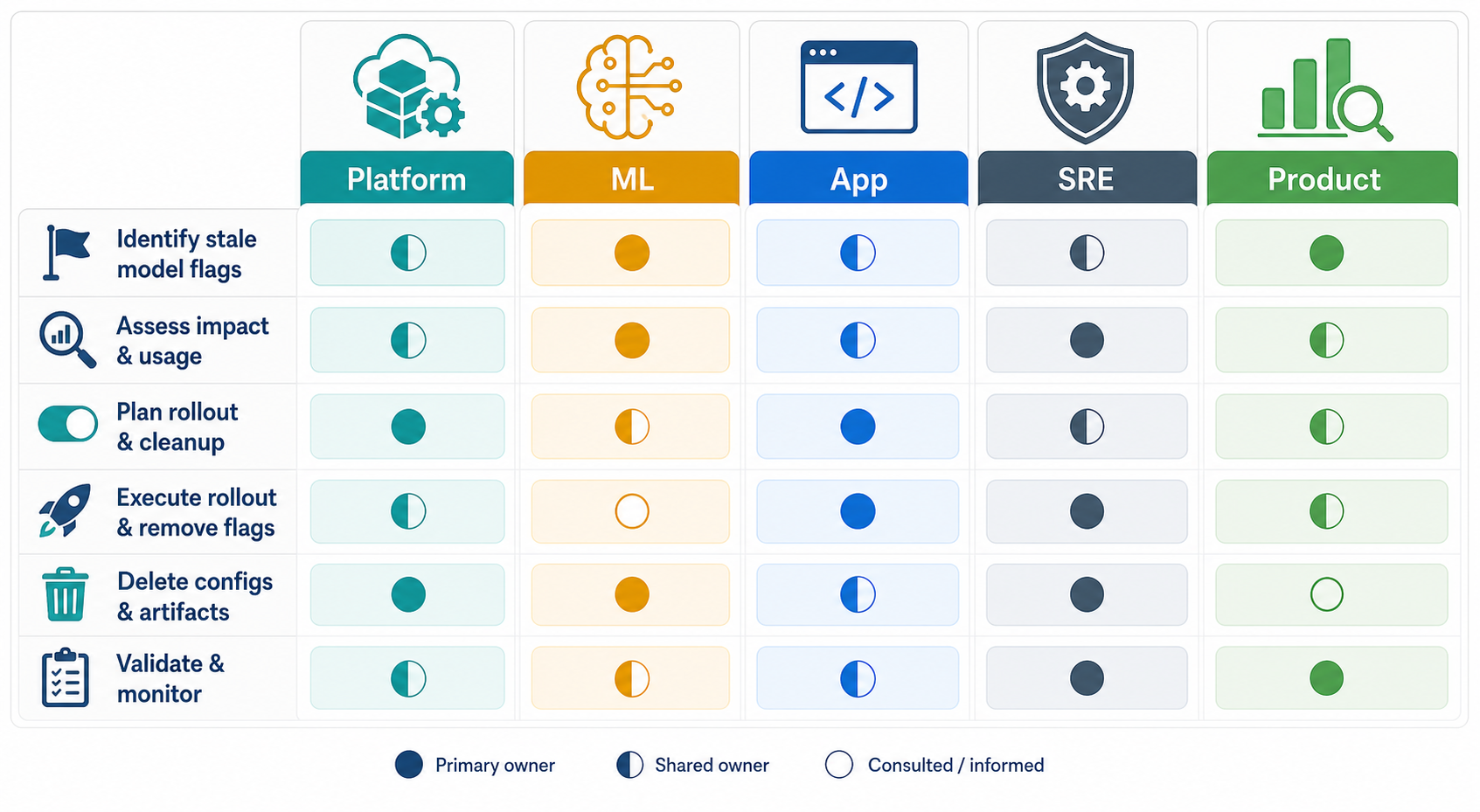
Stale model flags stay stale when cleanup belongs to everyone and nobody. Assign ownership while the flag is created, not after it becomes debt.
| Role | Owns during rollout | Owns during cleanup |
|---|---|---|
| Platform engineering | Flag structure, environments, SDK use, access boundaries | Flag archive, SDK removal, cross-service coordination |
| ML or AI engineering | Model quality, evaluation criteria, fallback model validity | Final model decision, obsolete model retirement |
| Application team | User workflow behavior and integration tests | Code branch removal and product behavior verification |
| Operations or SRE | Alerts, latency, incident runbooks, provider health | Post-cleanup monitoring and rollback runbook update |
| Product owner | Success criteria and rollout population | Decision record and customer-facing follow-up |
This matrix is intentionally practical. It prevents the common pattern where the platform team archives a flag while the application still contains both branches, or the ML team removes a model while the application still claims it can roll back.
How to use FeatBit for controlled model flag cleanup
FeatBit is most useful in this workflow when the flag is treated as a production control point rather than a loose conditional. A good model rollout flag should have:
- A descriptive key, such as
ai-search-model-v2-rollout. - Separate environments for development, staging, and production.
- Targeting rules that show who receives the candidate model.
- Percentage rollout when the model is being expanded gradually.
- Clear variation names that map to real model paths.
- A cleanup ticket or owner recorded in the team's release process.
FeatBit's feature flag model supports the release-control workflow: teams can target users, ramp traffic, switch behavior at runtime, and keep deployment separate from release. That makes it a good fit for AI model routing when the team also adds cleanup discipline.
The important rule is simple: if a flag is temporary, name it and operate it as temporary. If the business needs a permanent fallback, create a dedicated operational flag with a different purpose.
Example: retiring a model comparison flag
Assume a search team used FeatBit to compare two answer-ranking models:
Flag key: ai-search-ranker-v2
Variations:
  baseline = ranker-v1
  candidate = ranker-v2
Final decision:
  candidate serves 100 percent of production traffic
A rushed cleanup would simply archive the flag. A safer cleanup does more:
- Confirm
ranker-v2is the production default in every service that evaluates the flag. - Export or record the experiment result, rollout notes, and metric review.
- Remove the
ranker-v1branch from application code. - Remove old prompt, ranking, and test fixtures that only support
ranker-v1. - Keep or create a separate emergency fallback if the team still needs one.
- Deploy the cleanup and verify production metrics.
- Archive
ai-search-ranker-v2in FeatBit.
The result is a simpler codebase with a clearer operational story. The team can still respond to incidents, but it is no longer pretending that an old comparison flag is the right rollback mechanism.
Cleanup checklist
Use this checklist before archiving an AI model flag:
- The flag has a named owner.
- The final model decision is written down.
- The chosen variation is the production default.
- The old model is either retired or explicitly kept as an operational fallback.
- Every consuming service has been checked.
- Unused model, prompt, retrieval, and metric code has been removed.
- Tests cover the remaining production path.
- Dashboards and alerts no longer depend on deleted variation labels.
- The cleanup pull request links to the flag and decision record.
- The flag is archived only after the cleanup deployment is verified.
Source notes and further reading
- FeatBit docs describe feature flags as a way to ship safely, roll out gradually, recover without redeployment, target experiences, and support experimentation: FeatBit documentation.
- FeatBit's AI release-control positioning is useful background for teams using flags as runtime control points in AI systems: Feature flags as the control layer for AI systems.
- Unleash documents feature flag states, expected lifetimes, stale flags, archive behavior, and integrations that can trigger cleanup workflows: Unleash feature flags documentation.
- DevCycle documents stale feature notifications, including stale reasons such as unmodified, released, and unused features: DevCycle stale feature notifications.
- Martin Fowler's feature toggle article remains a useful reference for thinking about toggle categories and the cost of long-lived toggle points: Feature Toggles.
Related FeatBit resources
- FeatBit AI control layer for teams evaluating feature flags as runtime AI controls.
- FeatBit AI native for product context around AI-era feature flag workflows.
- How to implement feature flags for a broader implementation guide.
- FeatBit documentation for setup and product details.