
What Is Stale AI Flag Cleanup?
Stale AI flag cleanup is the practice of finding feature flags that once controlled AI behavior, deciding whether each control still needs to exist, removing the unused code paths, and archiving the flag configuration after the production risk has passed.
It sounds like normal feature flag hygiene. The difference is that AI flags often control more than a visible product feature. They may select a model, switch a prompt template, gate an agent tool, route a percentage of requests to a new retrieval pipeline, or keep a kill switch ready for a risky behavior. If those flags stay in the codebase after their decision has been made, developers inherit old branches that are hard to reason about and easy for humans or coding agents to reuse incorrectly.
The goal is not to remove every AI flag quickly. The goal is to separate live control surfaces from dead control surfaces so teams keep runtime safety without carrying unnecessary complexity.
The Short Answer
An AI flag becomes stale when it no longer changes an active product or operational decision.
Common examples include:
- A prompt experiment flag after the winning prompt is permanently adopted.
- A model routing flag after all traffic has moved to one model family.
- A retrieval or ranking flag after the old pipeline is removed from the roadmap.
- An agent permission flag after a tool is either approved as standard behavior or blocked permanently.
- A safety mitigation flag after the mitigation has been folded into the default code path.
- A temporary cost-control flag after the budget policy has moved into a normal configuration layer.
Cleanup means more than turning the flag off in a dashboard. A complete cleanup removes the conditional branch from application code, deletes or consolidates obsolete prompts and configuration, updates tests and runbooks, and then archives or deletes the flag record according to the team's governance policy.
Why AI Flags Go Stale Faster
AI systems create more control points because their behavior depends on runtime choices. A conventional feature flag might decide whether a checkout button is visible. An AI flag might decide which model answers a user, whether an agent can call a write tool, which prompt variant is used for a regulated workflow, or whether a fallback path should trigger when evaluation quality drops.
Those control points are useful during rollout. They let teams canary a prompt, contain a bad model version, or roll back an agent behavior without redeploying. FeatBit describes this pattern as an AI control layer: every AI decision point becomes a named, observable control surface.
The same control surface becomes technical debt when the decision is over and nobody removes it. Stale AI flags create four practical problems:
- Old behavior can be resurrected accidentally. A retired prompt or model route may still be reachable through a branch that looks harmless.
- Developers lose confidence in the code. Every conditional makes it harder to know which path production actually uses.
- Coding agents get noisy context. AI coding tools may preserve obsolete branches because the repository still presents them as valid product logic.
- Governance becomes harder. Audit trails and approval flows are less useful when they mix active controls with forgotten experiments.
This is why stale AI flag cleanup belongs in the developer workflow, not only in a quarterly dashboard review.
What Counts as an AI Flag?
For cleanup purposes, treat a flag as an AI flag when it changes AI system behavior at runtime. The implementation may still be an ordinary boolean, string, or multivariate feature flag.
Typical AI flag categories include:
| AI flag category | Example key | Cleanup trigger |
|---|---|---|
| Model route | ai.summary.model_family |
One model is the permanent default and rollback no longer needs the old route |
| Prompt version | ai.checkout.prompt_v3 |
The experiment has concluded and the winning prompt is embedded as the default |
| Agent tool access | ai.agent.enable_refund_tool |
The tool is approved as standard access or removed from the agent entirely |
| Retrieval path | ai.search.use_hybrid_ranker |
The old retrieval stack is no longer maintained |
| Safety guardrail | ai.output.strict_json_retry |
The guardrail is part of default behavior or has been replaced |
| Cost throttle | ai.use_small_model_for_free_tier |
The policy has become permanent configuration instead of a release decision |
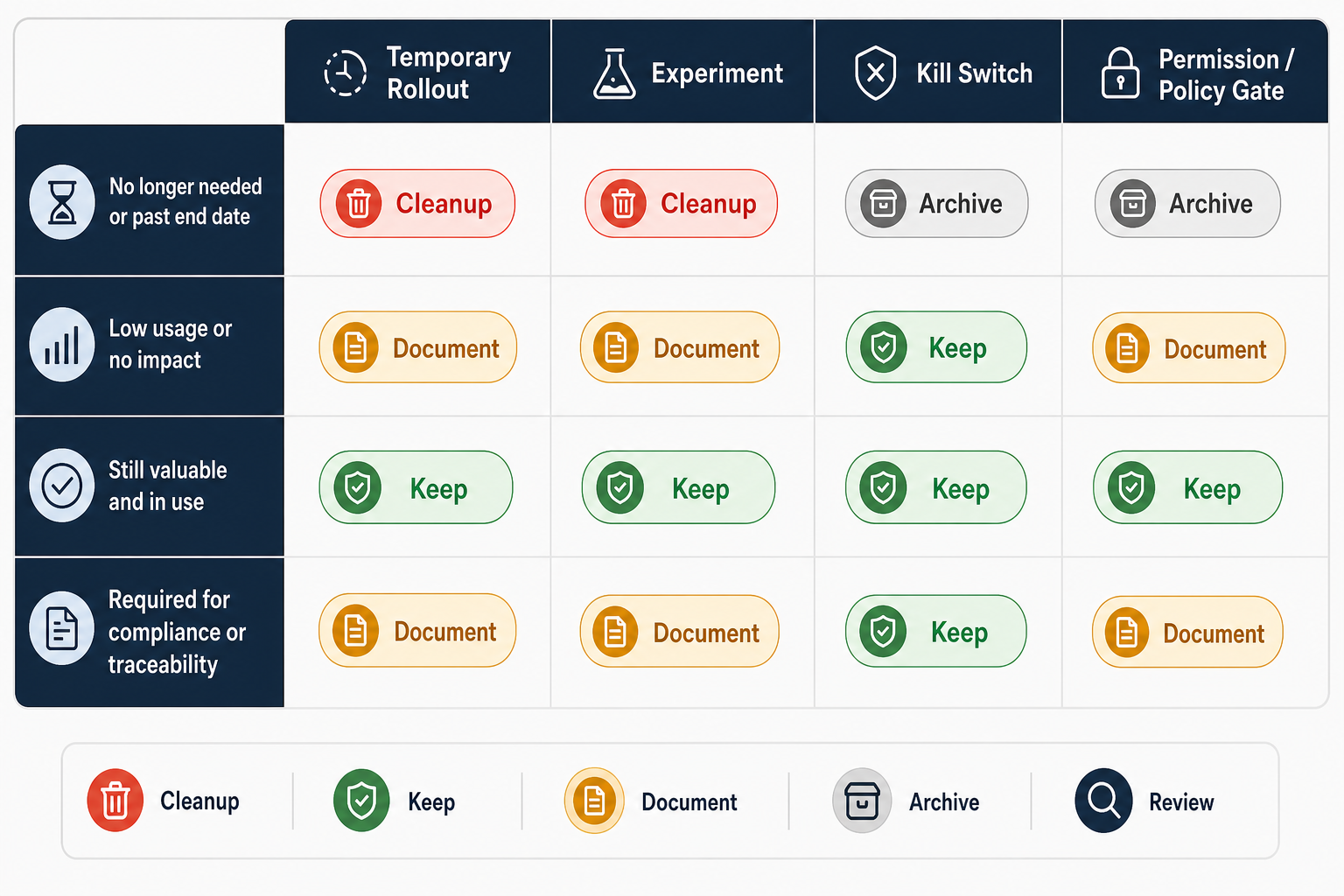
Not every long-lived AI flag is stale. Kill switches, permission gates, customer-tier controls, and compliance-related controls may be intentionally long-lived. The cleanup decision depends on purpose, ownership, evidence, and reversibility.
How to Tell Whether an AI Flag Is Stale
A stale AI flag usually shows more than one signal. Do not rely on a single data point.
Use this decision frame:
| Signal | What it suggests | What to verify before removal |
|---|---|---|
| The rollout or experiment is complete | The temporary decision may be over | Confirm the winning behavior and final rollout state |
| The old prompt, model, or tool path has no planned use | The branch may be dead code | Check roadmap notes, incident runbooks, and owner intent |
| The flag has not changed recently | It may be forgotten | Verify whether it is a permanent permission or kill switch |
| Runtime evaluation data shows no usage | The path may not be active | Confirm instrumentation covers the SDK or API calls used by the app |
| Code search finds no references | The dashboard flag may be safe to archive | Check backend jobs, serverless functions, scripts, and notebooks |
| Tests only cover one variation | The other branch may be obsolete or risky | Decide whether to remove the branch or restore meaningful test coverage |
Unleash documents active, potentially stale, and stale flag states, and notes that stale state does not change application behavior by itself. DevCycle similarly warns that stale detection depends on evaluation data from specific SDK calls. The lesson for AI teams is simple: the platform can surface candidates, but cleanup still needs code review and owner confirmation.
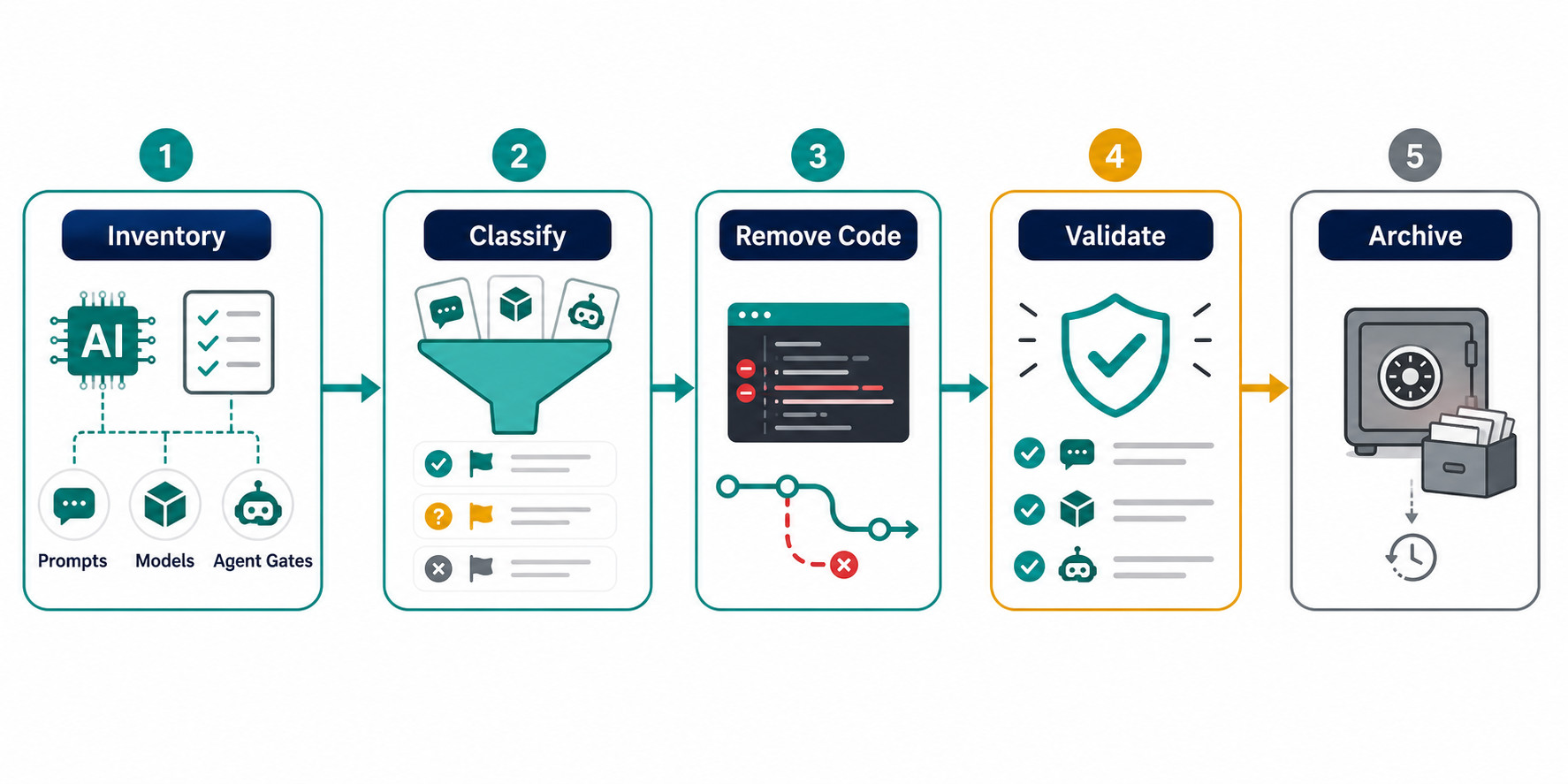
A Practical Cleanup Workflow
1. Inventory the AI Control Surface
Start with a list of flags that affect AI behavior. Include flags in application code, prompt orchestration, model gateways, retrieval services, background jobs, and agent tool registries.
For each flag, record:
- Flag key and type.
- Owner.
- Creation date or first known use.
- Intended lifecycle: temporary rollout, experiment, kill switch, permission gate, customer entitlement, or operational setting.
- Current production value.
- Known code references.
- Associated prompts, model configs, tools, metrics, and runbooks.
FeatBit teams can connect this inventory to the broader feature flag lifecycle by using flag descriptions, project organization, audit logs, and feature usage context in the flag management workflow.
2. Classify the Flag Before Touching Code
Do not clean all flags with the same rule. AI flags fall into at least four cleanup classes:
| Class | Cleanup stance |
|---|---|
| Temporary rollout flag | Remove after full rollout and rollback window |
| Experiment flag | Remove after the decision is made and the metric readout is stored |
| Operational kill switch | Keep, but document owner and response criteria |
| Permission or policy gate | Keep if it represents a real business or safety boundary |
The most common mistake is treating a safety gate like an experiment flag or treating an experiment flag like a permanent policy. Both create risk.
3. Decide the Final Behavior
Before removing a branch, write down the intended final behavior in plain language.
Example:
The checkout assistant should always use prompt template v3 for English-language carts. The v2 template should be removed. The model route should continue to use the
fast-defaultmodel unless the separate emergency model kill switch is disabled.
This short decision note prevents cleanup PRs from becoming archaeology. Reviewers can compare the code change with the intended product behavior instead of rediscovering the whole rollout history.
4. Remove the Code Branch, Not Just the Dashboard Flag
The useful cleanup happens in code.
Before cleanup:
const promptTemplate = await flags.stringVariation(
  "ai_checkout_prompt_template",
  user,
  "v2"
);

const response = await runCheckoutAssistant({
  prompt: promptTemplate === "v3" ? checkoutPromptV3 : checkoutPromptV2,
  cart,
  user,
});
After the decision:
const response = await runCheckoutAssistant({
  prompt: checkoutPromptV3,
  cart,
  user,
});
Then remove checkoutPromptV2, update tests, and delete docs that still tell operators to switch between v2 and v3. If a rollback path is still required, keep a separate emergency control with a clear name rather than preserving an old experiment flag.
5. Validate the Removal Like a Release
Flag cleanup changes behavior because it removes alternatives. Treat it as a normal production change:
- Run unit tests for the remaining path.
- Run prompt or model evaluation checks if the flag controlled generated output.
- Check traces, logs, or custom events that were previously segmented by variation.
- Confirm support and incident runbooks no longer reference the removed flag.
- Deploy behind the normal delivery process.
For AI paths, include an evaluation sample that covers the old risk. If the removed flag controlled a safety mitigation, do not merge until the final behavior has an equivalent safety check or an explicit decision that the mitigation is no longer needed.
6. Archive the Flag After Code Is Clean
Archive or delete the flag only after the code no longer evaluates it. Otherwise the running application may keep asking for a missing control and fall back in a way that surprises operators.
Several platforms make this lifecycle explicit. Unleash recommends archiving feature flags that are no longer needed and removing them from the codebase to keep technical debt low. DevCycle documents CLI support for finding and cleaning variable usages. The important sequence is consistent across tools: identify candidates, remove code references, validate, then archive.
What FeatBit Adds to This Workflow
FeatBit is useful in stale AI flag cleanup because cleanup depends on runtime control, ownership, and evidence.
In a FeatBit-based workflow, teams can:
- Keep AI behavior behind runtime flags during rollout instead of redeploying for every prompt or model change.
- Use targeting rules to limit AI behavior by environment, segment, geography, or user context.
- Use experimentation and custom events when a prompt or model decision needs measured evidence.
- Review feature usage and audit context before removing an old control.
- Self-host the control plane when AI governance, data residency, or internal access boundaries matter.
That does not mean every AI control should stay in FeatBit forever. The healthy pattern is the opposite: use FeatBit while a behavior needs runtime control, then remove temporary flags when the decision becomes ordinary code or ordinary configuration.
For teams building AI release workflows, stale flag cleanup pairs naturally with safe AI deployment, AI rollback strategy, and the server-side Flag Evaluation API.
Cleanup Checklist for a Pull Request
Use this checklist before approving a stale AI flag cleanup PR:
- The flag owner and final behavior are named in the PR description.
- The cleanup removes all direct code references to the stale flag key.
- Obsolete prompt files, model aliases, tool definitions, or config entries are removed.
- Tests cover the remaining behavior.
- Evaluation or monitoring checks are updated when AI output quality could change.
- Dashboards and runbooks no longer reference the removed variation.
- The flag is archived only after the code cleanup is merged and deployed.
- A separate kill switch remains if rollback still needs runtime control.
This keeps cleanup small enough to review and concrete enough to automate later.
FAQ
Is stale AI flag cleanup just feature flag cleanup with a new name?
No. It uses the same lifecycle discipline, but the objects being controlled are different. AI flags may control prompts, model routes, retrieval pipelines, agent tools, safety behavior, and token-cost policies. Cleanup has to account for those assets, not only application branches.
When should an AI flag stay long term?
Keep the flag when it represents an ongoing operational decision: a kill switch, a permission boundary, a customer entitlement, a compliance-sensitive control, or a policy that changes by segment. Document it as long-lived so it is not mistaken for a forgotten rollout flag.
Who should own stale AI flag cleanup?
The owner should be the team that owns the AI behavior, not only the platform team that owns the flag system. Platform teams can provide reports and workflow, but prompt, model, and agent decisions need product and engineering context.
Can AI coding agents remove stale flags automatically?
They can help find references, prepare cleanup diffs, and update tests, but the final behavior still needs owner approval. This is especially important when a flag controls safety, tool access, cost, or regulated user flows.
What is the safest first step?
Start by labeling AI flags by lifecycle: experiment, rollout, kill switch, permission, or policy. That one classification step usually reveals which flags are cleanup candidates and which should be documented as permanent controls.
Source Notes
- Unleash explains stale and potentially stale flag states, expected lifetimes, project technical debt rating, and archive recommendations in its technical debt documentation and feature flag reference.
- DevCycle documents stale feature notifications, cleanup status, and CLI cleanup support in Stale Feature Notifications and DevCycle CLI & MCP Server.
- Martin Fowler's feature toggle taxonomy remains a useful foundation for distinguishing short-lived release toggles from longer-lived operational and permission toggles: Feature Toggles.
- FeatBit product context comes from the FeatBit documentation overview, FeatBit GitHub repository, AI Control Layer, and Flag Evaluation API developer insight.
Image and Open Graph Notes
- Cover image:
/images/blogs/what-is-stale-ai-flag-cleanup/cover.pngshould show an AI release control panel with active, stale, and archived flags. - Body image:
/images/blogs/what-is-stale-ai-flag-cleanup/cleanup-workflow.pngshould visualize inventory, classify, remove code, validate, and archive. - Body image:
/images/blogs/what-is-stale-ai-flag-cleanup/cleanup-decision-matrix.pngshould visualize the keep, cleanup, and document decision frame for AI flags.