
How to Detect Stale AI Feature Flags Before They Become Debt
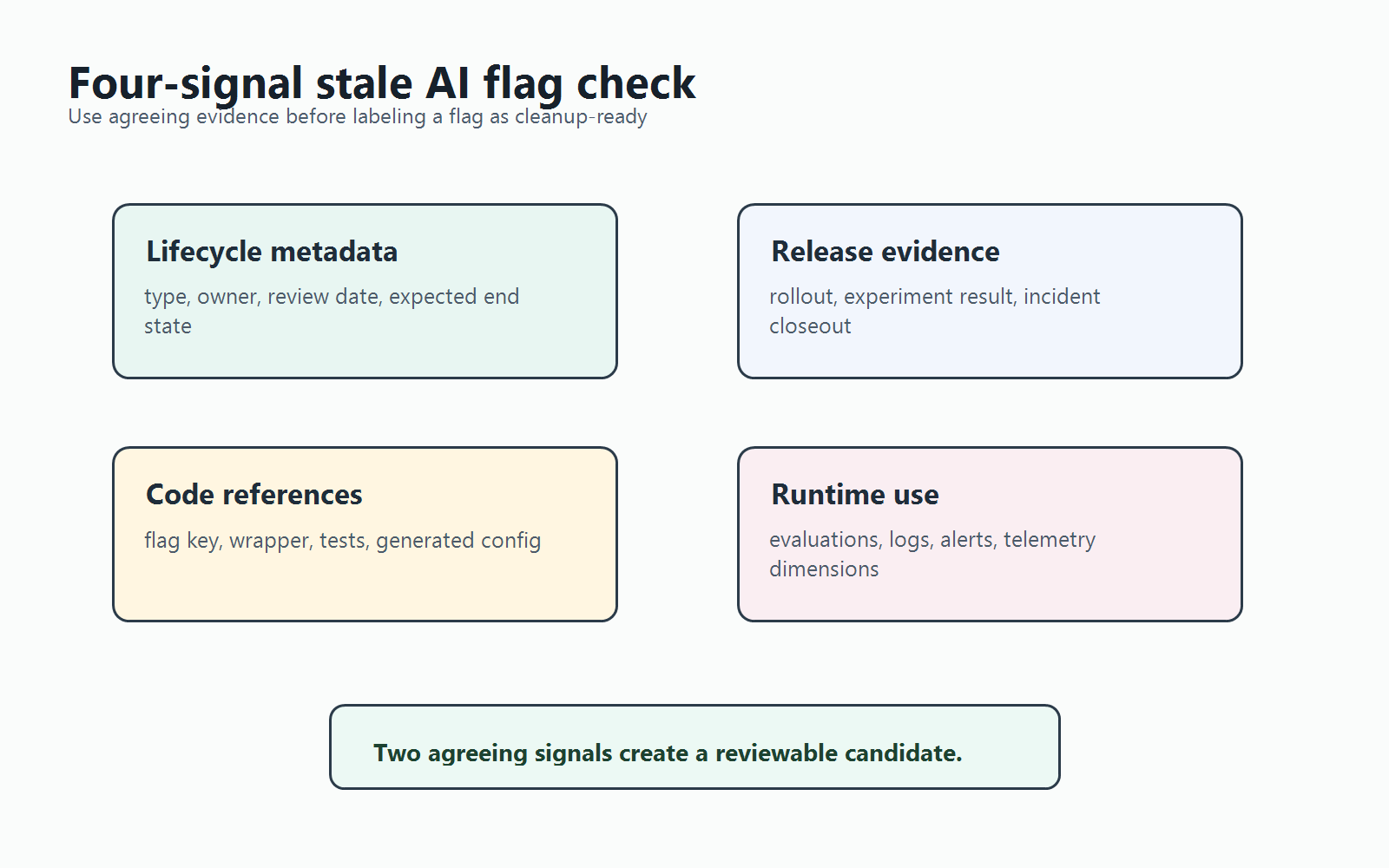
You detect stale AI feature flags by combining four signals: the flag's original AI release purpose, its rollout or experiment evidence, its current code references, and recent runtime use. Age alone is not enough. A long-lived AI kill switch may be healthy, while a two-week-old prompt experiment can already be stale if the team chose a winner and stopped reviewing the old branch.
The useful output is not "delete this flag." The useful output is a reviewable candidate list that tells the owner whether to keep, clean up, archive, or investigate the flag.
What Counts as an AI Feature Flag?
An AI feature flag controls a production behavior where AI is part of the decision surface. Common examples include:
- routing a request between model providers or model versions;
- enabling a new prompt, retrieval strategy, ranking policy, or guardrail;
- changing an agent's tool access, autonomy level, approval rule, or fallback mode;
- exposing AI-generated code or generated UI behavior to a segment;
- running an AI quality, latency, cost, or conversion experiment.
These flags need normal release discipline, but they also need AI-specific context. The cleanup reviewer must know whether the flag changed product behavior, model behavior, policy behavior, cost behavior, or emergency fallback behavior.
FeatBit's AI control layer framing is useful here: each AI decision point is a runtime control surface. That means stale detection should ask whether the control surface still has an active decision to make.
The Four Detection Signals
Use this matrix before asking an AI coding agent, script, or developer to remove anything.
| Signal | What to Check | Why It Matters |
|---|---|---|
| Lifecycle metadata | Flag type, owner, review date, expected end state, linked ticket | Prevents every old flag from being treated as removable |
| Release evidence | Rollout percentage, experiment result, incident note, approval record | Shows whether the original decision is complete |
| Repository references | Exact flag key, typed wrapper, generated config, tests, fallback branches | Shows where cleanup would change code |
| Runtime use | Recent evaluations, telemetry dimensions, model or prompt logs, alerts | Shows whether production still depends on the flag |
A stale AI flag candidate should usually have at least two agreeing signals. For example, a prompt experiment flag that is at 100 percent rollout and still has old prompt branches in code is a cleanup candidate. A model fallback flag with low usage may not be stale if it exists for emergency containment.
Build an AI Flag Inventory First
Detection is easier when every AI flag carries enough context at creation time. If the inventory is missing, build it now as a read-only report.
Start with these fields:
flag_key: ai_summary_prompt_v3
flag_type: experiment
ai_surface: prompt
owner: Search Experience
created_for: compare v2 and v3 summary prompts
expected_end_state: keep winning prompt, remove losing prompt branch
review_trigger: experiment decision accepted
cleanup_allowed_for_agent: prepare_pr_after_owner_approval
fallback_behavior: v2 summary prompt
This is also where FeatBit's feature flag lifecycle management model helps. A flag should have a type, owner, evidence rule, release decision, and cleanup path. Without that contract, stale detection becomes guesswork.
Detect Candidates Without Deleting Anything
Run stale detection in read-only mode first. The report should group flags by decision state, not by age alone.
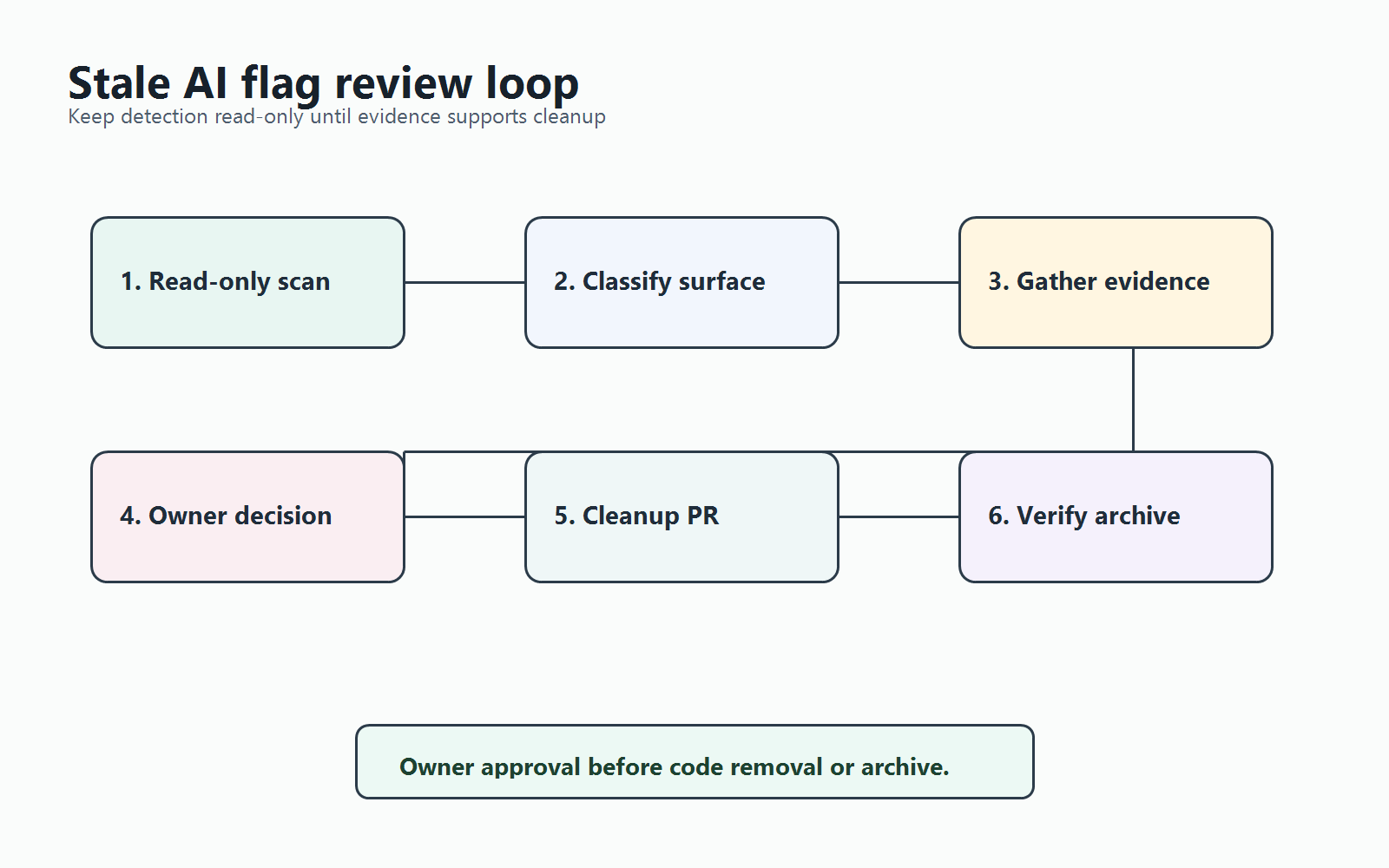
Use this review order:
- List AI-related flags. Filter by tags, naming conventions, project, description, or typed registry entries such as
ai,model,prompt,agent,retrieval, orguardrail. - Classify the control surface. Decide whether the flag controls a release, experiment, operational fallback, permission rule, migration, or emergency kill switch.
- Check release evidence. Look for a completed rollout, accepted experiment result, owner decision, incident closeout, or abandoned branch.
- Search code references. Find exact flag keys, wrapper functions, generated types, tests, environment config, and documentation.
- Check runtime evidence. Confirm whether production still evaluates the flag and whether the non-selected branch is still observed.
- Return a decision. Mark each flag as
cleanup_candidate,retain_operational_control,needs_owner_input, ornot_enough_evidence.
This workflow pairs well with an AI assistant, but the assistant should produce evidence before it edits code. FeatBit's guide to cleaning up stale feature flags with coding agents follows the same principle: gather references and evidence first, then prepare a small cleanup pull request.
AI-Specific Staleness Patterns
AI flags become stale in a few recognizable ways.
| Pattern | Detection Signal | Likely Decision |
|---|---|---|
| Prompt experiment finished | One prompt serves all users and the experiment result is accepted | Remove losing prompt branch after owner approval |
| Model rollout completed | Candidate model is fully rolled out and old model branch has no fallback role | Clean up routing code, but keep a separate emergency fallback if needed |
| Agent tool beta ended | Tool access is enabled for the intended segment and no rollout decision remains | Convert the temporary rollout flag into a stable permission policy or remove it |
| Retrieval strategy abandoned | Flag remains off and the new retrieval path has no recent evaluations | Remove abandoned branch after confirming no scheduled re-test |
| Guardrail rule became permanent | Temporary rule is now part of the operating policy | Rename or reclassify as an operational control instead of treating it as stale |
The last row is important. Not every long-lived AI flag is debt. Some controls should remain because they protect production: kill switches, provider fallback, high-cost model limits, region rules, approval gates, and tenant-specific permissions. The stale signal is not "old." The stale signal is "no active release decision, no operational reason to remain, and cleanup evidence is available."
A Practical Query for Review
If your team uses a flag registry, dashboard export, or FeatBit API workflow, the first report can be simple:
For each AI-related flag:
- show key, type, owner, created date, last modified date, and tags
- show current rollout state by environment
- show whether production evaluated it in the last review window
- show repository references by file path and wrapper name
- show linked release, experiment, incident, or cleanup ticket
- recommend one status: cleanup_candidate, retain, needs_owner_input, insufficient_evidence
If your team connects FeatBit to assistant workflows through the FeatBit MCP server, keep the first pass read-only. Let the assistant gather candidate evidence and draft the cleanup plan. Require explicit approval before any production write, archive, or code removal.
Common False Positives
Avoid these mistakes when reviewing stale AI flags.
Treating 100 percent rollout as automatic cleanup. A model or prompt flag at 100 percent can still protect rollback until the team has another recovery path.
Ignoring code references outside application code. AI flags may appear in evaluation scripts, prompt registries, notebooks, generated types, dashboards, or test fixtures.
Archiving before code cleanup. The dashboard can look clean while stale branches still exist in the repository. Prefer code cleanup, deploy, verification, then archive.
Letting the AI assistant infer product intent. An assistant can find references and summarize evidence. It should not decide that a model, prompt, or agent policy is no longer needed unless the owner rule is explicit.
Mixing temporary rollout flags with permanent controls. A prompt experiment and a provider kill switch should not share the same review rule.
When to Move From Detection to Cleanup
Move from detection to cleanup only when the evidence packet is strong enough for a reviewer to approve the surviving behavior.
Use this checklist:
- the flag type and AI control surface are clear;
- the owner agrees the original release or experiment decision is complete;
- the surviving behavior is explicit;
- repository references are known;
- tests can assert the surviving behavior without the flag branch;
- runtime evidence will confirm that production stopped evaluating the flag after deployment;
- the archive or delete step happens after cleanup is verified.
For the cleanup workflow itself, use stale flag cleanup automation as the next step. This article is about detection. Cleanup is a separate workflow because code removal, deployment verification, and dashboard retirement need a narrower review path.
Source Notes
- FeatBit context: feature flag lifecycle management, AI control layer, FeatBit MCP server workflow, stale flag cleanup automation, and clean up feature flags with coding agents.
- Category context: Unleash documents feature flag types, expected lifetimes, potentially stale states, stale states, lifecycle stages, and archive behavior in its feature flags documentation.
- Category context: DevCycle documents stale feature notifications, stale reasons, evaluation-data caveats, snoozing, and report emails in its stale feature notifications documentation.
- Category context: PostHog's Product for Engineers newsletter describes stale flag criteria, owners, and alerts in "Don't make these feature flag mistakes".
- Image and Open Graph recommendation: use
cover.pngas the social preview. Usestaleness-signal-map.pngnear the four-signal explanation andstaleness-review-loop.pngnear the read-only workflow because both summarize decisions explained in crawlable text.