
How to Adjust AI Parameters on the Fly Without Losing Release Control
Adjusting AI parameters on the fly means changing model behavior through runtime configuration instead of waiting for a redeploy. For production teams, the goal is not only speed. The goal is to change temperature, token limits, model profiles, retrieval depth, timeout budgets, or fallback behavior with targeting, evidence, rollback, and an audit trail.
The safe pattern is to put AI parameter profiles behind feature flags or remote config, evaluate the profile on the server before the AI call, attach the selected profile to telemetry, and expand only when quality, cost, latency, and safety guardrails stay healthy.
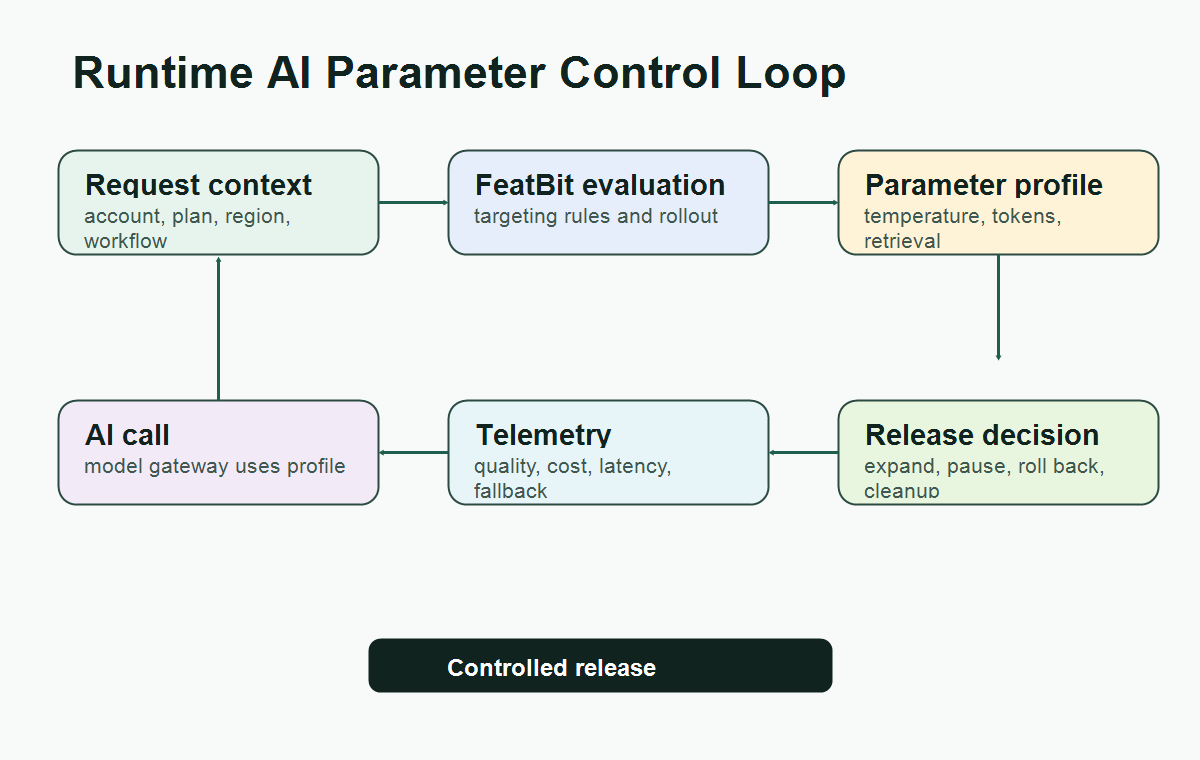
What "On The Fly" Should Mean
"On the fly" should not mean that anyone can edit live model settings casually. It should mean that the application can select an approved parameter profile at request time.
That distinction matters. A raw settings panel can make production behavior drift without a decision record. A flag-controlled profile turns the change into a release decision:
| Runtime question | What the control should answer |
|---|---|
| Who receives the parameter profile? | Internal users, beta accounts, a region, an account tier, or a traffic percentage. |
| Which profile runs? | Conservative, balanced, exploratory, low-cost, high-quality, or incident fallback. |
| What changed? | Temperature, token budget, model route, retrieval depth, timeout, tool choice, or fallback behavior. |
| What evidence is needed? | Quality signal, task outcome, cost, latency, fallback rate, correction rate, or safety review. |
| How does rollback work? | Return the affected segment to the baseline profile without redeploying. |
FeatBit's AI control layer framing is useful here: an AI decision point becomes a named runtime control surface. Parameter tuning is one of those control surfaces when the value affects user-visible behavior, cost, latency, or risk.
Which AI Parameters Belong Behind Runtime Controls
Not every setting deserves a flag. Some values are ordinary engineering defaults. Use runtime control when the setting changes production behavior and the team needs targeted rollout, rollback, or measurement.
Good candidates include:
- model profile, provider route, or reasoning mode;
- sampling settings such as temperature or top-p;
- output token limits and timeout budgets;
- retrieval depth, reranker choice, chunk count, or source filter;
- fallback mode for failed, expensive, slow, or uncertain responses;
- guardrail thresholds, escalation thresholds, or human-review routing;
- tool choice policy for agentic workflows;
- cost-saving mode for specific account tiers or incident states.
OpenAI's Responses API reference documents parameters such as temperature, top-p, and maximum output tokens. Its temperature guidance notes that higher values make output more random while lower values make it more focused, and recommends changing temperature or top-p rather than both at the same time. That is a useful engineering constraint for runtime configuration: do not expose every knob independently when a named profile would be easier to review.
Use Profiles Instead Of Loose Knobs
The most common mistake is to create one flag per low-level parameter:
support_temperature
support_top_p
support_max_tokens
support_timeout_ms
support_retrieval_k
That looks flexible, but it creates combinations nobody reviewed. A safer pattern is a single structured profile flag.
{
  "profile": "support_balanced_v3",
  "modelRoute": "standard_support",
  "temperature": 0.3,
  "topP": 1,
  "maxOutputTokens": 900,
  "timeoutMs": 9000,
  "retrieval": {
    "profile": "verified_docs",
    "maxChunks": 6,
    "reranker": "baseline"
  },
  "fallback": "human_escalation"
}
A profile makes review practical. The owner can say, "This is the balanced support profile," instead of asking every reviewer to reason about a matrix of unrelated settings.
FeatBit supports this pattern through multivariate flags whose variations can be strings, numbers, or JSON. FeatBit's remote config documentation describes changing application behavior in real time without deployment and notes that string, number, or JSON variation data can be used when a boolean value is too limited.
A Runtime Workflow For Parameter Changes
Treat every meaningful AI parameter change as a small release.
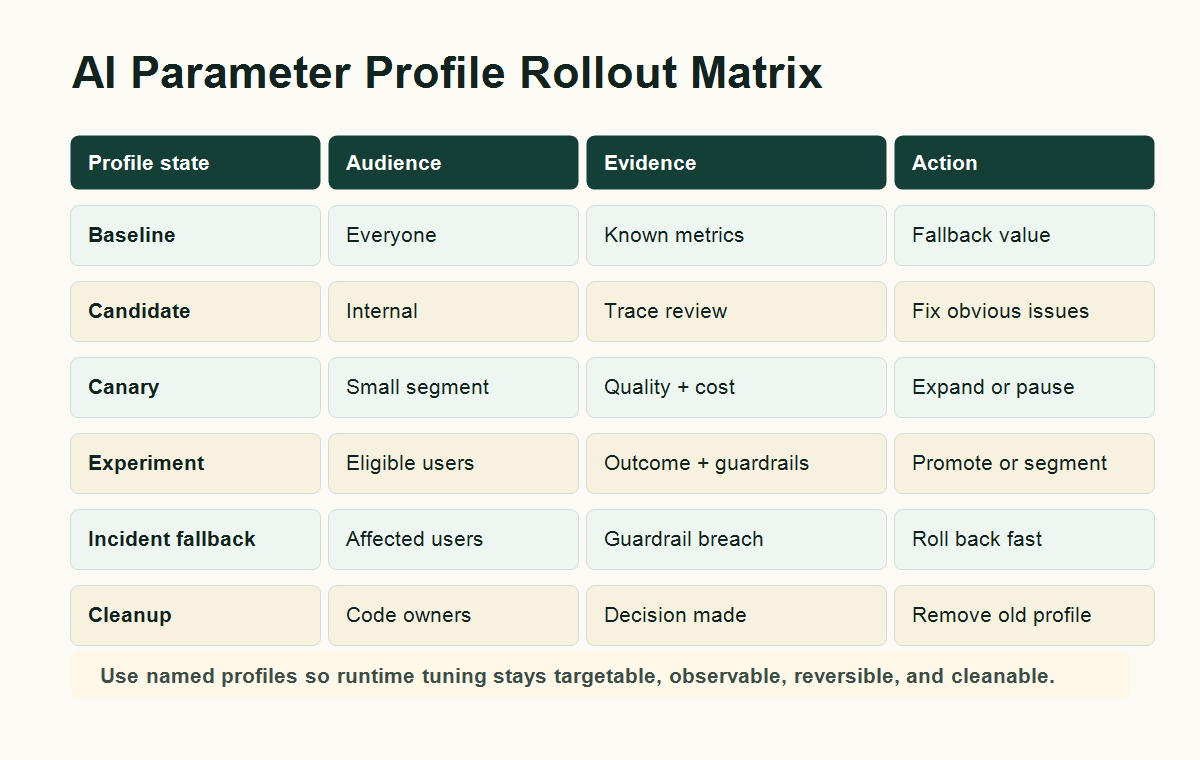
| Stage | Action | Decision evidence |
|---|---|---|
| Define baseline | Keep the current profile as the safe fallback. | Known behavior, current metrics, rollback value. |
| Create candidate | Add a named profile such as support_low_cost_v2 or support_citation_first_v1. |
Change record, owner, intended effect. |
| Internal targeting | Serve the candidate only to employees, test accounts, or staging traffic. | Trace quality, obvious failures, latency and cost checks. |
| Canary rollout | Expand to a small eligible segment. | Quality, task outcome, fallback rate, correction rate, cost, latency. |
| Experiment or staged rollout | Compare profile variants or progressively expand the candidate. | Primary outcome plus guardrails. |
| Release decision | Promote, pause, segment, roll back, or iterate. | Predefined decision rule. |
| Cleanup | Remove losing profiles or convert the winner into ordinary config. | Owner approval and lifecycle record. |
This is narrower than a full AI experimentation platform and broader than a config edit. The profile is a runtime release object. It may support experimentation, but even a non-experimented parameter change should still have targeting, observability, and rollback.
Evaluate The Profile On The Server
AI parameter controls usually belong in the server path because the parameter profile is consumed before or inside the AI call. The server can evaluate the flag once, attach the result to the request context, and send the resolved parameters to the model gateway.
type AiParameterProfile = {
  profile: string;
  modelRoute: string;
  temperature: number;
  topP: number;
  maxOutputTokens: number;
  timeoutMs: number;
  fallback: "baseline" | "human_escalation" | "cached_answer";
};

const fallbackProfile: AiParameterProfile = {
  profile: "support_baseline_v1",
  modelRoute: "standard_support",
  temperature: 0.2,
  topP: 1,
  maxOutputTokens: 700,
  timeoutMs: 8000,
  fallback: "human_escalation",
};

async function answerSupportQuestion(request: SupportRequest) {
  const evaluationContext = {
    keyId: request.accountId,
    plan: request.plan,
    region: request.region,
    workflow: "support_answer",
  };

  const profile = await flags.jsonVariation<AiParameterProfile>(
    "support-answer-parameter-profile",
    evaluationContext,
    fallbackProfile
  );

  const response = await runSupportModel({
    question: request.question,
    modelRoute: profile.modelRoute,
    temperature: profile.temperature,
    topP: profile.topP,
    maxOutputTokens: profile.maxOutputTokens,
    timeoutMs: profile.timeoutMs,
  });

  await trackAiParameterExposure({
    accountId: request.accountId,
    flagKey: "support-answer-parameter-profile",
    profile: profile.profile,
    latencyMs: response.latencyMs,
    estimatedCostUsd: response.estimatedCostUsd,
  });

  return response;
}
OpenFeature's evaluation context specification describes contextual data used for targeting, including rule-based evaluation, overrides, and fractional evaluation. For AI parameter changes, that context is what lets a platform team target profiles by account, workflow, environment, region, plan, or risk tier instead of pushing one global setting to everyone.
For more detail on request-path placement, see FeatBit's guide to server-side evaluation for AI feature flags.
Connect Parameter Changes To Metrics
Parameter tuning without measurement is just live editing. Each profile should create an exposure record that can be joined to outcomes.
Track at least:
- flag key and profile name;
- user, account, session, conversation, or workflow key;
- model route and parameter profile version;
- latency, timeout, error, and fallback state;
- cost or token usage when available;
- quality signal, human correction, user feedback, or task outcome;
- rollout stage and decision owner.
Then define one primary outcome and a few guardrails before expansion.
| Profile change | Primary outcome | Guardrails |
|---|---|---|
| Lower temperature for support answers | Accepted answer without escalation | user correction rate, complaint rate, latency |
| Lower token budget for free-tier chats | Resolved question per cost unit | truncation rate, fallback rate, satisfaction |
| Larger retrieval depth for enterprise accounts | Cited answer accepted by reviewer | latency, irrelevant source rate, token cost |
| Faster model route during incidents | Successful fallback response | answer quality, retry rate, support tickets |
| More exploratory assistant mode for beta users | Completed creative workflow | unsafe output review, user undo rate, cost |
FeatBit's AI experimentation and measurement design pages expand this decision model. The key is to decide what "better" means before the new profile reaches broad production traffic.
Rollback Is Part Of The Parameter Design
Every runtime parameter profile needs a safe fallback value. If FeatBit is unavailable, if the JSON profile fails validation, or if guardrails breach, the application should return to a known baseline.
Use three layers:
- SDK fallback. The application has a validated default profile in code.
- Flag fallback variation. The off variation serves the baseline profile.
- Operational rollback. Operators can target a segment back to baseline, reduce rollout percentage, or activate incident mode.
That rollback design is what separates release control from a settings page. FeatBit's safe AI deployment guidance uses the same operating idea: expose behavior gradually, keep a fallback path available, and make rollback possible before the change scales.
Governance Rules For Live Parameter Editing
Runtime control should not remove review. It should make review smaller and more targeted.
Use these rules before letting teams adjust AI parameters on the fly:
- Give every parameter profile an owner.
- Validate JSON schema before serving the profile.
- Keep dangerous combinations out of the UI or configuration layer.
- Require approval for high-risk profile changes, such as tool authority, retrieval source, threshold relaxation, or broad production expansion.
- Record who changed the profile, which environment changed, and which segment was affected.
- Review temporary parameter flags after the release decision.
- Remove old profiles that no longer have an active release purpose.
The lifecycle rule matters because AI controls can become hard-to-read production debt. FeatBit's feature flag lifecycle management model helps teams treat each flag as a release asset with ownership, evidence, decision state, and cleanup.
How This Differs From Remote Config Alone
Remote config is the mechanism. Release control is the operating model.
Flagsmith's documentation describes Remote Config as typed values returned alongside a feature's on/off state, useful for tweaking behavior without changing code. FeatBit's remote config guide makes a similar point for string, number, and JSON variation values.
For AI systems, that mechanism needs extra discipline because a parameter change can alter quality, cost, safety, data access, or user trust. The practical standard is:
- remote config stores the value;
- feature flag targeting decides who receives the value;
- server-side evaluation applies the value before the AI call;
- telemetry records which value ran;
- rollout and rollback rules decide whether the value expands;
- lifecycle cleanup removes temporary profiles after the decision.
That is the difference between "we can change parameters instantly" and "we can operate AI behavior safely at runtime."
Common Mistakes
Changing every knob independently. Exposing temperature, top-p, token budget, retrieval depth, and fallback as separate live controls creates unreviewed combinations. Use named profiles unless independent control is truly required.
Evaluating too late. If the flag is evaluated after the model call, it cannot control the AI behavior. Evaluate before prompt assembly, retrieval, model routing, tool choice, and parameter injection.
Treating cost as the only metric. Lower token budgets or cheaper model routes can reduce spend while increasing escalations, retries, complaints, or manual correction.
Skipping segment analysis. A profile can help casual users while harming enterprise workflows, regulated regions, or power users. Target and review likely segments explicitly.
Leaving temporary profiles forever. Once the decision is made, promote the winning profile into normal code or durable config, remove losing branches, and archive the temporary release flag.
Starting Checklist
Before adjusting AI parameters on the fly in production, confirm:
- The parameter profile has a clear owner and release question.
- The baseline profile is still available as a fallback.
- The candidate profile changes a reviewed set of values, not a random combination of knobs.
- Flag evaluation happens server-side before the AI call.
- Targeting starts with internal users, a beta segment, or a small percentage.
- Exposure events include flag key, profile name, unit ID, and rollout stage.
- Outcome events can be joined back to the served profile.
- Cost, latency, quality, fallback, and safety guardrails are defined before expansion.
- Rollback can return affected users to the baseline without redeploying.
- Cleanup rules say when the temporary control should be removed or made durable.
Bottom Line
Adjusting AI parameters on the fly is useful only when it is controlled. The production pattern is to move from loose settings to named parameter profiles, serve those profiles through feature flags or remote config, target rollout carefully, measure the result, and keep rollback active.
FeatBit fits that runtime control layer: it helps teams target AI parameter profiles by context, roll them out progressively, connect exposure to evidence, roll back quickly, and clean up temporary controls after the decision.
Source Notes
- OpenAI API context: the Responses API reference documents request parameters including temperature, top-p, and maximum output tokens. This article uses those parameters as examples of values that may need controlled runtime profiles.
- OpenFeature context: the evaluation context specification describes contextual data used for targeting, rule-based evaluation, overrides, and fractional flag evaluation.
- FeatBit implementation context: remote config, create flag variations, targeting rules, percentage rollouts, flag insights, and feature flag lifecycle management support the workflow described here.
- Category terminology context: Flagsmith's Basic Flag Management documentation describes Remote Config as typed values returned with feature state for behavior tweaks without code changes. This article does not make comparative performance, pricing, security, or market-ranking claims.
- Related FeatBit reading: AI control layer, AI experimentation, safe AI deployment, server-side evaluation for AI feature flags, and feature flag lifecycle management.
Image And Open Graph Notes
- Use
cover.pngas the Open Graph image because it summarizes runtime AI parameter profiles as release controls. - Use
runtime-control-loop.pngnear the opening because it shows where request context, flag evaluation, AI parameters, telemetry, and release decisions connect. - Use
parameter-matrix.pngin the workflow section because it explains how baseline, candidate, canary, experiment, fallback, and cleanup states fit together.