
Parameter Stores vs Feature Flags: Where Runtime Control Belongs
Parameter stores are useful when the job is to centralize stable configuration values. Feature flags are the better control plane when the value changes who receives a behavior, how quickly it rolls out, what evidence is required, and how the team rolls back without redeploying.
The confusion comes from one shared word: configuration. A database endpoint, API base URL, or environment default is configuration. So is an AI prompt profile, model route, retrieval depth, guardrail threshold, or agent tool mode. But the second group is not just data to retrieve. It is production behavior to release.
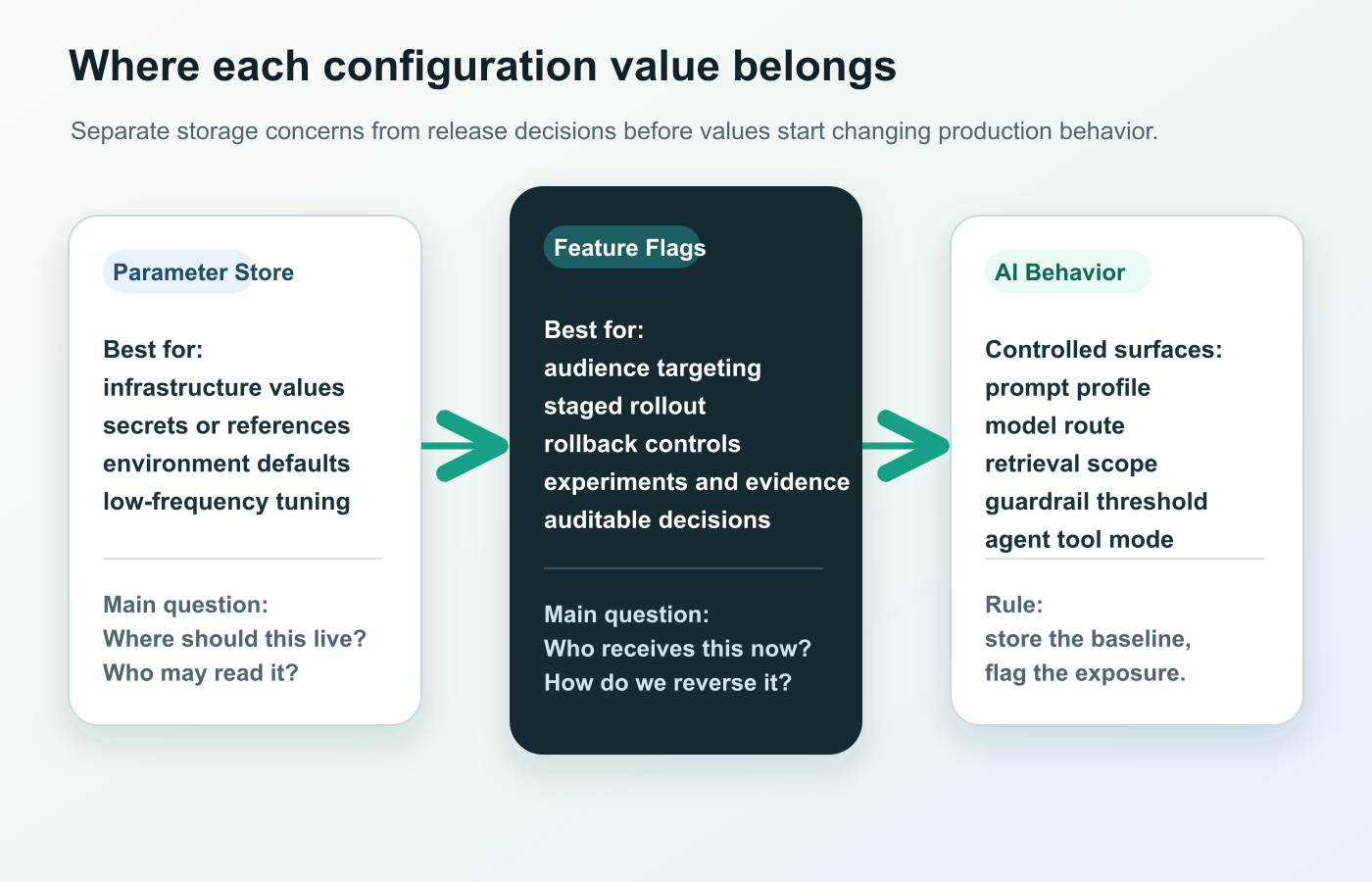
The practical rule is simple: store the baseline, flag the exposure decision.
What Parameter Stores Are Good At
A parameter store is a centralized place to keep named values so applications do not hardcode them. In cloud infrastructure, that often means environment-specific values, service endpoints, resource identifiers, low-frequency tuning settings, and sometimes encrypted strings.
AWS Systems Manager Parameter Store describes this pattern as storing, organizing, and retrieving configuration data at scale. The same AWS page lists examples such as connection strings, environment variables, service endpoints, resource identifiers, and application tuning parameters.
That is valuable infrastructure. A parameter store can help a team:
- avoid hardcoded values in source code;
- organize settings by environment, service, or path;
- apply cloud IAM controls to who can read or write values;
- keep a version history for investigation;
- let deployment templates, workers, and services retrieve the same value consistently.
Parameter stores are especially strong when the question is "Where should this value live?" or "Which service is allowed to read it?"
They are weaker when the question is "Which users should receive this behavior now?" or "Can we expand from 5 percent to 25 percent and roll back if latency moves?"
The New Parameter Store Meaning In Product Teams
Some product and experimentation platforms use "parameter stores" differently from cloud infrastructure teams. Statsig's Parameter Stores documentation frames them as a way to map dynamic config or experiment parameters to runtime values in SDKs. The page explains that teams can define parameters in app code and later remap those parameters to feature gates, experiments, dynamic configs, or layers.
That is a useful abstraction, especially for client applications where release cycles are slow. A mobile app can ship a parameterized tagline, button_color, onboarding_step_count, or model profile key once, then change what the parameter maps to later.
But this product-language meaning also raises the same operating question:
- Is the parameter a stable value that only needs central storage?
- Or is the parameter a release decision that needs targeting, rollout, evidence, rollback, and cleanup?
If the parameter can change user-visible behavior, cost, latency, risk, or access, it needs more than a storage location. It needs a release-control workflow.
Why Feature Flags Are A Different Control Plane
Feature flags are not only boolean switches. In a mature release workflow, a flag is the runtime decision point for exposure: who receives a behavior, under which conditions, at what percentage, with which fallback, and with which evidence.
AWS makes this distinction clearly. Its Parameter Store documentation says it does not recommend Parameter Store for feature flags, operational levers, allow lists, block lists, circuit breakers, or dynamic configurations, and points to AWS AppConfig for those cases. AWS AppConfig describes feature flags and dynamic configurations as ways to adjust application behavior in production, with gradual rollout, validation, monitoring, and rollback.
Azure makes a related distinction through Azure App Configuration, which centralizes application settings and feature flags, supports dynamic setting changes, and controls feature availability in real time.
The pattern is consistent across platforms: configuration storage is not the same as release control.
| Question | Parameter store | Feature flag or remote config flag |
|---|---|---|
| Where should the value live? | Strong fit | Sometimes, but not the main job |
| Who can read or write it? | Strong fit through IAM or platform permissions | Also needed, but tied to release workflow |
| Who should receive the behavior? | Weak fit | Strong fit through targeting rules |
| Can we start with internal users or 5 percent? | Weak fit | Strong fit through staged rollout |
| Can we instantly roll back a bad behavior? | Usually custom application logic | Strong fit when rollback variation is built in |
| Can we connect exposure to metrics? | Usually outside the store | Strong fit when events and insights are attached |
| Can we clean it up after the decision? | Possible, but not release-specific | Strong fit when flags have lifecycle rules |
A Decision Rule For Engineering Teams
Use the value's blast radius to choose the control plane.
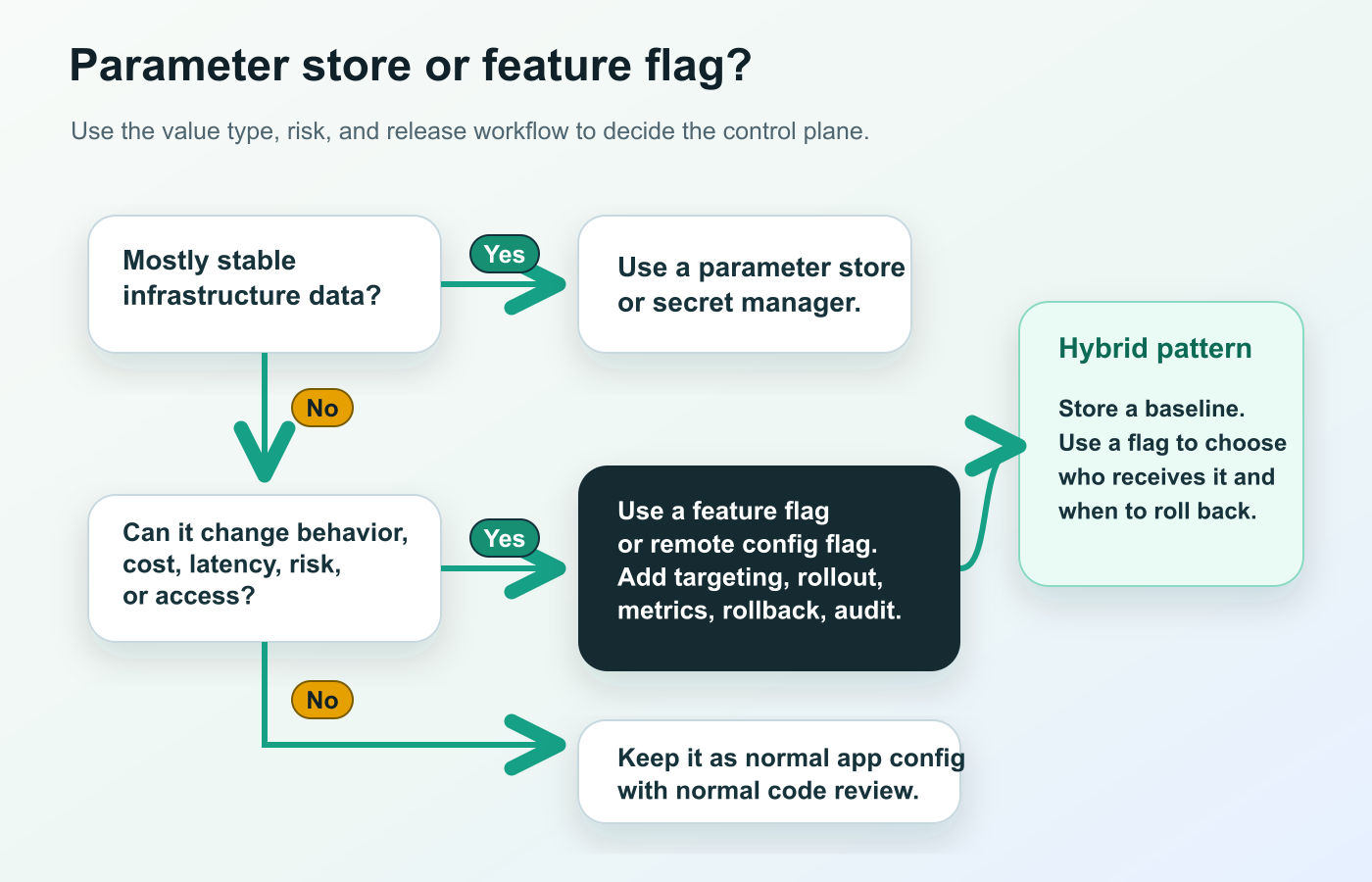
Use a parameter store when the value is mostly stable infrastructure data:
- database hostnames, service URLs, queue names, and resource identifiers;
- non-rotating connection strings or references to secrets;
- environment names, region codes, or deployment-time constants;
- low-frequency tuning values that do not need targeted exposure;
- values that should change through infrastructure review, not product rollout.
Use a feature flag or remote config flag when the value changes production behavior:
- enabling a feature for internal users, beta accounts, a region, or a percentage of traffic;
- selecting a prompt, model route, retrieval profile, or guardrail mode;
- changing timeout budgets, fallback modes, or cost-saving profiles during an incident;
- activating an agent tool mode for one workflow before broader release;
- testing a product variant, onboarding path, recommendation strategy, or pricing experience;
- rolling back a risky behavior without redeploying the application.
Use normal application config when the value is low-risk and does not need central storage or runtime release control.
The hybrid pattern is often the cleanest: keep stable baselines in a parameter store or code configuration, then use a flag to decide who receives the candidate behavior and when to roll back.
How This Applies To AI Systems
AI systems make the distinction more important because many "parameters" are behavior changes.
A temperature value might look like a simple number, but it can change answer determinism. A model route can change quality, latency, and cost. A retrieval profile can change which sources influence an answer. A guardrail threshold can change when a user gets blocked or escalated. An agent tool mode can change whether the system drafts, reads, writes, or asks for approval.
These values should not be treated as casual live edits just because they are easy to store.
A safer AI runtime-control contract includes:
runtime_control:
  key: support_answer_profile
  baseline: support_safe_v2
  candidate: support_faster_model_v1
  storage_source: parameter_store_or_code_default
  exposure_control: feature_flag
  first_audience: internal_support_team
  rollout_path:
    - internal
    - 5_percent_beta_accounts
    - 25_percent_eligible_accounts
  guardrails:
    - answer_quality_review
    - latency_p95
    - fallback_rate
    - estimated_cost_per_case
  rollback: serve_support_safe_v2
  cleanup: promote_candidate_or_remove_after_decision
This is where FeatBit's AI control layer point of view matters. The flag is not the prompt editor, model gateway, vector database, or secret store. It is the runtime control point that decides which approved behavior is active for a user, account, environment, region, workflow, or rollout stage.
For a deeper AI configuration model, see AI config management, how to adjust AI parameters on the fly, and what AI configuration one feature flag can control.
What FeatBit Adds To The Workflow
FeatBit supports the runtime-control side of this decision. Its remote config guide explains that remote config lets teams alter application behavior in real time without waiting for a deployment, and that FeatBit can use string, number, or JSON variation data for non-boolean values.
FeatBit's flag variation documentation covers boolean and multivariate flags, including string, number, and JSON variations. That means a team can serve named profiles instead of loose knobs:
{
  "profile": "support_safe_v2",
  "modelRoute": "standard_support",
  "retrievalProfile": "verified_docs",
  "maxOutputTokens": 900,
  "timeoutMs": 9000,
  "fallback": "human_escalation"
}
The profile can be evaluated server-side before the AI call or product workflow starts. Then the application attaches the selected variation to telemetry and business events. FeatBit's percentage rollout documentation explains incremental rollout, and the audit log documentation describes tracking changes made to feature flags in an environment.
That combination changes the operating model:
- Store a safe baseline in code, a parameter store, or a reviewed default.
- Create a FeatBit flag with typed variations for the candidate behavior.
- Target internal users, beta accounts, regions, tiers, or risk segments first.
- Expand with percentage rollout only after guardrails look healthy.
- Roll back by serving the baseline variation to affected audiences.
- Decide whether to promote, segment, iterate, or remove the temporary control.
The result is not "FeatBit replaces every parameter store." It should not. The result is a cleaner boundary: parameter stores own stable configuration storage, while FeatBit owns exposure decisions, progressive rollout, rollback, experimentation, and release learning.
Pitfalls To Avoid
Putting every value behind a flag. A flag is a release-control asset. If a value is stable infrastructure data, keep it in a parameter store, secret manager, or normal app config.
Using a parameter store as a hidden feature flag system. If the application polls a key and changes behavior for live users, you have built an unofficial flag system without targeting, rollout, metrics, audit, or cleanup.
Exposing loose AI knobs. Do not create independent controls for every low-level AI setting unless reviewers understand all combinations. Named profiles are easier to approve and safer to roll back.
Skipping fallback design. A runtime control needs a safe off variation or baseline profile. Without that, rollback becomes another engineering project.
Ignoring assignment consistency. If a value is part of an experiment or staged rollout, decide whether assignment should be by user, account, conversation, device, or workflow. A parameter store normally will not solve that by itself.
Leaving temporary parameters forever. Every release-control parameter should have an owner, evidence rule, and cleanup expectation. FeatBit's feature flag lifecycle management model helps keep runtime control from turning into release debt.
A Practical Split For Platform Teams
For a platform team, the clean split looks like this:
| Control surface | Primary owner | Best home |
|---|---|---|
| Database endpoint | Platform or infrastructure | Parameter store or secret manager |
| API base URL | Platform or service owner | Parameter store, service discovery, or app config |
| Prompt profile selection | AI product or platform | Feature flag or remote config flag |
| Model route selection | AI platform | Feature flag with server-side evaluation |
| Retrieval profile | Search or AI platform | Feature flag when exposure varies by audience |
| Guardrail threshold | AI safety, product, or platform | Feature flag with rollout and metrics |
| Agent tool mode | Platform, security, or workflow owner | Feature flag plus hard authorization layer |
| Emergency fallback | Service owner or incident commander | Feature flag kill switch or rollback variation |
If a value changes the release decision, do not bury it in a parameter store simply because it is a parameter. Give it a control surface that operators, product managers, and engineers can reason about.
Bottom Line
Parameter stores answer the storage question. Feature flags answer the release question.
Use parameter stores for stable configuration, secrets references, environment defaults, and infrastructure values. Use feature flags or remote config flags when the value affects who gets a behavior, how it rolls out, how evidence is collected, how rollback works, and how the decision is cleaned up.
For AI-era software, that distinction is not academic. Prompts, model routes, retrieval scopes, guardrail thresholds, and agent tool modes are often runtime release decisions. Store the baseline where it belongs, then use FeatBit to control exposure, measure the result, roll back quickly, and remove temporary controls after the decision.
Source Notes
- Statsig context: Parameter Stores describes mapping dynamic config or experiment parameters to runtime values and remapping parameters to gates, experiments, dynamic configs, or layers.
- AWS context: Systems Manager Parameter Store describes configuration storage and points feature flags and dynamic configurations toward AWS AppConfig.
- Azure context: Azure App Configuration describes centralized settings, feature flag management, dynamic setting changes, and real-time feature availability control.
- FeatBit implementation context: remote config, flag variations, percentage rollouts, audit logs, and feature flag lifecycle management support the workflow described here.
Image And Open Graph Recommendations
- Use
/images/blogs/parameter-stores-vs-feature-flags-runtime-control/cover.pngas the Open Graph image because it summarizes the storage-versus-control distinction. - Use
runtime-control-map.pngnear the opening to show the boundary between parameter stores, feature flags, and AI behavior. - Use
decision-flow.pngin the decision section to make the article useful for readers scanning for a practical rule.