
AI-Assisted Flag Management: A Practical Workflow for Developers
AI-assisted flag management is not about letting an agent decide what reaches production. The useful version is narrower and more reliable: let AI draft the flag plan, generate the first implementation checklist, find places in the code that need a guard, and prepare cleanup notes. Keep the system of record, approvals, rollout rules, targeting, event tracking, and rollback authority in your feature flag platform.
That separation matters because a feature flag is a production control, not just a code annotation. A bad flag can expose unfinished behavior, split a user journey incorrectly, pollute experiment data, or leave dead code behind. AI can reduce the manual work around flag creation, but it should not remove the deterministic controls that make feature flags safe.
This tutorial shows a practical workflow for teams using FeatBit or evaluating how to bring AI assistants into feature flag work without turning release management into a chat prompt.
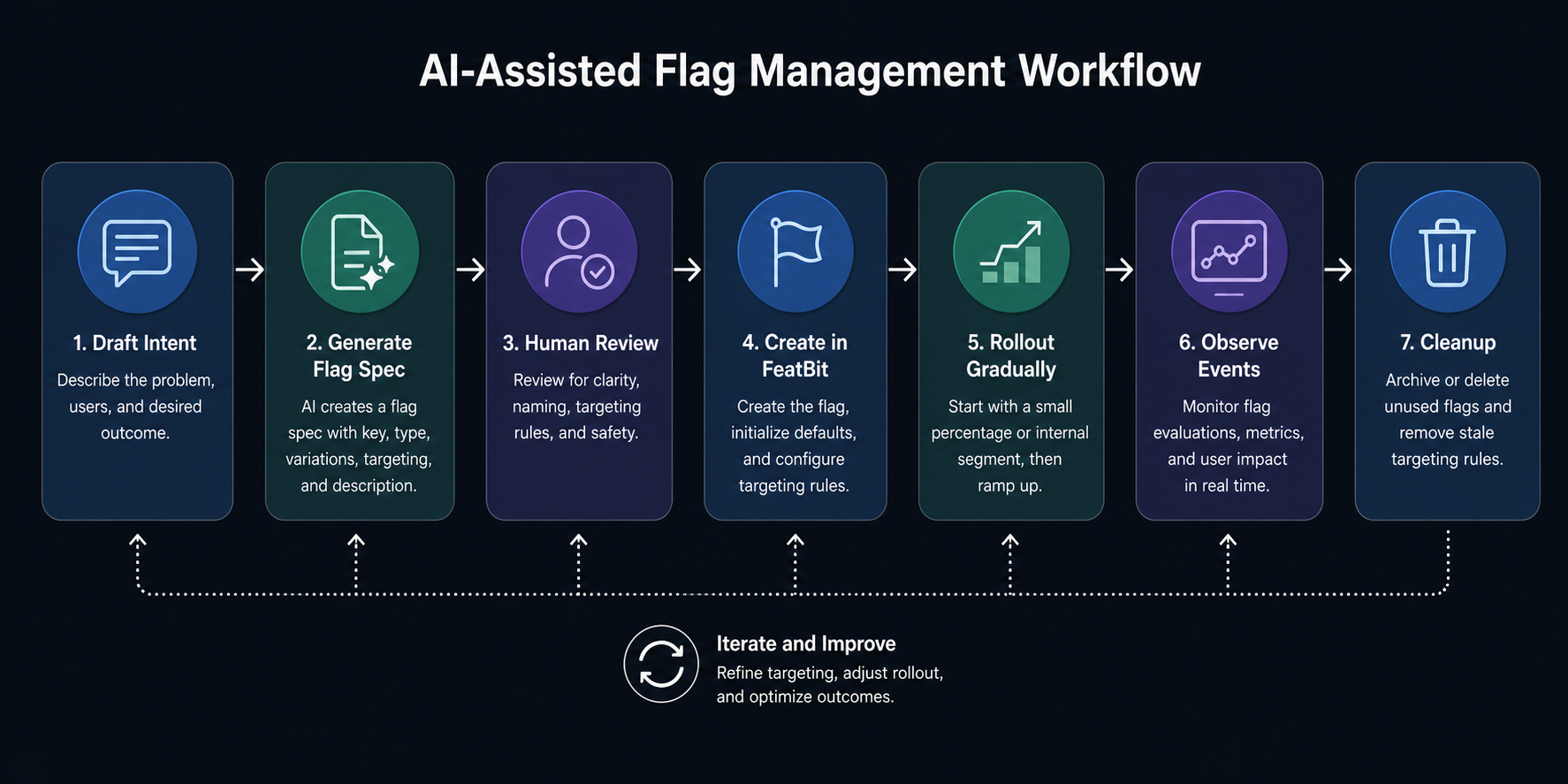
The developer job behind the keyword
When developers search for AI-assisted flag management, they usually are not looking for another definition of feature flags. They want to know how much of the flag lifecycle can be accelerated by an AI assistant without losing control.
The real workflow has seven jobs:
- Decide whether the change needs a flag.
- Name the flag so it is searchable and hard to misuse.
- Choose the flag type, fallback, variations, and owner.
- Add code that evaluates the flag in the right runtime boundary.
- Create targeting and rollout rules in the flag platform.
- Connect exposure and business events so the team can learn from the rollout.
- Remove the flag when it has served its purpose.
AI can help with every job, but it should not own every decision. Treat the assistant as a drafting layer and FeatBit as the control plane.
Start with a flag intent file
Before asking an assistant to create anything, give it a small structured brief. This prevents the model from inventing a vague flag, using an unsafe default, or mixing release flags with experiment flags.
flag_intent:
  key: checkout-v2-release
  purpose: Release the redesigned checkout flow gradually.
  type: boolean
  fallback: false
  owner: payments-platform
  environments:
    - development
    - staging
    - production
  first_target:
    rule: Internal staff and beta customers only.
  rollout_plan:
    - 0 percent in production until approval
    - 5 percent after smoke testing
    - 25 percent after error and conversion checks
    - 100 percent after product signoff
  rollback_trigger:
    - Increased checkout error rate
    - Payment completion regression
  cleanup_date: 2026-07-15
Then ask the assistant to review the brief instead of acting on it immediately:
Review this flag intent. Identify missing fields, unsafe defaults, unclear owner, telemetry gaps, and cleanup risks. Do not create or enable the flag.
This is a better first prompt than "create a checkout flag" because it turns AI into a reviewer before it becomes an operator.
Let AI draft, then validate against FeatBit rules
For FeatBit, the flag specification should map to platform concepts the team can inspect: key, type, variations, fallback, targeting, rollout percentage, environments, and lifecycle ownership. If your team uses the FeatBit REST API, the assistant can prepare a request plan or a review checklist, but production mutation should still run through a validated script, CI job, or human-approved workflow.
A useful assistant output looks like this:
{
  "key": "checkout-v2-release",
  "type": "boolean",
  "fallback": false,
  "owner": "payments-platform",
  "initialProductionState": "off",
  "requiresApprovalBeforeProductionTargeting": true,
  "cleanupDate": "2026-07-15",
  "telemetry": {
    "exposureEvent": "checkout_v2_exposed",
    "successMetric": "payment_completed",
    "guardrails": ["checkout_error", "payment_failed"]
  }
}
The important part is not the JSON shape itself. The important part is that the AI output is reviewable before it changes the flag platform.
Add guardrails for what AI may change
AI-assisted flag management becomes risky when the assistant has the same authority as a release manager. Keep the permissions narrow.
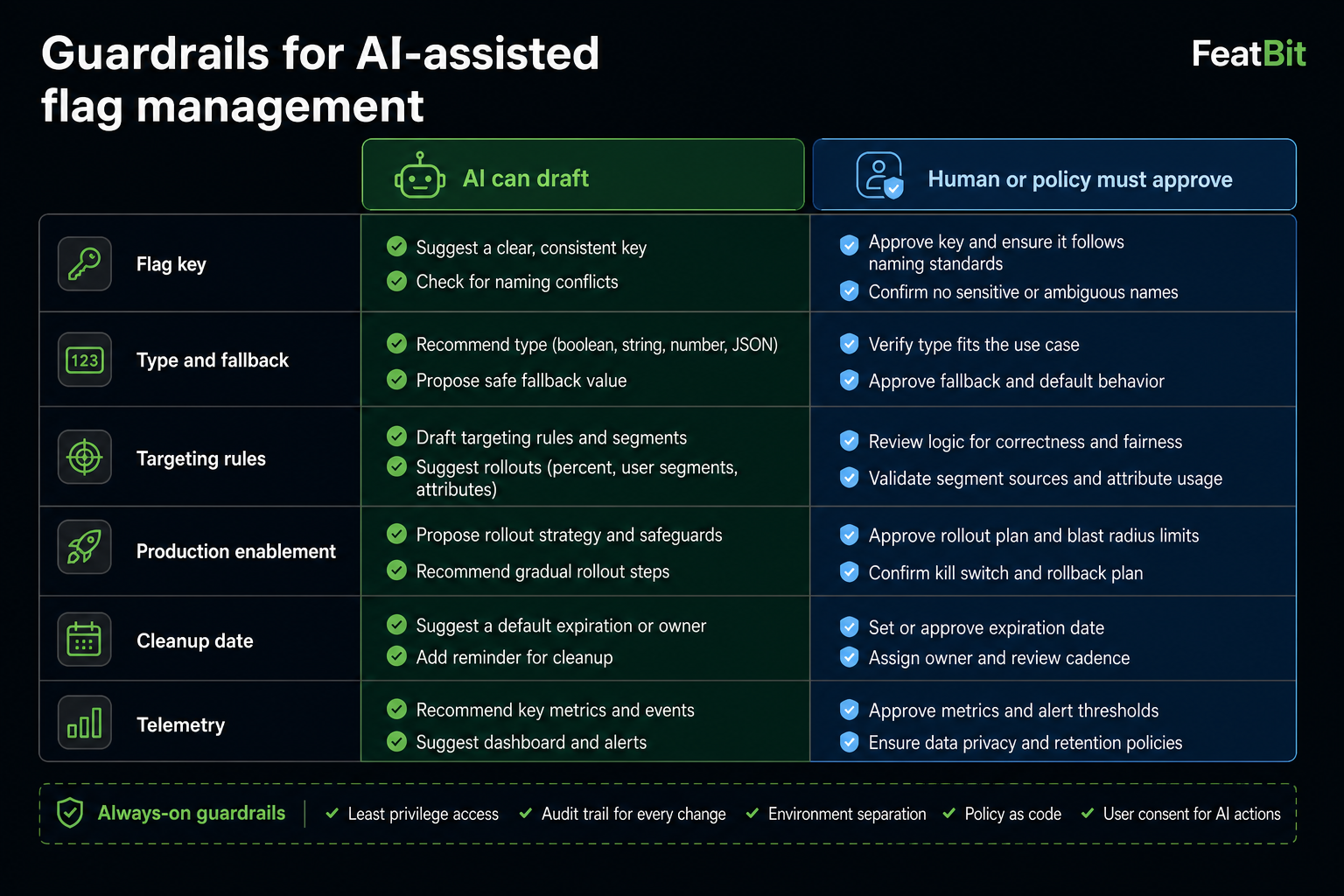
Use a simple operating model:
| Task | AI can draft | Human or policy must approve |
|---|---|---|
| Flag name and description | Yes | Naming convention exceptions |
| Flag type and fallback | Yes | Fallback changes for production paths |
| Code insertion points | Yes | Merge to protected branches |
| Targeting rules | Yes | Production audience changes |
| Rollout percentage | Yes | Any production increase |
| Experiment metrics | Yes | Primary metric and guardrail selection |
| Cleanup plan | Yes | Removing shared or long-lived flags |
This model also helps if you later expose FeatBit through internal tools or an MCP server. The Model Context Protocol security guidance emphasizes explicit consent, scope boundaries, and protection against unsafe tool use. Those ideas apply directly to feature flag operations because flag updates can change production behavior.
Keep evaluation deterministic in code
AI can find the likely code path, but the runtime behavior should stay boring. Evaluate a flag once at the correct boundary, use an explicit fallback, and keep business logic separate from flag retrieval.
type CheckoutExperience = 'classic' | 'v2';

export function selectCheckoutExperience(isCheckoutV2Enabled: boolean): CheckoutExperience {
  return isCheckoutV2Enabled ? 'v2' : 'classic';
}
The assistant can suggest where isCheckoutV2Enabled should come from. The implementation should still follow your SDK pattern and your app architecture. If you use OpenFeature, keep the provider boundary explicit. The OpenFeature specification defines stable concepts such as evaluation APIs, providers, evaluation context, hooks, events, and tracking that are useful when teams want flag evaluation to remain portable.
For FeatBit projects, a good implementation prompt is:
Find the checkout entry point and propose the smallest code change that passes an evaluated boolean flag into the checkout selection function. Keep the FeatBit SDK call outside pure business logic. Include tests for fallback behavior.
This prompt narrows the assistant's work to code structure and tests. It does not give the assistant authority to enable the feature.
Use AI to improve rollout planning
The most valuable AI assistance often happens before rollout. Ask the assistant to find missing checks:
Given this flag intent and code diff, list the production checks required before increasing rollout from 5 percent to 25 percent. Include telemetry, support readiness, data migration, and rollback checks.
The output should become a rollout checklist:
- The flag is off by default in production.
- Internal staff can test the new path through a targeting rule.
- The rollback path has been tested with the flag disabled.
- Exposure events and success metrics are visible before rollout starts.
- Guardrail metrics have owners and thresholds.
- The cleanup date is tracked in the ticket or flag description.
FeatBit's value in this workflow is that rollout remains an operational control. AI can draft the checklist, but the actual audience expansion happens through FeatBit rules, approvals, and environment-specific configuration.
For a deeper grounding in release patterns, see FeatBit's guide to implementing feature flags across the stack and the article on progressive delivery with feature flags.
Use AI for cleanup before it becomes debt
Flag cleanup is an ideal AI-assisted task because the assistant can search code, summarize references, and draft a removal plan. It should still produce a pull request that humans can review.
Ask for a cleanup plan:
The flag checkout-v2-release is fully rolled out. Find all references, identify tests that should change, and draft a safe removal plan. Do not delete code yet.
A strong response should include:
- Every code reference to the flag key.
- Whether the fallback path is still reachable.
- Which tests cover each branch.
- Whether documentation or runbooks mention the flag.
- Whether telemetry dashboards depend on the exposure event.
- A staged pull request plan for removal.
This keeps AI focused on analysis and drafting. The team still reviews the behavior change.
What not to automate
Do not let AI autonomously:
- Enable a production flag without approval.
- Increase rollout to a broader audience based only on a chat response.
- Change experiment metrics after an experiment has started.
- Delete a flag without code search and owner review.
- Reuse an old flag key for a new purpose.
- Turn a release flag into a permission flag without changing ownership and lifecycle expectations.
These are governance decisions. AI can prepare evidence, but the system should require a human or policy gate.
How this differs from vendor-specific AI flag tools
The feature flag market is moving toward AI-assisted workflows. Unleash documents a beta MCP server for managing flags with AI assistants and notes that production use is not yet recommended for that experimental feature. DevCycle documents an MCP server that lets AI tools interact with feature management from coding environments. PostHog has been writing about AI-assisted product engineering and product analytics workflows, including AI usage around its product platform.
Those examples show the category direction, but the practical question for engineering teams is vendor-neutral: where should AI stop?
For a FeatBit workflow, the answer is:
- AI drafts the flag intent, implementation checklist, rollout checklist, and cleanup plan.
- FeatBit stores the flag configuration, environment state, targeting rules, and rollout controls.
- Developers keep SDK usage explicit in code.
- Product and engineering owners approve production changes.
- Telemetry determines whether the rollout proceeds.
That boundary gives teams the speed benefit of AI without converting feature management into an unreviewed automation surface.
A reusable prompt pack
Use these prompts as a starting point for your team.
Flag creation review
Review this feature request and decide whether it needs a feature flag. If yes, propose a flag key, type, fallback, owner, environments, rollout plan, telemetry events, and cleanup date. Do not create the flag.
Implementation review
Review this code diff for feature flag safety. Check fallback behavior, repeated evaluations, mixed business logic, missing tests, and cleanup risk.
Rollout review
Before increasing rollout, review the current flag plan, exposure data, error signals, support notes, and rollback path. Return a go, wait, or rollback recommendation with evidence gaps.
Cleanup review
The feature is fully released. Find all references to this flag, identify the permanent code path, list tests to update, and draft a removal pull request plan. Do not remove code automatically.
Final checklist
Before you connect an AI assistant to any feature flag workflow, make sure these controls exist:
- A structured flag intent format.
- A naming convention that makes flag purpose visible.
- Explicit fallbacks for every flag type.
- Environment-specific production approval.
- Telemetry for exposures, success metrics, and guardrails.
- A cleanup date and owner.
- Read-only AI access by default.
- Human approval for production mutations.
- Audit logs for any tool-driven flag changes.
AI-assisted flag management should make developers faster at the work around release control. It should not make production behavior less accountable. Keep FeatBit as the deterministic control plane, use AI as a drafting and review assistant, and let evidence guide rollout decisions.
Source notes
- FeatBit product context: FeatBit website, FeatBit REST API documentation, and the FeatBit open-source repository.
- Standards and security context: OpenFeature specification and Model Context Protocol security best practices.
- Category context: Unleash MCP Server documentation, DevCycle MCP documentation, and PostHog's public writing about AI-assisted product engineering.
- Image recommendation: use
/images/blogs/ai-assisted-flag-management/cover.pngas the Open Graph image. The body diagrams should remain crawlable supplements to the text, not the only place where the workflow or guardrails are explained.