
PostHog AI Feature Flags: What to Check Before AI Changes Rollouts
PostHog AI feature flags are worth evaluating as a workflow question, not only as a product feature. PostHog documents feature flags for gradual rollout, targeting, A/B testing, remote configuration, and kill switches, and it documents PostHog AI as an assistant that can work inside the PostHog platform, including creating feature flags. The practical question for engineering teams is what AI should be allowed to create, change, approve, and roll back.
This article is for developers and platform teams who searched for PostHog AI feature flags because they want to understand the new AI-assisted feature flag workflow. It is not a claim that PostHog is unsafe or that every team needs to migrate. It is a control checklist: if an AI assistant can create or manage feature flags, how do you keep production release decisions reviewable?
What PostHog Documents Today
PostHog's feature flag documentation describes flags as a way to toggle features for users, groups, or traffic percentages without redeploying code. The same documentation lists common uses such as phased rollouts, kill switches, targeting, A/B testing, remote configuration, and beta programs.
PostHog's feature flag creation docs also describe several implementation details that matter when AI is involved:
| PostHog feature flag concept | Why it matters for AI-assisted workflows |
|---|---|
| Flag key and description | The assistant must create a key humans can recognize in code and incident reviews. |
| Boolean, multivariate, and remote config flags | The assistant should not choose a flag type without knowing whether the change is a release, experiment, or config decision. |
| Release conditions and rollout percentages | The assistant needs a reviewable audience and percentage plan before any production change. |
| Client-side, server-side, or both runtimes | Sensitive backend controls should not accidentally become client-visible flags. |
| Evaluation contexts | The assistant should know where a flag is evaluated, such as app, platform, service, or environment. |
| Usage dashboards | Rollout decisions need call volume and variation evidence, not only a flag being enabled. |
PostHog's PostHog AI docs say the assistant can reference product data, perform actions in PostHog, use developer tools, create feature flags, summarize insights, and search documentation. PostHog's MCP docs also describe a hosted MCP endpoint that can let AI agents use PostHog from MCP-compatible clients, including feature flag and experiment management.
Those are useful capabilities. They also move feature flag work closer to the same place developers write prompts, inspect errors, query data, and ask an assistant to make changes. That is why the control boundary matters.
The Reader Job: Navigate Capability Without Losing Release Control
When someone searches "PostHog AI feature flags," they may be trying to do one of five things:
- Learn whether PostHog AI can create feature flags.
- Understand how PostHog feature flags connect to experiments and product analytics.
- Decide whether an AI assistant should manage rollout settings.
- Compare a product analytics-centered flag workflow with a release-control-centered flag workflow.
- Find a safer operating model before letting an assistant mutate production behavior.
The first two questions are product navigation. The last three are engineering governance. A strong AI feature flag workflow should answer both.
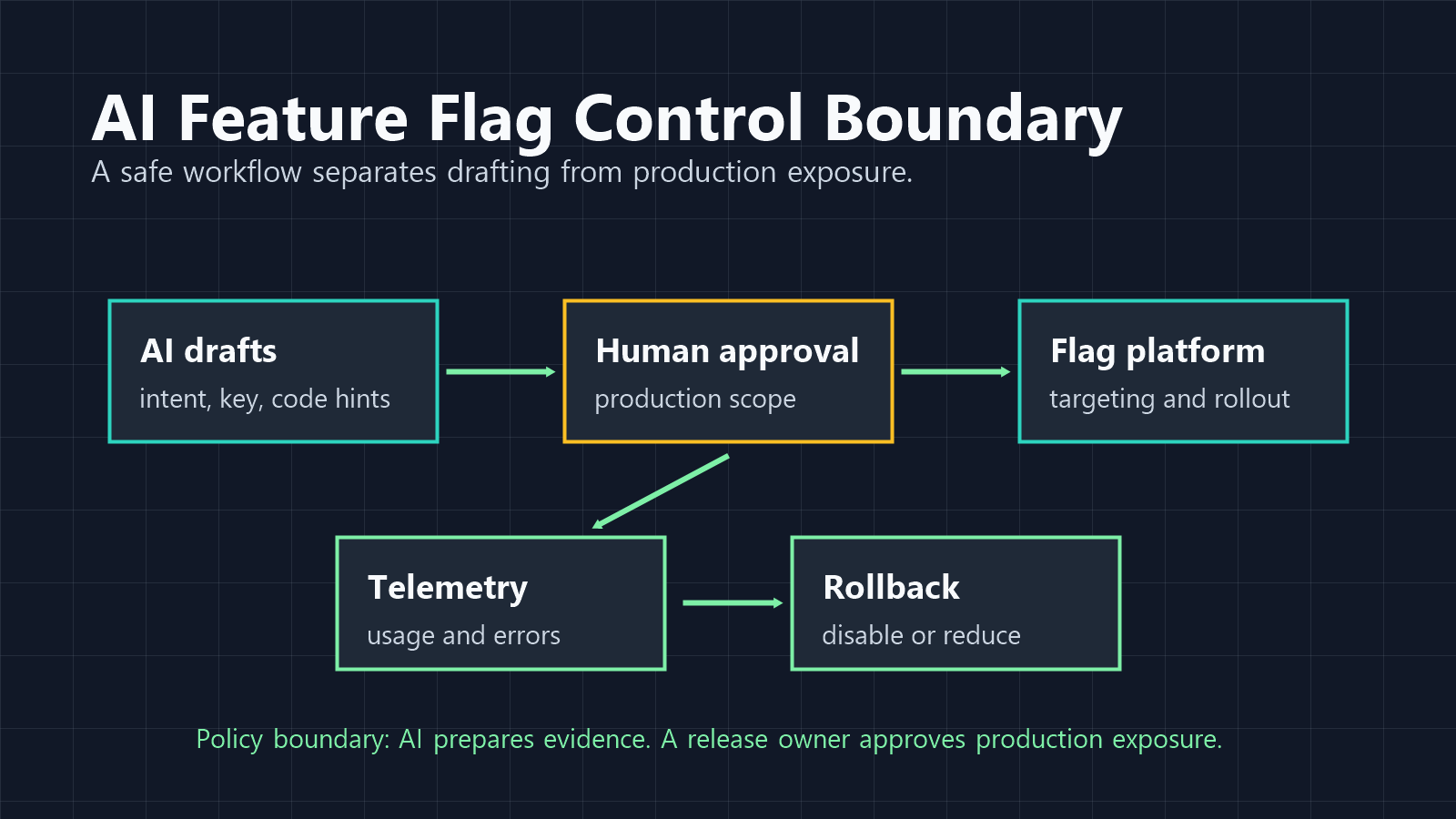
FeatBit's lens is simple: a feature flag is release-decision infrastructure. It separates deployment from release, controls exposure, creates rollback paths, and gives the team evidence for the next decision. AI can draft or accelerate the work around those decisions, but it should not erase the decision boundary.
A Control Checklist for PostHog AI Feature Flags
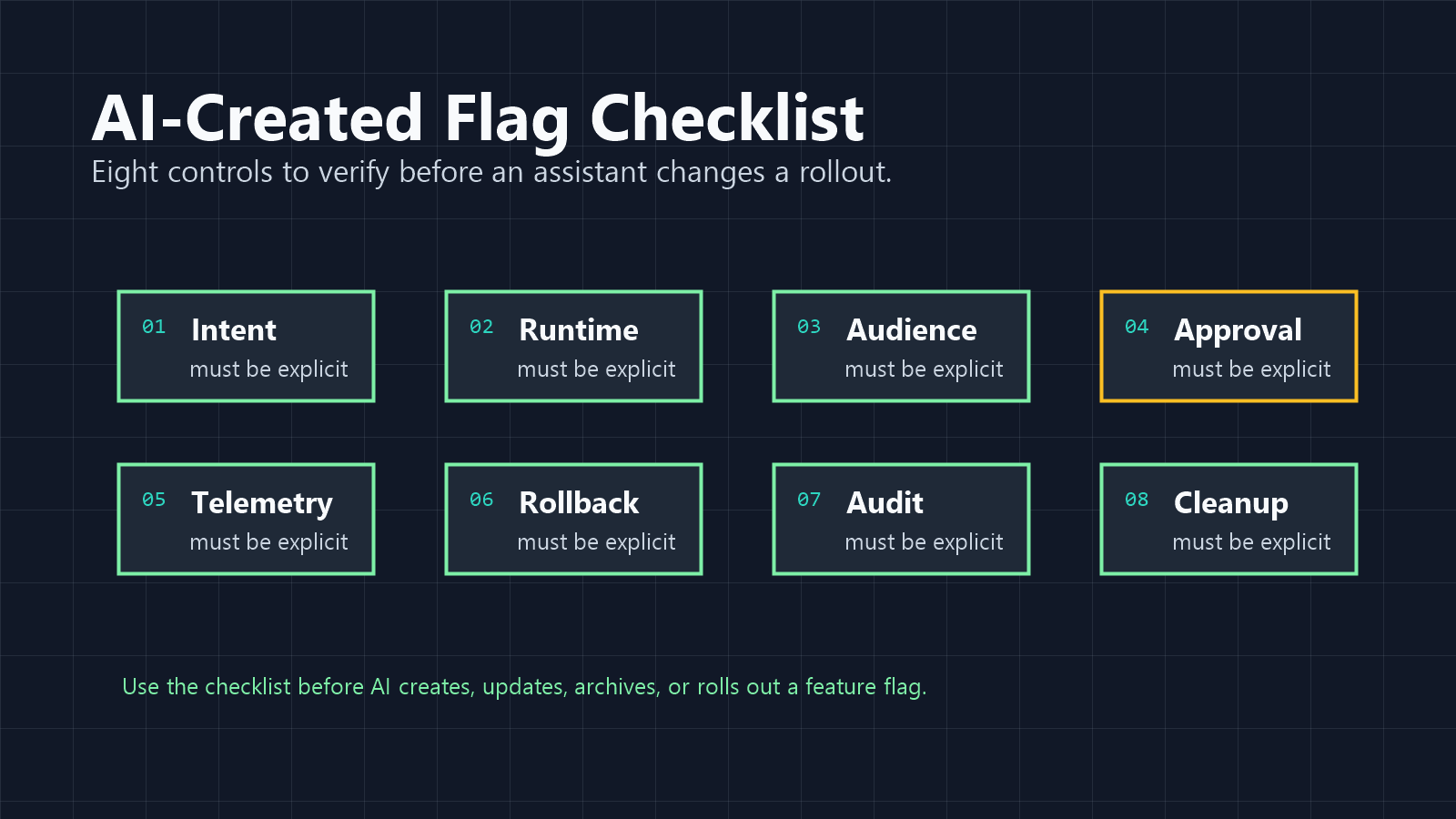
Use this checklist before you let an AI assistant create or modify feature flags in any platform.
| Control | Question to answer | Risk if skipped |
|---|---|---|
| Intent | Is this flag for release, experiment, remote config, permission, or operations? | The assistant may choose the wrong flag type or lifecycle. |
| Runtime | Should evaluation happen client-side, server-side, or both? | Sensitive controls may be exposed to the wrong runtime. |
| Audience | Which users, groups, cohorts, accounts, or percentages are included first? | A prompt can become a broad production rollout. |
| Approval | Who approves production creation, targeting, rollout increase, and deletion? | AI-created changes become hard to distinguish from release decisions. |
| Telemetry | Which exposure, success, guardrail, and error signals are reviewed? | The team can roll out faster but learn less. |
| Rollback | What exact flag change reverses the release without redeploying? | A bad rollout still requires manual code or deployment recovery. |
| Audit | Can reviewers reconstruct who or what changed the flag and why? | Incidents lose context, especially when tools act across systems. |
| Cleanup | What owner, review date, and end state are attached to the flag? | AI-created flags become long-lived technical debt. |
The checklist does not require a specific vendor. It requires a release-control model.
Where AI Should Help
AI is useful around feature flags when the task is tedious, structured, and reviewable.
Good AI-assisted jobs include:
- proposing whether a change needs a flag;
- drafting the flag key, description, type, fallback, owner, and cleanup date;
- finding likely code paths that need flag evaluation;
- preparing rollout checklists for internal, beta, canary, and broad release stages;
- summarizing flag usage, experiment results, errors, and product analytics before a rollout decision;
- drafting cleanup plans after a feature is fully released or an experiment has ended.
A practical prompt might look like this:
Review this planned AI search feature. Propose a feature flag plan with flag key,
type, fallback, owner, first audience, rollout stages, telemetry, rollback rule,
and cleanup date. Do not create or update the flag.
That prompt lets the assistant produce a reviewable release plan. It does not grant it the authority to change production.
Where AI Should Stop
The risky boundary is not "AI created a flag." The risky boundary is "AI changed who sees production behavior without a release decision."
Treat these actions as approval-required:
- enabling a new production flag;
- increasing rollout percentage;
- changing release conditions for customer cohorts or groups;
- changing an experiment's primary metric after exposure starts;
- switching runtime from server-side to client-side when the flag controls sensitive behavior;
- deleting or archiving a flag without code search and owner review;
- reusing an existing flag key for a new purpose;
- changing a kill switch, incident mode, or permission-like flag.
PostHog's docs describe feature flag dependencies, evaluation runtimes, release conditions, payloads, and usage dashboards. Those mechanics are valuable, but AI still needs a policy boundary around them. If the assistant can use PostHog MCP or PostHog AI to perform product actions, the workflow should make high-impact operations visible before they execute.
Product Analytics Context Is Powerful, But It Is Not the Whole Release Decision
PostHog's strong natural fit is analytics-centered feature delivery. Feature flags, experiments, session replay, product analytics, surveys, error tracking, and data warehouse queries can all sit in the same product system. For product engineers, that is a compelling workflow because the assistant can move from "what happened?" to "what should we change?" in one environment.
Release control needs one more layer of discipline: define who is allowed to change exposure and what evidence is required before the rollout expands.
For example, an AI assistant may summarize that a new onboarding variant has higher completion among early users. A release manager still needs to know:
- whether the sample is representative enough for a broader rollout;
- whether support tickets, error tracking, latency, and cost guardrails are clean;
- whether the same flag is used in backend or client code;
- whether a rollback path has been tested;
- whether the flag is temporary and should be cleaned up later.
That is the difference between analytics assistance and release decision infrastructure.
FeatBit's Alternative Frame: AI as Drafting Layer, Flags as Control Plane
FeatBit's position is not that AI should be kept away from feature flags. The opposite is true: AI can make feature flag work easier when the workflow is structured.
In a FeatBit-style operating model:
- AI drafts the flag plan, code checklist, rollout checklist, and cleanup plan.
- The feature flag platform stores the environment-specific flag state, targeting rules, rollout percentage, and audit history.
- Developers evaluate flags through SDKs, OpenFeature providers, or controlled APIs rather than through ad hoc prompt logic.
- Product and engineering owners approve production exposure changes.
- Telemetry and experiment evidence guide continue, pause, rollback, or cleanup decisions.
This model works whether the team uses FeatBit, PostHog, or another feature flag platform. The FeatBit-specific advantage is the release-control lens: feature flags are not just attached to product analytics, they are operational controls for progressive rollout, rollback, audit, experimentation, and lifecycle management.
For implementation patterns, see FeatBit's AI control layer, AI agent deployment loop, feature flag lifecycle management, and guide to using an MCP server for feature flag operations.
A Practical Evaluation Workflow
If your team is evaluating PostHog AI feature flags, run a small controlled trial before allowing production mutations.
Step 1: Start in read-only mode
Ask the assistant to find flags, summarize usage dashboards, explain release conditions, and identify stale or risky flags. Do not allow create, update, archive, or rollout changes yet.
Step 2: Let AI draft a new flag plan
Give the assistant a feature request and ask for the flag key, type, fallback, runtime, audience, rollout stages, telemetry, rollback rule, owner, and cleanup date. Review the plan before creating anything.
Step 3: Allow staging creation only
If your workflow supports it, allow the assistant to create or prepare the flag in a non-production environment. Check whether the created flag matches naming, runtime, targeting, and telemetry rules.
Step 4: Keep production in prepare mode
For production, let the assistant prepare the exact intended operation and evidence summary. A human or policy gate approves the operation.
Step 5: Read back audit and telemetry
After any approved mutation, have the assistant read the flag state, audit event, and usage or experiment signals. The assistant should confirm what changed, not only say it completed a task.
Step 6: Review cleanup
When the release is complete, ask the assistant to find code references and propose a cleanup pull request plan. Do not delete flag branches without owner review and tests.
Comparison: Analytics-Centered vs Release-Control-Centered AI Flag Workflows
This comparison is a decision frame, not a vendor ranking.
| Workflow question | Analytics-centered AI flag workflow | Release-control-centered AI flag workflow |
|---|---|---|
| Primary strength | Connect flags with product data, experiments, replays, and insights. | Keep exposure, rollback, audit, lifecycle, and governance explicit. |
| Best first use | Ask AI to summarize usage and create product-facing flags. | Ask AI to draft rollout plans, guardrails, and cleanup paths. |
| Risk to watch | Treating a data insight as automatic rollout approval. | Creating too much process around low-risk feature work. |
| Required boundary | Approval before production audience or experiment changes. | Evidence requirements before continue, pause, rollback, or cleanup decisions. |
| Good fit | Product engineers optimizing experiences in one product data platform. | Platform and engineering teams standardizing safe releases across services. |
Many teams need both. Product analytics helps explain what users did. Release control decides who should see the next change and how quickly the team can reverse it.
The Bottom Line
PostHog AI feature flags are part of a broader category shift: AI assistants are moving from answering questions to changing product systems. That can make developers faster, especially when feature flags, analytics, experiments, and error signals live close together.
The release engineering question is whether speed stays accountable. Before AI creates or changes flags, define the flag intent, runtime, audience, approval rule, telemetry, rollback path, audit readback, and cleanup rule. If those controls are missing, the assistant may make flag work faster while making release decisions harder to trust.
FeatBit's recommendation is to use AI as the drafting and review layer, then keep feature flags as the deterministic control plane for production exposure.
Source Notes
- PostHog product facts are based on PostHog's official feature flags documentation, creating feature flags documentation, PostHog AI documentation, and Model Context Protocol documentation, checked on June 2, 2026.
- FeatBit implementation context: AI control layer, AI agent deployment loop, feature flag lifecycle management, FeatBit MCP server workflow, and AI-assisted flag management.
- Image and Open Graph recommendation: use
/images/blogs/posthog-ai-feature-flags/cover.pngas the Open Graph image. The body images are workflow aids; the checklist and comparison remain in crawlable text.