
How Feature Flags Control How Intelligence Behaves
Feature flags control how intelligence behaves by turning AI decisions into named runtime controls. Instead of hard-coding one prompt, model, retrieval profile, tool policy, or guardrail mode, the application evaluates a flag for the current user, account, workflow, environment, and risk context before the AI behavior runs.
That does not make the model deterministic. It makes the release decision controllable. A team can expose a new behavior to internal users, keep a safer fallback ready, measure what happened, narrow the rollout when guardrails fail, and clean up the old branch after the decision is settled.
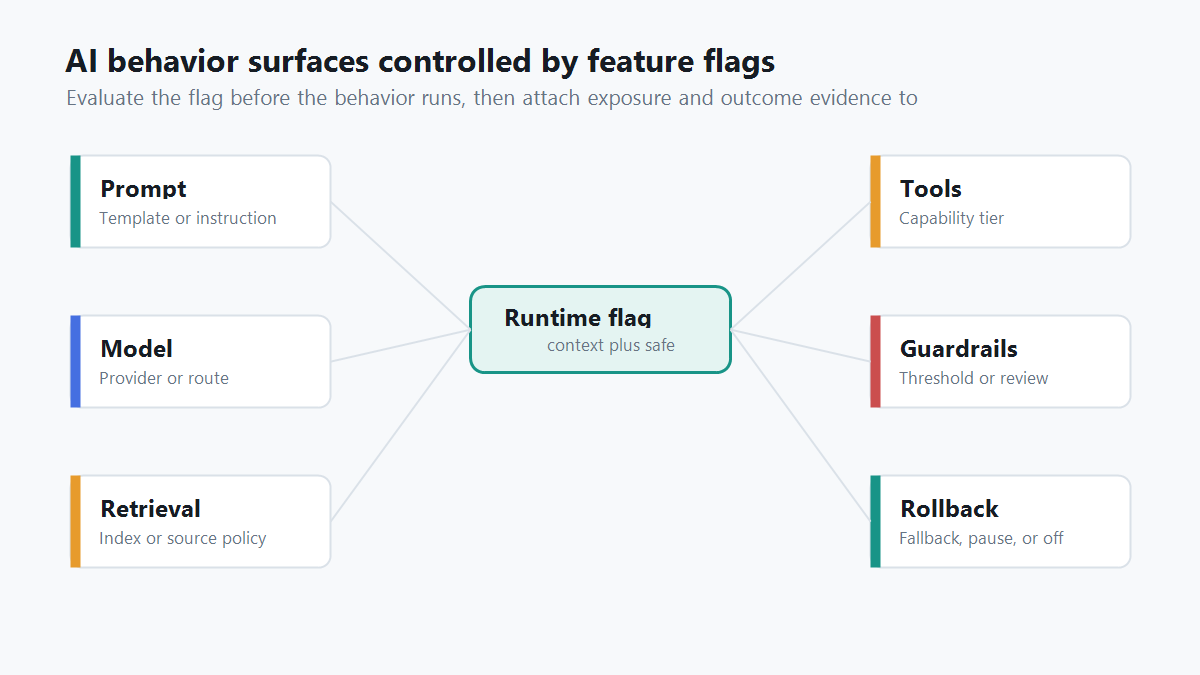
What "Control AI Behavior" Means In Production
The phrase sounds abstract until you map it to the surfaces that actually change product behavior.
An AI application may answer differently because the prompt changed. It may become more expensive because the model route changed. It may expose different information because the retrieval profile changed. It may become more autonomous because a tool policy changed. It may become safer, slower, or more conservative because a guardrail threshold changed.
Feature flags give those behavior surfaces a production control point. The flag does not replace evaluation, observability, authorization, or human review. It decides which approved behavior is active for a specific context and leaves a path to change that decision without a redeploy.
This is why the useful question is not "Can we put AI behind a flag?" The useful question is "Which AI behavior should be adjustable, targeted, measurable, and reversible at runtime?"
The Behavior Surfaces Worth Flagging
Start with the control surface, not with the flag key. The right flag boundary is the smallest behavior change that a release owner might need to expand, pause, roll back, or compare.
| AI behavior surface | What the flag controls | Safe fallback |
|---|---|---|
| Prompt or instruction set | Which prompt template, system instruction, or policy text runs | Last stable prompt |
| Model route | Provider, model version, model tier, or reasoning profile | Conservative model route |
| Retrieval profile | Index, reranker, source filter, memory scope, or citation rule | Verified baseline retrieval |
| Tool authority | Read-only, draft-write, approval-required, or unavailable tools | Read-only or disabled tools |
| Guardrail mode | Refusal threshold, content filter mode, review trigger, or fallback mode | Stricter guardrail mode |
| Cost and latency policy | Token budget, retry policy, streaming mode, or fallback threshold | Lower-cost stable profile |
| Experiment assignment | Which behavior variant receives live traffic | Control variant |
| Incident response | Whether to narrow, pause, or disable a risky behavior | Fallback or off |
This map also prevents one common mistake: bundling every AI decision into a single global flag. A global ai_enabled switch can help during an emergency, but it is too blunt for normal operations. If the new retrieval profile is failing, the team should not have to turn off the entire assistant.
FeatBit's AI control layer uses the same operating idea: every meaningful AI decision point can become a runtime control surface when it needs targeting, evidence, auditability, and rollback.
A Feature Flag Is A Behavior Contract
For AI behavior, a flag should be more than a switch in a dashboard. Treat it as a behavior contract that describes what can change, who can receive it, how evidence will be collected, and what rollback means.
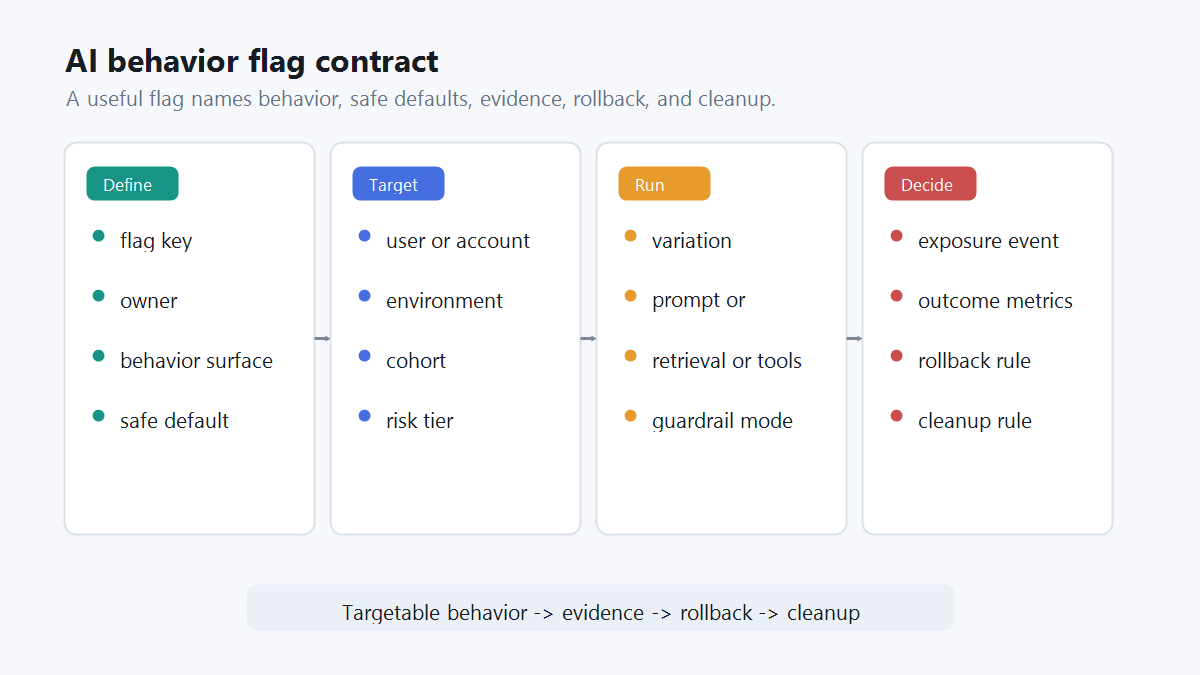
A practical contract includes:
| Contract field | Why it matters |
|---|---|
| Flag key | Gives the behavior a stable name in code, telemetry, and release notes |
| Owner | Makes rollout, rollback, and cleanup accountable |
| Behavior surface | Prevents a prompt flag from secretly changing model, retrieval, and tool policy too |
| Safe default | Defines what happens when context is missing or evaluation fails |
| Evaluation context | Names the user, account, environment, region, risk tier, workflow, or agent identity used for targeting |
| Variations | Makes each behavior route explicit, such as baseline, candidate, fallback, or off |
| Exposure event | Records when the AI behavior actually ran |
| Outcome metrics | Connects the variation to quality, cost, latency, user outcome, and guardrail evidence |
| Rollback rule | States which signal should reduce exposure or restore the baseline |
| Cleanup rule | Decides when temporary release logic should be removed or converted into an operational control |
OpenFeature's flag evaluation specification is useful category context here because it standardizes typed evaluation around a flag key, default value, evaluation context, and optional evaluation details. For AI systems, those concepts become part of the evidence trail: which context received which behavior, and why.
Example: A Support Assistant Answer Route
Imagine a support assistant that currently answers with prompt_v3, model_a, and baseline retrieval. The team wants to test a stricter answer format, a different model route, and a reranker for enterprise accounts.
Do not call the flag new_ai. Name the behavior route:
ai_answer_route:
  owner: support_ai_team
  behavior_surface: answer_generation_route
  assignment_unit: account_id
  default: baseline
  variations:
    baseline:
      prompt: prompt_v3
      model: model_a
      retrieval: baseline_search
      guardrail_mode: standard
    candidate:
      prompt: prompt_v4_structured
      model: model_b
      retrieval: reranker_v2
      guardrail_mode: strict
    fallback:
      prompt: prompt_v3
      model: model_a
      retrieval: baseline_search
      guardrail_mode: strict
  eligible_scope:
    environment: production
    segment: enterprise_support_beta
  rollback_when:
    - missing_exposure_events
    - p95_latency_breach
    - human_correction_rate_breach
    - unsafe_answer_review
  cleanup:
    after_decision: promote_winner_or_remove_candidate_route
This is not a pure prompt test because the candidate changes prompt, model, retrieval, and guardrail mode together. That can be valid, but the release decision should name it honestly as an answer route. If the candidate wins, the team knows which route won. If it fails, the team knows which bundle needs investigation.
FeatBit's AI experimentation guidance expands this pattern across prompts, model versions, retrieval settings, and agent strategies. The important part is that the flag gives live exposure a stable variation key, while evaluation and product metrics explain whether the behavior should expand.
Evaluate Before The AI Action Runs
The flag should be evaluated at the boundary where the AI behavior is selected or authorized.
For prompts, evaluate before the prompt is assembled. For model routes, evaluate before provider selection. For retrieval, evaluate before documents are fetched. For tool access, evaluate in the tool router before the tool executes. For human review, evaluate before the action is allowed to continue automatically.
type AnswerRoute = "baseline" | "candidate" | "fallback" | "off";

async function answerSupportQuestion(input: {
  accountId: string;
  userId: string;
  region: string;
  question: string;
}) {
  const route = await flags.string<AnswerRoute>(
    "ai_answer_route",
    {
      key: input.accountId,
      custom: {
        userId: input.userId,
        region: input.region,
        surface: "support_answer",
      },
    },
    "fallback"
  );

  if (route === "off") {
    return handoffToSupportQueue(input);
  }

  const profile = answerProfiles[route];
  const result = await runAnswerPipeline(input.question, profile);

  await trackAiExposure({
    flagKey: "ai_answer_route",
    unitId: input.accountId,
    variation: route,
    prompt: profile.prompt,
    model: profile.model,
    retrieval: profile.retrieval,
  });

  return result;
}
The exact SDK calls will vary by stack. The operating rule is stable: evaluate once in the trusted runtime, execute the selected behavior, and record exposure only when the selected AI behavior actually runs.
Flags Control Release Decisions, Not Hard Security Boundaries
Feature flags are release controls. They are not a replacement for authorization.
A flag can decide whether a write-capable agent mode is active for a beta segment. It should not be the only thing preventing an unauthorized identity from calling a production write API. That hard boundary belongs in IAM, API scopes, service credentials, sandbox rules, and the tool router.
Use feature flags for:
- targeted rollout;
- prompt, model, retrieval, guardrail, and tool-policy variants;
- staged autonomy;
- online evaluation and A/B assignment;
- fallback and rollback;
- auditability of release-control changes.
Use hard security controls for:
- identity and authentication;
- permission enforcement;
- data access boundaries;
- credential scope;
- network and sandbox isolation;
- irreversible action approval.
For AI risk management, that separation matters. NIST's AI Risk Management Framework describes AI risk management as work across the design, development, use, and evaluation of AI systems. Runtime flags help with the use and evaluation side of that lifecycle, but they do not remove the need for engineering controls around access and side effects.
If the risky behavior is agent tool access, see the implementation-focused guide to agent tool permission gates with feature flags. If the question is where evaluation should happen, use the architecture guide on client-side versus server-side AI flag evaluation.
Connect Behavior Control To Evidence
A flag that changes AI behavior without evidence is only a remote control. A useful behavior flag produces a release decision.
At minimum, connect the evaluated variation to:
- exposure: which user, account, conversation, or workflow actually received the behavior;
- quality: evaluator score, human correction, accepted answer, rejected answer, or review result;
- product outcome: task completion, support resolution, conversion, retention, or operator efficiency;
- guardrails: latency, cost, fallback rate, escalation rate, unsafe output, complaint rate, or incident signal;
- decision: continue, pause, roll back, expand, or promote;
- cleanup: remove the losing branch, archive the temporary flag, or document a permanent operational control.
FeatBit's Track Insights API, flag insights, targeting rules, and percentage rollouts are the implementation primitives behind that loop. The release decision framework on measurement design gives the metric side of the same workflow.
Common Mistakes
Putting control only in the prompt. A prompt can describe preferred behavior, but it is not a reliable production gate. The execution boundary should enforce the evaluated flag.
Using one flag for every AI surface. If prompt, model, retrieval, and tool access all change behind one generic flag, the team cannot tell what caused an outcome or roll back the narrowest risky surface.
Logging eligibility instead of exposure. A user who was eligible for a candidate route did not necessarily receive it. Record exposure when the AI behavior actually runs.
Letting flags become permanent policy debt. Some AI flags are long-lived operational controls, such as an incident fallback mode. Others are temporary release controls. Write the cleanup rule before rollout expands.
Treating flags as security permissions. Flags can reduce or expand active behavior for an approved context. They should not replace identity, authorization, scoped credentials, or data-access enforcement.
FeatBit's Perspective
FeatBit treats feature flags as release-decision infrastructure. For AI systems, that means a flag can control more than whether a UI feature appears. It can control which intelligence pathway runs: prompt, model, retrieval, tool authority, guardrail mode, fallback route, experiment assignment, and rollout stage.
That control is useful because AI behavior changes faster than deployment pipelines. Teams need to adjust behavior under production evidence without turning every prompt edit, model route, or agent-policy change into an all-or-nothing release.
The FeatBit operating model is:
- Name the AI behavior surface.
- Put the behavior behind a typed flag with a safe fallback.
- Evaluate in the trusted runtime before the AI action runs.
- Target exposure by user, account, environment, segment, risk tier, or rollout percentage.
- Record exposure and outcome evidence.
- Expand, pause, roll back, or clean up based on the release decision.
That is how feature flags control how intelligence behaves: not by making AI predictable, but by making behavior changes targetable, measurable, reversible, and owned.
FAQ
Do feature flags make AI behavior deterministic?
No. A feature flag does not remove model variability. It controls which behavior route is active, such as a prompt, model profile, retrieval policy, tool mode, guardrail setting, or fallback path.
Should every AI feature have a feature flag?
Every material AI behavior change should have a runtime control when it affects users, cost, trust, data access, safety, or release evidence. Low-risk static experiences may only need normal deployment controls.
Are AI feature flags different from remote config?
They can overlap. The difference is the operating contract. An AI behavior flag should include targeting, safe fallback, exposure evidence, rollback, ownership, and cleanup, not only a remotely edited value.
Can feature flags replace AI evals?
No. Evals judge behavior. Feature flags control exposure to that behavior and connect live variation assignment to evidence. Most production AI releases need both.
Source Notes
- Optimizely category context: Optimizely Feature Experimentation documentation includes feature flag creation, variations, audience targeting, A/B tests, targeted delivery, event tracking, and analysis as feature experimentation concepts. This article uses that vendor terminology as category context, not as a ranking or comparison claim.
- Feature flag standard context: the OpenFeature flag evaluation specification describes typed flag evaluation with a flag key, default value, evaluation context, and detailed evaluation metadata.
- AI risk context: NIST's AI Risk Management Framework frames AI risk management across design, development, use, and evaluation. This article applies that mindset to release control and production behavior management.
- FeatBit implementation context: AI control layer, safe AI deployment, AI experimentation, feature flag lifecycle management, targeting rules, percentage rollouts, Track Insights API, and flag insights support the workflow described here.
Image And Open Graph Notes
- Use
cover.pngas the Open Graph image because it summarizes AI behavior control as a runtime control console. - Use
control-surface-map.pngnear the opening because it maps the behavior surfaces that can be controlled by flags. - Use
behavior-contract.pngin the behavior contract section because it shows the operational fields needed before rollout.