
Feature Flags for AI-Powered Products: Control the Launch, Not Just the Code
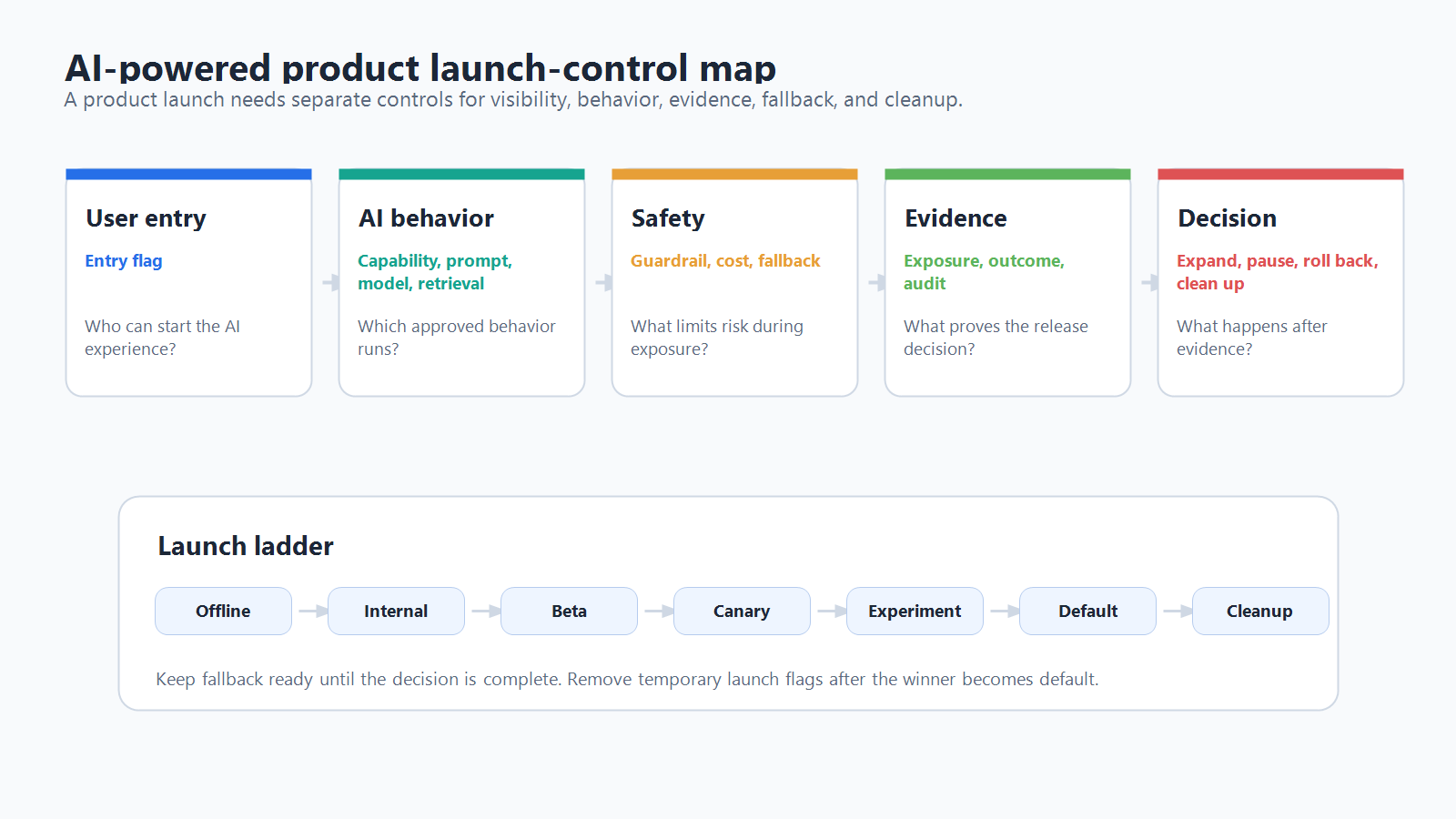
Feature flags for AI-powered products should do more than hide a new assistant behind an ai_enabled switch. A useful flag plan gives product, platform, and operations teams separate controls for the parts of the AI experience that may need staged exposure, rollback, measurement, or cleanup: prompts, model routes, retrieval profiles, guardrails, tool authority, fallback behavior, cost policy, and the user-facing entry point.
The reader job is launch readiness. Before an AI-powered product reaches broad traffic, the team should know which behavior can change at runtime, who can receive each behavior, what evidence will decide expansion, and how the product falls back when quality, latency, cost, or safety signals move the wrong way.
Why AI-Powered Products Need A Wider Flag Plan
Traditional feature flags often start with a product surface: show the new checkout, enable the beta dashboard, or turn on a permission. AI-powered products add more runtime decisions behind the surface.
A support assistant may be visible to everyone while only some accounts receive a new prompt. A search experience may keep the same UI while changing the retrieval index, reranker, citation policy, or fallback model. An agent workflow may need separate controls for read-only tools, draft-write tools, approval-required actions, and incident fallback.
That is why the launch question is not only "Should the AI feature be on?" It is:
- Which AI decisions can change user outcomes?
- Which decisions need staged exposure instead of full release?
- Which decisions need audit evidence and owner approval?
- Which decisions need a fast rollback path?
- Which temporary flags need cleanup after the release decision?
FeatBit's AI control layer describes the same operating idea at a category level: meaningful AI decision points become runtime controls when they require targeting, evidence, auditability, or rollback. This article turns that idea into a practical launch checklist for product teams.
The Product Launch Flag Taxonomy
Use a small taxonomy before creating flag keys. The goal is to keep each flag tied to a release decision, not to create a dashboard full of vague toggles.
| Flag type | What it controls | Example variation | Launch question |
|---|---|---|---|
| Entry-point flag | Whether users can see or start the AI capability | hidden, internal, beta, public |
Who can access the AI product surface? |
| Capability flag | Which AI feature mode is active | summarize_only, draft_reply, autofill |
Which job can the AI perform? |
| Prompt flag | Which instruction or template runs | baseline, evidence_first, concise |
Which behavior style is ready for traffic? |
| Model-route flag | Which model, provider, tier, or reasoning profile runs | stable_route, candidate_route |
Which model path should serve this cohort? |
| Retrieval flag | Which index, filter, reranker, or memory scope runs | verified_sources, expanded_context |
Which knowledge path is safe for this account or workflow? |
| Guardrail flag | Which moderation, refusal, review, or policy mode applies | strict, balanced, review_required |
Which protection level should gate the response? |
| Cost and latency flag | Token budget, fallback threshold, retry policy, or streaming behavior | standard_budget, cost_capped |
How much runtime cost or delay is acceptable? |
| Fallback flag | What happens when the AI path fails or risk rises | baseline, read_only, human_queue |
What should users receive instead of the risky behavior? |
| Experiment flag | Stable assignment for a live comparison | control, candidate |
Which variant gets exposure and outcome evidence? |
| Kill-switch flag | Emergency disablement or narrow rollback | on, off, fallback_only |
How can operators reduce blast radius immediately? |
This taxonomy also helps de-duplicate controls. If a single flag changes the prompt, model, retrieval profile, and guardrail mode at once, the team may not know which change caused the result. If every setting becomes its own flag, operators may not understand the release decision. Start with the decision the team must make, then choose the smallest control surface that can support that decision.
Map Flags To Product Risk, Not Engineering Convenience
The most useful AI feature flags are placed where they control a user-visible or operator-relevant risk.
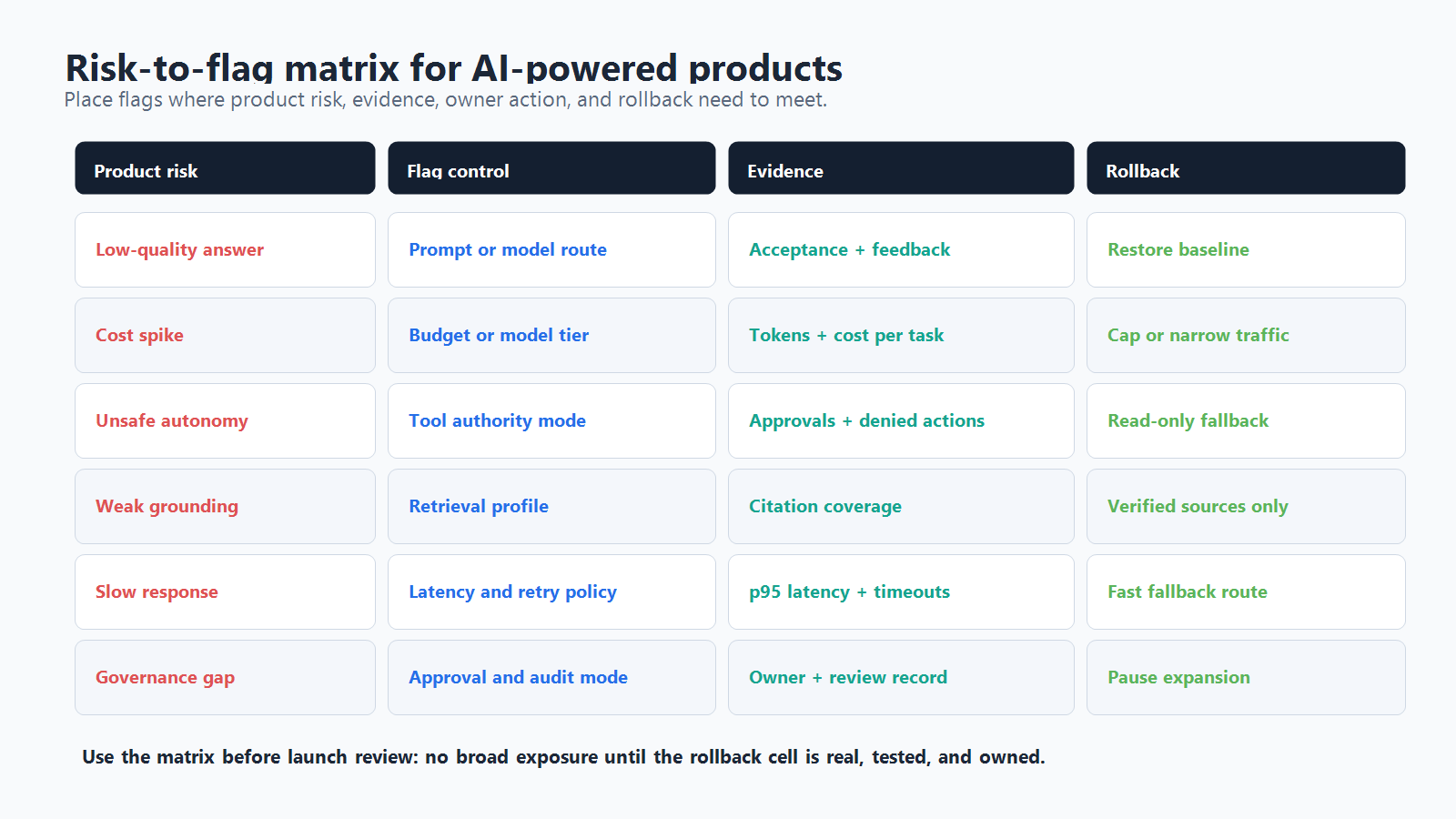
| AI product risk | Flag control | Evidence to watch | Rollback action |
|---|---|---|---|
| Low-quality answer | Prompt, model route, retrieval profile | acceptance rate, correction rate, negative feedback, escalation rate | restore baseline route for affected segment |
| Slow response | model route, token budget, streaming mode | p95 latency, timeout rate, retry rate | move traffic to faster route or non-AI fallback |
| Cost spike | model tier, token budget, fallback threshold | cost per task, tokens per response, high-cost fallback rate | cap budget or route only high-value workflows |
| Unsafe autonomy | tool authority, approval mode, fallback mode | approval rate, denied tool calls, incident tags | reduce to read-only or approval-required mode |
| Weak source grounding | retrieval profile, citation rule, answer policy | cited-source coverage, unsupported-answer reports | revert to verified-source profile |
| Confusing UX | entry-point, capability, onboarding copy | activation rate, task completion, support tickets | narrow audience or hide entry point |
| Governance gap | approval gate, audit mode, owner rule | missing owner, missing evidence, unreviewed changes | pause expansion until review record is complete |
This is a launch-control exercise, not a claim that flags are the only safety layer. Identity, authorization, sandboxing, content filtering, secure data access, human review, model evaluation, and observability still matter. Feature flags sit at the release-decision layer: they decide which approved behavior is active for a specific context and make that decision adjustable without redeploying.
NIST's AI Risk Management Framework is useful background because it frames AI risk management as work that should be incorporated into the design, development, use, and evaluation of AI products and systems. In product terms, that means the team should define risk signals and management actions before broad exposure, not after the first incident.
Build The Launch Ladder Before The First Public Rollout
An AI-powered product launch should move through explicit exposure stages. The exact percentages depend on traffic volume and risk, but the operating model should be visible before launch.
| Stage | Audience | Goal | Exit criteria |
|---|---|---|---|
| Local and offline | development fixtures, eval sets, replayed examples | prove the behavior is eligible for live exposure | no known blocker, clear fallback, owner assigned |
| Internal | employees or trusted internal users | catch obvious quality, latency, cost, and UX failures | no severe guardrail failures, telemetry complete |
| Design partner or beta | selected accounts, users, or workflows | validate real tasks without broad blast radius | primary metric improves or holds; guardrails acceptable |
| Canary | small percentage of eligible production traffic | test production behavior under real load | metrics stable over the agreed observation window |
| Experiment or expansion | larger split or staged percentage rollout | compare business outcome and product quality | decision state is continue, pause, rollback candidate, or inconclusive |
| Default and cleanup | broad audience | make the winning behavior durable | old branch removed or converted into an operational control |
FeatBit supports this style of release planning through targeting rules, user segments, percentage rollouts, flag insights, audit logs, and workflows. For an AI-powered product, those primitives should be connected to the AI behavior boundary: evaluate before the model, prompt, retrieval, or tool decision runs; record exposure only when the AI behavior actually executes; and keep the fallback route available until the release decision is complete.
For a narrower walkthrough of a first live comparison, use the FeatBit tutorial on experimenting with AI using feature flags. For staged production exposure of LLM changes, the LLM canary release page goes deeper on canary metrics and rollback.
Evaluate With The Right Context
AI feature flag evaluation needs enough context to make stable and reviewable decisions. OpenFeature's evaluation-context model is a helpful neutral reference because it treats context as data used for dynamic flag evaluation, including identifiers that support deterministic percentage rollout.
For AI-powered products, common context fields include:
| Context field | Why it matters |
|---|---|
userId or accountId |
stable assignment, beta targeting, entitlement, account-level rollback |
environment |
separates development, staging, and production behavior |
workflow |
distinguishes support summary, search answer, code suggestion, or agent action |
riskTier |
applies stricter controls to high-impact workflows |
region |
supports data locality, latency, or regional rollout rules |
modelRoute or candidateId |
joins exposure records to the AI behavior that actually ran |
agentId or toolRisk |
controls agent authority and approval requirements |
experimentId |
links exposure to outcome analysis and cleanup |
The important rule is consistency. The same assignment key should appear in flag evaluation, exposure events, outcome events, dashboards, audit records, and rollback reports. If the product evaluates by request but measures by conversation, the evidence may become hard to trust.
A Minimal Implementation Pattern
The exact SDK shape depends on the language and architecture. The pattern is stable:
- Build evaluation context from server-known facts.
- Evaluate the AI behavior flag before the AI action runs.
- Select the approved behavior route.
- Record exposure when the behavior actually executes.
- Emit outcome and guardrail metrics using the same assignment identifiers.
- Fall back safely when evaluation or the AI path fails.
type AiLaunchContext = {
  userId: string;
  accountId: string;
  environment: "production" | "staging";
  workflow: "support_summary";
  riskTier: "standard" | "high";
};

type SummaryRoute = "baseline" | "evidence_first" | "fallback";

async function runSupportSummary(input: Ticket, context: AiLaunchContext) {
  const route = await flags.string<SummaryRoute>(
    "support-summary-route",
    context,
    "baseline"
  );

  try {
    const response = await summarizeTicket(input, route);

    await telemetry.track("ai_summary_exposed", {
      accountId: context.accountId,
      userId: context.userId,
      workflow: context.workflow,
      route,
      ticketId: input.id
    });

    return response;
  } catch (error) {
    await telemetry.track("ai_summary_fallback", {
      accountId: context.accountId,
      workflow: context.workflow,
      route
    });

    return summarizeTicket(input, "baseline");
  }
}
This example is intentionally simple. In a production system, the flag client should use safe defaults, the AI route should be server-controlled, and the telemetry events should join to both product outcomes and guardrail metrics.
If your immediate architecture question is where evaluation belongs, read server-side versus client-side AI feature flag evaluation. For most model routing, prompt construction, retrieval, tool authority, and fallback decisions, server-side or edge-side evaluation is easier to protect and easier to audit than browser-side evaluation.
Define Evidence Before Expansion
Do not wait for dashboards to tell the team what matters. A launch-ready AI flag has an evidence plan.
| Evidence type | Examples | Why it matters |
|---|---|---|
| Exposure evidence | user, account, workflow, variation, timestamp | proves who actually received the AI behavior |
| Quality evidence | accepted draft rate, correction rate, answer rating, human review result | shows whether the output helps the task |
| Business evidence | conversion, retention, support deflection, completion rate | connects AI quality to product impact |
| Guardrail evidence | latency, timeout, cost, escalation, refusal, unsafe-action rate | catches harm that a primary metric may hide |
| Operations evidence | owner, approval, audit log, incident state, rollback action | proves the release was controlled |
| Cleanup evidence | decision, winning route, stale branch, removal plan | prevents temporary launch flags from becoming debt |
FeatBit's feature flag lifecycle management page is relevant here because AI launch flags should not live forever by accident. Some controls become permanent operational controls, such as cost policy or incident fallback. Others are temporary release flags and should be removed after the decision is settled.
What FeatBit Adds To AI Product Launches
FeatBit is useful in this workflow when the team needs an open-source release-control layer for AI behavior, not only a code toggle. The practical fit is:
- target internal users, beta accounts, regions, environments, or workflow segments before broad exposure;
- run percentage rollouts and canaries for prompts, models, retrieval profiles, or AI capabilities;
- keep audit records for flag changes and rollout decisions;
- connect flag exposure with product, quality, latency, cost, and guardrail metrics;
- roll back a risky AI behavior without redeploying the application;
- manage flag ownership and cleanup after the release decision.
For teams evaluating a private deployment model, FeatBit's self-hosted feature flag platform is also relevant when AI product telemetry, targeting data, and rollout governance should remain under the team's infrastructure control.
Common Mistakes
Using one global AI flag. A global switch can help as an emergency kill switch, but it is too blunt for normal release decisions. Separate the entry point, model route, prompt, retrieval profile, guardrail mode, and fallback when they carry different risks.
Changing too many variables in one variation. If the candidate route changes prompt, model, retrieval, and UX copy at once, the team may not know what caused the result. Bundle only when the product decision is about the full bundle.
Evaluating after the AI call. If the model, prompt, tool policy, or retrieval profile has already run, the flag cannot prevent exposure. Evaluate at the decision boundary.
Tracking page views instead of AI exposure. A user may open the page and never trigger the AI behavior. Record exposure when the controlled AI path actually runs.
Skipping fallback design. Rollback is not a slogan. The fallback must be implemented, tested, and understandable to support, product, and operations teams.
Keeping launch flags forever. Temporary rollout flags should have owners and cleanup rules. Permanent operational controls should be named and documented as such.
Launch Checklist
Before exposing an AI-powered product broadly, confirm:
- Each AI behavior surface has an owner and a reason to be flagged.
- The entry point, capability, model route, prompt, retrieval, guardrail, cost, fallback, and experiment controls are not accidentally mixed together.
- Evaluation happens before the AI behavior runs.
- Assignment keys are stable across evaluation, exposure, outcome events, and rollback reports.
- Internal, beta, canary, experiment, and broad rollout stages are defined.
- Primary metrics and guardrails are documented before expansion.
- Fallback behavior is implemented and tested.
- Operators can narrow or roll back exposure without redeploying.
- Audit records can reconstruct who changed what and why.
- Temporary flags have cleanup criteria.
The bottom line: feature flags for AI-powered products are not only launch switches. They are the runtime release controls that let teams expose AI behavior gradually, measure it honestly, reverse it quickly, and clean it up when the decision is made.
Source Notes
- NIST's AI Risk Management Framework supports the article's risk-management framing: AI risk work should be incorporated into the design, development, use, and evaluation of AI products, services, and systems.
- OpenFeature's evaluation context documentation supports the context and deterministic targeting discussion.
- FeatBit documentation for targeting rules, percentage rollouts, flag insights, and audit logs covers the core product primitives behind staged AI launches.
- Related FeatBit reading: feature flags control AI behavior, AI feature flag lifecycle management, AI control layer, safe AI deployment, and feature flag lifecycle management.
Image And Open Graph Notes
- Cover image:
/images/blogs/feature-flags-for-ai-powered-products/cover.png - Body image 1:
/images/blogs/feature-flags-for-ai-powered-products/launch-control-map.png - Body image 2:
/images/blogs/feature-flags-for-ai-powered-products/risk-flag-matrix.png - Open Graph image should use the cover artwork, with the launch-control map as the article's primary explanatory diagram.