
Approval Gate for Feature Rollouts: Approve Launches Without Freezing Deployment
An approval gate is the decision point that decides whether a launch, rollout expansion, or production action is allowed to continue. In feature delivery, the useful version is not a committee meeting before deployment. It is a controlled release checkpoint: the code can already be deployed, but broader exposure waits until the right reviewer sees the right evidence and the rollback path is clear.
That distinction matters for teams using feature flags. If deployment and release are coupled, approval often becomes a late-stage blocker. If the new behavior is behind a flag, approval can happen at the exposure boundary: internal users, beta segment, 5 percent rollout, 25 percent rollout, full launch, or rollback. The gate approves the next audience, not merely the build artifact.
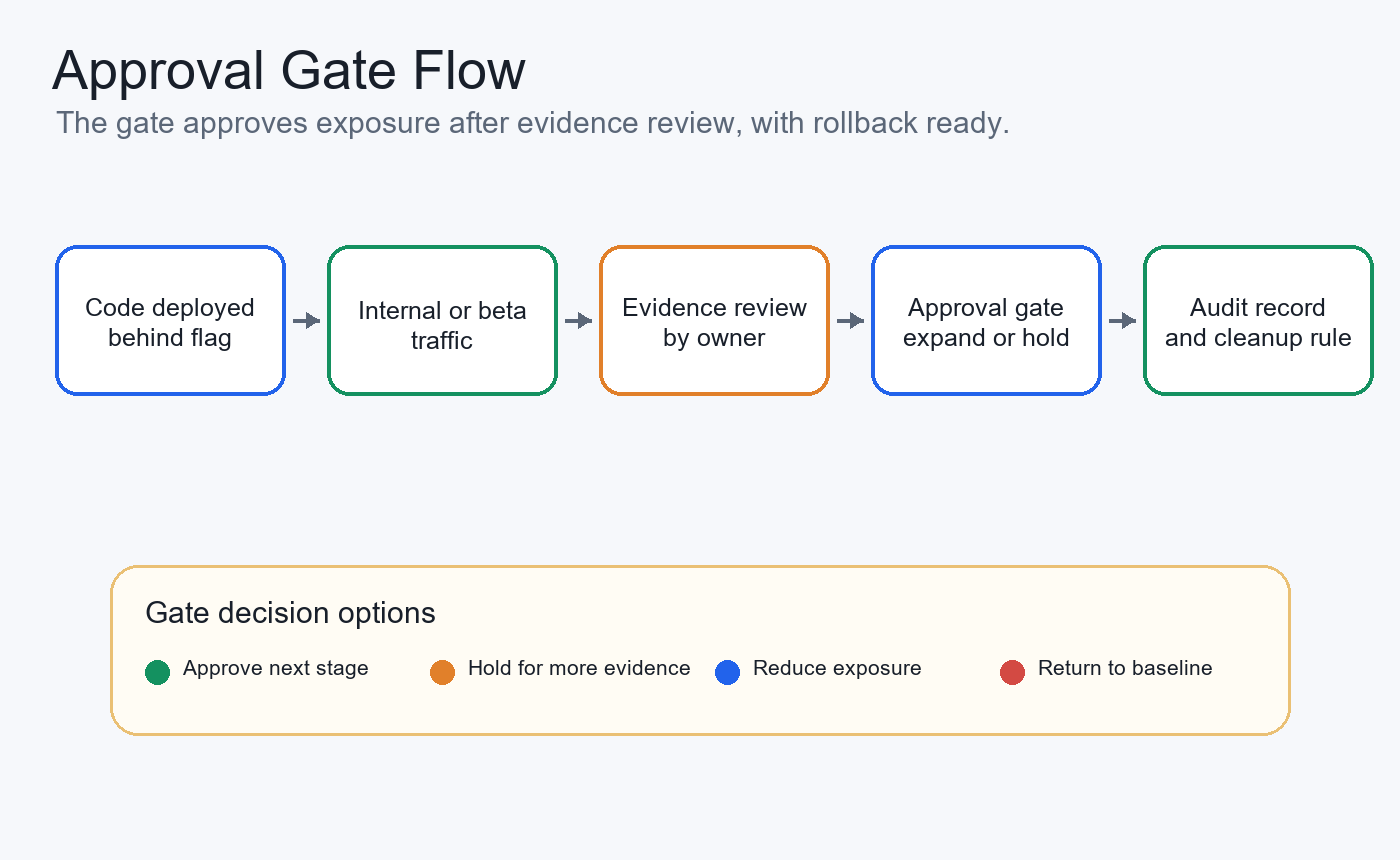
What An Approval Gate Should Decide
An approval gate should answer a concrete operational question: "Is this release ready for the next level of exposure?"
That means the gate needs more than a yes or no. It should define:
- what change is being approved;
- who is allowed to approve it;
- which users, accounts, regions, or environments are affected;
- which evidence the approver should inspect;
- what guardrails would block expansion;
- what rollback action returns users to a safer state;
- what record will explain the decision later.
Cloud deployment systems already use this pattern. Azure Pipelines documents approvals and checks as controls that can pause a stage until checks are satisfied, including manual approval, branch control, business hours, REST API checks, monitor alerts, and exclusive locks. Google Cloud Deploy lets teams require approval on deployment targets and approve or reject rollouts before they enter a target. Those tools are useful deployment gates.
Feature rollout approval adds a second layer: even after the artifact reaches production infrastructure, the new behavior can remain hidden, limited, or reversible through a feature flag.
Approval Gate Vs Deployment Gate Vs Human Review
Teams often use the same phrase for different controls. Separate them before designing the workflow.
| Control | Primary job | Typical location | What it should approve |
|---|---|---|---|
| Deployment gate | Decide whether an artifact can move to an environment | CI/CD pipeline, environment, service connection | Build quality, policy checks, environment readiness |
| Approval gate | Decide whether a release can move to the next exposure stage | Feature flag, release workflow, launch checklist | Audience, rollout percentage, guardrails, rollback plan |
| Human review | Ask a person to inspect a change or action | Pull request, ticket, admin UI, review queue | Risk, evidence, exception handling, accountability |
| Runtime guardrail | Stop or reduce exposure when a signal fails | Observability, APM, experiment metric, incident automation | Health, quality, safety, cost, or business threshold |
These controls can work together. For example, Azure Pipelines can protect the production environment before a deployment stage starts. Google Cloud Deploy can require approval before a rollout enters a target. Amazon Augmented AI shows a different human-in-the-loop pattern where a workflow sends tasks to a workforce when review conditions are met. In a feature rollout, FeatBit can then decide who sees the approved behavior, how much traffic gets it, and how quickly the team can roll back.
The key design choice is location. Put the approval gate at the point where risk changes. For many product launches, risk changes when exposure expands, not when code lands on servers.
A Practical Approval Gate Contract
Do not start by creating a generic "approval required" checkbox. Start with the contract the reviewer needs.
| Contract field | Approval question |
|---|---|
| Change summary | What user-visible behavior, backend path, AI behavior, or operational action is changing? |
| Owner | Who owns the next release decision and rollback? |
| Current stage | Is this internal, beta, canary, regional, percentage rollout, full launch, or rollback? |
| Requested next stage | Which audience or percentage is being requested? |
| Evidence package | What data, tests, monitoring, support notes, or experiment signals justify the move? |
| Guardrails | Which signals block approval or force rollback? |
| Approver role | Which product, engineering, security, data, or operations owner must approve? |
| Rollback action | Which flag variation, targeting rule, or percentage change stops the risky behavior? |
| Audit record | Where will the approval, evidence, exposure, and rollback decision be reconstructed? |
| Cleanup rule | Is the flag temporary release control or a long-lived operational policy? |
This contract keeps approval from becoming ceremonial. The approver is not only asked, "Do you approve?" They are asked, "Do you approve this audience, with this evidence, under these guardrails, with this rollback path?"
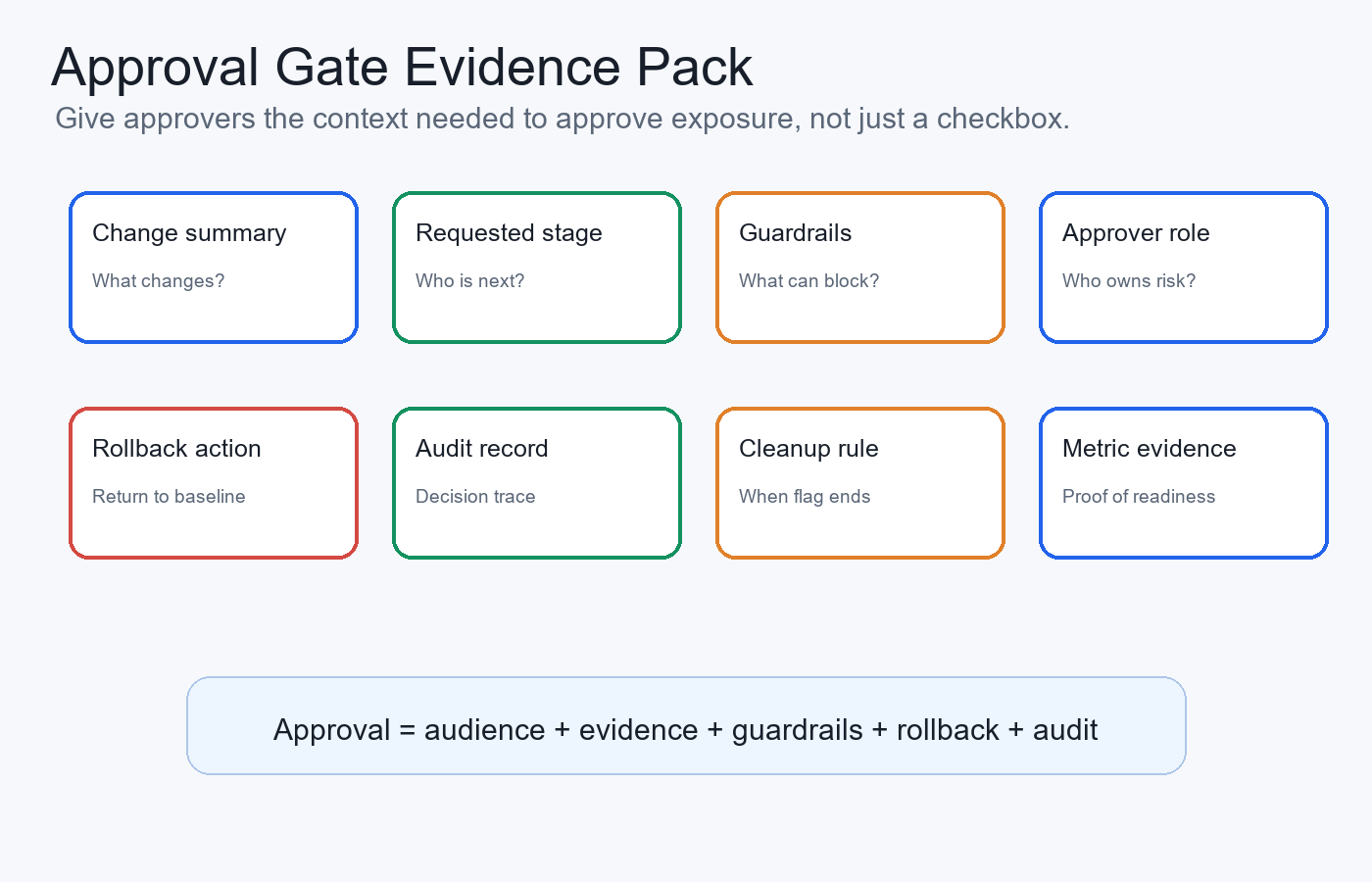
Use Feature Flags To Approve Exposure, Not Only Code
Feature flags make approval gates more precise because they separate deployment from release.
A typical rollout path can look like this:
- Deploy code with the new behavior disabled by default.
- Enable the flag for internal users.
- Review telemetry, support feedback, logs, and guardrail metrics.
- Approve a beta segment or a small percentage rollout.
- Hold expansion until the next evidence gate passes.
- Expand gradually or roll back by changing the flag state.
- Record the final decision and schedule cleanup if the flag was temporary.
FeatBit supports the release-control primitives behind this workflow: targeting rules, percentage rollouts, audit logs, IAM and RBAC, webhooks, and feature flag lifecycle management. The product decision remains with the team, but the control plane should make exposure targeted, observable, reversible, and reviewable.
For a commercial or regulated product, this model also gives platform teams a clearer evaluation path. A feature flag platform should not only store toggles. It should help the team limit who can change production rollout state, show what changed, connect exposure to evidence, and keep temporary rollout flags from becoming long-term debt.
Example: Approving A Billing Feature Rollout
Imagine a team launching a redesigned billing workflow. The code has passed tests and has been deployed to production behind a flag called billing_checkout_v2.
The approval gate is not "can this code deploy?" That decision already happened. The approval gate is "can the next group of users enter the new checkout?"
approval_gate:
  flagKey: billing_checkout_v2
  owner: billing-platform-team
  currentStage: internal_users
  requestedStage: five_percent_low_risk_accounts
  approvers:
    - billing_product_owner
    - engineering_release_owner
  evidence:
    - internal_test_plan_passed
    - no_checkout_error_rate_regression
    - support_playbook_ready
    - rollback_variation_tested
  guardrails:
    - payment_error_rate
    - checkout_completion_rate
    - p95_latency
    - support_ticket_rate
  rollback:
    action: set billing_checkout_v2 to baseline for affected segment
  audit:
    record: flag_change, approver, evidence_links, rollout_percentage
  cleanup:
    after_full_launch: remove old checkout branch and archive release flag
The same shape works for non-billing launches with different guardrails. A search ranking release may care about click quality and latency. A permission feature may need security review and account-level targeting. An AI assistant may need human review rate, fallback rate, safety events, and cost guardrails. The gate should match the risk created by the next exposure step.
When To Require Approval
Not every flag change needs a formal gate. If every small adjustment requires approval, teams learn to bypass the process or batch unrelated changes together.
Use approval gates when at least one condition is true:
- the next stage exposes the change to customers for the first time;
- the release affects payments, permissions, data access, compliance posture, customer trust, or external systems;
- rollback is possible but operationally sensitive;
- the release uses a new model, prompt, workflow, integration, or infrastructure path;
- the change affects a high-value segment, regulated region, or enterprise account;
- guardrail metrics are still incomplete or early;
- the team needs a reviewable decision trail.
Avoid formal approval gates for low-risk internal UI copy, test-only flags, development environments, or changes where normal code review and automated tests are enough. Approval should protect decisions that matter, not add friction to every edit.
What The Approver Needs To See
An approval request should be short enough to review quickly and specific enough to reconstruct later.
Use this minimum approval card:
| Field | Example |
|---|---|
| Change | Redesigned billing checkout behind billing_checkout_v2 |
| Requested exposure | 5 percent of low-risk production accounts |
| Evidence | Internal test pass, no error regression, rollback checked |
| Guardrails | Payment error rate, completion rate, latency, support tickets |
| Stop condition | Any severe payment failure or telemetry gap |
| Rollback | Return affected segment to baseline variation |
| Approvers | Billing product owner, engineering release owner |
| Audit location | FeatBit flag audit log plus release ticket |
This is where many approval processes fail. "Looks good to me" is not a launch decision. A useful approval gate states what was approved, for whom, based on what evidence, and how the team can reverse it.
Common Failure Modes
Approving deployment instead of exposure. A pipeline can prove the artifact is ready for an environment. It does not prove every user should see the new behavior today.
Putting approval only in chat. Chat messages are hard to reconstruct months later. Store approval with the flag change, release ticket, pull request, deployment record, or audit system.
Using one approver for every risk. Product value, security posture, data handling, operations, and customer support risk can need different owners.
Skipping guardrails. An approval gate without metrics becomes a manual opinion checkpoint. Define the signals that would block expansion before the rollout starts.
No rollback rehearsal. If the team has not checked the baseline variation or rollback rule, the approval is incomplete.
Forgetting cleanup. Temporary release gates should end with a cleanup decision: keep the winning behavior, remove the old branch, archive the flag, or document the flag as a permanent operational control.
Where FeatBit Fits
FeatBit fits the runtime release-control layer around product launches, operational changes, and AI-era software behavior. It does not replace CI/CD, code review, identity management, observability, or incident response. It connects those systems to the actual exposure decision.
Use FeatBit to:
- keep risky behavior behind named flags and typed variations;
- target internal users, beta segments, enterprise accounts, regions, or percentage cohorts;
- restrict production flag changes through IAM and RBAC;
- preserve audit history for flag and targeting changes;
- connect rollout state to webhooks, observability, experiment metrics, or release tickets;
- roll back a segment, percentage, or variation without redeploying;
- review temporary release flags through lifecycle rules.
If the launch involves AI behavior, FeatBit's human-in-the-loop release control, AI control layer, and safe AI deployment pages expand the same idea for prompts, models, retrieval, tool authority, fallback, and autonomy levels. If the launch is a standard software feature, the operating model is still the same: approve the next exposure step, keep the rollback path active, and leave an evidence trail.
Starting Checklist
Before a feature rollout approval gate opens the next stage, confirm:
- The feature flag, owner, environment, and requested audience are named.
- The approver matches the risk created by the next exposure step.
- The evidence package is attached and readable.
- Guardrails and stop conditions are explicit.
- Rollback returns users to a known safe variation without redeploying.
- The approval record links to the flag change, release ticket, metrics, and reviewer identity.
- The cleanup rule is defined before broad rollout.
The bottom line: an approval gate should not freeze deployment. It should make launch decisions more precise. Deploy the code when engineering quality is ready. Approve exposure when evidence, ownership, guardrails, rollback, and audit records are ready.
Source Notes
- Microsoft Learn Define approvals and checks is cited for deployment-stage approval and check concepts in Azure Pipelines.
- Google Cloud Deploy Promote your release and manage approvals and configuration schema are cited for target approval behavior and the
requireApprovaltarget property. - AWS SageMaker AI Create a Human Review Workflow is cited as category context for human review workflows, worker instructions, conditions, and output records.
- FeatBit implementation context: targeting rules, percentage rollouts, audit logs, IAM and RBAC, webhooks, and feature flag lifecycle management.
- Related FeatBit reading: progressive rollout patterns, feature flags as release decision infrastructure, AI governance with feature flags, and what is a human-in-the-loop flag.
Image And Open Graph Notes
- Use
cover.pngas the Open Graph image because it presents approval gates as launch-control checkpoints, not generic workflow approval. - Use
approval-gate-flow.pngnear the opening because it shows how deployed code moves through evidence review, staged exposure, audit, and rollback. - Use
evidence-pack.pngin the contract section because it summarizes the information an approver needs before expansion.