
Approval Flow for AI Config Changes: A Governance Playbook
An approval flow for AI config changes decides when a prompt, model route, retrieval profile, tool policy, grader threshold, fallback, or rollout rule is safe enough to reach users. Treat it as release governance, not as a static settings review.
The practical goal is not to make every AI edit wait for a committee. The goal is to separate low-risk tuning from production-impacting behavior, route the right changes to the right reviewers, preserve evidence, and keep a reversible runtime control in place while the team learns from production.
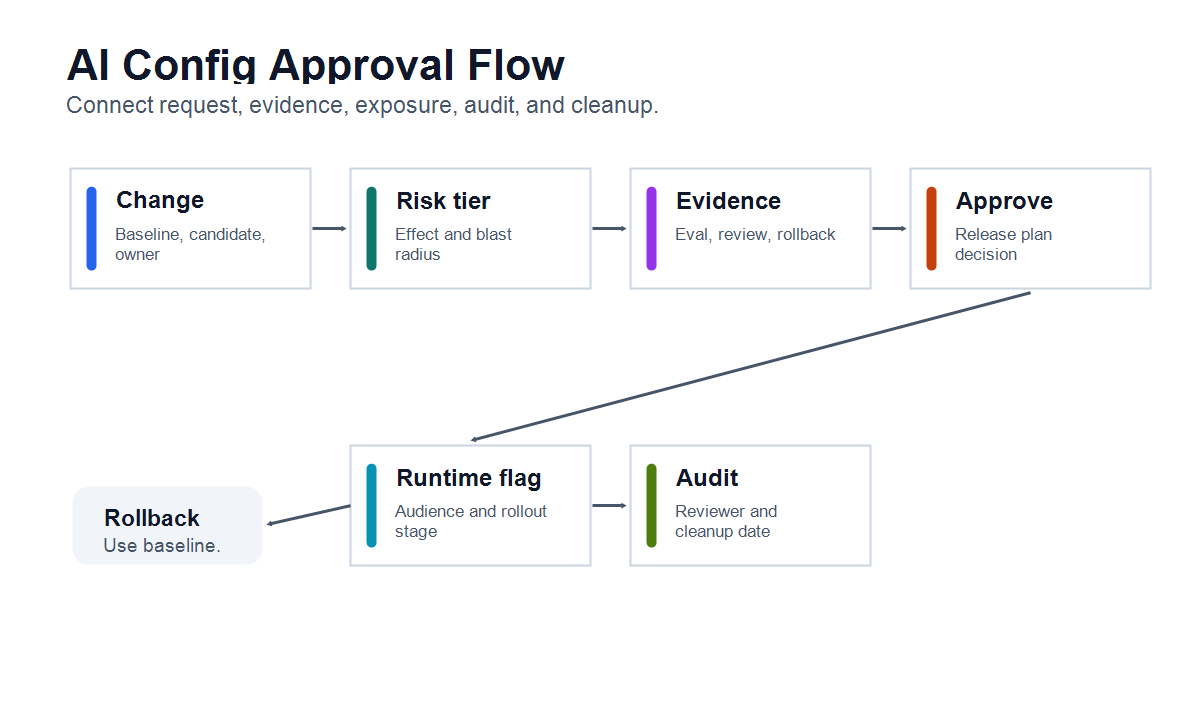
What Counts As An AI Config Change
AI configuration is broader than a prompt string. Any setting that changes generated behavior, tool authority, cost, latency, data exposure, or user-visible outcomes belongs in the approval model.
| Config surface | Example change | Why approval may be needed |
|---|---|---|
| Prompt or instruction | Move from concise support answers to citation-heavy answers | Changes tone, evidence behavior, and failure modes |
| Model route | Switch from one model provider or model tier to another | Changes quality, latency, cost, and data boundary |
| Retrieval profile | Add a new index, source, filter, or ranking rule | Changes what evidence the AI can use |
| Tool policy | Allow draft creation, ticket updates, or external actions | Changes agent authority and side effects |
| Guardrail threshold | Lower a confidence, toxicity, grounding, or escalation threshold | Changes what reaches users without review |
| Fallback behavior | Return a generic answer instead of escalating to a human | Changes user experience during uncertainty |
| Rollout rule | Expand from internal users to beta accounts or production traffic | Changes blast radius |
This is why approval should be tied to the production effect, not only to the file or UI field being edited. A one-line threshold change can be more consequential than a large prompt refactor.
The Approval Boundary
Use approval when a config change affects risk, not when it merely exists.
| Change tier | Examples | Approval posture |
|---|---|---|
| Low | Copy cleanup, formatting, test-only prompt examples, non-production defaults | Normal review and owner record |
| Medium | Prompt variant, retrieval filter, model parameter, fallback copy, internal rollout | Owner approval and controlled exposure |
| High | Model route, production retrieval source, tool authority, threshold relaxation, customer-visible fallback | Named reviewer, evidence check, staged rollout, rollback plan |
| Restricted | Permission change, regulated data path, financial action, destructive agent capability, broad production expansion | Security or policy review, explicit approval, narrow exposure, audited decision |
The boundary should be visible in engineering workflow. If the team cannot say who approved the change, what evidence they saw, and how to roll back, the config should not move directly to broad production exposure.
NIST's AI Risk Management Framework frames AI risk management as work that should be incorporated into the design, development, use, and evaluation of AI systems. For AI config changes, the operational translation is simple: record the change, map the risk, measure the evidence, manage exposure, and keep the decision reviewable.
A Seven-Step Approval Flow
The approval flow should produce a release decision, not only a yes or no on a settings screen.
1. Create A Change Record
Every meaningful AI config change needs a compact record before approval.
Include:
- config key, owner, service, environment, and affected workflow;
- baseline and candidate values, with secret values redacted;
- intended behavior change in plain language;
- expected audience and first rollout stage;
- known data, cost, latency, safety, support, or compliance impact;
- rollback value and fallback behavior.
The record should be easy for a reviewer to inspect without opening every prompt file, feature flag, experiment, or model gateway setting.
2. Classify Risk By Effect
Classify the change by what can happen after it is live.
Ask:
- Does this change affect user data, money, permissions, safety, legal terms, or customer trust?
- Can the behavior be disabled without redeploying?
- Can exposure start with internal users, one segment, or a small percentage?
- What signal would tell the team to pause or roll back?
- Is the change temporary, experimental, or a durable operating control?
OWASP's Top 10 for Large Language Model Applications lists risks such as excessive agency, sensitive information disclosure, insecure plugin design, and overreliance. Those categories are useful reminders that config changes can create security and trust risk even when the application code does not change.
3. Attach Reviewer Evidence
Approval should be based on evidence appropriate to the risk tier.
| Evidence | Useful for | Not enough for |
|---|---|---|
| Config diff | Showing exactly what changed | Proving production impact |
| Offline eval or regression suite | Catching obvious quality regressions | Proving business outcome |
| Security or data review | Checking access, sources, and scopes | Measuring user value |
| Internal or shadow traffic | Observing realistic inputs before exposure | Full production expansion |
| Guardrail metrics | Watching cost, latency, safety, escalation, or correction burden | Explaining the whole release decision |
| Rollback test | Proving the team can return to baseline | Deciding whether to expand |
For prompt and grader workflows, the evidence should name the candidate, baseline, scorer, threshold, and rollout condition. For model and retrieval changes, it should name the route, data boundary, fallback, and metric guardrails.
4. Route To The Right Approver
The approver should match the risk created by the change.
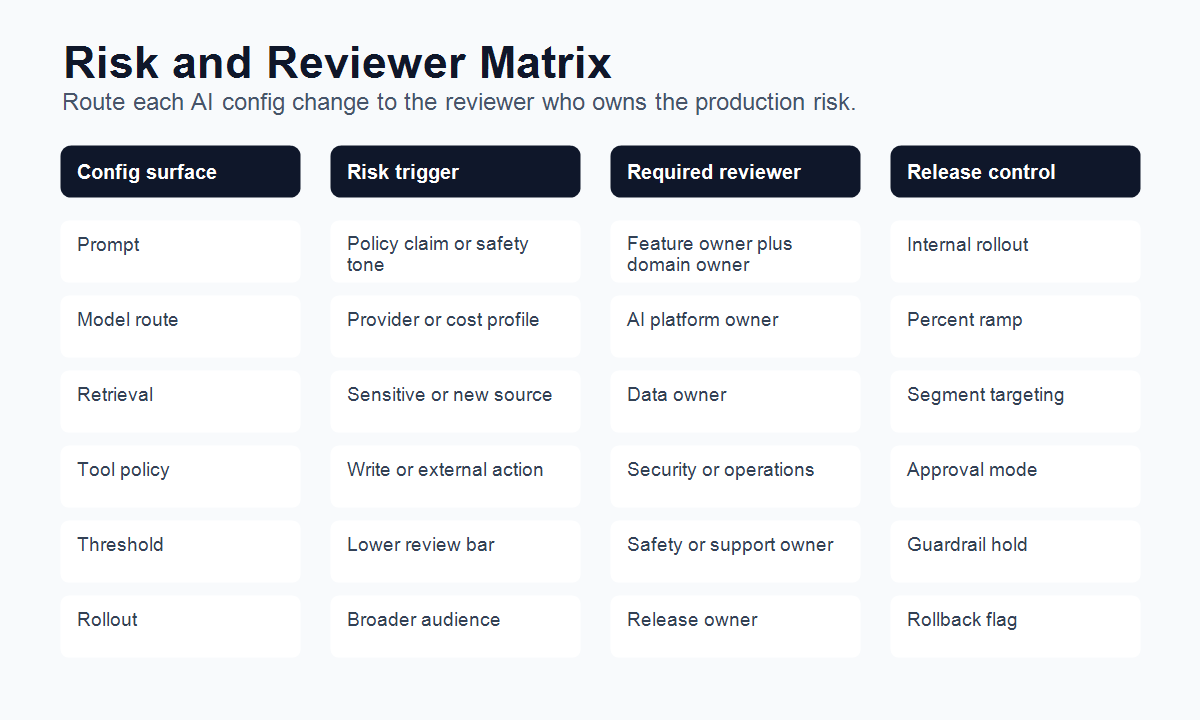
| Config change | Default reviewer | Escalate when |
|---|---|---|
| Prompt wording | Feature owner or product engineer | It changes claims, policy wording, safety behavior, or regulated-user handling |
| Model route | AI platform owner | It changes provider, data residency, latency target, or cost profile |
| Retrieval source | Data or knowledge owner | It adds sensitive, stale, customer-specific, or unverified data |
| Tool policy | Security, platform, or operations owner | It enables write actions, external effects, permission changes, or production automation |
| Guardrail threshold | Safety, support, or domain owner | It reduces review, escalation, grounding, or confidence requirements |
| Rollout expansion | Release owner | It moves beyond internal, beta, regional, or low-risk cohorts |
Do not let the person who made a high-risk config change be the only approver for production expansion. Separation of duties matters most when the change can affect customer trust, data handling, or external action.
5. Approve The Release Plan, Not Only The Config
An AI config can be correct and still be unsafe to expose widely.
Approval should cover:
- the config value or candidate bundle;
- the first audience;
- the rollout percentage or segment;
- the guardrail metrics to watch;
- the decision owner;
- the rollback value;
- the cleanup or permanence rule.
This is the point where AI config approval becomes release approval. The reviewer is not only asking "is this prompt acceptable?" They are asking "who should experience this behavior first, what would make us stop, and how will we know?"
6. Roll Out Through Runtime Flags
Do not make the approved config the only production value. Put the behavior behind a runtime control so exposure can start small, expand by evidence, and roll back quickly.
OpenFeature's evaluation context specification describes contextual data used for targeting, including user, application, host, and custom fields. That pattern matters for AI config release because the rollout decision often depends on account, region, workflow, risk tier, environment, model route, or agent identity.
A simple release contract might look like this:
aiConfigChange:
  key: support-answer-config-v4
  owner: support-ai-platform
  baseline:
    prompt: support_answer_v3
    modelRoute: standard_support_model
    retrievalProfile: support_docs_public_only
  candidate:
    prompt: support_answer_v4_citation_first
    modelRoute: standard_support_model
    retrievalProfile: support_docs_public_plus_policy_index
  approval:
    riskTier: high
    requiredReviewers:
      - support-owner
      - data-owner
    evidence:
      - offline-regression-suite-passed
      - no-sensitive-source-leakage
      - rollback-tested
  exposure:
    first: internal-support-team
    next: five-percent-low-risk-accounts
    holdIf:
      - escalation-rate-increases
      - grounding-score-below-threshold
      - latency-p95-above-budget
  rollback:
    flagVariation: baseline
    owner: support-ai-platform
  cleanup:
    reviewAfter: two-healthy-release-windows
The exact fields will differ by team. The important pattern is that approval, rollout, evidence, rollback, and cleanup are part of the same record.
7. Write An Audit Record And Review Date
Audit the decision, not only the final config value.
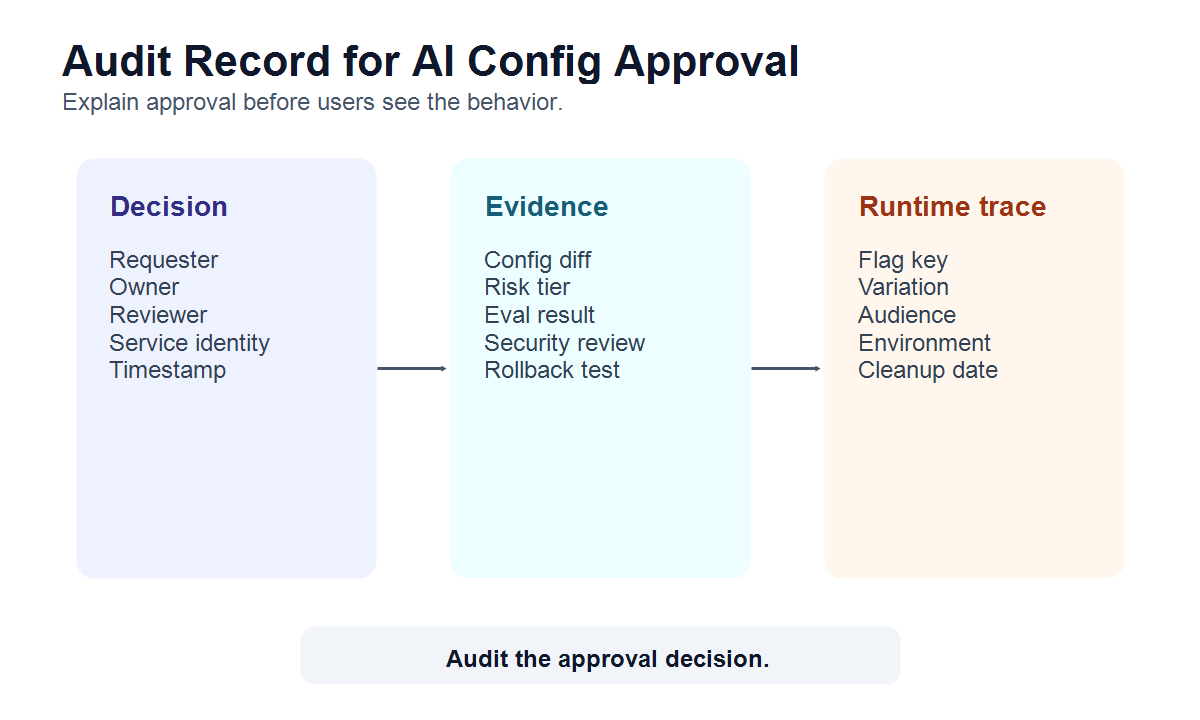
Minimum fields:
| Field | Why it matters |
|---|---|
| Requester, owner, reviewer, and service identity | Separates authorship, ownership, and approval |
| Config key and candidate version | Reconstructs what changed |
| Risk tier and approval rule | Explains why review was required |
| Evidence links | Shows what the reviewer used |
| Flag key, variation, audience, and environment | Connects approval to actual exposure |
| Decision and timestamp | Supports accountability |
| Rollback value and trigger | Makes recovery inspectable |
| Cleanup or review date | Prevents temporary config from becoming permanent drift |
For tool-connected agent systems, the Model Context Protocol authorization specification is a useful reminder that authorization boundaries, token audience validation, and transport security are separate from release approval. A runtime flag can decide which approved behavior is active now. It should not replace hard authorization.
Where FeatBit Fits
FeatBit fits the runtime approval and release-control layer around AI config systems. It does not need to be the prompt editor, model registry, retrieval platform, grader engine, or identity provider.
Use FeatBit to:
- keep AI behavior behind a named flag or variation;
- target config changes by environment, account, user, region, workflow, or risk segment;
- start with internal users before beta or production cohorts;
- ramp exposure by percentage when evidence is healthy;
- roll back to a baseline prompt, model route, retrieval profile, or fallback without redeploying;
- preserve audit history for flag and targeting changes;
- connect exposure and metric events to experimentation or release decisions;
- review temporary AI config flags through lifecycle rules.
FeatBit documentation for targeting rules, percentage rollouts, audit logs, IAM, webhooks, and flag lifecycle management covers the implementation primitives behind that workflow.
If your team wants the broader operating model, FeatBit's AI governance and risk control, AI control layer, and safe AI deployment pages connect this approval flow to runtime control, staged exposure, rollback, and observability.
Common Failure Modes
Approving the value without approving exposure. A prompt or model route may be acceptable for internal users and still too risky for broad production traffic.
Using one global approval rule. Low-risk edits should not wait behind the same process as tool authority, retrieval expansion, or regulated-data behavior.
Letting approval live only in chat. Chat approval disappears from release memory. Store the decision with the config record, flag change, pull request, ticket, or audit log.
Skipping rollback evidence. If the team has never tested the baseline variation, fallback, or flag reversal, approval is incomplete.
Treating graders as automatic launch authority. A passing grader can qualify a candidate. It does not decide audience, blast radius, business impact, or cleanup.
Leaving temporary AI config forever. Prompt candidates, threshold experiments, and rollout flags need review dates. Durable operational controls need named owners.
Starting Checklist
Before an AI config change reaches production users, confirm:
- The config surface, owner, baseline, candidate, and affected workflow are recorded.
- The risk tier is based on production effect, not file size or edit size.
- Required reviewers match the risk class.
- Evidence is attached and readable by the reviewer.
- The release plan names first audience, expansion rule, guardrails, and rollback value.
- The behavior is controlled by a runtime flag or equivalent release control.
- Audit records connect approval, flag variation, rollout stage, and reviewer identity.
- The cleanup or review date is defined before expansion.
The bottom line: AI config approval should turn a hidden settings edit into a controlled release decision. Approve the change, but also approve the audience, evidence, fallback, audit record, and cleanup path.
Source Notes
- NIST AI Risk Management Framework, for the design, development, use, and evaluation framing of AI risk management.
- OWASP Top 10 for Large Language Model Applications, for LLM application risk categories such as excessive agency, sensitive information disclosure, insecure plugin design, and overreliance.
- OpenFeature evaluation context specification, for the vendor-neutral idea of contextual data in flag evaluation and targeting.
- Model Context Protocol authorization specification, for hard authorization boundaries, token audience validation, and transport-level security considerations in tool-connected systems.
- FeatBit implementation context: targeting rules, percentage rollouts, audit logs, IAM, webhooks, and flag lifecycle management.
- Related FeatBit reading: AI-generated code governance, AI flag owner review workflow, prompts and graders for AI release teams, and set tool permissions, fallbacks, and human approval for AI agents.
Image And Open Graph Notes
- Use
cover.pngas the Open Graph image because it summarizes approval, rollout control, audit, and rollback for AI config changes. - Use
config-approval-flow.pngnear the opening because it shows the end-to-end approval path. - Use
risk-reviewer-matrix.pngnear the approver section because it helps teams route changes by risk. - Use
audit-record-model.pngnear the audit section because it shows which fields make the approval reconstructable later.