
How to Audit AI Model Changes Before They Reach Everyone
Auditing AI model changes means reconstructing the full release decision: what changed, who approved it, which users or workflows saw it, what evidence justified expansion, which guardrails were watched, and how the team could roll back. A model registry can tell you that a model version exists. A deployment log can tell you that code shipped. Neither is enough by itself when a live product changes model route, prompt, retrieval profile, fallback policy, or rollout percentage.
For production teams, the audit unit should be the model route decision. A route decision can include the model, prompt version, retrieval profile, tool policy, safety mode, cost policy, and fallback. If those fields change together, audit them together. That is the only way a future reviewer can understand what users actually experienced.
The Short Answer
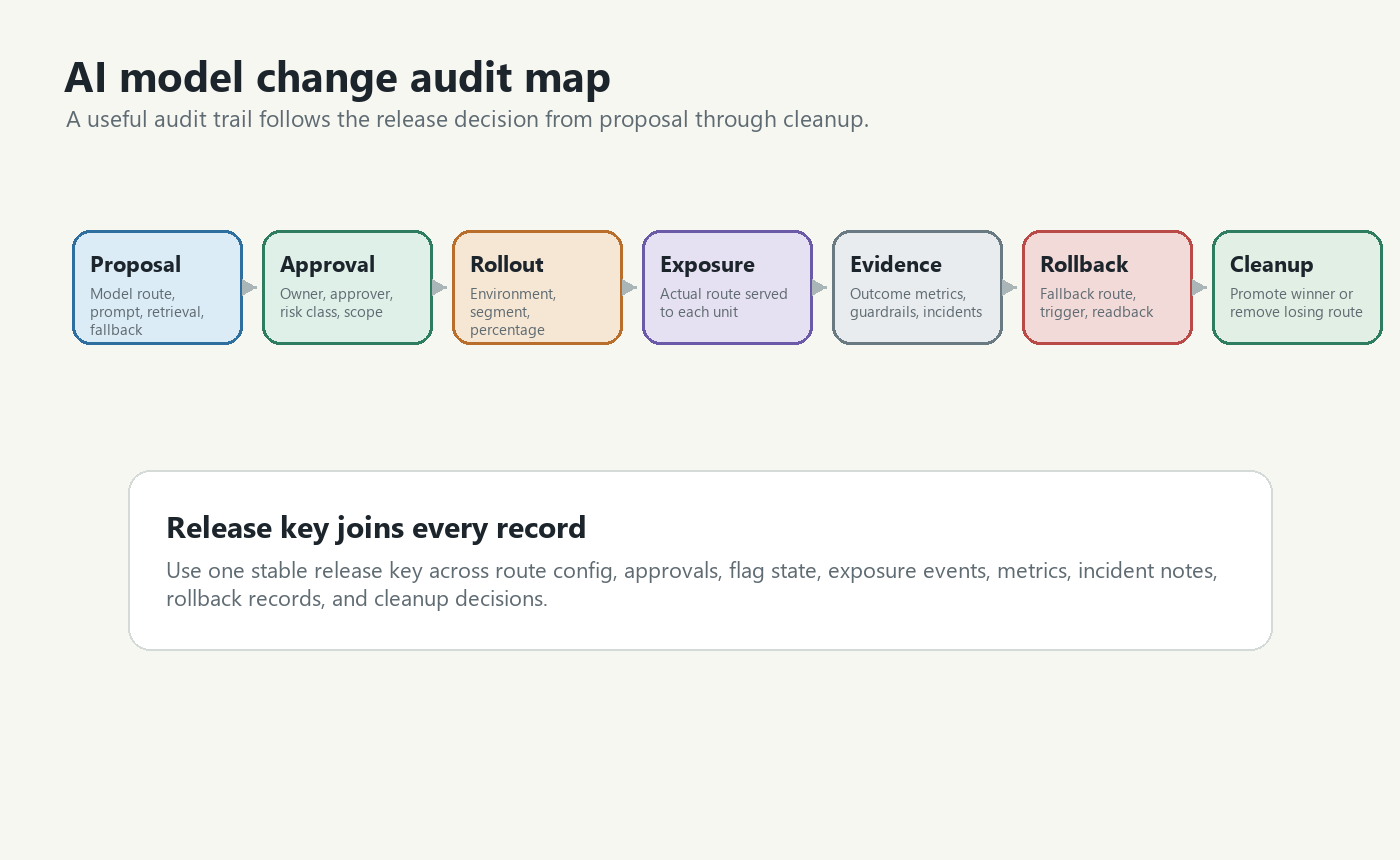
To audit AI model changes, keep five records connected by the same release key:
| Record | What it proves | Example fields |
|---|---|---|
| Change record | What changed in the AI behavior | model route, prompt version, retrieval profile, fallback policy |
| Decision record | Why the team allowed exposure | owner, approver, hypothesis, eval result, risk class |
| Rollout record | Who received the change and when | environment, segment, percentage, targeting rule, schedule |
| Evidence record | What happened after exposure | exposure events, outcome events, guardrails, incidents, support notes |
| Reversal record | How the team could stop or narrow the change | fallback route, rollback owner, trigger, rollback timestamp |
The release key can be a feature flag key, experiment key, change request ID, or deployment ticket. The important rule is consistency: every audit event should point back to the same decision.
Audit The Route, Not Only The Model Name
The most common audit mistake is logging only model=gpt-4.1 or model=candidate_b. In a real AI product, the model is rarely the whole behavior.
A support assistant route might include:
route:
  key: support_answer_model_route
  model: support_model_b
  promptVersion: support_prompt_v5
  retrievalProfile: enterprise_kb_rerank
  safetyMode: strict
  fallbackRoute: support_model_a_safe
  temperature: 0.2
  toolPolicy: search_only
If the prompt changed at the same time as the model, a later incident review cannot honestly say "model B caused the issue" unless the route metadata was preserved. It might have been the prompt, retrieval profile, fallback policy, latency behavior, or the interaction between them.
OpenFeature's flag evaluation specification is useful language here because it treats evaluation as a typed decision with a flag key, default value, evaluation context, and optional details. For AI model changes, the same pattern helps the application return a named route for a specific user, account, conversation, or workflow.
Build The Minimum Audit Ledger
An audit ledger does not need to be a giant compliance database on day one. It does need enough fields to answer a future incident, governance, or product-learning question without guessing.
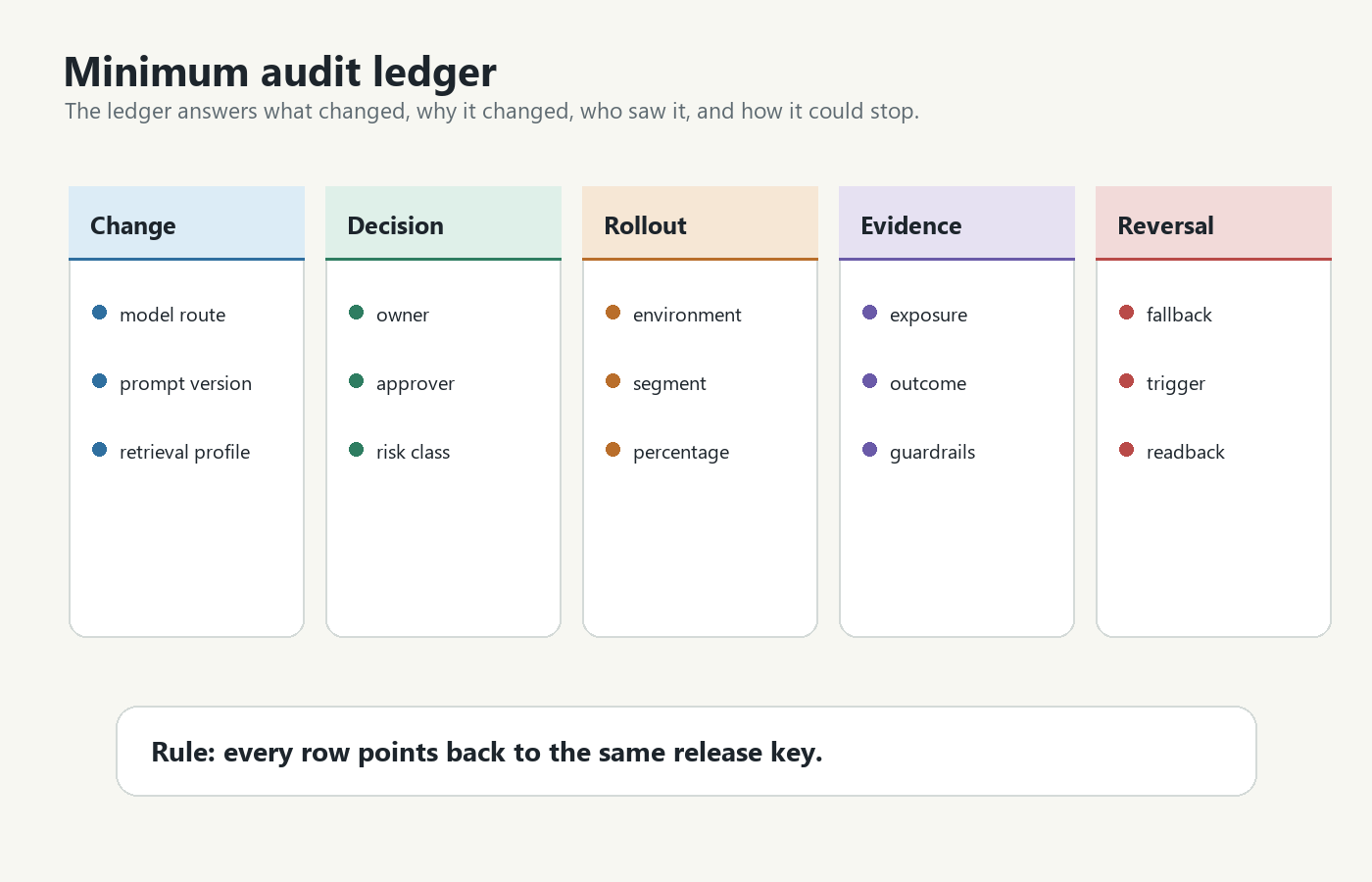
Use a ledger like this before expanding beyond internal traffic:
| Field | Why it matters |
|---|---|
releaseKey |
Joins route config, feature flag state, exposure events, metrics, and rollback records. |
changeType |
Distinguishes model swap, prompt update, retrieval change, fallback change, routing change, or combined route change. |
riskClass |
Tells reviewers whether the change needed offline evals, human review, canary, or stricter approval. |
owner |
Names the team or person responsible for the release decision. |
approver |
Records who allowed production exposure or expansion. |
environment |
Prevents staging evidence from being mistaken for production evidence. |
targetScope |
Shows whether the change affected employees, beta users, one customer segment, or broad traffic. |
variation |
Names the baseline, candidate, fallback, or emergency route. |
decisionReason |
Explains why the team continued, paused, rolled back, or promoted the candidate. |
evidenceLinks |
Points to eval runs, experiment reports, dashboards, incident notes, or support reviews. |
For FeatBit teams, a feature flag can become the release key for this ledger. The flag stores a named control point for the model route, while audit logs, targeting rules, insights, metric events, and webhooks help connect operational changes to evidence. FeatBit's audit log documentation describes tracking changes made to feature flags in an environment, and webhooks can send feature flag change events to downstream systems.
Connect Approval To Exposure
Approval is not the same as exposure. A team may approve a candidate model for internal testing, then later approve a 5 percent canary, then later approve a broader rollout. Each step should have a separate decision record.
Use decision states instead of vague comments:
decision:
  releaseKey: support_answer_model_route
  state: continue_canary
  approvedScope: 5_percent_low_risk_accounts
  owner: ai_platform
  approver: support_product_lead
  evidence:
    offlineEval: support_eval_2026_06_12
    internalExposure: employees_48h_no_severe_issues
    guardrails:
      p95Latency: healthy
      fallbackRate: healthy
      escalationRate: watch
  rollback:
    defaultRoute: support_model_a_safe
    trigger: severe_quality_issue_or_missing_telemetry
This structure gives the future reviewer a clean answer to "why did this model reach users?" It also makes it obvious when evidence is missing. If a model was approved for internal traffic only, the audit trail should not silently justify broad traffic.
NIST's AI Risk Management Framework is not a product-release checklist, but its Govern, Map, Measure, and Manage functions are a useful reminder: AI risk work needs governance, context, measurement, and action. For a model rollout, that translates into owners, release scope, metrics, and rollback decisions. Treat this as operational guidance, not as a claim that any release workflow automatically satisfies a regulation or standard.
Record Actual Exposure, Not Intended Assignment
An audit trail that records only the planned rollout can mislead the team. The application should also record what actually ran.
For AI systems, actual exposure can differ from intended assignment because:
- the candidate route fell back to the baseline route;
- the prompt changed after the flag variation was created;
- a retrieval service failed and a narrower context was used;
- a model provider returned an error and a backup provider handled the request;
- a user moved between segments during a rollout;
- telemetry emitted before the model call instead of after execution.
That is why exposure events should include both assignment and execution fields:
{
  "event": "ai_model_route_exposure",
  "releaseKey": "support_answer_model_route",
  "unitType": "conversation",
  "unitId": "conv_83921",
  "accountId": "acct_1842",
  "variation": "candidate",
  "modelRoute": "support_model_b",
  "promptVersion": "support_prompt_v5",
  "retrievalProfile": "enterprise_kb_rerank",
  "fallbackUsed": false,
  "environment": "production",
  "timestamp": "2026-06-13T09:15:30Z"
}
If the application falls back, record that too. A candidate model cannot be credited or blamed for an outcome if the candidate did not actually serve the user.
FeatBit's Track Insights API, flag insights, and measurement design guidance fit this layer. The flag controls the route decision; events prove which route ran and what happened after.
Use Audit Questions Before Expanding Traffic
Before moving from internal traffic to canary, or from canary to broad rollout, ask the same audit questions every time.
| Audit question | Pass signal | Pause signal |
|---|---|---|
| What changed? | The model route fields are named and versioned. | The team says "new model" but prompt, retrieval, or fallback also changed. |
| Who owns it? | Owner and approver are recorded for the current rollout stage. | The change is owned by a channel, dashboard, or automated job with no accountable person. |
| Who saw it? | Targeting, segment, environment, and percentage are visible. | Only deployment logs exist, with no exposure record. |
| What evidence supports expansion? | Offline eval, internal exposure, canary, or experiment evidence is linked. | The team relies on a benchmark score with no production guardrail check. |
| How can it stop? | Rollback route and trigger are written before expansion. | Rollback requires a new deployment or provider change during an incident. |
| What gets cleaned up? | Losing route and temporary flag have an owner and review date. | Old prompts, aliases, or routing branches can remain reachable indefinitely. |
This checklist is deliberately practical. It helps engineering, product, support, security, and compliance-adjacent teams share one view of the release without turning every model change into a slow meeting.
Keep Rollback In The Audit Trail
Rollback is not only an incident response action. It is part of the audit story.
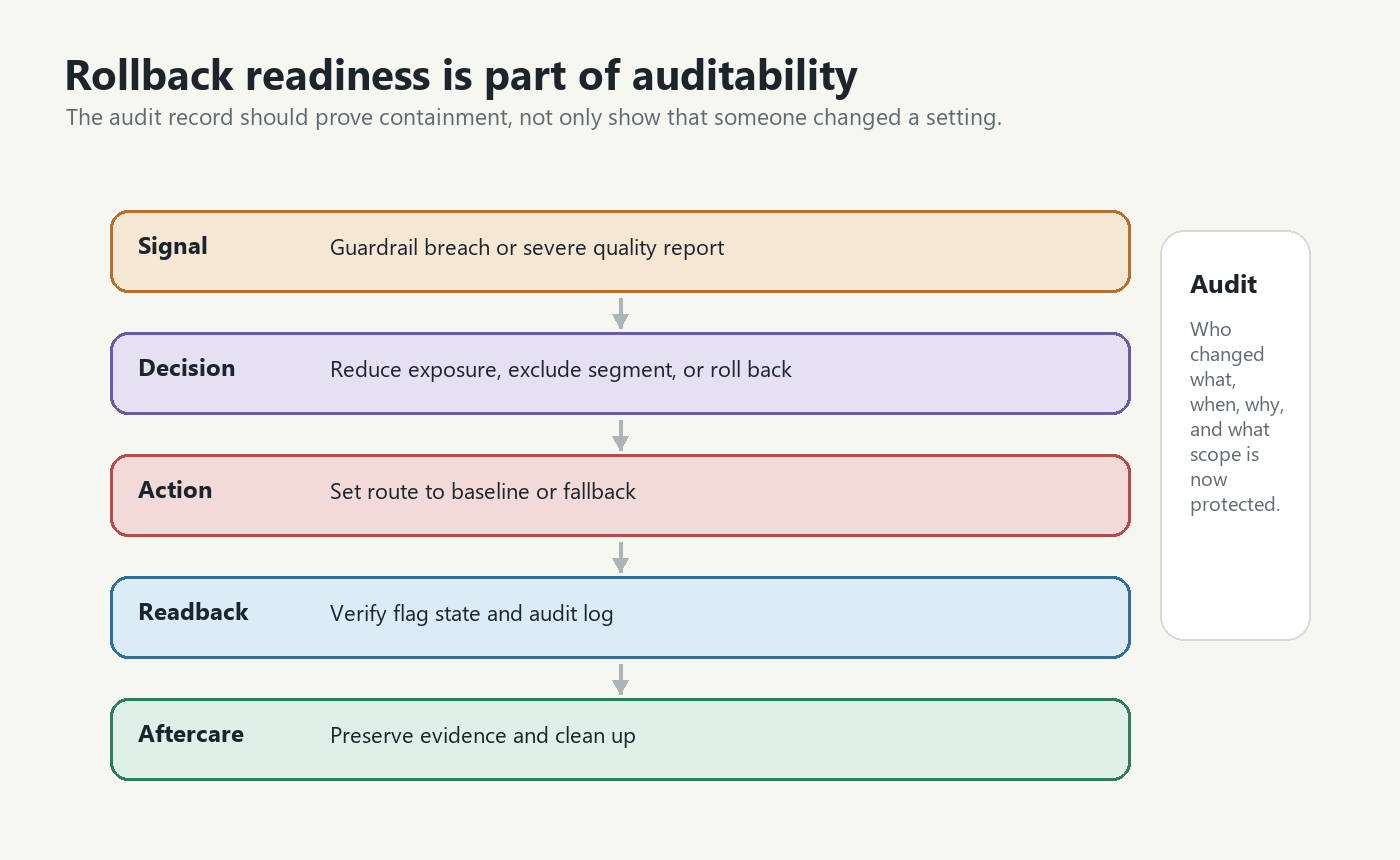
A useful rollback record includes:
| Rollback field | Example |
|---|---|
| Trigger | p95 latency breach, fallback spike, severe quality report, missing exposure telemetry |
| Scope | all production traffic, one account segment, one locale, one workflow |
| Action | set default variation to baseline, exclude segment from candidate, reduce rollout to zero |
| Operator | person, service account, or approved automation that made the change |
| Time to containment | when the harmful route stopped receiving new eligible traffic |
| Follow-up | preserve evidence, update evals, decide whether to repair or retire the candidate |
After rollback, read back the control-plane state and the audit log. The question is not only "did someone click rollback?" The question is "can we prove the affected scope is no longer receiving the risky route?"
FeatBit's targeting rules, percentage rollouts, and safe AI deployment pages expand the rollout side of this workflow. The broader AI governance page explains why auditability, rollback, and runtime control need to be part of AI release operations instead of after-the-fact documentation.
Separate Auditability From Authorization
Audit logs show what happened. They do not automatically prove that the right person was allowed to do it.
Keep these layers separate:
| Layer | Job |
|---|---|
| Identity and access control | Decide who can create, approve, or mutate production controls. |
| Release control | Decide who receives a model route and at what rollout stage. |
| Telemetry | Prove which AI behavior actually ran and what outcome followed. |
| Audit log | Preserve the change history for review, incident response, and learning. |
| Lifecycle management | Remove stale routes, prompts, flags, and temporary branches after the decision. |
FeatBit's IAM overview and feature flag lifecycle management guidance are relevant here. Access control limits who can change production behavior. Lifecycle discipline keeps old AI release controls from becoming hidden technical debt.
Common Audit Failures
Logging the dashboard change but not the runtime exposure. The audit log can show that a flag changed, but the exposure event proves which user, account, conversation, or workflow received the candidate route.
Changing several AI surfaces under one vague label. "Model upgrade" is too thin if the prompt, retrieval profile, fallback route, or safety mode also changed.
Approving the first stage and reusing that approval forever. Internal exposure approval should not automatically justify canary, experiment, or broad rollout.
Keeping rollback outside the release record. If rollback lives only in an incident chat, the next reviewer may not know whether the risky route was contained.
Treating auditability as compliance proof. Audit trails are evidence. Whether they satisfy a specific legal, regulatory, contractual, or internal control requirement depends on that requirement and should be reviewed by the responsible experts.
A FeatBit Operating Model
For FeatBit readers, the practical operating model is:
- Represent the AI model route as a typed feature flag variation.
- Put route fields in the variation or in a named route config that the variation selects.
- Evaluate the flag at the point where the AI behavior actually runs.
- Record exposure events with the release key, variation, route fields, and assignment unit.
- Join exposure to outcome metrics and guardrails before expanding traffic.
- Use audit logs and webhooks to preserve control-plane changes.
- Write rollback rules before canary or experiment traffic begins.
- Close the lifecycle by promoting the chosen route, retiring the losing route, and cleaning up temporary flag logic.
This is why feature flags matter for AI model governance. They are not a model registry, an eval suite, or a legal compliance system. They are the runtime control point that connects model-route decisions to targeting, rollout, evidence, rollback, and audit history.
Bottom Line
If someone asks, "How can I audit AI model changes?", the answer is not "turn on logs." The answer is to design the model change as a release decision.
Name the route, record the owner, connect approval to exposure, capture actual runtime behavior, watch guardrails, preserve rollback evidence, and clean up temporary controls after the decision. That gives your team a usable audit trail: not just who changed a setting, but why the AI behavior changed, who saw it, what happened, and how the team stayed in control.
Source Notes
- AI risk context: NIST's AI Risk Management Framework and AI RMF 1.0 PDF are cited for the general Govern, Map, Measure, and Manage framing. This article does not make compliance claims.
- Feature flag standard context: the OpenFeature flag evaluation specification provides vendor-neutral language for typed flag evaluation, flag keys, evaluation context, and evaluation details.
- FeatBit implementation context: audit logs, webhooks, targeting rules, percentage rollouts, Track Insights API, flag insights, IAM, safe AI deployment, AI governance, measurement design, and feature flag lifecycle management support the workflow described here.
Image And Open Graph Notes
- Use
cover.pngas the Open Graph image because it summarizes AI model auditability as a release-control system, not a generic log store. - Use
audit-map.pngnear the opening because it shows the end-to-end audit path from proposal to cleanup. - Use
audit-ledger.pngin the ledger section because it visualizes the minimum records needed for reconstruction. - Use
rollback-readiness.pngin the rollback section because auditability depends on proving containment, not only recording a change.