
Feature Flag Management with GitHub Copilot: A Safe Workflow for Release Teams
Feature flag management with GitHub Copilot works best when Copilot improves the work around a flag, not when it becomes the release authority. Let Copilot read repository instructions, draft the flag contract, update code, generate tests, summarize risk, and prepare cleanup. Keep the flag system of record, production targeting, rollout stages, audit trail, telemetry, and rollback decisions in FeatBit.
That boundary matters because a feature flag changes production behavior. A Copilot suggestion can be fast and useful, but a production flag still needs an owner, a safe fallback, a rollout plan, metrics, review evidence, and a cleanup path.
This guide is intentionally Copilot-specific. It focuses on repository instructions, Copilot cloud agent pull requests, MCP-enabled context, and review checkpoints. For the broader vendor-neutral pattern, read FeatBit's guide to AI-assisted flag management.
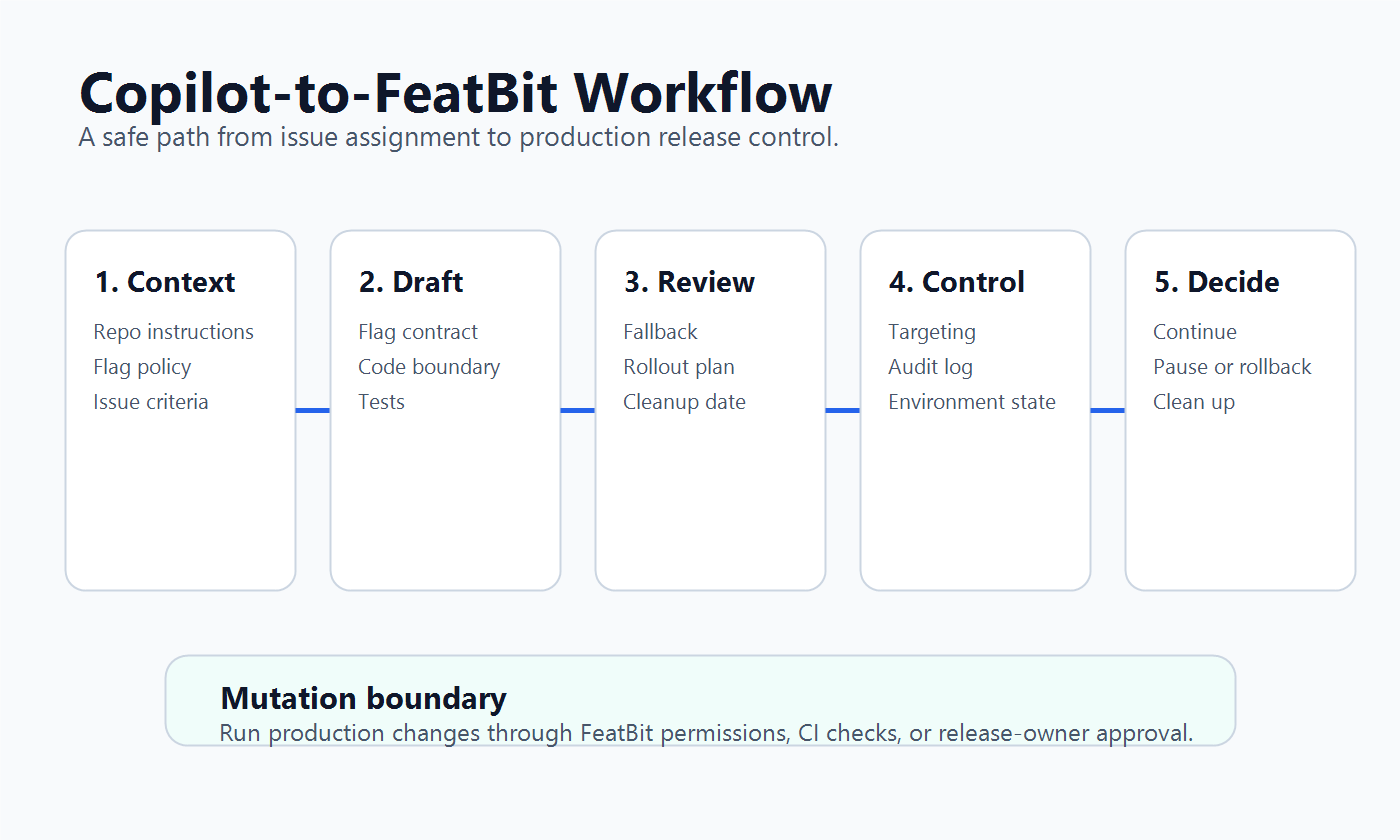
What Copilot Should and Should Not Own
When developers search for "feature flag management with Copilot," the practical question is not whether Copilot can type a flag check. The real question is where Copilot belongs in the release workflow.
Use this split as the default:
| Work item | Copilot can help | FeatBit or release owners must control |
|---|---|---|
| Flag design | Propose key, type, fallback, owner, and lifecycle notes | Approve the flag contract and production purpose |
| Code implementation | Add the SDK boundary, pass evaluated values, write tests | Enforce repository architecture and runtime behavior |
| Pull request review | Summarize risk, missing tests, and rollout assumptions | Accept the change, merge to protected branches, and define rollout gates |
| MCP or API workflow | Fetch context, draft API requests, prepare scripts | Mutate production flag state only through approved credentials and policy |
| Rollout | Draft stage gates and rollback criteria | Change targeting, rollout percentage, or production variation |
| Cleanup | Find references and draft a removal plan | Decide the permanent path and archive or delete the old flag |
GitHub's Copilot cloud agent documentation describes the agent as able to research a repository, create a plan, make code changes on a branch, and support pull request flow. That makes it a strong fit for code-side flag work. It does not remove the need for release governance.
Put Flag Policy in Repository Instructions
Copilot needs durable context before it can help safely. GitHub documents repository-wide custom instructions in .github/copilot-instructions.md, path-specific instructions under .github/instructions, and AGENTS.md files for agents. Use those files to turn feature flag rules into repeatable context instead of one-off prompts.
A useful Copilot instruction block is short and enforceable:
## Feature flag rules

- Register every new flag in the typed flag registry before using it in application code.
- Evaluate flags once at the server or runtime boundary and pass evaluated values inward.
- Use an explicit fallback for every flag type.
- New production release flags start disabled unless the issue says otherwise.
- Add owner, cleanup condition, telemetry events, and rollout notes to the PR.
- Do not change production targeting or rollout percentage from code without release-owner approval.
For a Next.js application, a path-specific instruction could be even narrower:
---
applyTo: "src/app/**"
---

When adding feature flags in App Router pages, evaluate server-side and pass values to client components as props. Do not call a feature flag SDK directly from a client component.
This is where Copilot becomes more reliable. The assistant no longer has to infer whether flags are evaluated server-side, where typed definitions live, or how fallbacks are handled.
Start Every Copilot Task With a Flag Contract
The smallest useful artifact is a flag contract. It should be written before Copilot edits code or calls a tool.
flag_contract:
  key: checkout-ai-summary
  purpose: Release AI-generated order summaries after checkout.
  type: boolean
  fallback: false
  owner: growth-platform
  environments:
    - development
    - staging
    - production
  first_production_audience: internal staff only
  rollout_plan:
    - disabled by default
    - internal staff
    - 5 percent canary
    - 25 percent after quality and latency checks
    - 100 percent after release decision
  telemetry:
    exposure_event: checkout_ai_summary_exposed
    success_metric: post_checkout_help_click
    guardrails:
      - checkout_error_rate
      - summary_generation_latency
      - support_contact_rate
  rollback_trigger:
    - checkout error rate regression
    - latency guardrail breach
    - support escalation from summary mismatch
  cleanup_condition: remove temporary rollout flag after full release decision
Then ask Copilot to review the contract before implementation:
Review this feature flag contract for unsafe defaults, missing ownership, unclear telemetry, rollout risk, and cleanup gaps. Do not edit code yet.
That prompt keeps Copilot in a reviewer role first. After the contract is complete, ask for the code change:
Implement the smallest code change for this flag contract. Follow repository feature flag instructions. Keep flag evaluation at the server boundary, pass the evaluated value as a prop, add fallback tests, and include rollout and cleanup notes in the PR summary.
Use Copilot for Pull Request Evidence
Copilot-generated flag changes should leave review memory, not just a diff. The pull request should answer the questions a release owner will need later:
- Why does this change need a flag?
- What is the safe fallback?
- Where is the flag evaluated?
- Which users see the change first?
- What metric proves the rollout is healthy enough to expand?
- What action rolls the change back?
- When should the flag be removed or converted into a permanent operational control?
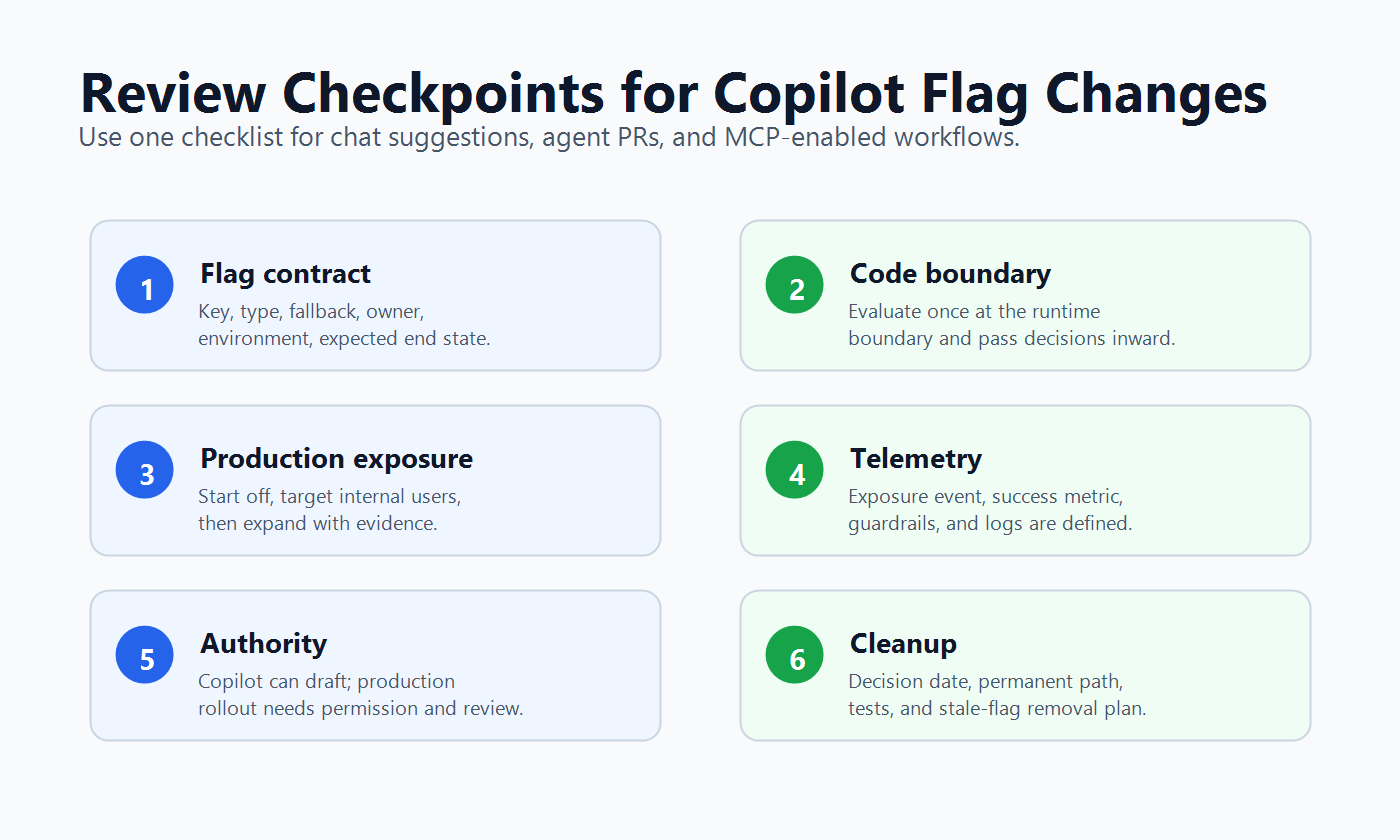
A concise PR template can make this mechanical:
## Feature flag review

- Flag key:
- Flag type and fallback:
- Owner:
- Initial production state:
- First audience:
- Rollout stages:
- Exposure event:
- Success metric:
- Guardrail metrics:
- Rollback action:
- Cleanup condition:

## Copilot involvement

- What Copilot drafted:
- Existing patterns it followed:
- Files changed:
- Tests added or updated:
- Known gaps for human review:
This is especially important for Copilot cloud agent work because the agent can make changes on a branch and support a pull request workflow. Treat the PR as the durable record of intent, risk, verification, and release control.
Connect Copilot to FeatBit Carefully
GitHub documents MCP as a way to connect Copilot Chat with external context providers. MCP can be useful for feature flag work because Copilot may need to see flag metadata, existing keys, rollout notes, or API shapes. It also increases the importance of permission boundaries because a flag platform can change production behavior.
For FeatBit, a practical maturity ladder looks like this:
| Stage | Copilot access | Release posture |
|---|---|---|
| Read-only context | Copilot can inspect docs, examples, flag naming rules, and existing keys | Safe default for most teams |
| Draft-only operations | Copilot can produce a proposed API request or CLI command | Human reviews before execution |
| Approved script execution | A CI job or internal tool runs validated changes with scoped credentials | Good for repeatable non-production or low-risk changes |
| Production mutation | Targeting or rollout changes affect live users | Requires explicit release-owner approval, audit, and rollback plan |
The FeatBit MCP repository, FeatBit CLI repository, and FeatBit REST API documentation are relevant building blocks. The operating rule is simple: Copilot can prepare the change, but production exposure should still be controlled by FeatBit permissions, environment rules, review policy, and audit logs.
Keep Runtime Evaluation Boring
Copilot may suggest clever abstractions. Feature flag evaluation should stay boring. Evaluate the flag once at the right boundary, use an explicit fallback, and keep business logic testable without the flag SDK.
type CheckoutSummaryMode = 'classic' | 'ai_summary';

export function selectCheckoutSummaryMode(
  isAiSummaryEnabled: boolean
): CheckoutSummaryMode {
  return isAiSummaryEnabled ? 'ai_summary' : 'classic';
}
Then keep SDK integration outside the pure decision function:
export async function CheckoutPage() {
  const { flags } = await getFeatBitFlags();
  const summaryMode = selectCheckoutSummaryMode(flags.checkoutAiSummary);

  return <CheckoutView summaryMode={summaryMode} />;
}
The exact API will differ by stack. The rule should not: Copilot can wire the code, but the runtime path should be readable, testable, and reversible.
FeatBit's docs on targeting rules, percentage rollouts, flag insights, and audit logs are the production controls around that code boundary.
Use a Release Ladder, Not a Chat Decision
A Copilot response is not release evidence. Use Copilot to prepare the ladder, then use FeatBit and production telemetry to decide whether each step is ready.
| Stage | FeatBit state | Evidence before moving on |
|---|---|---|
| Code merged | Production flag is off | Tests pass, fallback path works, owner accepts contract |
| Internal | Target employees or test accounts | Logs, support notes, basic quality checks, no obvious errors |
| Canary | Small customer or traffic segment | Error rate, latency, exposure volume, guardrail metrics |
| Progressive rollout | Percentage increases in stages | Success metric and guardrails remain healthy |
| Decision | Full release, pause, rollback, or cleanup | Release owner records the reason and next action |
This matches FeatBit's broader view of safe AI deployment: expose behavior gradually, observe it, and keep rollback available. If the feature itself is an AI behavior, the same control plane can manage prompt profile, model route, retrieval setting, or fallback mode through the AI control layer.
Ask Copilot Better Questions
The prompt quality matters less than the operating boundary, but these prompts are useful starting points.
Decide whether a flag is needed
Review this issue and decide whether the change needs a feature flag. If yes, propose a flag contract with key, type, fallback, owner, first audience, rollout stages, telemetry, rollback trigger, and cleanup condition. Do not edit code.
Review a flag implementation
Review this diff for feature flag safety. Check whether evaluation happens once at the correct boundary, fallbacks are explicit, client components receive evaluated values, tests cover both paths, and the PR includes rollout and cleanup notes.
Prepare a FeatBit change
Using the approved flag contract, draft the FeatBit API or CLI operation needed for the staging environment only. Explain each field and list the approval required before any production targeting change.
Clean up a released flag
The flag is fully released and the winning path is permanent. Find all references, identify tests to update, draft the removal plan, and list any docs, dashboards, or events that may still depend on the flag key. Do not remove code yet.
Common Mistakes
Letting Copilot create a flag without a contract. This usually produces a key and an if statement, not a managed release asset.
Using Copilot instructions as policy theater. Instructions help only when they are specific enough to check in code review. "Use best practices" is too vague.
Giving tool access before read-only context is useful. If Copilot cannot accurately explain existing flag keys, owners, rollout state, and code patterns, it is not ready to mutate flag state.
Treating production rollout as a prompt response. Copilot can summarize evidence. FeatBit and the release owner should control exposure.
Skipping cleanup because the agent can do it later. Copilot can make cleanup cheaper, but someone still needs to decide the permanent path and approve removal.
How FeatBit Fits the Copilot Workflow
FeatBit's role is not to replace Copilot. It is to keep the release decision deterministic after Copilot accelerates the code-side work.
Use Copilot for:
- reading repository instructions and examples;
- drafting a flag contract;
- editing code behind the flag;
- generating tests and PR review notes;
- finding stale flag references;
- preparing API, CLI, or MCP-driven change proposals.
Use FeatBit for:
- typed flag configuration and environment state;
- targeting rules and percentage rollouts;
- audit logs and release ownership;
- exposure and insight data;
- rollback without redeploying;
- lifecycle decisions and cleanup.
If your team is standardizing this workflow, connect it to FeatBit's feature flag lifecycle management model. Copilot should help maintain the lifecycle record. It should not erase the distinction between draft, approve, expose, measure, decide, and clean up.
Source Notes
- GitHub Copilot context sources: repository custom instructions, Copilot cloud agent, and extending Copilot Chat with MCP servers.
- FeatBit implementation sources: REST API documentation, targeting rules, percentage rollouts, flag insights, audit logs, FeatBit MCP, and FeatBit CLI.
- Internal reader journey: AI-assisted flag management, feature flag lifecycle management, AI control layer, and safe AI deployment.
- Image and Open Graph recommendation: use
cover.pngas the social preview. Use the workflow image near the implementation path and the review-checkpoints image near the PR evidence section because both supplement, rather than replace, crawlable text.